**BentoPDF** is a powerful, privacy-first, client-side PDF toolkit that is self-hostable and allows you to manipulate, edit, merge, and process PDF files directly in your browser. No server-side processing is required, ensuring your files remain secure and private.
[](https://github.com/alam00000/bentopdf/pkgs/container/bentopdf-simple) 

---
## Table of Contents
- [Join Us on Discord](#-join-us-on-discord)
- [Documentation](#-documentation)
- [Licensing](#-licensing)
- [Stargazers over time](#-stargazers-over-time)
- [Why BentoPDF?](#-why-bentopdf)
- [Features / Tools Supported](#️-features--tools-supported)
- [Organize & Manage PDFs](#organize--manage-pdfs)
- [Edit & Modify PDFs](#edit--modify-pdfs)
- [Convert to PDF](#convert-to-pdf)
- [Convert from PDF](#convert-from-pdf)
- [Secure & Optimize PDFs](#secure--optimize-pdfs)
- [Other Products](#-other-products)
- [Translations](#-translations)
- [Getting Started](#-getting-started)
- [Prerequisites](#prerequisites)
- [Quick Start](#-quick-start)
- [Static Hosting](#static-hosting-using-netlify-vercel-and-github-pages)
- [Self-Hosting Locally](#-self-hosting-locally)
- [Docker Compose / Podman Compose](#-run-with-docker-compose--podman-compose-recommended)
- [Podman Quadlet](#-podman-quadlet-systemd-integration)
- [Self-Hosted Build (Simple Mode)](#-self-hosted-build-simple-mode)
- [Commercial Build](#-commercial-build)
- [Custom Branding](#-custom-branding)
- [Disabling Specific Tools](#-disabling-specific-tools)
- [Disabling the GitHub Star Counter](#-disabling-the-github-star-counter)
- [WASM Configuration](#wasm-configuration)
- [Air-Gapped / Offline Deployment](#air-gapped--offline-deployment)
- [Security Features](#-security-features)
- [Digital Signature CORS Proxy](#digital-signature-cors-proxy-required)
- [Version Management](#-version-management)
- [Development Setup](#-development-setup)
- [Tech Stack & Background](#️-tech-stack--background)
- [Roadmap](#️-roadmap)
- [Contributing](#-contributing)
- [Special Thanks](#special-thanks)
---
## 📢 Join Us on Discord
[](https://discord.gg/Bgq3Ay3f2w)
Have questions, feature requests, or want to chat with the community? Join our Discord server!
---
## 📚 Documentation
[](https://www.bentopdf.com/docs)
Visit our [Documentation](https://www.bentopdf.com/docs) for:
- **Getting Started** guide
- **Tools Reference** (50+ tools)
- **Self-Hosting** guides (Docker, Vercel, Netlify, Cloudflare, AWS, Hostinger, Nginx, Apache)
- **Contributing** guide
- **Commercial License** details
---
## 📜 Licensing
BentoPDF is **dual-licensed** to fit your needs:
| License | Best For | Price |
| -------------- | -------------------------------------------- | ------------------ |
| **AGPL-3.0** | Open-source projects with public source code | **Free** |
| **Commercial** | Proprietary / closed-source applications | **$79** (lifetime) |
> **One-time purchase** · **One product, unlimited devices & users** · **Lifetime updates** · **No AGPL ob> **Building on BentoPDF? Hyper Compress is included.\*\* The commercial license covers [Hyper Compress](https://github.com/alam00000/bentopdf-hyper-compress) as a bundled component in eligible products: companies under US$1 million in revenue and funding, general PDF toolkits, and only through BentoPDF's own tools on the end user's device. Using the engine on its own, on a server, through an API or in other software needs a separate [Hyper Compress license](https://www.bentopdf.com/hyper-compress#pricing) from $99/year, and [Kura](https://www.bentopdf.com/kura#pricing) is licensed separately from $99/year. See the [full license terms](COMMERCIAL-LICENSE.md).-components).
📖 For more details, see our [Licensing Page](https://www.bentopdf.com/licensing)
### AGPL Components (Pre-configured via CDN)
BentoPDF does **not** bundle AGPL-licensed processing libraries in its source code, but **pre-configures CDN URLs** so all features work out of the box with zero setup:
| Component | License | Features Enabled |
| ---------------------- | -------- | --------------------------------------------------------------------------------------------------- |
| **PyMuPDF** | AGPL-3.0 | PDF to Text/Markdown/SVG/DOCX, Extract Images/Tables, EPUB/MOBI/XPS conversion, Compression, Deskew |
| **Ghostscript** | AGPL-3.0 | PDF/A Conversion, Font to Outline |
| **CoherentPDF (CPDF)** | AGPL-3.0 | Merge, Split by Bookmarks, Table of Contents, PDF to/from JSON, Attachments |
> [!TIP]
> **Zero-config by default.** WASM modules are loaded at runtime from jsDelivr CDN. No manual configuration is needed. For custom deployments (air-gapped, self-hosted), see [WASM Configuration](#wasm-configuration) below.
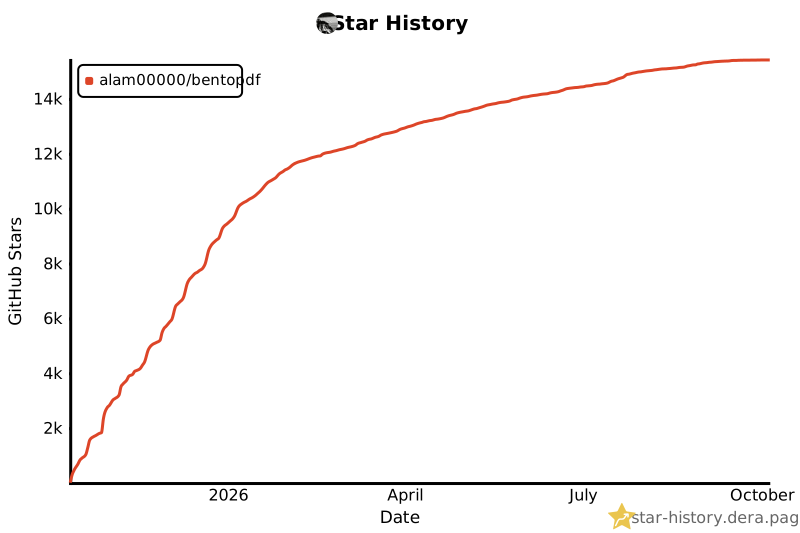
## ⭐ Stargazers over time
[](https://github.com/alam00000/bentopdf/stargazers)
---
## ✨ Why BentoPDF?
- **Privacy First**: All processing happens in your browser. Your files are never uploaded to a server, guaranteeing 100% privacy.
- **No Limits**: Manipulate as many files as you want, as often as you want. There are no restrictions or upload limits.
- **High Performance**: Built with modern web technologies, BentoPDF is fast and efficient, handling even large PDF files with ease.
- **Completely Free**: BentoPDF is a free and open-source tool for everyone.
---
## 🛠️ Features / Tools Supported
BentoPDF offers a comprehensive suite of tools to handle all your PDF needs.
### Organize & Manage PDFs
| Tool Name | Description |
| :--------------------------- | :----------------------------------------------------------------------------------------------------- |
| **Merge PDFs** | Combine multiple PDF files into one. Preserves Bookmarks. |
| **Split PDFs** | Extract specific pages or divide a document into smaller files. |
| **Organize Pages** | Reorder, duplicate, or delete pages with a simple drag-and-drop interface. |
| **Extract Pages** | Save a specific range of pages as a new PDF. |
| **Delete Pages** | Remove unwanted pages from your document. |
| **Rotate PDF** | Rotate individual or all pages in a document. |
| **Rotate by Custom Degrees** | Rotate pages by any custom angle. |
| **N-Up PDF** | Combine multiple pages onto a single page. |
| **View PDF** | A powerful, integrated PDF viewer. |
| **Alternate & Mix Pages** | Merge pages by alternating pages from each PDF. Preserves Bookmarks. |
| **Posterize PDF** | Split a PDF into multiple smaller pages for print. |
| **PDF Multi Tool** | Merge, Split, Organize, Delete, Rotate, Add Blank Pages, Extract and Duplicate in a unified interface. |
| **PDF Booklet** | Rearrange pages for double-sided booklet printing. Fold and staple to create a booklet. |
| **Add Attachments** | Embed one or more files into your PDF. |
| **Extract Attachments** | Extract all embedded files from PDF(s) as a ZIP. |
| **Edit Attachments** | View or remove attachments in your PDF. |
| **Divide Pages** | Divide pages horizontally or vertically. |
| **Combine to Single Page** | Stitch all pages into one continuous scroll. |
| **Add Blank Page** | Insert an empty page anywhere in your PDF. |
| **Reverse Pages** | Flip the order of all pages in your document. |
| **View Metadata** | Inspect the hidden properties of your PDF. |
| **PDFs to ZIP** | Package multiple PDF files into a ZIP archive. |
| **Compare PDFs** | Compare two PDFs side by side. |
### Edit & Modify PDFs
| Tool Name | Description |
| :------------------------ | :---------------------------------------------------------------------------------------------------------------------------------------------------------------------------------------------- |
| **PDF Editor** | Annotate, highlight, redact, comment, add shapes/images, search, and view PDFs. |
| **Edit PDF Text** | Edit existing text directly in your PDF. Reuses the document's embedded fonts and keeps the rest of the page untouched. |
| **Create Fillable Forms** | Create professional fillable PDF forms with text fields, checkboxes, dropdowns, radio buttons, signatures, and more. Fully compliant with PDF standards for compatibility with all PDF viewers. |
| **PDF Form Filler** | Fill in forms directly in the browser. Also supports XFA forms. |
| **Add Page Numbers** | Easily add page numbers with customizable formatting. |
| **Bates Numbering** | Add sequential Bates numbers across one or more PDF files. |
| **Add Watermark** | Add text or image watermarks to protect your documents. |
| **Header & Footer** | Add customizable headers and footers. |
| **Crop PDF** | Crop specific pages or the entire document. |
| **Deskew PDF** | Automatically straighten tilted scanned pages using OpenCV. |
| **Font to Outline** | Convert all fonts to vector outlines for consistent rendering across all devices. |
| **Invert Colors** | Invert the colors of your PDF pages for better readability. |
| **Change Background** | Modify the background color of your PDF. |
| **Change Text Color** | Change the color of text content within the PDF. |
| **Flatten PDF** | Flatten form fields and annotations into static content. |
| **Remove Annotations** | Remove comments, highlights, and other annotations. |
| **Remove Blank Pages** | Auto detect and remove blank pages in a PDF. |
| **Edit Bookmarks** | Add, Edit, Create, Import and Export PDF Bookmarks. |
| **Add Stamps** | Add image stamps to your PDF using the annotation toolbar. |
| **Table of Contents** | Generate a table of contents page from PDF bookmarks. |
| **Redact Content** | Permanently remove sensitive content from your PDFs. |
| **Scanner Effect** | Make your PDF look like a scanned document. |
| **Adjust Colors** | Fine-tune brightness, contrast, saturation and more. |
### Automate
| Tool Name | Description |
| :----------------------- | :--------------------------------------------------------------- |
| **PDF Workflow Builder** | Build custom PDF processing pipelines with a visual node editor. |
### Convert to PDF
| Tool Name | Description |
| :-------------------- | :----------------------------------------------------------------------------------------------------- |
| **Image to PDF** | Convert JPG, PNG, BMP, GIF, TIFF, PNM, PGM, PBM, PPM, PAM, JXR, JPX, JP2, PSD, SVG, HEIC, WebP to PDF. |
| **JPG to PDF** | Convert JPG, JPEG, and JPEG2000 (JP2/JPX) images to PDF. |
| **PNG to PDF** | Convert PNG images to PDF. |
| **WebP to PDF** | Convert WebP images to PDF. |
| **SVG to PDF** | Convert SVG images to PDF. |
| **BMP to PDF** | Convert BMP images to PDF. |
| **HEIC to PDF** | Convert HEIC images to PDF. |
| **TIFF to PDF** | Convert TIFF images to PDF. |
| **PSD to PDF** | Convert Adobe Photoshop (PSD) files to PDF. |
| **Word to PDF** | Convert Word documents (DOCX, DOC, ODT, RTF) to PDF. |
| **Excel to PDF** | Convert Excel spreadsheets (XLSX, XLS, ODS, CSV) to PDF. |
| **PowerPoint to PDF** | Convert PowerPoint presentations (PPTX, PPT, ODP) to PDF. |
| **ODT to PDF** | Convert OpenDocument Text files to PDF. |
| **ODS to PDF** | Convert OpenDocument Spreadsheet (ODS) files to PDF. |
| **ODP to PDF** | Convert OpenDocument Presentation (ODP) files to PDF. |
| **ODG to PDF** | Convert OpenDocument Graphics (ODG) files to PDF. |
| **RTF to PDF** | Convert Rich Text Format documents to PDF. |
| **CSV to PDF** | Convert CSV spreadsheet files to PDF. |
| **Markdown to PDF** | Write or paste Markdown and export it as a beautifully formatted PDF. |
| **Text to PDF** | Convert plain text files into a PDF. |
| **JSON to PDF** | Convert JSON files to PDF. |
| **XML to PDF** | Convert XML documents to PDF. |
| **EPUB to PDF** | Convert EPUB e-books to PDF. |
| **MOBI to PDF** | Convert MOBI e-books to PDF. |
| **FB2 to PDF** | Convert FictionBook (FB2) e-books to PDF. |
| **CBZ to PDF** | Convert comic book archives (CBZ/CBR) to PDF. |
| **XPS to PDF** | Convert XPS/OXPS documents to PDF. |
| **Email to PDF** | Convert email files (EML, MSG) to PDF. Supports Outlook exports. |
| **Pages to PDF** | Convert Apple Pages documents to PDF. |
| **WPD to PDF** | Convert WordPerfect documents (WPD) to PDF. |
| **WPS to PDF** | Convert WPS Office documents to PDF. |
| **PUB to PDF** | Convert Microsoft Publisher (PUB) files to PDF. |
| **VSD to PDF** | Convert Microsoft Visio (VSD, VSDX) files to PDF. |
### Convert from PDF
| Tool Name | Description |
| :------------------- | :----------------------------------------------------------------------------- |
| **PDF to Image** | Convert PDF pages to JPG, PNG, WebP, BMP, or TIFF formats. |
| **PDF to JPG** | Convert each PDF page into a JPG image. |
| **PDF to PNG** | Convert each PDF page into a PNG image. |
| **PDF to WebP** | Convert each PDF page into a WebP image. |
| **PDF to BMP** | Convert each PDF page into a BMP image. |
| **PDF to TIFF** | Convert each PDF page into a TIFF image. |
| **PDF to CBZ** | Convert a PDF into a CBZ (Comic Book Archive) for comic readers and Calibre. |
| **PDF to SVG** | Convert each page into a scalable vector graphic (SVG) for perfect quality. |
| **PDF to Greyscale** | Convert a color PDF into a black-and-white version. |
| **PDF to Text** | Extract text from PDF files and save as plain text (.txt). |
| **PDF to JSON** | Convert PDF files to JSON format. |
| **PDF to CSV** | Extract tables from PDF and convert to CSV format. |
| **PDF to Excel** | Extract tables from PDF and convert to Excel (XLSX) format. |
| **Extract Tables** | Extract tables from PDF files and export as CSV, JSON, or Markdown. |
| **OCR PDF** | Make scanned PDFs searchable and copyable using Optical Character Recognition. |
### Secure & Optimize PDFs
| Tool Name | Description |
| :---------------------- | :--------------------------------------------------------------------------------------------------------- |
| **Compress PDF** | Reduce file size while maintaining quality. |
| **Repair PDF** | Attempt to repair and recover data from a corrupted PDF. |
| **Encrypt PDF** | Add a password to protect your PDF from unauthorized access. |
| **Decrypt PDF** | Remove password protection from a PDF (password required). |
| **Change Permissions** | Set or modify user permissions for printing, copying, and editing. |
| **Sign PDF** | Draw, type, or upload your signature. |
| **Digital Signature** | Add cryptographic digital signatures using X.509 certificates (PFX/PEM). Private key never leaves browser. |
| **Validate Signature** | Verify digital signatures, check certificate validity, and confirm document integrity. |
| **Redact Content** | Permanently remove sensitive content from your PDFs. |
| **Edit Metadata** | View and modify PDF metadata (author, title, keywords, etc.). |
| **Remove Metadata** | Strip all metadata from your PDF for privacy. |
| **Linearize PDF** | Optimize PDF for fast web viewing. |
| **Sanitize PDF** | Remove metadata, annotations, scripts, and more. |
| **Fix Page Size** | Standardize all pages to a uniform size. |
| **Page Dimensions** | Analyze page size, orientation, and units. |
| **Remove Restrictions** | Remove password protection and security restrictions associated with digitally signed PDF files. |
---
## 🌍 Translations
BentoPDF is available in multiple languages:
| Language | Status |
| ------------------- | ------------------------------------------------------------------------------------------------------------------------- |
| English | [](public/locales/en/common.json) |
| Chinese | [](public/locales/zh/common.json) |
| Traditional Chinese | [](public/locales/zh-TW/common.json) |
| French | [](public/locales/fr/common.json) |
| German | [](public/locales/de/common.json) |
| Indonesian | [](public/locales/id/common.json) |
| Italian | [](public/locales/it/common.json) |
| Portuguese | [](public/locales/pt/common.json) |
| Turkish | [](public/locales/tr/common.json) |
| Vietnamese | [](public/locales/vi/common.json) |
| Korean | [](public/locales/ko/common.json) |
| Russian | [](public/locales/ru/common.json) |
| Persian (Farsi) | [](public/locales/fa/common.json) |
Want to help translate BentoPDF into your language? Check out our [Translation Guide](TRANSLATION.md)!
---
## 🚀 Getting Started
You can run BentoPDF locally for development or personal use.
### Prerequisites
- [Node.js](https://nodejs.org/) (v18 or higher recommended)
- [npm](https://www.npmjs.com/) (or yarn/pnpm)
- [Docker](https://www.docker.com/) & [Docker Compose](https://docs.docker.com/compose/install/) (for containerized setup)
### 🚀 Quick Start
Run BentoPDF instantly from GitHub Container Registry (Recommended):
```bash
docker run -p 3000:8080 ghcr.io/alam00000/bentopdf-simple:latest
```
Open your browser at: http://localhost:3000
> [!TIP]
> BentoPDF ships in two builds:
>
> - **Self-Hosted build** — `ghcr.io/alam00000/bentopdf-simple:latest`. Every PDF tool the public site has, **without** the BentoPDF marketing (no hero, FAQ, testimonials, footer). Use this for internal/team/organization deployments. It is **not** a feature-reduced lite version.
> - **Commercial build** — `ghcr.io/alam00000/bentopdf:latest`. The full marketing site, used by bentopdf.com itself and by commercial license holders running public-facing deployments. Includes hero, FAQ, testimonials, and footer.
>
> If in doubt: pull the Self-Hosted build.
Alternative: Using Docker Hub or Podman
**Docker Hub:**
```bash
docker run -p 3000:8080 bentopdfteam/bentopdf-simple:latest
```
**Podman (GHCR):**
```bash
podman run -p 3000:8080 ghcr.io/alam00000/bentopdf-simple:latest
```
**Podman (Docker Hub):**
```bash
podman run -p 3000:8080 docker.io/bentopdfteam/bentopdf-simple:latest
```
> [!NOTE]
> All `docker` commands in this documentation work with Podman by replacing `docker` with `podman`.
### Static Hosting using Netlify, Vercel, and GitHub Pages
It is very straightforward to host your own instance of BentoPDF using a static web page hosting service. Plus, services such as Netlify, Vercel, and GitHub Pages all offer a free tier for getting started. See [Static Hosting](https://github.com/alam00000/bentopdf/blob/main/STATIC-HOSTING.md) for details.
### 🏠 Self-Hosting Locally
Since BentoPDF is fully client-side, all processing happens in the user's browser and no server-side processing is required. This means you can host BentoPDF as simple static files on any web server or hosting platform.
> [!IMPORTANT]
> Office file conversion uses LibreOffice WASM, which requires `SharedArrayBuffer`. That means the app must be both cross-origin isolated and served from a secure context. `http://localhost` works for local testing, but `http://192.168.x.x` or other LAN IPs usually require HTTPS even if the server already sends the correct COOP/COEP headers.
**Download from Releases (Recommended):**
The easiest way to self-host is to download the pre-built distribution file from our [GitHub releases](https://github.com/alam00000/bentopdf/releases). Each release includes a `dist-{version}.zip` file that contains all necessary files for self-hosting.
1. Go to [BentoPDF Releases](https://github.com/alam00000/bentopdf/releases)
2. Download the latest `dist-{version}.zip` file
3. Extract the zip file
4. Serve the extracted folder with your preferred web server
**Serve the extracted folder (requires Node.js):**
```bash
# Navigate to the extracted folder
cd dist-1.7.3 # Replace with your version
# Start a local server
npx http-server -c-1
```
The website will be accessible at: `http://localhost:8080/`
> [!NOTE]
> The `-c-1` flag disables caching for development.
**Build from Source (Advanced):**
If you prefer to build from source:
```bash
# Clone the repository
git clone https://github.com/alam00000/bentopdf.git
cd bentopdf
# Install dependencies
npm install
# Build the project
npm run build
# Package the distribution for hosting (optional)
npm run package
# Preview the build locally
npm run preview
# The website will be accessible at: http://localhost:4173/
```
**Compression Modes:**
By default the build saves no compressed copies, and your server or host compresses files as it sends them. If your server can send precompressed files (nginx `gzip_static` or `brotli_static`, Apache, Caddy `precompressed`), set `COMPRESSION_MODE` to save `.gz` and/or `.br` copies next to each text and WASM file. The originals are always kept.
The prebuilt Docker images have no copies, and their nginx compresses with gzip on the fly. Build your own image with `COMPRESSION_MODE=g` to have it serve `.gz` copies instead. The image's nginx can't serve brotli, so for brotli put a proxy or CDN that compresses with brotli, such as Traefik or Cloudflare, in front of it.
```bash
# No copies (default)
npm run build:original
docker build --build-arg COMPRESSION_MODE=o -t bentopdf:original .
# Gzip copies
npm run build:gzip
docker build --build-arg COMPRESSION_MODE=g -t bentopdf:gzip .
# Brotli copies
npm run build:brotli
docker build --build-arg COMPRESSION_MODE=b -t bentopdf:brotli .
# Both
npm run build:all
docker build --build-arg COMPRESSION_MODE=all -t bentopdf:all .
```
| Mode | Copies made | Use case |
| ----- | --------------- | ------------------------------------- |
| `o` | none | Default, server compresses on the fly |
| `g` | `.gz` | nginx with `gzip_static` |
| `b` | `.br` | Servers with `brotli_static` |
| `all` | `.gz` and `.br` | Servers that serve both |
**CDN Optimization:**
BentoPDF can use jsDelivr CDN to serve large WASM files (LibreOffice, Ghostscript, PyMuPDF) for improved performance and reduced bandwidth costs:
```bash
# Production build with CDN (Recommended)
VITE_USE_CDN=true npm run build
# Standard build with local files only
npm run build
```
**How it works:**
- When `VITE_USE_CDN=true`: Browser loads WASM files from jsDelivr CDN (fast, global delivery)
- Local files are **always included** as automatic fallback
- If CDN fails then it falls back to local files
⚙️ WASM Configuration
Advanced PDF features (PyMuPDF, Ghostscript, CoherentPDF) are pre-configured to load from jsDelivr CDN via environment variables. This means **all features work out of the box** — no manual setup needed.
The default URLs are set in `.env.production`:
```bash
VITE_WASM_PYMUPDF_URL=https://cdn.jsdelivr.net/npm/@bentopdf/pymupdf-wasm@0.11.16/
VITE_WASM_GS_URL=https://cdn.jsdelivr.net/npm/@bentopdf/gs-wasm@0.1.1/assets/
VITE_WASM_CPDF_URL=https://cdn.jsdelivr.net/npm/coherentpdf@2.5.5/dist/
VITE_TESSERACT_WORKER_URL=
VITE_TESSERACT_CORE_URL=
VITE_TESSERACT_LANG_URL=
VITE_TESSERACT_AVAILABLE_LANGUAGES=
VITE_OCR_FONT_BASE_URL=
```
To override via Docker build args:
```bash
docker build \
--build-arg VITE_WASM_PYMUPDF_URL=https://your-server.com/pymupdf/ \
--build-arg VITE_WASM_GS_URL=https://your-server.com/gs/ \
--build-arg VITE_WASM_CPDF_URL=https://your-server.com/cpdf/ \
--build-arg VITE_TESSERACT_WORKER_URL=https://your-server.com/ocr/worker.min.js \
--build-arg VITE_TESSERACT_CORE_URL=https://your-server.com/ocr/core \
--build-arg VITE_TESSERACT_LANG_URL=https://your-server.com/ocr/lang-data \
--build-arg VITE_TESSERACT_AVAILABLE_LANGUAGES=eng,deu \
--build-arg VITE_OCR_FONT_BASE_URL=https://your-server.com/ocr/fonts \
-t bentopdf .
```
To disable a module (require manual user config via Advanced Settings), set its variable to an empty string.
For OCR, either leave all `VITE_TESSERACT_*` variables empty and use the default online assets, or set the worker/core/lang URLs together for self-hosted/offline OCR. If your self-hosted bundle only includes a subset such as `eng,deu`, also set `VITE_TESSERACT_AVAILABLE_LANGUAGES=eng,deu` so the UI only shows bundled languages and OCR fails with a descriptive message for unsupported ones. For fully offline searchable-PDF output, also set `VITE_OCR_FONT_BASE_URL` to the internal directory that serves the bundled OCR text-layer fonts.
Users can also override these defaults per-browser via **Advanced Settings** in the UI — user overrides take priority over the environment defaults.
> [!IMPORTANT]
> These URLs are baked into the JavaScript at **build time**. The WASM files themselves are downloaded by the **user's browser** at runtime — Docker does not download them during the build.