mirror of
https://github.com/alam00000/bentopdf.git
synced 2026-11-05 11:52:48 +01:00
Compare commits
| Author | SHA1 | Date | |
|---|---|---|---|
 alam00000 |
0584def180 | ||
|
github-actions[bot]
|
ccdb4dd8e5 | ||
|
github-actions[bot]
|
6ce0d69ba5 | ||
|
github-actions[bot]
|
167b7e8f90 | ||
|
github-actions[bot]
|
b5a69f9191 | ||
|
github-actions[bot]
|
2651471a84 | ||
|
github-actions[bot]
|
872a32929e | ||
|
alam00000
|
46bf0fbb57 | ||
|
alam00000
|
3a5f146d1b | ||
|
alam00000
|
1a41545fff | ||
|
alam00000
|
c10511203e | ||
|
alam00000
|
4d1dc2a838 | ||
|
alam00000
|
4874f1e8a7 | ||
|
github-actions[bot]
|
2560a31cdd | ||
|
alam00000
|
daae736907 | ||
|
github-actions[bot]
|
044b2eae99 | ||
|
Alam
|
ea3f42db84 | ||
|
Alam
|
72d20bba09 | ||
|
alam00000
|
5a7927572f | ||
|
alam00000
|
866d40edc8 | ||
|
github-actions[bot]
|
9ae5c93886 | ||
|
Alam
|
a44ad4d7d3 | ||
|
Alam
|
4c4701ef37 | ||
|
Alam
|
fe65e9e999 | ||
|
Alam
|
ff6a09ae72 | ||
|
Stephan Paternotte
|
81929c7f5e | ||
|
github-actions[bot]
|
2d37ac9f77 | ||
|
Carmine Zacchia
|
3aefd7bb06 | ||
|
alam00000
|
c5ec840d10 | ||
|
alam00000
|
597e36904e | ||
|
github-actions[bot]
|
e01f80867b | ||
|
alam00000
|
d69566ebef | ||
|
alam00000
|
d931a71589 | ||
|
alam00000
|
2117d70837 | ||
|
alam00000
|
9e980cdea2 | ||
|
dependabot[bot]
|
31f6f977f9 | ||
|
github-actions[bot]
|
83ff47db9b | ||
|
alam00000
|
bfc32874ce | ||
|
alam00000
|
f404ff021a | ||
|
pavel-miniutka
|
4e2d269dc3 | ||
|
github-actions[bot]
|
e95a631909 | ||
|
pavel-miniutka
|
47af6863bd | ||
|
pavel-miniutka
|
9c90d08a14 | ||
|
alam00000
|
f96cd4e516 | ||
|
alam00000
|
a453313ff3 | ||
|
alam00000
|
9132dd42b5 | ||
|
alam00000
|
f35224f16f | ||
|
alam00000
|
62041f4677 | ||
|
alam00000
|
4f57cb076f | ||
|
github-actions[bot]
|
627288ca13 | ||
|
Alam
|
480acfdf44 | ||
|
alam00000
|
7888fca6fa | ||
|
Alam
|
921a5b4249 | ||
|
alam00000
|
4bb43fda08 | ||
|
alam00000
|
acdca59f18 | ||
|
Alam
|
829b13f8ff | ||
|
Alam
|
4339d21d41 | ||
|
alam00000
|
1d78b8ec72 | ||
|
alam00000
|
bf513bbcb9 | ||
|
r0ckarong
|
7831571696 | ||
|
alam00000
|
c449a85745 | ||
|
Alam
|
8e606b652c | ||
|
Alam
|
3fa731aa6e | ||
|
Alam
|
121c3d891a | ||
|
Alam
|
32db7cb173 | ||
|
Alam
|
1713fb0991 | ||
|
Alam
|
47d6871bc5 | ||
|
Alam
|
be36588468 | ||
|
Alam
|
532ba68f4f | ||
|
alam00000
|
5bcdd8deeb | ||
|
alam00000
|
7f6bebf21f | ||
|
Alam
|
0f65fdb2f4 | ||
|
Alam
|
09d1860396 | ||
|
alam00000
|
5b4b40fe81 | ||
|
alam00000
|
6ac503efae | ||
|
alam00000
|
c72185ed0b | ||
|
alam00000
|
aee3e0a65a | ||
|
alam00000
|
5392c1be76 | ||
|
alam00000
|
356128c60d | ||
|
alam00000
|
8dc7509ceb | ||
|
alam00000
|
cba16fe750 | ||
|
alam00000
|
a55614d5ab | ||
|
alam00000
|
6b4e9f2a94 | ||
|
alam00000
|
75e76c9619 | ||
|
github-actions[bot]
|
6529b0e9b7 | ||
|
alam00000
|
78cb827ec7 | ||
|
OctoBored
|
dbcb9cc153 | ||
|
github-actions[bot]
|
1d2cd3f805 | ||
|
alam00000
|
053f22a87b | ||
|
alam00000
|
e8f26c4a70 | ||
|
alam00000
|
9635c398d6 | ||
|
alam00000
|
5bf54f1dad | ||
|
alam00000
|
ee17fa8760 | ||
|
alam00000
|
61fde80a90 | ||
|
alam00000
|
ca95925de9 | ||
|
alam00000
|
706e74f084 | ||
|
alam00000
|
e1a4a31458 | ||
|
alam00000
|
866ecfed2d | ||
|
alam00000
|
10b63b5f89 | ||
|
alam00000
|
af5b95e93c | ||
|
dependabot[bot]
|
b8f3d4e582 | ||
|
Stephan Paternotte
|
3672ecf91d | ||
|
dependabot[bot]
|
7c8c7600ae | ||
|
dependabot[bot]
|
42b2615882 | ||
|
dependabot[bot]
|
02548b80b1 | ||
|
github-actions[bot]
|
2ed0575ca3 | ||
|
github-actions[bot]
|
54778a7e43 | ||
|
github-actions[bot]
|
59de529311 | ||
|
github-actions[bot]
|
5a4be8e7f2 | ||
|
github-actions[bot]
|
d9183028d5 | ||
|
Alam
|
fae0aa4c04 | ||
|
alam00000
|
55915a2901 | ||
|
dependabot[bot]
|
f2a8b77733 | ||
|
Alam
|
c8d04e51b9 | ||
|
Alam
|
b003355a0c | ||
|
Alam
|
79ae42d73a | ||
|
dependabot[bot]
|
2835e7e5f9 | ||
|
dependabot[bot]
|
a59a1f41cd | ||
|
alam00000
|
0447cfc032 | ||
|
alam00000
|
7070bae927 | ||
|
alam00000
|
a3e64f6340 | ||
|
alam00000
|
45496fcd2e | ||
|
Matt Van Horn
|
115bc70ad1 | ||
|
dependabot[bot]
|
e59ce4feac | ||
|
Peter Dave Hello
|
ea0a8755bf | ||
|
Alam
|
21c924a3e6 | ||
|
alam00000
|
58cd1a8893 | ||
|
Peter Dave Hello
|
57a6422e61 | ||
|
github-actions[bot]
|
0ef279e0da | ||
|
alam00000
|
8dcd936873 | ||
|
github-actions[bot]
|
5ef0b40dea | ||
|
alam00000
|
6f02f2d2b7 | ||
|
alam00000
|
b21f602cca | ||
|
Alam
|
b09fc21e66 | ||
|
dependabot[bot]
|
fa6355b98a | ||
|
alam00000
|
53bcf09566 | ||
|
alam00000
|
d2dc459ba9 | ||
|
alam00000
|
71ced499e7 | ||
|
nine-dev9
|
994fd81626 | ||
|
nine-dev9
|
4487f2c1c6 | ||
|
nine-dev9
|
39024e1a63 | ||
|
nine-dev9
|
01c6148904 | ||
|
github-actions[bot]
|
fc264f796a | ||
|
nine-dev9
|
94c60f01c8 | ||
|
r0ckarongandCopilot
|
ad5811efb0 | ||
|
r0ckarongandcoderabbitai[bot]
|
1ada0cee13 | ||
|
r0ckarong
|
d7c14f821a | ||
|
r0ckarong
|
98371733a6 | ||
|
r0ckarong
|
6c53646e94 | ||
|
r0ckarong
|
4812d5b389 | ||
|
github-actions[bot]
|
e55c2ed405 | ||
|
github-actions[bot]
|
4b875a638c | ||
|
Alam
|
b71d6c9b96 | ||
|
Alam
|
d63d1683c7 | ||
|
Alam
|
0347013df1 | ||
|
github-actions[bot]
|
412f2f1acb | ||
|
github-actions[bot]
|
a471bbcf4d | ||
|
Mondeep Chetry
|
e1843e17b3 | ||
|
alam00000
|
ac3ad68b56 | ||
|
marek-mraz
|
745698a5ba | ||
|
github-actions[bot]
|
dc1dbb036c | ||
|
marek-mraz
|
175c52bb1f | ||
|
alam00000
|
1d9b7c2a07 | ||
|
alam00000
|
1534ce4d85 | ||
|
alam00000
|
72e8c9f7b3 | ||
|
dependabot[bot]
|
3cab1d37c7 | ||
|
Alam
|
14e2c53030 | ||
|
Alam
|
65335a2b88 | ||
|
alam00000
|
0ce043c18e | ||
|
alam00000
|
58a0053778 | ||
|
Alam
|
f24bf4ea98 | ||
|
Alam
|
1b76465b21 | ||
|
Alam
|
741e4fa7bc | ||
|
Alam
|
135027fb23 | ||
|
dependabot[bot]
|
878c63d8ba | ||
|
dependabot[bot]
|
fb53fa0d7e | ||
|
Alam
|
661b66b765 | ||
|
Stephan Paternotte
|
9215a5a943 | ||
|
dependabot[bot]
|
6b119660b0 | ||
|
alam00000
|
c6ea2ca595 | ||
|
alam00000
|
7a6cd61286 | ||
|
Alam
|
bef12f1d23 | ||
|
Alam
|
dd2ee5d5a1 | ||
|
alam00000
|
3362b63350 | ||
|
dependabot[bot]
|
21bc0a50f0 | ||
|
dependabot[bot]
|
947ae84da8 | ||
|
Alam
|
f5d4bde317 | ||
|
Alam
|
973c32e500 | ||
|
alam00000
|
f169308439 | ||
|
alam00000
|
8b6da83ba7 | ||
|
alam00000
|
fc941350b3 | ||
|
Alam
|
a45f7fb48e | ||
|
Alam
|
5f889bcc0a | ||
|
Alam
|
3c668bddb1 | ||
|
Alam
|
4bde98f2e4 | ||
|
dependabot[bot]
|
0957319e3d | ||
|
Alam
|
f41c51eb61 | ||
|
Alam
|
5e6af6c0d9 | ||
|
Stephan Paternotte
|
249c8ccdfc | ||
|
Stephan Paternotte
|
e6c43d38ca | ||
|
Stephan Paternotte
|
0c53a4ace6 | ||
|
Stephan Paternotte
|
815bd42229 | ||
|
dependabot[bot]
|
4f66a6a41f | ||
|
dependabot[bot]
|
7a248ba882 | ||
|
dependabot[bot]
|
078525171c | ||
|
Alam
|
bbffdad609 | ||
|
Alam
|
9f11ffa325 | ||
|
Alam
|
847ac79f05 | ||
|
alam00000
|
48c74de326 | ||
|
alam00000
|
7e9e8f4afd | ||
|
alam00000
|
14557c123c | ||
|
alam00000
|
668ea89a48 | ||
|
alam00000
|
ea53689bba | ||
|
alam00000
|
6f5c75b913 | ||
|
alam00000
|
ef3dab5aeb | ||
|
dependabot[bot]
|
1e9175b5e5 | ||
|
dependabot[bot]
|
7f022ea35d | ||
|
alam00000
|
0040317e48 | ||
|
dependabot[bot]
|
0c19c0d9a3 | ||
|
alam00000
|
eff1548ebe | ||
|
alam00000
|
18cdfac8cd | ||
|
alam00000
|
7587a5f94a | ||
|
alam00000
|
ac296cdb7f | ||
|
alam00000
|
81e82918bf | ||
|
alam00000
|
e37d2d539e | ||
|
alam00000
|
54c6091e10 | ||
|
alam00000
|
b612548b78 | ||
|
alam00000
|
28b4f3ebc4 | ||
|
alam00000
|
7527187812 | ||
|
alam00000
|
b040aef729 | ||
|
alam00000
|
121de29d80 | ||
|
alam00000
|
df3567a61f | ||
|
Alam
|
af763d73c1 | ||
|
alam00000
|
b9f128f8c7 | ||
|
dependabot[bot]
|
478ccf3eda | ||
|
alam00000
|
b4779bb49b | ||
|
Sebastian Espei
|
4e1f8c5a24 | ||
|
Sebastian Espei
|
f4a583aa63 | ||
|
Sebastian Espei
|
8c97768d74 | ||
|
Sebastian Espei
|
9c3f652553 | ||
|
Sebastian Espei
|
a3692db354 | ||
|
Sebastian Espei
|
33d7c6ba52 | ||
|
Sebastian Espei
|
4f9431b23e | ||
|
Sebastian Espei
|
0b458ce8c8 | ||
|
Sebastian Espei
|
7f42080a38 | ||
|
Sebastian Espei
|
a8b2b241d1 | ||
|
Sebastian Espei
|
b9dacf5537 | ||
|
Alam
|
d92ee1a003 | ||
|
Alam
|
4663ae7834 | ||
|
Alam
|
2311125d92 | ||
|
Alam
|
2807489f2b | ||
|
Sebastian Espei
|
0ea7c69b25 | ||
|
pavel-miniutka
|
bb433b4afb | ||
|
Sebastian Espei
|
84f13cdb93 | ||
|
pavel-miniutka
|
f4a01abffb | ||
|
Sebastian Espei
|
9bc846249e | ||
|
Sebastian Espei
|
cf8dd5ec2c | ||
|
Sebastian Espei
|
2dd58cc894 | ||
|
Sebastian Espei
|
5934430bfc | ||
|
Sebastian Espei
|
2879557d6c | ||
|
Alam
|
c67e639dee | ||
|
Sebastian Espei
|
7e61a543e7 | ||
|
Sebastian Espei
|
9cec7fa459 | ||
|
alam00000
|
75dad6e75d | ||
|
Sebastian Espei
|
0f9eb1bc0b | ||
|
Sebastian Espei
|
63707f0a18 | ||
|
dependabot[bot]
|
0ac37a87bc | ||
|
Sebastian Espei
|
5cc2ec3416 | ||
|
Sebastian Espei
|
412bfcd96b | ||
|
Sebastian Espei
|
d408149720 | ||
|
Sebastian Espei
|
f393962746 | ||
|
Sebastian Espei
|
f4ab00e195 | ||
|
github-actions[bot]
|
651793bffa | ||
|
tkymmm
|
dc87af90ae | ||
|
tkymmm
|
e72df17c38 | ||
|
tkymmm
|
51fab1cbf8 | ||
|
tkymmm
|
1b3df67c47 | ||
|
github-actions[bot]
|
095d68df83 | ||
|
Alam
|
5c956a5b15 | ||
|
github-actions[bot]
|
d2e3dc1d89 | ||
|
Spencer Oliver
|
934610522f | ||
|
Spencer Oliver
|
ad4cacd108 | ||
|
alam00000
|
a55a69487e | ||
|
Alam
|
d17969a50d | ||
|
Alam
|
ac20897e2a | ||
|
dependabot[bot]
|
c745d55d32 | ||
|
Stephan Paternotte
|
2ff4272133 | ||
|
alam00000
|
1ffe63f9ed | ||
|
alam00000
|
c80b5e24c6 | ||
|
alam00000
|
a8c49e1cc4 | ||
|
alam00000
|
bfe4e5b663 | ||
|
alam00000
|
2f0d48c01b | ||
|
Alam
|
816179edef | ||
|
dependabot[bot]
|
b1a9715c52 | ||
|
Alam
|
23602bc8db | ||
|
Alam
|
00aef19114 | ||
|
alam00000
|
38c42fd197 | ||
|
alam00000
|
4efab56e48 | ||
|
alam00000
|
12677f1647 | ||
|
alam00000
|
ffddca2a7d | ||
|
Sebastian Espei
|
6920c999c8 | ||
|
Sebastian Espei
|
fa8bd1c525 | ||
|
Sebastian Espei
|
afa18931c6 | ||
|
quhxl
|
0ed5e958b1 | ||
|
github-actions[bot]
|
5fb6b416f3 | ||
|
quhxl
|
ec178bd6d9 | ||
|
Stephan Paternotte
|
5b2d764a10 | ||
|
dedys
|
e64595a42f | ||
|
Sebastian Espei
|
bd8ebfebcb | ||
|
alam00000
|
ed6e6c01be | ||
|
Stephan Paternotte
|
635f031e2c | ||
|
Sebastian Espei
|
1cbb8e487b | ||
|
Sebastian Espei
|
4eb4efffa2 | ||
|
Sebastian Espei
|
2e8cd3fafd | ||
|
Sebastian Espei
|
882f135abc | ||
|
Sebastian Espei
|
e22229475a | ||
|
Sebastian Espei
|
7e7409de08 | ||
|
Sebastian Espei
|
1d747ffcef | ||
|
Sebastian Espei
|
b19c68c284 | ||
|
Sebastian Espei
|
3673099646 | ||
|
Sebastian Espei
|
2bdacb7507 |
+2
-2
@@ -9,8 +9,8 @@ VITE_CORS_PROXY_SECRET=
|
||||
# Pre-configured defaults enable advanced PDF features out of the box.
|
||||
# For air-gapped / offline deployments, point these to your internal server (e.g., /wasm/pymupdf/).
|
||||
VITE_WASM_PYMUPDF_URL=https://cdn.jsdelivr.net/npm/@bentopdf/[email protected]/
|
||||
VITE_WASM_GS_URL=https://cdn.jsdelivr.net/npm/@bentopdf/gs-wasm/assets/
|
||||
VITE_WASM_CPDF_URL=https://cdn.jsdelivr.net/npm/coherentpdf/dist/
|
||||
VITE_WASM_GS_URL=https://cdn.jsdelivr.net/npm/@bentopdf/gs-wasm@0.1.1/assets/
|
||||
VITE_WASM_CPDF_URL=https://cdn.jsdelivr.net/npm/coherentpdf@2.5.5/dist/
|
||||
|
||||
# OCR assets (optional)
|
||||
# Set all three together for self-hosted or air-gapped OCR.
|
||||
|
||||
@@ -0,0 +1,28 @@
|
||||
name: BentoPDF CodeQL config
|
||||
|
||||
paths-ignore:
|
||||
- dist
|
||||
- dist-test
|
||||
- coverage
|
||||
- node_modules
|
||||
- vendor
|
||||
- bentopdf-pymupdf-wasm
|
||||
- libreoffice-wasm-package
|
||||
- bentopdf-airgap-bundle
|
||||
- public/pdfjs-viewer
|
||||
- public/pdfjs-annotation-viewer
|
||||
- public/libreoffice-wasm
|
||||
- public/coherentpdf.browser.min.js
|
||||
- public/workers
|
||||
- public/embedpdf
|
||||
- docs/.vitepress
|
||||
- '**/*.min.js'
|
||||
- '**/*.d.ts'
|
||||
|
||||
query-filters:
|
||||
- exclude:
|
||||
id: js/log-injection
|
||||
- exclude:
|
||||
id: js/tainted-format-string
|
||||
- exclude:
|
||||
id: js/file-system-race
|
||||
@@ -29,6 +29,9 @@ jobs:
|
||||
- name: Install dependencies
|
||||
run: npm ci
|
||||
|
||||
- name: Run tests
|
||||
run: npm run test:run
|
||||
|
||||
- name: Build distribution
|
||||
run: npm run build
|
||||
|
||||
@@ -44,7 +47,9 @@ jobs:
|
||||
- name: Create GitHub Release
|
||||
uses: softprops/action-gh-release@v2
|
||||
with:
|
||||
files: dist-${{ steps.version.outputs.version }}.zip
|
||||
files: |
|
||||
dist-${{ steps.version.outputs.version }}.zip
|
||||
dist-simple-${{ steps.version.outputs.version }}.zip
|
||||
generate_release_notes: true
|
||||
draft: false
|
||||
prerelease: false
|
||||
|
||||
@@ -0,0 +1,41 @@
|
||||
name: CodeQL
|
||||
|
||||
on:
|
||||
push:
|
||||
branches: [main]
|
||||
pull_request:
|
||||
branches: [main]
|
||||
schedule:
|
||||
- cron: '0 6 * * 1'
|
||||
|
||||
permissions:
|
||||
contents: read
|
||||
|
||||
jobs:
|
||||
analyze:
|
||||
name: Analyze (${{ matrix.language }})
|
||||
runs-on: ubuntu-latest
|
||||
permissions:
|
||||
security-events: write
|
||||
actions: read
|
||||
contents: read
|
||||
strategy:
|
||||
fail-fast: false
|
||||
matrix:
|
||||
language: [javascript-typescript]
|
||||
|
||||
steps:
|
||||
- name: Checkout
|
||||
uses: actions/checkout@v4
|
||||
|
||||
- name: Initialize CodeQL
|
||||
uses: github/codeql-action/init@v3
|
||||
with:
|
||||
languages: ${{ matrix.language }}
|
||||
queries: security-extended
|
||||
config-file: ./.github/codeql-config.yml
|
||||
|
||||
- name: Perform CodeQL Analysis
|
||||
uses: github/codeql-action/analyze@v3
|
||||
with:
|
||||
category: /language:${{ matrix.language }}
|
||||
@@ -0,0 +1,59 @@
|
||||
name: Update Docker Downloads Badge
|
||||
|
||||
on:
|
||||
schedule:
|
||||
- cron: '17 4 * * 1'
|
||||
workflow_dispatch:
|
||||
|
||||
permissions:
|
||||
contents: write
|
||||
|
||||
concurrency:
|
||||
group: docker-downloads-badge
|
||||
cancel-in-progress: false
|
||||
|
||||
jobs:
|
||||
update:
|
||||
if: github.repository == 'alam00000/bentopdf'
|
||||
runs-on: ubuntu-latest
|
||||
steps:
|
||||
- name: Sum GHCR download counts
|
||||
id: counts
|
||||
run: |
|
||||
set -euo pipefail
|
||||
total=0
|
||||
for pkg in bentopdf bentopdf-simple; do
|
||||
raw=$(curl -sf --retry 3 --retry-delay 5 --max-time 30 \
|
||||
"https://ghcr-badge.elias.eu.org/api/alam00000/bentopdf/$pkg" \
|
||||
| jq -e -r '.downloadCountRaw')
|
||||
case "$raw" in ''|*[!0-9]*) echo "::error::invalid count for $pkg: $raw"; exit 1 ;; esac
|
||||
echo "$pkg: $raw"
|
||||
total=$((total + raw))
|
||||
done
|
||||
if [ "$total" -le 0 ]; then echo "::error::total is zero"; exit 1; fi
|
||||
message=$(awk -v n="$total" 'BEGIN{
|
||||
if (n >= 1000000) printf "%.1fM", n/1000000;
|
||||
else if (n >= 1000) printf "%.1fk", n/1000;
|
||||
else printf "%d", n
|
||||
}')
|
||||
echo "total=$total" >> "$GITHUB_OUTPUT"
|
||||
echo "message=$message" >> "$GITHUB_OUTPUT"
|
||||
echo "combined: $total -> $message"
|
||||
|
||||
- name: Publish badge JSON to badges branch
|
||||
env:
|
||||
GH_TOKEN: ${{ secrets.GITHUB_TOKEN }}
|
||||
MESSAGE: ${{ steps.counts.outputs.message }}
|
||||
run: |
|
||||
set -euo pipefail
|
||||
mkdir badges && cd badges
|
||||
jq -n --arg message "$MESSAGE" \
|
||||
'{schemaVersion: 1, label: "Docker Downloads", message: $message, color: "blue", namedLogo: "docker"}' \
|
||||
> docker-downloads.json
|
||||
cat docker-downloads.json
|
||||
git init -q -b badges
|
||||
git config user.name "github-actions[bot]"
|
||||
git config user.email "41898282+github-actions[bot]@users.noreply.github.com"
|
||||
git add docker-downloads.json
|
||||
git commit -qm "chore: update docker downloads badge ($MESSAGE)"
|
||||
git push -qf "https://x-access-token:${GH_TOKEN}@github.com/${GITHUB_REPOSITORY}.git" badges
|
||||
@@ -0,0 +1,35 @@
|
||||
name: SEO audit
|
||||
|
||||
on:
|
||||
pull_request:
|
||||
paths:
|
||||
- '**/*.html'
|
||||
- 'public/locales/**'
|
||||
- 'scripts/generate-i18n-pages.mjs'
|
||||
- 'scripts/generate-sitemap.mjs'
|
||||
- 'scripts/seo-audit.mjs'
|
||||
- 'src/partials/**'
|
||||
- 'package.json'
|
||||
- 'package-lock.json'
|
||||
- 'vite.config.ts'
|
||||
|
||||
jobs:
|
||||
audit:
|
||||
runs-on: ubuntu-latest
|
||||
env:
|
||||
HUSKY: 0
|
||||
SITE_URL: https://www.bentopdf.com
|
||||
steps:
|
||||
- name: Checkout
|
||||
uses: actions/checkout@v4
|
||||
- name: Setup Node.js
|
||||
uses: actions/setup-node@v4
|
||||
with:
|
||||
node-version: '20'
|
||||
cache: npm
|
||||
- name: Install dependencies
|
||||
run: npm ci
|
||||
- name: Build
|
||||
run: npm run build
|
||||
- name: SEO audit
|
||||
run: npm run seo-audit
|
||||
@@ -1,67 +1,67 @@
|
||||
# Simple workflow for deploying static content to GitHub Pages
|
||||
name: Deploy static content to Pages
|
||||
|
||||
on:
|
||||
# Runs on pushes targeting the default branch
|
||||
push:
|
||||
branches: ["main"]
|
||||
|
||||
# Allows you to run this workflow manually from the Actions tab
|
||||
workflow_dispatch:
|
||||
|
||||
# Sets permissions of the GITHUB_TOKEN to allow deployment to GitHub Pages
|
||||
permissions:
|
||||
contents: read
|
||||
pages: write
|
||||
id-token: write
|
||||
|
||||
# Allow only one concurrent deployment, skipping runs queued between the run in-progress and latest queued.
|
||||
# However, do NOT cancel in-progress runs as we want to allow these production deployments to complete.
|
||||
concurrency:
|
||||
group: "pages"
|
||||
cancel-in-progress: false
|
||||
|
||||
|
||||
# Configure these variables under your repo settings.
|
||||
# You will likely need to set BASE_URL to be the name of your repo eg 'bentopdf'
|
||||
env:
|
||||
SIMPLE_MODE: ${{ vars.SIMPLE_MODE }}
|
||||
BASE_URL: ${{ vars.BASE_URL }}/
|
||||
HUSKY: 0
|
||||
|
||||
jobs:
|
||||
# Single deploy job since we're just deploying
|
||||
# Simple workflow for deploying static content to GitHub Pages
|
||||
name: Deploy static content to Pages
|
||||
|
||||
on:
|
||||
# Runs on pushes targeting the default branch
|
||||
push:
|
||||
branches: ["main"]
|
||||
|
||||
# Allows you to run this workflow manually from the Actions tab
|
||||
workflow_dispatch:
|
||||
|
||||
# Sets permissions of the GITHUB_TOKEN to allow deployment to GitHub Pages
|
||||
permissions:
|
||||
contents: read
|
||||
pages: write
|
||||
id-token: write
|
||||
|
||||
# Allow only one concurrent deployment, skipping runs queued between the run in-progress and latest queued.
|
||||
# However, do NOT cancel in-progress runs as we want to allow these production deployments to complete.
|
||||
concurrency:
|
||||
group: "pages"
|
||||
cancel-in-progress: false
|
||||
|
||||
|
||||
# Configure these variables under your repo settings.
|
||||
# You will likely need to set BASE_URL to be the name of your repo eg 'bentopdf'
|
||||
env:
|
||||
SIMPLE_MODE: ${{ vars.SIMPLE_MODE }}
|
||||
BASE_URL: ${{ vars.BASE_URL }}/
|
||||
SITE_URL: ${{ vars.SITE_URL }}
|
||||
HUSKY: 0
|
||||
|
||||
jobs:
|
||||
# Single deploy job since we're just deploying
|
||||
deploy:
|
||||
if: github.repository == 'alam00000/bentopdf'
|
||||
environment:
|
||||
name: github-pages
|
||||
url: ${{ steps.deployment.outputs.page_url }}
|
||||
runs-on: ubuntu-latest
|
||||
steps:
|
||||
- name: Checkout
|
||||
uses: actions/checkout@v4
|
||||
- name: Setup Node.js
|
||||
uses: actions/setup-node@v4
|
||||
with:
|
||||
node-version: "20"
|
||||
- name: Install dependencies
|
||||
run: npm ci
|
||||
- name: Build distribution
|
||||
run: |
|
||||
# export SIMPLE_MODE=${{ vars.SIMPLE_MODE }}
|
||||
# export BASE_URL=${{ vars.BASE_URL }}/
|
||||
npm run build
|
||||
|
||||
- name: Setup Pages
|
||||
uses: actions/configure-pages@v5
|
||||
- name: Upload artifact
|
||||
uses: actions/upload-pages-artifact@v3
|
||||
with:
|
||||
# Upload entire repository
|
||||
path: dist
|
||||
name: github-pages-deployment
|
||||
- name: Deploy to GitHub Pages
|
||||
id: deployment
|
||||
uses: actions/deploy-pages@v4
|
||||
with:
|
||||
artifact_name: github-pages-deployment
|
||||
url: ${{ steps.deployment.outputs.page_url }}
|
||||
runs-on: ubuntu-latest
|
||||
steps:
|
||||
- name: Checkout
|
||||
uses: actions/checkout@v4
|
||||
- name: Setup Node.js
|
||||
uses: actions/setup-node@v4
|
||||
with:
|
||||
node-version: "20"
|
||||
- name: Install dependencies
|
||||
run: npm ci
|
||||
- name: Build distribution
|
||||
run: |
|
||||
# export SIMPLE_MODE=${{ vars.SIMPLE_MODE }}
|
||||
# export BASE_URL=${{ vars.BASE_URL }}/
|
||||
npm run build
|
||||
|
||||
- name: Setup Pages
|
||||
uses: actions/configure-pages@v5
|
||||
- name: Upload artifact
|
||||
uses: actions/upload-pages-artifact@v3
|
||||
with:
|
||||
# Upload entire repository
|
||||
path: dist
|
||||
name: github-pages-deployment
|
||||
- name: Deploy to GitHub Pages
|
||||
id: deployment
|
||||
uses: actions/deploy-pages@v4
|
||||
with:
|
||||
artifact_name: github-pages-deployment
|
||||
|
||||
@@ -0,0 +1,36 @@
|
||||
name: Tests
|
||||
|
||||
on:
|
||||
push:
|
||||
branches:
|
||||
- 'main'
|
||||
pull_request:
|
||||
workflow_dispatch:
|
||||
|
||||
concurrency:
|
||||
group: tests-${{ github.ref }}
|
||||
cancel-in-progress: true
|
||||
|
||||
jobs:
|
||||
test:
|
||||
runs-on: ubuntu-latest
|
||||
env:
|
||||
HUSKY: 0
|
||||
steps:
|
||||
- name: Checkout code
|
||||
uses: actions/checkout@v4
|
||||
|
||||
- name: Setup Node.js
|
||||
uses: actions/setup-node@v4
|
||||
with:
|
||||
node-version: '20'
|
||||
cache: 'npm'
|
||||
|
||||
- name: Install dependencies
|
||||
run: npm ci
|
||||
|
||||
- name: Typecheck
|
||||
run: npx tsc --noEmit
|
||||
|
||||
- name: Run tests
|
||||
run: npm run test:run
|
||||
@@ -0,0 +1,198 @@
|
||||
name: Update PDF Engine and Viewer
|
||||
|
||||
on:
|
||||
workflow_dispatch:
|
||||
schedule:
|
||||
- cron: '17 4 * * *'
|
||||
|
||||
permissions:
|
||||
contents: write
|
||||
pull-requests: write
|
||||
|
||||
concurrency:
|
||||
group: update-engine
|
||||
cancel-in-progress: false
|
||||
|
||||
env:
|
||||
FORK_URL: https://github.com/alam00000/bentopdf-pdfium-viewer
|
||||
HUSKY: 0
|
||||
|
||||
jobs:
|
||||
update:
|
||||
runs-on: ubuntu-latest
|
||||
if: github.repository == 'alam00000/bentopdf'
|
||||
steps:
|
||||
- name: Checkout repo
|
||||
uses: actions/checkout@v4
|
||||
|
||||
- name: Read current upstream marker
|
||||
id: current
|
||||
run: |
|
||||
if [ -f vendor/bentopdf-viewer/.upstream-version ]; then
|
||||
echo "version=$(cat vendor/bentopdf-viewer/.upstream-version)" >> "$GITHUB_OUTPUT"
|
||||
else
|
||||
echo "version=" >> "$GITHUB_OUTPUT"
|
||||
fi
|
||||
|
||||
- name: Read fork HEAD
|
||||
id: upstream
|
||||
run: echo "version=$(git ls-remote "$FORK_URL" refs/heads/main | cut -c1-12)" >> "$GITHUB_OUTPUT"
|
||||
|
||||
- name: Should update?
|
||||
id: gate
|
||||
run: |
|
||||
if [ "${{ steps.upstream.outputs.version }}" = "${{ steps.current.outputs.version }}" ]; then
|
||||
echo "run=false" >> "$GITHUB_OUTPUT"
|
||||
echo "Already on ${{ steps.current.outputs.version }}."
|
||||
else
|
||||
echo "run=true" >> "$GITHUB_OUTPUT"
|
||||
echo "Updating ${{ steps.current.outputs.version }} -> ${{ steps.upstream.outputs.version }}"
|
||||
fi
|
||||
|
||||
- name: Setup Node
|
||||
if: steps.gate.outputs.run == 'true'
|
||||
uses: actions/setup-node@v4
|
||||
with:
|
||||
node-version: 22
|
||||
cache: npm
|
||||
|
||||
- name: Enable corepack (pnpm)
|
||||
if: steps.gate.outputs.run == 'true'
|
||||
run: corepack enable
|
||||
|
||||
- name: Clone the viewer fork
|
||||
if: steps.gate.outputs.run == 'true'
|
||||
run: git clone --depth 1 --branch main "$FORK_URL" ./_fork
|
||||
|
||||
- name: Require a published engine
|
||||
if: steps.gate.outputs.run == 'true'
|
||||
run: |
|
||||
test -s ./_fork/packages/pdfium/src/vendor/pdfium.wasm
|
||||
test -s ./_fork/packages/pdfium/src/vendor/pdfium.js
|
||||
|
||||
- name: Pack the engine
|
||||
if: steps.gate.outputs.run == 'true'
|
||||
id: engine
|
||||
run: |
|
||||
set -euo pipefail
|
||||
SHA=${{ steps.upstream.outputs.version }}
|
||||
VENDOR=./_fork/packages/pdfium/src/vendor
|
||||
STAGE=$(mktemp -d)/package
|
||||
mkdir -p "$STAGE"
|
||||
cp "$VENDOR/pdfium.js" "$STAGE/editcore.js"
|
||||
cp "$VENDOR/pdfium.wasm" "$STAGE/editcore.wasm"
|
||||
cat > "$STAGE/package.json" <<JSON
|
||||
{
|
||||
"name": "bentopdf-pdfium",
|
||||
"version": "0.0.0-$SHA",
|
||||
"type": "module",
|
||||
"main": "editcore.js",
|
||||
"exports": { ".": "./editcore.js", "./editcore.wasm": "./editcore.wasm" },
|
||||
"license": "AGPL-3.0"
|
||||
}
|
||||
JSON
|
||||
mkdir -p vendor/bentopdf-pdfium
|
||||
OUT="vendor/bentopdf-pdfium/bentopdf-pdfium-$SHA.tgz"
|
||||
tar -czf "$OUT" -C "$(dirname "$STAGE")" package
|
||||
find vendor/bentopdf-pdfium -maxdepth 1 -name 'bentopdf-pdfium*.tgz' ! -name "$(basename "$OUT")" -delete
|
||||
echo "tarball=$OUT" >> "$GITHUB_OUTPUT"
|
||||
|
||||
- name: Build the viewer
|
||||
if: steps.gate.outputs.run == 'true'
|
||||
working-directory: ./_fork
|
||||
run: |
|
||||
pnpm install --no-frozen-lockfile
|
||||
pnpm run build:snippet
|
||||
|
||||
- name: Pack the viewer without a second engine
|
||||
if: steps.gate.outputs.run == 'true'
|
||||
id: viewer
|
||||
run: |
|
||||
set -euo pipefail
|
||||
SHA=${{ steps.upstream.outputs.version }}
|
||||
WORK=$(mktemp -d)
|
||||
(cd ./_fork && npm pack ./viewers/snippet --pack-destination "$WORK" >/dev/null)
|
||||
TMP=$(mktemp -d)
|
||||
tar -xzf "$WORK"/*.tgz -C "$TMP"
|
||||
rm -f "$TMP/package/dist/pdfium.wasm"
|
||||
PKG="$TMP/package/package.json" node - <<'NODE'
|
||||
const fs = require('fs');
|
||||
const p = process.env.PKG;
|
||||
const pkg = JSON.parse(fs.readFileSync(p, 'utf8'));
|
||||
pkg.name = 'bentopdf-viewer';
|
||||
pkg.dependencies = pkg.dependencies || {};
|
||||
// The rollup bundle inlines every @embedpdf/* package, so these
|
||||
// declared deps would only pull unused copies from upstream npm.
|
||||
for (const k of Object.keys(pkg.dependencies)) {
|
||||
if (k.startsWith('@embedpdf/')) delete pkg.dependencies[k];
|
||||
if (k === 'preact') pkg.dependencies[k] = '^10.17.0';
|
||||
}
|
||||
fs.writeFileSync(p, JSON.stringify(pkg, null, 2) + '\n');
|
||||
NODE
|
||||
mkdir -p vendor/bentopdf-viewer
|
||||
OUT="vendor/bentopdf-viewer/bentopdf-viewer-$SHA.tgz"
|
||||
tar -czf "$OUT" -C "$TMP" package
|
||||
find vendor/bentopdf-viewer -maxdepth 1 -name 'bentopdf-viewer-*.tgz' ! -name "$(basename "$OUT")" -delete
|
||||
echo "tarball=$OUT" >> "$GITHUB_OUTPUT"
|
||||
|
||||
- name: Point dependencies at the new tarballs
|
||||
if: steps.gate.outputs.run == 'true'
|
||||
run: |
|
||||
node -e "
|
||||
const fs = require('fs');
|
||||
const pkg = JSON.parse(fs.readFileSync('package.json', 'utf8'));
|
||||
pkg.dependencies['bentopdf-pdfium'] = 'file:' + process.argv[1];
|
||||
pkg.dependencies['bentopdf-viewer'] = 'file:' + process.argv[2];
|
||||
fs.writeFileSync('package.json', JSON.stringify(pkg, null, 2) + '\n');
|
||||
" "${{ steps.engine.outputs.tarball }}" "${{ steps.viewer.outputs.tarball }}"
|
||||
|
||||
- name: Cleanup upstream clone
|
||||
if: steps.gate.outputs.run == 'true'
|
||||
run: rm -rf ./_fork
|
||||
|
||||
- name: Install and verify one shared engine
|
||||
if: steps.gate.outputs.run == 'true'
|
||||
run: |
|
||||
set -euo pipefail
|
||||
npm install
|
||||
test -s node_modules/bentopdf-pdfium/editcore.wasm
|
||||
if find node_modules/bentopdf-viewer -name '*.wasm' | grep -q .; then
|
||||
echo "::error::viewer package still ships a wasm; the engine would be duplicated"
|
||||
exit 1
|
||||
fi
|
||||
if ! grep -q "bentopdf-pdfium/editcore.wasm" src/js/logic/edit-pdf-page.ts; then
|
||||
echo "::error::the PDF editor no longer points at the shared engine"
|
||||
exit 1
|
||||
fi
|
||||
echo "engine sha256: $(sha256sum node_modules/bentopdf-pdfium/editcore.wasm | cut -c1-16)"
|
||||
|
||||
- name: Typecheck and test
|
||||
if: steps.gate.outputs.run == 'true'
|
||||
run: |
|
||||
npx tsc --noEmit
|
||||
npm run test:run
|
||||
|
||||
- name: Write upstream marker
|
||||
if: steps.gate.outputs.run == 'true'
|
||||
run: |
|
||||
echo "${{ steps.upstream.outputs.version }}" > vendor/bentopdf-viewer/.upstream-version
|
||||
echo "${{ steps.upstream.outputs.version }}" > vendor/bentopdf-pdfium/.upstream-version
|
||||
|
||||
- name: Create Pull Request
|
||||
if: steps.gate.outputs.run == 'true'
|
||||
uses: peter-evans/create-pull-request@v6
|
||||
with:
|
||||
commit-message: 'build(deps): bump PDF engine and viewer to ${{ steps.upstream.outputs.version }}'
|
||||
title: 'build(deps): bump PDF engine and viewer to ${{ steps.upstream.outputs.version }}'
|
||||
body: |
|
||||
Both vendored packages built from one clone of the viewer fork at
|
||||
`${{ steps.upstream.outputs.version }}`, so the text editor and the
|
||||
PDF editor run the same engine.
|
||||
|
||||
- `bentopdf-pdfium` — the engine wasm, packed from the fork's published `src/vendor`
|
||||
- `bentopdf-viewer` — the snippet bundle, packed **without** `dist/pdfium.wasm`
|
||||
|
||||
The viewer loads the shared engine through `EmbedPDF.init({ wasmUrl })`.
|
||||
CI verified a single wasm on disk, typecheck, and the test suite.
|
||||
branch: chore/update-pdf-engine
|
||||
delete-branch: true
|
||||
@@ -1,141 +0,0 @@
|
||||
name: Update EmbedPDF Snippet
|
||||
|
||||
on:
|
||||
workflow_dispatch:
|
||||
|
||||
permissions:
|
||||
contents: write
|
||||
pull-requests: write
|
||||
|
||||
jobs:
|
||||
update-snippet:
|
||||
runs-on: ubuntu-latest
|
||||
steps:
|
||||
- name: Checkout repo
|
||||
uses: actions/checkout@v4
|
||||
|
||||
- name: Read current upstream version marker
|
||||
id: current-version
|
||||
run: |
|
||||
if [ -f vendor/embedpdf/.upstream-version ]; then
|
||||
CUR=$(cat vendor/embedpdf/.upstream-version)
|
||||
else
|
||||
CUR=""
|
||||
fi
|
||||
echo "version=$CUR" >> "$GITHUB_OUTPUT"
|
||||
|
||||
- name: Read latest upstream version (@embedpdf/core)
|
||||
id: upstream-version
|
||||
run: |
|
||||
LATEST=$(npm view @embedpdf/core version)
|
||||
echo "version=$LATEST" >> "$GITHUB_OUTPUT"
|
||||
|
||||
- name: Should update?
|
||||
id: gate
|
||||
run: |
|
||||
if [ "${{ steps.upstream-version.outputs.version }}" = "${{ steps.current-version.outputs.version }}" ]; then
|
||||
echo "run=false" >> "$GITHUB_OUTPUT"
|
||||
echo "No upstream version change detected."
|
||||
else
|
||||
echo "run=true" >> "$GITHUB_OUTPUT"
|
||||
echo "Updating from '${{ steps.current-version.outputs.version }}' to '${{ steps.upstream-version.outputs.version }}'"
|
||||
fi
|
||||
|
||||
- name: Enable corepack (pnpm)
|
||||
if: steps.gate.outputs.run == 'true'
|
||||
run: corepack enable
|
||||
|
||||
- name: Prepare workspace
|
||||
if: steps.gate.outputs.run == 'true'
|
||||
run: |
|
||||
mkdir -p vendor/embedpdf
|
||||
npm config set cache ./\.npm-cache
|
||||
|
||||
- name: Clone upstream embed-pdf-viewer
|
||||
if: steps.gate.outputs.run == 'true'
|
||||
run: git clone --depth 1 --branch main https://github.com/embedpdf/embed-pdf-viewer ./_upstream/embed-pdf-viewer
|
||||
|
||||
- name: Setup Node
|
||||
if: steps.gate.outputs.run == 'true'
|
||||
uses: actions/setup-node@v4
|
||||
with:
|
||||
node-version: 20
|
||||
cache: npm
|
||||
|
||||
- name: Install upstream deps
|
||||
if: steps.gate.outputs.run == 'true'
|
||||
working-directory: ./_upstream/embed-pdf-viewer
|
||||
run: pnpm install --no-frozen-lockfile
|
||||
|
||||
- name: Build snippet
|
||||
if: steps.gate.outputs.run == 'true'
|
||||
working-directory: ./_upstream/embed-pdf-viewer
|
||||
run: pnpm run build:snippet
|
||||
|
||||
- name: Pack snippet tarball
|
||||
if: steps.gate.outputs.run == 'true'
|
||||
working-directory: ./_upstream/embed-pdf-viewer
|
||||
run: |
|
||||
npm pack ./viewers/snippet --pack-destination ../../vendor/embedpdf
|
||||
ls -l ../../vendor/embedpdf
|
||||
|
||||
- name: Sanitize tarball (rename pkg and pin deps)
|
||||
if: steps.gate.outputs.run == 'true'
|
||||
env:
|
||||
UPSTREAM_VERSION: ${{ steps.upstream-version.outputs.version }}
|
||||
run: |
|
||||
TARBALL=$(ls vendor/embedpdf/*.tgz | sort | tail -n1)
|
||||
TMP=$(mktemp -d)
|
||||
tar -xzf "$TARBALL" -C "$TMP"
|
||||
PKG="$TMP/package/package.json"
|
||||
PKG="$PKG" node - <<'NODE'
|
||||
const fs = require("fs");
|
||||
const path = process.env.PKG;
|
||||
const ver = process.env.UPSTREAM_VERSION || "1.4.1";
|
||||
const pkg = JSON.parse(fs.readFileSync(path, "utf8"));
|
||||
pkg.name = "embedpdf-snippet";
|
||||
pkg.dependencies = pkg.dependencies || {};
|
||||
for (const k of Object.keys(pkg.dependencies)) {
|
||||
if (k.startsWith("@embedpdf/")) pkg.dependencies[k] = `^${ver}`;
|
||||
if (k === "preact") pkg.dependencies[k] = "^10.17.0";
|
||||
}
|
||||
fs.writeFileSync(path, JSON.stringify(pkg, null, 2) + "\n");
|
||||
NODE
|
||||
NEW=vendor/embedpdf/embedpdf-snippet-${UPSTREAM_VERSION}.tgz
|
||||
tar -czf "$NEW" -C "$TMP" package
|
||||
# Remove any older snippet tarballs, keep only the new one
|
||||
find vendor/embedpdf -maxdepth 1 -name 'embedpdf-snippet-*.tgz' ! -name "$(basename "$NEW")" -delete
|
||||
rm -rf "$TMP"
|
||||
ls -l vendor/embedpdf
|
||||
|
||||
- name: Update package.json dependency path
|
||||
if: steps.gate.outputs.run == 'true'
|
||||
run: |
|
||||
TARBALL=$(ls vendor/embedpdf/embedpdf-snippet-*.tgz | sort | tail -n1)
|
||||
node -e "const fs=require('fs');const pkg=require('./package.json');const tar=process.argv[1];pkg.dependencies['embedpdf-snippet']='file:'+tar;fs.writeFileSync('package.json',JSON.stringify(pkg,null,2)+'\n');" "$TARBALL"
|
||||
|
||||
- name: Refresh lockfile
|
||||
if: steps.gate.outputs.run == 'true'
|
||||
run: npm install --package-lock-only --ignore-scripts
|
||||
|
||||
- name: Write upstream version marker
|
||||
if: steps.gate.outputs.run == 'true'
|
||||
run: |
|
||||
echo "${{ steps.upstream-version.outputs.version }}" > vendor/embedpdf/.upstream-version
|
||||
|
||||
- name: Cleanup upstream clone
|
||||
if: steps.gate.outputs.run == 'true'
|
||||
run: rm -rf ./_upstream
|
||||
|
||||
- name: Create Pull Request
|
||||
if: steps.gate.outputs.run == 'true'
|
||||
uses: peter-evans/create-pull-request@v6
|
||||
with:
|
||||
commit-message: "build(deps): bump embedpdf-snippet from ${{ steps.current-version.outputs.version }} to ${{ steps.upstream-version.outputs.version }}"
|
||||
title: "build(deps): bump embedpdf-snippet from ${{ steps.current-version.outputs.version }} to ${{ steps.upstream-version.outputs.version }}"
|
||||
body: |
|
||||
- Build snippet from upstream embed-pdf-viewer via `npm run build:snippet`
|
||||
- Pack tarball into `vendor/embedpdf/` and point dependency to it
|
||||
- Refresh package-lock.json
|
||||
branch: chore/update-embedpdf-snippet
|
||||
delete-branch: true
|
||||
+14
-2
@@ -33,12 +33,24 @@ coverage/
|
||||
# Generated sitemap
|
||||
public/sitemap.xml
|
||||
|
||||
# Generated by scripts/generate-security-headers.mjs at build time
|
||||
security-headers.conf
|
||||
|
||||
# CodeQL local scan artifacts (npm run security:codeql)
|
||||
codeql-db/
|
||||
codeql-results.sarif
|
||||
codeql-results.csv
|
||||
|
||||
#backup
|
||||
.seo-backup
|
||||
libreoffice-wasm-package
|
||||
|
||||
# helm chart
|
||||
bentopdf-*.tgz
|
||||
/bentopdf-*.tgz
|
||||
|
||||
# test
|
||||
dist-test
|
||||
dist-test
|
||||
test
|
||||
# Sibling checkouts of the engine/viewer forks
|
||||
bentopdf-pdfium-viewer/
|
||||
bentopdf-pymupdf-wasm/
|
||||
|
||||
@@ -12,8 +12,14 @@ Header always set Referrer-Policy "strict-origin-when-cross-origin"
|
||||
Header always set Permissions-Policy "geolocation=(), microphone=(), camera=()"
|
||||
Header always set Cross-Origin-Opener-Policy "same-origin"
|
||||
Header always set Cross-Origin-Embedder-Policy "require-corp"
|
||||
Header always set Content-Security-Policy "default-src 'self'; script-src 'self' 'wasm-unsafe-eval' 'unsafe-eval' blob: https://cdn.jsdelivr.net; worker-src 'self' blob:; style-src 'self' 'unsafe-inline' https://fonts.googleapis.com; img-src 'self' data: blob: https:; font-src 'self' data: https://fonts.gstatic.com https://rawcdn.githack.com; connect-src 'self' blob: https://api.github.com https://fonts.gstatic.com https://cdn.jsdelivr.net https://bentopdf-cors-proxy.bentopdf.workers.dev https://rawcdn.githack.com; object-src 'none'; base-uri 'self'; frame-src 'self' blob:; frame-ancestors 'self'; form-action 'self'"
|
||||
</IfModule>
|
||||
|
||||
# Block source maps from being served
|
||||
<FilesMatch "\.map$">
|
||||
Require all denied
|
||||
</FilesMatch>
|
||||
|
||||
# ============================================
|
||||
# 2. BROWSER CACHING
|
||||
# ============================================
|
||||
@@ -93,7 +99,7 @@ RewriteRule ^(.*)$ https://%{HTTP_HOST}%{REQUEST_URI} [L,R=301]
|
||||
|
||||
# Remove trailing slash (except for language root directories)
|
||||
RewriteCond %{REQUEST_FILENAME} !-d
|
||||
RewriteCond %{REQUEST_URI} !^/(de|es|zh|zh-TW|vi|it|id|tr|fr|pt)/$
|
||||
RewriteCond %{REQUEST_URI} !^/(ar|be|da|de|es|fr|id|it|ja|ko|nl|pl|pt|ru|sk|sv|tr|uk|vi|zh|zh-TW)/$
|
||||
RewriteCond %{REQUEST_URI} (.+)/$
|
||||
RewriteRule ^ %1 [R=301,L]
|
||||
|
||||
@@ -111,11 +117,11 @@ RewriteRule ^en/(.+)$ /$1 [R=301,L]
|
||||
|
||||
# Language prefix root (e.g., /de/ -> /de/index.html)
|
||||
RewriteCond %{DOCUMENT_ROOT}/$1/index.html -f
|
||||
RewriteRule ^(de|es|zh|zh-TW|vi|it|id|tr|fr|pt)/?$ /$1/index.html [L]
|
||||
RewriteRule ^(ar|be|da|de|es|fr|id|it|ja|ko|nl|pl|pt|ru|sk|sv|tr|uk|vi|zh|zh-TW)/?$ /$1/index.html [L]
|
||||
|
||||
# Language prefix with path (e.g., /de/merge-pdf -> /de/merge-pdf.html)
|
||||
RewriteCond %{DOCUMENT_ROOT}/$1/$2.html -f
|
||||
RewriteRule ^(de|es|zh|zh-TW|vi|it|id|tr|fr|pt)/([^/]+)/?$ /$1/$2.html [L]
|
||||
RewriteRule ^(ar|be|da|de|es|fr|id|it|ja|ko|nl|pl|pt|ru|sk|sv|tr|uk|vi|zh|zh-TW)/([^/]+)/?$ /$1/$2.html [L]
|
||||
|
||||
# ============================================
|
||||
# 5.5. DOCS ROUTING (VitePress)
|
||||
|
||||
@@ -1,2 +1,7 @@
|
||||
# Handlebars partials with template syntax inside HTML attributes
|
||||
src/partials/footer.html
|
||||
|
||||
blog/posts/
|
||||
|
||||
public/pdfjs-viewer/
|
||||
public/pdfjs-annotation-viewer/
|
||||
|
||||
+4
-2
@@ -1,3 +1,5 @@
|
||||
# Dockerfile.nonroot intentionally starts as root to support PUID/PGID (LSIO pattern).
|
||||
# The entrypoint.sh creates the user at runtime and drops privileges via su-exec.
|
||||
DS-0002
|
||||
|
||||
KSV-0125
|
||||
|
||||
DS-0013
|
||||
|
||||
@@ -10,10 +10,10 @@
|
||||
name="description"
|
||||
content="Oops! The page you're looking for doesn't exist. Return to BentoPDF's homepage to access our free PDF tools."
|
||||
/>
|
||||
<meta name="robots" content="noindex, follow" />
|
||||
<meta name="robots" content="noindex, nofollow" />
|
||||
|
||||
<!-- Canonical URL -->
|
||||
<link rel="canonical" href="https://www.bentopdf.com/404.html" />
|
||||
<link rel="canonical" href="https://www.bentopdf.com/404" />
|
||||
|
||||
<!-- Open Graph -->
|
||||
<meta property="og:type" content="website" />
|
||||
@@ -128,25 +128,25 @@
|
||||
<p class="text-gray-500 mb-4">Or try these popular tools:</p>
|
||||
<div class="flex flex-wrap justify-center gap-3">
|
||||
<a
|
||||
href="/src/pages/merge-pdf.html"
|
||||
href="/merge-pdf"
|
||||
class="px-4 py-2 bg-gray-800 text-gray-300 rounded-lg hover:bg-gray-700 hover:text-white transition-colors text-sm"
|
||||
>
|
||||
Merge PDF
|
||||
</a>
|
||||
<a
|
||||
href="/src/pages/split-pdf.html"
|
||||
href="/split-pdf"
|
||||
class="px-4 py-2 bg-gray-800 text-gray-300 rounded-lg hover:bg-gray-700 hover:text-white transition-colors text-sm"
|
||||
>
|
||||
Split PDF
|
||||
</a>
|
||||
<a
|
||||
href="/src/pages/compress-pdf.html"
|
||||
href="/compress-pdf"
|
||||
class="px-4 py-2 bg-gray-800 text-gray-300 rounded-lg hover:bg-gray-700 hover:text-white transition-colors text-sm"
|
||||
>
|
||||
Compress PDF
|
||||
</a>
|
||||
<a
|
||||
href="/src/pages/edit-pdf.html"
|
||||
href="/edit-pdf"
|
||||
class="px-4 py-2 bg-gray-800 text-gray-300 rounded-lg hover:bg-gray-700 hover:text-white transition-colors text-sm"
|
||||
>
|
||||
Edit PDF
|
||||
@@ -159,7 +159,6 @@
|
||||
{{> footer }}
|
||||
|
||||
<script type="module" src="src/js/utils/lucide-init.ts"></script>
|
||||
<script type="module" src="src/version.ts"></script>
|
||||
<script type="module" src="src/js/main.ts"></script>
|
||||
<script type="module" src="src/js/mobileMenu.ts"></script>
|
||||
|
||||
|
||||
+1
-1
@@ -81,7 +81,7 @@ When submitting code contributions, please use our [pull request template](.gith
|
||||
|
||||
```bash
|
||||
git clone https://github.com/alam00000/bentopdf.git
|
||||
cd bento-pdf
|
||||
cd bentopdf
|
||||
npm install
|
||||
```
|
||||
|
||||
|
||||
+18
-7
@@ -19,6 +19,8 @@ COPY . .
|
||||
# Pass SIMPLE_MODE environment variable if provided
|
||||
ARG SIMPLE_MODE=false
|
||||
ENV SIMPLE_MODE=$SIMPLE_MODE
|
||||
ARG DISABLE_GITHUB_STARS=false
|
||||
ENV DISABLE_GITHUB_STARS=$DISABLE_GITHUB_STARS
|
||||
ARG COMPRESSION_MODE=all
|
||||
ENV COMPRESSION_MODE=$COMPRESSION_MODE
|
||||
|
||||
@@ -62,17 +64,22 @@ ENV VITE_FOOTER_TEXT=$VITE_FOOTER_TEXT
|
||||
ARG DISABLE_TOOLS
|
||||
ENV DISABLE_TOOLS=$DISABLE_TOOLS
|
||||
|
||||
# Public-facing canonical site URL. Defaults to the official site so self-hosters
|
||||
# consolidate SEO signals back to bentopdf.com. Override with --build-arg
|
||||
# SITE_URL=https://your-domain.example to claim canonical for your own deployment.
|
||||
ARG SITE_URL=https://www.bentopdf.com
|
||||
ENV SITE_URL=$SITE_URL
|
||||
|
||||
ENV NODE_OPTIONS="--max-old-space-size=3072"
|
||||
|
||||
RUN --mount=type=secret,id=VITE_CORS_PROXY_URL \
|
||||
--mount=type=secret,id=VITE_CORS_PROXY_SECRET \
|
||||
RUN --mount=type=secret,id=VITE_CORS_PROXY_URL,required=false \
|
||||
--mount=type=secret,id=VITE_CORS_PROXY_SECRET,required=false \
|
||||
VITE_CORS_PROXY_URL=$(cat /run/secrets/VITE_CORS_PROXY_URL 2>/dev/null || echo "") \
|
||||
VITE_CORS_PROXY_SECRET=$(cat /run/secrets/VITE_CORS_PROXY_SECRET 2>/dev/null || echo "") \
|
||||
npm run build:with-docs
|
||||
|
||||
# Production stage
|
||||
# TODO@ALAM: Change to quay once fixed
|
||||
FROM nginx:1.28.3-alpine-slim
|
||||
FROM quay.io/nginx/nginx-unprivileged:alpine-slim
|
||||
|
||||
LABEL org.opencontainers.image.source="https://github.com/alam00000/bentopdf"
|
||||
LABEL org.opencontainers.image.url="https://github.com/alam00000/bentopdf"
|
||||
@@ -82,15 +89,19 @@ ARG BASE_URL
|
||||
|
||||
# Set this to "true" to disable Nginx listening on IPv6
|
||||
ENV DISABLE_IPV6=false
|
||||
ENV PORT=8080
|
||||
|
||||
USER root
|
||||
RUN apk upgrade --no-cache
|
||||
USER nginx
|
||||
|
||||
COPY --chown=nginx:nginx --from=builder /app/dist /usr/share/nginx/html${BASE_URL%/}
|
||||
COPY --chown=nginx:nginx nginx.conf /etc/nginx/nginx.conf
|
||||
COPY --chown=nginx:nginx --from=builder /app/security-headers.conf /etc/nginx/security-headers.conf
|
||||
COPY --chown=nginx:nginx --from=builder /app/security-headers-docs.conf /etc/nginx/security-headers-docs.conf
|
||||
COPY --chown=nginx:nginx --chmod=755 nginx-ipv6.sh /docker-entrypoint.d/99-disable-ipv6.sh
|
||||
RUN mkdir -p /etc/nginx/tmp /var/cache/nginx && chown -R nginx:nginx /etc/nginx/tmp /var/cache/nginx
|
||||
|
||||
USER nginx
|
||||
COPY --chown=nginx:nginx --chmod=755 nginx-noindex.sh /docker-entrypoint.d/98-noindex.sh
|
||||
RUN mkdir -p /etc/nginx/tmp && chown -R nginx:nginx /etc/nginx/tmp
|
||||
|
||||
EXPOSE 8080
|
||||
CMD ["nginx", "-g", "daemon off;"]
|
||||
|
||||
+13
-3
@@ -19,6 +19,8 @@ COPY . .
|
||||
|
||||
ARG SIMPLE_MODE=false
|
||||
ENV SIMPLE_MODE=$SIMPLE_MODE
|
||||
ARG DISABLE_GITHUB_STARS=false
|
||||
ENV DISABLE_GITHUB_STARS=$DISABLE_GITHUB_STARS
|
||||
ARG COMPRESSION_MODE=all
|
||||
ENV COMPRESSION_MODE=$COMPRESSION_MODE
|
||||
|
||||
@@ -55,16 +57,20 @@ ENV VITE_BRAND_NAME=$VITE_BRAND_NAME
|
||||
ENV VITE_BRAND_LOGO=$VITE_BRAND_LOGO
|
||||
ENV VITE_FOOTER_TEXT=$VITE_FOOTER_TEXT
|
||||
|
||||
# Public-facing canonical site URL. See Dockerfile for details.
|
||||
ARG SITE_URL=https://www.bentopdf.com
|
||||
ENV SITE_URL=$SITE_URL
|
||||
|
||||
ENV NODE_OPTIONS="--max-old-space-size=3072"
|
||||
|
||||
RUN --mount=type=secret,id=VITE_CORS_PROXY_URL \
|
||||
--mount=type=secret,id=VITE_CORS_PROXY_SECRET \
|
||||
RUN --mount=type=secret,id=VITE_CORS_PROXY_URL,required=false \
|
||||
--mount=type=secret,id=VITE_CORS_PROXY_SECRET,required=false \
|
||||
VITE_CORS_PROXY_URL=$(cat /run/secrets/VITE_CORS_PROXY_URL 2>/dev/null || echo "") \
|
||||
VITE_CORS_PROXY_SECRET=$(cat /run/secrets/VITE_CORS_PROXY_SECRET 2>/dev/null || echo "") \
|
||||
npm run build:with-docs
|
||||
|
||||
# Production stage — uses standard nginx (starts as root, drops to PUID/PGID)
|
||||
FROM nginx:1.28.3-alpine-slim
|
||||
FROM nginx:alpine-slim
|
||||
|
||||
LABEL org.opencontainers.image.source="https://github.com/alam00000/bentopdf"
|
||||
LABEL org.opencontainers.image.url="https://github.com/alam00000/bentopdf"
|
||||
@@ -74,12 +80,16 @@ ARG BASE_URL
|
||||
ENV PUID=1000
|
||||
ENV PGID=1000
|
||||
ENV DISABLE_IPV6=false
|
||||
ENV PORT=8080
|
||||
|
||||
RUN apk upgrade --no-cache && apk add --no-cache su-exec
|
||||
|
||||
COPY --from=builder /app/dist /usr/share/nginx/html${BASE_URL%/}
|
||||
COPY nginx.conf /etc/nginx/nginx.conf
|
||||
COPY --from=builder /app/security-headers.conf /etc/nginx/security-headers.conf
|
||||
COPY --from=builder /app/security-headers-docs.conf /etc/nginx/security-headers-docs.conf
|
||||
COPY --chmod=755 entrypoint.sh /entrypoint.sh
|
||||
COPY --chmod=755 nginx-noindex.sh /usr/local/bin/bentopdf-noindex.sh
|
||||
|
||||
RUN mkdir -p /etc/nginx/tmp \
|
||||
/var/cache/nginx/client_temp \
|
||||
|
||||
@@ -1,22 +1,23 @@
|
||||
<p align="center"><img src="public/images/favicon-no-bg.svg" width="80"></p>
|
||||
<h1 align="center">BentoPDF</h1>
|
||||
<p align="center"><sub>Supported by</sub></p>
|
||||
<p align="center">
|
||||
<a href="https://vercel.com/open-source-program">
|
||||
<img alt="Vercel OSS Program" src="https://vercel.com/oss/program-badge-2026.svg" height="30" />
|
||||
</a>
|
||||
|
||||
<a href="https://www.digitalocean.com/?refcode=d93c189ef6d0&utm_campaign=Referral_Invite&utm_medium=Referral_Program&utm_source=badge">
|
||||
<img src="https://web-platforms.sfo2.cdn.digitaloceanspaces.com/WWW/Badge%203.svg" alt="DigitalOcean Referral Badge">
|
||||
<img src="https://web-platforms.sfo2.cdn.digitaloceanspaces.com/WWW/Badge%203.svg" alt="DigitalOcean Referral Badge" height="44">
|
||||
</a>
|
||||
</p>
|
||||
|
||||
**BentoPDF** is a powerful, privacy-first, client-side PDF toolkit that is self hostable and allows you to manipulate, edit, merge, and process PDF files directly in your browser. No server-side processing is required, ensuring your files remain secure and private.
|
||||
**BentoPDF** is a powerful, privacy-first, client-side PDF toolkit that is self-hostable and allows you to manipulate, edit, merge, and process PDF files directly in your browser. No server-side processing is required, ensuring your files remain secure and private.
|
||||
|
||||
[](https://github.com/alam00000/bentopdf/pkgs/container/bentopdf) [](https://ko-fi.com/alio01) 
|
||||
[](https://github.com/alam00000/bentopdf/pkgs/container/bentopdf-simple) [](https://ko-fi.com/alio01) 
|
||||
[](https://github.com/sponsors/alam00000)
|
||||
|
||||

|
||||
|
||||
### FOSS Hack 2026
|
||||
|
||||
[](https://drive.google.com/file/d/14Vf62PvHiuf1RKFKtMlAzpbf4QQPLpRF/view?usp=sharing)
|
||||
|
||||
---
|
||||
|
||||
## Table of Contents
|
||||
@@ -33,6 +34,7 @@
|
||||
- [Convert to PDF](#convert-to-pdf)
|
||||
- [Convert from PDF](#convert-from-pdf)
|
||||
- [Secure & Optimize PDFs](#secure--optimize-pdfs)
|
||||
- [Other Products](#-other-products)
|
||||
- [Translations](#-translations)
|
||||
- [Getting Started](#-getting-started)
|
||||
- [Prerequisites](#prerequisites)
|
||||
@@ -41,9 +43,11 @@
|
||||
- [Self-Hosting Locally](#-self-hosting-locally)
|
||||
- [Docker Compose / Podman Compose](#-run-with-docker-compose--podman-compose-recommended)
|
||||
- [Podman Quadlet](#-podman-quadlet-systemd-integration)
|
||||
- [Simple Mode](#-simple-mode-for-internal-use)
|
||||
- [Self-Hosted Build (Simple Mode)](#-self-hosted-build-simple-mode)
|
||||
- [Commercial Build](#-commercial-build)
|
||||
- [Custom Branding](#-custom-branding)
|
||||
- [Disabling Specific Tools](#-disabling-specific-tools)
|
||||
- [Disabling the GitHub Star Counter](#-disabling-the-github-star-counter)
|
||||
- [WASM Configuration](#wasm-configuration)
|
||||
- [Air-Gapped / Offline Deployment](#air-gapped--offline-deployment)
|
||||
- [Security Features](#-security-features)
|
||||
@@ -115,7 +119,7 @@ BentoPDF does **not** bundle AGPL-licensed processing libraries in its source co
|
||||
|
||||
## ⭐ Stargazers over time
|
||||
|
||||
[](https://star-history.com/#alam00000/bentopdf&Date)
|
||||
[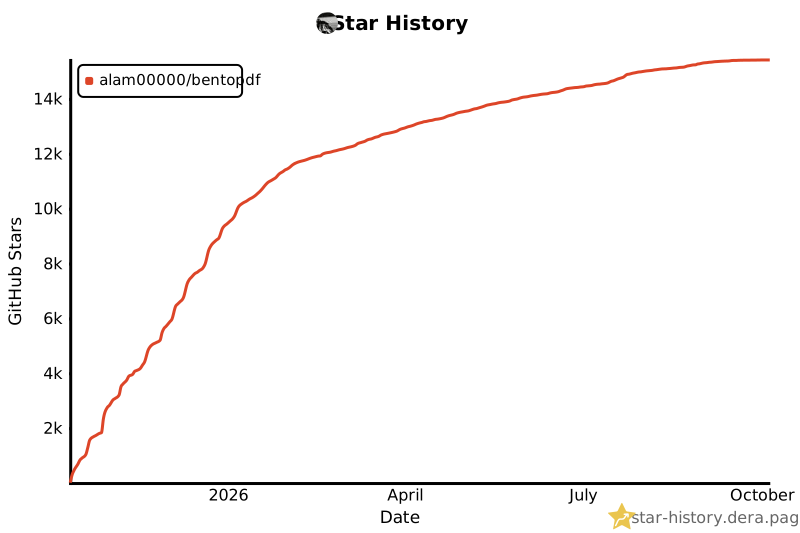](https://github.com/alam00000/bentopdf/stargazers)
|
||||
|
||||
---
|
||||
|
||||
@@ -134,7 +138,7 @@ We're incredibly grateful to all our sponsors and supporters who help keep Bento
|
||||
## ✨ Why BentoPDF?
|
||||
|
||||
- **Privacy First**: All processing happens in your browser. Your files are never uploaded to a server, guaranteeing 100% privacy.
|
||||
- **No Limits**: Manipulate as many files as you want, as often you want. There are no restrictions or upload limits.
|
||||
- **No Limits**: Manipulate as many files as you want, as often as you want. There are no restrictions or upload limits.
|
||||
- **High Performance**: Built with modern web technologies, BentoPDF is fast and efficient, handling even large PDF files with ease.
|
||||
- **Completely Free**: BentoPDF is a free and open-source tool for everyone.
|
||||
|
||||
@@ -146,37 +150,38 @@ BentoPDF offers a comprehensive suite of tools to handle all your PDF needs.
|
||||
|
||||
### Organize & Manage PDFs
|
||||
|
||||
| Tool Name | Description |
|
||||
| :--------------------------- | :------------------------------------------------------------------------------------------------------ |
|
||||
| **Merge PDFs** | Combine multiple PDF files into one. Preserves Bookmarks. |
|
||||
| **Split PDFs** | Extract specific pages or divide a document into smaller files. |
|
||||
| **Organize Pages** | Reorder, duplicate, or delete pages with a simple drag-and-drop interface. |
|
||||
| **Extract Pages** | Save a specific range of pages as a new PDF. |
|
||||
| **Delete Pages** | Remove unwanted pages from your document. |
|
||||
| **Rotate PDF** | Rotate individual or all pages in a document. |
|
||||
| **Rotate by Custom Degrees** | Rotate pages by any custom angle. |
|
||||
| **N-Up PDF** | Combine multiple pages onto a single page. |
|
||||
| **View PDF** | A powerful, integrated PDF viewer. |
|
||||
| **Alternate & Mix Pages** | Merge pages by alternating pages from each PDF. Preserves Bookmarks. |
|
||||
| **Posterize PDF** | Split a PDF into multiple smaller pages for print. |
|
||||
| **PDF Multi Tool** | Merge, Split, Organize, Delete, Rotate, Add Blank Pages, Extract and Duplicate in an unified interface. |
|
||||
| **PDF Booklet** | Rearrange pages for double-sided booklet printing. Fold and staple to create a booklet. |
|
||||
| **Add Attachments** | Embed one or more files into your PDF. |
|
||||
| **Extract Attachments** | Extract all embedded files from PDF(s) as a ZIP. |
|
||||
| **Edit Attachments** | View or remove attachments in your PDF. |
|
||||
| **Divide Pages** | Divide pages horizontally or vertically. |
|
||||
| **Combine to Single Page** | Stitch all pages into one continuous scroll. |
|
||||
| **Add Blank Page** | Insert an empty page anywhere in your PDF. |
|
||||
| **Reverse Pages** | Flip the order of all pages in your document. |
|
||||
| **View Metadata** | Inspect the hidden properties of your PDF. |
|
||||
| **PDFs to ZIP** | Package multiple PDF files into a ZIP archive. |
|
||||
| **Compare PDFs** | Compare two PDFs side by side. |
|
||||
| Tool Name | Description |
|
||||
| :--------------------------- | :----------------------------------------------------------------------------------------------------- |
|
||||
| **Merge PDFs** | Combine multiple PDF files into one. Preserves Bookmarks. |
|
||||
| **Split PDFs** | Extract specific pages or divide a document into smaller files. |
|
||||
| **Organize Pages** | Reorder, duplicate, or delete pages with a simple drag-and-drop interface. |
|
||||
| **Extract Pages** | Save a specific range of pages as a new PDF. |
|
||||
| **Delete Pages** | Remove unwanted pages from your document. |
|
||||
| **Rotate PDF** | Rotate individual or all pages in a document. |
|
||||
| **Rotate by Custom Degrees** | Rotate pages by any custom angle. |
|
||||
| **N-Up PDF** | Combine multiple pages onto a single page. |
|
||||
| **View PDF** | A powerful, integrated PDF viewer. |
|
||||
| **Alternate & Mix Pages** | Merge pages by alternating pages from each PDF. Preserves Bookmarks. |
|
||||
| **Posterize PDF** | Split a PDF into multiple smaller pages for print. |
|
||||
| **PDF Multi Tool** | Merge, Split, Organize, Delete, Rotate, Add Blank Pages, Extract and Duplicate in a unified interface. |
|
||||
| **PDF Booklet** | Rearrange pages for double-sided booklet printing. Fold and staple to create a booklet. |
|
||||
| **Add Attachments** | Embed one or more files into your PDF. |
|
||||
| **Extract Attachments** | Extract all embedded files from PDF(s) as a ZIP. |
|
||||
| **Edit Attachments** | View or remove attachments in your PDF. |
|
||||
| **Divide Pages** | Divide pages horizontally or vertically. |
|
||||
| **Combine to Single Page** | Stitch all pages into one continuous scroll. |
|
||||
| **Add Blank Page** | Insert an empty page anywhere in your PDF. |
|
||||
| **Reverse Pages** | Flip the order of all pages in your document. |
|
||||
| **View Metadata** | Inspect the hidden properties of your PDF. |
|
||||
| **PDFs to ZIP** | Package multiple PDF files into a ZIP archive. |
|
||||
| **Compare PDFs** | Compare two PDFs side by side. |
|
||||
|
||||
### Edit & Modify PDFs
|
||||
|
||||
| Tool Name | Description |
|
||||
| :------------------------ | :---------------------------------------------------------------------------------------------------------------------------------------------------------------------------------------------- |
|
||||
| **PDF Editor** | Annotate, highlight, redact, comment, add shapes/images, search, and view PDFs. |
|
||||
| **Edit PDF Text** | Edit existing text directly in your PDF. Reuses the document's embedded fonts and keeps the rest of the page untouched. |
|
||||
| **Create Fillable Forms** | Create professional fillable PDF forms with text fields, checkboxes, dropdowns, radio buttons, signatures, and more. Fully compliant with PDF standards for compatibility with all PDF viewers. |
|
||||
| **PDF Form Filler** | Fill in forms directly in the browser. Also supports XFA forms. |
|
||||
| **Add Page Numbers** | Easily add page numbers with customizable formatting. |
|
||||
@@ -324,30 +329,38 @@ You can run BentoPDF locally for development or personal use.
|
||||
Run BentoPDF instantly from GitHub Container Registry (Recommended):
|
||||
|
||||
```bash
|
||||
docker run -p 3000:8080 ghcr.io/alam00000/bentopdf:latest
|
||||
docker run -p 3000:8080 ghcr.io/alam00000/bentopdf-simple:latest
|
||||
```
|
||||
|
||||
Open your browser at: http://localhost:3000
|
||||
|
||||
> [!TIP]
|
||||
> BentoPDF ships in two builds:
|
||||
>
|
||||
> - **Self-Hosted build** — `ghcr.io/alam00000/bentopdf-simple:latest`. Every PDF tool the public site has, **without** the BentoPDF marketing (no hero, FAQ, testimonials, footer). Use this for internal/team/organization deployments. It is **not** a feature-reduced lite version.
|
||||
> - **Commercial build** — `ghcr.io/alam00000/bentopdf:latest`. The full marketing site, used by bentopdf.com itself and by commercial license holders running public-facing deployments. Includes hero, FAQ, testimonials, and footer.
|
||||
>
|
||||
> If in doubt: pull the Self-Hosted build.
|
||||
|
||||
<details>
|
||||
<summary><b>Alternative: Using Docker Hub or Podman</b></summary>
|
||||
|
||||
**Docker Hub:**
|
||||
|
||||
```bash
|
||||
docker run -p 3000:8080 bentopdfteam/bentopdf:latest
|
||||
docker run -p 3000:8080 bentopdfteam/bentopdf-simple:latest
|
||||
```
|
||||
|
||||
**Podman (GHCR):**
|
||||
|
||||
```bash
|
||||
podman run -p 3000:8080 ghcr.io/alam00000/bentopdf:latest
|
||||
podman run -p 3000:8080 ghcr.io/alam00000/bentopdf-simple:latest
|
||||
```
|
||||
|
||||
**Podman (Docker Hub):**
|
||||
|
||||
```bash
|
||||
podman run -p 3000:8080 docker.io/bentopdfteam/bentopdf:latest
|
||||
podman run -p 3000:8080 docker.io/bentopdfteam/bentopdf-simple:latest
|
||||
```
|
||||
|
||||
> [!NOTE]
|
||||
@@ -470,8 +483,8 @@ The default URLs are set in `.env.production`:
|
||||
|
||||
```bash
|
||||
VITE_WASM_PYMUPDF_URL=https://cdn.jsdelivr.net/npm/@bentopdf/[email protected]/
|
||||
VITE_WASM_GS_URL=https://cdn.jsdelivr.net/npm/@bentopdf/gs-wasm/assets/
|
||||
VITE_WASM_CPDF_URL=https://cdn.jsdelivr.net/npm/coherentpdf/dist/
|
||||
VITE_WASM_GS_URL=https://cdn.jsdelivr.net/npm/@bentopdf/gs-wasm@0.1.1/assets/
|
||||
VITE_WASM_CPDF_URL=https://cdn.jsdelivr.net/npm/coherentpdf@2.5.5/dist/
|
||||
VITE_TESSERACT_WORKER_URL=
|
||||
VITE_TESSERACT_CORE_URL=
|
||||
VITE_TESSERACT_LANG_URL=
|
||||
@@ -679,7 +692,7 @@ BentoPDF can also be hosted from a subdirectory (e.g., `example.com/tools/bentop
|
||||
```bash
|
||||
|
||||
# Example:
|
||||
# 1. Build the app with the specific BASE_URL. BASE_URL must have a trailing and leading slash. The BASE_URL can be any url of your choice. Here we are using /tools/bentopdf/ as an example.
|
||||
# 1. Build the app with the specific BASE_URL. BASE_URL must have a trailing and leading slash. The BASE_URL can be any URL of your choice. Here we are using /tools/bentopdf/ as an example.
|
||||
|
||||
BASE_URL=/tools/bentopdf/ npm run build
|
||||
|
||||
@@ -745,8 +758,9 @@ For a more robust setup with auto-restart capabilities:
|
||||
```yaml
|
||||
services:
|
||||
bentopdf:
|
||||
image: ghcr.io/alam00000/bentopdf:latest # Recommended
|
||||
# image: bentopdfteam/bentopdf:latest # Alternative: Docker Hub
|
||||
image: ghcr.io/alam00000/bentopdf-simple:latest # Self-Hosted build (recommended)
|
||||
# image: bentopdfteam/bentopdf-simple:latest # Self-Hosted build (Docker Hub)
|
||||
# image: ghcr.io/alam00000/bentopdf:latest # Commercial build (bentopdf.com / commercial license holders)
|
||||
container_name: bentopdf
|
||||
ports:
|
||||
- '3000:8080'
|
||||
@@ -777,7 +791,7 @@ Description=BentoPDF - Privacy-first PDF toolkit
|
||||
After=network-online.target
|
||||
|
||||
[Container]
|
||||
Image=ghcr.io/alam00000/bentopdf:latest
|
||||
Image=ghcr.io/alam00000/bentopdf-simple:latest
|
||||
ContainerName=bentopdf
|
||||
PublishPort=3000:8080
|
||||
AutoUpdate=registry
|
||||
@@ -798,18 +812,61 @@ systemctl --user enable --now bentopdf
|
||||
|
||||
For detailed Quadlet configuration, see [Self-Hosting Docker Guide](https://bentopdf.com/docs/self-hosting/docker).
|
||||
|
||||
### 🏢 Simple Mode for Internal Use
|
||||
### 🏢 Self-Hosted build (Simple Mode)
|
||||
|
||||
For organizations that want a clean, distraction-free interface focused solely on PDF tools, BentoPDF supports a **Simple Mode** that hides all branding and marketing content.
|
||||
The Self-Hosted build (the `bentopdf-simple` image, also called Simple Mode) is **functionally identical** to the Commercial build. Every PDF tool is present and behaves the same. It just hides the marketing that only makes sense on bentopdf.com itself or on a commercial public-facing deployment. **It is not a feature-reduced or "lite" version.**
|
||||
|
||||
**What Simple Mode does:**
|
||||
**What the Self-Hosted build hides** (cosmetic only, no PDF features are removed):
|
||||
|
||||
- Hides navigation, hero section, features, FAQ, testimonials, and footer
|
||||
- Shows only the essential PDF tools
|
||||
- Navigation bar, hero section, features section, FAQ, testimonials, footer
|
||||
- Updates page title to "PDF Tools"
|
||||
- Perfect for internal company tools and educational institutions
|
||||
|
||||
For more details, see [SIMPLE_MODE.md](SIMPLE_MODE.md).
|
||||
**What the Self-Hosted build keeps** (everything that actually does PDF work):
|
||||
|
||||
- All PDF tools (merge, split, edit, sign, OCR, Office conversion, every other tool)
|
||||
- Custom branding support, all build-time and runtime config
|
||||
|
||||
The Commercial build (`ghcr.io/alam00000/bentopdf:latest`) is what powers bentopdf.com itself and is used by commercial license holders running public-facing deployments. It adds the hero, FAQ, testimonials, and footer that wouldn't make sense on an internal tool.
|
||||
|
||||
If you're self-hosting BentoPDF for your team, organization, or as an internal tool, pull `ghcr.io/alam00000/bentopdf-simple:latest`. For more details, see [SIMPLE_MODE.md](SIMPLE_MODE.md).
|
||||
|
||||
### 🏬 Commercial Build
|
||||
|
||||
The Commercial build (the `bentopdf` image. Note: no `-simple` suffix) is what powers bentopdf.com itself. It includes the full marketing site (hero, features, FAQ, testimonials, footer) on top of every PDF tool. Use this build when you're running BentoPDF as a **public-facing PDF service under your own brand**. For example:
|
||||
|
||||
- You're deploying BentoPDF as a hosted SaaS for end-users (with your own domain and branding)
|
||||
- You want the landing-page experience (marketing sections + tools), not just the tool surface
|
||||
- You're a commercial license holder embedding BentoPDF into a commercial product or workflow
|
||||
|
||||
**Run it as-is** (carries BentoPDF branding by default. Useful to evaluate what the build looks like):
|
||||
|
||||
```bash
|
||||
docker run -p 3000:8080 ghcr.io/alam00000/bentopdf:latest
|
||||
```
|
||||
|
||||
**Build with your own brand** (the typical commercial path — replace the BentoPDF logo, name, and footer):
|
||||
|
||||
```bash
|
||||
docker build \
|
||||
--build-arg VITE_BRAND_NAME="AcmePDF" \
|
||||
--build-arg VITE_BRAND_LOGO="images/acme-logo.svg" \
|
||||
--build-arg VITE_FOOTER_TEXT="© 2026 Acme Corp. All rights reserved." \
|
||||
-t acmepdf .
|
||||
|
||||
docker run -p 3000:8080 acmepdf
|
||||
```
|
||||
|
||||
Or set the same variables when building from source — see [Custom Branding](#-custom-branding) below for the full list of options.
|
||||
|
||||
**Combine with other build-time flags** (`BASE_URL`, `VITE_DEFAULT_LANGUAGE`, `DISABLE_TOOLS`, `VITE_USE_CDN`, WASM URL overrides for air-gapped use, etc.) — every option that works on the Self-Hosted build also works here.
|
||||
|
||||
> [!IMPORTANT]
|
||||
> **Licensing**: Running the Commercial build is allowed under both license options BentoPDF ships under:
|
||||
>
|
||||
> - **AGPL-3.0** (free): allowed if your deployment publishes its full source code under AGPL — this includes any branding modifications, custom configuration, and any code you build on top of it.
|
||||
> - **Commercial license** ($79 lifetime): required for closed-source / proprietary deployments — e.g., a private SaaS where you don't open-source your branding fork or surrounding business logic.
|
||||
>
|
||||
> See the [Licensing page](https://bentopdf.com/licensing.html) for the full comparison.
|
||||
|
||||
### 🎨 Custom Branding
|
||||
|
||||
@@ -870,7 +927,7 @@ docker build --build-arg DISABLE_TOOLS="edit-pdf,sign-pdf,encrypt-pdf" -t bentop
|
||||
```bash
|
||||
docker run -d -p 3000:8080 \
|
||||
-v ./config.json:/usr/share/nginx/html/config.json:ro \
|
||||
ghcr.io/alam00000/bentopdf:latest
|
||||
ghcr.io/alam00000/bentopdf-simple:latest
|
||||
```
|
||||
|
||||
Both methods can be combined — the lists are merged. For the full list of tool IDs, see the [self-hosting docs](https://bentopdf.com/docs/self-hosting/docker#disabling-specific-tools).
|
||||
@@ -885,12 +942,30 @@ You can also disable specific features inside the PDF Editor (e.g., redaction, f
|
||||
|
||||
For the full list of editor categories, see the [self-hosting docs](https://bentopdf.com/docs/self-hosting/docker#disabling-editor-features).
|
||||
|
||||
### 🔕 Disabling the GitHub Star Counter
|
||||
|
||||
The navbar shows a live GitHub star count, fetched from `api.github.com` on page load. The only external request that isn't serving a PDF feature. Self-hosters who want zero non-essential network calls can disable it at build time. This removes the fetch code from the bundle entirely and drops `api.github.com` from the Content-Security-Policy.
|
||||
|
||||
Simple Mode builds (`bentopdf-simple`) always skip the star counter — this flag is only needed on the Commercial build or custom full builds.
|
||||
|
||||
**Docker:**
|
||||
|
||||
```bash
|
||||
docker build --build-arg DISABLE_GITHUB_STARS=true -t bentopdf .
|
||||
```
|
||||
|
||||
**Building from source:**
|
||||
|
||||
```bash
|
||||
DISABLE_GITHUB_STARS=true npm run build
|
||||
```
|
||||
|
||||
### 🔒 Security Features
|
||||
|
||||
BentoPDF runs as a non-root user using nginx-unprivileged for enhanced security:
|
||||
|
||||
- **Non-Root Execution**: Container runs with minimal privileges using nginx-unprivileged
|
||||
- **Port 8080**: Uses high port number to avoid requiring root privileges
|
||||
- **Port 8080**: Uses high port number to avoid requiring root privileges (configurable via `PORT` env var)
|
||||
- **Security Best Practices**: Follows Principle of Least Privilege
|
||||
|
||||
#### Basic Usage
|
||||
@@ -900,6 +975,18 @@ docker build -t bentopdf .
|
||||
docker run -p 8080:8080 bentopdf
|
||||
```
|
||||
|
||||
#### Custom Port
|
||||
|
||||
By default, BentoPDF listens on port `8080` inside the container. To change this, set the `PORT` environment variable:
|
||||
|
||||
```bash
|
||||
docker run -p 3000:9090 -e PORT=9090 ghcr.io/alam00000/bentopdf-simple:latest
|
||||
```
|
||||
|
||||
| Variable | Description | Default |
|
||||
| -------- | ------------------------------ | ------- |
|
||||
| `PORT` | Nginx listen port in container | `8080` |
|
||||
|
||||
#### Custom User ID (PUID/PGID)
|
||||
|
||||
For environments that require running as a specific non-root user (e.g., NAS devices, Kubernetes with security contexts), use the non-root Dockerfile:
|
||||
@@ -1041,19 +1128,19 @@ DOCKER_BUILDKIT=1 docker build \
|
||||
|
||||
### 📦 Version Management
|
||||
|
||||
BentoPDF supports semantic versioning with multiple container tags available:
|
||||
BentoPDF publishes two image variants. Both ship the same PDF tools. The difference is purely whether the bentopdf.com marketing is included.
|
||||
|
||||
**GitHub Container Registry (Recommended):**
|
||||
**Self-Hosted build** — recommended for internal/team/organization deployments:
|
||||
|
||||
- **Latest**: `ghcr.io/alam00000/bentopdf-simple:latest`
|
||||
- **Specific Version**: `ghcr.io/alam00000/bentopdf-simple:1.0.0`
|
||||
- **Docker Hub**: `bentopdfteam/bentopdf-simple:latest`
|
||||
|
||||
**Commercial build** — used by bentopdf.com itself and by commercial license holders running public-facing deployments:
|
||||
|
||||
- **Latest**: `ghcr.io/alam00000/bentopdf:latest`
|
||||
- **Specific Version**: `ghcr.io/alam00000/bentopdf:1.0.0`
|
||||
- **Version with Prefix**: `ghcr.io/alam00000/bentopdf:v1.0.0`
|
||||
|
||||
**Docker Hub:**
|
||||
|
||||
- **Latest**: `bentopdfteam/bentopdf:latest`
|
||||
- **Specific Version**: `bentopdfteam/bentopdf:1.0.0`
|
||||
- **Version with Prefix**: `bentopdfteam/bentopdf:v1.0.0`
|
||||
- **Docker Hub**: `bentopdfteam/bentopdf:latest`
|
||||
|
||||
#### Quick Release
|
||||
|
||||
@@ -1088,11 +1175,15 @@ For detailed release instructions, see [RELEASE.md](RELEASE.md).
|
||||
```
|
||||
|
||||
3. **Run the Development Server**:
|
||||
|
||||
```bash
|
||||
npm run dev
|
||||
```
|
||||
|
||||
The application will be available at `http://localhost:5173`.
|
||||
|
||||
> The dev server binds to `localhost` only by default. To expose it on your LAN (e.g. for mobile device testing), set `VITE_DEV_HOST=0.0.0.0 npm run dev`. The built-in CORS proxy at `/cors-proxy?url=` restricts targets to a known host allowlist; to permit additional hosts in development, set `VITE_DEV_CORS_PROXY_EXTRA_HOSTS="host1.example.com,host2.example.com"`.
|
||||
|
||||
#### Option 2: Build and Run with Docker Compose
|
||||
|
||||
1. **Clone the Repository**:
|
||||
@@ -1134,16 +1225,20 @@ BentoPDF was originally built using **HTML**, **CSS**, and **vanilla JavaScript*
|
||||
|
||||
---
|
||||
|
||||
## 📦 Other Products
|
||||
|
||||
| Product | Description | Links |
|
||||
| :----------------- | :------------------------------------------------------------------------------------------------------------------------------------ | :----------------------------------------------------------------------------------------------------- |
|
||||
| **Kura** | PDF standards and preflight engine. Converts to every PDF/A level, PDF/UA, PDF/X, PDF/E and PDF/VT, and can perform preflight checks. | [Website](https://kura.bentopdf.com) · [GitHub](https://github.com/alam00000/bentopdf-kura) |
|
||||
| **Hyper Compress** | The best open source PDF compression engine. | [Website](https://hyper.bentopdf.com) · [GitHub](https://github.com/alam00000/bentopdf-hyper-compress) |
|
||||
|
||||
---
|
||||
|
||||
## 🗺️ Roadmap
|
||||
|
||||
### Planned Features:
|
||||
|
||||
- **HTML to PDF**: Convert HTML files or web pages into PDF documents.
|
||||
- **Markdown to PDF**: Enhanced support for converting `.md` files to PDF.
|
||||
- **Convert to PDF/A**: Convert PDFs to the PDF/A archival format.
|
||||
- **Edit PDF Content**: Directly edit text and other content within your PDF.
|
||||
- **PDF to Office**: Converts PDF files into editable Word, Excel, and PowerPoint formats.
|
||||
- **Office to PDF**: Converts Word, Excel, and PowerPoint documents into optimized PDFs.
|
||||
|
||||
Contributions and discussions on the roadmap are welcome! Join the conversation via [Discord](https://discord.gg/Bgq3Ay3f2w).
|
||||
|
||||
|
||||
+38
-32
@@ -1,21 +1,25 @@
|
||||
# Simple Mode for BentoPDF
|
||||
# Simple Mode for BentoPDF (the Self-Hosted build)
|
||||
|
||||
Simple Mode is designed for internal organizational use where you want to hide all branding and marketing content, showing only the essential PDF tools for your users.
|
||||
Simple Mode is what powers the **Self-Hosted build** of BentoPDF (`bentopdf-simple`). It is **functionally identical** to the Commercial build that powers bentopdf.com — every PDF tool is present and behaves the same. It just hides the marketing chrome (hero, FAQ, testimonials, footer) that only makes sense on the public bentopdf.com site or on a commercial public-facing deployment.
|
||||
|
||||
## What Simple Mode Does
|
||||
> **Simple Mode is not a feature-reduced "lite" version.** Every PDF tool — merge, split, edit, sign, OCR, Office conversion, every other tool — works identically in both builds. The only difference is the marketing UI around the tools.
|
||||
|
||||
When enabled, Simple Mode will:
|
||||
The Commercial build (`ghcr.io/alam00000/bentopdf:latest`) is used by bentopdf.com itself and by commercial license holders running public-facing PDF deployments where the full marketing site makes sense.
|
||||
|
||||
- Hide the navigation bar
|
||||
- Hide the hero section with marketing content
|
||||
- Hide the features section
|
||||
- Hide the security/compliance section
|
||||
- Hide the FAQ section
|
||||
- Hide the testimonials section
|
||||
- Hide the support section
|
||||
- Hide the footer
|
||||
- Update the page title to "PDF Tools"
|
||||
- Make the tools section more prominent
|
||||
## What Simple Mode Hides
|
||||
|
||||
When enabled, Simple Mode hides the following bentopdf.com-specific marketing UI:
|
||||
|
||||
- Navigation bar
|
||||
- Hero section with marketing content
|
||||
- Features section
|
||||
- Security/compliance section
|
||||
- FAQ section
|
||||
- Testimonials section
|
||||
- Support section
|
||||
- Footer
|
||||
|
||||
It also updates the page title to "PDF Tools" and makes the tools section more prominent. **No PDF tools are removed or disabled.**
|
||||
|
||||
## How to Enable Simple Mode
|
||||
|
||||
@@ -136,20 +140,20 @@ npx serve dist -p 3000
|
||||
|
||||
Open `http://localhost:3000` in your browser.
|
||||
|
||||
### Method 4: Compare Both Modes
|
||||
### Method 4: Compare Both Builds Side-by-Side
|
||||
|
||||
```bash
|
||||
# Test Normal Mode (Docker)
|
||||
# Commercial build (the bentopdf.com look)
|
||||
docker run -p 3000:8080 ghcr.io/alam00000/bentopdf:latest
|
||||
|
||||
# Test Simple Mode (Docker)
|
||||
# Self-Hosted build (Simple Mode)
|
||||
docker run -p 3001:8080 ghcr.io/alam00000/bentopdf-simple:latest
|
||||
|
||||
# Podman users: replace 'docker' with 'podman'
|
||||
```
|
||||
|
||||
- Normal Mode: `http://localhost:3000`
|
||||
- Simple Mode: `http://localhost:3001`
|
||||
- Commercial build: `http://localhost:3000`
|
||||
- Self-Hosted build: `http://localhost:3001`
|
||||
|
||||
## 🔍 What to Look For
|
||||
|
||||
@@ -165,19 +169,7 @@ When Simple Mode is working correctly, you should see:
|
||||
|
||||
## 📦 Available Container Images
|
||||
|
||||
### Normal Mode (Full Branding)
|
||||
|
||||
**GitHub Container Registry (Recommended):**
|
||||
|
||||
- `ghcr.io/alam00000/bentopdf:latest`
|
||||
- `ghcr.io/alam00000/bentopdf:v1.0.0` (versioned)
|
||||
|
||||
**Docker Hub:**
|
||||
|
||||
- `bentopdfteam/bentopdf:latest`
|
||||
- `bentopdfteam/bentopdf:v1.0.0` (versioned)
|
||||
|
||||
### Simple Mode (Clean Interface)
|
||||
### Self-Hosted build (Simple Mode) — recommended for self-hosting
|
||||
|
||||
**GitHub Container Registry (Recommended):**
|
||||
|
||||
@@ -189,6 +181,20 @@ When Simple Mode is working correctly, you should see:
|
||||
- `bentopdfteam/bentopdf-simple:latest`
|
||||
- `bentopdfteam/bentopdf-simple:v1.0.0` (versioned)
|
||||
|
||||
### Commercial build — used by bentopdf.com and commercial license holders
|
||||
|
||||
The full marketing site, including hero/FAQ/testimonials/footer. Pull this only if you specifically want the bentopdf.com look — for example, you're running a public-facing PDF deployment under a commercial license.
|
||||
|
||||
**GitHub Container Registry (Recommended):**
|
||||
|
||||
- `ghcr.io/alam00000/bentopdf:latest`
|
||||
- `ghcr.io/alam00000/bentopdf:v1.0.0` (versioned)
|
||||
|
||||
**Docker Hub:**
|
||||
|
||||
- `bentopdfteam/bentopdf:latest`
|
||||
- `bentopdfteam/bentopdf:v1.0.0` (versioned)
|
||||
|
||||
## 🚀 Production Deployment Examples
|
||||
|
||||
### Docker Compose / Podman Compose
|
||||
|
||||
+121
-64
@@ -1,64 +1,121 @@
|
||||
# Hosting BentoPDF as a static website
|
||||
|
||||
As an alternative to runnning BenotPDF locally or in a Docker container, you can very easily host it as a set of static web pages. Here are a few examples:
|
||||
|
||||
## Netlify
|
||||
|
||||
### Netlify - static deployment
|
||||
|
||||
One of simplest ways to host BentoPDF is to create a project at [Netlify](https://www.netlify.com/) and create a static deployment. You can accomplish this by first downloading the pre-built distribution file from our [GitHub releases](https://github.com/alam00000/bentopdf/releases). Each release includes a `dist-{version}.zip` file that contains all necessary files for self-hosting.
|
||||
|
||||
1. Go to [BentoPDF Releases](https://github.com/alam00000/bentopdf/releases)
|
||||
2. Download the latest `dist-{version}.zip` file
|
||||
3. Next, if you have not already done so, create a Netlify account and log in.
|
||||
4. From your Netlify projects page, add a new project and select "Deploy manually".
|
||||
5. Drag and drop to upload the Bentopdf zip file you downloaded in step 3.
|
||||
6. Your BentoPDF deployment should now be working! Optionally, you can go into Project Configuration and change the project name.
|
||||
|
||||
When a new BentoPDF release becomes available, you will need to repeat steps 1-3, then go into "Deploys" and upload the new release.
|
||||
|
||||
### Netlify - dynamic deployment
|
||||
|
||||
Alternatively, you can configure a Netlify project to automatically deploy whenever your BentoPDF is updated.
|
||||
|
||||
1. If you have not done so already, create a fork of BentoPDF into your own Github account.
|
||||
2. If you have not already done so, create a Netlify account and log in.
|
||||
3. From your Netlify projects page, add a new project and select 'Import an existing project'.
|
||||
4. Select the GitHub button, authorize Netlify, then choose where to install the integration. You can choose 'All repositories' or 'Only select repositories' and choose your BentoPDF fork.
|
||||
5. Select your repo and give it a project name. (add environment variables?) Then click the blue 'Deploy' button.
|
||||
6. The Netlify build & deploy process will kick off. Once it finishes, you can click on the provided URL `https://[projectname]/netlify.app` to view your deployment of BentoPDF.
|
||||
|
||||
Whenever the BentoPDF source code is updated, you can sync the changes into your repo. This will kick off a new build and deploy within Netlify.
|
||||
|
||||
If you want to use BentoPDF's simple mode, go into Deploy Settings, then Environment Variables, and Add a variable. Add `SIMPLE_MODE` and set it to `true`. You will need to manually kick a new build to get this to take effect.
|
||||
|
||||
## Vercel
|
||||
|
||||
Vercel provides similar services to Netlify dynamic hosting.
|
||||
|
||||
1. If you have not done so already, create a fork of BentoPDF into your own Github account.
|
||||
2. If you have not already done so, create a Vercel account and log in.
|
||||
3. From your Vercel Overview page, select 'Add new project'
|
||||
4. Under 'Import Git Repository' and then choose 'Add GitHub Account'. Follow the prompts to authorize Vercel integration. You can choose 'All repositories' or 'Only select repositories' and choose your BentoPDF fork.
|
||||
5. Select 'Import' to import the repo into Vercel.
|
||||
6. Under 'Framework Preset', select 'Vite' and save the settings.
|
||||
7. The Vercel build & deploy process will kick off. Once it finishes, you can click on the provided link to view your deployment of BentoPDF.
|
||||
|
||||
Whenever the BentoPDF source code is updated, you can sync the changes into your repo. This will kick off a new build and deploy within BentoPDF.
|
||||
|
||||
If you want to use BentoPDF's simple mode, go into Project Settings, then Environment Variables, and Create a new variable. Add `SIMPLE_MODE` and set it to `true`. You will need to redeploy to get this to take effect.
|
||||
|
||||
## GitHub Pages
|
||||
|
||||
You can also host your own instance of BentoPDF using GitHub pages. An advantage of this over the other options is you are able to do everything in GitHub without any third party service.
|
||||
|
||||
1. If you have not done so already, create a fork of BentoPDF into your own Github account.
|
||||
2. From your fork, go to `Settings->Pages`, and change the 'Source' to 'GitHub Actions'
|
||||
3. Go to `Settings->Secrets and Variables > Actions`, then select 'Variables', and add the repository variable `BASE_URL`. Set the value to `/bentopdf`. *If you've renamed the repo to something other than bentopdf, put that here*.
|
||||
4. Go to `Actions` in the top menu, and select 'I understand' to enable Actions
|
||||
5. Within Actions, on the left, select 'Deploy static content to Pages', and then on the right select 'Run workflow', and in the dropdown, 'Run Workflow'. The action will now run to build BentoPDF and deploy it to GitHub Pages.
|
||||
|
||||
When the build completes, you can find the website at `https://[your-github-username]/bentopdf`
|
||||
|
||||
|
||||
If/when you merge changes from the source BentoPDF repository, the build and deploy action will automatically be kicked off and the new version will be automatically deployed to GitHub Pages.
|
||||
# Hosting BentoPDF as a static website
|
||||
|
||||
As an alternative to running BentoPDF locally or in a Docker container, you can easily host it as a set of static web pages. Here are a few examples:
|
||||
|
||||
## Netlify
|
||||
|
||||
### Netlify - static deployment
|
||||
|
||||
One of the simplest ways to host BentoPDF is to create a project at [Netlify](https://www.netlify.com/) and create a static deployment. You can accomplish this by first downloading the pre-built distribution file from our [GitHub releases](https://github.com/alam00000/bentopdf/releases). Each release includes a `dist-{version}.zip` file that contains all necessary files for self-hosting.
|
||||
|
||||
1. Go to [BentoPDF Releases](https://github.com/alam00000/bentopdf/releases)
|
||||
2. Download the latest `dist-{version}.zip` file
|
||||
3. Next, if you have not already done so, create a Netlify account and log in.
|
||||
4. From your Netlify projects page, add a new project and select "Deploy manually".
|
||||
5. Drag and drop to upload the BentoPDF zip file you downloaded in step 2.
|
||||
6. Your BentoPDF deployment should now be working! Optionally, you can go into Project Configuration and change the project name.
|
||||
|
||||
When a new BentoPDF release becomes available, you will need to repeat steps 1-3, then go into "Deploys" and upload the new release.
|
||||
|
||||
### Netlify - dynamic deployment
|
||||
|
||||
Alternatively, you can configure a Netlify project to automatically deploy whenever your BentoPDF is updated.
|
||||
|
||||
1. If you have not done so already, create a fork of BentoPDF into your own GitHub account.
|
||||
2. If you have not already done so, create a Netlify account and log in.
|
||||
3. From your Netlify projects page, add a new project and select 'Import an existing project'.
|
||||
4. Select the GitHub button, authorize Netlify, then choose where to install the integration. You can choose 'All repositories' or 'Only select repositories' and choose your BentoPDF fork.
|
||||
5. Select your repo and give it a project name. (add environment variables?) Then click the blue 'Deploy' button.
|
||||
6. The Netlify build & deploy process will kick off. Once it finishes, you can click on the provided URL `https://[projectname]/netlify.app` to view your deployment of BentoPDF.
|
||||
|
||||
Whenever the BentoPDF source code is updated, you can sync the changes into your repo. This will kick off a new build and deploy within Netlify.
|
||||
|
||||
If you want to use BentoPDF's simple mode, go into Deploy Settings, then Environment Variables, and Add a variable. Add `SIMPLE_MODE` and set it to `true`. You will need to manually kick a new build to get this to take effect.
|
||||
|
||||
## Vercel
|
||||
|
||||
Vercel provides similar services to Netlify dynamic hosting.
|
||||
|
||||
1. If you have not done so already, create a fork of BentoPDF into your own GitHub account.
|
||||
2. If you have not already done so, create a Vercel account and log in.
|
||||
3. From your Vercel Overview page, select 'Add new project'
|
||||
4. Under 'Import Git Repository' and then choose 'Add GitHub Account'. Follow the prompts to authorize Vercel integration. You can choose 'All repositories' or 'Only select repositories' and choose your BentoPDF fork.
|
||||
5. Select 'Import' to import the repo into Vercel.
|
||||
6. Under 'Framework Preset', select 'Vite' and save the settings.
|
||||
7. The Vercel build & deploy process will kick off. Once it finishes, you can click on the provided link to view your deployment of BentoPDF.
|
||||
|
||||
Whenever the BentoPDF source code is updated, you can sync the changes into your repo. This will kick off a new build and deploy within Vercel.
|
||||
|
||||
If you want to use BentoPDF's simple mode, go into Project Settings, then Environment Variables, and Create a new variable. Add `SIMPLE_MODE` and set it to `true`. You will need to redeploy to get this to take effect.
|
||||
|
||||
## GitHub Pages
|
||||
|
||||
You can also host your own instance of BentoPDF using GitHub Pages. An advantage of this over the other options is you are able to do everything in GitHub without any third-party service.
|
||||
|
||||
1. If you have not done so already, create a fork of BentoPDF into your own GitHub account.
|
||||
2. From your fork, go to `Settings->Pages`, and change the 'Source' to 'GitHub Actions'
|
||||
3. Go to `Settings->Secrets and Variables > Actions`, then select 'Variables', and add the repository variable `BASE_URL`. Set the value to `/bentopdf`. _If you've renamed the repo to something other than bentopdf, put that here_.
|
||||
4. Go to `Actions` in the top menu, and select 'I understand' to enable Actions
|
||||
5. Within Actions, on the left, select 'Deploy static content to Pages', and then on the right select 'Run workflow', and in the dropdown, 'Run Workflow'. The action will now run to build BentoPDF and deploy it to GitHub Pages.
|
||||
|
||||
When the build completes, you can find the website at `https://[your-github-username]/bentopdf`
|
||||
|
||||
If/when you merge changes from the source BentoPDF repository, the build and deploy action will automatically be kicked off and the new version will be automatically deployed to GitHub Pages.
|
||||
|
||||
## SEO and search engine indexing
|
||||
|
||||
By default, every self-hosted BentoPDF build emits canonical URLs and an
|
||||
hreflang/`x-default` set that point back to `https://www.bentopdf.com`. This
|
||||
is intentional for two reasons:
|
||||
|
||||
1. **It consolidates SEO signals to the official site** so your instance
|
||||
doesn't compete with bentopdf.com on brand searches like "bentopdf".
|
||||
2. **It keeps your instance off public search results.** If you self-host
|
||||
on a small VPS, a home server, or anywhere with limited bandwidth, you
|
||||
probably don't want strangers from Google landing on it. With the
|
||||
default canonical pointing back to the official site, search engines
|
||||
treat your instance as a copy and won't surface it for organic traffic
|
||||
and your bandwidth is reserved for the people you actually share the URL
|
||||
with.
|
||||
|
||||
You have two clean overrides depending on what you want.
|
||||
|
||||
### Run your own SEO instance (claim canonical for yourself)
|
||||
|
||||
If you operate a public deployment and want it to be the indexed copy for
|
||||
your audience, set `SITE_URL` at build time to your origin. The build will
|
||||
emit canonicals, hreflang, and structured data pointing at your domain.
|
||||
|
||||
- Docker:
|
||||
```sh
|
||||
docker build --build-arg SITE_URL=https://pdf.example.com -t bentopdf-self .
|
||||
```
|
||||
- Netlify, Vercel, GitHub Pages, or any other static host: set `SITE_URL`
|
||||
in your project's environment variables and re-deploy. The build script
|
||||
reads it during `npm run build`.
|
||||
|
||||
### Stay invisible to search engines (no SEO competition either way)
|
||||
|
||||
Set the runtime environment variable `ROBOTS_NOINDEX=true`. The container
|
||||
injects `<meta name="robots" content="noindex, follow">` into every served
|
||||
HTML file at startup. The canonical link still points at the official site
|
||||
by default, so when crawlers do follow internal links they still see
|
||||
bentopdf.com as the authoritative source.
|
||||
|
||||
```sh
|
||||
docker run -d -p 8080:8080 -e ROBOTS_NOINDEX=true ghcr.io/alam00000/bentopdf:latest
|
||||
```
|
||||
|
||||
You can combine the two: build with your own `SITE_URL` and run with
|
||||
`ROBOTS_NOINDEX=true` for a private deployment that's neither competing
|
||||
with bentopdf.com nor advertising itself.
|
||||
|
||||
### Note on Simple Mode
|
||||
|
||||
Simple Mode (`SIMPLE_MODE=true`) controls the **UI** — it ships a stripped-down
|
||||
homepage suitable for company intranets and single-purpose deployments. It
|
||||
does **not** by itself control whether your instance is indexed by search
|
||||
engines. A public-facing simple-mode deployment is fully indexable by default,
|
||||
just like the full-mode build. If you want a simple-mode deployment hidden
|
||||
from search engines, combine `SIMPLE_MODE=true` at build time with
|
||||
`ROBOTS_NOINDEX=true` at runtime.
|
||||
|
||||
+17
-3
@@ -33,6 +33,13 @@ BentoPDF uses **i18next** for internationalization (i18n). Currently supported l
|
||||
- **Traditional Chinese (Taiwan)** (`zh-TW`)
|
||||
- **Korean** (`ko`)
|
||||
- **Russian** (`ru`)
|
||||
- **Ukrainian** (`uk`)
|
||||
- **Slovak** (`sk`)
|
||||
- **Arabic** (`ar`)
|
||||
- **Dutch** (`nl`)
|
||||
- **Danish** (`da`)
|
||||
- **Swedish** (`sv`)
|
||||
- **Japanese** (`ja`)
|
||||
|
||||
The app automatically detects the language from the URL path:
|
||||
|
||||
@@ -393,7 +400,7 @@ Some strings contain HTML or special characters:
|
||||
|
||||
```json
|
||||
{
|
||||
"faq.analytics.answer": "We care about your privacy. BentoPDF does not track personal information. We use <a href=\"https://simpleanalytics.com\" class=\"text-indigo-400 hover:underline\" target=\"_blank\" rel=\"noopener noreferrer\">Simple Analytics</a> solely to see anonymous visit counts."
|
||||
"faq.analytics.answer": "No. BentoPDF does not track you at all. We do not use cookies, analytics, or any tracking scripts, not even on the live website at bentopdf.com. We never know who you are or what you do with the tools."
|
||||
}
|
||||
```
|
||||
|
||||
@@ -401,7 +408,7 @@ When translating, **keep the HTML tags intact**:
|
||||
|
||||
```json
|
||||
{
|
||||
"faq.analytics.answer": "Wir schätzen Ihre Privatsphäre. BentoPDF verfolgt keine persönlichen Informationen. Wir verwenden <a href=\"https://simpleanalytics.com\" class=\"text-indigo-400 hover:underline\" target=\"_blank\" rel=\"noopener noreferrer\">Simple Analytics</a> ausschließlich, um anonyme Besucherzahlen zu sehen."
|
||||
"faq.analytics.answer": "Nein. BentoPDF verfolgt Sie in keiner Weise. Wir verwenden keine Cookies, keine Analysetools und keine Tracking-Skripte – auch nicht auf der Live-Website bentopdf.com. Wir wissen nie, wer Sie sind oder was Sie mit den Tools tun."
|
||||
}
|
||||
```
|
||||
|
||||
@@ -603,8 +610,15 @@ Current translation coverage:
|
||||
| Traditional Chinese | `zh-TW` | ✅ Complete | Community |
|
||||
| Korean | `ko` | ✅ Complete | Community |
|
||||
| Russian | `ru` | ✅ Complete | Community |
|
||||
| Ukrainian | `uk` | ✅ Complete | Community |
|
||||
| Slovak | `sk` | ✅ Complete | Community |
|
||||
| Arabic | `ar` | ✅ Complete | Community |
|
||||
| Dutch | `nl` | ✅ Complete | Community |
|
||||
| Danish | `da` | ✅ Complete | Community |
|
||||
| Swedish | `sv` | ✅ Complete | Community |
|
||||
| Japanese | `ja` | ✅ Complete | Community |
|
||||
| Your Language | `??` | 🚧 In Progress | You? |
|
||||
|
||||
---
|
||||
|
||||
**Last Updated**: January 2026
|
||||
**Last Updated**: June 2026
|
||||
|
||||
+254
-194
@@ -5,7 +5,7 @@
|
||||
<meta name="viewport" content="width=device-width, initial-scale=1.0" />
|
||||
|
||||
<!-- Primary Meta Tags -->
|
||||
<title>About BentoPDF - Privacy-First Free PDF Tools | Our Mission</title>
|
||||
<title>About BentoPDF - Privacy-First Free PDF Tools | Our Story</title>
|
||||
<meta
|
||||
name="description"
|
||||
content="Learn about BentoPDF - 100% free, privacy-first PDF toolkit. All tools run in your browser, no uploads, no signup. Fast, secure, and forever free."
|
||||
@@ -18,7 +18,7 @@
|
||||
<meta name="robots" content="index, follow" />
|
||||
|
||||
<!-- Canonical URL -->
|
||||
<link rel="canonical" href="https://www.bentopdf.com/about.html" />
|
||||
<link rel="canonical" href="https://www.bentopdf.com/about" />
|
||||
|
||||
<!-- Open Graph -->
|
||||
<meta property="og:type" content="website" />
|
||||
@@ -51,6 +51,7 @@
|
||||
<meta name="twitter:site" content="@BentoPDF" />
|
||||
|
||||
<link href="/src/css/styles.css" rel="stylesheet" />
|
||||
<link href="/src/css/landing.css" rel="stylesheet" />
|
||||
|
||||
<!-- Web App Manifest -->
|
||||
<link rel="manifest" href="/site.webmanifest" />
|
||||
@@ -77,229 +78,276 @@
|
||||
<link rel="icon" href="/favicon.ico" sizes="32x32" />
|
||||
</head>
|
||||
|
||||
<body class="antialiased bg-gray-900 text-gray-300">
|
||||
<body class="lp antialiased">
|
||||
{{> navbar }}
|
||||
|
||||
<div id="app" class="min-h-screen container mx-auto p-4 md:p-8">
|
||||
<section id="about-hero" class="text-center py-16 md:py-24">
|
||||
<h1 class="text-3xl md:text-6xl font-bold text-white mb-4">
|
||||
<span data-i18n="about.hero.title"
|
||||
>We believe PDF tools should be</span
|
||||
>
|
||||
<span class="marker-slanted" data-i18n="about.hero.subtitle"
|
||||
>fast, private, and free.</span
|
||||
>
|
||||
</h1>
|
||||
<p
|
||||
class="text-lg md:text-xl text-gray-400"
|
||||
data-i18n="about.hero.noCompromises"
|
||||
>
|
||||
No compromises.
|
||||
</p>
|
||||
</section>
|
||||
|
||||
<div class="section-divider"></div>
|
||||
|
||||
<section id="mission-section" class="py-16 max-w-4xl mx-auto">
|
||||
<div class="text-center">
|
||||
<i
|
||||
data-lucide="rocket"
|
||||
class="w-16 h-16 text-indigo-400 mx-auto mb-6"
|
||||
></i>
|
||||
<h2
|
||||
class="text-3xl md:text-4xl font-bold text-white mb-4"
|
||||
data-i18n="about.mission.title"
|
||||
>
|
||||
Our Mission
|
||||
</h2>
|
||||
<p
|
||||
class="text-lg text-gray-400 leading-relaxed"
|
||||
data-i18n="about.mission.description"
|
||||
>
|
||||
To provide the most comprehensive PDF toolbox that respects your
|
||||
privacy and never asks for payment. We believe essential document
|
||||
tools should be accessible to everyone, everywhere, without
|
||||
barriers.
|
||||
</p>
|
||||
</div>
|
||||
</section>
|
||||
|
||||
<div
|
||||
class="bg-gray-800 rounded-xl p-8 md:p-12 my-16 border border-gray-700"
|
||||
>
|
||||
<div class="grid grid-cols-1 md:grid-cols-2 gap-12 items-center">
|
||||
<div class="text-center md:text-left">
|
||||
<span
|
||||
class="text-indigo-400 font-bold uppercase"
|
||||
data-i18n="about.philosophy.label"
|
||||
>Our Core Philosophy</span
|
||||
<div id="app">
|
||||
<section id="story-section" class="lp-sec lp-sec--first">
|
||||
<div class="lp-frame">
|
||||
<div class="lp-story">
|
||||
<div class="lp-story-head">
|
||||
<h1 class="lp-h2">
|
||||
<span class="line">Hi, I'm Alam.</span>
|
||||
<span class="line dim">I build BentoPDF.</span>
|
||||
</h1>
|
||||
<div class="lp-story-by">
|
||||
<img
|
||||
class="lp-avatar"
|
||||
src="/images/author-alam.jpg"
|
||||
alt="Alam"
|
||||
width="44"
|
||||
height="44"
|
||||
/>
|
||||
<a
|
||||
href="https://github.com/alam00000"
|
||||
target="_blank"
|
||||
rel="me noopener noreferrer"
|
||||
>GitHub</a
|
||||
>
|
||||
<a
|
||||
href="https://www.linkedin.com/in/abdullah-alam01/"
|
||||
target="_blank"
|
||||
rel="me noopener noreferrer"
|
||||
>LinkedIn</a
|
||||
>
|
||||
<a
|
||||
href="https://x.com/alamdraws"
|
||||
target="_blank"
|
||||
rel="me noopener noreferrer"
|
||||
>X</a
|
||||
>
|
||||
</div>
|
||||
</div>
|
||||
<div class="lp-story-body">
|
||||
<p>
|
||||
BentoPDF started off as just a simple internal tool I used for
|
||||
quickly merging and splitting PDFs.
|
||||
</p>
|
||||
<p>
|
||||
At some point, I decided to
|
||||
<a
|
||||
href="https://www.reddit.com/r/webdev/comments/1nr937y/i_made_bentopdf_a_privacy_first_pdf_toolkit_that/"
|
||||
target="_blank"
|
||||
rel="noopener noreferrer"
|
||||
>share it on Reddit</a
|
||||
>. Someone in the comments
|
||||
<a
|
||||
href="https://www.reddit.com/r/webdev/comments/1nr937y/comment/ngdeqby/"
|
||||
target="_blank"
|
||||
rel="noopener noreferrer"
|
||||
>asked if it was open source</a
|
||||
>. I thought, “Why not?” So a couple of weeks later, I
|
||||
<a
|
||||
href="https://github.com/alam00000/bentopdf"
|
||||
target="_blank"
|
||||
rel="noopener noreferrer"
|
||||
>put the code on GitHub</a
|
||||
>.
|
||||
</p>
|
||||
<p>
|
||||
I posted it on
|
||||
<a
|
||||
href="https://www.reddit.com/r/selfhosted/comments/1o5borw/bentopdf_is_a_self_hostable_pdf_toolkit/"
|
||||
target="_blank"
|
||||
rel="noopener noreferrer"
|
||||
>r/selfhosted</a
|
||||
>
|
||||
the next day, and that's when things really started to take off.
|
||||
</p>
|
||||
<p>
|
||||
I honestly never thought BentoPDF would grow into what it is
|
||||
today. It started as a little tool I made for myself, and
|
||||
somehow it turned into a much bigger project used by people all
|
||||
over the world.
|
||||
</p>
|
||||
</div>
|
||||
</div>
|
||||
<div class="lp-grid lp-grid--4 lp-cross">
|
||||
<div class="lp-cell lp-stat lp-cell--accent lp-reveal">
|
||||
<b>15K+</b><span>GitHub stars</span>
|
||||
</div>
|
||||
<div class="lp-cell lp-stat lp-cell--white lp-reveal">
|
||||
<b>10M+</b><span>Downloads</span>
|
||||
</div>
|
||||
<div class="lp-cell lp-stat lp-cell--hatch lp-reveal">
|
||||
<b>1.3K+</b><span>Forks</span>
|
||||
</div>
|
||||
<a
|
||||
href="https://github.com/alam00000/bentopdf/graphs/contributors"
|
||||
target="_blank"
|
||||
rel="noopener noreferrer"
|
||||
class="lp-cell lp-stat lp-cell--raised lp-reveal lp-stat-link"
|
||||
>
|
||||
<h2
|
||||
class="text-3xl md:text-4xl font-bold text-white mt-2 mb-4"
|
||||
data-i18n="about.philosophy.title"
|
||||
>
|
||||
Privacy First. Always.
|
||||
</h2>
|
||||
<p
|
||||
class="text-gray-400 leading-relaxed"
|
||||
data-i18n="about.philosophy.description"
|
||||
>
|
||||
In an era where data is a commodity, we take a different approach.
|
||||
All processing for Bentopdf tools happens locally in your browser.
|
||||
This means your files never touch our servers, we never see your
|
||||
documents, and we don't track what you do. Your documents remain
|
||||
completely and unequivocally private. It's not just a feature;
|
||||
it's our foundation.
|
||||
<b>60+</b
|
||||
><span>Contributors <i data-lucide="arrow-up-right"></i></span>
|
||||
</a>
|
||||
</div>
|
||||
<div class="lp-story-outro">
|
||||
<p>
|
||||
I don't build BentoPDF alone anymore. More than 60 people have
|
||||
contributed code, translations and fixes, and thousands more have
|
||||
starred it, shared it, reported bugs and asked for features. Thank
|
||||
you.
|
||||
</p>
|
||||
<p>Enough about me. Here's more about BentoPDF.</p>
|
||||
</div>
|
||||
<div class="flex justify-center">
|
||||
<div class="relative w-48 h-48">
|
||||
<div
|
||||
class="absolute inset-0 bg-indigo-500 rounded-full opacity-20 animate-pulse"
|
||||
></div>
|
||||
<div
|
||||
class="absolute inset-4 bg-indigo-500 rounded-full opacity-30 animate-pulse delay-500"
|
||||
></div>
|
||||
<i
|
||||
data-lucide="shield-check"
|
||||
class="w-48 h-48 text-indigo-400"
|
||||
></i>
|
||||
</div>
|
||||
</section>
|
||||
|
||||
<section id="mission-section" class="lp-sec lp-band">
|
||||
<div class="lp-frame">
|
||||
<figure class="lp-manifesto lp-reveal">
|
||||
<h2 class="lp-h2">
|
||||
<span class="line" data-i18n="about.mission.title">Our</span>
|
||||
<span class="line dim" data-i18n="about.mission.titleDim"
|
||||
>Mission</span
|
||||
>
|
||||
</h2>
|
||||
<blockquote
|
||||
class="lp-manifesto-text"
|
||||
data-i18n="about.mission.description"
|
||||
>
|
||||
To provide the most comprehensive PDF toolbox that respects your
|
||||
privacy and never asks for payment. We believe essential document
|
||||
tools should be accessible to everyone, everywhere, without
|
||||
barriers.
|
||||
</blockquote>
|
||||
</figure>
|
||||
</div>
|
||||
</section>
|
||||
|
||||
<section id="philosophy-section" class="lp-sec">
|
||||
<div class="lp-frame">
|
||||
<div class="lp-head lp-head--center">
|
||||
<div>
|
||||
<h2 class="lp-h2">
|
||||
<span class="line" data-i18n="about.hero.title"
|
||||
>PDF tools should be</span
|
||||
>
|
||||
<span class="line dim" data-i18n="about.hero.subtitle"
|
||||
>fast, private, and free.</span
|
||||
>
|
||||
</h2>
|
||||
<p class="lp-head-p" data-i18n="about.hero.noCompromises">
|
||||
No compromises.
|
||||
</p>
|
||||
<p class="lp-head-p" data-i18n="about.philosophy.description">
|
||||
Every BentoPDF tool runs locally in your browser. Your files are
|
||||
never uploaded, nobody else sees your documents, and nothing
|
||||
tracks what you do.
|
||||
</p>
|
||||
</div>
|
||||
</div>
|
||||
<div class="lp-grid lp-grid--3 lp-cross">
|
||||
<div class="lp-cell lp-stat lp-cell--accent lp-reveal">
|
||||
<b>0</b
|
||||
><span data-i18n="features.noUploads.title">No Uploads</span>
|
||||
</div>
|
||||
<div class="lp-cell lp-stat lp-cell--white lp-reveal">
|
||||
<b>0</b><span data-i18n="hero.noSignups">No Signups</span>
|
||||
</div>
|
||||
<div class="lp-cell lp-stat lp-cell--hatch lp-reveal">
|
||||
<b>$0</b
|
||||
><span data-i18n="features.foreverFree.title">Forever Free</span>
|
||||
</div>
|
||||
</div>
|
||||
</div>
|
||||
</div>
|
||||
</section>
|
||||
|
||||
<section id="why-Bentopdf" class="py-16">
|
||||
<h2 class="text-3xl md:text-4xl font-bold text-center text-white mb-12">
|
||||
<span data-i18n="about.whyBentopdf.title">Why</span>
|
||||
<span class="marker-slanted">Bentopdf?</span>
|
||||
</h2>
|
||||
<div class="grid grid-cols-1 md:grid-cols-2 gap-8 max-w-5xl mx-auto">
|
||||
<div class="bg-gray-800 p-6 rounded-lg flex items-start gap-4">
|
||||
<i
|
||||
data-lucide="zap"
|
||||
class="w-10 h-10 text-indigo-400 flex-shrink-0 mt-1"
|
||||
></i>
|
||||
<section id="why-bentopdf" class="lp-sec lp-band">
|
||||
<div class="lp-frame">
|
||||
<div class="lp-head lp-head--center">
|
||||
<div>
|
||||
<h3
|
||||
class="text-xl font-bold text-white"
|
||||
data-i18n="about.whyBentopdf.speed.title"
|
||||
>
|
||||
Built for Speed
|
||||
</h3>
|
||||
<p
|
||||
class="text-gray-400 mt-2"
|
||||
data-i18n="about.whyBentopdf.speed.description"
|
||||
>
|
||||
No waiting for uploads or downloads to a server. By processing
|
||||
files directly in your browser using modern web technologies
|
||||
like WebAssembly, we offer unparalleled speed for all our tools.
|
||||
</p>
|
||||
<h2 class="lp-h2">
|
||||
<span class="line" data-i18n="about.whyBentopdf.title"
|
||||
>Why</span
|
||||
>
|
||||
<span class="line dim">BentoPDF?</span>
|
||||
</h2>
|
||||
</div>
|
||||
</div>
|
||||
<div class="bg-gray-800 p-6 rounded-lg flex items-start gap-4">
|
||||
<i
|
||||
data-lucide="badge-dollar-sign"
|
||||
class="w-10 h-10 text-indigo-400 flex-shrink-0 mt-1"
|
||||
></i>
|
||||
<div>
|
||||
<h3
|
||||
class="text-xl font-bold text-white"
|
||||
data-i18n="about.whyBentopdf.free.title"
|
||||
>
|
||||
Completely Free
|
||||
</h3>
|
||||
<p
|
||||
class="text-gray-400 mt-2"
|
||||
data-i18n="about.whyBentopdf.free.description"
|
||||
>
|
||||
No trials, no subscriptions, no hidden fees, and no "premium"
|
||||
features held hostage. We believe powerful PDF tools should be a
|
||||
public utility, not a profit center.
|
||||
<div class="lp-grid lp-grid--2 lp-cross">
|
||||
<div class="lp-cell lp-reveal">
|
||||
<span class="lp-tile"><i data-lucide="zap"></i></span>
|
||||
<h3 data-i18n="about.whyBentopdf.speed.title">Built for Speed</h3>
|
||||
<p data-i18n="about.whyBentopdf.speed.description">
|
||||
There's no upload or download step. Files are processed right in
|
||||
your browser using WebAssembly, so you're never waiting on a
|
||||
server.
|
||||
</p>
|
||||
</div>
|
||||
</div>
|
||||
<div class="bg-gray-800 p-6 rounded-lg flex items-start gap-4">
|
||||
<i
|
||||
data-lucide="user-plus"
|
||||
class="w-10 h-10 text-indigo-400 flex-shrink-0 mt-1"
|
||||
></i>
|
||||
<div>
|
||||
<h3
|
||||
class="text-xl font-bold text-white"
|
||||
data-i18n="about.whyBentopdf.noAccount.title"
|
||||
>
|
||||
<div class="lp-cell lp-reveal">
|
||||
<span class="lp-tile"
|
||||
><i data-lucide="badge-dollar-sign"></i
|
||||
></span>
|
||||
<h3 data-i18n="about.whyBentopdf.free.title">Free to Use</h3>
|
||||
<p data-i18n="about.whyBentopdf.free.description">
|
||||
Every tool is free, with no trials, no subscriptions and no
|
||||
watermarks. Development is funded by commercial licenses.
|
||||
</p>
|
||||
</div>
|
||||
<div class="lp-cell lp-reveal">
|
||||
<span class="lp-tile"><i data-lucide="user-plus"></i></span>
|
||||
<h3 data-i18n="about.whyBentopdf.noAccount.title">
|
||||
No Account Required
|
||||
</h3>
|
||||
<p
|
||||
class="text-gray-400 mt-2"
|
||||
data-i18n="about.whyBentopdf.noAccount.description"
|
||||
>
|
||||
Start using any tool immediately. We don't need your email, a
|
||||
password, or any personal information. Your workflow should be
|
||||
frictionless and anonymous.
|
||||
<p data-i18n="about.whyBentopdf.noAccount.description">
|
||||
Open any tool and start right away. No email, no password, no
|
||||
personal information.
|
||||
</p>
|
||||
</div>
|
||||
</div>
|
||||
<div class="bg-gray-800 p-6 rounded-lg flex items-start gap-4">
|
||||
<i
|
||||
data-lucide="code-2"
|
||||
class="w-10 h-10 text-indigo-400 flex-shrink-0 mt-1"
|
||||
></i>
|
||||
<div>
|
||||
<h3
|
||||
class="text-xl font-bold text-white"
|
||||
data-i18n="about.whyBentopdf.openSource.title"
|
||||
>
|
||||
Open Source Spirit
|
||||
<div class="lp-cell lp-reveal">
|
||||
<span class="lp-tile"><i data-lucide="code-2"></i></span>
|
||||
<h3 data-i18n="about.whyBentopdf.openSource.title">
|
||||
Open Source
|
||||
</h3>
|
||||
<p
|
||||
class="text-gray-400 mt-2"
|
||||
data-i18n="about.whyBentopdf.openSource.description"
|
||||
>
|
||||
Built with transparency in mind. We leverage incredible
|
||||
open-source libraries like PDF-lib and PDF.js, and believe in
|
||||
the community-driven effort to make powerful tools accessible to
|
||||
everyone.
|
||||
<p data-i18n="about.whyBentopdf.openSource.description">
|
||||
The code is public on GitHub under AGPL-3.0, so you can check
|
||||
exactly how your files are handled. It builds on open-source
|
||||
projects like PDF.js, pdf-lib, qpdf and LibreOffice.
|
||||
</p>
|
||||
</div>
|
||||
</div>
|
||||
</div>
|
||||
</section>
|
||||
|
||||
<div class="section-divider"></div>
|
||||
|
||||
<section id="cta-section" class="text-center py-16">
|
||||
<h2
|
||||
class="text-3xl font-bold text-white mb-4"
|
||||
data-i18n="about.cta.title"
|
||||
>
|
||||
Ready to get started?
|
||||
</h2>
|
||||
<p
|
||||
class="text-lg text-gray-400 mb-8 max-w-2xl mx-auto"
|
||||
data-i18n="about.cta.description"
|
||||
>
|
||||
Join thousands of users who trust Bentopdf for their daily document
|
||||
needs. Experience the difference that privacy and performance can
|
||||
make.
|
||||
</p>
|
||||
<a
|
||||
href="index.html#tools-header"
|
||||
class="inline-block px-8 py-3 rounded-full bg-gradient-to-b from-indigo-500 to-indigo-600 text-white font-semibold focus:ring-2 focus:ring-offset-2 focus:ring-offset-gray-900 focus:ring-indigo-400 hover:shadow-xl hover:shadow-indigo-500/30 transition-all duration-200 transform hover:-translate-y-1"
|
||||
data-i18n="about.cta.button"
|
||||
>
|
||||
Explore All Tools
|
||||
</a>
|
||||
<section id="cta-section" class="lp-sec">
|
||||
<div class="lp-frame">
|
||||
<div class="lp-cta">
|
||||
<h2 class="lp-h2" data-i18n="about.cta.title">
|
||||
Ready to get started?
|
||||
</h2>
|
||||
<p data-i18n="about.cta.description">
|
||||
Join thousands of users who trust BentoPDF for their daily
|
||||
document needs. Experience the difference that privacy and
|
||||
performance can make.
|
||||
</p>
|
||||
<div class="lp-cta-actions">
|
||||
<span class="lp-brackets">
|
||||
<a
|
||||
href="index.html#tools-header"
|
||||
class="lp-btn lp-btn--primary"
|
||||
>
|
||||
<span data-i18n="about.cta.button">Explore All Tools</span>
|
||||
<i data-lucide="arrow-right"></i>
|
||||
</a>
|
||||
</span>
|
||||
<a href="https://bentopdf.com/docs/" class="lp-btn lp-btn--ghost">
|
||||
<i data-lucide="book-open"></i>
|
||||
<span data-i18n="nav.docs">Docs</span>
|
||||
</a>
|
||||
</div>
|
||||
</div>
|
||||
</div>
|
||||
</section>
|
||||
</div>
|
||||
|
||||
{{> footer }}
|
||||
|
||||
<script type="module" src="src/js/utils/lucide-init.ts"></script>
|
||||
<script type="module" src="src/version.ts"></script>
|
||||
<script type="module" src="src/js/main.ts"></script>
|
||||
<script type="module" src="src/js/mobileMenu.ts"></script>
|
||||
<script type="module" src="src/js/landing.ts"></script>
|
||||
|
||||
<!-- JSON-LD Schema -->
|
||||
<script type="application/ld+json">
|
||||
@@ -307,8 +355,20 @@
|
||||
"@context": "https://schema.org",
|
||||
"@type": "AboutPage",
|
||||
"name": "About BentoPDF",
|
||||
"description": "Learn about BentoPDF's mission to provide free, privacy-first PDF tools",
|
||||
"url": "https://www.bentopdf.com/about"
|
||||
"description": "How BentoPDF started, told by its creator Alam",
|
||||
"url": "https://www.bentopdf.com/about",
|
||||
"mainEntity": {
|
||||
"@type": "Person",
|
||||
"name": "Alam",
|
||||
"url": "https://www.bentopdf.com/blog/author-alam",
|
||||
"image": "https://www.bentopdf.com/images/author-alam.jpg",
|
||||
"jobTitle": "Creator and maintainer of BentoPDF",
|
||||
"sameAs": [
|
||||
"https://github.com/alam00000",
|
||||
"https://www.linkedin.com/in/abdullah-alam01/",
|
||||
"https://x.com/alamdraws"
|
||||
]
|
||||
}
|
||||
}
|
||||
</script>
|
||||
</body>
|
||||
|
||||
Binary file not shown.
Binary file not shown.
@@ -0,0 +1,149 @@
|
||||
<!doctype html>
|
||||
<html lang="en">
|
||||
<head>
|
||||
<meta charset="UTF-8" />
|
||||
<meta name="viewport" content="width=device-width, initial-scale=1.0" />
|
||||
<title>Alam, Creator of BentoPDF</title>
|
||||
<meta
|
||||
name="description"
|
||||
content="Alam builds BentoPDF, the open-source, privacy-first PDF toolkit that runs entirely in your browser. Every post on this blog is written by him."
|
||||
/>
|
||||
<meta name="robots" content="index, follow" />
|
||||
<link rel="canonical" href="https://www.bentopdf.com/blog/author-alam" />
|
||||
<meta property="og:type" content="profile" />
|
||||
<meta
|
||||
property="og:url"
|
||||
content="https://www.bentopdf.com/blog/author-alam"
|
||||
/>
|
||||
<meta property="og:title" content="Alam, Creator of BentoPDF" />
|
||||
<meta
|
||||
property="og:description"
|
||||
content="The maintainer behind BentoPDF and the author of every post on this blog."
|
||||
/>
|
||||
<meta
|
||||
property="og:image"
|
||||
content="https://www.bentopdf.com/images/author-alam.jpg"
|
||||
/>
|
||||
<meta property="og:site_name" content="BentoPDF" />
|
||||
<meta name="twitter:card" content="summary" />
|
||||
<link rel="manifest" href="/site.webmanifest" />
|
||||
<link rel="icon" type="image/svg+xml" href="/images/favicon.svg" />
|
||||
<link rel="icon" href="/favicon.ico" sizes="32x32" />
|
||||
<link href="/src/css/styles.css" rel="stylesheet" />
|
||||
</head>
|
||||
|
||||
<body class="antialiased bg-gray-900">
|
||||
{{> navbar }}
|
||||
|
||||
<section class="max-w-3xl mx-auto px-4 py-12">
|
||||
<div class="flex items-center gap-5 mb-8">
|
||||
<img
|
||||
src="/images/author-alam.jpg"
|
||||
alt="Alam"
|
||||
width="80"
|
||||
height="80"
|
||||
class="rounded-full"
|
||||
/>
|
||||
<div>
|
||||
<h1 class="text-3xl font-bold text-white">Alam</h1>
|
||||
<p class="text-gray-400">Creator and maintainer of BentoPDF</p>
|
||||
</div>
|
||||
</div>
|
||||
|
||||
<p class="text-gray-300 leading-relaxed mb-5">
|
||||
I’m Alam, and I build
|
||||
<a href="/" class="text-indigo-300 hover:text-indigo-400">BentoPDF</a>,
|
||||
a free, open-source PDF toolkit with 100+ tools that run entirely in
|
||||
your browser.
|
||||
</p>
|
||||
<p class="text-gray-300 leading-relaxed mb-5">
|
||||
There’s no uploading your files to a server, no account to create, and
|
||||
no tracking. Your documents stay on your device. The
|
||||
<a
|
||||
href="https://github.com/alam00000/bentopdf"
|
||||
rel="noopener"
|
||||
class="text-indigo-300 hover:text-indigo-400"
|
||||
>source code</a
|
||||
>
|
||||
is public, so you can see how it works yourself. BentoPDF is
|
||||
AGPL-licensed and self-hostable.
|
||||
</p>
|
||||
<p class="text-gray-300 leading-relaxed mb-5">
|
||||
I write every post on this blog myself. I’ll write about PDFs, how they
|
||||
work, things I learn while building BentoPDF, and occasionally things
|
||||
that go wrong.
|
||||
</p>
|
||||
<p class="text-gray-300 leading-relaxed mb-5">
|
||||
When I compare BentoPDF with another PDF tool, I’ll link to its
|
||||
documentation so you can check what I’m saying. If there’s something
|
||||
BentoPDF doesn’t do well, I’ll say that too.
|
||||
</p>
|
||||
<p class="text-gray-300 leading-relaxed mb-5">
|
||||
And if I get something wrong, please
|
||||
<a
|
||||
href="https://github.com/alam00000/bentopdf/issues"
|
||||
rel="noopener"
|
||||
class="text-indigo-300 hover:text-indigo-400"
|
||||
>open an issue</a
|
||||
>. I’ll fix it and add a note to the post.
|
||||
</p>
|
||||
|
||||
<p class="text-gray-300 leading-relaxed mb-5">
|
||||
You can find me on
|
||||
<a
|
||||
href="https://github.com/alam00000"
|
||||
rel="me noopener"
|
||||
class="text-indigo-300 hover:text-indigo-400"
|
||||
>GitHub</a
|
||||
>,
|
||||
<a
|
||||
href="https://www.linkedin.com/in/abdullah-alam01/"
|
||||
rel="me noopener"
|
||||
class="text-indigo-300 hover:text-indigo-400"
|
||||
>LinkedIn</a
|
||||
>
|
||||
and
|
||||
<a
|
||||
href="https://x.com/alamdraws"
|
||||
rel="me noopener"
|
||||
class="text-indigo-300 hover:text-indigo-400"
|
||||
>X</a
|
||||
>.
|
||||
</p>
|
||||
|
||||
<p class="text-gray-300 leading-relaxed">
|
||||
<a
|
||||
href="/blog"
|
||||
class="inline-flex items-center gap-2 text-indigo-300 hover:text-indigo-400 font-semibold"
|
||||
>Read the blog <i class="ph ph-arrow-right" aria-hidden="true"></i
|
||||
></a>
|
||||
</p>
|
||||
</section>
|
||||
|
||||
{{> footer }}
|
||||
<script type="module" src="/src/js/utils/lucide-init.ts"></script>
|
||||
<script type="module">
|
||||
import '@phosphor-icons/web/regular';
|
||||
</script>
|
||||
<script type="module" src="/src/js/mobileMenu.ts"></script>
|
||||
|
||||
<script type="application/ld+json">
|
||||
{
|
||||
"@context": "https://schema.org",
|
||||
"@type": "ProfilePage",
|
||||
"mainEntity": {
|
||||
"@type": "Person",
|
||||
"name": "Alam",
|
||||
"url": "https://www.bentopdf.com/blog/author-alam",
|
||||
"image": "https://www.bentopdf.com/images/author-alam.jpg",
|
||||
"jobTitle": "Creator and maintainer of BentoPDF",
|
||||
"sameAs": [
|
||||
"https://github.com/alam00000",
|
||||
"https://www.linkedin.com/in/abdullah-alam01/",
|
||||
"https://x.com/alamdraws"
|
||||
]
|
||||
}
|
||||
}
|
||||
</script>
|
||||
</body>
|
||||
</html>
|
||||
@@ -0,0 +1,473 @@
|
||||
<!doctype html>
|
||||
<html lang="en">
|
||||
<head>
|
||||
<meta charset="UTF-8" />
|
||||
<meta name="viewport" content="width=device-width, initial-scale=1.0" />
|
||||
<title>
|
||||
How to Edit a PDF Without Uploading It Anywhere | BentoPDF Blog
|
||||
</title>
|
||||
<meta
|
||||
name="description"
|
||||
content="Edit PDF text, fill forms, redact, and sign in your browser while the file stays on your device. Step by step, with the right tool for each job."
|
||||
/>
|
||||
<meta name="robots" content="index, follow, max-image-preview:large" />
|
||||
<link
|
||||
rel="canonical"
|
||||
href="https://www.bentopdf.com/blog/edit-pdf-without-uploading"
|
||||
/>
|
||||
<meta property="og:type" content="article" />
|
||||
<meta
|
||||
property="og:url"
|
||||
content="https://www.bentopdf.com/blog/edit-pdf-without-uploading"
|
||||
/>
|
||||
<meta
|
||||
property="og:title"
|
||||
content="How to Edit a PDF Without Uploading It Anywhere"
|
||||
/>
|
||||
<meta
|
||||
property="og:description"
|
||||
content="Edit PDF text, fill forms, redact, and sign in your browser while the file stays on your device. Step by step, with the right tool for each job."
|
||||
/>
|
||||
<meta
|
||||
property="og:image"
|
||||
content="https://www.bentopdf.com/images/og-tools.png"
|
||||
/>
|
||||
<meta property="og:site_name" content="BentoPDF" />
|
||||
<meta name="twitter:card" content="summary_large_image" />
|
||||
<link rel="manifest" href="/site.webmanifest" />
|
||||
<link rel="icon" type="image/svg+xml" href="/images/favicon.svg" />
|
||||
<link rel="icon" href="/favicon.ico" sizes="32x32" />
|
||||
<link href="/src/css/styles.css" rel="stylesheet" />
|
||||
</head>
|
||||
|
||||
<body class="antialiased bg-gray-900">
|
||||
{{> navbar }}
|
||||
|
||||
<article class="max-w-3xl mx-auto px-4 py-12">
|
||||
<nav
|
||||
class="flex items-center gap-2 text-sm text-gray-400 mb-6"
|
||||
aria-label="Breadcrumb"
|
||||
>
|
||||
<a href="/blog" class="hover:text-indigo-300">Blog</a>
|
||||
<i class="ph ph-caret-right text-xs" aria-hidden="true"></i>
|
||||
<span class="text-gray-300">Edit a PDF without uploading</span>
|
||||
</nav>
|
||||
|
||||
<h1 class="text-3xl md:text-4xl font-bold text-white mb-4 leading-tight">
|
||||
How to edit a PDF without uploading it anywhere
|
||||
</h1>
|
||||
|
||||
<div class="flex items-center gap-3 mb-10 text-sm text-gray-400">
|
||||
<img
|
||||
src="/images/author-alam.jpg"
|
||||
alt="Alam"
|
||||
width="40"
|
||||
height="40"
|
||||
class="rounded-full"
|
||||
/>
|
||||
<div>
|
||||
<a
|
||||
href="/blog/author-alam"
|
||||
class="text-gray-200 font-semibold hover:text-indigo-300"
|
||||
>Alam</a
|
||||
>, builds BentoPDF ·
|
||||
<time datetime="2026-09-03">September 3, 2026</time>
|
||||
</div>
|
||||
</div>
|
||||
|
||||
<p class="text-gray-300 leading-relaxed mb-5">
|
||||
You can edit a PDF in your browser without uploading the file to a
|
||||
server.
|
||||
</p>
|
||||
<p class="text-gray-300 leading-relaxed mb-5">
|
||||
Open
|
||||
<a class="text-indigo-300 hover:text-indigo-400" href="/edit-pdf"
|
||||
>BentoPDF's PDF editor</a
|
||||
>, pick your file, make your changes, and download the result. The PDF
|
||||
stays on your device. There's no account and no watermark.
|
||||
</p>
|
||||
<p class="text-gray-300 leading-relaxed mb-5">
|
||||
But “edit a PDF” can mean a few different things. You might want to
|
||||
change existing text, fill out a form, add a signature, redact
|
||||
something, or just highlight a paragraph. The right tool depends on what
|
||||
you're trying to do.
|
||||
</p>
|
||||
<h2 class="text-2xl font-bold text-white mt-10 mb-4">
|
||||
Why edit a PDF without uploading it?
|
||||
</h2>
|
||||
<p class="text-gray-300 leading-relaxed mb-5">
|
||||
Think about the PDFs you normally edit.
|
||||
</p>
|
||||
<p class="text-gray-300 leading-relaxed mb-5">
|
||||
Contracts. Bank statements. Tax documents. Forms with your address or ID
|
||||
number.
|
||||
</p>
|
||||
<p class="text-gray-300 leading-relaxed mb-5">
|
||||
Those aren't necessarily files you want to upload to a random “free
|
||||
PDF editor.”
|
||||
</p>
|
||||
<p class="text-gray-300 leading-relaxed mb-5">
|
||||
With an on-device PDF editor, the file stays on your computer while
|
||||
you're working on it.
|
||||
</p>
|
||||
<p class="text-gray-300 leading-relaxed mb-5">
|
||||
You can even check this yourself. Open your browser's developer
|
||||
tools, go to the Network tab, and watch what happens while you edit. The
|
||||
PDF itself doesn't need to be sent to a server.
|
||||
</p>
|
||||
<h2 class="text-2xl font-bold text-white mt-10 mb-4">
|
||||
How to edit the actual text in a PDF
|
||||
</h2>
|
||||
<p class="text-gray-300 leading-relaxed mb-5">
|
||||
If you want to change words that are already in the PDF, use
|
||||
<a class="text-indigo-300 hover:text-indigo-400" href="/edit-pdf-text"
|
||||
>Edit PDF Text</a
|
||||
>.
|
||||
</p>
|
||||
<ol
|
||||
class="list-decimal list-inside text-gray-300 leading-relaxed mb-5 space-y-2"
|
||||
>
|
||||
<li>Open the tool.</li>
|
||||
<li>Drop in your PDF.</li>
|
||||
<li>Click on the text you want to change.</li>
|
||||
<li>Type your changes.</li>
|
||||
<li>Download the edited PDF.</li>
|
||||
</ol>
|
||||
<p class="text-gray-300 leading-relaxed mb-5">
|
||||
BentoPDF loads the PDF in your browser and does the editing on your
|
||||
device.
|
||||
</p>
|
||||
<p class="text-gray-300 leading-relaxed mb-5">
|
||||
This is one of the harder things to do with PDFs because PDF text
|
||||
doesn't work quite like text in a Word document. The PDF is mostly
|
||||
concerned with putting things at particular positions on a page, so
|
||||
changing a sentence can mean figuring out how the surrounding text
|
||||
should move.
|
||||
</p>
|
||||
<p class="text-gray-300 leading-relaxed mb-5">
|
||||
It works well for ordinary documents, but PDFs with unusual embedded
|
||||
fonts or very complicated layouts can be trickier. I'd always open
|
||||
the downloaded PDF and check it.
|
||||
</p>
|
||||
<h2 class="text-2xl font-bold text-white mt-10 mb-4">
|
||||
How to annotate a PDF
|
||||
</h2>
|
||||
<p class="text-gray-300 leading-relaxed mb-5">
|
||||
If you don't need to change the existing text, annotating a PDF is
|
||||
much simpler.
|
||||
</p>
|
||||
<p class="text-gray-300 leading-relaxed mb-5">
|
||||
The
|
||||
<a class="text-indigo-300 hover:text-indigo-400" href="/edit-pdf"
|
||||
>PDF editor</a
|
||||
>
|
||||
lets you add highlights, comments, shapes, stamps, text boxes, and
|
||||
images.
|
||||
</p>
|
||||
<p class="text-gray-300 leading-relaxed mb-5">
|
||||
Open the PDF, add your annotations, and download the result.
|
||||
</p>
|
||||
<p class="text-gray-300 leading-relaxed mb-5">
|
||||
Again, the editing happens in your browser rather than on a remote
|
||||
server.
|
||||
</p>
|
||||
<h2 class="text-2xl font-bold text-white mt-10 mb-4">
|
||||
How to fill out a PDF form
|
||||
</h2>
|
||||
<p class="text-gray-300 leading-relaxed mb-5">
|
||||
There are two common kinds of PDF forms.
|
||||
</p>
|
||||
<p class="text-gray-300 leading-relaxed mb-5">
|
||||
If the PDF has actual form fields, open it in
|
||||
<a class="text-indigo-300 hover:text-indigo-400" href="/form-filler"
|
||||
>PDF Form Filler</a
|
||||
>
|
||||
and type into the fields. It handles standard AcroForm fields, and also
|
||||
XFA forms, which are the legacy XML-based format. XFA is worth calling
|
||||
out because Chrome and most other viewers show those files as blank
|
||||
pages, which is why some government forms tell you to open them in Adobe
|
||||
Reader. Firefox and BentoPDF's form filler render them properly.
|
||||
</p>
|
||||
<p class="text-gray-300 leading-relaxed mb-5">
|
||||
If it's a scanned or flattened form, there aren't any fields to
|
||||
click. In that case, you can put text boxes over the blank spaces in the
|
||||
<a class="text-indigo-300 hover:text-indigo-400" href="/edit-pdf"
|
||||
>PDF editor</a
|
||||
>
|
||||
and type into them. If you'd rather have real fields,
|
||||
<a class="text-indigo-300 hover:text-indigo-400" href="/form-creator"
|
||||
>Create PDF Form</a
|
||||
>
|
||||
can add them to the document first.
|
||||
</p>
|
||||
<p class="text-gray-300 leading-relaxed mb-5">
|
||||
This is especially useful for government and HR forms, which often
|
||||
contain personal information I'd rather not upload somewhere just to
|
||||
fill in a few boxes.
|
||||
</p>
|
||||
<p class="text-gray-300 leading-relaxed mb-5">
|
||||
If the PDF is a scan and you actually need to edit the scanned text
|
||||
itself, you'll need OCR first.
|
||||
<a class="text-indigo-300 hover:text-indigo-400" href="/ocr-pdf"
|
||||
>BentoPDF's OCR tool</a
|
||||
>
|
||||
can recognize the text in the document while keeping the processing on
|
||||
your device.
|
||||
</p>
|
||||
<h2 class="text-2xl font-bold text-white mt-10 mb-4">
|
||||
How to redact a PDF properly
|
||||
</h2>
|
||||
<p class="text-gray-300 leading-relaxed mb-5">
|
||||
This one is important because putting a black box over text isn't
|
||||
necessarily redaction.
|
||||
</p>
|
||||
<p class="text-gray-300 leading-relaxed mb-5">
|
||||
If you draw a rectangle over a name, the original name may still exist
|
||||
underneath it. It might still be selectable, searchable, or extractable.
|
||||
</p>
|
||||
<p class="text-gray-300 leading-relaxed mb-5">
|
||||
Proper redaction removes the underlying content.
|
||||
</p>
|
||||
<p class="text-gray-300 leading-relaxed mb-5">
|
||||
The
|
||||
<a class="text-indigo-300 hover:text-indigo-400" href="/edit-pdf"
|
||||
>PDF editor</a
|
||||
>
|
||||
has redaction tools that permanently remove the underlying content
|
||||
rather than drawing over it. For documents where you also want to strip
|
||||
metadata or other hidden content,
|
||||
<a class="text-indigo-300 hover:text-indigo-400" href="/sanitize-pdf"
|
||||
>Sanitize PDF</a
|
||||
>
|
||||
can help with that.
|
||||
</p>
|
||||
<p class="text-gray-300 leading-relaxed mb-5">
|
||||
There's also a privacy reason to do redaction locally: if you upload
|
||||
the original, unredacted PDF to a redaction service, that service has
|
||||
already received the information you're trying to hide.
|
||||
</p>
|
||||
<h2 class="text-2xl font-bold text-white mt-10 mb-4">
|
||||
How to sign a PDF without uploading it
|
||||
</h2>
|
||||
<p class="text-gray-300 leading-relaxed mb-5">
|
||||
<a class="text-indigo-300 hover:text-indigo-400" href="/sign-pdf"
|
||||
>Sign PDF</a
|
||||
>
|
||||
lets you add a drawn, typed, or image signature to a PDF. Place it on
|
||||
the page, resize it, and optionally flatten it so it becomes part of the
|
||||
page instead of an annotation someone can drag away later.
|
||||
</p>
|
||||
<p class="text-gray-300 leading-relaxed mb-5">
|
||||
The signature is added on your device, so you don't need to upload
|
||||
the document to a signing service just to place a signature on it.
|
||||
</p>
|
||||
<p class="text-gray-300 leading-relaxed mb-5">
|
||||
One thing to keep in mind: adding a signature image to a PDF is not the
|
||||
same thing as applying a cryptographic digital signature. If the
|
||||
recipient needs a signature that can actually be verified, use
|
||||
<a
|
||||
class="text-indigo-300 hover:text-indigo-400"
|
||||
href="/digital-sign-pdf"
|
||||
>Digital Signature</a
|
||||
>
|
||||
instead. It signs the document with an X.509 certificate (PKCS#12 .pfx
|
||||
and .p12, or PEM), which proves who signed it and shows whether anything
|
||||
changed afterwards. You can also add a visible signature block on top of
|
||||
that. The certificate password and private key stay in your browser,
|
||||
same as the PDF.
|
||||
</p>
|
||||
<h2 class="text-2xl font-bold text-white mt-10 mb-4">
|
||||
Can you edit a PDF offline?
|
||||
</h2>
|
||||
<p class="text-gray-300 leading-relaxed mb-5">Yes.</p>
|
||||
<p class="text-gray-300 leading-relaxed mb-5">
|
||||
There's an easy way to test it: load the editor, turn off Wi-Fi, and
|
||||
edit a PDF.
|
||||
</p>
|
||||
<p class="text-gray-300 leading-relaxed mb-5">
|
||||
The PDF processing code runs in your browser using WebAssembly. Once the
|
||||
application has loaded, the actual PDF processing doesn't need a
|
||||
server.
|
||||
</p>
|
||||
<p class="text-gray-300 leading-relaxed mb-5">
|
||||
This is also something you can inspect yourself in your browser's
|
||||
developer tools. The website is how you get the software; it doesn't
|
||||
have to be where your PDF gets processed.
|
||||
</p>
|
||||
<p class="text-gray-300 leading-relaxed mb-5">
|
||||
If you want to run the whole thing yourself, BentoPDF is
|
||||
<a
|
||||
rel="noopener"
|
||||
class="text-indigo-300 hover:text-indigo-400"
|
||||
href="https://github.com/alam00000/bentopdf"
|
||||
>open source and self-hostable</a
|
||||
>. You can run your own instance instead of relying on ours.
|
||||
</p>
|
||||
<h2 class="text-2xl font-bold text-white mt-10 mb-4">
|
||||
What about scanned PDFs?
|
||||
</h2>
|
||||
<p class="text-gray-300 leading-relaxed mb-5">
|
||||
A scanned PDF is basically a collection of images.
|
||||
</p>
|
||||
<p class="text-gray-300 leading-relaxed mb-5">
|
||||
If you want to change the words in it, an ordinary PDF text editor
|
||||
can't simply edit them because there isn't any text there yet.
|
||||
</p>
|
||||
<p class="text-gray-300 leading-relaxed mb-5">
|
||||
You'll need OCR (optical character recognition) to turn the pixels
|
||||
into text.
|
||||
</p>
|
||||
<p class="text-gray-300 leading-relaxed mb-5">
|
||||
You can either OCR the PDF first and then edit the resulting text, or,
|
||||
if you're just filling out a scanned form, put text boxes on top of
|
||||
the existing page.
|
||||
</p>
|
||||
<h2 class="text-2xl font-bold text-white mt-10 mb-4">
|
||||
Is there a file size limit?
|
||||
</h2>
|
||||
<p class="text-gray-300 leading-relaxed mb-5">
|
||||
There isn't an imposed file-size limit.
|
||||
</p>
|
||||
<p class="text-gray-300 leading-relaxed mb-5">
|
||||
The practical limit is your device's available memory. Normal PDFs
|
||||
are usually fine, but a thousand-page scanned archive is a very
|
||||
different workload from a five-page contract.
|
||||
</p>
|
||||
<p class="text-gray-300 leading-relaxed mb-5">
|
||||
For very large PDFs, a desktop application may be a better choice.
|
||||
</p>
|
||||
<h2 class="text-2xl font-bold text-white mt-10 mb-4">
|
||||
Will editing a digitally signed PDF break the signature?
|
||||
</h2>
|
||||
<p class="text-gray-300 leading-relaxed mb-5">Yes.</p>
|
||||
<p class="text-gray-300 leading-relaxed mb-5">
|
||||
Changing a digitally signed PDF will invalidate its existing signature.
|
||||
This isn't specific to BentoPDF; it's a consequence of changing
|
||||
a document that has already been signed.
|
||||
</p>
|
||||
<p class="text-gray-300 leading-relaxed mb-5">So the usual order is:</p>
|
||||
<p class="text-gray-300 leading-relaxed mb-5">
|
||||
<strong>Edit first. Sign last.</strong>
|
||||
</p>
|
||||
<p class="text-gray-300 leading-relaxed mb-5">
|
||||
If you need to make changes to a signed document, make sure you
|
||||
understand the signature requirements before doing so.
|
||||
</p>
|
||||
|
||||
<div class="bg-gray-800 border border-gray-700 rounded-xl p-6 my-10">
|
||||
<p class="text-white font-semibold mb-2">Edit your PDF now</p>
|
||||
<p class="text-gray-400 mb-4">
|
||||
Free, no signup. Your file stays on your device.
|
||||
</p>
|
||||
<a
|
||||
href="/edit-pdf"
|
||||
class="inline-block bg-indigo-600 hover:bg-indigo-700 text-white font-semibold px-5 py-2.5 rounded-lg"
|
||||
>Open the PDF editor</a
|
||||
>
|
||||
</div>
|
||||
</article>
|
||||
|
||||
{{> footer }}
|
||||
<script type="module" src="/src/js/utils/lucide-init.ts"></script>
|
||||
<script type="module" src="/src/js/mobileMenu.ts"></script>
|
||||
<script type="module">
|
||||
import '@phosphor-icons/web/regular';
|
||||
</script>
|
||||
|
||||
<script type="application/ld+json">
|
||||
{
|
||||
"@context": "https://schema.org",
|
||||
"@type": "BlogPosting",
|
||||
"headline": "How to edit a PDF without uploading it anywhere",
|
||||
"description": "Edit PDF text, fill forms, redact, and sign in your browser while the file stays on your device. Step by step, with the right tool for each job.",
|
||||
"url": "https://www.bentopdf.com/blog/edit-pdf-without-uploading",
|
||||
"datePublished": "2026-09-03",
|
||||
"dateModified": "2026-09-03",
|
||||
"image": "https://www.bentopdf.com/images/og-tools.png",
|
||||
"author": {
|
||||
"@type": "Person",
|
||||
"name": "Alam",
|
||||
"url": "https://www.bentopdf.com/blog/author-alam",
|
||||
"sameAs": [
|
||||
"https://github.com/alam00000",
|
||||
"https://www.linkedin.com/in/abdullah-alam01/",
|
||||
"https://x.com/alamdraws"
|
||||
]
|
||||
},
|
||||
"publisher": {
|
||||
"@type": "Organization",
|
||||
"name": "BentoPDF",
|
||||
"url": "https://www.bentopdf.com"
|
||||
}
|
||||
}
|
||||
</script>
|
||||
<script type="application/ld+json">
|
||||
{
|
||||
"@context": "https://schema.org",
|
||||
"@type": "BreadcrumbList",
|
||||
"itemListElement": [
|
||||
{
|
||||
"@type": "ListItem",
|
||||
"position": 1,
|
||||
"name": "Blog",
|
||||
"item": "https://www.bentopdf.com/blog/"
|
||||
},
|
||||
{
|
||||
"@type": "ListItem",
|
||||
"position": 2,
|
||||
"name": "Edit a PDF without uploading",
|
||||
"item": "https://www.bentopdf.com/blog/edit-pdf-without-uploading"
|
||||
}
|
||||
]
|
||||
}
|
||||
</script>
|
||||
<script type="application/ld+json">
|
||||
{
|
||||
"@context": "https://schema.org",
|
||||
"@type": "FAQPage",
|
||||
"mainEntity": [
|
||||
{
|
||||
"@type": "Question",
|
||||
"name": "Why edit a PDF without uploading it?",
|
||||
"acceptedAnswer": {
|
||||
"@type": "Answer",
|
||||
"text": "Think about the PDFs you normally edit. Contracts. Bank statements. Tax documents. Forms with your address or ID number. Those aren't necessarily files you want to upload to a random “free PDF editor.” With an on-device PDF editor, the file stays on your computer while you're working on it. You can even check this yourself. Open your browser's developer tools, go to the Network tab, and watch what happens while you edit. The PDF itself doesn't need to be sent to a server."
|
||||
}
|
||||
},
|
||||
{
|
||||
"@type": "Question",
|
||||
"name": "Can you edit a PDF offline?",
|
||||
"acceptedAnswer": {
|
||||
"@type": "Answer",
|
||||
"text": "Yes. There's an easy way to test it: load the editor, turn off Wi-Fi, and edit a PDF. The PDF processing code runs in your browser using WebAssembly. Once the application has loaded, the actual PDF processing doesn't need a server. This is also something you can inspect yourself in your browser's developer tools. The website is how you get the software; it doesn't have to be where your PDF gets processed. If you want to run the whole thing yourself, BentoPDF is open source and self-hostable. You can run your own instance instead of relying on ours."
|
||||
}
|
||||
},
|
||||
{
|
||||
"@type": "Question",
|
||||
"name": "What about scanned PDFs?",
|
||||
"acceptedAnswer": {
|
||||
"@type": "Answer",
|
||||
"text": "A scanned PDF is basically a collection of images. If you want to change the words in it, an ordinary PDF text editor can't simply edit them because there isn't any text there yet. You'll need OCR (optical character recognition) to turn the pixels into text. You can either OCR the PDF first and then edit the resulting text, or, if you're just filling out a scanned form, put text boxes on top of the existing page."
|
||||
}
|
||||
},
|
||||
{
|
||||
"@type": "Question",
|
||||
"name": "Is there a file size limit?",
|
||||
"acceptedAnswer": {
|
||||
"@type": "Answer",
|
||||
"text": "There isn't an imposed file-size limit. The practical limit is your device's available memory. Normal PDFs are usually fine, but a thousand-page scanned archive is a very different workload from a five-page contract. For very large PDFs, a desktop application may be a better choice."
|
||||
}
|
||||
},
|
||||
{
|
||||
"@type": "Question",
|
||||
"name": "Will editing a digitally signed PDF break the signature?",
|
||||
"acceptedAnswer": {
|
||||
"@type": "Answer",
|
||||
"text": "Yes. Changing a digitally signed PDF will invalidate its existing signature. This isn't specific to BentoPDF; it's a consequence of changing a document that has already been signed. So the usual order is: Edit first. Sign last. If you need to make changes to a signed document, make sure you understand the signature requirements before doing so."
|
||||
}
|
||||
}
|
||||
]
|
||||
}
|
||||
</script>
|
||||
</body>
|
||||
</html>
|
||||
@@ -0,0 +1,87 @@
|
||||
<!doctype html>
|
||||
<html lang="en">
|
||||
<head>
|
||||
<meta charset="UTF-8" />
|
||||
<meta name="viewport" content="width=device-width, initial-scale=1.0" />
|
||||
<title>The BentoPDF Blog | Privacy-First PDF Guides</title>
|
||||
<meta
|
||||
name="description"
|
||||
content="Guides and honest comparisons from the maintainer of BentoPDF: how PDF tools handle your files, and how to get things done without uploading them."
|
||||
/>
|
||||
<meta name="robots" content="index, follow, max-image-preview:large" />
|
||||
<link rel="canonical" href="https://www.bentopdf.com/blog/" />
|
||||
<meta property="og:type" content="website" />
|
||||
<meta property="og:url" content="https://www.bentopdf.com/blog/" />
|
||||
<meta property="og:title" content="The BentoPDF Blog" />
|
||||
<meta
|
||||
property="og:description"
|
||||
content="Guides and honest comparisons from the maintainer of BentoPDF."
|
||||
/>
|
||||
<meta
|
||||
property="og:image"
|
||||
content="https://www.bentopdf.com/images/og-tools.png"
|
||||
/>
|
||||
<meta property="og:site_name" content="BentoPDF" />
|
||||
<meta name="twitter:card" content="summary_large_image" />
|
||||
<link rel="manifest" href="/site.webmanifest" />
|
||||
<link rel="icon" type="image/svg+xml" href="/images/favicon.svg" />
|
||||
<link rel="icon" href="/favicon.ico" sizes="32x32" />
|
||||
<link href="/src/css/styles.css" rel="stylesheet" />
|
||||
</head>
|
||||
|
||||
<body class="antialiased bg-gray-900">
|
||||
{{> navbar }}
|
||||
|
||||
<section class="max-w-3xl mx-auto px-4 py-12">
|
||||
<h1 class="text-3xl md:text-4xl font-bold text-white mb-4">
|
||||
The BentoPDF Blog
|
||||
</h1>
|
||||
<p class="text-gray-300 leading-relaxed mb-2">
|
||||
I'm
|
||||
<a
|
||||
href="/blog/author-alam"
|
||||
class="text-indigo-300 hover:text-indigo-400"
|
||||
>Alam</a
|
||||
>. I build BentoPDF and write about PDFs, how they work, and the weird
|
||||
things I run into along the way.
|
||||
</p>
|
||||
</section>
|
||||
|
||||
<section class="max-w-3xl mx-auto px-4 pb-16">
|
||||
<div class="space-y-6">
|
||||
<a
|
||||
href="/blog/edit-pdf-without-uploading"
|
||||
class="block bg-gray-800 border border-gray-700 rounded-xl p-6 hover:border-indigo-500 transition-colors"
|
||||
>
|
||||
<h2 class="text-xl font-bold text-white mb-2">
|
||||
How to edit a PDF without uploading it anywhere
|
||||
</h2>
|
||||
<p class="text-gray-400 mb-3">
|
||||
Rewrite text, fill forms, redact properly, and sign, locally on your
|
||||
device.
|
||||
</p>
|
||||
<span class="text-sm text-gray-500">September 3, 2026</span>
|
||||
</a>
|
||||
</div>
|
||||
</section>
|
||||
|
||||
{{> footer }}
|
||||
<script type="module" src="/src/js/utils/lucide-init.ts"></script>
|
||||
<script type="module" src="/src/js/mobileMenu.ts"></script>
|
||||
|
||||
<script type="application/ld+json">
|
||||
{
|
||||
"@context": "https://schema.org",
|
||||
"@type": "Blog",
|
||||
"name": "The BentoPDF Blog",
|
||||
"url": "https://www.bentopdf.com/blog/",
|
||||
"description": "Guides and honest comparisons from the maintainer of BentoPDF.",
|
||||
"publisher": {
|
||||
"@type": "Organization",
|
||||
"name": "BentoPDF",
|
||||
"url": "https://www.bentopdf.com"
|
||||
}
|
||||
}
|
||||
</script>
|
||||
</body>
|
||||
</html>
|
||||
@@ -0,0 +1,134 @@
|
||||
---
|
||||
{
|
||||
"title": "How to Edit a PDF Without Uploading It Anywhere | BentoPDF Blog",
|
||||
"h1": "How to edit a PDF without uploading it anywhere",
|
||||
"ogTitle": "How to Edit a PDF Without Uploading It Anywhere",
|
||||
"breadcrumb": "Edit a PDF without uploading",
|
||||
"description": "Edit PDF text, fill forms, redact, and sign in your browser while the file stays on your device. Step by step, with the right tool for each job.",
|
||||
"card": "Rewrite text, fill forms, redact properly, and sign, locally on your device.",
|
||||
"date": "2026-09-03",
|
||||
"cta": {
|
||||
"heading": "Edit your PDF now",
|
||||
"text": "Free, no signup. Your file stays on your device.",
|
||||
"href": "/edit-pdf",
|
||||
"label": "Open the PDF editor"
|
||||
}
|
||||
}
|
||||
---
|
||||
You can edit a PDF in your browser without uploading the file to a server.
|
||||
|
||||
Open [BentoPDF's PDF editor](/edit-pdf), pick your file, make your changes, and download the result. The PDF stays on your device. There's no account and no watermark.
|
||||
|
||||
But “edit a PDF” can mean a few different things. You might want to change existing text, fill out a form, add a signature, redact something, or just highlight a paragraph. The right tool depends on what you're trying to do.
|
||||
|
||||
## Why edit a PDF without uploading it?
|
||||
|
||||
Think about the PDFs you normally edit.
|
||||
|
||||
Contracts. Bank statements. Tax documents. Forms with your address or ID number.
|
||||
|
||||
Those aren't necessarily files you want to upload to a random “free PDF editor.”
|
||||
|
||||
With an on-device PDF editor, the file stays on your computer while you're working on it.
|
||||
|
||||
You can even check this yourself. Open your browser's developer tools, go to the Network tab, and watch what happens while you edit. The PDF itself doesn't need to be sent to a server.
|
||||
|
||||
## How to edit the actual text in a PDF
|
||||
|
||||
If you want to change words that are already in the PDF, use [Edit PDF Text](/edit-pdf-text).
|
||||
|
||||
1. Open the tool.
|
||||
2. Drop in your PDF.
|
||||
3. Click on the text you want to change.
|
||||
4. Type your changes.
|
||||
5. Download the edited PDF.
|
||||
|
||||
BentoPDF loads the PDF in your browser and does the editing on your device.
|
||||
|
||||
This is one of the harder things to do with PDFs because PDF text doesn't work quite like text in a Word document. The PDF is mostly concerned with putting things at particular positions on a page, so changing a sentence can mean figuring out how the surrounding text should move.
|
||||
|
||||
It works well for ordinary documents, but PDFs with unusual embedded fonts or very complicated layouts can be trickier. I'd always open the downloaded PDF and check it.
|
||||
|
||||
## How to annotate a PDF
|
||||
|
||||
If you don't need to change the existing text, annotating a PDF is much simpler.
|
||||
|
||||
The [PDF editor](/edit-pdf) lets you add highlights, comments, shapes, stamps, text boxes, and images.
|
||||
|
||||
Open the PDF, add your annotations, and download the result.
|
||||
|
||||
Again, the editing happens in your browser rather than on a remote server.
|
||||
|
||||
## How to fill out a PDF form
|
||||
|
||||
There are two common kinds of PDF forms.
|
||||
|
||||
If the PDF has actual form fields, open it in [PDF Form Filler](/form-filler) and type into the fields. It handles standard AcroForm fields, and also XFA forms, which are the legacy XML-based format. XFA is worth calling out because Chrome and most other viewers show those files as blank pages, which is why some government forms tell you to open them in Adobe Reader. Firefox and BentoPDF's form filler render them properly.
|
||||
|
||||
If it's a scanned or flattened form, there aren't any fields to click. In that case, you can put text boxes over the blank spaces in the [PDF editor](/edit-pdf) and type into them. If you'd rather have real fields, [Create PDF Form](/form-creator) can add them to the document first.
|
||||
|
||||
This is especially useful for government and HR forms, which often contain personal information I'd rather not upload somewhere just to fill in a few boxes.
|
||||
|
||||
If the PDF is a scan and you actually need to edit the scanned text itself, you'll need OCR first. [BentoPDF's OCR tool](/ocr-pdf) can recognize the text in the document while keeping the processing on your device.
|
||||
|
||||
## How to redact a PDF properly
|
||||
|
||||
This one is important because putting a black box over text isn't necessarily redaction.
|
||||
|
||||
If you draw a rectangle over a name, the original name may still exist underneath it. It might still be selectable, searchable, or extractable.
|
||||
|
||||
Proper redaction removes the underlying content.
|
||||
|
||||
The [PDF editor](/edit-pdf) has redaction tools that permanently remove the underlying content rather than drawing over it. For documents where you also want to strip metadata or other hidden content, [Sanitize PDF](/sanitize-pdf) can help with that.
|
||||
|
||||
There's also a privacy reason to do redaction locally: if you upload the original, unredacted PDF to a redaction service, that service has already received the information you're trying to hide.
|
||||
|
||||
## How to sign a PDF without uploading it
|
||||
|
||||
[Sign PDF](/sign-pdf) lets you add a drawn, typed, or image signature to a PDF. Place it on the page, resize it, and optionally flatten it so it becomes part of the page instead of an annotation someone can drag away later.
|
||||
|
||||
The signature is added on your device, so you don't need to upload the document to a signing service just to place a signature on it.
|
||||
|
||||
One thing to keep in mind: adding a signature image to a PDF is not the same thing as applying a cryptographic digital signature. If the recipient needs a signature that can actually be verified, use [Digital Signature](/digital-sign-pdf) instead. It signs the document with an X.509 certificate (PKCS#12 .pfx and .p12, or PEM), which proves who signed it and shows whether anything changed afterwards. You can also add a visible signature block on top of that. The certificate password and private key stay in your browser, same as the PDF.
|
||||
|
||||
## Can you edit a PDF offline?
|
||||
|
||||
Yes.
|
||||
|
||||
There's an easy way to test it: load the editor, turn off Wi-Fi, and edit a PDF.
|
||||
|
||||
The PDF processing code runs in your browser using WebAssembly. Once the application has loaded, the actual PDF processing doesn't need a server.
|
||||
|
||||
This is also something you can inspect yourself in your browser's developer tools. The website is how you get the software; it doesn't have to be where your PDF gets processed.
|
||||
|
||||
If you want to run the whole thing yourself, BentoPDF is [open source and self-hostable](https://github.com/alam00000/bentopdf). You can run your own instance instead of relying on ours.
|
||||
|
||||
## What about scanned PDFs?
|
||||
|
||||
A scanned PDF is basically a collection of images.
|
||||
|
||||
If you want to change the words in it, an ordinary PDF text editor can't simply edit them because there isn't any text there yet.
|
||||
|
||||
You'll need OCR (optical character recognition) to turn the pixels into text.
|
||||
|
||||
You can either OCR the PDF first and then edit the resulting text, or, if you're just filling out a scanned form, put text boxes on top of the existing page.
|
||||
|
||||
## Is there a file size limit?
|
||||
|
||||
There isn't an imposed file-size limit.
|
||||
|
||||
The practical limit is your device's available memory. Normal PDFs are usually fine, but a thousand-page scanned archive is a very different workload from a five-page contract.
|
||||
|
||||
For very large PDFs, a desktop application may be a better choice.
|
||||
|
||||
## Will editing a digitally signed PDF break the signature?
|
||||
|
||||
Yes.
|
||||
|
||||
Changing a digitally signed PDF will invalidate its existing signature. This isn't specific to BentoPDF; it's a consequence of changing a document that has already been signed.
|
||||
|
||||
So the usual order is:
|
||||
|
||||
**Edit first. Sign last.**
|
||||
|
||||
If you need to make changes to a signed document, make sure you understand the signature requirements before doing so.
|
||||
+2
-2
@@ -7,10 +7,10 @@ type: application
|
||||
# This is the chart version. This version number should be incremented each time you make changes
|
||||
# to the chart and its templates, including the app version.
|
||||
# Versions are expected to follow Semantic Versioning (https://semver.org/)
|
||||
version: 1.0.2
|
||||
version: 1.0.8
|
||||
|
||||
# This is the version number of the application being deployed. This version number should be
|
||||
# incremented each time you make changes to the application. Versions are not expected to
|
||||
# follow Semantic Versioning. They should reflect the version the application is using.
|
||||
# It is recommended to use it with quotes.
|
||||
appVersion: '2.2.1'
|
||||
appVersion: '2.8.9'
|
||||
|
||||
+1
-1
@@ -91,7 +91,7 @@ helm package .
|
||||
helm push bentopdf-*.tgz oci://ghcr.io/$GHCR_USERNAME/charts
|
||||
```
|
||||
|
||||
This could be automated as part of a Github workflow.
|
||||
This could be automated as part of a GitHub workflow.
|
||||
|
||||
### Deploy
|
||||
|
||||
|
||||
@@ -75,6 +75,8 @@ securityContext:
|
||||
capabilities:
|
||||
drop:
|
||||
- ALL
|
||||
seccompProfile:
|
||||
type: RuntimeDefault
|
||||
|
||||
resources: {}
|
||||
|
||||
|
||||
+142
-16
@@ -13,15 +13,21 @@
|
||||
*/
|
||||
|
||||
const ALLOWED_PATH_PATTERNS = [
|
||||
/\.crt$/i,
|
||||
/\.cer$/i,
|
||||
/\.pem$/i,
|
||||
/\/certs\//i,
|
||||
/\/ocsp/i,
|
||||
/\/crl/i,
|
||||
/caIssuers/i,
|
||||
/\.(crt|cer|pem|der|p7c|p7b)$/i,
|
||||
/(^|\/)certs(\/|$)/i,
|
||||
/(^|\/)ocsp(\/|$)/i,
|
||||
/(^|\/)crl(\/|$)/i,
|
||||
/(^|\/)caissuers(\/|$)/i,
|
||||
];
|
||||
|
||||
const ALLOWED_TSA_HOSTS = new Set([
|
||||
'timestamp.digicert.com',
|
||||
'timestamp.sectigo.com',
|
||||
'ts.ssl.com',
|
||||
'freetsa.org',
|
||||
'tsa.mesign.com',
|
||||
]);
|
||||
|
||||
const ALLOWED_ORIGINS = ['https://www.bentopdf.com', 'https://bentopdf.com'];
|
||||
|
||||
const SAFE_CONTENT_TYPES = [
|
||||
@@ -30,6 +36,7 @@ const SAFE_CONTENT_TYPES = [
|
||||
'application/x-pem-file',
|
||||
'application/pkcs7-mime',
|
||||
'application/octet-stream',
|
||||
'application/timestamp-reply',
|
||||
'text/plain',
|
||||
];
|
||||
|
||||
@@ -40,6 +47,8 @@ const RATE_LIMIT_WINDOW_MS = 60 * 1000;
|
||||
|
||||
const MAX_FILE_SIZE_BYTES = 10 * 1024 * 1024;
|
||||
|
||||
let warnedNoProxySecret = false;
|
||||
|
||||
async function verifySignature(message, signature, secret) {
|
||||
try {
|
||||
const encoder = new TextEncoder();
|
||||
@@ -114,6 +123,31 @@ function isPrivateOrReservedHost(hostname) {
|
||||
return false;
|
||||
}
|
||||
|
||||
async function hostnameResolvesToPrivate(hostname) {
|
||||
const clean = hostname.replace(/^\[|\]$/g, '');
|
||||
if (/^\d+\.\d+\.\d+\.\d+$/.test(clean) || clean.includes(':')) {
|
||||
return isPrivateOrReservedHost(clean);
|
||||
}
|
||||
const ips = [];
|
||||
for (const type of ['A', 'AAAA']) {
|
||||
try {
|
||||
const res = await fetch(
|
||||
`https://1.1.1.1/dns-query?name=${encodeURIComponent(clean)}&type=${type}`,
|
||||
{ headers: { accept: 'application/dns-json' } }
|
||||
);
|
||||
if (!res.ok) return true;
|
||||
const data = await res.json();
|
||||
for (const ans of data.Answer || []) {
|
||||
if (ans && ans.data) ips.push(String(ans.data).replace(/\.$/, ''));
|
||||
}
|
||||
} catch {
|
||||
return true;
|
||||
}
|
||||
}
|
||||
if (ips.length === 0) return true;
|
||||
return ips.some((ip) => isPrivateOrReservedHost(ip));
|
||||
}
|
||||
|
||||
function isValidCertificateUrl(urlString) {
|
||||
try {
|
||||
const url = new URL(urlString);
|
||||
@@ -132,6 +166,17 @@ function isValidCertificateUrl(urlString) {
|
||||
}
|
||||
}
|
||||
|
||||
function isValidTsaUrl(urlString) {
|
||||
try {
|
||||
const url = new URL(urlString);
|
||||
if (!['http:', 'https:'].includes(url.protocol)) return false;
|
||||
if (isPrivateOrReservedHost(url.hostname)) return false;
|
||||
return ALLOWED_TSA_HOSTS.has(url.hostname);
|
||||
} catch {
|
||||
return false;
|
||||
}
|
||||
}
|
||||
|
||||
function getSafeContentType(upstreamContentType) {
|
||||
if (!upstreamContentType) return 'application/octet-stream';
|
||||
const match = SAFE_CONTENT_TYPES.find((ct) =>
|
||||
@@ -143,7 +188,7 @@ function getSafeContentType(upstreamContentType) {
|
||||
function corsHeaders(origin) {
|
||||
return {
|
||||
'Access-Control-Allow-Origin': origin,
|
||||
'Access-Control-Allow-Methods': 'GET, OPTIONS',
|
||||
'Access-Control-Allow-Methods': 'GET, POST, OPTIONS',
|
||||
'Access-Control-Allow-Headers': 'Content-Type',
|
||||
'Access-Control-Max-Age': '86400',
|
||||
};
|
||||
@@ -161,7 +206,7 @@ function handleOptions(request) {
|
||||
}
|
||||
|
||||
export default {
|
||||
async fetch(request, env, ctx) {
|
||||
async fetch(request, env) {
|
||||
const url = new URL(request.url);
|
||||
const origin = request.headers.get('Origin');
|
||||
|
||||
@@ -170,6 +215,10 @@ export default {
|
||||
}
|
||||
|
||||
// NOTE: If you are selfhosting this proxy, you can remove this check, or can set it to only accept requests from your own domain
|
||||
// SECURITY: The Origin allow-list and the optional PROXY_SECRET HMAC are anti-abuse controls, NOT a security boundary — the Origin
|
||||
// header is forgeable by non-browser clients and the HMAC secret ships in the public client bundle. The real SSRF defense is the
|
||||
// private/reserved-IP resolution check (hostnameResolvesToPrivate). Deployments running this off Cloudflare cannot fully close the
|
||||
// DNS-rebinding gap in code and MUST add network egress filtering (see docs/self-hosting/cors-proxy.md).
|
||||
if (!isAllowedOrigin(origin)) {
|
||||
return new Response(
|
||||
JSON.stringify({
|
||||
@@ -185,7 +234,7 @@ export default {
|
||||
);
|
||||
}
|
||||
|
||||
if (request.method !== 'GET') {
|
||||
if (request.method !== 'GET' && request.method !== 'POST') {
|
||||
return new Response('Method not allowed', {
|
||||
status: 405,
|
||||
headers: corsHeaders(origin),
|
||||
@@ -198,7 +247,7 @@ export default {
|
||||
return new Response(
|
||||
JSON.stringify({
|
||||
error: 'Missing url parameter',
|
||||
usage: 'GET /?url=<certificate_url>',
|
||||
usage: 'GET /?url=<certificate_url> or POST /?url=<tsa_url>',
|
||||
}),
|
||||
{
|
||||
status: 400,
|
||||
@@ -210,7 +259,28 @@ export default {
|
||||
);
|
||||
}
|
||||
|
||||
if (!isValidCertificateUrl(targetUrl)) {
|
||||
const requestContentType = request.headers.get('Content-Type') || '';
|
||||
const isTsaQuery =
|
||||
request.method === 'POST' &&
|
||||
requestContentType === 'application/timestamp-query';
|
||||
|
||||
if (isTsaQuery) {
|
||||
if (!isValidTsaUrl(targetUrl)) {
|
||||
return new Response(
|
||||
JSON.stringify({
|
||||
error: 'Disallowed TSA host',
|
||||
message: `Only known RFC 3161 TSA hosts are accepted: ${[...ALLOWED_TSA_HOSTS].join(', ')}`,
|
||||
}),
|
||||
{
|
||||
status: 403,
|
||||
headers: {
|
||||
...corsHeaders(origin),
|
||||
'Content-Type': 'application/json',
|
||||
},
|
||||
}
|
||||
);
|
||||
}
|
||||
} else if (!isValidCertificateUrl(targetUrl)) {
|
||||
return new Response(
|
||||
JSON.stringify({
|
||||
error: 'Invalid or disallowed URL',
|
||||
@@ -252,7 +322,8 @@ export default {
|
||||
const now = Date.now();
|
||||
if (
|
||||
isNaN(requestTime) ||
|
||||
Math.abs(now - requestTime) > MAX_TIMESTAMP_AGE_MS
|
||||
requestTime > now + 60000 ||
|
||||
now - requestTime > MAX_TIMESTAMP_AGE_MS
|
||||
) {
|
||||
return new Response(
|
||||
JSON.stringify({
|
||||
@@ -291,6 +362,13 @@ export default {
|
||||
}
|
||||
);
|
||||
}
|
||||
} else if (!warnedNoProxySecret) {
|
||||
warnedNoProxySecret = true;
|
||||
console.warn(
|
||||
'[CORS Proxy] PROXY_SECRET is not set — request signatures are not verified, so the proxy is callable by any client that can ' +
|
||||
'send an allowed Origin header. Set PROXY_SECRET to deter casual abuse (note: it ships in the public client bundle, so it is ' +
|
||||
'not a real authentication boundary), and add network egress filtering if running off Cloudflare.'
|
||||
);
|
||||
}
|
||||
|
||||
const clientIP = request.headers.get('CF-Connecting-IP') || 'unknown';
|
||||
@@ -343,12 +421,60 @@ export default {
|
||||
);
|
||||
}
|
||||
|
||||
let targetHostname;
|
||||
try {
|
||||
const response = await fetch(targetUrl, {
|
||||
targetHostname = new URL(targetUrl).hostname;
|
||||
} catch {
|
||||
targetHostname = '';
|
||||
}
|
||||
if (!targetHostname || (await hostnameResolvesToPrivate(targetHostname))) {
|
||||
return new Response(
|
||||
JSON.stringify({
|
||||
error: 'Forbidden destination',
|
||||
message: 'The requested host is not permitted',
|
||||
}),
|
||||
{
|
||||
status: 403,
|
||||
headers: {
|
||||
...corsHeaders(origin),
|
||||
'Content-Type': 'application/json',
|
||||
},
|
||||
}
|
||||
);
|
||||
}
|
||||
|
||||
try {
|
||||
const upstreamInit = {
|
||||
method: request.method,
|
||||
redirect: 'manual',
|
||||
signal: AbortSignal.timeout(10000),
|
||||
headers: {
|
||||
'User-Agent': 'BentoPDF-CertProxy/1.0',
|
||||
},
|
||||
});
|
||||
};
|
||||
|
||||
if (isTsaQuery) {
|
||||
upstreamInit.headers['Content-Type'] = 'application/timestamp-query';
|
||||
upstreamInit.body = await request.arrayBuffer();
|
||||
}
|
||||
|
||||
const response = await fetch(targetUrl, upstreamInit);
|
||||
|
||||
if (response.status >= 300 && response.status < 400) {
|
||||
return new Response(
|
||||
JSON.stringify({
|
||||
error: 'Redirect blocked',
|
||||
message: 'Upstream redirects are not allowed',
|
||||
}),
|
||||
{
|
||||
status: 502,
|
||||
headers: {
|
||||
...corsHeaders(origin),
|
||||
'Content-Type': 'application/json',
|
||||
},
|
||||
}
|
||||
);
|
||||
}
|
||||
|
||||
if (!response.ok) {
|
||||
return new Response(
|
||||
@@ -431,7 +557,7 @@ export default {
|
||||
response.headers.get('Content-Type')
|
||||
),
|
||||
'Content-Length': totalSize.toString(),
|
||||
'Cache-Control': 'public, max-age=86400',
|
||||
'Cache-Control': 'no-store',
|
||||
'X-Content-Type-Options': 'nosniff',
|
||||
},
|
||||
});
|
||||
|
||||
@@ -3,7 +3,7 @@ main = "cors-proxy-worker.js"
|
||||
compatibility_date = "2024-01-01"
|
||||
|
||||
# Deploy to Cloudflare's global network
|
||||
# If you are self hosting change the name to your worker name
|
||||
# If you are self-hosting, change the name to your worker name
|
||||
# Run: npx wrangler deploy
|
||||
|
||||
# =============================================================================
|
||||
|
||||
+71
-32
@@ -13,7 +13,7 @@
|
||||
<meta name="robots" content="index, follow" />
|
||||
|
||||
<!-- Canonical URL -->
|
||||
<link rel="canonical" href="https://www.bentopdf.com/contact.html" />
|
||||
<link rel="canonical" href="https://www.bentopdf.com/contact" />
|
||||
|
||||
<!-- Open Graph -->
|
||||
<meta property="og:type" content="website" />
|
||||
@@ -48,9 +48,8 @@
|
||||
/>
|
||||
<meta name="twitter:site" content="@BentoPDF" />
|
||||
|
||||
<title>Contact BentoPDF - Get in Touch | Support</title>
|
||||
|
||||
<link href="/src/css/styles.css" rel="stylesheet" />
|
||||
<link href="/src/css/landing.css" rel="stylesheet" />
|
||||
|
||||
<!-- Web App Manifest -->
|
||||
<link rel="manifest" href="/site.webmanifest" />
|
||||
@@ -77,46 +76,86 @@
|
||||
<link rel="icon" href="/favicon.ico" sizes="32x32" />
|
||||
</head>
|
||||
|
||||
<body class="antialiased bg-gray-900 text-gray-300">
|
||||
<body class="lp antialiased">
|
||||
{{> navbar }}
|
||||
|
||||
<div id="app" class="min-h-screen container mx-auto p-4 md:p-8">
|
||||
<section id="contact-hero" class="text-center py-16 md:py-24">
|
||||
<h1
|
||||
class="text-4xl md:text-5xl font-bold text-white mb-4"
|
||||
data-i18n="contact.title"
|
||||
>
|
||||
Get in Touch
|
||||
</h1>
|
||||
<p
|
||||
class="text-lg md:text-xl text-gray-400 max-w-3xl mx-auto"
|
||||
data-i18n="contact.subtitle"
|
||||
>
|
||||
We'd love to hear from you. Whether you have a question, feedback, or
|
||||
a feature request, please don't hesitate to reach out.
|
||||
</p>
|
||||
<div id="app">
|
||||
<section id="contact-hero" class="lp-sec lp-sec--first">
|
||||
<div class="lp-frame">
|
||||
<div class="lp-cta">
|
||||
<div>
|
||||
<h1 class="lp-h2">
|
||||
<span class="line" data-i18n="contact.title">Get in Touch</span>
|
||||
</h1>
|
||||
<p class="lp-head-p" data-i18n="contact.subtitle">
|
||||
We'd love to hear from you. Whether you have a question,
|
||||
feedback, or a feature request, please don't hesitate to reach
|
||||
out.
|
||||
</p>
|
||||
</div>
|
||||
</div>
|
||||
</div>
|
||||
</section>
|
||||
|
||||
<div class="max-w-2xl mx-auto text-center py-8">
|
||||
<p class="text-lg text-gray-400">
|
||||
<span data-i18n="contact.email"
|
||||
>You can reach us directly by email at:</span
|
||||
>
|
||||
<a
|
||||
href="mailto:[email protected]"
|
||||
class="text-indigo-400 underline hover:text-indigo-300"
|
||||
>[email protected]</a
|
||||
>
|
||||
</p>
|
||||
</div>
|
||||
<section id="contact-channels" class="lp-sec lp-band">
|
||||
<div class="lp-frame">
|
||||
<div class="lp-grid lp-grid--2 lp-cross">
|
||||
<a class="lp-cell lp-reveal" href="mailto:[email protected]">
|
||||
<span class="lp-tile"><i data-lucide="mail"></i></span>
|
||||
<h3 data-i18n="contact.emailTitle">Email</h3>
|
||||
<p data-i18n="contact.email">
|
||||
You can reach us directly by email at:
|
||||
</p>
|
||||
<b>[email protected]</b>
|
||||
</a>
|
||||
|
||||
<a
|
||||
class="lp-cell lp-reveal"
|
||||
href="https://github.com/alam00000/bentopdf/issues"
|
||||
target="_blank"
|
||||
rel="noopener noreferrer"
|
||||
>
|
||||
<span class="lp-tile"><i data-lucide="github"></i></span>
|
||||
<h3>GitHub</h3>
|
||||
<p data-i18n="contact.githubText">
|
||||
Report a bug, request a feature, or read the source.
|
||||
</p>
|
||||
<b>github.com/alam00000/bentopdf</b>
|
||||
</a>
|
||||
|
||||
<a
|
||||
class="lp-cell lp-reveal"
|
||||
href="https://discord.gg/Bgq3Ay3f2w"
|
||||
target="_blank"
|
||||
rel="noopener noreferrer"
|
||||
>
|
||||
<span class="lp-tile"><i data-lucide="message-circle"></i></span>
|
||||
<h3>Discord</h3>
|
||||
<p data-i18n="contact.discordText">
|
||||
Join the community to chat with us and other users.
|
||||
</p>
|
||||
<b>discord.gg/Bgq3Ay3f2w</b>
|
||||
</a>
|
||||
|
||||
<a class="lp-cell lp-reveal" href="faq.html">
|
||||
<span class="lp-tile"><i data-lucide="help-circle"></i></span>
|
||||
<h3 data-i18n="footer.faqLink">FAQ</h3>
|
||||
<p data-i18n="contact.faqText">
|
||||
Find quick answers to the questions we get most often.
|
||||
</p>
|
||||
<b data-i18n="contact.faqLink">Read the FAQ</b>
|
||||
</a>
|
||||
</div>
|
||||
</div>
|
||||
</section>
|
||||
</div>
|
||||
|
||||
{{> footer }}
|
||||
|
||||
<script type="module" src="src/js/utils/lucide-init.ts"></script>
|
||||
<script type="module" src="src/version.ts"></script>
|
||||
<script type="module" src="src/js/main.ts"></script>
|
||||
<script type="module" src="src/js/mobileMenu.ts"></script>
|
||||
<script type="module" src="src/js/landing.ts"></script>
|
||||
<!-- JSON-LD Schema -->
|
||||
<script type="application/ld+json">
|
||||
{
|
||||
|
||||
+4
-4
@@ -1,11 +1,11 @@
|
||||
services:
|
||||
bentopdf:
|
||||
# GitHub Container Registry (Recommended)
|
||||
# simple mode - ghcr.io/alam00000/bentopdf-simple:latest
|
||||
# default mode - ghcr.io/alam00000/bentopdf:latest
|
||||
# Self-Hosted build - ghcr.io/alam00000/bentopdf-simple:latest
|
||||
# Commercial build - ghcr.io/alam00000/bentopdf:latest
|
||||
# Docker Hub (Alternative)
|
||||
# simple mode - bentopdfteam/bentopdf-simple:latest
|
||||
# default mode - bentopdfteam/bentopdf:latest
|
||||
# Self-Hosted build - bentopdfteam/bentopdf-simple:latest
|
||||
# Commercial build - bentopdfteam/bentopdf:latest
|
||||
image: ghcr.io/alam00000/bentopdf-simple:latest
|
||||
container_name: bentopdf
|
||||
restart: unless-stopped
|
||||
|
||||
@@ -1,9 +1,20 @@
|
||||
import { defineConfig } from 'vitepress'
|
||||
|
||||
const SITE_URL = 'https://www.bentopdf.com'
|
||||
|
||||
export default defineConfig({
|
||||
title: "BentoPDF Docs",
|
||||
description: "Documentation for BentoPDF - The free, open-source, privacy-first PDF toolkit",
|
||||
base: '/docs/',
|
||||
cleanUrls: true,
|
||||
|
||||
transformPageData(pageData) {
|
||||
const relPath = pageData.relativePath.replace(/\.md$/, '')
|
||||
const slug = relPath === 'index' ? '' : relPath.replace(/\/index$/, '/')
|
||||
const canonicalUrl = slug ? `${SITE_URL}/docs/${slug}` : `${SITE_URL}/docs/`
|
||||
pageData.frontmatter.head ??= []
|
||||
pageData.frontmatter.head.push(['link', { rel: 'canonical', href: canonicalUrl }])
|
||||
},
|
||||
|
||||
themeConfig: {
|
||||
logo: '/images/favicon-no-bg.svg',
|
||||
@@ -104,7 +115,7 @@ export default defineConfig({
|
||||
{ text: 'PDF to Excel', link: '/tools/pdf-to-excel' },
|
||||
{ text: 'PDF to Greyscale', link: '/tools/pdf-to-greyscale' },
|
||||
{ text: 'PDF to JSON', link: '/tools/pdf-to-json' },
|
||||
{ text: 'PDF to Word', link: '/tools/pdf-to-docx' },
|
||||
{ text: 'PDF to Word', link: '/tools/pdf-to-word' },
|
||||
{ text: 'Extract Images', link: '/tools/extract-images' },
|
||||
{ text: 'PDF to Markdown', link: '/tools/pdf-to-markdown' },
|
||||
{ text: 'Prepare PDF for AI', link: '/tools/prepare-pdf-for-ai' },
|
||||
@@ -121,6 +132,7 @@ export default defineConfig({
|
||||
{ text: 'OCR PDF', link: '/tools/ocr-pdf' },
|
||||
{ text: 'Merge PDF', link: '/tools/merge-pdf' },
|
||||
{ text: 'Alternate & Mix Pages', link: '/tools/alternate-merge' },
|
||||
{ text: 'Duplex Collate', link: '/tools/duplex-collate' },
|
||||
{ text: 'Organize & Duplicate', link: '/tools/organize-pdf' },
|
||||
{ text: 'Add Attachments', link: '/tools/add-attachments' },
|
||||
{ text: 'Extract Attachments', link: '/tools/extract-attachments' },
|
||||
@@ -164,9 +176,9 @@ export default defineConfig({
|
||||
text: 'Secure PDF',
|
||||
collapsed: true,
|
||||
items: [
|
||||
{ text: 'Encrypt PDF', link: '/tools/encrypt-pdf' },
|
||||
{ text: 'Protect PDF', link: '/tools/protect-pdf' },
|
||||
{ text: 'Sanitize PDF', link: '/tools/sanitize-pdf' },
|
||||
{ text: 'Decrypt PDF', link: '/tools/decrypt-pdf' },
|
||||
{ text: 'Unlock PDF', link: '/tools/unlock-pdf' },
|
||||
{ text: 'Flatten PDF', link: '/tools/flatten-pdf' },
|
||||
{ text: 'Remove Metadata', link: '/tools/remove-metadata' },
|
||||
{ text: 'Change Permissions', link: '/tools/change-permissions' },
|
||||
|
||||
@@ -24,14 +24,17 @@ Visit [bentopdf.com](https://bentopdf.com) to use BentoPDF instantly—no instal
|
||||
> `http://localhost` works for local testing because browsers treat loopback as trustworthy. `http://192.168.x.x` or other LAN IPs usually do not, so Word/Excel/PowerPoint conversions will require HTTPS when accessed from other devices on your network.
|
||||
|
||||
```bash
|
||||
# Pull and run the Docker image
|
||||
docker run -d -p 3000:8080 ghcr.io/alam00000/bentopdf:latest
|
||||
# Pull and run the Docker image (self-hosted build)
|
||||
docker run -d -p 3000:8080 ghcr.io/alam00000/bentopdf-simple:latest
|
||||
|
||||
# Or use Docker Compose
|
||||
curl -O https://raw.githubusercontent.com/alam00000/bentopdf/main/docker-compose.yml
|
||||
docker compose up -d
|
||||
```
|
||||
|
||||
> [!TIP]
|
||||
> BentoPDF ships in two builds: the **Self-Hosted build** (`bentopdf-simple`, used above) for internal/team/organization deployments, and the **Commercial build** (`bentopdf:latest`) used by bentopdf.com itself and by commercial license holders running public-facing deployments. Both ship the same PDF tools — the Commercial build adds the bentopdf.com hero, FAQ, testimonials, and footer. If in doubt, use the Self-Hosted build.
|
||||
|
||||
Then open `http://localhost:3000` in your browser.
|
||||
|
||||
> [!NOTE]
|
||||
|
||||

@@ -0,0 +1,7 @@
|
||||
<svg width="166" height="166" viewBox="0 0 166 166" fill="none" xmlns="http://www.w3.org/2000/svg">
|
||||
<g transform="translate(40, 0)">
|
||||
<path d="M56.7848 80.9116L0 25.6211L24.8434 1.43151C26.8037 -0.47717 29.9814 -0.47717 31.9414 1.43151L85.177 53.2662L56.7848 80.9116Z" fill="#A5B4FC"/>
|
||||
<path d="M-1.30805e-05 80.7335L21.2939 101.467L42.5878 80.7335L21.2939 60L-1.30805e-05 80.7335Z" fill="#E0E7FF"/>
|
||||
<path d="M56.7848 83L81.6279 107.19C83.5881 109.098 83.5881 112.192 81.6279 114.101L28.3925 165.936L0 138.29L56.7848 83Z" fill="#6366F1"/>
|
||||
</g>
|
||||
</svg>
|
||||
|
After Width: | Height: | Size: 550 B |
@@ -207,6 +207,32 @@ Ensure MIME type is configured:
|
||||
AddType application/wasm .wasm
|
||||
```
|
||||
|
||||
### Sign PDF or Form Filler Shows a Blank Viewer (`.mjs` MIME error)
|
||||
|
||||
If the browser console shows:
|
||||
|
||||
```
|
||||
Failed to load module script: The server responded with a non-JavaScript
|
||||
MIME type of "application/octet-stream". Strict MIME type checking is
|
||||
enforced for module scripts per HTML spec.
|
||||
```
|
||||
|
||||
…and the failing request ends in `.mjs`, your Apache config is missing the `.mjs → application/javascript` mapping. The bundled PDF viewer ships ES module files with a `.mjs` extension, and Apache's stock `mime.types` doesn't include them by default.
|
||||
|
||||
Add to your VirtualHost or `.htaccess`:
|
||||
|
||||
```apache
|
||||
AddType application/javascript .mjs
|
||||
```
|
||||
|
||||
Then reload Apache:
|
||||
|
||||
```bash
|
||||
sudo apache2ctl configtest && sudo systemctl reload apache2
|
||||
```
|
||||
|
||||
To confirm: in browser DevTools → Network tab, find the failing `.mjs` request and check the `Content-Type` response header. It should now be `application/javascript`, not `application/octet-stream`.
|
||||
|
||||
### Rewrite Not Working
|
||||
|
||||
Check that mod_rewrite is enabled:
|
||||
|
||||
@@ -39,6 +39,17 @@ aws s3 cp s3://your-bentopdf-bucket/ s3://your-bentopdf-bucket/ \
|
||||
--include "*.wasm" \
|
||||
--content-type "application/wasm" \
|
||||
--metadata-directive REPLACE
|
||||
|
||||
# Set correct MIME type for ES module files (.mjs)
|
||||
# S3 defaults .mjs to application/octet-stream, which browsers refuse to
|
||||
# execute as ES modules. The bundled PDF viewer (Sign PDF, Form Filler)
|
||||
# ships ES modules with .mjs extensions and will fail without this step.
|
||||
aws s3 cp s3://your-bentopdf-bucket/ s3://your-bentopdf-bucket/ \
|
||||
--recursive \
|
||||
--exclude "*" \
|
||||
--include "*.mjs" \
|
||||
--content-type "application/javascript" \
|
||||
--metadata-directive REPLACE
|
||||
```
|
||||
|
||||
## Step 3: Create CloudFront Distribution
|
||||
|
||||
@@ -126,6 +126,14 @@ The included Cloudflare Worker has several security measures:
|
||||
| **Rate Limiting** | 60 requests per IP per minute (requires KV) |
|
||||
| **HMAC Signatures** | Optional client-side signing (deters casual abuse) |
|
||||
|
||||
### DNS rebinding (self-hosting off Cloudflare)
|
||||
|
||||
The worker rejects any URL that resolves to a private or internal IP. It can't use a fixed allowlist of hosts, since certificate-chain URLs point to whatever CA issued the cert (FNMT, corporate CAs, and so on), so the destinations aren't known up front. That leaves a small rebinding window: someone running the DNS for their own domain could hand a public IP to the safety check and a private one to the real request a moment later.
|
||||
|
||||
On Cloudflare this isn't exploitable — Workers can't reach private IPs or the `169.254.169.254` metadata endpoint, so a rebind lands on nothing. Just don't give the worker a way in: don't attach a Tunnel, Service, or private-network binding (it only needs `RATE_LIMIT_KV`).
|
||||
|
||||
If you run this off Cloudflare (workerd, Node, and the like) inside a VPC, the runtime _can_ reach internal IPs. Put an egress firewall in front of it and block the private ranges — `10.0.0.0/8`, `172.16.0.0/12`, `192.168.0.0/16`, `127.0.0.0/8`, `169.254.0.0/16`, and their IPv6 equivalents. App code can't enforce that once you're off Cloudflare.
|
||||
|
||||
## Disabling the Proxy
|
||||
|
||||
If you don't want to use a CORS proxy, set the environment variable to an empty string:
|
||||
|
||||
+74
-52
@@ -19,19 +19,27 @@ The easiest way to self-host BentoPDF in a production environment.
|
||||
|
||||
## Quick Start
|
||||
|
||||
> [!TIP]
|
||||
> BentoPDF ships in two builds:
|
||||
>
|
||||
> - **Self-Hosted build** — `ghcr.io/alam00000/bentopdf-simple:latest`. Every PDF tool, **without** the marketing chrome (no hero, FAQ, testimonials, footer). Use this for internal/team/organization deployments. It is **not** a feature-reduced "lite" version.
|
||||
> - **Commercial build** — `ghcr.io/alam00000/bentopdf:latest`. The full marketing site, used by bentopdf.com itself and by commercial license holders running public-facing deployments.
|
||||
>
|
||||
> If in doubt: pull the Self-Hosted build.
|
||||
|
||||
```bash
|
||||
# Docker
|
||||
docker run -d \
|
||||
--name bentopdf \
|
||||
-p 3000:8080 \
|
||||
--restart unless-stopped \
|
||||
ghcr.io/alam00000/bentopdf:latest
|
||||
ghcr.io/alam00000/bentopdf-simple:latest
|
||||
|
||||
# Podman
|
||||
podman run -d \
|
||||
--name bentopdf \
|
||||
-p 3000:8080 \
|
||||
ghcr.io/alam00000/bentopdf:latest
|
||||
ghcr.io/alam00000/bentopdf-simple:latest
|
||||
```
|
||||
|
||||
## Docker Compose / Podman Compose
|
||||
@@ -41,7 +49,7 @@ Create `docker-compose.yml`:
|
||||
```yaml
|
||||
services:
|
||||
bentopdf:
|
||||
image: ghcr.io/alam00000/bentopdf:latest
|
||||
image: ghcr.io/alam00000/bentopdf-simple:latest
|
||||
container_name: bentopdf
|
||||
ports:
|
||||
- '3000:8080'
|
||||
@@ -90,26 +98,39 @@ docker run -d -p 3000:8080 bentopdf:custom
|
||||
|
||||
## Environment Variables
|
||||
|
||||
| Variable | Description | Default |
|
||||
| ------------------------------------ | ------------------------------------------- | -------------------------------------------------------------- |
|
||||
| `SIMPLE_MODE` | Build without LibreOffice tools | `false` |
|
||||
| `BASE_URL` | Deploy to subdirectory | `/` |
|
||||
| `VITE_WASM_PYMUPDF_URL` | PyMuPDF WASM module URL | `https://cdn.jsdelivr.net/npm/@bentopdf/[email protected]/` |
|
||||
| `VITE_WASM_GS_URL` | Ghostscript WASM module URL | `https://cdn.jsdelivr.net/npm/@bentopdf/gs-wasm/assets/` |
|
||||
| `VITE_WASM_CPDF_URL` | CoherentPDF WASM module URL | `https://cdn.jsdelivr.net/npm/coherentpdf/dist/` |
|
||||
| `VITE_TESSERACT_WORKER_URL` | OCR worker script URL | _(empty; use Tesseract.js default CDN)_ |
|
||||
| `VITE_TESSERACT_CORE_URL` | OCR core runtime directory | _(empty; use Tesseract.js default CDN)_ |
|
||||
| `VITE_TESSERACT_LANG_URL` | OCR traineddata directory | _(empty; use Tesseract.js default CDN)_ |
|
||||
| `VITE_TESSERACT_AVAILABLE_LANGUAGES` | Comma-separated OCR languages exposed in UI | _(empty; show full catalog)_ |
|
||||
| `VITE_OCR_FONT_BASE_URL` | OCR text-layer font directory | _(empty; use remote Noto font URLs)_ |
|
||||
| `VITE_DEFAULT_LANGUAGE` | Default UI language | `en` |
|
||||
| `VITE_BRAND_NAME` | Custom brand name | `BentoPDF` |
|
||||
| `VITE_BRAND_LOGO` | Logo path relative to `public/` | `images/favicon-no-bg.svg` |
|
||||
| `VITE_FOOTER_TEXT` | Custom footer/copyright text | `© 2026 BentoPDF. All rights reserved.` |
|
||||
| `DISABLE_TOOLS` | Comma-separated tool IDs to hide | _(empty; all tools enabled)_ |
|
||||
| Variable | Description | Default |
|
||||
| ------------------------------------ | ---------------------------------------------------------------------------------------------------------------------------- | -------------------------------------------------------------- |
|
||||
| `SIMPLE_MODE` | Build the Self-Hosted variant (hides bentopdf.com marketing chrome — hero, FAQ, testimonials, footer). All PDF tools remain. | `false` |
|
||||
| `BASE_URL` | Deploy to subdirectory | `/` |
|
||||
| `VITE_WASM_PYMUPDF_URL` | PyMuPDF WASM module URL | `https://cdn.jsdelivr.net/npm/@bentopdf/[email protected]/` |
|
||||
| `VITE_WASM_GS_URL` | Ghostscript WASM module URL | `https://cdn.jsdelivr.net/npm/@bentopdf/gs-wasm@0.1.1/assets/` |
|
||||
| `VITE_WASM_CPDF_URL` | CoherentPDF WASM module URL | `https://cdn.jsdelivr.net/npm/coherentpdf@2.5.5/dist/` |
|
||||
| `VITE_TESSERACT_WORKER_URL` | OCR worker script URL | _(empty; use Tesseract.js default CDN)_ |
|
||||
| `VITE_TESSERACT_CORE_URL` | OCR core runtime directory | _(empty; use Tesseract.js default CDN)_ |
|
||||
| `VITE_TESSERACT_LANG_URL` | OCR traineddata directory | _(empty; use Tesseract.js default CDN)_ |
|
||||
| `VITE_TESSERACT_AVAILABLE_LANGUAGES` | Comma-separated OCR languages exposed in UI | _(empty; show full catalog)_ |
|
||||
| `VITE_OCR_FONT_BASE_URL` | OCR text-layer font directory | _(empty; use remote Noto font URLs)_ |
|
||||
| `VITE_DEFAULT_LANGUAGE` | Default UI language | `en` |
|
||||
| `VITE_BRAND_NAME` | Custom brand name | `BentoPDF` |
|
||||
| `VITE_BRAND_LOGO` | Logo path relative to `public/` | `images/favicon-no-bg.svg` |
|
||||
| `VITE_FOOTER_TEXT` | Custom footer/copyright text | `© 2026 BentoPDF. All rights reserved.` |
|
||||
| `DISABLE_TOOLS` | Comma-separated tool IDs to hide | _(empty; all tools enabled)_ |
|
||||
| `DISABLE_GITHUB_STARS` | Skip the GitHub star-count fetch on page load and drop `api.github.com` from the CSP. Simple Mode builds always skip it. | `false` |
|
||||
|
||||
WASM module URLs are pre-configured with CDN defaults — all advanced features work out of the box. Override these for air-gapped or self-hosted deployments.
|
||||
|
||||
### Content-Security-Policy
|
||||
|
||||
The nginx image ships with an enforcing `Content-Security-Policy` header. The CSP's `script-src`, `connect-src`, and `font-src` directives are **generated at build time** from the `VITE_*` URL variables above — whatever hosts you pass via `--build-arg` are automatically added to the policy.
|
||||
|
||||
As a result:
|
||||
|
||||
- If you override `VITE_CORS_PROXY_URL` or `VITE_WASM_*_URL` at build time, the CSP permits those origins automatically — no extra config needed.
|
||||
- If you configure custom WASM URLs at _runtime_ via the in-app Advanced Settings page, those origins are **not** in the CSP and the browser will block fetches to them. Runtime configuration is intended for experimentation; for permanent custom URLs set the matching `VITE_*` build arg.
|
||||
- Air-gapped deployments that override all three `VITE_WASM_*_URL` values also get the public `cdn.jsdelivr.net` removed from CSP (each default is replaced, not appended). Similarly, setting `VITE_CORS_PROXY_URL` replaces the public `bentopdf-cors-proxy.bentopdf.workers.dev` default.
|
||||
|
||||
The CSP includes `'unsafe-eval'` in `script-src` because the LibreOffice WASM runtime (used by Word/Excel/PowerPoint conversion tools) compiles internal dispatch code via `new Function()`. Removing it would break all LibreOffice-backed tools. If you build in `SIMPLE_MODE` (without LibreOffice), you can manually edit the generated `security-headers.conf` to drop `'unsafe-eval'` for a stricter policy.
|
||||
|
||||
For OCR, leave the `VITE_TESSERACT_*` variables empty to use the default online assets, or set all three together for self-hosted/offline OCR. Partial OCR overrides are rejected because the worker, core runtime, and traineddata directory must match. For fully offline searchable PDF output, also set `VITE_OCR_FONT_BASE_URL` so the OCR text-layer fonts are loaded from your internal server instead of the public Noto font URLs.
|
||||
|
||||
`VITE_DEFAULT_LANGUAGE` sets the UI language for first-time visitors. Supported values: `en`, `ar`, `be`, `fr`, `de`, `es`, `zh`, `zh-TW`, `vi`, `tr`, `id`, `it`, `pt`, `nl`, `da`. Users can still switch languages — this only changes the default.
|
||||
@@ -187,7 +208,7 @@ Mount a `config.json` file into the served directory — no rebuild needed:
|
||||
docker run -d \
|
||||
-p 3000:8080 \
|
||||
-v ./config.json:/usr/share/nginx/html/config.json:ro \
|
||||
ghcr.io/alam00000/bentopdf:latest
|
||||
ghcr.io/alam00000/bentopdf-simple:latest
|
||||
```
|
||||
|
||||
Or with Docker Compose:
|
||||
@@ -195,7 +216,7 @@ Or with Docker Compose:
|
||||
```yaml
|
||||
services:
|
||||
bentopdf:
|
||||
image: ghcr.io/alam00000/bentopdf:latest
|
||||
image: ghcr.io/alam00000/bentopdf-simple:latest
|
||||
ports:
|
||||
- '3000:8080'
|
||||
volumes:
|
||||
@@ -243,6 +264,16 @@ You can also disable specific features inside the PDF Editor (e.g., redaction, a
|
||||
|
||||
Categories are hierarchical — disabling a parent (e.g., `annotation`) disables all its children.
|
||||
|
||||
### Disabling the GitHub Star Counter
|
||||
|
||||
The navbar shows a live GitHub star count, fetched from `api.github.com` on page load. The only external request that isn't serving a PDF feature. Disable it at build time to remove the fetch code from the bundle and drop `api.github.com` from the Content-Security-Policy:
|
||||
|
||||
```bash
|
||||
docker build --build-arg DISABLE_GITHUB_STARS=true -t bentopdf .
|
||||
```
|
||||
|
||||
Simple Mode builds (`bentopdf-simple`) always skip the star counter — this flag is only needed on the Commercial build or custom full builds.
|
||||
|
||||
### Custom WASM URLs (Air-Gapped / Self-Hosted)
|
||||
|
||||
> [!IMPORTANT]
|
||||
@@ -307,6 +338,20 @@ Use the codes printed by `bash scripts/prepare-airgap.sh --list-ocr-languages`,
|
||||
|
||||
Set a variable to empty string to disable that module (users must configure manually via Advanced Settings).
|
||||
|
||||
## Custom Port
|
||||
|
||||
By default, BentoPDF listens on port `8080` inside the container. To change this, set the `PORT` environment variable at runtime:
|
||||
|
||||
```bash
|
||||
docker run -p 3000:9090 -e PORT=9090 ghcr.io/alam00000/bentopdf-simple:latest
|
||||
```
|
||||
|
||||
| Variable | Description | Default |
|
||||
| -------- | ------------------------------ | ------- |
|
||||
| `PORT` | Nginx listen port in container | `8080` |
|
||||
|
||||
This works with both the standard and nonroot Dockerfiles.
|
||||
|
||||
## Custom User ID (PUID/PGID)
|
||||
|
||||
For environments that require running as a specific non-root user (NAS devices, Kubernetes with security contexts, organizational policies), BentoPDF provides a separate Dockerfile with LSIO-style PUID/PGID support.
|
||||
@@ -333,6 +378,7 @@ docker run -d \
|
||||
| -------------- | --------------------- | ------- |
|
||||
| `PUID` | User ID to run as | `1000` |
|
||||
| `PGID` | Group ID to run as | `1000` |
|
||||
| `PORT` | Nginx listen port | `8080` |
|
||||
| `DISABLE_IPV6` | Disable IPv6 listener | `false` |
|
||||
|
||||
### Docker Compose
|
||||
@@ -383,7 +429,7 @@ services:
|
||||
- ./letsencrypt:/letsencrypt
|
||||
|
||||
bentopdf:
|
||||
image: ghcr.io/alam00000/bentopdf:latest
|
||||
image: ghcr.io/alam00000/bentopdf-simple:latest
|
||||
labels:
|
||||
- 'traefik.enable=true'
|
||||
- 'traefik.http.routers.bentopdf.rule=Host(`pdf.example.com`)'
|
||||
@@ -411,7 +457,7 @@ services:
|
||||
- caddy_data:/data
|
||||
|
||||
bentopdf:
|
||||
image: ghcr.io/alam00000/bentopdf:latest
|
||||
image: ghcr.io/alam00000/bentopdf-simple:latest
|
||||
restart: unless-stopped
|
||||
|
||||
volumes:
|
||||
@@ -433,7 +479,7 @@ pdf.example.com {
|
||||
```yaml
|
||||
services:
|
||||
bentopdf:
|
||||
image: ghcr.io/alam00000/bentopdf:latest
|
||||
image: ghcr.io/alam00000/bentopdf-simple:latest
|
||||
deploy:
|
||||
resources:
|
||||
limits:
|
||||
@@ -459,7 +505,7 @@ After=network-online.target
|
||||
Wants=network-online.target
|
||||
|
||||
[Container]
|
||||
Image=ghcr.io/alam00000/bentopdf:latest
|
||||
Image=ghcr.io/alam00000/bentopdf-simple:latest
|
||||
ContainerName=bentopdf
|
||||
PublishPort=3000:8080
|
||||
AutoUpdate=registry
|
||||
@@ -494,30 +540,6 @@ journalctl --user -u bentopdf -f
|
||||
> [!TIP]
|
||||
> For system-wide deployment, use `systemctl` without `--user` flag and place the file in `/etc/containers/systemd/`.
|
||||
|
||||
### Simple Mode Quadlet
|
||||
|
||||
For Simple Mode deployment, create `bentopdf-simple.container`:
|
||||
|
||||
```ini
|
||||
[Unit]
|
||||
Description=BentoPDF Simple Mode - Clean PDF toolkit
|
||||
After=network-online.target
|
||||
Wants=network-online.target
|
||||
|
||||
[Container]
|
||||
Image=ghcr.io/alam00000/bentopdf-simple:latest
|
||||
ContainerName=bentopdf-simple
|
||||
PublishPort=3000:8080
|
||||
AutoUpdate=registry
|
||||
|
||||
[Service]
|
||||
Restart=always
|
||||
TimeoutStartSec=300
|
||||
|
||||
[Install]
|
||||
WantedBy=default.target
|
||||
```
|
||||
|
||||
### Quadlet with Health Check
|
||||
|
||||
```ini
|
||||
@@ -527,7 +549,7 @@ After=network-online.target
|
||||
Wants=network-online.target
|
||||
|
||||
[Container]
|
||||
Image=ghcr.io/alam00000/bentopdf:latest
|
||||
Image=ghcr.io/alam00000/bentopdf-simple:latest
|
||||
ContainerName=bentopdf
|
||||
PublishPort=3000:8080
|
||||
AutoUpdate=registry
|
||||
@@ -573,7 +595,7 @@ Then reference it in your container file:
|
||||
|
||||
```ini
|
||||
[Container]
|
||||
Image=ghcr.io/alam00000/bentopdf:latest
|
||||
Image=ghcr.io/alam00000/bentopdf-simple:latest
|
||||
ContainerName=bentopdf
|
||||
PublishPort=3000:8080
|
||||
Network=bentopdf.network
|
||||
|
||||
+128
-19
@@ -6,6 +6,14 @@ BentoPDF can be self-hosted on your own infrastructure. This guide covers variou
|
||||
|
||||
The fastest way to self-host BentoPDF:
|
||||
|
||||
> [!TIP]
|
||||
> BentoPDF ships in two builds:
|
||||
>
|
||||
> - **Self-Hosted build** — `ghcr.io/alam00000/bentopdf-simple:latest`. Every PDF tool, **without** the marketing chrome (no hero, FAQ, testimonials, footer). Use this for internal/team/organization deployments. It is **not** a feature-reduced "lite" version.
|
||||
> - **Commercial build** — `ghcr.io/alam00000/bentopdf:latest`. The full marketing site, used by bentopdf.com itself and by commercial license holders running public-facing deployments.
|
||||
>
|
||||
> If in doubt: pull the Self-Hosted build.
|
||||
|
||||
> [!IMPORTANT]
|
||||
> Office file conversion requires `SharedArrayBuffer`, which means the app must be both cross-origin isolated and served from a secure context. The official image already sends the required COOP/COEP headers, but browsers still disable `SharedArrayBuffer` on plain HTTP local-network origins such as `http://192.168.x.x`.
|
||||
>
|
||||
@@ -13,10 +21,10 @@ The fastest way to self-host BentoPDF:
|
||||
|
||||
```bash
|
||||
# Docker
|
||||
docker run -d -p 3000:8080 ghcr.io/alam00000/bentopdf:latest
|
||||
docker run -d -p 3000:8080 ghcr.io/alam00000/bentopdf-simple:latest
|
||||
|
||||
# Podman
|
||||
podman run -d -p 3000:8080 ghcr.io/alam00000/bentopdf:latest
|
||||
podman run -d -p 3000:8080 ghcr.io/alam00000/bentopdf-simple:latest
|
||||
```
|
||||
|
||||
Or with Docker Compose / Podman Compose:
|
||||
@@ -25,7 +33,7 @@ Or with Docker Compose / Podman Compose:
|
||||
# docker-compose.yml
|
||||
services:
|
||||
bentopdf:
|
||||
image: ghcr.io/alam00000/bentopdf:latest
|
||||
image: ghcr.io/alam00000/bentopdf-simple:latest
|
||||
ports:
|
||||
- '3000:8080'
|
||||
restart: unless-stopped
|
||||
@@ -45,7 +53,7 @@ Run BentoPDF as a systemd service. Create `~/.config/containers/systemd/bentopdf
|
||||
|
||||
```ini
|
||||
[Container]
|
||||
Image=ghcr.io/alam00000/bentopdf:latest
|
||||
Image=ghcr.io/alam00000/bentopdf-simple:latest
|
||||
ContainerName=bentopdf
|
||||
PublishPort=3000:8080
|
||||
AutoUpdate=registry
|
||||
@@ -78,28 +86,71 @@ npm run build
|
||||
|
||||
## Configuration Options
|
||||
|
||||
### Simple Mode
|
||||
### Self-Hosted build (Simple Mode)
|
||||
|
||||
Simple Mode is designed for internal organizational use where you want to hide all branding and marketing content, showing only the essential PDF tools.
|
||||
The Self-Hosted build (the `bentopdf-simple` image, also called Simple Mode) is **functionally identical** to the Commercial build — every PDF tool is present and behaves the same. It just hides the marketing chrome that only makes sense on bentopdf.com itself or on a commercial public-facing deployment. **It is not a feature-reduced or "lite" version.**
|
||||
|
||||
**What Simple Mode hides:**
|
||||
**What the Self-Hosted build hides** (cosmetic only — no PDF features are removed):
|
||||
|
||||
- Navigation bar
|
||||
- Hero section with marketing content
|
||||
- Features, FAQ, testimonials sections
|
||||
- Footer
|
||||
- Navigation bar, hero section, features section, FAQ, testimonials, footer
|
||||
- Updates page title to "PDF Tools"
|
||||
|
||||
```bash
|
||||
# Build with Simple Mode
|
||||
SIMPLE_MODE=true npm run build
|
||||
**What the Self-Hosted build keeps** (everything that actually does PDF work):
|
||||
|
||||
# Or use the pre-built Docker image
|
||||
docker run -p 3000:8080 bentopdfteam/bentopdf-simple:latest
|
||||
- Every PDF tool (merge, split, edit, sign, OCR, Office conversion, etc.)
|
||||
- Custom branding support, all build-time and runtime config
|
||||
|
||||
The Commercial build (`ghcr.io/alam00000/bentopdf:latest`) is what powers bentopdf.com itself and is used by commercial license holders running public-facing deployments — it adds the hero, FAQ, testimonials, and footer that wouldn't make sense on an internal tool.
|
||||
|
||||
If you're self-hosting BentoPDF for your team, organization, or as an internal tool, pull the Self-Hosted build:
|
||||
|
||||
```bash
|
||||
# Use the pre-built image (recommended)
|
||||
docker run -p 3000:8080 ghcr.io/alam00000/bentopdf-simple:latest
|
||||
|
||||
# Or build it yourself
|
||||
SIMPLE_MODE=true npm run build
|
||||
```
|
||||
|
||||
See [SIMPLE_MODE.md](https://github.com/alam00000/bentopdf/blob/main/SIMPLE_MODE.md) for full details.
|
||||
|
||||
### Commercial build (public-facing deployments with your own brand)
|
||||
|
||||
The Commercial build (the `bentopdf` image — no `-simple` suffix) is what powers bentopdf.com itself. It includes the full marketing site (hero, features, FAQ, testimonials, footer) on top of every PDF tool. Use this build when you want to **deploy BentoPDF as a public-facing PDF service under your own brand** — for example:
|
||||
|
||||
- You're running BentoPDF as a hosted SaaS for end-users on your own domain
|
||||
- You want the landing-page experience (marketing sections + tools), not just the bare tool surface
|
||||
- You're a commercial license holder embedding BentoPDF into a commercial product
|
||||
|
||||
**Run it as-is** (BentoPDF branding — useful to preview the build):
|
||||
|
||||
```bash
|
||||
docker run -p 3000:8080 ghcr.io/alam00000/bentopdf:latest
|
||||
```
|
||||
|
||||
**Build with your own brand** (the typical commercial workflow):
|
||||
|
||||
```bash
|
||||
docker build \
|
||||
--build-arg VITE_BRAND_NAME="AcmePDF" \
|
||||
--build-arg VITE_BRAND_LOGO="images/acme-logo.svg" \
|
||||
--build-arg VITE_FOOTER_TEXT="© 2026 Acme Corp. All rights reserved." \
|
||||
-t acmepdf .
|
||||
|
||||
docker run -p 3000:8080 acmepdf
|
||||
```
|
||||
|
||||
Every other build-time option (`BASE_URL`, `VITE_DEFAULT_LANGUAGE`, `DISABLE_TOOLS`, WASM URL overrides, etc.) works the same way it does on the Self-Hosted build.
|
||||
|
||||
::: warning Licensing
|
||||
Running the Commercial build is allowed under either of BentoPDF's two license options:
|
||||
|
||||
- **AGPL-3.0** (free) — allowed if your deployment publishes its full source code under AGPL, including any branding modifications and surrounding business logic.
|
||||
- **Commercial license** ($79 lifetime) — required for closed-source / proprietary deployments where you don't open-source your branding fork or business code.
|
||||
|
||||
See the [Licensing page](https://bentopdf.com/licensing.html) for the full comparison. AGPL-licensed WASM modules (PyMuPDF, Ghostscript, CoherentPDF) load from a CDN at runtime, so they don't enter your image and don't change your licensing posture.
|
||||
:::
|
||||
|
||||
### Base URL
|
||||
|
||||
Deploy to a subdirectory:
|
||||
@@ -161,7 +212,7 @@ DISABLE_TOOLS="edit-pdf,sign-pdf" npm run build
|
||||
```bash
|
||||
docker run -d -p 3000:8080 \
|
||||
-v ./config.json:/usr/share/nginx/html/config.json:ro \
|
||||
ghcr.io/alam00000/bentopdf:latest
|
||||
ghcr.io/alam00000/bentopdf-simple:latest
|
||||
```
|
||||
|
||||
Both methods can be combined — the lists are merged.
|
||||
@@ -183,6 +234,64 @@ Choose your platform:
|
||||
- [Kubernetes](/self-hosting/kubernetes)
|
||||
- [CORS Proxy](/self-hosting/cors-proxy) - Required for digital signatures
|
||||
|
||||
## Common Issues
|
||||
|
||||
### Word / ODT / Excel / PowerPoint to PDF Hangs (SharedArrayBuffer Unavailable)
|
||||
|
||||
**Symptom**: LibreOffice-based document conversions (Word, ODT, Excel, PowerPoint to PDF) hang at ~55% or fail to start. The browser console may show:
|
||||
|
||||
> `ReferenceError: SharedArrayBuffer is not defined`
|
||||
|
||||
…or `window.crossOriginIsolated` reports `false`, or the WASM compilation reports `expected magic word 00 61 73 6d, found 1f 8b 08 08`.
|
||||
|
||||
**Cause**: LibreOffice WASM requires `SharedArrayBuffer`, which the browser only enables when the page is **cross-origin isolated** AND served from a **secure context**. That means two things must be true:
|
||||
|
||||
1. Every response includes both headers:
|
||||
- `Cross-Origin-Embedder-Policy: require-corp`
|
||||
- `Cross-Origin-Opener-Policy: same-origin`
|
||||
2. The page is served from `https://...` or `http://localhost`. Plain HTTP on a LAN IP (e.g. `http://192.168.x.x`) does NOT count as secure — browsers disable `SharedArrayBuffer` there.
|
||||
|
||||
The `00 61 73 6d / 1f 8b 08 08` mismatch is a separate sub-symptom: the pre-compressed `.wasm.gz` / `.data.gz` files are missing the `Content-Encoding: gzip` response header, so the browser receives raw gzip bytes instead of decompressed WASM.
|
||||
|
||||
**Fix**: see your platform-specific deployment guide for the exact configuration:
|
||||
|
||||
- [Nginx →](/self-hosting/nginx#word-odt-excel-to-pdf-not-working)
|
||||
- [Apache →](/self-hosting/apache#word-odt-excel-to-pdf-not-working)
|
||||
- [AWS S3 + CloudFront →](/self-hosting/aws#step-3b-response-headers-policy-required-for-libreoffice-wasm)
|
||||
- [Cloudflare Pages →](/self-hosting/cloudflare#configuration-file) (`_headers` file)
|
||||
- [Netlify →](/self-hosting/netlify#word-odt-excel-to-pdf-stuck-at-55) (`netlify.toml`)
|
||||
- [Vercel →](/self-hosting/vercel#word-odt-excel-to-pdf-not-working) (`vercel.json`)
|
||||
- [Hostinger →](/self-hosting/hostinger#libreoffice-tools-not-working) (`.htaccess`)
|
||||
- [Kubernetes →](/self-hosting/kubernetes#ensuring-the-sharedarraybuffer-headers-still-work-ingress-gateway)
|
||||
- **Docker**: handled automatically by the bundled nginx config — no action needed.
|
||||
|
||||
**Verify**: open DevTools Console on any BentoPDF page and run:
|
||||
|
||||
```js
|
||||
console.log(window.crossOriginIsolated); // should be true
|
||||
console.log(typeof SharedArrayBuffer); // should be "function"
|
||||
```
|
||||
|
||||
If the page is HTTPS or `http://localhost` AND both COEP/COOP headers are present on every response, both checks pass. If you're on `http://192.168.x.x` or another non-loopback HTTP origin, terminate it with HTTPS — there is no header-only fix.
|
||||
|
||||
### `.mjs` Files Served as `application/octet-stream`
|
||||
|
||||
**Symptom**: Sign PDF / Form Filler / certain other tools show a blank viewer or fail to load. The browser console reports:
|
||||
|
||||
> `Failed to load module script: The server responded with a non-JavaScript MIME type of "application/octet-stream". Strict MIME type checking is enforced for module scripts per HTML spec.`
|
||||
|
||||
**Cause**: Your web server or reverse proxy doesn't have a MIME-type mapping for `.mjs` files (the bundled PDF viewer ships ES modules with that extension). Many stock server configs default to `application/octet-stream` for unrecognized extensions, which browsers refuse to execute as ES modules.
|
||||
|
||||
**Fix**: see your platform-specific deployment guide for the exact snippet:
|
||||
|
||||
- [Nginx →](/self-hosting/nginx#sign-pdf-or-form-filler-shows-a-blank-viewer-mjs-mime-error)
|
||||
- [Apache →](/self-hosting/apache#sign-pdf-or-form-filler-shows-a-blank-viewer-mjs-mime-error)
|
||||
- [AWS S3 + CloudFront →](/self-hosting/aws#step-2-build-and-upload) (see `aws s3 cp ... --include "*.mjs"`)
|
||||
- [Kubernetes →](/self-hosting/kubernetes#mjs-mime-type-errors-sign-pdf-form-filler-iframe-blank)
|
||||
- **Docker, Vercel, Netlify, Cloudflare Pages, Hostinger**: handled automatically — no action needed.
|
||||
|
||||
**Verify**: open DevTools → Network tab, find the failing `.mjs` request, check the `Content-Type` response header. It should be `application/javascript`. If it's still `application/octet-stream`, an outer reverse proxy or CDN may be re-sniffing the type — check each layer in your serving chain.
|
||||
|
||||
## WASM Configuration (AGPL Components)
|
||||
|
||||
BentoPDF **does not bundle** AGPL-licensed processing libraries in its source code, but **pre-configures CDN URLs** so all features work out of the box — no manual setup needed.
|
||||
@@ -203,8 +312,8 @@ These are set in `.env.production` and baked into the build:
|
||||
|
||||
```bash
|
||||
VITE_WASM_PYMUPDF_URL=https://cdn.jsdelivr.net/npm/@bentopdf/pymupdf-wasm@0.11.16/
|
||||
VITE_WASM_GS_URL=https://cdn.jsdelivr.net/npm/@bentopdf/gs-wasm/assets/
|
||||
VITE_WASM_CPDF_URL=https://cdn.jsdelivr.net/npm/coherentpdf/dist/
|
||||
VITE_WASM_GS_URL=https://cdn.jsdelivr.net/npm/@bentopdf/gs-wasm@0.1.1/assets/
|
||||
VITE_WASM_CPDF_URL=https://cdn.jsdelivr.net/npm/coherentpdf@2.5.5/dist/
|
||||
VITE_TESSERACT_WORKER_URL=
|
||||
VITE_TESSERACT_CORE_URL=
|
||||
VITE_TESSERACT_LANG_URL=
|
||||
|
||||
@@ -130,6 +130,23 @@ ingress:
|
||||
add_header Cross-Origin-Embedder-Policy "require-corp" always;
|
||||
```
|
||||
|
||||
## `.mjs` MIME-type errors (Sign PDF / Form Filler iframe blank)
|
||||
|
||||
If the browser console shows `Failed to load module script: ... non-JavaScript MIME type "application/octet-stream"` on a `.mjs` request, an Ingress/Gateway controller in front of the BentoPDF nginx is replacing the upstream `Content-Type` header with `application/octet-stream`.
|
||||
|
||||
The BentoPDF image's nginx already serves `.mjs` as `application/javascript`. The fix is to stop the controller from stripping/replacing it. For nginx-ingress:
|
||||
|
||||
```yaml
|
||||
ingress:
|
||||
annotations:
|
||||
nginx.ingress.kubernetes.io/configuration-snippet: |
|
||||
location ~* \.mjs$ {
|
||||
types {} default_type application/javascript;
|
||||
}
|
||||
```
|
||||
|
||||
Or use a `ResponseHeaderModifier` filter in Gateway API to set `Content-Type: application/javascript` for `.mjs` paths. Verify with DevTools → Network tab: the failed `.mjs` request should now show `content-type: application/javascript`.
|
||||
|
||||
### If you’re using Gateway API and want to force-add headers
|
||||
|
||||
Gateway API supports a `ResponseHeaderModifier` filter. You can attach it in `httpRoute.rules[*].filters`:
|
||||
|
||||
@@ -174,6 +174,43 @@ types {
|
||||
}
|
||||
```
|
||||
|
||||
### Sign PDF or Form Filler Shows a Blank Viewer (`.mjs` MIME error)
|
||||
|
||||
If the browser console shows:
|
||||
|
||||
```
|
||||
Failed to load module script: The server responded with a non-JavaScript
|
||||
MIME type of "application/octet-stream". Strict MIME type checking is
|
||||
enforced for module scripts per HTML spec.
|
||||
```
|
||||
|
||||
…and the failing request ends in `.mjs`, your nginx is missing the `.mjs → application/javascript` mapping. The bundled PDF viewer (used by Sign PDF, Form Filler, and a few other tools) ships ES module files with a `.mjs` extension, and nginx's stock `mime.types` doesn't include them by default.
|
||||
|
||||
Fix it by adding `mjs` to the existing `application/javascript` line in `/etc/nginx/mime.types`:
|
||||
|
||||
```nginx
|
||||
application/javascript js mjs;
|
||||
```
|
||||
|
||||
> Do NOT append a _second_ `application/javascript` line — nginx parses `mime.types` line-by-line and only one type-to-extension mapping wins, so a second line is silently ignored on some versions. Edit the existing line to add `mjs` alongside `js`.
|
||||
|
||||
Or override locally inside your server block (no global file edit):
|
||||
|
||||
```nginx
|
||||
types {
|
||||
application/javascript js mjs;
|
||||
application/wasm wasm;
|
||||
}
|
||||
```
|
||||
|
||||
Reload nginx after the change:
|
||||
|
||||
```bash
|
||||
sudo nginx -t && sudo systemctl reload nginx
|
||||
```
|
||||
|
||||
To confirm: in browser DevTools → Network tab, find the failing `.mjs` request and check the `Content-Type` response header. It should now be `application/javascript`, not `application/octet-stream`.
|
||||
|
||||
### Word/ODT/Excel to PDF Not Working
|
||||
|
||||
LibreOffice WASM requires `SharedArrayBuffer`, which needs `Cross-Origin-Embedder-Policy` and `Cross-Origin-Opener-Policy` headers. It also needs a secure context, so `http://localhost` works for local testing but `http://192.168.x.x` or other LAN IPs usually require HTTPS. Note that nginx `add_header` directives in a `location` block **override** server-level `add_header` directives — they don't merge. Every `location` block with its own `add_header` must include the COEP/COOP headers.
|
||||
|
||||
@@ -33,6 +33,13 @@ Add text or image watermarks to your PDF pages using a visual editor. You can po
|
||||
- **Opacity** -- Control image transparency.
|
||||
- **Scale** -- Resize the image watermark.
|
||||
|
||||
**Layout settings:**
|
||||
|
||||
- **Single** -- One watermark per page, positioned by dragging or with the position presets.
|
||||
- **Tiled** -- Repeats the watermark across the whole page in a diagonal grid that follows the rotation angle, so the mark covers the document from edge to edge.
|
||||
- **Horizontal gap** -- Spacing between tiles along the text direction, as a percentage of the watermark width (tiled mode only).
|
||||
- **Vertical gap** -- Spacing between tile rows, as a percentage of the watermark height (tiled mode only).
|
||||
|
||||
**General settings:**
|
||||
|
||||
- **Apply to all pages** -- When checked, the same watermark applies to every page. Uncheck to set individual watermarks per page.
|
||||
@@ -43,6 +50,7 @@ Add text or image watermarks to your PDF pages using a visual editor. You can po
|
||||
- Visual drag-and-drop positioning on a live PDF preview
|
||||
- Resizable watermark with corner handles
|
||||
- Text and image watermark modes
|
||||
- Single or full-page tiled (repeating) layout with adjustable spacing
|
||||
- Per-page or global watermark application
|
||||
- Page-by-page navigation in the preview
|
||||
- Opacity and rotation controls
|
||||
@@ -59,6 +67,7 @@ Add text or image watermarks to your PDF pages using a visual editor. You can po
|
||||
## Tips
|
||||
|
||||
- For diagonal watermarks across the page, set a rotation around 45 degrees and increase the font size.
|
||||
- Tiled mode makes a document much harder to reuse after cropping, since removing one mark still leaves dozens behind. Lower the opacity when tiling so the underlying text stays readable.
|
||||
- Image watermarks with transparent backgrounds (PNG format) blend more naturally with the document content.
|
||||
- If you need different watermark text on different pages, uncheck "Apply to all pages" and navigate page by page.
|
||||
|
||||
|
||||
@@ -56,6 +56,6 @@ If you set only an owner password (no user password), anyone can open the file b
|
||||
|
||||
## Related Tools
|
||||
|
||||
- [Encrypt PDF](./encrypt-pdf) -- simple password protection without granular permissions
|
||||
- [Decrypt PDF](./decrypt-pdf) -- remove encryption entirely
|
||||
- [Encrypt PDF](./protect-pdf) -- simple password protection without granular permissions
|
||||
- [Decrypt PDF](./unlock-pdf) -- remove encryption entirely
|
||||
- [Remove Restrictions](./remove-restrictions) -- strip all restrictions when you have the owner password
|
||||
|
||||
@@ -61,5 +61,5 @@ Signing may require an internet connection. The signing library fetches the cert
|
||||
|
||||
- [Validate Signature](./validate-signature-pdf) -- verify digital signatures in signed PDFs
|
||||
- [Flatten PDF](./flatten-pdf) -- flatten forms before signing to prevent modifications
|
||||
- [Encrypt PDF](./encrypt-pdf) -- add password protection on top of the digital signature
|
||||
- [Encrypt PDF](./protect-pdf) -- add password protection on top of the digital signature
|
||||
- [Remove Metadata](./remove-metadata) -- strip metadata before signing
|
||||
|
||||
@@ -0,0 +1,55 @@
|
||||
---
|
||||
title: Duplex Collate
|
||||
description: Reorder duplex scan PDFs that contain front pages and back pages in separate blocks into proper front/back page order.
|
||||
---
|
||||
|
||||
# Duplex Collate
|
||||
|
||||
Duplex Collate is designed for ADF scan workflows where one PDF contains two blocks of pages:
|
||||
|
||||
- all front sides first
|
||||
- all back sides second
|
||||
|
||||
Instead of manually splitting and reassembling, this tool interleaves the two blocks into natural reading order: front1, back1, front2, back2, and so on.
|
||||
|
||||
## How It Works
|
||||
|
||||
1. Upload a single PDF created from duplex stack scanning.
|
||||
2. Set the split point where the front block ends.
|
||||
3. Choose back block handling:
|
||||
- **Reverse back block** (common when the stack is flipped before scanning backs)
|
||||
- **Keep back block as-is**
|
||||
4. Click **Collate PDF** to download the reordered result.
|
||||
|
||||
## Options
|
||||
|
||||
- **Auto-detect split (half)**: sets the split point to `ceil(totalPages / 2)`.
|
||||
- **Odd page warning**: warns when total pages are odd (often a scan mismatch).
|
||||
- **Uneven block confirmation**: asks for confirmation when front/back block sizes differ.
|
||||
- **Grouped export**: split the collated output into separate PDFs based on original document page count and download as ZIP.
|
||||
|
||||
## Output Behavior
|
||||
|
||||
- **Default**: one output PDF (single input PDF in, single output PDF out).
|
||||
- **Grouped mode**: output is chunked by your pages-per-document value; if multiple chunks are produced, they are downloaded as one ZIP, otherwise a single PDF is downloaded.
|
||||
|
||||
If block sizes are uneven, paired pages are collated first, and remaining unpaired pages are appended at the end.
|
||||
|
||||
## Common Use Cases
|
||||
|
||||
- Restoring order after scanning a pile of double-sided forms in two passes.
|
||||
- Rebuilding front/back packets from office scanners that output all fronts then all backs.
|
||||
- Post-processing archive scans before splitting into per-document files.
|
||||
|
||||
## Tips
|
||||
|
||||
- Most duplex batches should have an even total page count.
|
||||
- If output looks inverted on backs, switch between **Reverse back block** and **Keep back block as-is**.
|
||||
- For 2-page originals (front+back), use grouped export with `2` pages per document.
|
||||
|
||||
## Related Tools
|
||||
|
||||
- [Alternate & Mix Pages](./alternate-merge)
|
||||
- [Split PDF](./split-pdf)
|
||||
- [Merge PDF](./merge-pdf)
|
||||
- [Organize & Duplicate](./organize-pdf)
|
||||
@@ -48,4 +48,4 @@ The tool uses pdf-lib to flatten form fields (via `form.flatten()`) and a dedica
|
||||
- [Sanitize PDF](./sanitize-pdf) -- flatten forms plus remove metadata, scripts, and more
|
||||
- [Rasterize PDF](./rasterize-pdf) -- convert to image-based PDF for maximum flattening
|
||||
- [Font to Outline](./font-to-outline) -- flatten fonts to vector paths
|
||||
- [Encrypt PDF](./encrypt-pdf) -- lock the flattened PDF with a password
|
||||
- [Encrypt PDF](./protect-pdf) -- lock the flattened PDF with a password
|
||||
|
||||
+4
-3
@@ -95,7 +95,7 @@ Extract content from PDFs into images, documents, and data formats.
|
||||
- [**PDF to Excel**](./pdf-to-excel) — Extract tables from PDF and convert to Excel (XLSX).
|
||||
- [**PDF to Greyscale**](./pdf-to-greyscale) — Convert all colors to black and white.
|
||||
- [**PDF to JSON**](./pdf-to-json) — Convert PDF files to JSON format.
|
||||
- [**PDF to Word**](./pdf-to-docx) — Convert PDF files to editable Word documents.
|
||||
- [**PDF to Word**](./pdf-to-word) — Convert PDF files to editable Word documents.
|
||||
- [**Extract Images**](./extract-images) — Extract all embedded images from your PDF files.
|
||||
- [**PDF to Markdown**](./pdf-to-markdown) — Convert PDF text and tables to Markdown format.
|
||||
- [**Prepare PDF for AI**](./prepare-pdf-for-ai) — Extract PDF content as LlamaIndex JSON for RAG/LLM pipelines.
|
||||
@@ -117,6 +117,7 @@ Rearrange, combine, split, and manage your PDF pages and files.
|
||||
- [**OCR PDF**](./ocr-pdf) — Make a PDF searchable and copyable.
|
||||
- [**Merge PDF**](./merge-pdf) — Combine multiple PDFs into one file.
|
||||
- [**Alternate & Mix Pages**](./alternate-merge) — Merge PDFs by alternating pages from each PDF.
|
||||
- [**Duplex Collate**](./duplex-collate) — Reorder front/back scan blocks into proper page sequence.
|
||||
- [**Organize & Duplicate**](./organize-pdf) — Duplicate, reorder, and delete pages.
|
||||
- [**Add Attachments**](./add-attachments) — Embed one or more files into your PDF.
|
||||
- [**Extract Attachments**](./extract-attachments) — Extract all embedded files from PDF(s) as a ZIP.
|
||||
@@ -170,9 +171,9 @@ Protect, encrypt, and control access to your PDF documents.
|
||||
|
||||
<div class="tool-grid">
|
||||
|
||||
- [**Encrypt PDF**](./encrypt-pdf) — Lock your PDF by adding a password.
|
||||
- [**Encrypt PDF**](./protect-pdf) — Lock your PDF by adding a password.
|
||||
- [**Sanitize PDF**](./sanitize-pdf) — Remove metadata, annotations, scripts, and more.
|
||||
- [**Decrypt PDF**](./decrypt-pdf) — Unlock PDF by removing password protection.
|
||||
- [**Decrypt PDF**](./unlock-pdf) — Unlock PDF by removing password protection.
|
||||
- [**Flatten PDF**](./flatten-pdf) — Make form fields and annotations non-editable.
|
||||
- [**Remove Metadata**](./remove-metadata) — Strip hidden data from your PDF.
|
||||
- [**Change Permissions**](./change-permissions) — Set or change user permissions on a PDF.
|
||||
|
||||
@@ -39,5 +39,5 @@ Converts PDF files to Markdown (`.md`) format, preserving headings, paragraphs,
|
||||
## Related Tools
|
||||
|
||||
- [PDF to Text](./pdf-to-text)
|
||||
- [PDF to Word](./pdf-to-docx)
|
||||
- [PDF to Word](./pdf-to-word)
|
||||
- [Prepare PDF for AI](./prepare-pdf-for-ai)
|
||||
|
||||
@@ -40,4 +40,4 @@ This tool has no configurable options. All text content is extracted from every
|
||||
|
||||
- [PDF to Markdown](./pdf-to-markdown)
|
||||
- [Prepare PDF for AI](./prepare-pdf-for-ai)
|
||||
- [PDF to Word](./pdf-to-docx)
|
||||
- [PDF to Word](./pdf-to-word)
|
||||
|
||||
@@ -58,7 +58,7 @@ AES-256 is computationally infeasible to brute-force with current technology. Th
|
||||
|
||||
## Related Tools
|
||||
|
||||
- [Decrypt PDF](./decrypt-pdf) -- remove encryption when you know the password
|
||||
- [Decrypt PDF](./unlock-pdf) -- remove encryption when you know the password
|
||||
- [Change Permissions](./change-permissions) -- modify specific usage restrictions
|
||||
- [Remove Restrictions](./remove-restrictions) -- strip all security from a PDF
|
||||
- [Sanitize PDF](./sanitize-pdf) -- remove hidden content before encrypting
|
||||
@@ -46,5 +46,5 @@ No options to configure. The tool is thorough by design: it clears everything.
|
||||
## Related Tools
|
||||
|
||||
- [Sanitize PDF](./sanitize-pdf) -- remove metadata plus scripts, attachments, and more
|
||||
- [Encrypt PDF](./encrypt-pdf) -- protect the cleaned PDF with a password
|
||||
- [Encrypt PDF](./protect-pdf) -- protect the cleaned PDF with a password
|
||||
- [Compress PDF](./compress-pdf) -- removing metadata can slightly reduce file size; compress for more savings
|
||||
|
||||
@@ -40,6 +40,6 @@ The tool uses QPDF's `--decrypt` and `--remove-restrictions` flags to produce a
|
||||
|
||||
## Related Tools
|
||||
|
||||
- [Decrypt PDF](./decrypt-pdf) -- unlock a PDF when you know the user password
|
||||
- [Encrypt PDF](./encrypt-pdf) -- re-apply encryption with new settings
|
||||
- [Decrypt PDF](./unlock-pdf) -- unlock a PDF when you know the user password
|
||||
- [Encrypt PDF](./protect-pdf) -- re-apply encryption with new settings
|
||||
- [Change Permissions](./change-permissions) -- selectively modify which actions are allowed
|
||||
|
||||
@@ -49,5 +49,5 @@ All options are enabled by default. Uncheck any you want to preserve.
|
||||
|
||||
- [Remove Metadata](./remove-metadata) -- strip only metadata without touching other content
|
||||
- [Flatten PDF](./flatten-pdf) -- flatten forms and annotations specifically
|
||||
- [Encrypt PDF](./encrypt-pdf) -- add password protection after sanitizing
|
||||
- [Encrypt PDF](./protect-pdf) -- add password protection after sanitizing
|
||||
- [Rasterize PDF](./rasterize-pdf) -- the nuclear option: convert to images to eliminate all hidden content
|
||||
|
||||
@@ -41,6 +41,6 @@ If you have the password to an encrypted PDF, this tool removes the encryption e
|
||||
|
||||
## Related Tools
|
||||
|
||||
- [Encrypt PDF](./encrypt-pdf) -- re-apply encryption with a new password
|
||||
- [Encrypt PDF](./protect-pdf) -- re-apply encryption with a new password
|
||||
- [Remove Restrictions](./remove-restrictions) -- remove usage restrictions without full decryption
|
||||
- [Change Permissions](./change-permissions) -- modify specific permissions on an encrypted PDF
|
||||
@@ -26,6 +26,31 @@ The tool extracts PKCS#7 signature objects from the PDF, decodes the ASN.1 struc
|
||||
- **Self-signed detection**: Is the certificate its own issuer?
|
||||
- **Trust chain**: When a trusted certificate is provided, does the signer's certificate chain back to it?
|
||||
|
||||
### Cryptographic Verification
|
||||
|
||||
- The tool reconstructs the bytes covered by the signature's `/ByteRange`, hashes them with the algorithm the signer declared, and compares the result against the `messageDigest` attribute inside the signature.
|
||||
- It then re-serializes the signed attributes as a DER SET and verifies the signature against the signer certificate's public key.
|
||||
- **A signature is reported as valid only when all of these pass.** If the PDF bytes were modified after signing, or the embedded signature does not match the signer's key, the status shows "Invalid — Cryptographic Verification Failed" with the specific reason.
|
||||
|
||||
#### Supported Signature Algorithms
|
||||
|
||||
| Algorithm | Verification path |
|
||||
| ----------------------- | -------------------------------------------------------------------------------------- |
|
||||
| RSA (PKCS#1 v1.5) | node-forge `publicKey.verify`, with Web Crypto fallback |
|
||||
| RSA-PSS (RSASSA-PSS) | Web Crypto `verify({name: 'RSA-PSS', saltLength})` |
|
||||
| ECDSA P-256/P-384/P-521 | Web Crypto `verify({name: 'ECDSA', hash})` after DER → IEEE P1363 signature conversion |
|
||||
|
||||
If a signature uses an algorithm outside this list (for example Ed25519, SM2, or RSA with an unusual digest OID), the card shows **"Unverified — Unsupported Signature Algorithm"** in yellow, along with the specific OID or reason. This is a deliberate three-state distinction:
|
||||
|
||||
- **Valid** — signature cryptographically verified against the signer's public key.
|
||||
- **Invalid** — verification ran and produced a negative result (bytes changed, key mismatch).
|
||||
- **Unverified** — the tool could not run verification for this algorithm. The certificate metadata is still shown, but you should treat the signature as "unknown" and verify it with Adobe Acrobat or `openssl cms -verify`.
|
||||
|
||||
### Insecure Digest Algorithms
|
||||
|
||||
- Signatures using **MD5 or SHA-1** are rejected as invalid and flagged with "Insecure Digest" status. Both algorithms have published collision attacks, so a signature over a SHA-1 or MD5 hash offers no integrity guarantee.
|
||||
- SHA-224, SHA-256, SHA-384, and SHA-512 are all accepted.
|
||||
|
||||
### Document Coverage
|
||||
|
||||
- **Full coverage**: The signature covers the entire PDF file, meaning no bytes were added or changed after signing.
|
||||
|
||||
@@ -34,9 +34,26 @@ chown -R "$PUID:$PGID" \
|
||||
/usr/share/nginx/html \
|
||||
/etc/nginx/nginx.conf
|
||||
|
||||
PORT=${PORT:-8080}
|
||||
case "$PORT" in
|
||||
''|*[!0-9]*) echo "ERROR: PORT must be a number, got '$PORT'" >&2; exit 1 ;;
|
||||
esac
|
||||
if [ "$PORT" -lt 1 ] || [ "$PORT" -gt 65535 ]; then
|
||||
echo "ERROR: PORT must be between 1 and 65535, got '$PORT'" >&2
|
||||
exit 1
|
||||
fi
|
||||
if [ "$PORT" != "8080" ]; then
|
||||
echo "Changing Nginx listen port to $PORT"
|
||||
sed -i "s/listen 8080/listen $PORT/g; s/listen \[::\]:8080/listen [::]:$PORT/g" /etc/nginx/nginx.conf
|
||||
fi
|
||||
|
||||
if [ "$DISABLE_IPV6" = "true" ]; then
|
||||
echo "Disabling Nginx IPv6 listener"
|
||||
sed -i '/^[[:space:]]*listen[[:space:]]*\[::\]:[0-9]*/s/^/#/' /etc/nginx/nginx.conf
|
||||
fi
|
||||
|
||||
if [ "${ROBOTS_NOINDEX:-false}" = "true" ] && [ -x /usr/local/bin/bentopdf-noindex.sh ]; then
|
||||
NOINDEX_HTML_ROOT=/usr/share/nginx/html /usr/local/bin/bentopdf-noindex.sh || true
|
||||
fi
|
||||
|
||||
exec su-exec "$PUID:$PGID" "$@"
|
||||
|
||||
@@ -2,6 +2,8 @@ import globals from 'globals';
|
||||
import pluginJs from '@eslint/js';
|
||||
import tseslint from 'typescript-eslint';
|
||||
import eslintConfigPrettier from 'eslint-config-prettier';
|
||||
import security from 'eslint-plugin-security';
|
||||
import noUnsanitized from 'eslint-plugin-no-unsanitized';
|
||||
|
||||
export default [
|
||||
{ files: ['**/*.{js,mjs,cjs,ts}'] },
|
||||
@@ -12,14 +14,42 @@ export default [
|
||||
'node_modules/**',
|
||||
'**/.vitepress/cache/**',
|
||||
'public/**/*.min.js',
|
||||
'vendor/**',
|
||||
'bentopdf-pymupdf-wasm/**',
|
||||
'libreoffice-wasm-package/**',
|
||||
'bentopdf-airgap-bundle/**',
|
||||
'public/pdfjs-viewer/**',
|
||||
'public/pdfjs-annotation-viewer/**',
|
||||
'public/coherentpdf.browser.min.js',
|
||||
'public/libreoffice-wasm/**',
|
||||
'public/workers/**',
|
||||
],
|
||||
},
|
||||
{ languageOptions: { globals: { ...globals.browser, ...globals.node } } },
|
||||
|
||||
pluginJs.configs.recommended,
|
||||
...tseslint.configs.recommended,
|
||||
eslintConfigPrettier,
|
||||
security.configs.recommended,
|
||||
noUnsanitized.configs.recommended,
|
||||
{
|
||||
rules: {
|
||||
'no-unsanitized/method': 'warn',
|
||||
'no-unsanitized/property': 'warn',
|
||||
'security/detect-eval-with-expression': 'error',
|
||||
'security/detect-new-buffer': 'error',
|
||||
'security/detect-unsafe-regex': 'warn',
|
||||
'security/detect-pseudoRandomBytes': 'error',
|
||||
'security/detect-bidi-characters': 'error',
|
||||
'security/detect-disable-mustache-escape': 'error',
|
||||
'security/detect-possible-timing-attacks': 'off',
|
||||
'security/detect-object-injection': 'off',
|
||||
'security/detect-non-literal-fs-filename': 'off',
|
||||
'security/detect-non-literal-regexp': 'off',
|
||||
'security/detect-non-literal-require': 'off',
|
||||
'security/detect-child-process': 'off',
|
||||
'security/detect-no-csrf-before-method-override': 'off',
|
||||
'security/detect-buffer-noassert': 'off',
|
||||
'@typescript-eslint/no-explicit-any': 'warn',
|
||||
'@typescript-eslint/no-unused-vars': [
|
||||
'warn',
|
||||
@@ -60,4 +90,14 @@ export default [
|
||||
'no-misleading-character-class': 'warn',
|
||||
},
|
||||
},
|
||||
{
|
||||
files: ['src/js/editcore/**/*.js'],
|
||||
rules: {
|
||||
'no-useless-assignment': 'off',
|
||||
'security/detect-unsafe-regex': 'off',
|
||||
'security/detect-object-injection': 'off',
|
||||
'no-unsanitized/property': 'off',
|
||||
'no-empty': 'off',
|
||||
},
|
||||
},
|
||||
];
|
||||
|
||||
@@ -13,7 +13,7 @@
|
||||
<meta name="robots" content="index, follow" />
|
||||
|
||||
<!-- Canonical URL -->
|
||||
<link rel="canonical" href="https://www.bentopdf.com/faq.html" />
|
||||
<link rel="canonical" href="https://www.bentopdf.com/faq" />
|
||||
|
||||
<!-- Open Graph -->
|
||||
<meta property="og:type" content="website" />
|
||||
@@ -48,8 +48,8 @@
|
||||
/>
|
||||
<meta name="twitter:site" content="@BentoPDF" />
|
||||
|
||||
<title>FAQ - Frequently Asked Questions | BentoPDF</title>
|
||||
<link href="/src/css/styles.css" rel="stylesheet" />
|
||||
<link href="/src/css/landing.css" rel="stylesheet" />
|
||||
|
||||
<!-- Web App Manifest -->
|
||||
<link rel="manifest" href="/site.webmanifest" />
|
||||
@@ -76,10 +76,13 @@
|
||||
<link rel="icon" href="/favicon.ico" sizes="32x32" />
|
||||
</head>
|
||||
|
||||
<body class="antialiased bg-gray-900 text-gray-300">
|
||||
<body class="lp antialiased bg-gray-900 text-gray-300">
|
||||
{{> navbar }}
|
||||
|
||||
<div id="app" class="min-h-screen container mx-auto p-4 md:p-8">
|
||||
<div
|
||||
id="app"
|
||||
class="min-h-screen container mx-auto px-4 pt-4 md:px-8 md:pt-8"
|
||||
>
|
||||
<section id="faq-hero" class="text-center py-16 md:py-24">
|
||||
<h1 class="text-4xl md:text-5xl font-bold text-white mb-4">
|
||||
Frequently Asked Questions
|
||||
@@ -90,42 +93,32 @@
|
||||
</p>
|
||||
</section>
|
||||
|
||||
<div class="max-w-4xl mx-auto space-y-4">
|
||||
<details
|
||||
class="bg-gray-800 border border-gray-700 rounded-lg p-5 group"
|
||||
>
|
||||
<summary class="flex items-center justify-between cursor-pointer">
|
||||
<div class="faq-list">
|
||||
<details class="faq-d">
|
||||
<summary class="faq-d-q">
|
||||
<h3 class="font-semibold text-white text-lg">
|
||||
Are my files safe and private?
|
||||
</h3>
|
||||
<i
|
||||
data-lucide="plus"
|
||||
class="w-6 h-6 text-indigo-400 icon flex-shrink-0"
|
||||
></i>
|
||||
<i data-lucide="plus" class="faq-d-icon"></i>
|
||||
</summary>
|
||||
<div class="mt-4 text-gray-400">
|
||||
<div class="faq-d-a">
|
||||
<p>
|
||||
<strong>Absolutely.</strong> This is the most important feature of
|
||||
BentoPDF. All processing happens 100% locally in your web browser.
|
||||
Your files are never uploaded to any server, which means we—or
|
||||
anyone else—can never see them. Your privacy is guaranteed.
|
||||
Your files are never uploaded to any server, which means we, or
|
||||
anyone else, can never see them. Your privacy is guaranteed.
|
||||
</p>
|
||||
</div>
|
||||
</details>
|
||||
|
||||
<details
|
||||
class="bg-gray-800 border border-gray-700 rounded-lg p-5 group"
|
||||
>
|
||||
<summary class="flex items-center justify-between cursor-pointer">
|
||||
<details class="faq-d">
|
||||
<summary class="faq-d-q">
|
||||
<h3 class="font-semibold text-white text-lg">
|
||||
Is BentoPDF really free? What's the catch?
|
||||
</h3>
|
||||
<i
|
||||
data-lucide="plus"
|
||||
class="w-6 h-6 text-indigo-400 icon flex-shrink-0"
|
||||
></i>
|
||||
<i data-lucide="plus" class="faq-d-icon"></i>
|
||||
</summary>
|
||||
<div class="mt-4 text-gray-400">
|
||||
<div class="faq-d-a">
|
||||
<p>
|
||||
Yes, it's completely free, and there's no catch. There are no
|
||||
hidden fees, no subscription plans, no usage limits, and no
|
||||
@@ -135,19 +128,14 @@
|
||||
</div>
|
||||
</details>
|
||||
|
||||
<details
|
||||
class="bg-gray-800 border border-gray-700 rounded-lg p-5 group"
|
||||
>
|
||||
<summary class="flex items-center justify-between cursor-pointer">
|
||||
<details class="faq-d">
|
||||
<summary class="faq-d-q">
|
||||
<h3 class="font-semibold text-white text-lg">
|
||||
Do I need an internet connection to use the tools?
|
||||
</h3>
|
||||
<i
|
||||
data-lucide="plus"
|
||||
class="w-6 h-6 text-indigo-400 icon flex-shrink-0"
|
||||
></i>
|
||||
<i data-lucide="plus" class="faq-d-icon"></i>
|
||||
</summary>
|
||||
<div class="mt-4 text-gray-400">
|
||||
<div class="faq-d-a">
|
||||
<p>
|
||||
After you load the website for the first time, most tools will
|
||||
work completely offline! Because all the processing libraries are
|
||||
@@ -159,19 +147,14 @@
|
||||
</div>
|
||||
</details>
|
||||
|
||||
<details
|
||||
class="bg-gray-800 border border-gray-700 rounded-lg p-5 group"
|
||||
>
|
||||
<summary class="flex items-center justify-between cursor-pointer">
|
||||
<details class="faq-d">
|
||||
<summary class="faq-d-q">
|
||||
<h3 class="font-semibold text-white text-lg">
|
||||
Are there any file size or usage limitations?
|
||||
</h3>
|
||||
<i
|
||||
data-lucide="plus"
|
||||
class="w-6 h-6 text-indigo-400 icon flex-shrink-0"
|
||||
></i>
|
||||
<i data-lucide="plus" class="faq-d-icon"></i>
|
||||
</summary>
|
||||
<div class="mt-4 text-gray-400">
|
||||
<div class="faq-d-a">
|
||||
<p>
|
||||
No, we do not impose any artificial limits on file size, the
|
||||
number of files, or how many times you can use a tool. The only
|
||||
@@ -182,19 +165,14 @@
|
||||
</div>
|
||||
</details>
|
||||
|
||||
<details
|
||||
class="bg-gray-800 border border-gray-700 rounded-lg p-5 group"
|
||||
>
|
||||
<summary class="flex items-center justify-between cursor-pointer">
|
||||
<details class="faq-d">
|
||||
<summary class="faq-d-q">
|
||||
<h3 class="font-semibold text-white text-lg">
|
||||
Why did my PDF fail to process?
|
||||
</h3>
|
||||
<i
|
||||
data-lucide="plus"
|
||||
class="w-6 h-6 text-indigo-400 icon flex-shrink-0"
|
||||
></i>
|
||||
<i data-lucide="plus" class="faq-d-icon"></i>
|
||||
</summary>
|
||||
<div class="mt-4 text-gray-400">
|
||||
<div class="faq-d-a">
|
||||
<p>Failures are rare but can happen for a few reasons:</p>
|
||||
<ul class="list-disc list-inside mt-2 space-y-1">
|
||||
<li>
|
||||
@@ -213,50 +191,31 @@
|
||||
</div>
|
||||
</details>
|
||||
|
||||
<details
|
||||
class="bg-gray-800 border border-gray-700 rounded-lg p-5 group"
|
||||
>
|
||||
<summary class="flex items-center justify-between cursor-pointer">
|
||||
<details class="faq-d">
|
||||
<summary class="faq-d-q">
|
||||
<h3 class="font-semibold text-white text-lg">
|
||||
Do you track my activity on BentoPDF?
|
||||
</h3>
|
||||
<i
|
||||
data-lucide="plus"
|
||||
class="w-6 h-6 text-indigo-400 icon flex-shrink-0"
|
||||
></i>
|
||||
<i data-lucide="plus" class="faq-d-icon"></i>
|
||||
</summary>
|
||||
<div class="mt-4 text-gray-400">
|
||||
<div class="faq-d-a">
|
||||
<p>
|
||||
We care about your privacy. BentoPDF does not track personal
|
||||
information. We use
|
||||
<a
|
||||
href="https://simpleanalytics.com"
|
||||
class="text-indigo-400 hover:underline"
|
||||
target="_blank"
|
||||
rel="noopener noreferrer"
|
||||
>Simple Analytics</a
|
||||
>
|
||||
solely to see anonymous visit counts. This means we can know how
|
||||
many users visit our site, but
|
||||
<strong>we never know who you are</strong>. Simple Analytics is
|
||||
fully GDPR-compliant and respects your privacy.
|
||||
No. BentoPDF does not track you at all. We do not use cookies,
|
||||
analytics, or any tracking scripts, not even on the live website
|
||||
at bentopdf.com. We never know who you are or what you do with the
|
||||
tools.
|
||||
</p>
|
||||
</div>
|
||||
</details>
|
||||
|
||||
<details
|
||||
class="bg-gray-800 border border-gray-700 rounded-lg p-5 group"
|
||||
>
|
||||
<summary class="flex items-center justify-between cursor-pointer">
|
||||
<details class="faq-d">
|
||||
<summary class="faq-d-q">
|
||||
<h3 class="font-semibold text-white text-lg">
|
||||
What technology does BentoPDF use?
|
||||
</h3>
|
||||
<i
|
||||
data-lucide="plus"
|
||||
class="w-6 h-6 text-indigo-400 icon flex-shrink-0"
|
||||
></i>
|
||||
<i data-lucide="plus" class="faq-d-icon"></i>
|
||||
</summary>
|
||||
<div class="mt-4 text-gray-400">
|
||||
<div class="faq-d-a">
|
||||
<p>
|
||||
BentoPDF is built on the power of modern web technologies. We
|
||||
primarily use JavaScript libraries like
|
||||
@@ -269,29 +228,30 @@
|
||||
</details>
|
||||
</div>
|
||||
|
||||
<div class="section-divider mt-16"></div>
|
||||
|
||||
<section id="contact-section" class="text-center py-16">
|
||||
<h2 class="text-3xl font-bold text-white mb-4">
|
||||
Still have questions?
|
||||
</h2>
|
||||
<p class="text-lg text-gray-400 mb-8 max-w-2xl mx-auto">
|
||||
If you can't find the answer you're looking for, feel free to reach
|
||||
out to our support team. We're always Bento to help.
|
||||
</p>
|
||||
<a
|
||||
href="contact.html"
|
||||
class="inline-block px-8 py-3 rounded-full bg-gray-700 text-white font-semibold focus:ring-2 focus:ring-offset-2 focus:ring-offset-gray-900 focus:ring-indigo-400 hover:bg-gray-600 transition-colors duration-200"
|
||||
>
|
||||
Contact Us
|
||||
</a>
|
||||
<section id="contact-section" class="lp-sec">
|
||||
<div class="lp-frame">
|
||||
<div class="lp-cta">
|
||||
<h2 class="lp-h2">Still have questions?</h2>
|
||||
<p>
|
||||
If you can't find the answer you're looking for, feel free to
|
||||
reach out. We're always happy to help.
|
||||
</p>
|
||||
<div class="lp-cta-actions">
|
||||
<span class="lp-brackets">
|
||||
<a href="contact.html" class="lp-btn lp-btn--primary">
|
||||
<span data-i18n="footer.contactUs">Contact Us</span>
|
||||
<i data-lucide="arrow-right"></i>
|
||||
</a>
|
||||
</span>
|
||||
</div>
|
||||
</div>
|
||||
</div>
|
||||
</section>
|
||||
</div>
|
||||
|
||||
{{> footer }}
|
||||
|
||||
<script type="module" src="src/js/utils/lucide-init.ts"></script>
|
||||
<script type="module" src="src/version.ts"></script>
|
||||
<script type="module" src="src/js/mobileMenu.ts"></script>
|
||||
<script type="module" src="src/js/main.ts"></script>
|
||||
<script type="application/ld+json">
|
||||
@@ -304,7 +264,7 @@
|
||||
"name": "Are my files safe and private?",
|
||||
"acceptedAnswer": {
|
||||
"@type": "Answer",
|
||||
"text": "Absolutely. This is the most important feature of BentoPDF. All processing happens 100% locally in your web browser. Your files are never uploaded to any server, which means we—or anyone else—can never see them. Your privacy is guaranteed."
|
||||
"text": "Absolutely. This is the most important feature of BentoPDF. All processing happens 100% locally in your web browser. Your files are never uploaded to any server, which means we, or anyone else, can never see them. Your privacy is guaranteed."
|
||||
}
|
||||
},
|
||||
{
|
||||
@@ -344,7 +304,7 @@
|
||||
"name": "Do you track my activity on BentoPDF?",
|
||||
"acceptedAnswer": {
|
||||
"@type": "Answer",
|
||||
"text": "We care about your privacy. BentoPDF does not track personal information. We use Simple Analytics solely to see anonymous visit counts. This means we can know how many users visit our site, but we never know who you are. Simple Analytics is fully GDPR-compliant and respects your privacy."
|
||||
"text": "No. BentoPDF does not track you at all. We do not use cookies, analytics, or any tracking scripts, not even on the live website at bentopdf.com. We never know who you are or what you do with the tools."
|
||||
}
|
||||
},
|
||||
{
|
||||
|
||||
@@ -0,0 +1,692 @@
|
||||
<!doctype html>
|
||||
<html lang="en">
|
||||
<head>
|
||||
<meta charset="UTF-8" />
|
||||
<meta name="viewport" content="width=device-width, initial-scale=1.0" />
|
||||
<!-- Primary Meta Tags -->
|
||||
<title>Hyper Compress - PDF Compression Engine | BentoPDF</title>
|
||||
<meta
|
||||
name="description"
|
||||
content="Hyper Compress is a content-preserving PDF compression engine. Free under the AGPL, commercial licenses from $99/year."
|
||||
/>
|
||||
<meta name="author" content="BentoPDF" />
|
||||
<meta name="robots" content="index, follow" />
|
||||
|
||||
<!-- Canonical URL -->
|
||||
<link rel="canonical" href="https://www.bentopdf.com/hyper-compress" />
|
||||
|
||||
<!-- Open Graph -->
|
||||
<meta property="og:type" content="website" />
|
||||
<meta property="og:url" content="https://www.bentopdf.com/hyper-compress" />
|
||||
<meta
|
||||
property="og:title"
|
||||
content="Hyper Compress - PDF Compression Engine | BentoPDF"
|
||||
/>
|
||||
<meta
|
||||
property="og:description"
|
||||
content="Hyper Compress is a content-preserving PDF compression engine. Free under the AGPL, commercial licenses from $99/year."
|
||||
/>
|
||||
<meta
|
||||
property="og:image"
|
||||
content="https://www.bentopdf.com/images/og-tools.png"
|
||||
/>
|
||||
<meta property="og:site_name" content="BentoPDF" />
|
||||
|
||||
<!-- Twitter Card -->
|
||||
<meta name="twitter:card" content="summary_large_image" />
|
||||
<meta
|
||||
name="twitter:title"
|
||||
content="Hyper Compress - PDF Compression Engine | BentoPDF"
|
||||
/>
|
||||
<meta
|
||||
name="twitter:description"
|
||||
content="Hyper Compress is a content-preserving PDF compression engine. Free under the AGPL, commercial licenses from $99/year."
|
||||
/>
|
||||
<meta
|
||||
name="twitter:image"
|
||||
content="https://www.bentopdf.com/images/og-tools.png"
|
||||
/>
|
||||
<meta name="twitter:site" content="@BentoPDF" />
|
||||
|
||||
<link href="/src/css/styles.css" rel="stylesheet" />
|
||||
<link href="/src/css/landing.css" rel="stylesheet" />
|
||||
|
||||
<!-- Web App Manifest -->
|
||||
<link rel="manifest" href="/site.webmanifest" />
|
||||
|
||||
<!-- Favicons -->
|
||||
<link rel="icon" type="image/svg+xml" href="/images/favicon.svg" />
|
||||
<link
|
||||
rel="icon"
|
||||
type="image/png"
|
||||
sizes="192x192"
|
||||
href="/images/favicon-192x192.png"
|
||||
/>
|
||||
<link
|
||||
rel="icon"
|
||||
type="image/png"
|
||||
sizes="512x512"
|
||||
href="/images/favicon-512x512.png"
|
||||
/>
|
||||
<link
|
||||
rel="apple-touch-icon"
|
||||
sizes="180x180"
|
||||
href="/images/apple-touch-icon.png"
|
||||
/>
|
||||
<link rel="icon" href="/favicon.ico" sizes="32x32" />
|
||||
</head>
|
||||
|
||||
<body class="lp antialiased">
|
||||
{{> navbar }}
|
||||
|
||||
<div id="app">
|
||||
<section id="hyper-compress-hero" class="lp-sec lp-sec--first">
|
||||
<div class="lp-frame">
|
||||
<div class="lp-head lp-head--center">
|
||||
<div>
|
||||
<h1 class="lp-h1">
|
||||
<span class="line">Meet</span>
|
||||
<span class="line dim">Hyper Compress</span>
|
||||
</h1>
|
||||
<p class="lp-head-p">
|
||||
The best open source PDF compression engine. It never returns a
|
||||
file larger than the original, offers a true lossless mode, and
|
||||
posted the lowest corruption rate of every engine we
|
||||
benchmarked.
|
||||
</p>
|
||||
<p class="lp-head-p">
|
||||
Ships as a CLI, Node SDK, C library, self-hosted service and
|
||||
WebAssembly build.
|
||||
</p>
|
||||
<div class="lp-actions">
|
||||
<span class="lp-brackets">
|
||||
<a href="#pricing" class="lp-btn lp-btn--primary">
|
||||
<span>See pricing</span>
|
||||
<i data-lucide="arrow-right"></i>
|
||||
</a>
|
||||
</span>
|
||||
<a
|
||||
href="https://hyper.bentopdf.com"
|
||||
target="_blank"
|
||||
rel="noopener"
|
||||
class="lp-btn lp-btn--ghost"
|
||||
>
|
||||
<i data-lucide="external-link"></i>
|
||||
<span>Visit website</span>
|
||||
</a>
|
||||
<a
|
||||
href="https://github.com/alam00000/bentopdf-hyper-compress"
|
||||
target="_blank"
|
||||
rel="noopener"
|
||||
class="lp-btn lp-btn--ghost"
|
||||
>
|
||||
<i data-lucide="github"></i>
|
||||
<span>View on GitHub</span>
|
||||
</a>
|
||||
</div>
|
||||
</div>
|
||||
</div>
|
||||
|
||||
<div class="lp-grid lp-grid--4">
|
||||
<div class="lp-cell lp-stat lp-cell--accent lp-reveal">
|
||||
<b>64.8%</b><span>median reduction, strongest preset</span>
|
||||
</div>
|
||||
<div class="lp-cell lp-stat lp-cell--white lp-reveal">
|
||||
<b>22.4%</b><span>median reduction, lossless</span>
|
||||
</div>
|
||||
<div class="lp-cell lp-stat lp-cell--hatch lp-reveal">
|
||||
<b>0.39%</b><span>corruption rate, lowest tested</span>
|
||||
</div>
|
||||
<div class="lp-cell lp-stat lp-cell--raised lp-reveal">
|
||||
<b>2,104</b><span>real-world PDFs benchmarked</span>
|
||||
</div>
|
||||
</div>
|
||||
</div>
|
||||
</section>
|
||||
|
||||
<section class="lp-sec">
|
||||
<div class="lp-frame">
|
||||
<div class="lp-pad--tight">
|
||||
<div class="lp-note lp-reveal">
|
||||
<i data-lucide="badge-check"></i>
|
||||
<p>
|
||||
<strong
|
||||
>Open source, self-hosting and internal use stay free.</strong
|
||||
>
|
||||
Hyper Compress is licensed under the AGPL-3.0. If your project
|
||||
is AGPL-compatible, or you run Hyper Compress as-is for
|
||||
yourself, you never need a commercial license. Commercial
|
||||
licenses are only for shipping Hyper Compress inside
|
||||
closed-source software.
|
||||
</p>
|
||||
</div>
|
||||
</div>
|
||||
</div>
|
||||
</section>
|
||||
|
||||
<section id="pricing" class="lp-sec lp-band">
|
||||
<div class="lp-frame">
|
||||
<div class="lp-head lp-head--center">
|
||||
<div>
|
||||
<h2 class="lp-h2">
|
||||
<span class="line">Commercial</span>
|
||||
<span class="line dim">Licenses</span>
|
||||
</h2>
|
||||
<p class="lp-head-p">
|
||||
Per product, billed annually. Every tier includes all updates
|
||||
and new releases while active.
|
||||
</p>
|
||||
</div>
|
||||
</div>
|
||||
|
||||
<div class="lp-grid lp-grid--4">
|
||||
<div class="lp-cell lp-tier lp-reveal">
|
||||
<h3>Solo</h3>
|
||||
<p class="lp-tier-for">
|
||||
One developer, under $100k annual revenue
|
||||
</p>
|
||||
<div class="lp-tier-price"><b>$99</b><span>/ year</span></div>
|
||||
<ul>
|
||||
<li><i data-lucide="check"></i>One closed-source product</li>
|
||||
<li><i data-lucide="check"></i>All updates while active</li>
|
||||
<li><i data-lucide="check"></i>Email support</li>
|
||||
</ul>
|
||||
<a
|
||||
href="https://buy.polar.sh/polar_cl_38OODBtvzFt24gT3W2ibWPZmm5HVMdUuWOjBt3ImRJA"
|
||||
class="lp-btn lp-btn--ghost lp-btn--sm"
|
||||
target="_blank"
|
||||
rel="noopener noreferrer"
|
||||
>Get Solo</a
|
||||
>
|
||||
</div>
|
||||
<div class="lp-cell lp-tier lp-cell--accent lp-reveal">
|
||||
<h3>Indie</h3>
|
||||
<p class="lp-tier-for">Companies under $1M annual revenue</p>
|
||||
<div class="lp-tier-price"><b>$199</b><span>/ year</span></div>
|
||||
<ul>
|
||||
<li><i data-lucide="check"></i>One closed-source product</li>
|
||||
<li><i data-lucide="check"></i>Unlimited developers</li>
|
||||
<li><i data-lucide="check"></i>All updates while active</li>
|
||||
<li><i data-lucide="check"></i>Email support</li>
|
||||
</ul>
|
||||
<a
|
||||
href="https://buy.polar.sh/polar_cl_SWybHH8hi4Yufhn6seVrlJnlXZfymvLQgCadU3pWjT9"
|
||||
class="lp-btn lp-btn--primary lp-btn--sm"
|
||||
target="_blank"
|
||||
rel="noopener noreferrer"
|
||||
>Get Indie</a
|
||||
>
|
||||
</div>
|
||||
<div class="lp-cell lp-tier lp-reveal">
|
||||
<h3>Business</h3>
|
||||
<p class="lp-tier-for">Companies at $1M annual revenue or more</p>
|
||||
<div class="lp-tier-price"><b>$499</b><span>/ year</span></div>
|
||||
<ul>
|
||||
<li><i data-lucide="check"></i>One closed-source product</li>
|
||||
<li><i data-lucide="check"></i>Unlimited developers</li>
|
||||
<li><i data-lucide="check"></i>All updates while active</li>
|
||||
<li><i data-lucide="check"></i>Priority email support</li>
|
||||
</ul>
|
||||
<a
|
||||
href="https://buy.polar.sh/polar_cl_k2hYaoG49OZyB3WbAkmVyB55MRHqYQqex1bja0z7DfY"
|
||||
class="lp-btn lp-btn--ghost lp-btn--sm"
|
||||
target="_blank"
|
||||
rel="noopener noreferrer"
|
||||
>Get Business</a
|
||||
>
|
||||
</div>
|
||||
<div class="lp-cell lp-tier lp-reveal">
|
||||
<h3>OEM</h3>
|
||||
<p class="lp-tier-for">
|
||||
Redistribution, reselling as an SDK, or offering Hyper Compress
|
||||
as a service
|
||||
</p>
|
||||
<div class="lp-tier-price">
|
||||
<span class="lp-tier-from">from</span><b>$1,999</b
|
||||
><span>/ year</span>
|
||||
</div>
|
||||
<ul>
|
||||
<li><i data-lucide="check"></i>Redistribution rights</li>
|
||||
<li><i data-lucide="check"></i>Terms shaped to your product</li>
|
||||
<li><i data-lucide="check"></i>Priority support</li>
|
||||
</ul>
|
||||
<a
|
||||
href="mailto:[email protected]?subject=Hyper%20Compress%20commercial%20license%20OEM"
|
||||
class="lp-btn lp-btn--ghost lp-btn--sm"
|
||||
>Contact us</a
|
||||
>
|
||||
</div>
|
||||
</div>
|
||||
</div>
|
||||
</section>
|
||||
|
||||
<section id="license-details" class="lp-sec lp-band">
|
||||
<div class="lp-frame">
|
||||
<div class="lp-head lp-head--center">
|
||||
<div>
|
||||
<h2 class="lp-h2">
|
||||
<span class="line">Commercial license</span>
|
||||
<span class="line dim">details</span>
|
||||
</h2>
|
||||
</div>
|
||||
</div>
|
||||
<div class="lp-pad">
|
||||
<div class="grid grid-cols-1 gap-6">
|
||||
<div class="lp-panel">
|
||||
<h3
|
||||
class="text-xl font-semibold text-white mb-4 flex items-center gap-3"
|
||||
>
|
||||
<i data-lucide="package" class="w-6 h-6 text-indigo-400"></i>
|
||||
Delivery & licensing model
|
||||
</h3>
|
||||
<ul class="space-y-3 text-gray-400">
|
||||
<li class="flex items-start gap-3">
|
||||
<i
|
||||
data-lucide="check-circle"
|
||||
class="w-5 h-5 text-green-400 flex-shrink-0 mt-0.5"
|
||||
></i>
|
||||
<span
|
||||
><strong class="text-white"
|
||||
>No license key is required or provided.</strong
|
||||
>
|
||||
Hyper Compress intentionally does not use license keys, to
|
||||
streamline deployment and reduce operational
|
||||
friction.</span
|
||||
>
|
||||
</li>
|
||||
<li class="flex items-start gap-3">
|
||||
<i
|
||||
data-lucide="check-circle"
|
||||
class="w-5 h-5 text-green-400 flex-shrink-0 mt-0.5"
|
||||
></i>
|
||||
<span
|
||||
>Upon purchase you receive a ZIP archive containing the
|
||||
complete Hyper Compress source code.</span
|
||||
>
|
||||
</li>
|
||||
<li class="flex items-start gap-3">
|
||||
<i
|
||||
data-lucide="check-circle"
|
||||
class="w-5 h-5 text-green-400 flex-shrink-0 mt-0.5"
|
||||
></i>
|
||||
<span
|
||||
>Because Hyper Compress is open source, every release and
|
||||
every update can always be downloaded from our
|
||||
<a
|
||||
href="https://github.com/alam00000/bentopdf-hyper-compress/releases"
|
||||
target="_blank"
|
||||
rel="noopener noreferrer"
|
||||
class="text-indigo-400 hover:underline"
|
||||
>GitHub releases page</a
|
||||
>.</span
|
||||
>
|
||||
</li>
|
||||
<li class="flex items-start gap-3">
|
||||
<i
|
||||
data-lucide="check-circle"
|
||||
class="w-5 h-5 text-green-400 flex-shrink-0 mt-0.5"
|
||||
></i>
|
||||
<span
|
||||
>The source code provided is identical to the code
|
||||
published in our public open-source repository.</span
|
||||
>
|
||||
</li>
|
||||
<li class="flex items-start gap-3">
|
||||
<i
|
||||
data-lucide="x-circle"
|
||||
class="w-5 h-5 text-red-400 flex-shrink-0 mt-0.5"
|
||||
></i>
|
||||
<span
|
||||
><strong class="text-white">No refunds.</strong> Under no
|
||||
circumstances shall a refund be made after purchase.</span
|
||||
>
|
||||
</li>
|
||||
</ul>
|
||||
<p class="mt-4 text-gray-300">
|
||||
<strong class="text-white">GitHub repository:</strong>
|
||||
<a
|
||||
href="https://github.com/alam00000/bentopdf-hyper-compress"
|
||||
target="_blank"
|
||||
rel="noopener noreferrer"
|
||||
class="text-indigo-400 hover:underline"
|
||||
>github.com/alam00000/bentopdf-hyper-compress</a
|
||||
>
|
||||
</p>
|
||||
</div>
|
||||
|
||||
<div class="lp-panel">
|
||||
<h3
|
||||
class="text-xl font-semibold text-white mb-4 flex items-center gap-3"
|
||||
>
|
||||
<i
|
||||
data-lucide="file-text"
|
||||
class="w-6 h-6 text-indigo-400"
|
||||
></i>
|
||||
Invoicing
|
||||
</h3>
|
||||
<ul class="space-y-3 text-gray-400">
|
||||
<li class="flex items-start gap-3">
|
||||
<i
|
||||
data-lucide="check-circle"
|
||||
class="w-5 h-5 text-green-400 flex-shrink-0 mt-0.5"
|
||||
></i>
|
||||
<span
|
||||
>We use <strong class="text-white">Polar</strong> for
|
||||
payments, which
|
||||
<strong class="text-white"
|
||||
>automatically sends invoices</strong
|
||||
>
|
||||
via email after purchase.</span
|
||||
>
|
||||
</li>
|
||||
<li class="flex items-start gap-3">
|
||||
<i
|
||||
data-lucide="check-circle"
|
||||
class="w-5 h-5 text-green-400 flex-shrink-0 mt-0.5"
|
||||
></i>
|
||||
<span
|
||||
>Polar handles
|
||||
<strong class="text-white">VAT invoices</strong> for
|
||||
businesses in applicable regions.</span
|
||||
>
|
||||
</li>
|
||||
<li class="flex items-start gap-3">
|
||||
<i
|
||||
data-lucide="info"
|
||||
class="w-5 h-5 text-blue-400 flex-shrink-0 mt-0.5"
|
||||
></i>
|
||||
<span
|
||||
>For VAT invoices, select
|
||||
<strong class="text-white"
|
||||
>"I'm purchasing as a business"</strong
|
||||
>
|
||||
during checkout and enter your billing address and Tax/VAT
|
||||
number.</span
|
||||
>
|
||||
</li>
|
||||
</ul>
|
||||
</div>
|
||||
</div>
|
||||
</div>
|
||||
</div>
|
||||
</section>
|
||||
|
||||
<section id="compare" class="lp-sec">
|
||||
<div class="lp-frame">
|
||||
<div class="lp-head lp-head--center">
|
||||
<div>
|
||||
<h2 class="lp-h2">
|
||||
<span class="line">What each tier</span>
|
||||
<span class="line dim">covers</span>
|
||||
</h2>
|
||||
<p class="lp-head-p">
|
||||
Every tier lets you ship Hyper Compress inside one closed-source
|
||||
product. The tiers differ by who you are, how many developers
|
||||
you have, and whether Hyper Compress is passed on to anyone
|
||||
else.
|
||||
</p>
|
||||
</div>
|
||||
</div>
|
||||
<div class="lp-pad--tight lp-reveal">
|
||||
<div class="overflow-x-auto">
|
||||
<table class="lp-table lp-compare">
|
||||
<thead>
|
||||
<tr>
|
||||
<th></th>
|
||||
<th>Solo</th>
|
||||
<th>Indie</th>
|
||||
<th>Business</th>
|
||||
<th>OEM</th>
|
||||
</tr>
|
||||
</thead>
|
||||
<tbody>
|
||||
<tr>
|
||||
<th scope="row">Who it's for</th>
|
||||
<td>One developer, under $100k annual revenue</td>
|
||||
<td>Companies under $1M annual revenue</td>
|
||||
<td>Companies at $1M annual revenue or more</td>
|
||||
<td>
|
||||
Anyone redistributing, reselling or hosting the engine
|
||||
</td>
|
||||
</tr>
|
||||
<tr>
|
||||
<th scope="row">Annual price</th>
|
||||
<td>$99</td>
|
||||
<td>$199</td>
|
||||
<td>$499</td>
|
||||
<td>from $1,999</td>
|
||||
</tr>
|
||||
<tr>
|
||||
<th scope="row">Developers covered</th>
|
||||
<td>One developer</td>
|
||||
<td>Unlimited</td>
|
||||
<td>Unlimited</td>
|
||||
<td>Discussed with you</td>
|
||||
</tr>
|
||||
<tr>
|
||||
<th scope="row">Closed-source products covered</th>
|
||||
<td>One</td>
|
||||
<td>One</td>
|
||||
<td>One</td>
|
||||
<td>Terms shaped to your product</td>
|
||||
</tr>
|
||||
<tr>
|
||||
<th scope="row">Updates while active</th>
|
||||
<td class="lp-yes"><i data-lucide="check"></i></td>
|
||||
<td class="lp-yes"><i data-lucide="check"></i></td>
|
||||
<td class="lp-yes"><i data-lucide="check"></i></td>
|
||||
<td class="lp-yes"><i data-lucide="check"></i></td>
|
||||
</tr>
|
||||
<tr>
|
||||
<th scope="row">Support</th>
|
||||
<td>Email</td>
|
||||
<td>Email</td>
|
||||
<td>Priority email</td>
|
||||
<td>Priority</td>
|
||||
</tr>
|
||||
<tr>
|
||||
<th scope="row">
|
||||
Redistribute inside someone else's product
|
||||
</th>
|
||||
<td class="lp-no"><i data-lucide="x"></i></td>
|
||||
<td class="lp-no"><i data-lucide="x"></i></td>
|
||||
<td class="lp-no"><i data-lucide="x"></i></td>
|
||||
<td class="lp-yes"><i data-lucide="check"></i></td>
|
||||
</tr>
|
||||
<tr>
|
||||
<th scope="row">Resell as an SDK</th>
|
||||
<td class="lp-no"><i data-lucide="x"></i></td>
|
||||
<td class="lp-no"><i data-lucide="x"></i></td>
|
||||
<td class="lp-no"><i data-lucide="x"></i></td>
|
||||
<td class="lp-yes"><i data-lucide="check"></i></td>
|
||||
</tr>
|
||||
<tr>
|
||||
<th scope="row">
|
||||
Offer Hyper Compress as a hosted service
|
||||
</th>
|
||||
<td class="lp-no"><i data-lucide="x"></i></td>
|
||||
<td class="lp-no"><i data-lucide="x"></i></td>
|
||||
<td class="lp-no"><i data-lucide="x"></i></td>
|
||||
<td class="lp-yes"><i data-lucide="check"></i></td>
|
||||
</tr>
|
||||
</tbody>
|
||||
</table>
|
||||
</div>
|
||||
<p class="lp-table-note">
|
||||
Redistribution, reselling and hosting are what separate OEM from
|
||||
the rest. If Hyper Compress only ships inside your own
|
||||
closed-source product, the choice between Solo, Indie and Business
|
||||
is purely a question of your size.
|
||||
</p>
|
||||
</div>
|
||||
</div>
|
||||
</section>
|
||||
|
||||
<section class="lp-sec lp-band">
|
||||
<div class="lp-frame">
|
||||
<div class="lp-head lp-head--center">
|
||||
<div>
|
||||
<h2 class="lp-h2">
|
||||
<span class="line">License</span>
|
||||
<span class="line dim">Terms</span>
|
||||
</h2>
|
||||
</div>
|
||||
</div>
|
||||
<div class="lp-grid lp-grid--2">
|
||||
<div class="lp-cell lp-reveal">
|
||||
<span class="lp-tile"><i data-lucide="package"></i></span>
|
||||
<h3>Per product</h3>
|
||||
<p>
|
||||
A license covers one shipped product. A second product needs a
|
||||
second license, or ask about covering your whole catalogue at
|
||||
OEM.
|
||||
</p>
|
||||
</div>
|
||||
<div class="lp-cell lp-reveal">
|
||||
<span class="lp-tile"><i data-lucide="refresh-cw"></i></span>
|
||||
<h3>Updates included</h3>
|
||||
<p>
|
||||
Every release published while your license is active is yours.
|
||||
If you let it lapse, you keep a perpetual right to the last
|
||||
version you received.
|
||||
</p>
|
||||
</div>
|
||||
<div class="lp-cell lp-reveal">
|
||||
<span class="lp-tile"><i data-lucide="unlock"></i></span>
|
||||
<h3>No AGPL obligations</h3>
|
||||
<p>
|
||||
The commercial license replaces the AGPL for your product. You
|
||||
ship closed source, with no requirement to publish your changes
|
||||
or your application.
|
||||
</p>
|
||||
</div>
|
||||
<div class="lp-cell lp-reveal">
|
||||
<span class="lp-tile"><i data-lucide="shield-check"></i></span>
|
||||
<h3>Clean provenance</h3>
|
||||
<p>
|
||||
Hyper Compress is written and owned by BentoPDF, and every
|
||||
third-party component it bundles, including PDFium, qpdf, jpegli
|
||||
and Leptonica, is permissively licensed. No copyleft surprises
|
||||
in your supply chain.
|
||||
</p>
|
||||
</div>
|
||||
</div>
|
||||
</div>
|
||||
</section>
|
||||
|
||||
<section class="lp-sec">
|
||||
<div class="lp-frame">
|
||||
<div class="lp-head lp-head--center">
|
||||
<div>
|
||||
<h2 class="lp-h2">
|
||||
<span class="line">Frequently Asked</span>
|
||||
<span class="line dim">Questions</span>
|
||||
</h2>
|
||||
</div>
|
||||
</div>
|
||||
<div class="lp-faq-wrap">
|
||||
<div id="faq-accordion" class="lp-faq lp-reveal">
|
||||
<div class="faq-item">
|
||||
<button
|
||||
class="faq-question w-full flex justify-between items-center text-left"
|
||||
type="button"
|
||||
>
|
||||
<span>Do I need a commercial license?</span>
|
||||
<i data-lucide="plus" class="faq-icon"></i>
|
||||
</button>
|
||||
<div
|
||||
class="faq-answer max-h-0 overflow-hidden transition-all duration-300 ease-in-out"
|
||||
>
|
||||
<p>
|
||||
Only if you ship Hyper Compress inside closed-source
|
||||
software. Open-source projects under an AGPL-compatible
|
||||
license, self-hosting, and internal use are all free under
|
||||
the AGPL-3.0.
|
||||
</p>
|
||||
</div>
|
||||
</div>
|
||||
<div class="faq-item">
|
||||
<button
|
||||
class="faq-question w-full flex justify-between items-center text-left"
|
||||
type="button"
|
||||
>
|
||||
<span
|
||||
>Does the BentoPDF commercial license cover Hyper
|
||||
Compress?</span
|
||||
>
|
||||
<i data-lucide="plus" class="faq-icon"></i>
|
||||
</button>
|
||||
<div
|
||||
class="faq-answer max-h-0 overflow-hidden transition-all duration-300 ease-in-out"
|
||||
>
|
||||
<p>
|
||||
No. Hyper Compress is a separate project with its own
|
||||
license. The BentoPDF app license does not grant any rights
|
||||
to Hyper Compress, and a Hyper Compress license does not
|
||||
cover BentoPDF.
|
||||
</p>
|
||||
</div>
|
||||
</div>
|
||||
<div class="faq-item">
|
||||
<button
|
||||
class="faq-question w-full flex justify-between items-center text-left"
|
||||
type="button"
|
||||
>
|
||||
<span>What happens if my company outgrows its tier?</span>
|
||||
<i data-lucide="plus" class="faq-icon"></i>
|
||||
</button>
|
||||
<div
|
||||
class="faq-answer max-h-0 overflow-hidden transition-all duration-300 ease-in-out"
|
||||
>
|
||||
<p>
|
||||
You move up to the matching tier at your next renewal.
|
||||
Nothing retroactive. Growing past a threshold mid-term never
|
||||
invalidates your current license.
|
||||
</p>
|
||||
</div>
|
||||
</div>
|
||||
</div>
|
||||
</div>
|
||||
</div>
|
||||
</section>
|
||||
|
||||
<section class="lp-sec">
|
||||
<div class="lp-frame">
|
||||
<div class="lp-cta">
|
||||
<h2 class="lp-h2">Not sure which tier fits?</h2>
|
||||
<p>
|
||||
Tell us what you're building and we'll tell you what it costs. No
|
||||
calls required.
|
||||
</p>
|
||||
<div class="lp-cta-actions">
|
||||
<span class="lp-brackets">
|
||||
<a
|
||||
href="mailto:[email protected]?subject=Hyper%20Compress%20commercial%20license%20pricing"
|
||||
class="lp-btn lp-btn--primary"
|
||||
>
|
||||
<span>[email protected]</span>
|
||||
<i data-lucide="arrow-right"></i>
|
||||
</a>
|
||||
</span>
|
||||
</div>
|
||||
</div>
|
||||
</div>
|
||||
</section>
|
||||
</div>
|
||||
|
||||
{{> footer }}
|
||||
<script type="module" src="src/js/utils/lucide-init.ts"></script>
|
||||
<script type="module" src="src/js/main.ts"></script>
|
||||
<script type="module" src="src/js/mobileMenu.ts"></script>
|
||||
<script type="module" src="src/js/landing.ts"></script>
|
||||
<!-- JSON-LD Schema -->
|
||||
<script type="application/ld+json">
|
||||
{
|
||||
"@context": "https://schema.org",
|
||||
"@type": "WebPage",
|
||||
"name": "Hyper Compress - PDF Compression Engine | BentoPDF",
|
||||
"url": "https://www.bentopdf.com/hyper-compress"
|
||||
}
|
||||
</script>
|
||||
</body>
|
||||
</html>
|
||||
+454
-840
File diff suppressed because it is too large
Load Diff
@@ -0,0 +1,683 @@
|
||||
<!doctype html>
|
||||
<html lang="en">
|
||||
<head>
|
||||
<meta charset="UTF-8" />
|
||||
<meta name="viewport" content="width=device-width, initial-scale=1.0" />
|
||||
<!-- Primary Meta Tags -->
|
||||
<title>Kura - PDF/A, PDF/UA & PDF/X Conversion Engine | BentoPDF</title>
|
||||
<meta
|
||||
name="description"
|
||||
content="Kura converts any PDF to archival, print and accessibility standards. Free under the AGPL, commercial licenses from $99/year."
|
||||
/>
|
||||
<meta name="author" content="BentoPDF" />
|
||||
<meta name="robots" content="index, follow" />
|
||||
|
||||
<!-- Canonical URL -->
|
||||
<link rel="canonical" href="https://www.bentopdf.com/kura" />
|
||||
|
||||
<!-- Open Graph -->
|
||||
<meta property="og:type" content="website" />
|
||||
<meta property="og:url" content="https://www.bentopdf.com/kura" />
|
||||
<meta
|
||||
property="og:title"
|
||||
content="Kura - PDF/A, PDF/UA & PDF/X Conversion Engine | BentoPDF"
|
||||
/>
|
||||
<meta
|
||||
property="og:description"
|
||||
content="Kura converts any PDF to archival, print and accessibility standards. Free under the AGPL, commercial licenses from $99/year."
|
||||
/>
|
||||
<meta
|
||||
property="og:image"
|
||||
content="https://www.bentopdf.com/images/og-tools.png"
|
||||
/>
|
||||
<meta property="og:site_name" content="BentoPDF" />
|
||||
|
||||
<!-- Twitter Card -->
|
||||
<meta name="twitter:card" content="summary_large_image" />
|
||||
<meta
|
||||
name="twitter:title"
|
||||
content="Kura - PDF/A, PDF/UA & PDF/X Conversion Engine | BentoPDF"
|
||||
/>
|
||||
<meta
|
||||
name="twitter:description"
|
||||
content="Kura converts any PDF to archival, print and accessibility standards. Free under the AGPL, commercial licenses from $99/year."
|
||||
/>
|
||||
<meta
|
||||
name="twitter:image"
|
||||
content="https://www.bentopdf.com/images/og-tools.png"
|
||||
/>
|
||||
<meta name="twitter:site" content="@BentoPDF" />
|
||||
|
||||
<link href="/src/css/styles.css" rel="stylesheet" />
|
||||
<link href="/src/css/landing.css" rel="stylesheet" />
|
||||
|
||||
<!-- Web App Manifest -->
|
||||
<link rel="manifest" href="/site.webmanifest" />
|
||||
|
||||
<!-- Favicons -->
|
||||
<link rel="icon" type="image/svg+xml" href="/images/favicon.svg" />
|
||||
<link
|
||||
rel="icon"
|
||||
type="image/png"
|
||||
sizes="192x192"
|
||||
href="/images/favicon-192x192.png"
|
||||
/>
|
||||
<link
|
||||
rel="icon"
|
||||
type="image/png"
|
||||
sizes="512x512"
|
||||
href="/images/favicon-512x512.png"
|
||||
/>
|
||||
<link
|
||||
rel="apple-touch-icon"
|
||||
sizes="180x180"
|
||||
href="/images/apple-touch-icon.png"
|
||||
/>
|
||||
<link rel="icon" href="/favicon.ico" sizes="32x32" />
|
||||
</head>
|
||||
|
||||
<body class="lp antialiased">
|
||||
{{> navbar }}
|
||||
|
||||
<div id="app">
|
||||
<section id="kura-hero" class="lp-sec lp-sec--first">
|
||||
<div class="lp-frame">
|
||||
<div class="lp-head lp-head--center">
|
||||
<div>
|
||||
<h1 class="lp-h1">
|
||||
<span class="line">Meet</span>
|
||||
<span class="line dim">Kura</span>
|
||||
</h1>
|
||||
<p class="lp-head-p">
|
||||
The PDF standards and preflight engine. Convert any PDF to every
|
||||
PDF/A level, PDF/UA, PDF/X, PDF/E and PDF/VT, then preflight the
|
||||
result against 396 bundled profiles to confirm it conforms.
|
||||
</p>
|
||||
<p class="lp-head-p">
|
||||
Ships as a CLI, npm package, browser WebAssembly build, Docker
|
||||
image and C library.
|
||||
</p>
|
||||
<div class="lp-actions">
|
||||
<span class="lp-brackets">
|
||||
<a href="#pricing" class="lp-btn lp-btn--primary">
|
||||
<span>See pricing</span>
|
||||
<i data-lucide="arrow-right"></i>
|
||||
</a>
|
||||
</span>
|
||||
<a
|
||||
href="https://kura.bentopdf.com"
|
||||
target="_blank"
|
||||
rel="noopener"
|
||||
class="lp-btn lp-btn--ghost"
|
||||
>
|
||||
<i data-lucide="external-link"></i>
|
||||
<span>Visit website</span>
|
||||
</a>
|
||||
<a
|
||||
href="https://github.com/alam00000/bentopdf-kura"
|
||||
target="_blank"
|
||||
rel="noopener"
|
||||
class="lp-btn lp-btn--ghost"
|
||||
>
|
||||
<i data-lucide="github"></i>
|
||||
<span>View on GitHub</span>
|
||||
</a>
|
||||
</div>
|
||||
</div>
|
||||
</div>
|
||||
|
||||
<div class="lp-grid lp-grid--4">
|
||||
<div class="lp-cell lp-stat lp-cell--accent lp-reveal">
|
||||
<b>25</b><span>conformance targets</span>
|
||||
</div>
|
||||
<div class="lp-cell lp-stat lp-cell--white lp-reveal">
|
||||
<b>396</b><span>bundled preflight profiles</span>
|
||||
</div>
|
||||
<div class="lp-cell lp-stat lp-cell--hatch lp-reveal">
|
||||
<b>0</b><span>false findings in conformance testing</span>
|
||||
</div>
|
||||
<div class="lp-cell lp-stat lp-cell--raised lp-reveal">
|
||||
<b>5</b><span>form factors, one engine</span>
|
||||
</div>
|
||||
</div>
|
||||
</div>
|
||||
</section>
|
||||
|
||||
<section class="lp-sec">
|
||||
<div class="lp-frame">
|
||||
<div class="lp-pad--tight">
|
||||
<div class="lp-note lp-reveal">
|
||||
<i data-lucide="badge-check"></i>
|
||||
<p>
|
||||
<strong
|
||||
>Open source, self-hosting and internal use stay free.</strong
|
||||
>
|
||||
Kura is licensed under the AGPL-3.0. If your project is
|
||||
AGPL-compatible, or you run Kura as-is for yourself, you never
|
||||
need a commercial license. Commercial licenses are only for
|
||||
shipping Kura inside closed-source software.
|
||||
</p>
|
||||
</div>
|
||||
</div>
|
||||
</div>
|
||||
</section>
|
||||
|
||||
<section id="pricing" class="lp-sec lp-band">
|
||||
<div class="lp-frame">
|
||||
<div class="lp-head lp-head--center">
|
||||
<div>
|
||||
<h2 class="lp-h2">
|
||||
<span class="line">Commercial</span>
|
||||
<span class="line dim">Licenses</span>
|
||||
</h2>
|
||||
<p class="lp-head-p">
|
||||
Per product, billed annually. Every tier includes all updates
|
||||
and new releases while active.
|
||||
</p>
|
||||
</div>
|
||||
</div>
|
||||
|
||||
<div class="lp-grid lp-grid--4">
|
||||
<div class="lp-cell lp-tier lp-reveal">
|
||||
<h3>Solo</h3>
|
||||
<p class="lp-tier-for">
|
||||
One developer, under $100k annual revenue
|
||||
</p>
|
||||
<div class="lp-tier-price"><b>$99</b><span>/ year</span></div>
|
||||
<ul>
|
||||
<li><i data-lucide="check"></i>One closed-source product</li>
|
||||
<li><i data-lucide="check"></i>All updates while active</li>
|
||||
<li><i data-lucide="check"></i>Email support</li>
|
||||
</ul>
|
||||
<a
|
||||
href="https://buy.polar.sh/polar_cl_NLuLBtXkHXyelWdxPy6zarYyNJqMd4NF1PWJI2sEeZa"
|
||||
class="lp-btn lp-btn--ghost lp-btn--sm"
|
||||
target="_blank"
|
||||
rel="noopener noreferrer"
|
||||
>Get Solo</a
|
||||
>
|
||||
</div>
|
||||
<div class="lp-cell lp-tier lp-cell--accent lp-reveal">
|
||||
<h3>Indie</h3>
|
||||
<p class="lp-tier-for">Companies under $1M annual revenue</p>
|
||||
<div class="lp-tier-price"><b>$199</b><span>/ year</span></div>
|
||||
<ul>
|
||||
<li><i data-lucide="check"></i>One closed-source product</li>
|
||||
<li><i data-lucide="check"></i>Unlimited developers</li>
|
||||
<li><i data-lucide="check"></i>All updates while active</li>
|
||||
<li><i data-lucide="check"></i>Email support</li>
|
||||
</ul>
|
||||
<a
|
||||
href="https://buy.polar.sh/polar_cl_MMPcXzyyNvVfX3Fuvac1eGgG7pTgDiIDB2RCs4HUbxx"
|
||||
class="lp-btn lp-btn--primary lp-btn--sm"
|
||||
target="_blank"
|
||||
rel="noopener noreferrer"
|
||||
>Get Indie</a
|
||||
>
|
||||
</div>
|
||||
<div class="lp-cell lp-tier lp-reveal">
|
||||
<h3>Business</h3>
|
||||
<p class="lp-tier-for">Companies at $1M annual revenue or more</p>
|
||||
<div class="lp-tier-price"><b>$499</b><span>/ year</span></div>
|
||||
<ul>
|
||||
<li><i data-lucide="check"></i>One closed-source product</li>
|
||||
<li><i data-lucide="check"></i>Unlimited developers</li>
|
||||
<li><i data-lucide="check"></i>All updates while active</li>
|
||||
<li><i data-lucide="check"></i>Priority email support</li>
|
||||
</ul>
|
||||
<a
|
||||
href="https://buy.polar.sh/polar_cl_r4HLyDK1rda9cERr31Jbg99m3GEVDC2K4ooFo4FtoFb"
|
||||
class="lp-btn lp-btn--ghost lp-btn--sm"
|
||||
target="_blank"
|
||||
rel="noopener noreferrer"
|
||||
>Get Business</a
|
||||
>
|
||||
</div>
|
||||
<div class="lp-cell lp-tier lp-reveal">
|
||||
<h3>OEM</h3>
|
||||
<p class="lp-tier-for">
|
||||
Redistribution, reselling as an SDK, or offering Kura as a
|
||||
service
|
||||
</p>
|
||||
<div class="lp-tier-price">
|
||||
<span class="lp-tier-from">from</span><b>$1,999</b
|
||||
><span>/ year</span>
|
||||
</div>
|
||||
<ul>
|
||||
<li><i data-lucide="check"></i>Redistribution rights</li>
|
||||
<li><i data-lucide="check"></i>Terms shaped to your product</li>
|
||||
<li><i data-lucide="check"></i>Priority support</li>
|
||||
</ul>
|
||||
<a
|
||||
href="mailto:[email protected]?subject=Kura%20commercial%20license%20OEM"
|
||||
class="lp-btn lp-btn--ghost lp-btn--sm"
|
||||
>Contact us</a
|
||||
>
|
||||
</div>
|
||||
</div>
|
||||
</div>
|
||||
</section>
|
||||
|
||||
<section id="license-details" class="lp-sec lp-band">
|
||||
<div class="lp-frame">
|
||||
<div class="lp-head lp-head--center">
|
||||
<div>
|
||||
<h2 class="lp-h2">
|
||||
<span class="line">Commercial license</span>
|
||||
<span class="line dim">details</span>
|
||||
</h2>
|
||||
</div>
|
||||
</div>
|
||||
<div class="lp-pad">
|
||||
<div class="grid grid-cols-1 gap-6">
|
||||
<div class="lp-panel">
|
||||
<h3
|
||||
class="text-xl font-semibold text-white mb-4 flex items-center gap-3"
|
||||
>
|
||||
<i data-lucide="package" class="w-6 h-6 text-indigo-400"></i>
|
||||
Delivery & licensing model
|
||||
</h3>
|
||||
<ul class="space-y-3 text-gray-400">
|
||||
<li class="flex items-start gap-3">
|
||||
<i
|
||||
data-lucide="check-circle"
|
||||
class="w-5 h-5 text-green-400 flex-shrink-0 mt-0.5"
|
||||
></i>
|
||||
<span
|
||||
><strong class="text-white"
|
||||
>No license key is required or provided.</strong
|
||||
>
|
||||
Kura intentionally does not use license keys, to
|
||||
streamline deployment and reduce operational
|
||||
friction.</span
|
||||
>
|
||||
</li>
|
||||
<li class="flex items-start gap-3">
|
||||
<i
|
||||
data-lucide="check-circle"
|
||||
class="w-5 h-5 text-green-400 flex-shrink-0 mt-0.5"
|
||||
></i>
|
||||
<span
|
||||
>Upon purchase you receive a ZIP archive containing the
|
||||
complete Kura source code.</span
|
||||
>
|
||||
</li>
|
||||
<li class="flex items-start gap-3">
|
||||
<i
|
||||
data-lucide="check-circle"
|
||||
class="w-5 h-5 text-green-400 flex-shrink-0 mt-0.5"
|
||||
></i>
|
||||
<span
|
||||
>Because Kura is open source, every release and every
|
||||
update can always be downloaded from our
|
||||
<a
|
||||
href="https://github.com/alam00000/bentopdf-kura/releases"
|
||||
target="_blank"
|
||||
rel="noopener noreferrer"
|
||||
class="text-indigo-400 hover:underline"
|
||||
>GitHub releases page</a
|
||||
>.</span
|
||||
>
|
||||
</li>
|
||||
<li class="flex items-start gap-3">
|
||||
<i
|
||||
data-lucide="check-circle"
|
||||
class="w-5 h-5 text-green-400 flex-shrink-0 mt-0.5"
|
||||
></i>
|
||||
<span
|
||||
>The source code provided is identical to the code
|
||||
published in our public open-source repository.</span
|
||||
>
|
||||
</li>
|
||||
<li class="flex items-start gap-3">
|
||||
<i
|
||||
data-lucide="x-circle"
|
||||
class="w-5 h-5 text-red-400 flex-shrink-0 mt-0.5"
|
||||
></i>
|
||||
<span
|
||||
><strong class="text-white">No refunds.</strong> Under no
|
||||
circumstances shall a refund be made after purchase.</span
|
||||
>
|
||||
</li>
|
||||
</ul>
|
||||
<p class="mt-4 text-gray-300">
|
||||
<strong class="text-white">GitHub repository:</strong>
|
||||
<a
|
||||
href="https://github.com/alam00000/bentopdf-kura"
|
||||
target="_blank"
|
||||
rel="noopener noreferrer"
|
||||
class="text-indigo-400 hover:underline"
|
||||
>github.com/alam00000/bentopdf-kura</a
|
||||
>
|
||||
</p>
|
||||
</div>
|
||||
|
||||
<div class="lp-panel">
|
||||
<h3
|
||||
class="text-xl font-semibold text-white mb-4 flex items-center gap-3"
|
||||
>
|
||||
<i
|
||||
data-lucide="file-text"
|
||||
class="w-6 h-6 text-indigo-400"
|
||||
></i>
|
||||
Invoicing
|
||||
</h3>
|
||||
<ul class="space-y-3 text-gray-400">
|
||||
<li class="flex items-start gap-3">
|
||||
<i
|
||||
data-lucide="check-circle"
|
||||
class="w-5 h-5 text-green-400 flex-shrink-0 mt-0.5"
|
||||
></i>
|
||||
<span
|
||||
>We use <strong class="text-white">Polar</strong> for
|
||||
payments, which
|
||||
<strong class="text-white"
|
||||
>automatically sends invoices</strong
|
||||
>
|
||||
via email after purchase.</span
|
||||
>
|
||||
</li>
|
||||
<li class="flex items-start gap-3">
|
||||
<i
|
||||
data-lucide="check-circle"
|
||||
class="w-5 h-5 text-green-400 flex-shrink-0 mt-0.5"
|
||||
></i>
|
||||
<span
|
||||
>Polar handles
|
||||
<strong class="text-white">VAT invoices</strong> for
|
||||
businesses in applicable regions.</span
|
||||
>
|
||||
</li>
|
||||
<li class="flex items-start gap-3">
|
||||
<i
|
||||
data-lucide="info"
|
||||
class="w-5 h-5 text-blue-400 flex-shrink-0 mt-0.5"
|
||||
></i>
|
||||
<span
|
||||
>For VAT invoices, select
|
||||
<strong class="text-white"
|
||||
>"I'm purchasing as a business"</strong
|
||||
>
|
||||
during checkout and enter your billing address and Tax/VAT
|
||||
number.</span
|
||||
>
|
||||
</li>
|
||||
</ul>
|
||||
</div>
|
||||
</div>
|
||||
</div>
|
||||
</div>
|
||||
</section>
|
||||
|
||||
<section id="compare" class="lp-sec">
|
||||
<div class="lp-frame">
|
||||
<div class="lp-head lp-head--center">
|
||||
<div>
|
||||
<h2 class="lp-h2">
|
||||
<span class="line">What each tier</span>
|
||||
<span class="line dim">covers</span>
|
||||
</h2>
|
||||
<p class="lp-head-p">
|
||||
Every tier lets you ship Kura inside one closed-source product.
|
||||
The tiers differ by who you are, how many developers you have,
|
||||
and whether Kura is passed on to anyone else.
|
||||
</p>
|
||||
</div>
|
||||
</div>
|
||||
<div class="lp-pad--tight lp-reveal">
|
||||
<div class="overflow-x-auto">
|
||||
<table class="lp-table lp-compare">
|
||||
<thead>
|
||||
<tr>
|
||||
<th></th>
|
||||
<th>Solo</th>
|
||||
<th>Indie</th>
|
||||
<th>Business</th>
|
||||
<th>OEM</th>
|
||||
</tr>
|
||||
</thead>
|
||||
<tbody>
|
||||
<tr>
|
||||
<th scope="row">Who it's for</th>
|
||||
<td>One developer, under $100k annual revenue</td>
|
||||
<td>Companies under $1M annual revenue</td>
|
||||
<td>Companies at $1M annual revenue or more</td>
|
||||
<td>
|
||||
Anyone redistributing, reselling or hosting the engine
|
||||
</td>
|
||||
</tr>
|
||||
<tr>
|
||||
<th scope="row">Annual price</th>
|
||||
<td>$99</td>
|
||||
<td>$199</td>
|
||||
<td>$499</td>
|
||||
<td>from $1,999</td>
|
||||
</tr>
|
||||
<tr>
|
||||
<th scope="row">Developers covered</th>
|
||||
<td>One developer</td>
|
||||
<td>Unlimited</td>
|
||||
<td>Unlimited</td>
|
||||
<td>Discussed with you</td>
|
||||
</tr>
|
||||
<tr>
|
||||
<th scope="row">Closed-source products covered</th>
|
||||
<td>One</td>
|
||||
<td>One</td>
|
||||
<td>One</td>
|
||||
<td>Terms shaped to your product</td>
|
||||
</tr>
|
||||
<tr>
|
||||
<th scope="row">Updates while active</th>
|
||||
<td class="lp-yes"><i data-lucide="check"></i></td>
|
||||
<td class="lp-yes"><i data-lucide="check"></i></td>
|
||||
<td class="lp-yes"><i data-lucide="check"></i></td>
|
||||
<td class="lp-yes"><i data-lucide="check"></i></td>
|
||||
</tr>
|
||||
<tr>
|
||||
<th scope="row">Support</th>
|
||||
<td>Email</td>
|
||||
<td>Email</td>
|
||||
<td>Priority email</td>
|
||||
<td>Priority</td>
|
||||
</tr>
|
||||
<tr>
|
||||
<th scope="row">
|
||||
Redistribute inside someone else's product
|
||||
</th>
|
||||
<td class="lp-no"><i data-lucide="x"></i></td>
|
||||
<td class="lp-no"><i data-lucide="x"></i></td>
|
||||
<td class="lp-no"><i data-lucide="x"></i></td>
|
||||
<td class="lp-yes"><i data-lucide="check"></i></td>
|
||||
</tr>
|
||||
<tr>
|
||||
<th scope="row">Resell as an SDK</th>
|
||||
<td class="lp-no"><i data-lucide="x"></i></td>
|
||||
<td class="lp-no"><i data-lucide="x"></i></td>
|
||||
<td class="lp-no"><i data-lucide="x"></i></td>
|
||||
<td class="lp-yes"><i data-lucide="check"></i></td>
|
||||
</tr>
|
||||
<tr>
|
||||
<th scope="row">Offer Kura as a hosted service</th>
|
||||
<td class="lp-no"><i data-lucide="x"></i></td>
|
||||
<td class="lp-no"><i data-lucide="x"></i></td>
|
||||
<td class="lp-no"><i data-lucide="x"></i></td>
|
||||
<td class="lp-yes"><i data-lucide="check"></i></td>
|
||||
</tr>
|
||||
</tbody>
|
||||
</table>
|
||||
</div>
|
||||
<p class="lp-table-note">
|
||||
Redistribution, reselling and hosting are what separate OEM from
|
||||
the rest. If Kura only ships inside your own closed-source
|
||||
product, the choice between Solo, Indie and Business is purely a
|
||||
question of your size.
|
||||
</p>
|
||||
</div>
|
||||
</div>
|
||||
</section>
|
||||
|
||||
<section class="lp-sec lp-band">
|
||||
<div class="lp-frame">
|
||||
<div class="lp-head lp-head--center">
|
||||
<div>
|
||||
<h2 class="lp-h2">
|
||||
<span class="line">License</span>
|
||||
<span class="line dim">Terms</span>
|
||||
</h2>
|
||||
</div>
|
||||
</div>
|
||||
<div class="lp-grid lp-grid--2">
|
||||
<div class="lp-cell lp-reveal">
|
||||
<span class="lp-tile"><i data-lucide="package"></i></span>
|
||||
<h3>Per product</h3>
|
||||
<p>
|
||||
A license covers one shipped product. A second product needs a
|
||||
second license, or ask about covering your whole catalogue at
|
||||
OEM.
|
||||
</p>
|
||||
</div>
|
||||
<div class="lp-cell lp-reveal">
|
||||
<span class="lp-tile"><i data-lucide="refresh-cw"></i></span>
|
||||
<h3>Updates included</h3>
|
||||
<p>
|
||||
Every release published while your license is active is yours.
|
||||
If you let it lapse, you keep a perpetual right to the last
|
||||
version you received.
|
||||
</p>
|
||||
</div>
|
||||
<div class="lp-cell lp-reveal">
|
||||
<span class="lp-tile"><i data-lucide="unlock"></i></span>
|
||||
<h3>No AGPL obligations</h3>
|
||||
<p>
|
||||
The commercial license replaces the AGPL for your product. You
|
||||
ship closed source, with no requirement to publish your changes
|
||||
or your application.
|
||||
</p>
|
||||
</div>
|
||||
<div class="lp-cell lp-reveal">
|
||||
<span class="lp-tile"><i data-lucide="shield-check"></i></span>
|
||||
<h3>Clean provenance</h3>
|
||||
<p>
|
||||
Kura is written and owned by BentoPDF, and every third-party
|
||||
component it links, including qpdf, PDFium and FreeType, is
|
||||
permissively licensed. No copyleft surprises in your supply
|
||||
chain.
|
||||
</p>
|
||||
</div>
|
||||
</div>
|
||||
</div>
|
||||
</section>
|
||||
|
||||
<section class="lp-sec">
|
||||
<div class="lp-frame">
|
||||
<div class="lp-head lp-head--center">
|
||||
<div>
|
||||
<h2 class="lp-h2">
|
||||
<span class="line">Frequently Asked</span>
|
||||
<span class="line dim">Questions</span>
|
||||
</h2>
|
||||
</div>
|
||||
</div>
|
||||
<div class="lp-faq-wrap">
|
||||
<div id="faq-accordion" class="lp-faq lp-reveal">
|
||||
<div class="faq-item">
|
||||
<button
|
||||
class="faq-question w-full flex justify-between items-center text-left"
|
||||
type="button"
|
||||
>
|
||||
<span>Do I need a commercial license?</span>
|
||||
<i data-lucide="plus" class="faq-icon"></i>
|
||||
</button>
|
||||
<div
|
||||
class="faq-answer max-h-0 overflow-hidden transition-all duration-300 ease-in-out"
|
||||
>
|
||||
<p>
|
||||
Only if you ship Kura inside closed-source software.
|
||||
Open-source projects under an AGPL-compatible license,
|
||||
self-hosting, and internal use are all free under the
|
||||
AGPL-3.0.
|
||||
</p>
|
||||
</div>
|
||||
</div>
|
||||
<div class="faq-item">
|
||||
<button
|
||||
class="faq-question w-full flex justify-between items-center text-left"
|
||||
type="button"
|
||||
>
|
||||
<span>Does the BentoPDF commercial license cover Kura?</span>
|
||||
<i data-lucide="plus" class="faq-icon"></i>
|
||||
</button>
|
||||
<div
|
||||
class="faq-answer max-h-0 overflow-hidden transition-all duration-300 ease-in-out"
|
||||
>
|
||||
<p>
|
||||
No. Kura is a separate project with its own license. The
|
||||
BentoPDF app license does not grant any rights to Kura, and
|
||||
a Kura license does not cover BentoPDF.
|
||||
</p>
|
||||
</div>
|
||||
</div>
|
||||
<div class="faq-item">
|
||||
<button
|
||||
class="faq-question w-full flex justify-between items-center text-left"
|
||||
type="button"
|
||||
>
|
||||
<span>What happens if my company outgrows its tier?</span>
|
||||
<i data-lucide="plus" class="faq-icon"></i>
|
||||
</button>
|
||||
<div
|
||||
class="faq-answer max-h-0 overflow-hidden transition-all duration-300 ease-in-out"
|
||||
>
|
||||
<p>
|
||||
You move up to the matching tier at your next renewal.
|
||||
Nothing retroactive. Growing past a threshold mid-term never
|
||||
invalidates your current license.
|
||||
</p>
|
||||
</div>
|
||||
</div>
|
||||
</div>
|
||||
</div>
|
||||
</div>
|
||||
</section>
|
||||
|
||||
<section class="lp-sec">
|
||||
<div class="lp-frame">
|
||||
<div class="lp-cta">
|
||||
<h2 class="lp-h2">Not sure which tier fits?</h2>
|
||||
<p>
|
||||
Tell us what you're building and we'll tell you what it costs. No
|
||||
calls required.
|
||||
</p>
|
||||
<div class="lp-cta-actions">
|
||||
<span class="lp-brackets">
|
||||
<a
|
||||
href="mailto:[email protected]?subject=Kura%20commercial%20license%20pricing"
|
||||
class="lp-btn lp-btn--primary"
|
||||
>
|
||||
<span>[email protected]</span>
|
||||
<i data-lucide="arrow-right"></i>
|
||||
</a>
|
||||
</span>
|
||||
</div>
|
||||
</div>
|
||||
</div>
|
||||
</section>
|
||||
</div>
|
||||
|
||||
{{> footer }}
|
||||
<script type="module" src="src/js/utils/lucide-init.ts"></script>
|
||||
<script type="module" src="src/js/main.ts"></script>
|
||||
<script type="module" src="src/js/mobileMenu.ts"></script>
|
||||
<script type="module" src="src/js/landing.ts"></script>
|
||||
<!-- JSON-LD Schema -->
|
||||
<script type="application/ld+json">
|
||||
{
|
||||
"@context": "https://schema.org",
|
||||
"@type": "WebPage",
|
||||
"name": "Kura - PDF/A, PDF/UA & PDF/X Conversion Engine | BentoPDF",
|
||||
"url": "https://www.bentopdf.com/kura"
|
||||
}
|
||||
</script>
|
||||
</body>
|
||||
</html>
|
||||
+1142
-1033
File diff suppressed because it is too large
Load Diff
@@ -9,6 +9,19 @@ entrypoint_log() {
|
||||
fi
|
||||
}
|
||||
|
||||
PORT=${PORT:-8080}
|
||||
case "$PORT" in
|
||||
''|*[!0-9]*) echo "ERROR: PORT must be a number, got '$PORT'" >&2; exit 1 ;;
|
||||
esac
|
||||
if [ "$PORT" -lt 1 ] || [ "$PORT" -gt 65535 ]; then
|
||||
echo "ERROR: PORT must be between 1 and 65535, got '$PORT'" >&2
|
||||
exit 1
|
||||
fi
|
||||
if [ "$PORT" != "8080" ]; then
|
||||
entrypoint_log "Changing Nginx listen port to $PORT"
|
||||
sed -i "s/listen 8080/listen $PORT/g; s/listen \[::\]:8080/listen [::]:$PORT/g" /etc/nginx/nginx.conf
|
||||
fi
|
||||
|
||||
if [ "$DISABLE_IPV6" = "true" ]; then
|
||||
entrypoint_log "Disabling the Nginx IPv6 listener"
|
||||
sed -i '/^[[:space:]]*listen[[:space:]]*\[::\]:[0-9]*/s/^/#/' /etc/nginx/nginx.conf
|
||||
|
||||
@@ -0,0 +1,41 @@
|
||||
#!/bin/sh
|
||||
|
||||
set -e
|
||||
|
||||
entrypoint_log() {
|
||||
if [ -z "${NGINX_ENTRYPOINT_QUIET_LOGS:-}" ]; then
|
||||
echo "$@"
|
||||
fi
|
||||
}
|
||||
|
||||
if [ "${ROBOTS_NOINDEX:-false}" != "true" ]; then
|
||||
exit 0
|
||||
fi
|
||||
|
||||
ROOT="${NOINDEX_HTML_ROOT:-/usr/share/nginx/html}"
|
||||
MARKER='<!-- bentopdf-noindex-injected -->'
|
||||
META_TAG='<meta name="robots" content="noindex, follow">'
|
||||
|
||||
entrypoint_log "ROBOTS_NOINDEX=true: injecting noindex meta into HTML under $ROOT"
|
||||
|
||||
if [ ! -d "$ROOT" ]; then
|
||||
entrypoint_log "WARNING: $ROOT not found; skipping noindex injection"
|
||||
exit 0
|
||||
fi
|
||||
|
||||
find "$ROOT" -type f -name '*.html' | while read -r file; do
|
||||
if grep -q "$MARKER" "$file"; then
|
||||
continue
|
||||
fi
|
||||
if grep -q '<meta name="robots" content="noindex' "$file"; then
|
||||
sed -i "1a\\
|
||||
$MARKER
|
||||
" "$file"
|
||||
continue
|
||||
fi
|
||||
sed -i "s|</head>| $META_TAG\\
|
||||
$MARKER\\
|
||||
</head>|" "$file"
|
||||
done
|
||||
|
||||
entrypoint_log "ROBOTS_NOINDEX: injected meta into HTML files"
|
||||
+110
-41
@@ -12,7 +12,7 @@ http {
|
||||
default_type application/octet-stream;
|
||||
|
||||
gzip_static on;
|
||||
|
||||
|
||||
gzip on;
|
||||
gzip_vary on;
|
||||
gzip_min_length 1024;
|
||||
@@ -27,27 +27,107 @@ http {
|
||||
index index.html;
|
||||
absolute_redirect off;
|
||||
|
||||
location ~ ^/(en|ar|be|da|de|es|fr|id|it|ko|nl|pt|ru|sv|tr|vi|zh|zh-TW)(/.*)?$ {
|
||||
try_files $uri $uri/ $uri.html /$1/index.html /index.html;
|
||||
expires 5m;
|
||||
add_header Cache-Control "public, must-revalidate";
|
||||
add_header Cross-Origin-Embedder-Policy "require-corp" always;
|
||||
add_header Cross-Origin-Opener-Policy "same-origin" always;
|
||||
include /etc/nginx/security-headers.conf;
|
||||
|
||||
|
||||
location ^~ /pdfjs-viewer/ {
|
||||
try_files $uri =404;
|
||||
expires 1y;
|
||||
}
|
||||
location ^~ /pdfjs-annotation-viewer/ {
|
||||
try_files $uri =404;
|
||||
expires 1y;
|
||||
}
|
||||
|
||||
location ~ ^/(.+?)/(en|ar|be|da|de|es|fr|id|it|ko|nl|pt|ru|sv|tr|vi|zh|zh-TW)(/.*)?$ {
|
||||
try_files $uri $uri/ $uri.html /$1/$2/index.html /$1/index.html /index.html;
|
||||
if ($request_uri ~ ^/ua(/.*)?$) {
|
||||
return 301 /uk$1;
|
||||
}
|
||||
|
||||
if ($request_uri ~ ^/en/?(\?.*)?$) {
|
||||
return 301 /$1;
|
||||
}
|
||||
if ($request_uri ~ ^/en/(.+)$) {
|
||||
return 301 /$1;
|
||||
}
|
||||
|
||||
if ($request_uri ~ ^(/(?:ar|be|da|de|es|fr|id|it|ko|nl|pl|pt|ru|sk|sv|tr|vi|zh|zh-TW|uk|ja))?/src/pages/([a-z0-9][a-z0-9-]*)\.html(\?.*)?$) {
|
||||
return 301 $1/$2$3;
|
||||
}
|
||||
|
||||
if ($request_uri ~ ^(/(?:ar|be|da|de|es|fr|id|it|ko|nl|pl|pt|ru|sk|sv|tr|vi|zh|zh-TW|uk|ja))?/change-text-color(?:\.html)?/?(\?.*)?$) {
|
||||
return 301 $1/text-color$2;
|
||||
}
|
||||
|
||||
if ($request_uri ~ ^/tools/$) {
|
||||
return 301 /tools;
|
||||
}
|
||||
if ($request_uri ~ ^/tools/([a-z0-9][a-z0-9-]+?)(?:\.html)?(\?.*)?$) {
|
||||
return 301 /$1$2;
|
||||
}
|
||||
|
||||
if ($request_uri ~ ^/(getting-started|contributing)(\?.*)?$) {
|
||||
return 301 /docs/$1$2;
|
||||
}
|
||||
|
||||
if ($request_uri ~ ^/self-hosting(/.*)?$) {
|
||||
return 301 /docs/self-hosting$1;
|
||||
}
|
||||
|
||||
if ($request_uri ~ ^/docs/(.+?)/index\.html(\?.*)?$) {
|
||||
return 301 /docs/$1/$2;
|
||||
}
|
||||
if ($request_uri ~ ^/docs/index\.html(\?.*)?$) {
|
||||
return 301 /docs/$1;
|
||||
}
|
||||
if ($request_uri ~ ^/docs/(.+?)\.html(\?.*)?$) {
|
||||
return 301 /docs/$1$2;
|
||||
}
|
||||
|
||||
if ($request_uri ~ ^/docs/tools/pdf-to-docx/?(\?.*)?$) {
|
||||
return 301 /docs/tools/pdf-to-word$1;
|
||||
}
|
||||
if ($request_uri ~ ^/docs/tools/decrypt-pdf/?(\?.*)?$) {
|
||||
return 301 /docs/tools/unlock-pdf$1;
|
||||
}
|
||||
if ($request_uri ~ ^/docs/tools/encrypt-pdf/?(\?.*)?$) {
|
||||
return 301 /docs/tools/protect-pdf$1;
|
||||
}
|
||||
|
||||
if ($request_uri ~ ^(/(?:en|ar|be|da|de|es|fr|id|it|ko|nl|pl|pt|ru|sk|sv|tr|vi|zh|zh-TW|uk|ja))?/index\.html(\?.*)?$) {
|
||||
return 301 $1/$2;
|
||||
}
|
||||
if ($request_uri ~ ^(/(?:en|ar|be|da|de|es|fr|id|it|ko|nl|pl|pt|ru|sk|sv|tr|vi|zh|zh-TW|uk|ja))?/pdf-to-docx(?:\.html)?/?(\?.*)?$) {
|
||||
return 301 $1/pdf-to-word$2;
|
||||
}
|
||||
if ($request_uri ~ ^(/(?:en|ar|be|da|de|es|fr|id|it|ko|nl|pl|pt|ru|sk|sv|tr|vi|zh|zh-TW|uk|ja))?/decrypt-pdf(?:\.html)?/?(\?.*)?$) {
|
||||
return 301 $1/unlock-pdf$2;
|
||||
}
|
||||
if ($request_uri ~ ^(/(?:en|ar|be|da|de|es|fr|id|it|ko|nl|pl|pt|ru|sk|sv|tr|vi|zh|zh-TW|uk|ja))?/encrypt-pdf(?:\.html)?/?(\?.*)?$) {
|
||||
return 301 $1/protect-pdf$2;
|
||||
}
|
||||
|
||||
if ($request_uri ~ ^(/(?:en|ar|be|da|de|es|fr|id|it|ko|nl|pl|pt|ru|sk|sv|tr|vi|zh|zh-TW|uk|ja))?/([a-z0-9][a-z0-9-]*)\.html(\?.*)?$) {
|
||||
return 301 $1/$2$3;
|
||||
}
|
||||
|
||||
if ($request_uri ~ ^(/(?:en|ar|be|da|de|es|fr|id|it|ko|nl|pl|pt|ru|sk|sv|tr|vi|zh|zh-TW|uk|ja))/([a-z0-9][a-z0-9-]*)/(\?.*)?$) {
|
||||
return 301 $1/$2$3;
|
||||
}
|
||||
if ($request_uri ~ ^/((?!(?:en|ar|be|da|de|es|fr|id|it|ko|nl|pl|pt|ru|sk|sv|tr|vi|zh|zh-TW|uk|ja|docs|blog)/)[a-z0-9][a-z0-9-]*)/(\?.*)?$) {
|
||||
return 301 /$1$2;
|
||||
}
|
||||
|
||||
location ~ /src/pages/ {
|
||||
return 404;
|
||||
}
|
||||
|
||||
location ~ ^/(en|ar|be|da|de|es|fr|id|it|ko|nl|pl|pt|ru|sk|sv|tr|vi|zh|zh-TW|uk|ja)(/.*)?$ {
|
||||
try_files $uri $uri/ $uri.html =404;
|
||||
expires 5m;
|
||||
add_header Cache-Control "public, must-revalidate";
|
||||
add_header Cross-Origin-Embedder-Policy "require-corp" always;
|
||||
add_header Cross-Origin-Opener-Policy "same-origin" always;
|
||||
}
|
||||
|
||||
location ~* \.html$ {
|
||||
expires 1h;
|
||||
add_header Cache-Control "public, must-revalidate";
|
||||
add_header Cross-Origin-Embedder-Policy "require-corp" always;
|
||||
add_header Cross-Origin-Opener-Policy "same-origin" always;
|
||||
}
|
||||
|
||||
location ~* /libreoffice-wasm/soffice\.wasm\.gz$ {
|
||||
@@ -55,9 +135,8 @@ http {
|
||||
types {} default_type application/wasm;
|
||||
add_header Content-Encoding gzip;
|
||||
add_header Vary "Accept-Encoding";
|
||||
add_header Cache-Control "public, immutable";
|
||||
add_header Cross-Origin-Embedder-Policy "require-corp" always;
|
||||
add_header Cross-Origin-Opener-Policy "same-origin" always;
|
||||
include /etc/nginx/security-headers.conf;
|
||||
expires 1y;
|
||||
}
|
||||
|
||||
location ~* /libreoffice-wasm/soffice\.data\.gz$ {
|
||||
@@ -65,55 +144,45 @@ http {
|
||||
types {} default_type application/octet-stream;
|
||||
add_header Content-Encoding gzip;
|
||||
add_header Vary "Accept-Encoding";
|
||||
add_header Cache-Control "public, immutable";
|
||||
add_header Cross-Origin-Embedder-Policy "require-corp" always;
|
||||
add_header Cross-Origin-Opener-Policy "same-origin" always;
|
||||
include /etc/nginx/security-headers.conf;
|
||||
expires 1y;
|
||||
}
|
||||
|
||||
location ~ ^/((sw\.js|coherentpdf\.browser\.min\.js|qpdf\.wasm)$|(workers|pdfjs-viewer|pdfjs-annotation-viewer)/) {
|
||||
expires epoch;
|
||||
}
|
||||
|
||||
location ~* \.(wasm|wasm\.gz|data|data\.gz)$ {
|
||||
expires 1y;
|
||||
add_header Cache-Control "public, immutable";
|
||||
add_header Cross-Origin-Embedder-Policy "require-corp" always;
|
||||
add_header Cross-Origin-Opener-Policy "same-origin" always;
|
||||
}
|
||||
|
||||
location ~* \.(js|mjs|css|woff|woff2|ttf|eot|otf)$ {
|
||||
expires 1y;
|
||||
add_header Cache-Control "public, immutable";
|
||||
add_header Cross-Origin-Embedder-Policy "require-corp" always;
|
||||
add_header Cross-Origin-Opener-Policy "same-origin" always;
|
||||
}
|
||||
|
||||
location ~* \.(png|jpg|jpeg|gif|ico|svg|webp|avif|mp4|webm)$ {
|
||||
expires 1y;
|
||||
add_header Cache-Control "public, immutable";
|
||||
}
|
||||
|
||||
location ~* \.json$ {
|
||||
expires 1w;
|
||||
add_header Cache-Control "public, must-revalidate";
|
||||
expires epoch;
|
||||
}
|
||||
|
||||
location ~* \.pdf$ {
|
||||
expires 1y;
|
||||
add_header Cache-Control "public, immutable";
|
||||
}
|
||||
|
||||
error_page 404 /404.html;
|
||||
|
||||
location ^~ /docs/ {
|
||||
include /etc/nginx/security-headers-docs.conf;
|
||||
try_files $uri $uri/ $uri.html /docs/index.html =404;
|
||||
expires 5m;
|
||||
}
|
||||
|
||||
location / {
|
||||
try_files $uri $uri/ $uri.html =404;
|
||||
expires 5m;
|
||||
add_header Cache-Control "public, must-revalidate";
|
||||
add_header Cross-Origin-Embedder-Policy "require-corp" always;
|
||||
add_header Cross-Origin-Opener-Policy "same-origin" always;
|
||||
}
|
||||
|
||||
add_header X-Frame-Options "SAMEORIGIN" always;
|
||||
add_header X-Content-Type-Options "nosniff" always;
|
||||
add_header X-XSS-Protection "1; mode=block" always;
|
||||
add_header Cross-Origin-Opener-Policy "same-origin" always;
|
||||
add_header Cross-Origin-Embedder-Policy "require-corp" always;
|
||||
add_header Cross-Origin-Resource-Policy "cross-origin" always;
|
||||
}
|
||||
}
|
||||
|
||||
Generated
+1051
-1673
File diff suppressed because it is too large
Load Diff
+25
-10
@@ -1,12 +1,13 @@
|
||||
{
|
||||
"name": "bento-pdf",
|
||||
"private": true,
|
||||
"version": "2.8.1",
|
||||
"version": "2.8.9",
|
||||
"license": "AGPL-3.0-only",
|
||||
"type": "module",
|
||||
"scripts": {
|
||||
"dev": "vite",
|
||||
"build": "tsc && vite build && NODE_OPTIONS='--max-old-space-size=3072' node scripts/generate-i18n-pages.mjs && node scripts/generate-sitemap.mjs",
|
||||
"build": "node scripts/generate-blog.mjs && node scripts/generate-static-tool-links.mjs && tsc && vite build && node scripts/enhance-seo-pages.mjs && NODE_OPTIONS='--max-old-space-size=3072' node scripts/generate-i18n-pages.mjs && node scripts/generate-sitemap.mjs && node scripts/generate-security-headers.mjs && node scripts/seo-audit.mjs",
|
||||
"seo-audit": "node scripts/seo-audit.mjs",
|
||||
"build:with-docs": "npm run build && npm run docs:build && node scripts/include-docs-in-dist.js",
|
||||
"build:gzip": "COMPRESSION_MODE=g npm run build",
|
||||
"build:brotli": "COMPRESSION_MODE=b npm run build",
|
||||
@@ -22,7 +23,6 @@
|
||||
"test:watch": "vitest watch",
|
||||
"build:docker": "vite build",
|
||||
"format": "prettier --write .",
|
||||
"update-version": "node scripts/update-version.js",
|
||||
"release": "node scripts/release.js patch",
|
||||
"release:minor": "node scripts/release.js minor",
|
||||
"release:major": "node scripts/release.js major",
|
||||
@@ -34,6 +34,11 @@
|
||||
"docs:preview": "vitepress preview docs",
|
||||
"lint": "eslint .",
|
||||
"lint:fix": "eslint . --fix",
|
||||
"lint:security": "eslint . --no-inline-config --rule 'no-unsanitized/method:error' --rule 'no-unsanitized/property:error' --rule 'security/detect-eval-with-expression:error'",
|
||||
"security:codeql": "codeql database create ./codeql-db --language=javascript-typescript --source-root=. --overwrite --threads=0 && codeql database analyze ./codeql-db --format=sarif-latest --output=codeql-results.sarif --threads=0 codeql/javascript-queries:codeql-suites/javascript-security-extended.qls",
|
||||
"security:codeql:quick": "codeql database analyze ./codeql-db --format=csv --output=codeql-results.csv --threads=0 codeql/javascript-queries:codeql-suites/javascript-security-extended.qls",
|
||||
"security:patterns": "node scripts/security-patterns-check.mjs",
|
||||
"security:audit": "npm audit --audit-level=high && npm run lint:security && npm run security:patterns",
|
||||
"prepare": "husky"
|
||||
},
|
||||
"devDependencies": {
|
||||
@@ -49,17 +54,20 @@
|
||||
"@vitest/ui": "^4.0.18",
|
||||
"eslint": "^10.0.2",
|
||||
"eslint-config-prettier": "^10.1.8",
|
||||
"eslint-plugin-no-unsanitized": "^4.1.5",
|
||||
"eslint-plugin-security": "^4.0.0",
|
||||
"globals": "^17.4.0",
|
||||
"husky": "^9.1.7",
|
||||
"jsdom": "^28.1.0",
|
||||
"lint-staged": "^16.3.1",
|
||||
"marked": "^16.4.2",
|
||||
"prettier": "^3.8.1",
|
||||
"typescript": "~5.9.3",
|
||||
"typescript-eslint": "^8.56.1",
|
||||
"vite": "^7.3.1",
|
||||
"vite": "^8.0.16",
|
||||
"vite-plugin-compression": "^0.5.1",
|
||||
"vite-plugin-handlebars": "^2.0.0",
|
||||
"vite-plugin-node-polyfills": "^0.25.0",
|
||||
"vite-plugin-node-polyfills": "^0.26.0",
|
||||
"vitepress": "^1.6.4",
|
||||
"vitest": "^4.0.18",
|
||||
"vue": "^3.5.29"
|
||||
@@ -83,23 +91,26 @@
|
||||
"@types/node-forge": "^1.3.14",
|
||||
"@types/papaparse": "^5.5.2",
|
||||
"archiver": "^7.0.1",
|
||||
"bentopdf-pdfium": "file:vendor/bentopdf-pdfium/bentopdf-pdfium-813903c93c75.tgz",
|
||||
"bentopdf-viewer": "file:vendor/bentopdf-viewer/bentopdf-viewer-813903c93c75.tgz",
|
||||
"blob-stream": "^0.1.3",
|
||||
"bwip-js": "^4.8.0",
|
||||
"cropperjs": "^1.6.2",
|
||||
"diff": "^8.0.3",
|
||||
"embedpdf-snippet": "file:vendor/embedpdf/embedpdf-snippet-2.9.1.tgz",
|
||||
"dompurify": "^3.4.12",
|
||||
"fast-xml-parser": "^5.7.1",
|
||||
"heic2any": "^0.0.4",
|
||||
"highlight.js": "^11.11.1",
|
||||
"html2canvas": "^1.4.1",
|
||||
"i18next": "^25.8.13",
|
||||
"i18next-browser-languagedetector": "^8.2.1",
|
||||
"i18next-http-backend": "^3.0.2",
|
||||
"i18next-http-backend": "^3.0.6",
|
||||
"jspdf": "^4.2.1",
|
||||
"jspdf-autotable": "^5.0.2",
|
||||
"jszip": "^3.10.1",
|
||||
"lit": "^3.3.2",
|
||||
"lucide": "^0.575.0",
|
||||
"markdown-it": "^14.1.1",
|
||||
"markdown-it": "^14.2.0",
|
||||
"markdown-it-abbr": "^2.0.0",
|
||||
"markdown-it-anchor": "^9.2.0",
|
||||
"markdown-it-deflist": "^3.0.0",
|
||||
@@ -111,7 +122,7 @@
|
||||
"markdown-it-sup": "^2.0.0",
|
||||
"markdown-it-task-lists": "^2.1.1",
|
||||
"markdown-it-toc-done-right": "^4.2.0",
|
||||
"mermaid": "^11.12.3",
|
||||
"mermaid": "^11.16.1",
|
||||
"microdiff": "^1.5.0",
|
||||
"node-forge": "^1.4.0",
|
||||
"papaparse": "^5.5.3",
|
||||
@@ -146,9 +157,13 @@
|
||||
]
|
||||
},
|
||||
"overrides": {
|
||||
"uuid": "^14",
|
||||
"node-forge": "^1.4.0",
|
||||
"flatted": "^3.4.2",
|
||||
"react": "^18.3.1",
|
||||
"react-dom": "^18.3.1"
|
||||
"react-dom": "^18.3.1",
|
||||
"lodash-es": "^4.18.1",
|
||||
"follow-redirects": "^1.15.11",
|
||||
"esbuild": "^0.25.0"
|
||||
}
|
||||
}
|
||||
|
||||
+179
-92
@@ -18,7 +18,7 @@
|
||||
<meta name="robots" content="index, follow, max-image-preview:large" />
|
||||
|
||||
<!-- Canonical URL -->
|
||||
<link rel="canonical" href="https://www.bentopdf.com/pdf-converter.html" />
|
||||
<link rel="canonical" href="https://www.bentopdf.com/pdf-converter" />
|
||||
|
||||
<!-- Open Graph -->
|
||||
<meta property="og:type" content="website" />
|
||||
@@ -112,247 +112,247 @@
|
||||
<div
|
||||
class="grid grid-cols-2 md:grid-cols-3 lg:grid-cols-4 xl:grid-cols-5 gap-4"
|
||||
>
|
||||
<a href="/src/pages/word-to-pdf.html" class="tool-card">
|
||||
<a href="/word-to-pdf" class="tool-card">
|
||||
<i
|
||||
class="ph ph-microsoft-word-logo text-4xl text-indigo-400 mb-2"
|
||||
></i>
|
||||
<h3 class="font-semibold text-white">Word to PDF</h3>
|
||||
<p class="text-gray-400 text-sm">DOCX, DOC to PDF</p>
|
||||
</a>
|
||||
<a href="/src/pages/excel-to-pdf.html" class="tool-card">
|
||||
<a href="/excel-to-pdf" class="tool-card">
|
||||
<i
|
||||
class="ph ph-microsoft-excel-logo text-4xl text-indigo-400 mb-2"
|
||||
></i>
|
||||
<h3 class="font-semibold text-white">Excel to PDF</h3>
|
||||
<p class="text-gray-400 text-sm">XLSX, XLS to PDF</p>
|
||||
</a>
|
||||
<a href="/src/pages/powerpoint-to-pdf.html" class="tool-card">
|
||||
<a href="/powerpoint-to-pdf" class="tool-card">
|
||||
<i
|
||||
class="ph ph-microsoft-powerpoint-logo text-4xl text-indigo-400 mb-2"
|
||||
></i>
|
||||
<h3 class="font-semibold text-white">PowerPoint to PDF</h3>
|
||||
<p class="text-gray-400 text-sm">PPTX, PPT to PDF</p>
|
||||
</a>
|
||||
<a href="/src/pages/jpg-to-pdf.html" class="tool-card">
|
||||
<a href="/jpg-to-pdf" class="tool-card">
|
||||
<i class="ph ph-file-jpg text-4xl text-indigo-400 mb-2"></i>
|
||||
<h3 class="font-semibold text-white">JPG to PDF</h3>
|
||||
<p class="text-gray-400 text-sm">Convert images</p>
|
||||
</a>
|
||||
<a href="/src/pages/png-to-pdf.html" class="tool-card">
|
||||
<a href="/png-to-pdf" class="tool-card">
|
||||
<i class="ph ph-file-png text-4xl text-indigo-400 mb-2"></i>
|
||||
<h3 class="font-semibold text-white">PNG to PDF</h3>
|
||||
<p class="text-gray-400 text-sm">Convert images</p>
|
||||
</a>
|
||||
<a href="/src/pages/image-to-pdf.html" class="tool-card">
|
||||
<a href="/image-to-pdf" class="tool-card">
|
||||
<i class="ph ph-images text-4xl text-indigo-400 mb-2"></i>
|
||||
<h3 class="font-semibold text-white">Image to PDF</h3>
|
||||
<p class="text-gray-400 text-sm">Any image to PDF</p>
|
||||
</a>
|
||||
<a href="/src/pages/webp-to-pdf.html" class="tool-card">
|
||||
<a href="/webp-to-pdf" class="tool-card">
|
||||
<i class="ph ph-image text-4xl text-indigo-400 mb-2"></i>
|
||||
<h3 class="font-semibold text-white">WebP to PDF</h3>
|
||||
<p class="text-gray-400 text-sm">Modern format</p>
|
||||
</a>
|
||||
<a href="/src/pages/svg-to-pdf.html" class="tool-card">
|
||||
<a href="/svg-to-pdf" class="tool-card">
|
||||
<i class="ph ph-file-svg text-4xl text-indigo-400 mb-2"></i>
|
||||
<h3 class="font-semibold text-white">SVG to PDF</h3>
|
||||
<p class="text-gray-400 text-sm">Vector to PDF</p>
|
||||
</a>
|
||||
<a href="/src/pages/heic-to-pdf.html" class="tool-card">
|
||||
<a href="/heic-to-pdf" class="tool-card">
|
||||
<i class="ph ph-device-mobile text-4xl text-indigo-400 mb-2"></i>
|
||||
<h3 class="font-semibold text-white">HEIC to PDF</h3>
|
||||
<p class="text-gray-400 text-sm">iPhone photos</p>
|
||||
</a>
|
||||
<a href="/src/pages/tiff-to-pdf.html" class="tool-card">
|
||||
<a href="/tiff-to-pdf" class="tool-card">
|
||||
<i class="ph ph-image text-4xl text-indigo-400 mb-2"></i>
|
||||
<h3 class="font-semibold text-white">TIFF to PDF</h3>
|
||||
<p class="text-gray-400 text-sm">Convert TIFF</p>
|
||||
</a>
|
||||
<a href="/src/pages/bmp-to-pdf.html" class="tool-card">
|
||||
<a href="/bmp-to-pdf" class="tool-card">
|
||||
<i class="ph ph-image text-4xl text-indigo-400 mb-2"></i>
|
||||
<h3 class="font-semibold text-white">BMP to PDF</h3>
|
||||
<p class="text-gray-400 text-sm">Convert BMP</p>
|
||||
</a>
|
||||
<a href="/src/pages/txt-to-pdf.html" class="tool-card">
|
||||
<a href="/txt-to-pdf" class="tool-card">
|
||||
<i class="ph ph-text-t text-4xl text-indigo-400 mb-2"></i>
|
||||
<h3 class="font-semibold text-white">Text to PDF</h3>
|
||||
<p class="text-gray-400 text-sm">Plain text</p>
|
||||
</a>
|
||||
<a href="/src/pages/markdown-to-pdf.html" class="tool-card">
|
||||
<a href="/markdown-to-pdf" class="tool-card">
|
||||
<i class="ph ph-markdown-logo text-4xl text-indigo-400 mb-2"></i>
|
||||
<h3 class="font-semibold text-white">Markdown to PDF</h3>
|
||||
<p class="text-gray-400 text-sm">MD to PDF</p>
|
||||
</a>
|
||||
<a href="/src/pages/csv-to-pdf.html" class="tool-card">
|
||||
<a href="/csv-to-pdf" class="tool-card">
|
||||
<i class="ph ph-file-csv text-4xl text-indigo-400 mb-2"></i>
|
||||
<h3 class="font-semibold text-white">CSV to PDF</h3>
|
||||
<p class="text-gray-400 text-sm">Spreadsheet</p>
|
||||
</a>
|
||||
<a href="/src/pages/json-to-pdf.html" class="tool-card">
|
||||
<a href="/json-to-pdf" class="tool-card">
|
||||
<i class="ph ph-file-code text-4xl text-indigo-400 mb-2"></i>
|
||||
<h3 class="font-semibold text-white">JSON to PDF</h3>
|
||||
<p class="text-gray-400 text-sm">Data to PDF</p>
|
||||
</a>
|
||||
<a href="/src/pages/pdf-to-docx.html" class="tool-card">
|
||||
<a href="/pdf-to-word" class="tool-card">
|
||||
<i
|
||||
class="ph ph-microsoft-word-logo text-4xl text-indigo-400 mb-2"
|
||||
></i>
|
||||
<h3 class="font-semibold text-white">PDF to Word</h3>
|
||||
<p class="text-gray-400 text-sm">Editable DOCX</p>
|
||||
</a>
|
||||
<a href="/src/pages/pdf-to-excel.html" class="tool-card">
|
||||
<a href="/pdf-to-excel" class="tool-card">
|
||||
<i
|
||||
class="ph ph-microsoft-excel-logo text-4xl text-indigo-400 mb-2"
|
||||
></i>
|
||||
<h3 class="font-semibold text-white">PDF to Excel</h3>
|
||||
<p class="text-gray-400 text-sm">Extract tables</p>
|
||||
</a>
|
||||
<a href="/src/pages/pdf-to-jpg.html" class="tool-card">
|
||||
<a href="/pdf-to-jpg" class="tool-card">
|
||||
<i class="ph ph-file-image text-4xl text-indigo-400 mb-2"></i>
|
||||
<h3 class="font-semibold text-white">PDF to JPG</h3>
|
||||
<p class="text-gray-400 text-sm">Convert to images</p>
|
||||
</a>
|
||||
<a href="/src/pages/pdf-to-png.html" class="tool-card">
|
||||
<a href="/pdf-to-png" class="tool-card">
|
||||
<i class="ph ph-file-image text-4xl text-indigo-400 mb-2"></i>
|
||||
<h3 class="font-semibold text-white">PDF to PNG</h3>
|
||||
<p class="text-gray-400 text-sm">Convert to images</p>
|
||||
</a>
|
||||
<a href="/src/pages/pdf-to-text.html" class="tool-card">
|
||||
<a href="/pdf-to-text" class="tool-card">
|
||||
<i class="ph ph-text-aa text-4xl text-indigo-400 mb-2"></i>
|
||||
<h3 class="font-semibold text-white">PDF to Text</h3>
|
||||
<p class="text-gray-400 text-sm">Extract text</p>
|
||||
</a>
|
||||
<a href="/src/pages/pdf-to-markdown.html" class="tool-card">
|
||||
<a href="/pdf-to-markdown" class="tool-card">
|
||||
<i class="ph ph-markdown-logo text-4xl text-indigo-400 mb-2"></i>
|
||||
<h3 class="font-semibold text-white">PDF to Markdown</h3>
|
||||
<p class="text-gray-400 text-sm">Extract as MD</p>
|
||||
</a>
|
||||
<a href="/src/pages/pdf-to-csv.html" class="tool-card">
|
||||
<a href="/pdf-to-csv" class="tool-card">
|
||||
<i class="ph ph-file-csv text-4xl text-indigo-400 mb-2"></i>
|
||||
<h3 class="font-semibold text-white">PDF to CSV</h3>
|
||||
<p class="text-gray-400 text-sm">Extract tables</p>
|
||||
</a>
|
||||
<a href="/src/pages/pdf-to-json.html" class="tool-card">
|
||||
<a href="/pdf-to-json" class="tool-card">
|
||||
<i class="ph ph-file-code text-4xl text-indigo-400 mb-2"></i>
|
||||
<h3 class="font-semibold text-white">PDF to JSON</h3>
|
||||
<p class="text-gray-400 text-sm">Structured data</p>
|
||||
</a>
|
||||
<a href="/src/pages/pdf-to-svg.html" class="tool-card">
|
||||
<a href="/pdf-to-svg" class="tool-card">
|
||||
<i class="ph ph-file-code text-4xl text-indigo-400 mb-2"></i>
|
||||
<h3 class="font-semibold text-white">PDF to SVG</h3>
|
||||
<p class="text-gray-400 text-sm">Vector output</p>
|
||||
</a>
|
||||
<a href="/src/pages/pdf-to-webp.html" class="tool-card">
|
||||
<a href="/pdf-to-webp" class="tool-card">
|
||||
<i class="ph ph-file-image text-4xl text-indigo-400 mb-2"></i>
|
||||
<h3 class="font-semibold text-white">PDF to WebP</h3>
|
||||
<p class="text-gray-400 text-sm">Modern format</p>
|
||||
</a>
|
||||
<a href="/src/pages/pdf-to-tiff.html" class="tool-card">
|
||||
<a href="/pdf-to-tiff" class="tool-card">
|
||||
<i class="ph ph-file-image text-4xl text-indigo-400 mb-2"></i>
|
||||
<h3 class="font-semibold text-white">PDF to TIFF</h3>
|
||||
<p class="text-gray-400 text-sm">Convert to TIFF</p>
|
||||
</a>
|
||||
<a href="/src/pages/pdf-to-bmp.html" class="tool-card">
|
||||
<a href="/pdf-to-bmp" class="tool-card">
|
||||
<i class="ph ph-file-image text-4xl text-indigo-400 mb-2"></i>
|
||||
<h3 class="font-semibold text-white">PDF to BMP</h3>
|
||||
<p class="text-gray-400 text-sm">Convert to BMP</p>
|
||||
</a>
|
||||
<a href="/src/pages/pdf-to-greyscale.html" class="tool-card">
|
||||
<a href="/pdf-to-greyscale" class="tool-card">
|
||||
<i class="ph ph-palette text-4xl text-indigo-400 mb-2"></i>
|
||||
<h3 class="font-semibold text-white">PDF to Greyscale</h3>
|
||||
<p class="text-gray-400 text-sm">Remove colors</p>
|
||||
</a>
|
||||
<a href="/src/pages/pdf-to-pdfa.html" class="tool-card">
|
||||
<a href="/pdf-to-pdfa" class="tool-card">
|
||||
<i class="ph ph-archive text-4xl text-indigo-400 mb-2"></i>
|
||||
<h3 class="font-semibold text-white">PDF to PDF/A</h3>
|
||||
<p class="text-gray-400 text-sm">Archive format</p>
|
||||
</a>
|
||||
<a href="/src/pages/pdf-to-zip.html" class="tool-card">
|
||||
<a href="/pdf-to-zip" class="tool-card">
|
||||
<i class="ph ph-file-zip text-4xl text-indigo-400 mb-2"></i>
|
||||
<h3 class="font-semibold text-white">PDF to ZIP</h3>
|
||||
<p class="text-gray-400 text-sm">Package files</p>
|
||||
</a>
|
||||
<a href="/src/pages/odt-to-pdf.html" class="tool-card">
|
||||
<a href="/odt-to-pdf" class="tool-card">
|
||||
<i class="ph ph-file text-4xl text-indigo-400 mb-2"></i>
|
||||
<h3 class="font-semibold text-white">ODT to PDF</h3>
|
||||
<p class="text-gray-400 text-sm">OpenDocument</p>
|
||||
</a>
|
||||
<a href="/src/pages/ods-to-pdf.html" class="tool-card">
|
||||
<a href="/ods-to-pdf" class="tool-card">
|
||||
<i class="ph ph-table text-4xl text-indigo-400 mb-2"></i>
|
||||
<h3 class="font-semibold text-white">ODS to PDF</h3>
|
||||
<p class="text-gray-400 text-sm">OpenDocument</p>
|
||||
</a>
|
||||
<a href="/src/pages/odp-to-pdf.html" class="tool-card">
|
||||
<a href="/odp-to-pdf" class="tool-card">
|
||||
<i class="ph ph-presentation text-4xl text-indigo-400 mb-2"></i>
|
||||
<h3 class="font-semibold text-white">ODP to PDF</h3>
|
||||
<p class="text-gray-400 text-sm">OpenDocument</p>
|
||||
</a>
|
||||
<a href="/src/pages/odg-to-pdf.html" class="tool-card">
|
||||
<a href="/odg-to-pdf" class="tool-card">
|
||||
<i class="ph ph-image text-4xl text-indigo-400 mb-2"></i>
|
||||
<h3 class="font-semibold text-white">ODG to PDF</h3>
|
||||
<p class="text-gray-400 text-sm">Graphics</p>
|
||||
</a>
|
||||
<a href="/src/pages/rtf-to-pdf.html" class="tool-card">
|
||||
<a href="/rtf-to-pdf" class="tool-card">
|
||||
<i class="ph ph-file-text text-4xl text-indigo-400 mb-2"></i>
|
||||
<h3 class="font-semibold text-white">RTF to PDF</h3>
|
||||
<p class="text-gray-400 text-sm">Rich text</p>
|
||||
</a>
|
||||
<a href="/src/pages/epub-to-pdf.html" class="tool-card">
|
||||
<a href="/epub-to-pdf" class="tool-card">
|
||||
<i class="ph ph-book-open-text text-4xl text-indigo-400 mb-2"></i>
|
||||
<h3 class="font-semibold text-white">EPUB to PDF</h3>
|
||||
<p class="text-gray-400 text-sm">E-book format</p>
|
||||
</a>
|
||||
<a href="/src/pages/mobi-to-pdf.html" class="tool-card">
|
||||
<a href="/mobi-to-pdf" class="tool-card">
|
||||
<i class="ph ph-book-open-text text-4xl text-indigo-400 mb-2"></i>
|
||||
<h3 class="font-semibold text-white">MOBI to PDF</h3>
|
||||
<p class="text-gray-400 text-sm">Kindle format</p>
|
||||
</a>
|
||||
<a href="/src/pages/cbz-to-pdf.html" class="tool-card">
|
||||
<a href="/cbz-to-pdf" class="tool-card">
|
||||
<i class="ph ph-book-open text-4xl text-indigo-400 mb-2"></i>
|
||||
<h3 class="font-semibold text-white">CBZ to PDF</h3>
|
||||
<p class="text-gray-400 text-sm">Comic archive</p>
|
||||
</a>
|
||||
<a href="/src/pages/fb2-to-pdf.html" class="tool-card">
|
||||
<a href="/fb2-to-pdf" class="tool-card">
|
||||
<i class="ph ph-book-bookmark text-4xl text-indigo-400 mb-2"></i>
|
||||
<h3 class="font-semibold text-white">FB2 to PDF</h3>
|
||||
<p class="text-gray-400 text-sm">FictionBook</p>
|
||||
</a>
|
||||
<a href="/src/pages/psd-to-pdf.html" class="tool-card">
|
||||
<a href="/psd-to-pdf" class="tool-card">
|
||||
<i class="ph ph-image text-4xl text-indigo-400 mb-2"></i>
|
||||
<h3 class="font-semibold text-white">PSD to PDF</h3>
|
||||
<p class="text-gray-400 text-sm">Photoshop</p>
|
||||
</a>
|
||||
<a href="/src/pages/xps-to-pdf.html" class="tool-card">
|
||||
<a href="/xps-to-pdf" class="tool-card">
|
||||
<i class="ph ph-scan text-4xl text-indigo-400 mb-2"></i>
|
||||
<h3 class="font-semibold text-white">XPS to PDF</h3>
|
||||
<p class="text-gray-400 text-sm">Microsoft XPS</p>
|
||||
</a>
|
||||
<a href="/src/pages/pages-to-pdf.html" class="tool-card">
|
||||
<a href="/pages-to-pdf" class="tool-card">
|
||||
<i class="ph ph-file-text text-4xl text-indigo-400 mb-2"></i>
|
||||
<h3 class="font-semibold text-white">Pages to PDF</h3>
|
||||
<p class="text-gray-400 text-sm">Apple Pages</p>
|
||||
</a>
|
||||
<a href="/src/pages/pub-to-pdf.html" class="tool-card">
|
||||
<a href="/pub-to-pdf" class="tool-card">
|
||||
<i class="ph ph-book-open text-4xl text-indigo-400 mb-2"></i>
|
||||
<h3 class="font-semibold text-white">PUB to PDF</h3>
|
||||
<p class="text-gray-400 text-sm">Publisher</p>
|
||||
</a>
|
||||
<a href="/src/pages/vsd-to-pdf.html" class="tool-card">
|
||||
<a href="/vsd-to-pdf" class="tool-card">
|
||||
<i class="ph ph-git-branch text-4xl text-indigo-400 mb-2"></i>
|
||||
<h3 class="font-semibold text-white">VSD to PDF</h3>
|
||||
<p class="text-gray-400 text-sm">Visio</p>
|
||||
</a>
|
||||
<a href="/src/pages/wpd-to-pdf.html" class="tool-card">
|
||||
<a href="/wpd-to-pdf" class="tool-card">
|
||||
<i class="ph ph-file-text text-4xl text-indigo-400 mb-2"></i>
|
||||
<h3 class="font-semibold text-white">WPD to PDF</h3>
|
||||
<p class="text-gray-400 text-sm">WordPerfect</p>
|
||||
</a>
|
||||
<a href="/src/pages/wps-to-pdf.html" class="tool-card">
|
||||
<a href="/wps-to-pdf" class="tool-card">
|
||||
<i class="ph ph-file-text text-4xl text-indigo-400 mb-2"></i>
|
||||
<h3 class="font-semibold text-white">WPS to PDF</h3>
|
||||
<p class="text-gray-400 text-sm">WPS Office</p>
|
||||
</a>
|
||||
<a href="/src/pages/xml-to-pdf.html" class="tool-card">
|
||||
<a href="/xml-to-pdf" class="tool-card">
|
||||
<i class="ph ph-file-code text-4xl text-indigo-400 mb-2"></i>
|
||||
<h3 class="font-semibold text-white">XML to PDF</h3>
|
||||
<p class="text-gray-400 text-sm">XML data</p>
|
||||
@@ -422,59 +422,147 @@
|
||||
Frequently Asked Questions
|
||||
</h2>
|
||||
|
||||
<div class="space-y-4">
|
||||
<details class="bg-gray-800 p-5 rounded-lg border border-gray-700">
|
||||
<summary
|
||||
class="cursor-pointer font-semibold text-white flex items-center justify-between"
|
||||
>
|
||||
Are these pdf converter tools really free?
|
||||
<i class="ph ph-caret-down text-xl"></i>
|
||||
<div class="faq-list">
|
||||
<details class="faq-d">
|
||||
<summary class="faq-d-q">
|
||||
Which file formats can I convert to PDF?
|
||||
<i data-lucide="plus" class="faq-d-icon"></i>
|
||||
</summary>
|
||||
<p class="mt-3 text-gray-400">
|
||||
Yes! All BentoPDF pdf converter tools are 100% free with no hidden
|
||||
fees, no premium tiers, and no subscription required. Use
|
||||
unlimited tools, unlimited times.
|
||||
<p class="faq-d-a">
|
||||
Word, Excel, and PowerPoint files (including the older DOC, XLS,
|
||||
and PPT formats), OpenDocument text, spreadsheets, presentations,
|
||||
and drawings, RTF, plain text, Markdown, CSV, XML, ebooks in EPUB,
|
||||
MOBI, FB2, and CBZ, XPS, Publisher, Visio, WordPerfect, Microsoft
|
||||
Works, Apple Pages, and images in JPG, PNG, HEIC, WebP, TIFF, BMP,
|
||||
SVG, and PSD. If you have a folder of mixed image types,
|
||||
<a
|
||||
href="/image-to-pdf"
|
||||
class="text-indigo-300 hover:text-indigo-400"
|
||||
>Images to PDF</a
|
||||
>
|
||||
accepts them all in one batch and puts each image on its own page.
|
||||
</p>
|
||||
</details>
|
||||
|
||||
<details class="bg-gray-800 p-5 rounded-lg border border-gray-700">
|
||||
<summary
|
||||
class="cursor-pointer font-semibold text-white flex items-center justify-between"
|
||||
>
|
||||
Are my files private and secure?
|
||||
<i data-lucide="chevron-down" class="w-5 h-5"></i>
|
||||
<details class="faq-d">
|
||||
<summary class="faq-d-q">
|
||||
What can I convert a PDF into?
|
||||
<i data-lucide="plus" class="faq-d-icon"></i>
|
||||
</summary>
|
||||
<p class="mt-3 text-gray-400">
|
||||
Absolutely! All processing happens entirely in your browser. Your
|
||||
files never leave your device, are never uploaded to servers.
|
||||
Complete privacy guaranteed.
|
||||
<p class="faq-d-a">
|
||||
Word (DOCX), Excel (XLSX), CSV, plain text, Markdown, SVG, and
|
||||
page images in JPG, PNG, WebP, TIFF, or BMP, with multi-page PDFs
|
||||
delivered as a ZIP holding one image per page. For long-term
|
||||
archiving,
|
||||
<a
|
||||
href="/pdf-to-pdfa"
|
||||
class="text-indigo-300 hover:text-indigo-400"
|
||||
>PDF to PDF/A</a
|
||||
>
|
||||
outputs PDF/A-1b, 2b, or 3b, and a separate tool turns a color PDF
|
||||
into a grayscale one.
|
||||
</p>
|
||||
</details>
|
||||
|
||||
<details class="bg-gray-800 p-5 rounded-lg border border-gray-700">
|
||||
<summary
|
||||
class="cursor-pointer font-semibold text-white flex items-center justify-between"
|
||||
>
|
||||
Is there a file size limit?
|
||||
<i data-lucide="chevron-down" class="w-5 h-5"></i>
|
||||
<details class="faq-d">
|
||||
<summary class="faq-d-q">
|
||||
Does PDF to Word keep the layout?
|
||||
<i data-lucide="plus" class="faq-d-icon"></i>
|
||||
</summary>
|
||||
<p class="mt-3 text-gray-400">
|
||||
No file size limits! Process files of any size. Browser-based
|
||||
processing means no artificial limitations.
|
||||
<p class="faq-d-a">
|
||||
<a
|
||||
href="/pdf-to-word"
|
||||
class="text-indigo-300 hover:text-indigo-400"
|
||||
>PDF to Word</a
|
||||
>
|
||||
rebuilds the document with its text, basic formatting, and general
|
||||
layout, and it can convert a batch of files in one run. Pages with
|
||||
multiple columns, embedded forms, or heavy graphics may not come
|
||||
across perfectly, so expect to tidy those up in your word
|
||||
processor.
|
||||
</p>
|
||||
</details>
|
||||
|
||||
<details class="bg-gray-800 p-5 rounded-lg border border-gray-700">
|
||||
<summary
|
||||
class="cursor-pointer font-semibold text-white flex items-center justify-between"
|
||||
>
|
||||
Do I need to install software?
|
||||
<i data-lucide="chevron-down" class="w-5 h-5"></i>
|
||||
<details class="faq-d">
|
||||
<summary class="faq-d-q">
|
||||
Why is my converted Word or text file empty?
|
||||
<i data-lucide="plus" class="faq-d-icon"></i>
|
||||
</summary>
|
||||
<p class="mt-3 text-gray-400">
|
||||
No installation required! All tools are web-based and work
|
||||
directly in your browser. Just open the page and start using -
|
||||
works on any device.
|
||||
<p class="faq-d-a">
|
||||
The PDF is almost certainly a scan, which stores each page as a
|
||||
picture with no text layer, so PDF to Word, PDF to Text, and the
|
||||
table converters have nothing to pull out. Run the file through
|
||||
<a href="/ocr-pdf" class="text-indigo-300 hover:text-indigo-400"
|
||||
>OCR PDF</a
|
||||
>
|
||||
first to add a searchable text layer, then convert the result.
|
||||
</p>
|
||||
</details>
|
||||
<details class="faq-d">
|
||||
<summary class="faq-d-q">
|
||||
Can I get tables out of a PDF into Excel?
|
||||
<i data-lucide="plus" class="faq-d-icon"></i>
|
||||
</summary>
|
||||
<p class="faq-d-a">
|
||||
<a
|
||||
href="/pdf-to-excel"
|
||||
class="text-indigo-300 hover:text-indigo-400"
|
||||
>PDF to Excel</a
|
||||
>
|
||||
scans every page for tables and writes each one to its own
|
||||
worksheet, named after the page it came from. If it reports that
|
||||
no tables were found, the PDF lays the data out as loose text
|
||||
rather than a real table structure; PDF to CSV and Extract Tables
|
||||
rely on the same detection, so try PDF to Text to grab the raw
|
||||
content instead.
|
||||
</p>
|
||||
</details>
|
||||
<details class="faq-d">
|
||||
<summary class="faq-d-q">
|
||||
Do I need Microsoft Office installed to convert Word, Excel, or
|
||||
PowerPoint files?
|
||||
<i data-lucide="plus" class="faq-d-icon"></i>
|
||||
</summary>
|
||||
<p class="faq-d-a">
|
||||
No. Those files, along with Publisher, Visio, RTF, and
|
||||
WordPerfect, are converted by a LibreOffice engine that runs
|
||||
inside your browser, so there's nothing to install;
|
||||
<a
|
||||
href="/word-to-pdf"
|
||||
class="text-indigo-300 hover:text-indigo-400"
|
||||
>Word to PDF</a
|
||||
>, for example, also takes DOC, ODT, and RTF directly. The engine
|
||||
downloads once per session, which makes the first conversion take
|
||||
a few seconds longer than the ones after it.
|
||||
</p>
|
||||
</details>
|
||||
<details class="faq-d">
|
||||
<summary class="faq-d-q">
|
||||
Will converting a PDF to JPG or PNG lose quality?
|
||||
<i data-lucide="plus" class="faq-d-icon"></i>
|
||||
</summary>
|
||||
<p class="faq-d-a">
|
||||
Pages are rendered at twice their native size, so a letter-size
|
||||
page becomes an image of roughly 1,224 by 1,584 pixels.
|
||||
<a
|
||||
href="/pdf-to-jpg"
|
||||
class="text-indigo-300 hover:text-indigo-400"
|
||||
>PDF to JPG</a
|
||||
>
|
||||
is lossy with a quality slider that defaults to 90%, which keeps a
|
||||
good balance between sharpness and file size; PDF to PNG and PDF
|
||||
to TIFF are lossless, and PNG adds a scale control from 1x to 3x
|
||||
for print-quality output.
|
||||
</p>
|
||||
</details>
|
||||
<details class="faq-d">
|
||||
<summary class="faq-d-q">
|
||||
Are my files uploaded to a server during conversion?
|
||||
<i data-lucide="plus" class="faq-d-icon"></i>
|
||||
</summary>
|
||||
<p class="faq-d-a">
|
||||
No. Every converter on this page, including the Office, ebook, and
|
||||
image converters, runs as WebAssembly inside your browser tab, so
|
||||
the file is read from your device and the result is written
|
||||
straight back to it. There's no upload queue, no server copy, and
|
||||
nothing to delete afterward.
|
||||
</p>
|
||||
</details>
|
||||
</div>
|
||||
@@ -485,7 +573,6 @@
|
||||
{{> footer }}
|
||||
|
||||
<script type="module" src="/src/js/utils/lucide-init.ts"></script>
|
||||
<script type="module" src="/src/version.ts"></script>
|
||||
<script type="module" src="/src/js/mobileMenu.ts"></script>
|
||||
<script type="module" src="/src/js/main.ts"></script>
|
||||
|
||||
|
||||
+163
-71
@@ -5,7 +5,7 @@
|
||||
<meta name="viewport" content="width=device-width, initial-scale=1.0" />
|
||||
|
||||
<!-- Primary Meta Tags -->
|
||||
<title>PDF Editor - Free Online PDF Editor Tools | BentoPDF</title>
|
||||
<title>PDF Editing Tools - All Free Online PDF Editors | BentoPDF</title>
|
||||
<meta
|
||||
name="description"
|
||||
content="Edit, modify, and enhance your PDFs with 25+ free online tools. Compress, rotate, crop, add watermarks, page numbers, and more. Privacy-first PDF editing in your browser."
|
||||
@@ -18,14 +18,14 @@
|
||||
<meta name="robots" content="index, follow, max-image-preview:large" />
|
||||
|
||||
<!-- Canonical URL -->
|
||||
<link rel="canonical" href="https://www.bentopdf.com/pdf-editor.html" />
|
||||
<link rel="canonical" href="https://www.bentopdf.com/pdf-editor" />
|
||||
|
||||
<!-- Open Graph -->
|
||||
<meta property="og:type" content="website" />
|
||||
<meta property="og:url" content="https://www.bentopdf.com/pdf-editor" />
|
||||
<meta
|
||||
property="og:title"
|
||||
content="PDF Editor - Free Online PDF Editor Tools | BentoPDF"
|
||||
content="PDF Editing Tools - All Free Online PDF Editors | BentoPDF"
|
||||
/>
|
||||
<meta
|
||||
property="og:description"
|
||||
@@ -41,7 +41,10 @@
|
||||
|
||||
<!-- Twitter Card -->
|
||||
<meta name="twitter:card" content="summary_large_image" />
|
||||
<meta name="twitter:title" content="PDF Editor - Free Online Tools" />
|
||||
<meta
|
||||
name="twitter:title"
|
||||
content="PDF Editing Tools - All Free Online PDF Editors | BentoPDF"
|
||||
/>
|
||||
<meta
|
||||
name="twitter:description"
|
||||
content="Edit, modify, and enhance your PDFs with 25+ free online tools. Compress, rotate, crop, add watermarks, page numbers, and more. Privacy-first PDF editing in your browser."
|
||||
@@ -111,117 +114,122 @@
|
||||
<div
|
||||
class="grid grid-cols-2 md:grid-cols-3 lg:grid-cols-4 xl:grid-cols-5 gap-4"
|
||||
>
|
||||
<a href="/src/pages/edit-pdf.html" class="tool-card">
|
||||
<a href="/edit-pdf" class="tool-card">
|
||||
<i class="ph ph-pencil-simple text-4xl text-indigo-400 mb-2"></i>
|
||||
<h3 class="font-semibold text-white">Edit PDF</h3>
|
||||
<p class="text-gray-400 text-sm">Comprehensive editing</p>
|
||||
</a>
|
||||
<a href="/src/pages/compress-pdf.html" class="tool-card">
|
||||
<a href="/edit-pdf-text" class="tool-card">
|
||||
<i class="ph ph-cursor-text text-4xl text-indigo-400 mb-2"></i>
|
||||
<h3 class="font-semibold text-white">Edit PDF Text</h3>
|
||||
<p class="text-gray-400 text-sm">Rewrite text in place</p>
|
||||
</a>
|
||||
<a href="/compress-pdf" class="tool-card">
|
||||
<i class="ph ph-lightning text-4xl text-indigo-400 mb-2"></i>
|
||||
<h3 class="font-semibold text-white">Compress PDF</h3>
|
||||
<p class="text-gray-400 text-sm">Reduce file size</p>
|
||||
</a>
|
||||
<a href="/src/pages/rotate-pdf.html" class="tool-card">
|
||||
<a href="/rotate-pdf" class="tool-card">
|
||||
<i class="ph ph-arrow-clockwise text-4xl text-indigo-400 mb-2"></i>
|
||||
<h3 class="font-semibold text-white">Rotate PDF</h3>
|
||||
<p class="text-gray-400 text-sm">Rotate pages</p>
|
||||
</a>
|
||||
<a href="/src/pages/crop-pdf.html" class="tool-card">
|
||||
<a href="/crop-pdf" class="tool-card">
|
||||
<i class="ph ph-crop text-4xl text-indigo-400 mb-2"></i>
|
||||
<h3 class="font-semibold text-white">Crop PDF</h3>
|
||||
<p class="text-gray-400 text-sm">Trim pages</p>
|
||||
</a>
|
||||
<a href="/src/pages/organize-pdf.html" class="tool-card">
|
||||
<a href="/organize-pdf" class="tool-card">
|
||||
<i class="ph ph-files text-4xl text-indigo-400 mb-2"></i>
|
||||
<h3 class="font-semibold text-white">Organize PDF</h3>
|
||||
<p class="text-gray-400 text-sm">Reorder pages</p>
|
||||
</a>
|
||||
<a href="/src/pages/delete-pages.html" class="tool-card">
|
||||
<a href="/delete-pages" class="tool-card">
|
||||
<i class="ph ph-trash text-4xl text-indigo-400 mb-2"></i>
|
||||
<h3 class="font-semibold text-white">Delete Pages</h3>
|
||||
<p class="text-gray-400 text-sm">Remove pages</p>
|
||||
</a>
|
||||
<a href="/src/pages/add-watermark.html" class="tool-card">
|
||||
<a href="/add-watermark" class="tool-card">
|
||||
<i class="ph ph-drop text-4xl text-indigo-400 mb-2"></i>
|
||||
<h3 class="font-semibold text-white">Add Watermark</h3>
|
||||
<p class="text-gray-400 text-sm">Protect PDFs</p>
|
||||
</a>
|
||||
<a href="/src/pages/header-footer.html" class="tool-card">
|
||||
<a href="/header-footer" class="tool-card">
|
||||
<i class="ph ph-paragraph text-4xl text-indigo-400 mb-2"></i>
|
||||
<h3 class="font-semibold text-white">Header & Footer</h3>
|
||||
<p class="text-gray-400 text-sm">Add headers/footers</p>
|
||||
</a>
|
||||
<a href="/src/pages/page-numbers.html" class="tool-card">
|
||||
<a href="/page-numbers" class="tool-card">
|
||||
<i class="ph ph-list-numbers text-4xl text-indigo-400 mb-2"></i>
|
||||
<h3 class="font-semibold text-white">Page Numbers</h3>
|
||||
<p class="text-gray-400 text-sm">Number pages</p>
|
||||
</a>
|
||||
<a href="/src/pages/background-color.html" class="tool-card">
|
||||
<a href="/background-color" class="tool-card">
|
||||
<i class="ph ph-palette text-4xl text-indigo-400 mb-2"></i>
|
||||
<h3 class="font-semibold text-white">Background Color</h3>
|
||||
<p class="text-gray-400 text-sm">Change background</p>
|
||||
</a>
|
||||
<a href="/src/pages/text-color.html" class="tool-card">
|
||||
<a href="/text-color" class="tool-card">
|
||||
<i class="ph ph-eyedropper text-4xl text-indigo-400 mb-2"></i>
|
||||
<h3 class="font-semibold text-white">Text Color</h3>
|
||||
<p class="text-gray-400 text-sm">Change text color</p>
|
||||
</a>
|
||||
<a href="/src/pages/invert-colors.html" class="tool-card">
|
||||
<a href="/invert-colors" class="tool-card">
|
||||
<i class="ph ph-circle-half text-4xl text-indigo-400 mb-2"></i>
|
||||
<h3 class="font-semibold text-white">Invert Colors</h3>
|
||||
<p class="text-gray-400 text-sm">Dark mode</p>
|
||||
</a>
|
||||
<a href="/src/pages/add-blank-page.html" class="tool-card">
|
||||
<a href="/add-blank-page" class="tool-card">
|
||||
<i class="ph ph-file-plus text-4xl text-indigo-400 mb-2"></i>
|
||||
<h3 class="font-semibold text-white">Add Blank Page</h3>
|
||||
<p class="text-gray-400 text-sm">Insert pages</p>
|
||||
</a>
|
||||
<a href="/src/pages/reverse-pages.html" class="tool-card">
|
||||
<a href="/reverse-pages" class="tool-card">
|
||||
<i class="ph ph-sort-descending text-4xl text-indigo-400 mb-2"></i>
|
||||
<h3 class="font-semibold text-white">Reverse Pages</h3>
|
||||
<p class="text-gray-400 text-sm">Reverse order</p>
|
||||
</a>
|
||||
<a href="/src/pages/divide-pages.html" class="tool-card">
|
||||
<a href="/divide-pages" class="tool-card">
|
||||
<i class="ph ph-columns text-4xl text-indigo-400 mb-2"></i>
|
||||
<h3 class="font-semibold text-white">Divide Pages</h3>
|
||||
<p class="text-gray-400 text-sm">Split into parts</p>
|
||||
</a>
|
||||
<a href="/src/pages/remove-annotations.html" class="tool-card">
|
||||
<a href="/remove-annotations" class="tool-card">
|
||||
<i class="ph ph-eraser text-4xl text-indigo-400 mb-2"></i>
|
||||
<h3 class="font-semibold text-white">Remove Annotations</h3>
|
||||
<p class="text-gray-400 text-sm">Clean comments</p>
|
||||
</a>
|
||||
<a href="/src/pages/remove-blank-pages.html" class="tool-card">
|
||||
<a href="/remove-blank-pages" class="tool-card">
|
||||
<i class="ph ph-file-minus text-4xl text-indigo-400 mb-2"></i>
|
||||
<h3 class="font-semibold text-white">Remove Blank Pages</h3>
|
||||
<p class="text-gray-400 text-sm">Auto-clean</p>
|
||||
</a>
|
||||
<a href="/src/pages/extract-pages.html" class="tool-card">
|
||||
<a href="/extract-pages" class="tool-card">
|
||||
<i class="ph ph-squares-four text-4xl text-indigo-400 mb-2"></i>
|
||||
<h3 class="font-semibold text-white">Extract Pages</h3>
|
||||
<p class="text-gray-400 text-sm">Pull out pages</p>
|
||||
</a>
|
||||
<a href="/src/pages/extract-images.html" class="tool-card">
|
||||
<a href="/extract-images" class="tool-card">
|
||||
<i class="ph ph-download-simple text-4xl text-indigo-400 mb-2"></i>
|
||||
<h3 class="font-semibold text-white">Extract Images</h3>
|
||||
<p class="text-gray-400 text-sm">Get images</p>
|
||||
</a>
|
||||
<a href="/src/pages/extract-tables.html" class="tool-card">
|
||||
<a href="/extract-tables" class="tool-card">
|
||||
<i class="ph ph-table text-4xl text-indigo-400 mb-2"></i>
|
||||
<h3 class="font-semibold text-white">Extract Tables</h3>
|
||||
<p class="text-gray-400 text-sm">Export tables</p>
|
||||
</a>
|
||||
<a href="/src/pages/n-up-pdf.html" class="tool-card">
|
||||
<a href="/n-up-pdf" class="tool-card">
|
||||
<i class="ph ph-squares-four text-4xl text-indigo-400 mb-2"></i>
|
||||
<h3 class="font-semibold text-white">N-up PDF</h3>
|
||||
<p class="text-gray-400 text-sm">Multiple per page</p>
|
||||
</a>
|
||||
<a href="/src/pages/rotate-custom.html" class="tool-card">
|
||||
<a href="/rotate-custom" class="tool-card">
|
||||
<i class="ph ph-arrows-clockwise text-4xl text-indigo-400 mb-2"></i>
|
||||
<h3 class="font-semibold text-white">Custom Rotation</h3>
|
||||
<p class="text-gray-400 text-sm">Precise angles</p>
|
||||
</a>
|
||||
<a href="/src/pages/pdf-to-greyscale.html" class="tool-card">
|
||||
<a href="/pdf-to-greyscale" class="tool-card">
|
||||
<i class="ph ph-palette text-4xl text-indigo-400 mb-2"></i>
|
||||
<h3 class="font-semibold text-white">To Greyscale</h3>
|
||||
<p class="text-gray-400 text-sm">Remove color</p>
|
||||
@@ -291,59 +299,144 @@
|
||||
Frequently Asked Questions
|
||||
</h2>
|
||||
|
||||
<div class="space-y-4">
|
||||
<details class="bg-gray-800 p-5 rounded-lg border border-gray-700">
|
||||
<summary
|
||||
class="cursor-pointer font-semibold text-white flex items-center justify-between"
|
||||
>
|
||||
Are these pdf editor tools really free?
|
||||
<i class="ph ph-caret-down text-xl"></i>
|
||||
<div class="faq-list">
|
||||
<details class="faq-d">
|
||||
<summary class="faq-d-q">
|
||||
Can I change the existing text in a PDF?
|
||||
<i data-lucide="plus" class="faq-d-icon"></i>
|
||||
</summary>
|
||||
<p class="mt-3 text-gray-400">
|
||||
Yes! All BentoPDF pdf editor tools are 100% free with no hidden
|
||||
fees, no premium tiers, and no subscription required. Use
|
||||
unlimited tools, unlimited times.
|
||||
<p class="faq-d-a">
|
||||
<a
|
||||
href="/edit-pdf-text"
|
||||
class="text-indigo-300 hover:text-indigo-400"
|
||||
>Edit PDF Text</a
|
||||
>
|
||||
lets you click any paragraph and rewrite it in place, with the
|
||||
surrounding text reflowing as you type and controls for fonts and
|
||||
styling. For adding new text boxes, comments, highlights, shapes,
|
||||
or images on top of the page, use the general Edit PDF tool
|
||||
instead.
|
||||
</p>
|
||||
</details>
|
||||
|
||||
<details class="bg-gray-800 p-5 rounded-lg border border-gray-700">
|
||||
<summary
|
||||
class="cursor-pointer font-semibold text-white flex items-center justify-between"
|
||||
>
|
||||
Are my files private and secure?
|
||||
<i data-lucide="chevron-down" class="w-5 h-5"></i>
|
||||
<details class="faq-d">
|
||||
<summary class="faq-d-q">
|
||||
What can I do in the Edit PDF tool?
|
||||
<i data-lucide="plus" class="faq-d-icon"></i>
|
||||
</summary>
|
||||
<p class="mt-3 text-gray-400">
|
||||
Absolutely! All processing happens entirely in your browser. Your
|
||||
files never leave your device, are never uploaded to servers.
|
||||
Complete privacy guaranteed.
|
||||
<p class="faq-d-a">
|
||||
The
|
||||
<a href="/edit-pdf" class="text-indigo-300 hover:text-indigo-400"
|
||||
>Edit PDF</a
|
||||
>
|
||||
toolbar covers highlighting, underlining, strikethrough, freehand
|
||||
drawing, text and comments, shapes and images, permanent
|
||||
redaction, and full-text search. It keeps the original PDF
|
||||
structure, so fonts, layouts, and form fields stay intact, and you
|
||||
can keep up to 10 documents open in tabs and switch between them.
|
||||
</p>
|
||||
</details>
|
||||
|
||||
<details class="bg-gray-800 p-5 rounded-lg border border-gray-700">
|
||||
<summary
|
||||
class="cursor-pointer font-semibold text-white flex items-center justify-between"
|
||||
>
|
||||
Is there a file size limit?
|
||||
<i data-lucide="chevron-down" class="w-5 h-5"></i>
|
||||
<details class="faq-d">
|
||||
<summary class="faq-d-q">
|
||||
How do I make a PDF smaller?
|
||||
<i data-lucide="plus" class="faq-d-icon"></i>
|
||||
</summary>
|
||||
<p class="mt-3 text-gray-400">
|
||||
No file size limits! Process files of any size. Browser-based
|
||||
processing means no artificial limitations.
|
||||
<p class="faq-d-a">
|
||||
<a
|
||||
href="/compress-pdf"
|
||||
class="text-indigo-300 hover:text-indigo-400"
|
||||
>Compress PDF</a
|
||||
>
|
||||
offers two methods. Condense strips unused structure, downsamples
|
||||
images to a target DPI, and subsets fonts while keeping text
|
||||
selectable and links working; Photon re-renders each page as a
|
||||
JPEG, which saves more on scans and photo-heavy files but leaves
|
||||
text unselectable. Start with the Balanced level and only step up
|
||||
to Aggressive or Extreme if the file is still too large.
|
||||
</p>
|
||||
</details>
|
||||
|
||||
<details class="bg-gray-800 p-5 rounded-lg border border-gray-700">
|
||||
<summary
|
||||
class="cursor-pointer font-semibold text-white flex items-center justify-between"
|
||||
>
|
||||
Do I need to install software?
|
||||
<i data-lucide="chevron-down" class="w-5 h-5"></i>
|
||||
<details class="faq-d">
|
||||
<summary class="faq-d-q">
|
||||
Which editing tools keep my text selectable?
|
||||
<i data-lucide="plus" class="faq-d-icon"></i>
|
||||
</summary>
|
||||
<p class="mt-3 text-gray-400">
|
||||
No installation required! All tools are web-based and work
|
||||
directly in your browser. Just open the page and start using -
|
||||
works on any device.
|
||||
<p class="faq-d-a">
|
||||
Page-level tools such as Rotate, Organize, Delete Pages,
|
||||
Background Color, and Remove Annotations work on the PDF structure
|
||||
and leave text searchable. Invert Colors, Change Text Color, and
|
||||
PDF to Greyscale re-render every page as an image, so text in
|
||||
their output can no longer be selected or searched, and the Photon
|
||||
compression mode does the same. If you need searchable text after
|
||||
one of those, run the result through
|
||||
<a href="/ocr-pdf" class="text-indigo-300 hover:text-indigo-400"
|
||||
>OCR PDF</a
|
||||
>.
|
||||
</p>
|
||||
</details>
|
||||
<details class="faq-d">
|
||||
<summary class="faq-d-q">
|
||||
Can I add page numbers or a header and footer?
|
||||
<i data-lucide="plus" class="faq-d-icon"></i>
|
||||
</summary>
|
||||
<p class="faq-d-a">
|
||||
<a
|
||||
href="/page-numbers"
|
||||
class="text-indigo-300 hover:text-indigo-400"
|
||||
>Page Numbers</a
|
||||
>
|
||||
puts a number in any of six positions on every page, in plain or
|
||||
"page X of Y" style, with your choice of font size and color.
|
||||
Header and Footer adds text to six slots per page (left, center,
|
||||
and right at top and bottom), understands {page} and {total}
|
||||
placeholders so a footer like "Page {page} of {total}" fills in
|
||||
correctly on each page, and can be limited to a page range.
|
||||
</p>
|
||||
</details>
|
||||
<details class="faq-d">
|
||||
<summary class="faq-d-q">
|
||||
Can I put a watermark on every page?
|
||||
<i data-lucide="plus" class="faq-d-icon"></i>
|
||||
</summary>
|
||||
<p class="faq-d-a">
|
||||
<a
|
||||
href="/add-watermark"
|
||||
class="text-indigo-300 hover:text-indigo-400"
|
||||
>Add Watermark</a
|
||||
>
|
||||
stamps text or an image onto your pages, and you position it by
|
||||
dragging on a live preview, then set opacity, rotation, and size.
|
||||
A tiled mode repeats the mark across the whole page so it's much
|
||||
harder to crop out, and you can apply one watermark to all pages,
|
||||
restrict it to a page range, or set a different watermark on each
|
||||
page.
|
||||
</p>
|
||||
</details>
|
||||
<details class="faq-d">
|
||||
<summary class="faq-d-q">
|
||||
Can I rotate a single page, or fix a slightly tilted scan?
|
||||
<i data-lucide="plus" class="faq-d-icon"></i>
|
||||
</summary>
|
||||
<p class="faq-d-a">
|
||||
<a
|
||||
href="/rotate-pdf"
|
||||
class="text-indigo-300 hover:text-indigo-400"
|
||||
>Rotate PDF</a
|
||||
>
|
||||
shows a thumbnail of every page with its own left and right
|
||||
buttons for 90-degree turns, plus a bulk control for the whole
|
||||
document. For a scan that's off by a few degrees, Rotate by Custom
|
||||
Degrees accepts any angle, per page or for all pages at once.
|
||||
</p>
|
||||
</details>
|
||||
<details class="faq-d">
|
||||
<summary class="faq-d-q">
|
||||
Does editing a PDF here upload it anywhere?
|
||||
<i data-lucide="plus" class="faq-d-icon"></i>
|
||||
</summary>
|
||||
<p class="faq-d-a">
|
||||
No. The editor and every other tool on this page run as
|
||||
WebAssembly inside your browser, so the file is opened, changed,
|
||||
and saved on your own device without a server in between. Nothing
|
||||
is stored, so there's no copy to delete when you're done.
|
||||
</p>
|
||||
</details>
|
||||
</div>
|
||||
@@ -354,7 +447,6 @@
|
||||
{{> footer }}
|
||||
|
||||
<script type="module" src="/src/js/utils/lucide-init.ts"></script>
|
||||
<script type="module" src="/src/version.ts"></script>
|
||||
<script type="module" src="/src/js/mobileMenu.ts"></script>
|
||||
<script type="module" src="/src/js/main.ts"></script>
|
||||
|
||||
|
||||
+148
-61
@@ -14,16 +14,13 @@
|
||||
/>
|
||||
<meta
|
||||
name="keywords"
|
||||
content="pdf merge & split, merge pdf, split pdf, organize pdf, extract pages, delete pages, divide pages, add blank page, reverse pages, alternate merge, combine pages, compare pdfs, pdf booklet"
|
||||
content="pdf merge & split, merge pdf, split pdf, organize pdf, extract pages, delete pages, divide pages, add blank page, reverse pages, alternate merge, duplex collate, combine pages, compare pdfs, pdf booklet"
|
||||
/>
|
||||
<meta name="author" content="BentoPDF" />
|
||||
<meta name="robots" content="index, follow, max-image-preview:large" />
|
||||
|
||||
<!-- Canonical URL -->
|
||||
<link
|
||||
rel="canonical"
|
||||
href="https://www.bentopdf.com/pdf-merge-split.html"
|
||||
/>
|
||||
<link rel="canonical" href="https://www.bentopdf.com/pdf-merge-split" />
|
||||
|
||||
<!-- Open Graph -->
|
||||
<meta property="og:type" content="website" />
|
||||
@@ -122,64 +119,69 @@
|
||||
<div
|
||||
class="grid grid-cols-2 md:grid-cols-3 lg:grid-cols-4 xl:grid-cols-5 gap-4"
|
||||
>
|
||||
<a href="/src/pages/merge-pdf.html" class="tool-card">
|
||||
<a href="/merge-pdf" class="tool-card">
|
||||
<i class="ph ph-browsers text-4xl text-indigo-400 mb-2"></i>
|
||||
<h3 class="font-semibold text-white">Merge PDF</h3>
|
||||
<p class="text-gray-400 text-sm">Combine PDFs</p>
|
||||
</a>
|
||||
<a href="/src/pages/split-pdf.html" class="tool-card">
|
||||
<a href="/split-pdf" class="tool-card">
|
||||
<i class="ph ph-scissors text-4xl text-indigo-400 mb-2"></i>
|
||||
<h3 class="font-semibold text-white">Split PDF</h3>
|
||||
<p class="text-gray-400 text-sm">Separate pages</p>
|
||||
</a>
|
||||
<a href="/src/pages/organize-pdf.html" class="tool-card">
|
||||
<a href="/organize-pdf" class="tool-card">
|
||||
<i class="ph ph-files text-4xl text-indigo-400 mb-2"></i>
|
||||
<h3 class="font-semibold text-white">Organize PDF</h3>
|
||||
<p class="text-gray-400 text-sm">Reorder pages</p>
|
||||
</a>
|
||||
<a href="/src/pages/extract-pages.html" class="tool-card">
|
||||
<a href="/extract-pages" class="tool-card">
|
||||
<i class="ph ph-squares-four text-4xl text-indigo-400 mb-2"></i>
|
||||
<h3 class="font-semibold text-white">Extract Pages</h3>
|
||||
<p class="text-gray-400 text-sm">Pull out pages</p>
|
||||
</a>
|
||||
<a href="/src/pages/delete-pages.html" class="tool-card">
|
||||
<a href="/delete-pages" class="tool-card">
|
||||
<i class="ph ph-trash text-4xl text-indigo-400 mb-2"></i>
|
||||
<h3 class="font-semibold text-white">Delete Pages</h3>
|
||||
<p class="text-gray-400 text-sm">Remove pages</p>
|
||||
</a>
|
||||
<a href="/src/pages/divide-pages.html" class="tool-card">
|
||||
<a href="/divide-pages" class="tool-card">
|
||||
<i class="ph ph-columns text-4xl text-indigo-400 mb-2"></i>
|
||||
<h3 class="font-semibold text-white">Divide Pages</h3>
|
||||
<p class="text-gray-400 text-sm">Split into parts</p>
|
||||
</a>
|
||||
<a href="/src/pages/add-blank-page.html" class="tool-card">
|
||||
<a href="/add-blank-page" class="tool-card">
|
||||
<i class="ph ph-file-plus text-4xl text-indigo-400 mb-2"></i>
|
||||
<h3 class="font-semibold text-white">Add Blank Page</h3>
|
||||
<p class="text-gray-400 text-sm">Insert pages</p>
|
||||
</a>
|
||||
<a href="/src/pages/reverse-pages.html" class="tool-card">
|
||||
<a href="/reverse-pages" class="tool-card">
|
||||
<i class="ph ph-sort-descending text-4xl text-indigo-400 mb-2"></i>
|
||||
<h3 class="font-semibold text-white">Reverse Pages</h3>
|
||||
<p class="text-gray-400 text-sm">Reverse order</p>
|
||||
</a>
|
||||
<a href="/src/pages/alternate-merge.html" class="tool-card">
|
||||
<a href="/alternate-merge" class="tool-card">
|
||||
<i class="ph ph-shuffle text-4xl text-indigo-400 mb-2"></i>
|
||||
<h3 class="font-semibold text-white">Alternate Merge</h3>
|
||||
<p class="text-gray-400 text-sm">Interleave PDFs</p>
|
||||
</a>
|
||||
<a href="/src/pages/combine-single-page.html" class="tool-card">
|
||||
<a href="/duplex-collate" class="tool-card">
|
||||
<i class="ph ph-arrows-vertical text-4xl text-indigo-400 mb-2"></i>
|
||||
<h3 class="font-semibold text-white">Duplex Collate</h3>
|
||||
<p class="text-gray-400 text-sm">Front/back sort</p>
|
||||
</a>
|
||||
<a href="/combine-single-page" class="tool-card">
|
||||
<i
|
||||
class="ph ph-arrows-out-line-vertical text-4xl text-indigo-400 mb-2"
|
||||
></i>
|
||||
<h3 class="font-semibold text-white">Combine Pages</h3>
|
||||
<p class="text-gray-400 text-sm">Join pages</p>
|
||||
</a>
|
||||
<a href="/src/pages/compare-pdfs.html" class="tool-card">
|
||||
<a href="/compare-pdfs" class="tool-card">
|
||||
<i class="ph ph-git-diff text-4xl text-indigo-400 mb-2"></i>
|
||||
<h3 class="font-semibold text-white">Compare PDFs</h3>
|
||||
<p class="text-gray-400 text-sm">Find differences</p>
|
||||
</a>
|
||||
<a href="/src/pages/pdf-booklet.html" class="tool-card">
|
||||
<a href="/pdf-booklet" class="tool-card">
|
||||
<i class="ph ph-book-open text-4xl text-indigo-400 mb-2"></i>
|
||||
<h3 class="font-semibold text-white">PDF Booklet</h3>
|
||||
<p class="text-gray-400 text-sm">Create booklet</p>
|
||||
@@ -249,59 +251,145 @@
|
||||
Frequently Asked Questions
|
||||
</h2>
|
||||
|
||||
<div class="space-y-4">
|
||||
<details class="bg-gray-800 p-5 rounded-lg border border-gray-700">
|
||||
<summary
|
||||
class="cursor-pointer font-semibold text-white flex items-center justify-between"
|
||||
>
|
||||
Are these pdf merge & split tools really free?
|
||||
<i class="ph ph-caret-down text-xl"></i>
|
||||
<div class="faq-list">
|
||||
<details class="faq-d">
|
||||
<summary class="faq-d-q">
|
||||
How do I combine several PDFs into one file?
|
||||
<i data-lucide="plus" class="faq-d-icon"></i>
|
||||
</summary>
|
||||
<p class="mt-3 text-gray-400">
|
||||
Yes! All BentoPDF pdf merge & split tools are 100% free with no
|
||||
hidden fees, no premium tiers, and no subscription required. Use
|
||||
unlimited tools, unlimited times.
|
||||
<p class="faq-d-a">
|
||||
Add two or more files to
|
||||
<a href="/merge-pdf" class="text-indigo-300 hover:text-indigo-400"
|
||||
>Merge PDF</a
|
||||
>
|
||||
and drag them into the order you want. File Mode joins whole
|
||||
documents, with an optional page range per file such as 1-3, 5,
|
||||
while Page Mode lays out every page as a thumbnail so you can
|
||||
build the exact sequence. There's no cap on file count or total
|
||||
pages, and pages are copied without re-encoding, so quality
|
||||
doesn't change.
|
||||
</p>
|
||||
</details>
|
||||
|
||||
<details class="bg-gray-800 p-5 rounded-lg border border-gray-700">
|
||||
<summary
|
||||
class="cursor-pointer font-semibold text-white flex items-center justify-between"
|
||||
>
|
||||
Are my files private and secure?
|
||||
<i data-lucide="chevron-down" class="w-5 h-5"></i>
|
||||
<details class="faq-d">
|
||||
<summary class="faq-d-q">
|
||||
What are the different ways to split a PDF?
|
||||
<i data-lucide="plus" class="faq-d-icon"></i>
|
||||
</summary>
|
||||
<p class="mt-3 text-gray-400">
|
||||
Absolutely! All processing happens entirely in your browser. Your
|
||||
files never leave your device, are never uploaded to servers.
|
||||
Complete privacy guaranteed.
|
||||
<p class="faq-d-a">
|
||||
<a href="/split-pdf" class="text-indigo-300 hover:text-indigo-400"
|
||||
>Split PDF</a
|
||||
>
|
||||
has six modes: page ranges, visual selection from thumbnails, even
|
||||
or odd pages only, one file per page, splitting at bookmark
|
||||
boundaries with a choice of bookmark level, and fixed chunks of
|
||||
every N pages. A single range downloads as one PDF, while multiple
|
||||
ranges or per-page output arrive as a ZIP. Bookmark mode needs a
|
||||
PDF that actually contains bookmarks.
|
||||
</p>
|
||||
</details>
|
||||
|
||||
<details class="bg-gray-800 p-5 rounded-lg border border-gray-700">
|
||||
<summary
|
||||
class="cursor-pointer font-semibold text-white flex items-center justify-between"
|
||||
>
|
||||
Is there a file size limit?
|
||||
<i data-lucide="chevron-down" class="w-5 h-5"></i>
|
||||
<details class="faq-d">
|
||||
<summary class="faq-d-q">
|
||||
What's the difference between Split, Extract Pages, and Delete
|
||||
Pages?
|
||||
<i data-lucide="plus" class="faq-d-icon"></i>
|
||||
</summary>
|
||||
<p class="mt-3 text-gray-400">
|
||||
No file size limits! Process files of any size. Browser-based
|
||||
processing means no artificial limitations.
|
||||
<p class="faq-d-a">
|
||||
<a
|
||||
href="/extract-pages"
|
||||
class="text-indigo-300 hover:text-indigo-400"
|
||||
>Extract Pages</a
|
||||
>
|
||||
keeps only the pages you list and saves them as a new file, Delete
|
||||
Pages removes the pages you list and keeps everything else, and
|
||||
Split breaks one document into several files. Extract and Delete
|
||||
are inverses of each other, so pick whichever needs the shorter
|
||||
list of page numbers.
|
||||
</p>
|
||||
</details>
|
||||
|
||||
<details class="bg-gray-800 p-5 rounded-lg border border-gray-700">
|
||||
<summary
|
||||
class="cursor-pointer font-semibold text-white flex items-center justify-between"
|
||||
>
|
||||
Do I need to install software?
|
||||
<i data-lucide="chevron-down" class="w-5 h-5"></i>
|
||||
<details class="faq-d">
|
||||
<summary class="faq-d-q">
|
||||
Can I reorder pages or duplicate a page?
|
||||
<i data-lucide="plus" class="faq-d-icon"></i>
|
||||
</summary>
|
||||
<p class="mt-3 text-gray-400">
|
||||
No installation required! All tools are web-based and work
|
||||
directly in your browser. Just open the page and start using -
|
||||
works on any device.
|
||||
<p class="faq-d-a">
|
||||
<a
|
||||
href="/organize-pdf"
|
||||
class="text-indigo-300 hover:text-indigo-400"
|
||||
>Organize PDF</a
|
||||
>
|
||||
shows every page as a draggable thumbnail with a duplicate and a
|
||||
delete button on each one. You can also type a complete page order
|
||||
such as 3, 1, 2, 4 to rearrange everything in one step, and
|
||||
Reverse Pages flips an entire document, or a batch of them, in one
|
||||
click.
|
||||
</p>
|
||||
</details>
|
||||
<details class="faq-d">
|
||||
<summary class="faq-d-q">
|
||||
My scanner put all the front pages first and all the backs after.
|
||||
How do I fix the order?
|
||||
<i data-lucide="plus" class="faq-d-icon"></i>
|
||||
</summary>
|
||||
<p class="faq-d-a">
|
||||
<a
|
||||
href="/duplex-collate"
|
||||
class="text-indigo-300 hover:text-indigo-400"
|
||||
>Duplex Collate</a
|
||||
>
|
||||
handles exactly that: it interleaves the two blocks into front 1,
|
||||
back 1, front 2, back 2 order, with an option to reverse the back
|
||||
block for stacks that were flipped before the second pass. If the
|
||||
fronts and backs are in two separate files, Alternate Merge
|
||||
interleaves pages from multiple PDFs the same way.
|
||||
</p>
|
||||
</details>
|
||||
<details class="faq-d">
|
||||
<summary class="faq-d-q">
|
||||
How do I print a PDF as a folded booklet?
|
||||
<i data-lucide="plus" class="faq-d-icon"></i>
|
||||
</summary>
|
||||
<p class="faq-d-a">
|
||||
<a
|
||||
href="/pdf-booklet"
|
||||
class="text-indigo-300 hover:text-indigo-400"
|
||||
>PDF Booklet</a
|
||||
>
|
||||
reorders the pages into saddle-stitch imposition and shows a
|
||||
preview of each sheet before you download. Print the result
|
||||
double-sided with "flip on short edge", fold the stack in half,
|
||||
and staple at the spine; if the page count isn't a multiple of
|
||||
four, blank pages are added automatically to fill the last sheet.
|
||||
</p>
|
||||
</details>
|
||||
<details class="faq-d">
|
||||
<summary class="faq-d-q">
|
||||
Can I see what changed between two versions of a PDF?
|
||||
<i data-lucide="plus" class="faq-d-icon"></i>
|
||||
</summary>
|
||||
<p class="faq-d-a">
|
||||
<a
|
||||
href="/compare-pdfs"
|
||||
class="text-indigo-300 hover:text-indigo-400"
|
||||
>Compare PDFs</a
|
||||
>
|
||||
pairs up the pages of two documents and highlights differences in
|
||||
text, images, annotations, headers and footers, and formatting, in
|
||||
either a side-by-side or an overlay view. Filters let you hide the
|
||||
change types you don't care about, OCR can be switched on for
|
||||
scanned documents, and the comparison can be exported as a PDF
|
||||
report.
|
||||
</p>
|
||||
</details>
|
||||
<details class="faq-d">
|
||||
<summary class="faq-d-q">
|
||||
Are my files uploaded when I merge or split them?
|
||||
<i data-lucide="plus" class="faq-d-icon"></i>
|
||||
</summary>
|
||||
<p class="faq-d-a">
|
||||
No. Merging, splitting, and reordering run as WebAssembly inside
|
||||
your browser, so the files are read from your disk and the result
|
||||
is written back to it without passing through a server. That holds
|
||||
for large scans and multi-file batches too.
|
||||
</p>
|
||||
</details>
|
||||
</div>
|
||||
@@ -312,7 +400,6 @@
|
||||
{{> footer }}
|
||||
|
||||
<script type="module" src="/src/js/utils/lucide-init.ts"></script>
|
||||
<script type="module" src="/src/version.ts"></script>
|
||||
<script type="module" src="/src/js/mobileMenu.ts"></script>
|
||||
<script type="module" src="/src/js/main.ts"></script>
|
||||
|
||||
|
||||
+146
-55
@@ -18,7 +18,7 @@
|
||||
<meta name="robots" content="index, follow, max-image-preview:large" />
|
||||
|
||||
<!-- Canonical URL -->
|
||||
<link rel="canonical" href="https://www.bentopdf.com/pdf-security.html" />
|
||||
<link rel="canonical" href="https://www.bentopdf.com/pdf-security" />
|
||||
|
||||
<!-- Open Graph -->
|
||||
<meta property="og:type" content="website" />
|
||||
@@ -111,52 +111,52 @@
|
||||
<div
|
||||
class="grid grid-cols-2 md:grid-cols-3 lg:grid-cols-4 xl:grid-cols-5 gap-4"
|
||||
>
|
||||
<a href="/src/pages/encrypt-pdf.html" class="tool-card">
|
||||
<a href="/protect-pdf" class="tool-card">
|
||||
<i class="ph ph-lock text-4xl text-indigo-400 mb-2"></i>
|
||||
<h3 class="font-semibold text-white">Encrypt PDF</h3>
|
||||
<p class="text-gray-400 text-sm">Add password</p>
|
||||
</a>
|
||||
<a href="/src/pages/decrypt-pdf.html" class="tool-card">
|
||||
<a href="/unlock-pdf" class="tool-card">
|
||||
<i class="ph ph-lock-open text-4xl text-indigo-400 mb-2"></i>
|
||||
<h3 class="font-semibold text-white">Decrypt PDF</h3>
|
||||
<p class="text-gray-400 text-sm">Remove password</p>
|
||||
</a>
|
||||
<a href="/src/pages/sign-pdf.html" class="tool-card">
|
||||
<a href="/sign-pdf" class="tool-card">
|
||||
<i class="ph ph-pen-nib text-4xl text-indigo-400 mb-2"></i>
|
||||
<h3 class="font-semibold text-white">Sign PDF</h3>
|
||||
<p class="text-gray-400 text-sm">Digital signature</p>
|
||||
</a>
|
||||
<a href="/src/pages/remove-restrictions.html" class="tool-card">
|
||||
<a href="/remove-restrictions" class="tool-card">
|
||||
<i class="ph ph-link-break text-4xl text-indigo-400 mb-2"></i>
|
||||
<h3 class="font-semibold text-white">Remove Restrictions</h3>
|
||||
<p class="text-gray-400 text-sm">Unlock editing</p>
|
||||
</a>
|
||||
<a href="/src/pages/change-permissions.html" class="tool-card">
|
||||
<a href="/change-permissions" class="tool-card">
|
||||
<i class="ph ph-shield-check text-4xl text-indigo-400 mb-2"></i>
|
||||
<h3 class="font-semibold text-white">Change Permissions</h3>
|
||||
<p class="text-gray-400 text-sm">Set permissions</p>
|
||||
</a>
|
||||
<a href="/src/pages/sanitize-pdf.html" class="tool-card">
|
||||
<a href="/sanitize-pdf" class="tool-card">
|
||||
<i class="ph ph-broom text-4xl text-indigo-400 mb-2"></i>
|
||||
<h3 class="font-semibold text-white">Sanitize PDF</h3>
|
||||
<p class="text-gray-400 text-sm">Remove metadata</p>
|
||||
</a>
|
||||
<a href="/src/pages/flatten-pdf.html" class="tool-card">
|
||||
<a href="/flatten-pdf" class="tool-card">
|
||||
<i class="ph ph-stack text-4xl text-indigo-400 mb-2"></i>
|
||||
<h3 class="font-semibold text-white">Flatten PDF</h3>
|
||||
<p class="text-gray-400 text-sm">Merge layers</p>
|
||||
</a>
|
||||
<a href="/src/pages/linearize-pdf.html" class="tool-card">
|
||||
<a href="/linearize-pdf" class="tool-card">
|
||||
<i class="ph ph-gauge text-4xl text-indigo-400 mb-2"></i>
|
||||
<h3 class="font-semibold text-white">Linearize PDF</h3>
|
||||
<p class="text-gray-400 text-sm">Optimize for web</p>
|
||||
</a>
|
||||
<a href="/src/pages/remove-metadata.html" class="tool-card">
|
||||
<a href="/remove-metadata" class="tool-card">
|
||||
<i class="ph ph-file-x text-4xl text-indigo-400 mb-2"></i>
|
||||
<h3 class="font-semibold text-white">Remove Metadata</h3>
|
||||
<p class="text-gray-400 text-sm">Clean properties</p>
|
||||
</a>
|
||||
<a href="/src/pages/pdf-layers.html" class="tool-card">
|
||||
<a href="/pdf-layers" class="tool-card">
|
||||
<i class="ph ph-stack-simple text-4xl text-indigo-400 mb-2"></i>
|
||||
<h3 class="font-semibold text-white">PDF Layers</h3>
|
||||
<p class="text-gray-400 text-sm">Manage layers</p>
|
||||
@@ -226,59 +226,151 @@
|
||||
Frequently Asked Questions
|
||||
</h2>
|
||||
|
||||
<div class="space-y-4">
|
||||
<details class="bg-gray-800 p-5 rounded-lg border border-gray-700">
|
||||
<summary
|
||||
class="cursor-pointer font-semibold text-white flex items-center justify-between"
|
||||
>
|
||||
Are these pdf security tools really free?
|
||||
<i class="ph ph-caret-down text-xl"></i>
|
||||
<div class="faq-list">
|
||||
<details class="faq-d">
|
||||
<summary class="faq-d-q">
|
||||
What's the difference between protecting a PDF with a password and
|
||||
restricting its permissions?
|
||||
<i data-lucide="plus" class="faq-d-icon"></i>
|
||||
</summary>
|
||||
<p class="mt-3 text-gray-400">
|
||||
Yes! All BentoPDF pdf security tools are 100% free with no hidden
|
||||
fees, no premium tiers, and no subscription required. Use
|
||||
unlimited tools, unlimited times.
|
||||
<p class="faq-d-a">
|
||||
A user password, set with
|
||||
<a
|
||||
href="/protect-pdf"
|
||||
class="text-indigo-300 hover:text-indigo-400"
|
||||
>Protect PDF</a
|
||||
>, is required to open the file at all. Permissions are flags
|
||||
stored inside the encryption that control what a reader can do
|
||||
after opening, such as printing, copying, editing, annotating, or
|
||||
filling forms, and they only take effect when an owner password is
|
||||
set. Change Permissions lets you allow or deny each action
|
||||
individually, while Protect PDF applies the strictest set as soon
|
||||
as you add an owner password.
|
||||
</p>
|
||||
</details>
|
||||
|
||||
<details class="bg-gray-800 p-5 rounded-lg border border-gray-700">
|
||||
<summary
|
||||
class="cursor-pointer font-semibold text-white flex items-center justify-between"
|
||||
>
|
||||
Are my files private and secure?
|
||||
<i data-lucide="chevron-down" class="w-5 h-5"></i>
|
||||
<details class="faq-d">
|
||||
<summary class="faq-d-q">
|
||||
How strong is the password protection?
|
||||
<i data-lucide="plus" class="faq-d-icon"></i>
|
||||
</summary>
|
||||
<p class="mt-3 text-gray-400">
|
||||
Absolutely! All processing happens entirely in your browser. Your
|
||||
files never leave your device, are never uploaded to servers.
|
||||
Complete privacy guaranteed.
|
||||
<p class="faq-d-a">
|
||||
Protect PDF and Change Permissions use 256-bit AES encryption, the
|
||||
PDF 2.0 standard, applied by QPDF running in your browser. The
|
||||
encryption itself isn't practical to brute-force, so the weak
|
||||
point is the password: use a long passphrase and send it through a
|
||||
different channel than the file. Permission flags are a separate
|
||||
matter, since they rely on the reader honoring them and some
|
||||
third-party tools ignore them.
|
||||
</p>
|
||||
</details>
|
||||
|
||||
<details class="bg-gray-800 p-5 rounded-lg border border-gray-700">
|
||||
<summary
|
||||
class="cursor-pointer font-semibold text-white flex items-center justify-between"
|
||||
>
|
||||
Is there a file size limit?
|
||||
<i data-lucide="chevron-down" class="w-5 h-5"></i>
|
||||
<details class="faq-d">
|
||||
<summary class="faq-d-q">
|
||||
Can I remove a password from a PDF if I don't know it?
|
||||
<i data-lucide="plus" class="faq-d-icon"></i>
|
||||
</summary>
|
||||
<p class="mt-3 text-gray-400">
|
||||
No file size limits! Process files of any size. Browser-based
|
||||
processing means no artificial limitations.
|
||||
<p class="faq-d-a">
|
||||
No.
|
||||
<a
|
||||
href="/unlock-pdf"
|
||||
class="text-indigo-300 hover:text-indigo-400"
|
||||
>Unlock PDF</a
|
||||
>
|
||||
needs the password and then saves a copy with no encryption or
|
||||
restrictions left, and none of the tools crack or brute-force
|
||||
passwords. For a file that opens fine but blocks printing or
|
||||
copying, use Remove Restrictions instead, which asks for the owner
|
||||
password if the file has one.
|
||||
</p>
|
||||
</details>
|
||||
|
||||
<details class="bg-gray-800 p-5 rounded-lg border border-gray-700">
|
||||
<summary
|
||||
class="cursor-pointer font-semibold text-white flex items-center justify-between"
|
||||
>
|
||||
Do I need to install software?
|
||||
<i data-lucide="chevron-down" class="w-5 h-5"></i>
|
||||
<details class="faq-d">
|
||||
<summary class="faq-d-q">
|
||||
What's the difference between Sign PDF and a digital signature?
|
||||
<i data-lucide="plus" class="faq-d-icon"></i>
|
||||
</summary>
|
||||
<p class="mt-3 text-gray-400">
|
||||
No installation required! All tools are web-based and work
|
||||
directly in your browser. Just open the page and start using -
|
||||
works on any device.
|
||||
<p class="faq-d-a">
|
||||
Sign PDF places a drawn, typed, or uploaded signature image on the
|
||||
page, with an option to flatten it so nobody can move or delete it
|
||||
later.
|
||||
<a
|
||||
href="/digital-sign-pdf"
|
||||
class="text-indigo-300 hover:text-indigo-400"
|
||||
>Digital Signature</a
|
||||
>
|
||||
applies a cryptographic signature with your own X.509 certificate
|
||||
(.pfx, .p12, or .pem), which proves who signed and that the file
|
||||
hasn't changed since, and Validate Signature checks signatures
|
||||
already in a file. Certificate signing may need an internet
|
||||
connection to fetch the certificate chain, and self-signed
|
||||
certificates will show warnings in Adobe Reader.
|
||||
</p>
|
||||
</details>
|
||||
<details class="faq-d">
|
||||
<summary class="faq-d-q">
|
||||
How do I redact text so it's actually gone?
|
||||
<i data-lucide="plus" class="faq-d-icon"></i>
|
||||
</summary>
|
||||
<p class="faq-d-a">
|
||||
Use the redaction tool in the
|
||||
<a href="/edit-pdf" class="text-indigo-300 hover:text-indigo-400"
|
||||
>PDF Editor</a
|
||||
>, which permanently removes the marked content from the page
|
||||
instead of just covering it with a box. Redaction only deals with
|
||||
what's on the page, so if the file's properties, comments, or
|
||||
attachments could reveal the same information, run Remove Metadata
|
||||
or Sanitize PDF on the result as well.
|
||||
</p>
|
||||
</details>
|
||||
<details class="faq-d">
|
||||
<summary class="faq-d-q">
|
||||
What's the difference between Remove Metadata and Sanitize PDF?
|
||||
<i data-lucide="plus" class="faq-d-icon"></i>
|
||||
</summary>
|
||||
<p class="faq-d-a">
|
||||
<a
|
||||
href="/remove-metadata"
|
||||
class="text-indigo-300 hover:text-indigo-400"
|
||||
>Remove Metadata</a
|
||||
>
|
||||
strips only the document properties: title, author, dates,
|
||||
producer, XMP data, document IDs, and application-specific data,
|
||||
and it leaves pages, forms, links, and bookmarks untouched.
|
||||
Sanitize PDF goes further and can also flatten forms and delete
|
||||
annotations, embedded JavaScript, attachments, layers, links, and
|
||||
structure tags, with each item selectable. Both are irreversible,
|
||||
so keep your original file.
|
||||
</p>
|
||||
</details>
|
||||
<details class="faq-d">
|
||||
<summary class="faq-d-q">
|
||||
What does flattening a PDF do, and when should I use it?
|
||||
<i data-lucide="plus" class="faq-d-icon"></i>
|
||||
</summary>
|
||||
<p class="faq-d-a">
|
||||
<a
|
||||
href="/flatten-pdf"
|
||||
class="text-indigo-300 hover:text-indigo-400"
|
||||
>Flatten PDF</a
|
||||
>
|
||||
burns form fields and annotations (comments, highlights, stamps,
|
||||
sticky notes, signature fields) into the page content, so they
|
||||
look the same but can no longer be edited, moved, or removed. Use
|
||||
it after a form is filled in or a signature is placed and before
|
||||
you send the file, because there's no way to unflatten. Text stays
|
||||
selectable and searchable, and bookmarks are kept.
|
||||
</p>
|
||||
</details>
|
||||
<details class="faq-d">
|
||||
<summary class="faq-d-q">
|
||||
Are my passwords, certificates, or files sent to a server?
|
||||
<i data-lucide="plus" class="faq-d-icon"></i>
|
||||
</summary>
|
||||
<p class="faq-d-a">
|
||||
No. Encrypting, unlocking, sanitizing, and signing all run as
|
||||
WebAssembly in your browser, so the document, the password you
|
||||
type, and your certificate's private key stay on your device. The
|
||||
one network exception is Digital Signature, which may contact your
|
||||
certificate authority's servers to fetch the certificate chain;
|
||||
the document itself is still never sent.
|
||||
</p>
|
||||
</details>
|
||||
</div>
|
||||
@@ -289,7 +381,6 @@
|
||||
{{> footer }}
|
||||
|
||||
<script type="module" src="/src/js/utils/lucide-init.ts"></script>
|
||||
<script type="module" src="/src/version.ts"></script>
|
||||
<script type="module" src="/src/js/mobileMenu.ts"></script>
|
||||
<script type="module" src="/src/js/main.ts"></script>
|
||||
|
||||
|
||||
+11
-42
@@ -13,7 +13,7 @@
|
||||
<meta name="robots" content="index, follow" />
|
||||
|
||||
<!-- Canonical URL -->
|
||||
<link rel="canonical" href="https://www.bentopdf.com/privacy.html" />
|
||||
<link rel="canonical" href="https://www.bentopdf.com/privacy" />
|
||||
|
||||
<!-- Open Graph -->
|
||||
<meta property="og:type" content="website" />
|
||||
@@ -48,7 +48,6 @@
|
||||
/>
|
||||
<meta name="twitter:site" content="@BentoPDF" />
|
||||
|
||||
<title>Privacy Policy - Your Data Stays Private | BentoPDF</title>
|
||||
<link href="/src/css/styles.css" rel="stylesheet" />
|
||||
|
||||
<!-- Web App Manifest -->
|
||||
@@ -84,9 +83,7 @@
|
||||
<h1 class="text-4xl md:text-5xl font-bold text-center text-white mb-4">
|
||||
Privacy Policy
|
||||
</h1>
|
||||
<p class="text-center text-gray-500">
|
||||
Last Updated: September 14, 2025
|
||||
</p>
|
||||
<p class="text-center text-gray-500">Last Updated: August 29, 2026</p>
|
||||
|
||||
<div class="legal-content mt-12">
|
||||
<h2>1. Our Commitment to Privacy</h2>
|
||||
@@ -128,44 +125,17 @@
|
||||
</li>
|
||||
</ul>
|
||||
|
||||
<h2>3. Information We May Collect (Non-Personal Data)</h2>
|
||||
<h2>3. No Tracking or Analytics</h2>
|
||||
<p>
|
||||
To improve our website and services, we may collect anonymous,
|
||||
non-personally identifiable information. This type of data helps us
|
||||
understand how users interact with our site, which tools are most
|
||||
popular, and how we can improve the user experience. This includes:
|
||||
</p>
|
||||
<ul>
|
||||
<li>
|
||||
<strong>Usage Analytics:</strong> Anonymized data such as which
|
||||
tools are used, how often they are used, and which features are
|
||||
accessed. This is aggregated and cannot be tied back to an
|
||||
individual user or document.
|
||||
</li>
|
||||
<li>
|
||||
<strong>Performance Data:</strong> Anonymized error reports or
|
||||
performance metrics to help us identify and fix bugs. This data
|
||||
contains no personal information or file content.
|
||||
</li>
|
||||
</ul>
|
||||
<p>
|
||||
We use privacy-respecting analytics platforms for this purpose.
|
||||
Specifically, we use
|
||||
<a
|
||||
href="https://simpleanalytics.com"
|
||||
target="_blank"
|
||||
rel="noopener noreferrer"
|
||||
class="text-indigo-400 hover:underline"
|
||||
>Simple Analytics</a
|
||||
>
|
||||
to track anonymous visit counts. This means we can see how many
|
||||
users visit our site, but
|
||||
BentoPDF does not track you at all. We do not use cookies, analytics
|
||||
platforms, error-reporting services, or any tracking scripts, not
|
||||
even on the live website at bentopdf.com. We do not collect usage
|
||||
data, visit counts, performance metrics, or any other information
|
||||
about you or your session, anonymized or otherwise.
|
||||
<strong
|
||||
>we never collect personal information or identify individual
|
||||
users</strong
|
||||
>. Simple Analytics is fully GDPR-compliant and respects user
|
||||
privacy. We do not use tracking cookies for advertising or
|
||||
cross-site profiling.
|
||||
>We never know who you are, how many people use BentoPDF, or what
|
||||
you do with it.</strong
|
||||
>
|
||||
</p>
|
||||
|
||||
<h2>4. Third-Party Libraries</h2>
|
||||
@@ -215,7 +185,6 @@
|
||||
|
||||
{{> footer }}
|
||||
<script type="module" src="src/js/utils/lucide-init.ts"></script>
|
||||
<script type="module" src="src/version.ts"></script>
|
||||
<script type="module" src="src/js/mobileMenu.ts"></script>
|
||||
<script type="module" src="src/js/main.ts"></script>
|
||||
<!-- JSON-LD Schema -->
|
||||
|
||||
+2
-2
@@ -19,7 +19,7 @@ Generated by [`auto-changelog`](https://github.com/CookPete/auto-changelog).
|
||||
- Feature/reverse multi pdfs [`#58`](https://github.com/alam00000/bentopdf/pull/58)
|
||||
- added description to Unraid XML [`#65`](https://github.com/alam00000/bentopdf/pull/65)
|
||||
- Added hamburger Navbar [`#62`](https://github.com/alam00000/bentopdf/pull/62)
|
||||
- feat(versioning): Added version management sysytem [`#52`](https://github.com/alam00000/bentopdf/pull/52)
|
||||
- feat(versioning): Added version management system [`#52`](https://github.com/alam00000/bentopdf/pull/52)
|
||||
- Fix#20 : fixed the tesseract issue [`#60`](https://github.com/alam00000/bentopdf/pull/60)
|
||||
- feat: add search bar keyboard shortcut [`#49`](https://github.com/alam00000/bentopdf/pull/49)
|
||||
- feat(pdf-tools): add attachments feature to embed files in PDFs [`#53`](https://github.com/alam00000/bentopdf/pull/53)
|
||||
@@ -27,7 +27,7 @@ Generated by [`auto-changelog`](https://github.com/CookPete/auto-changelog).
|
||||
- feat: add support for multiple blank pages insertion [`#42`](https://github.com/alam00000/bentopdf/pull/42)
|
||||
- Multiupload handle encrypted pdf [`#43`](https://github.com/alam00000/bentopdf/pull/43)
|
||||
- feat:Setup Prettier for code formatting [`#30`](https://github.com/alam00000/bentopdf/pull/30)
|
||||
- created png as unraid does not supprot svg [`#24`](https://github.com/alam00000/bentopdf/pull/24)
|
||||
- created png as unraid does not support svg [`#24`](https://github.com/alam00000/bentopdf/pull/24)
|
||||
- adding unraid template [`#23`](https://github.com/alam00000/bentopdf/pull/23)
|
||||
- feat(pdf-tools): add alternate merge tool for mixing pdf pages [`#21`](https://github.com/alam00000/bentopdf/pull/21)
|
||||
- feat: add remove blank pages tool with sensitivity control [`#19`](https://github.com/alam00000/bentopdf/pull/19)
|
||||
|
||||
@@ -0,0 +1 @@
|
||||
{}
|
||||

Binary file not shown.
|
After Width: | Height: | Size: 7.5 KiB |
@@ -5,8 +5,11 @@
|
||||
"contact": "اتصل بنا",
|
||||
"licensing": "الترخيص",
|
||||
"allTools": "جميع الأدوات",
|
||||
"docs": "Docs",
|
||||
"openMainMenu": "فتح القائمة الرئيسية",
|
||||
"language": "اللغة"
|
||||
"language": "اللغة",
|
||||
"searchLanguage": "البحث عن لغة…",
|
||||
"noLanguagesFound": "لم يتم العثور على لغات"
|
||||
},
|
||||
"donation": {
|
||||
"message": "أعجبك BentoPDF؟ ساعدنا في إبقائه مجانيًا ومفتوح المصدر!",
|
||||
@@ -97,8 +100,11 @@
|
||||
},
|
||||
"howItWorks": {
|
||||
"title": "كيف يعمل",
|
||||
"step1Title": "تحميل الملف",
|
||||
"step1": "انقر أو اسحب وأفلت ملفك للبدء",
|
||||
"step2Title": "معالجة",
|
||||
"step2": "انقر زر المعالجة للبدء",
|
||||
"step3Title": "تنزيل",
|
||||
"step3": "احفظ ملفك المعالج فورًا"
|
||||
},
|
||||
"relatedTools": {
|
||||
@@ -129,6 +135,10 @@
|
||||
"resetToDefaults": "إعادة التعيين إلى الافتراضي",
|
||||
"fullWidthMode": "وضع العرض الكامل",
|
||||
"fullWidthDescription": "استخدم عرض الشاشة الكامل لجميع الأدوات بدلاً من حاوية مركزية",
|
||||
"compactMode": "الوضع المضغوط",
|
||||
"compactModeDescription": "عرض الأدوات كقائمة مضغوطة بدلاً من بطاقات",
|
||||
"advancedSettings": "الإعدادات المتقدمة",
|
||||
"advancedSettingsDescription": "تكوين وحدات المعالجة الخارجية (PyMuPDF، Ghostscript، CoherentPDF)",
|
||||
"settingsAutoSaved": "يتم حفظ الإعدادات تلقائيًا",
|
||||
"clickToSet": "انقر للتعيين",
|
||||
"pressKeys": "اضغط على المفاتيح...",
|
||||
@@ -202,17 +212,17 @@
|
||||
},
|
||||
"browserBased": {
|
||||
"question": "كيف تحافظ المعالجة عبر المتصفح على أمانك؟",
|
||||
"answer": "بالعمل بالكامل داخل متصفحك، يضمن BentoPDF أن ملفاتك لا تغادر جهازك أبدًا. هذا يلغي مخاطر اختراق الخوادم أو تسريب البيانات أو الوصول غير المصرح به. ملفاتك تبقى ملكك — دائمًا."
|
||||
"answer": "بالعمل بالكامل داخل متصفحك، يضمن BentoPDF أن ملفاتك لا تغادر جهازك أبدًا. هذا يلغي مخاطر اختراق الخوادم أو تسريب البيانات أو الوصول غير المصرح به. ملفاتك تبقى ملكك، دائمًا."
|
||||
},
|
||||
"analytics": {
|
||||
"question": "هل تستخدمون ملفات تعريف الارتباط أو التحليلات لتتبعي؟",
|
||||
"answer": "نحن نهتم بخصوصيتك. BentoPDF لا يتتبع المعلومات الشخصية. نستخدم Simple Analytics فقط لرؤية عدد الزيارات المجهولة. هذا يعني أننا نعرف عدد المستخدمين الذين يزورون موقعنا، لكننا لا نعرف أبدًا من أنت. Simple Analytics متوافق تمامًا مع GDPR ويحترم خصوصيتك."
|
||||
"answer": "لا. لا يتتبعك BentoPDF على الإطلاق. لا نستخدم ملفات تعريف الارتباط أو أدوات التحليلات أو أي نصوص تتبع، ولا حتى على الموقع المباشر bentopdf.com. لا نعرف أبدًا من أنت أو ماذا تفعل بالأدوات."
|
||||
}
|
||||
},
|
||||
"testimonials": {
|
||||
"title": "ماذا يقول",
|
||||
"users": "مستخدمونا",
|
||||
"say": ""
|
||||
"say": " "
|
||||
},
|
||||
"support": {
|
||||
"title": "أعجبك عملنا؟",
|
||||
@@ -229,7 +239,9 @@
|
||||
"legal": "قانوني",
|
||||
"termsAndConditions": "الشروط والأحكام",
|
||||
"privacyPolicy": "سياسة الخصوصية",
|
||||
"followUs": "تابعنا"
|
||||
"followUs": "تابعنا",
|
||||
"privacyShort": "الخصوصية",
|
||||
"termsShort": "الشروط"
|
||||
},
|
||||
"merge": {
|
||||
"title": "دمج ملفات PDF",
|
||||
@@ -260,11 +272,14 @@
|
||||
"add": "إضافة",
|
||||
"remove": "إزالة",
|
||||
"loading": "جارٍ التحميل...",
|
||||
"loadingPageCount": "جارٍ تحميل الصفحات...",
|
||||
"error": "خطأ",
|
||||
"success": "تم بنجاح",
|
||||
"file": "ملف",
|
||||
"files": "ملفات",
|
||||
"close": "إغلاق"
|
||||
"close": "إغلاق",
|
||||
"convert": "تحويل",
|
||||
"unknownError": "خطأ غير معروف"
|
||||
},
|
||||
"about": {
|
||||
"hero": {
|
||||
@@ -274,12 +289,13 @@
|
||||
},
|
||||
"mission": {
|
||||
"title": "مهمتنا",
|
||||
"titleDim": " ",
|
||||
"description": "تقديم أشمل مجموعة أدوات PDF تحترم خصوصيتك ولا تطلب أي مقابل. نؤمن بأن أدوات المستندات الأساسية يجب أن تكون متاحة للجميع، في كل مكان، بدون عوائق."
|
||||
},
|
||||
"philosophy": {
|
||||
"label": "فلسفتنا الأساسية",
|
||||
"title": "الخصوصية أولاً. دائمًا.",
|
||||
"description": "في عصر أصبحت فيه البيانات سلعة، نتبع نهجًا مختلفًا. تتم جميع معالجة أدوات Bentopdf محليًا في متصفحك. هذا يعني أن ملفاتك لا تلمس خوادمنا أبدًا، ولا نرى مستنداتك، ولا نتتبع ما تفعله. مستنداتك تبقى خاصة تمامًا وبشكل قاطع. إنها ليست مجرد ميزة؛ إنها أساسنا."
|
||||
"description": "في عصر أصبحت فيه البيانات سلعة، نتبع نهجًا مختلفًا. تتم جميع معالجة أدوات BentoPDF محليًا في متصفحك. هذا يعني أن ملفاتك لا تلمس خوادمنا أبدًا، ولا نرى مستنداتك، ولا نتتبع ما تفعله. مستنداتك تبقى خاصة تمامًا وبشكل قاطع. إنها ليست مجرد ميزة؛ إنها أساسنا."
|
||||
},
|
||||
"whyBentopdf": {
|
||||
"title": "لماذا",
|
||||
@@ -302,7 +318,7 @@
|
||||
},
|
||||
"cta": {
|
||||
"title": "مستعد للبدء؟",
|
||||
"description": "انضم إلى آلاف المستخدمين الذين يثقون بـ Bentopdf لاحتياجات مستنداتهم اليومية. اختبر الفرق الذي يمكن أن تحدثه الخصوصية والأداء.",
|
||||
"description": "انضم إلى آلاف المستخدمين الذين يثقون بـ BentoPDF لاحتياجات مستنداتهم اليومية. اختبر الفرق الذي يمكن أن تحدثه الخصوصية والأداء.",
|
||||
"button": "استكشف جميع الأدوات"
|
||||
}
|
||||
},
|
||||
@@ -337,9 +353,12 @@
|
||||
"download": "تنزيل:",
|
||||
"downloadSelected": "تنزيل المحدد",
|
||||
"exportPdf": "تصدير PDF",
|
||||
"uploadPdfFiles": "اختر ملفات PDF",
|
||||
"dragAndDrop": "اسحب وأفلت ملفات PDF هنا، أو انقر للاختيار",
|
||||
"uploadPdfFiles": "اختر ملفات PDF أو صور",
|
||||
"dragAndDrop": "اسحب وأفلت ملفات PDF أو الصور هنا، أو انقر للاختيار",
|
||||
"selectFiles": "اختر الملفات",
|
||||
"dropToAdd": "أفلت ملفات PDF أو الصور للإضافة",
|
||||
"convertingImages": "جارٍ تحويل الصور إلى PDF...",
|
||||
"failedToConvertImages": "فشل تحويل الصور إلى PDF.",
|
||||
"renderingPages": "جارٍ عرض الصفحات...",
|
||||
"actions": {
|
||||
"duplicatePage": "تكرار هذه الصفحة",
|
||||
|
||||
+547
-25
@@ -6,15 +6,20 @@
|
||||
"convertFromPdf": "تحويل من PDF",
|
||||
"organizeManage": "تنظيم وإدارة",
|
||||
"optimizeRepair": "تحسين وإصلاح",
|
||||
"securePdf": "تأمين PDF"
|
||||
"securePdf": "تأمين PDF",
|
||||
"input": "إدخال",
|
||||
"output": "إخراج"
|
||||
},
|
||||
"convertToPdf": "تحويل إلى PDF",
|
||||
"pdfMultiTool": {
|
||||
"name": "أداة PDF المتعددة",
|
||||
"subtitle": "دمج، تقسيم، تنظيم، حذف، تدوير، إضافة صفحات فارغة، استخراج وتكرار في واجهة موحدة."
|
||||
},
|
||||
"mergePdf": {
|
||||
"name": "دمج PDF",
|
||||
"subtitle": "دمج عدة ملفات PDF في ملف واحد. يحافظ على الإشارات المرجعية."
|
||||
"subtitle": "دمج عدة ملفات PDF في ملف واحد. يحافظ على الإشارات المرجعية.",
|
||||
"retainPageLabels": "الاحتفاظ بتسميات الصفحات الأصلية لكل ملف",
|
||||
"retainPageLabelsHint": "غير مفعّل (افتراضي): يستخدم ملف PDF المدمج ترقيمًا طبيعيًا من 1 إلى N. مفعّل: يتم الاحتفاظ بتسميات الصفحات الأصلية لكل ملف (قد ينتج عن ذلك تسميات مكررة)."
|
||||
},
|
||||
"splitPdf": {
|
||||
"name": "تقسيم PDF",
|
||||
@@ -50,6 +55,124 @@
|
||||
"name": "محرر PDF",
|
||||
"subtitle": "تعليق، تمييز، تنقيح، تعليقات، إضافة أشكال/صور، بحث وعرض ملفات PDF."
|
||||
},
|
||||
"editPdfText": {
|
||||
"name": "تحرير نص PDF",
|
||||
"subtitle": "انقر على أي فقرة وحرّرها في مكانها مع إعادة تدفق فوري للنص والخطوط والأنماط.",
|
||||
"saved": "تم حفظ ملف PDF بنجاح! ({{size}} كيلوبايت)",
|
||||
"failedToLoad": "تعذّر تحميل محرّر نصوص PDF.",
|
||||
"loadingFonts": "جارٍ تحميل الخطوط...",
|
||||
"fontsUnavailable": "تعذّر تنزيل خط مطلوب لبعض الأحرف. تحقّق من اتصالك وحاول مرة أخرى، وإلا فقد لا تظهر هذه الأحرف بشكل صحيح في ملف PDF المحفوظ.",
|
||||
"howToUpload": "رفع ملف PDF",
|
||||
"howToClick": "انقر على فقرة",
|
||||
"howToRestyle": "غيّر تنسيق أي شيء",
|
||||
"relatedPdfEditor": "التعليق على ملفات PDF وتمييزها",
|
||||
"relatedSignPdf": "ارسم توقيعك أو اكتبه أو ارفعه",
|
||||
"relatedWatermark": "اطبع نصًا أو صورًا",
|
||||
"relatedStamps": "ضع أختامًا على الصفحات",
|
||||
"relatedCompress": "تقليل حجم الملف",
|
||||
"relatedOrganizeName": "تنظيم PDF",
|
||||
"relatedOrganize": "إعادة ترتيب الصفحات وإدارتها",
|
||||
"open": "فتح",
|
||||
"export": "تصدير",
|
||||
"filterAll": "الكل",
|
||||
"filterText": "نص",
|
||||
"filterImages": "صور",
|
||||
"filterShapes": "أشكال",
|
||||
"addText": "إضافة نص",
|
||||
"langAuto": "تلقائي",
|
||||
"change": "تغيير",
|
||||
"ignore": "تجاهل",
|
||||
"next": "التالي",
|
||||
"replace": "استبدال",
|
||||
"replaceAll": "استبدال الكل",
|
||||
"emptyState": "افتح ملف PDF لتحرير نصه وصوره وأشكاله.",
|
||||
"choosePdf": "اختر ملف PDF…",
|
||||
"font": "الخط",
|
||||
"systemFonts": "خطوط النظام",
|
||||
"color": "اللون",
|
||||
"alignment": "المحاذاة",
|
||||
"style": "النمط",
|
||||
"lists": "القوائم",
|
||||
"outline": "المخطط",
|
||||
"spacing": "التباعد",
|
||||
"direction": "الاتجاه",
|
||||
"dirAuto": "تلقائي",
|
||||
"pathStroke": "حد المسار",
|
||||
"tipBackToUpload": "العودة إلى الرفع",
|
||||
"tipOpenAnotherPdf": "فتح ملف PDF آخر",
|
||||
"tipExportS": "تصدير (⌘S)",
|
||||
"tipUndoZ": "تراجع (⌘Z)",
|
||||
"tipRedoZ": "إعادة (⇧⌘Z)",
|
||||
"tipFileDetails": "تفاصيل الملف",
|
||||
"tipEditExistingContent": "تحرير المحتوى الحالي",
|
||||
"tipWhatTheEditToolTouchesNarrowTheScopeOnBus": "ما تتأثر به أداة التحرير — ضيّق النطاق في الصفحات المزدحمة",
|
||||
"tipClickThePageToAddATextBox": "انقر على الصفحة لإضافة مربع نص",
|
||||
"tipSpellCheckLanguage": "لغة التدقيق الإملائي",
|
||||
"tipFindAndReplace": "بحث واستبدال",
|
||||
"tipAddAnImage": "إضافة صورة",
|
||||
"tipCopyThisPageSTextInReadingOrder": "نسخ نص هذه الصفحة بترتيب القراءة",
|
||||
"tipCheckTheSpellingOfThisPage": "تدقيق إملاء هذه الصفحة",
|
||||
"tipShowOrHideTheFormatPanel": "إظهار لوحة التنسيق أو إخفاؤها",
|
||||
"phReplaceWith": "استبدال بـ",
|
||||
"tipAddToYourDictionary": "إضافة إلى القاموس",
|
||||
"tipClose": "إغلاق",
|
||||
"phFind": "بحث",
|
||||
"tipPreviousMatch": "التطابق السابق",
|
||||
"tipNextMatch": "التطابق التالي",
|
||||
"tipRotateLeft90": "تدوير 90° لليسار",
|
||||
"tipRotateRight90": "تدوير 90° لليمين",
|
||||
"tipFlipHorizontal": "قلب أفقي",
|
||||
"tipFlipVertical": "قلب رأسي",
|
||||
"tipReplaceThisImageKeepingItsPlacement": "استبدال هذه الصورة مع الحفاظ على موضعها",
|
||||
"tipAlternateTextForAccessibilityTaggedPdfs": "نص بديل لإمكانية الوصول (ملفات PDF الموسومة)",
|
||||
"tipBringToFront": "إحضار إلى الأمام",
|
||||
"tipSendToBack": "إرسال إلى الخلف",
|
||||
"tipDuplicate": "تكرار",
|
||||
"tipDelete": "حذف",
|
||||
"tipAlignLeftEdges": "محاذاة الحواف اليسرى",
|
||||
"tipAlignHorizontalCenters": "توسيط أفقي",
|
||||
"tipAlignRightEdges": "محاذاة الحواف اليمنى",
|
||||
"tipAlignTops": "محاذاة الحواف العلوية",
|
||||
"tipAlignVerticalCenters": "توسيط رأسي",
|
||||
"tipAlignBottoms": "محاذاة الحواف السفلية",
|
||||
"tipDistributeHorizontally": "توزيع أفقي",
|
||||
"tipDistributeVertically": "توزيع رأسي",
|
||||
"tipFontSize": "حجم الخط",
|
||||
"tipListFontsInstalledOnThisDeviceChromium": "عرض الخطوط المثبتة على هذا الجهاز (Chromium)",
|
||||
"tipCustomTextColor": "لون نص مخصص",
|
||||
"tipAlignLeft": "محاذاة لليسار",
|
||||
"tipAlignCenter": "توسيط",
|
||||
"tipAlignRight": "محاذاة لليمين",
|
||||
"tipJustify": "ضبط",
|
||||
"tipBold": "عريض",
|
||||
"tipItalic": "مائل",
|
||||
"tipUnderline": "تسطير",
|
||||
"tipStrikethrough": "يتوسطه خط",
|
||||
"tipSuperscript": "حرف مرتفع",
|
||||
"tipSubscript": "حرف منخفض",
|
||||
"tipToggleBulletedItem": "تبديل عنصر نقطي",
|
||||
"tipToggleNumberedItem": "تبديل عنصر مرقّم",
|
||||
"tipNumberedListMarkerStyle": "نمط علامة القوائم المرقّمة",
|
||||
"tipDecreaseListIndentTab": "تقليل المسافة البادئة (⇧Tab)",
|
||||
"tipIncreaseListIndentTab": "زيادة المسافة البادئة (Tab)",
|
||||
"tipTextOutlineColor": "لون حد النص",
|
||||
"tipOutlineWidth0None": "عرض الحد (0 = بلا)",
|
||||
"tipFromContent": "من المحتوى",
|
||||
"tipLeftToRight": "من اليسار إلى اليمين",
|
||||
"tipRightToLeft": "من اليمين إلى اليسار",
|
||||
"tipStrokeColor": "لون الحد",
|
||||
"tipStrokeWidth": "عرض الحد",
|
||||
"tipZoomPresets": "إعدادات التكبير المسبقة",
|
||||
"tipZoomOut": "تصغير",
|
||||
"tipZoomIn": "تكبير",
|
||||
"tipFitPage": "ملاءمة الصفحة",
|
||||
"tipPreviousPage": "الصفحة السابقة",
|
||||
"tipTypeAPageNumberAndPressEnter": "اكتب رقم الصفحة ثم اضغط Enter",
|
||||
"tipNextPage": "الصفحة التالية",
|
||||
"tipDocumentProperties": "خصائص المستند",
|
||||
"tipHideBar": "إخفاء الشريط",
|
||||
"tipShowBar": "إظهار الشريط"
|
||||
},
|
||||
"jpgToPdf": {
|
||||
"name": "JPG إلى PDF",
|
||||
"subtitle": "إنشاء PDF من صور JPG وJPEG وJPEG2000 (JP2/JPX)."
|
||||
@@ -68,7 +191,8 @@
|
||||
},
|
||||
"duplicateOrganize": {
|
||||
"name": "تكرار وتنظيم",
|
||||
"subtitle": "تكرار وإعادة ترتيب وحذف الصفحات."
|
||||
"subtitle": "تكرار وإعادة ترتيب وحذف الصفحات.",
|
||||
"saveChanges": "حفظ التغييرات"
|
||||
},
|
||||
"deletePages": {
|
||||
"name": "حذف الصفحات",
|
||||
@@ -76,11 +200,30 @@
|
||||
},
|
||||
"editBookmarks": {
|
||||
"name": "تعديل الإشارات المرجعية",
|
||||
"subtitle": "إضافة وتعديل واستيراد وحذف واستخراج الإشارات المرجعية في PDF."
|
||||
"subtitle": "إضافة وتعديل واستيراد وحذف واستخراج الإشارات المرجعية في PDF.",
|
||||
"autoExtractExisting": "استخراج الإشارات المرجعية الموجودة تلقائيًا",
|
||||
"importSectionTitle": "أو استيراد الإشارات المرجعية",
|
||||
"csvFormat": "تنسيق CSV: العنوان,الصفحة,المستوى",
|
||||
"jsonFormat": "تنسيق JSON",
|
||||
"uploadCsvAction": "انقر لتحميل CSV",
|
||||
"uploadJsonAction": "انقر لتحميل JSON",
|
||||
"orDragHere": "أو اسحب إلى هنا"
|
||||
},
|
||||
"tableOfContents": {
|
||||
"name": "جدول المحتويات",
|
||||
"subtitle": "إنشاء صفحة جدول محتويات من إشارات PDF المرجعية."
|
||||
"subtitle": "إنشاء صفحة جدول محتويات من إشارات PDF المرجعية.",
|
||||
"titleLabel": "عنوان جدول المحتويات",
|
||||
"fontSize": "حجم الخط",
|
||||
"fontFamily": "عائلة الخط",
|
||||
"addBookmark": "إضافة إشارة مرجعية لصفحة جدول المحتويات",
|
||||
"generateButton": "إنشاء جدول المحتويات",
|
||||
"selectPdfFirst": "يرجى تحديد ملف PDF أولاً.",
|
||||
"statusReadingFileMainThread": "جارٍ قراءة الملف (الخيط الرئيسي)...",
|
||||
"statusGenerating": "جارٍ إنشاء جدول المحتويات...",
|
||||
"errorReadingFileWithMessage": "خطأ في قراءة الملف: {{message}}",
|
||||
"successGeneratedDownloadStarted": "تم إنشاء جدول المحتويات بنجاح! بدأ التنزيل.",
|
||||
"workerErrorWithMessage": "خطأ: {{message}}",
|
||||
"workerErrorOccurred": "حدث خطأ في Worker. تحقق من وحدة التحكم لمزيد من التفاصيل."
|
||||
},
|
||||
"pageNumbers": {
|
||||
"name": "أرقام الصفحات",
|
||||
@@ -206,7 +349,8 @@
|
||||
"subtitle": "إضافة أختام صور إلى PDF باستخدام شريط أدوات التعليقات.",
|
||||
"usernameLabel": "اسم مستخدم الختم",
|
||||
"usernamePlaceholder": "أدخل اسمك (للأختام)",
|
||||
"usernameHint": "سيظهر هذا الاسم على الأختام التي تنشئها."
|
||||
"usernameHint": "سيظهر هذا الاسم على الأختام التي تنشئها.",
|
||||
"saveButton": "حفظ PDF المختوم"
|
||||
},
|
||||
"removeAnnotations": {
|
||||
"name": "إزالة التعليقات",
|
||||
@@ -214,11 +358,16 @@
|
||||
},
|
||||
"pdfFormFiller": {
|
||||
"name": "ملء نماذج PDF",
|
||||
"subtitle": "ملء النماذج مباشرة في المتصفح. يدعم أيضًا نماذج XFA."
|
||||
"subtitle": "ملء النماذج مباشرة في المتصفح. يدعم أيضًا نماذج XFA.",
|
||||
"uploadHint": "حمّل ملف PDF يحتوي على حقول نموذج. املأها مباشرة في العارض أدناه، ثم انقر على الزر لحفظ النموذج المملوء وتنزيله. يدعم أيضًا نماذج XFA.",
|
||||
"xfaNoteTitle": "ملاحظة حول نماذج XFA:",
|
||||
"xfaNoteDescription": "XFA (XML Forms Architecture) هو تنسيق قديم مدعوم فقط في بعض عارضات PDF مثل BentoPDF و Firefox. إذا فتحت ملف XFA PDF في برنامج آخر ورأيت صفحات فارغة أو لا توجد حقول نموذج، فهذا يعني أن هذا العارض لا يدعم XFA. لعرض وملء نماذج XFA بشكل صحيح، استخدم Firefox أو أداة ملء النماذج في BentoPDF."
|
||||
},
|
||||
"createPdfForm": {
|
||||
"name": "إنشاء نموذج PDF",
|
||||
"subtitle": "إنشاء نماذج PDF قابلة للتعبئة مع حقول نص بالسحب والإفلات."
|
||||
"subtitle": "إنشاء نماذج PDF قابلة للتعبئة مع حقول نص بالسحب والإفلات.",
|
||||
"orSeparator": "أو",
|
||||
"createBlankPdf": "إنشاء PDF فارغ"
|
||||
},
|
||||
"removeBlankPages": {
|
||||
"name": "إزالة الصفحات الفارغة",
|
||||
@@ -255,27 +404,101 @@
|
||||
},
|
||||
"textToPdf": {
|
||||
"name": "نص إلى PDF",
|
||||
"subtitle": "تحويل ملف نص عادي إلى PDF."
|
||||
"subtitle": "تحويل ملف نص عادي إلى PDF.",
|
||||
"uploadFiles": "تحميل الملفات",
|
||||
"typeText": "اكتب النص",
|
||||
"acceptedFormats": "ملفات نصية (.txt)",
|
||||
"fontFamily": "عائلة الخط",
|
||||
"fontSize": "حجم الخط",
|
||||
"textColor": "لون النص",
|
||||
"pageSize": "حجم الصفحة",
|
||||
"rtlAutoDetectNote": "يتم اكتشاف لغات RTL (العربية، الأردية، الفارسية، إلخ) تلقائيًا ويتم ضبط اتجاه النص.",
|
||||
"createButton": "إنشاء PDF"
|
||||
},
|
||||
"jsonToPdf": {
|
||||
"name": "JSON إلى PDF",
|
||||
"subtitle": "تحويل ملفات JSON إلى تنسيق PDF."
|
||||
"subtitle": "تحويل ملفات JSON إلى تنسيق PDF.",
|
||||
"noteLabel": "ملاحظة:",
|
||||
"noteText": "يتم دعم ملفات JSON التي أنشأتها أداة محول PDF إلى JSON فقط. لن تعمل ملفات JSON القياسية من أدوات أخرى.",
|
||||
"acceptedFormats": "ملفات JSON متعددة",
|
||||
"status": {
|
||||
"selectAtLeastOne": "يرجى تحديد ملف JSON واحد على الأقل",
|
||||
"selectedReady": "تم تحديد {{count}} ملف. جاهز للتحويل!",
|
||||
"readingFiles": "جارٍ قراءة الملفات (الخيط الرئيسي)...",
|
||||
"converting": "جارٍ تحويل ملفات JSON إلى PDF...",
|
||||
"readError": "خطأ في قراءة الملفات: {{message}}",
|
||||
"creatingZip": "جارٍ إنشاء ملف ZIP...",
|
||||
"success": "تم تحويل ملفات JSON إلى PDF بنجاح! بدأ تنزيل ZIP.",
|
||||
"zipError": "خطأ في إنشاء ZIP: {{message}}",
|
||||
"workerError": "خطأ في Worker: {{message}}",
|
||||
"getStarted": "اختر ملفات JSON للبدء"
|
||||
}
|
||||
},
|
||||
"pdfToJpg": {
|
||||
"name": "PDF إلى JPG",
|
||||
"subtitle": "تحويل كل صفحة PDF إلى صورة JPG."
|
||||
"subtitle": "تحويل كل صفحة PDF إلى صورة JPG.",
|
||||
"imageQuality": "جودة الصورة",
|
||||
"imageQualityExplanation": "جودة أعلى = حجم ملف أكبر",
|
||||
"alert": {
|
||||
"invalidFile": "ملف غير صالح",
|
||||
"invalidFileExplanation": "يرجى تحميل ملف PDF.",
|
||||
"noFile": "لا يوجد ملف",
|
||||
"noFileExplanation": "يرجى تحميل ملف PDF أولاً.",
|
||||
"conversionSuccess": "تم تحويل PDF إلى JPG بنجاح!",
|
||||
"conversionError": "فشل تحويل PDF إلى JPG. قد يكون الملف تالفًا."
|
||||
},
|
||||
"loader": {
|
||||
"converting": "جارٍ التحويل إلى JPG..."
|
||||
}
|
||||
},
|
||||
"pdfToPng": {
|
||||
"name": "PDF إلى PNG",
|
||||
"subtitle": "تحويل كل صفحة PDF إلى صورة PNG."
|
||||
"subtitle": "تحويل كل صفحة PDF إلى صورة PNG.",
|
||||
"imageScale": "مقياس الصورة",
|
||||
"imageScaleExplanation": "مقياس أكبر = جودة أفضل لكن ملف أكبر",
|
||||
"alert": {
|
||||
"invalidFile": "ملف غير صالح",
|
||||
"invalidFileExplanation": "يرجى تحميل ملف PDF.",
|
||||
"noFile": "لا يوجد ملف",
|
||||
"noFileExplanation": "يرجى تحميل ملف PDF أولاً.",
|
||||
"conversionSuccess": "تم تحويل PDF إلى PNG بنجاح!",
|
||||
"conversionError": "فشل تحويل PDF إلى PNG. قد يكون الملف تالفًا."
|
||||
},
|
||||
"loader": {
|
||||
"converting": "جارٍ التحويل إلى PNG..."
|
||||
}
|
||||
},
|
||||
"pdfToWebp": {
|
||||
"name": "PDF إلى WebP",
|
||||
"subtitle": "تحويل كل صفحة PDF إلى صورة WebP."
|
||||
"subtitle": "تحويل كل صفحة PDF إلى صورة WebP.",
|
||||
"imageQuality": "جودة الصورة",
|
||||
"imageQualityExplanation": "جودة أعلى = حجم ملف أكبر",
|
||||
"alert": {
|
||||
"invalidFile": "ملف غير صالح",
|
||||
"invalidFileExplanation": "يرجى تحميل ملف PDF.",
|
||||
"noFile": "لا يوجد ملف",
|
||||
"noFileExplanation": "يرجى تحميل ملف PDF أولاً.",
|
||||
"conversionSuccess": "تم تحويل PDF إلى WebP بنجاح!",
|
||||
"conversionError": "فشل تحويل PDF إلى WebP. قد يكون الملف تالفًا."
|
||||
},
|
||||
"loader": {
|
||||
"converting": "جارٍ التحويل إلى WebP..."
|
||||
}
|
||||
},
|
||||
"pdfToBmp": {
|
||||
"name": "PDF إلى BMP",
|
||||
"subtitle": "تحويل كل صفحة PDF إلى صورة BMP."
|
||||
"subtitle": "تحويل كل صفحة PDF إلى صورة BMP.",
|
||||
"alert": {
|
||||
"invalidFile": "ملف غير صالح",
|
||||
"invalidFileExplanation": "يرجى تحميل ملف PDF.",
|
||||
"noFile": "لا يوجد ملف",
|
||||
"noFileExplanation": "يرجى تحميل ملف PDF أولاً.",
|
||||
"conversionSuccess": "تم تحويل PDF إلى BMP بنجاح!",
|
||||
"conversionError": "فشل تحويل PDF إلى BMP. قد يكون الملف تالفًا."
|
||||
},
|
||||
"loader": {
|
||||
"converting": "جارٍ التحويل إلى BMP..."
|
||||
}
|
||||
},
|
||||
"pdfToTiff": {
|
||||
"name": "PDF إلى TIFF",
|
||||
@@ -287,7 +510,15 @@
|
||||
"colorMode": "وضع الألوان",
|
||||
"multiPage": "حفظ كملف TIFF متعدد الصفحات (ملف واحد)",
|
||||
"loadingVips": "جارٍ تحميل معالج الصور...",
|
||||
"converting": "جارٍ التحويل إلى TIFF..."
|
||||
"converting": "جارٍ التحويل إلى TIFF...",
|
||||
"alert": {
|
||||
"invalidFile": "ملف غير صالح",
|
||||
"invalidFileExplanation": "يرجى تحميل ملف PDF.",
|
||||
"noFile": "لا يوجد ملف",
|
||||
"noFileExplanation": "يرجى تحميل ملف PDF أولاً.",
|
||||
"conversionSuccess": "تم تحويل PDF إلى TIFF بنجاح!",
|
||||
"conversionError": "فشل تحويل PDF إلى TIFF. قد يكون الملف تالفًا."
|
||||
}
|
||||
},
|
||||
"pdfToCbz": {
|
||||
"name": "PDF إلى CBZ",
|
||||
@@ -325,15 +556,126 @@
|
||||
},
|
||||
"pdfToJson": {
|
||||
"name": "PDF إلى JSON",
|
||||
"subtitle": "تحويل ملفات PDF إلى تنسيق JSON."
|
||||
"subtitle": "تحويل ملفات PDF إلى تنسيق JSON.",
|
||||
"convertButton": "تحويل إلى JSON",
|
||||
"status": {
|
||||
"selectAtLeastOne": "يرجى تحديد ملف PDF واحد على الأقل",
|
||||
"selectedReady": "تم تحديد {{count}} ملف. جاهز للتحويل!",
|
||||
"checkingEncrypted": "جارٍ فحص ملفات PDF المشفرة...",
|
||||
"readingFiles": "جارٍ قراءة الملفات (الخيط الرئيسي)...",
|
||||
"converting": "جارٍ تحويل PDF إلى JSON...",
|
||||
"readError": "خطأ في قراءة الملفات: {{message}}",
|
||||
"creatingZip": "جارٍ إنشاء ملف ZIP...",
|
||||
"success": "تم تحويل PDF إلى JSON بنجاح! بدأ تنزيل ZIP.",
|
||||
"zipError": "خطأ في إنشاء ZIP: {{message}}",
|
||||
"workerError": "خطأ في Worker: {{message}}",
|
||||
"getStarted": "اختر ملفات PDF للبدء"
|
||||
}
|
||||
},
|
||||
"ocrPdf": {
|
||||
"name": "التعرف الضوئي على PDF",
|
||||
"subtitle": "اجعل PDF قابلاً للبحث والنسخ."
|
||||
"subtitle": "اجعل PDF قابلاً للبحث والنسخ.",
|
||||
"languagesInDocument": "اللغات في المستند",
|
||||
"searchLanguagesPlaceholder": "البحث عن لغات...",
|
||||
"selectedLabel": "محدد:",
|
||||
"none": "لا شيء",
|
||||
"advancedSettingsSummary": "الإعدادات المتقدمة (مستحسنة لتحسين الدقة)",
|
||||
"resolutionLabel": "الدقة",
|
||||
"resolutionStandard": "قياسية (192 DPI)",
|
||||
"resolutionHigh": "عالية (288 DPI)",
|
||||
"resolutionUltra": "فائقة (384 DPI)",
|
||||
"binarizeLabel": "تحويل الصورة إلى ثنائية (تحسين التباين للمسح النظيف)",
|
||||
"embedFullFontsLabel": "تضمين خطوط كاملة (ملف أكبر، توافق أفضل)",
|
||||
"whitelistPresetLabel": "إعداد قائمة الأحرف البيضاء",
|
||||
"whitelistNone": "لا شيء (جميع الأحرف)",
|
||||
"whitelistAlphanumeric": "حروف وأرقام + علامات ترقيم أساسية",
|
||||
"whitelistNumbersCurrency": "أرقام + رموز عملة",
|
||||
"whitelistLettersOnly": "حروف فقط (A-Z، a-z)",
|
||||
"whitelistNumbersOnly": "أرقام فقط (0-9)",
|
||||
"whitelistInvoice": "فاتورة/إيصال (أرقام، $، .، -، /)",
|
||||
"whitelistForms": "النماذج (حروف وأرقام + رموز شائعة)",
|
||||
"whitelistCustom": "مخصص...",
|
||||
"whitelistHelp": "سيتم التعرف على هذه الأحرف فقط. اتركه فارغًا لجميع الأحرف.",
|
||||
"whitelistInputLabel": "قائمة الأحرف البيضاء (اختياري)",
|
||||
"whitelistInputPlaceholder": "مثال: abcdefghijklmnopqrstuvwxyz0123456789$.,",
|
||||
"startButton": "بدء OCR",
|
||||
"progressInitializing": "جارٍ التهيئة...",
|
||||
"resultsTitle": "اكتمل OCR",
|
||||
"resultsDescription": "ملف PDF القابل للبحث جاهز. يمكنك أيضًا نسخ أو تنزيل النص المستخرج أدناه.",
|
||||
"copyToClipboard": "نسخ إلى الحافظة",
|
||||
"downloadTxt": "تنزيل كـ .txt",
|
||||
"downloadSearchablePdf": "تنزيل PDF قابل للبحث",
|
||||
"statusPrefix": "الحالة: {{status}}",
|
||||
"availabilityInvalidConfig": "لا يعرض هذا النشر أي لغات OCR صالحة. أعد بناءه باستخدام VITE_TESSERACT_AVAILABLE_LANGUAGES المضبوط على رموز Tesseract صالحة.",
|
||||
"availabilityBundles": "يتضمن هذا النشر OCR للغات: {{languages}}.",
|
||||
"noLanguagesAvailable": "لا توجد لغات OCR متوفرة في هذا النشر.",
|
||||
"noLanguagesTitle": "لم يتم تحديد لغات",
|
||||
"noLanguagesMessage": "يرجى تحديد لغة واحدة على الأقل لـ OCR.",
|
||||
"noFileTitle": "لا يوجد ملف",
|
||||
"noFileMessage": "يرجى تحميل ملف PDF أولاً.",
|
||||
"languageUnavailableTitle": "لغة OCR غير متوفرة",
|
||||
"ocrErrorTitle": "خطأ OCR",
|
||||
"ocrErrorMessage": "حدث خطأ أثناء عملية OCR. ربما فشل تحميل العامل. يرجى المحاولة مرة أخرى.",
|
||||
"howItWorksTitle": "كيف يعمل:",
|
||||
"extractTextLabel": "استخراج النص:",
|
||||
"extractTextDescription": "يستخدم Tesseract OCR للتعرف على النص من الصور الممسوحة ضوئيًا أو ملفات PDF.",
|
||||
"searchableOutputLabel": "إخراج قابل للبحث:",
|
||||
"searchableOutputDescription": "ينشئ ملف PDF جديدًا بطبقة نص غير مرئية، مما يجعل المستند قابلاً للبحث بالكامل مع الحفاظ على المظهر الأصلي.",
|
||||
"characterFilteringLabel": "تصفية الأحرف:",
|
||||
"characterFilteringDescription": "استخدم القوائم البيضاء لتصفية الأحرف غير المرغوب فيها وتحسين الدقة لأنواع المستندات المحددة (الفواتير، النماذج، إلخ).",
|
||||
"multiLanguageSupportLabel": "دعم متعدد اللغات:",
|
||||
"multiLanguageSupportDescription": "حدد لغات متعددة للمستندات التي تحتوي على محتوى بلغات مختلطة."
|
||||
},
|
||||
"alternateMix": {
|
||||
"alternateMerge": {
|
||||
"name": "تبديل ومزج الصفحات",
|
||||
"subtitle": "دمج ملفات PDF بتبديل الصفحات من كل ملف. يحافظ على الإشارات المرجعية."
|
||||
"subtitle": "دمج ملفات PDF بتبديل الصفحات من كل ملف. يحافظ على الإشارات المرجعية.",
|
||||
"retainPageLabels": "الاحتفاظ بتسميات الصفحات الأصلية لكل ملف",
|
||||
"retainPageLabelsHint": "غير مفعّل (افتراضي): يستخدم ملف PDF المدمج ترقيمًا طبيعيًا من 1 إلى N. مفعّل: يتم الاحتفاظ بتسميات الصفحات الأصلية لكل ملف (قد ينتج عن ذلك تسميات مكررة)."
|
||||
},
|
||||
"duplexCollate": {
|
||||
"name": "ترتيب المسح على الوجهين",
|
||||
"subtitle": "أعد ترتيب ملف PDF ممسوح في كتلتين (كل الوجوه الأمامية أولًا، ثم كل الوجوه الخلفية) إلى ترتيب أمامي/خلفي صحيح.",
|
||||
"totalPagesLabel": "إجمالي الصفحات:",
|
||||
"splitAfterPageLabel": "التقسيم بعد الصفحة",
|
||||
"splitAfterPagePlaceholder": "مثال: 50",
|
||||
"backBlockOrderLabel": "ترتيب كتلة الوجه الخلفي",
|
||||
"backBlockReverseOption": "عكس كتلة الوجه الخلفي (شائع عند قلب الرزمة)",
|
||||
"backBlockKeepOption": "إبقاء كتلة الوجه الخلفي كما هي",
|
||||
"autoSplitButton": "اكتشاف نقطة التقسيم تلقائيًا (المنتصف)",
|
||||
"exportGroupedLabel": "تصدير ملفات مجمّعة حسب طول المستند الأصلي",
|
||||
"pagesPerDocumentLabel": "عدد الصفحات لكل مستند أصلي",
|
||||
"groupedHelp": "عند التفعيل، يكون الناتج ملف ZIP يحتوي على ملف PDF لكل مستند مجمّع.",
|
||||
"collateButton": "ترتيب ملف PDF",
|
||||
"invalidFileTitle": "ملف غير صالح",
|
||||
"invalidFileMessage": "يرجى اختيار ملف PDF.",
|
||||
"loadingPdf": "جارٍ تحميل ملف PDF...",
|
||||
"loadErrorMessage": "تعذّر تحميل ملف PDF.",
|
||||
"fileMeta": "{{size}} - {{count}} صفحة",
|
||||
"oddPageWarning": "عدد الصفحات فردي ({{count}}). يجب أن يكون عدد صفحات المسح على الوجهين زوجيًا؛ قد تكون هناك صفحة ناقصة أو زائدة.",
|
||||
"previewSummary": "كتلة الوجه الأمامي: {{frontCount}} صفحة، كتلة الوجه الخلفي: {{backCount}} صفحة. الناتج: {{outputCount}} صفحة بترتيب أمامي/خلفي.",
|
||||
"previewMismatchWarning": "طول كتلتي الوجه الأمامي والخلفي مختلف ({{frontCount}} أمامية مقابل {{backCount}} خلفية). ستُضاف الصفحات الزائدة ({{extraCount}}) من الكتلة الأطول في النهاية دون مقابل.",
|
||||
"missingFileTitle": "ملف مفقود",
|
||||
"missingFileMessage": "يرجى رفع ملف PDF يحتوي على صفحتين على الأقل قبل المعالجة.",
|
||||
"invalidSplitTitle": "نقطة تقسيم غير صالحة",
|
||||
"invalidSplitMessage": "يجب أن تكون نقطة التقسيم بين الصفحة 1 والصفحة {{maxSplit}}.",
|
||||
"unevenConfirmTitle": "كتل غير متساوية",
|
||||
"unevenConfirmMessage": "تحتوي كتلة الوجه الأمامي على {{frontCount}} صفحة وكتلة الوجه الخلفي على {{backCount}} صفحة.\nيعني ذلك عادةً أن صفحة مُسحت مرتين أو أنها مفقودة.\n\nستُضاف الصفحات غير المقترنة ({{extraCount}}) في النهاية.\n\nهل تريد المتابعة على أي حال؟",
|
||||
"invalidGroupTitle": "حجم مجموعة غير صالح",
|
||||
"invalidGroupMessage": "يرجى إدخال عدد صفحات صالح لكل مستند أصلي.",
|
||||
"collatingLoader": "جارٍ ترتيب المسح على الوجهين...",
|
||||
"successMessage": "تم إنشاء ملف PDF المرتَّب بنجاح.",
|
||||
"successGroupedMessage": "اكتمل الترتيب. تم إنشاء {{fileCount}} ملف مجمّع.",
|
||||
"processErrorMessage": "تعذّر ترتيب ملف PDF.",
|
||||
"howItWorksStep1Title": "ارفع الملف الممسوح",
|
||||
"howItWorksStep1": "أفلت ملف PDF واحدًا يحتوي على جميع الوجوه الأمامية يليها جميع الوجوه الخلفية.",
|
||||
"howItWorksStep2Title": "حدّد نقطة التقسيم",
|
||||
"howItWorksStep2": "حدّد أين تنتهي كتلة الوجوه الأمامية، ثم اختر ما إذا كانت كتلة الوجوه الخلفية بحاجة إلى عكس.",
|
||||
"howItWorksStep3Title": "رتّب ونزّل",
|
||||
"howItWorksStep3": "احصل على ملف PDF واحد بترتيب متعاقب، أو ملف ZIP يحتوي على ملف منفصل لكل مستند أصلي.",
|
||||
"faqOddPagesQuestion": "ماذا لو كان عدد صفحات الملف الممسوح فرديًا؟",
|
||||
"faqOddPagesAnswer": "يجب أن يكون عدد صفحات المسح على الوجهين زوجيًا. إذا لم يكن كذلك، فغالبًا مُسحت صفحة مرتين أو فُقدت صفحة. تنبّهك الأداة قبل المعالجة، وتُضاف الصفحات غير المقترنة في النهاية حتى لا يضيع أي شيء.",
|
||||
"faqBackOrderQuestion": "لماذا قد أُبقي كتلة الوجوه الخلفية كما هي؟",
|
||||
"faqBackOrderAnswer": "يعتمد ذلك على طريقة إدخال الرزمة في التمريرة الثانية. قلب الرزمة بالكامل ينتج وجوهًا خلفية بترتيب معكوس، وهو الإعداد الافتراضي. أما إذا أعادها الماسح الضوئي بالترتيب نفسه للوجوه الأمامية، فاختر إبقاء الكتلة كما هي."
|
||||
},
|
||||
"addAttachments": {
|
||||
"name": "إضافة مرفقات",
|
||||
@@ -660,16 +1002,19 @@
|
||||
"pdfToText": {
|
||||
"name": "PDF إلى نص",
|
||||
"subtitle": "استخراج النص من ملفات PDF وحفظه كنص عادي (.txt). يدعم عدة ملفات.",
|
||||
"note": "تعمل هذه الأداة فقط مع ملفات PDF المنشأة رقميًا. للمستندات الممسوحة ضوئيًا أو ملفات PDF المبنية على الصور، استخدم أداة التعرف الضوئي.",
|
||||
"convertButton": "استخراج النص"
|
||||
"noteLabel": "ملاحظة:",
|
||||
"noteText": "تعمل هذه الأداة فقط مع ملفات PDF التي تم إنشاؤها رقميًا. للمستندات الممسوحة ضوئيًا أو ملفات PDF القائمة على الصور، استخدم أداة OCR PDF بدلاً من ذلك.",
|
||||
"convertButton": "استخراج النص",
|
||||
"note": "تعمل هذه الأداة فقط مع ملفات PDF المنشأة رقميًا. للمستندات الممسوحة ضوئيًا أو ملفات PDF المبنية على الصور، استخدم أداة التعرف الضوئي."
|
||||
},
|
||||
"digitalSignPdf": {
|
||||
"name": "توقيع رقمي لـ PDF",
|
||||
"pageTitle": "توقيع رقمي لـ PDF - إضافة توقيع تشفيري | BentoPDF",
|
||||
"subtitle": "إضافة توقيع رقمي تشفيري إلى PDF باستخدام شهادات X.509. يدعم تنسيقات PKCS#12 (.pfx، .p12) وPEM. مفتاحك الخاص لا يغادر متصفحك أبدًا.",
|
||||
"certificateSection": "الشهادة",
|
||||
"uploadCert": "رفع شهادة (.pfx، .p12)",
|
||||
"uploadCert": "رفع شهادة (.pfx, .p12, .pem)",
|
||||
"certPassword": "كلمة مرور الشهادة",
|
||||
"privateKeyPassword": "كلمة مرور المفتاح الخاص",
|
||||
"certPasswordPlaceholder": "أدخل كلمة مرور الشهادة",
|
||||
"certInfo": "معلومات الشهادة",
|
||||
"certSubject": "الموضوع",
|
||||
@@ -682,8 +1027,71 @@
|
||||
"locationPlaceholder": "مثلاً، نيويورك، الولايات المتحدة",
|
||||
"contactInfo": "معلومات الاتصال",
|
||||
"contactPlaceholder": "مثلاً، [email protected]",
|
||||
"visibleSignature": "توقيع مرئي",
|
||||
"visibleSignatureDescription": "عند التمكين، يظهر مربع توقيع مرئي على PDF. يمكنك تحميل صورة/شعار أو إضافة نص. إذا لم يتم توفير أي منهما، فسيتم عرض اسم الموقّع من الشهادة تلقائيًا.",
|
||||
"signatureImage": "صورة/شعار التوقيع (اختياري)",
|
||||
"uploadSignatureImage": "تحميل صورة (PNG، JPG، WebP)",
|
||||
"signaturePreviewAlt": "معاينة التوقيع",
|
||||
"remove": "إزالة",
|
||||
"page": "صفحة",
|
||||
"firstPage": "الصفحة الأولى",
|
||||
"lastPage": "الصفحة الأخيرة",
|
||||
"allPages": "جميع الصفحات",
|
||||
"customPage": "صفحة مخصصة #",
|
||||
"pageNumber": "صفحة #",
|
||||
"xPosition": "موضع X (يسار)",
|
||||
"yPosition": "موضع Y (أعلى)",
|
||||
"width": "العرض",
|
||||
"height": "الارتفاع",
|
||||
"addTextOverlay": "إضافة تراكب نص",
|
||||
"text": "نص",
|
||||
"textPlaceholder": "مثال: موقّع رقميًا من قبل أحمد محمد",
|
||||
"textColor": "لون النص",
|
||||
"fontSize": "حجم الخط",
|
||||
"invalidImageTitle": "صورة غير صالحة",
|
||||
"invalidImageMessage": "يرجى تحديد صورة PNG أو JPG أو WebP.",
|
||||
"invalidFileTitle": "ملف غير صالح",
|
||||
"invalidFileMessage": "يرجى تحديد ملف PDF.",
|
||||
"invalidCertificateTitle": "شهادة غير صالحة",
|
||||
"invalidCertificateMessage": "يرجى تحديد ملف شهادة .pfx أو .p12 أو .pem.",
|
||||
"certificateLoaded": "تم تحميل الشهادة",
|
||||
"certificateUnlocked": "تم إلغاء قفل الشهادة",
|
||||
"failedParsePem": "فشل في تحليل ملف PEM",
|
||||
"enterPasswordToUnlock": "أدخل كلمة المرور لإلغاء القفل",
|
||||
"invalidPasswordOrCertificate": "كلمة مرور أو شهادة غير صالحة",
|
||||
"incorrectPassword": "كلمة مرور غير صحيحة",
|
||||
"failedParseCertificate": "فشل في تحليل الشهادة",
|
||||
"missingDataTitle": "بيانات مفقودة",
|
||||
"missingDataMessage": "يرجى تحميل كل من PDF وشهادة صالحة.",
|
||||
"applyingSignature": "جارٍ تطبيق التوقيع الرقمي...",
|
||||
"signingFailedTitle": "فشل التوقيع",
|
||||
"chainFetchFailed": "فشل في جلب سلسلة الشهادات. قد يكون ذلك بسبب مشكلات في الشبكة أو عدم توفر وكيل الشهادات. يرجى التحقق من اتصالك بالإنترنت والمحاولة مرة أخرى. إذا استمرت المشكلة، فاتصل بالدعم.",
|
||||
"failedToSignPdf": "فشل في توقيع PDF: {{message}}",
|
||||
"defaultSignatureText": "موقّع رقميًا من قبل {{signer}}\n{{date}}",
|
||||
"pageCount": "{{count}} صفحات",
|
||||
"howToStep1Title": "تحميل PDF",
|
||||
"howToStep1Text": "حدد مستند PDF الذي تريد توقيعه",
|
||||
"howToStep2Title": "تحميل الشهادة",
|
||||
"howToStep2Text": "قدّم ملف الشهادة .pfx أو .p12 وكلمة المرور",
|
||||
"howToStep3Title": "توقيع وتنزيل",
|
||||
"howToStep3Text": "طبّق التوقيع الرقمي ونزّل ملف PDF الموقع",
|
||||
"relatedEncryptDesc": "حماية PDF بكلمة مرور",
|
||||
"relatedDecryptDesc": "إزالة كلمة مرور PDF",
|
||||
"relatedFlattenDesc": "جعل التعليقات التوضيحية دائمة",
|
||||
"relatedSanitizeDesc": "إزالة البيانات المخفية",
|
||||
"relatedPermissionsDesc": "تعيين أذونات PDF",
|
||||
"faqWhatIsQuestion": "ما هو التوقيع الرقمي؟",
|
||||
"faqWhatIsAnswer": "التوقيع الرقمي هو آلية تشفير تتحقق من صحة وسلامة المستند. على عكس التوقيع المرسوم، يستخدم تشفير المفتاح العام (شهادات X.509) لإثبات هوية الموقّع.",
|
||||
"faqFormatsQuestion": "ما تنسيقات الشهادات المدعومة؟",
|
||||
"faqFormatsAnswer": "ندعم شهادات بتنسيق PKCS#12 (.pfx، .p12) التي تحتوي على كل من شهادتك والمفتاح الخاص في ملف مشفر واحد. عادة ما تصدر هذه الشهادات من قبل سلطات الشهادات.",
|
||||
"faqPrivateKeyQuestion": "هل مفتاحي الخاص آمن؟",
|
||||
"faqPrivateKeyAnswer": "نعم! تتم جميع المعالجة بالكامل في متصفحك. شهادتك ومفتاحك الخاص وملفات PDF لا تغادر جهازك أبدًا ولا تُرفع إلى أي خادم.",
|
||||
"faqValidReadersQuestion": "هل سيكون التوقيع صالحًا في قارئات PDF؟",
|
||||
"faqValidReadersAnswer": "نعم، تُنشئ الأداة توقيعات قياسية PKCS#7 منفصلة معترف بها في جميع قارئات PDF الرئيسية. للتحقق الكامل، استخدم شهادة من سلطة شهادات موثوقة.",
|
||||
"applySignature": "تطبيق التوقيع الرقمي",
|
||||
"successMessage": "تم توقيع PDF بنجاح! يمكن التحقق من التوقيع في أي قارئ PDF."
|
||||
"successMessage": "تم توقيع PDF بنجاح! يمكن التحقق من التوقيع في أي قارئ PDF.",
|
||||
"internetRequiredTitle": "يلزم الاتصال بالإنترنت",
|
||||
"internetRequiredDescription": "قد يحتاج التوقيع إلى جلب معلومات سلسلة الشهادات من خادم مُصدر شهادتك للتحقق من صحة التوقيع."
|
||||
},
|
||||
"validateSignaturePdf": {
|
||||
"name": "التحقق من توقيع PDF",
|
||||
@@ -697,7 +1105,7 @@
|
||||
"tsaSectionTitle": "خادم الختم الزمني (TSA)",
|
||||
"selectTsa": "اختر خادم TSA",
|
||||
"applyTimestamp": "تطبيق الختم الزمني",
|
||||
"successMessage": "تم ختم PDF بالوقت بنجاح! يمكن التحقق من الختم في Adobe Acrobat وقارئات PDF الأخرى."
|
||||
"successMessage": "تم ختم PDF بالوقت بنجاح! يمكن التحقق من الختم في أي قارئ PDF."
|
||||
},
|
||||
"emailToPdf": {
|
||||
"name": "بريد إلكتروني إلى PDF",
|
||||
@@ -772,7 +1180,113 @@
|
||||
"templateLoaded": "تم تحميل القالب \"{{name}}\".",
|
||||
"failedLoadTemplate": "فشل تحميل القالب.",
|
||||
"noSettings": "لا توجد إعدادات قابلة للتخصيص لهذه العقدة.",
|
||||
"advancedSettings": "إعدادات متقدمة"
|
||||
"advancedSettings": "إعدادات متقدمة",
|
||||
"specialNodes": {
|
||||
"pdfInput": {
|
||||
"name": "إدخال PDF",
|
||||
"description": "تحميل ملف PDF أو أكثر"
|
||||
},
|
||||
"download": {
|
||||
"name": "تنزيل",
|
||||
"description": "تنزيل تلقائيًا كملف PDF أو ZIP"
|
||||
}
|
||||
},
|
||||
"errors": {
|
||||
"noPdfsConnected": "لا توجد ملفات PDF متصلة بعقدة {{node}}",
|
||||
"noPdfInputs": "لا توجد ملفات PDF في الإدخال",
|
||||
"expectedPdfInput": "كان من المتوقع إدخال PDF",
|
||||
"failedToRenderPage": "فشل عرض الصفحة {{page}}",
|
||||
"failedToGetCanvasContext": "فشل الحصول على سياق اللوحة للصفحة {{page}}",
|
||||
"failedToRenderPageToImage": "فشل عرض الصفحة {{page}} كصورة",
|
||||
"noPagesProcessed": "لم تتم معالجة أي صفحة",
|
||||
"cpdfNotConfigured": "لم يتم تكوين CoherentPDF. يرجى تكوينه في الإعدادات المتقدمة.",
|
||||
"workerError": "خطأ في العامل: {{message}}",
|
||||
"alternateMergeWorkerError": "خطأ في عامل الدمج المتناوب: {{message}}",
|
||||
"noPdfFilesUploaded": "لم يتم تحميل ملفات PDF في عقدة إدخال PDF",
|
||||
"failedToLoadFile": "فشل تحميل \"{{file}}\" — قد يكون الملف تالفًا",
|
||||
"noImagesUploaded": "لم يتم تحميل صور في عقدة إدخال الصور",
|
||||
"noWordDocsUploaded": "لم يتم تحميل مستندات في عقدة إدخال Word",
|
||||
"noExcelUploaded": "لم يتم تحميل جداول بيانات في عقدة إدخال Excel",
|
||||
"noPowerPointUploaded": "لم يتم تحميل عروض تقديمية في عقدة إدخال PowerPoint",
|
||||
"noCbzUploaded": "لم يتم تحميل أرشيفات قصص مصورة في عقدة إدخال CBZ",
|
||||
"noEmailUploaded": "لم يتم تحميل ملفات بريد إلكتروني في عقدة إدخال البريد الإلكتروني",
|
||||
"noEpubUploaded": "لم يتم تحميل ملفات EPUB في عقدة إدخال EPUB",
|
||||
"noFb2Uploaded": "لم يتم تحميل ملفات FB2 في عقدة إدخال FB2",
|
||||
"noJsonUploaded": "لم يتم تحميل ملفات JSON في عقدة إدخال JSON",
|
||||
"noMarkdownUploaded": "لم يتم تحميل ملفات Markdown في عقدة إدخال Markdown",
|
||||
"noMobiUploaded": "لم يتم تحميل ملفات MOBI في عقدة إدخال MOBI",
|
||||
"noOdgUploaded": "لم يتم تحميل ملفات ODG في عقدة إدخال ODG",
|
||||
"noPagesUploaded": "لم يتم تحميل ملفات Pages في عقدة إدخال Pages",
|
||||
"noPubUploaded": "لم يتم تحميل ملفات PUB في عقدة إدخال PUB",
|
||||
"noSvgUploaded": "لم يتم تحميل ملفات SVG في عقدة إدخال SVG",
|
||||
"noTextUploaded": "لم يتم تحميل ملفات نصية في عقدة إدخال النص",
|
||||
"noVsdUploaded": "لم يتم تحميل ملفات Visio في عقدة إدخال VSD",
|
||||
"noWpdUploaded": "لم يتم تحميل ملفات WPD في عقدة إدخال WPD",
|
||||
"noWpsUploaded": "لم يتم تحميل ملفات WPS في عقدة إدخال WPS",
|
||||
"noXmlUploaded": "لم يتم تحميل ملفات XML في عقدة إدخال XML",
|
||||
"noXpsUploaded": "لم يتم تحميل ملفات XPS في عقدة إدخال XPS",
|
||||
"alternateMergeNeedsTwo": "الدمج المتناوب يحتاج إلى ربط ملفي PDF على الأقل بإدخاله",
|
||||
"cropMarginsExceed": "هوامش الاقتصاص تتجاوز أبعاد الصفحة. قلل من القيم.",
|
||||
"digitalSignNoCertificate": "لم يتم تحميل أي شهادة في عقدة التوقيع الرقمي",
|
||||
"encryptUserPasswordRequired": "كلمة مرور المستخدم مطلوبة للتشفير",
|
||||
"extractImagesNoneFound": "لم يتم العثور على صور في ملفات PDF المتصلة",
|
||||
"invertColorsFailedReadImage": "فشل قراءة بيانات الصورة",
|
||||
"overlayRequiresPdf": "تتطلب عقدة التراكب إدخال PDF تراكبي.",
|
||||
"pdfToCsvNoTables": "لم يتم العثور على جداول في PDF",
|
||||
"pdfToXlsxNoTables": "لم يتم العثور على جداول في {{file}}",
|
||||
"posterizeFailedTileCanvas": "فشل الحصول على سياق لوحة المربعات",
|
||||
"redactNoText": "الإخفاء: لم يتم تحديد نص للإخفاء",
|
||||
"removeBlankPagesAllBlank": "جميع الصفحات فارغة",
|
||||
"svgFailedToConvert": "فشل تحويل SVG",
|
||||
"svgFailedToLoad": "فشل تحميل SVG",
|
||||
"timestampFailed": "فشل ختم الوقت باستخدام TSA {{tsa}}: {{message}}",
|
||||
"noOutputNodes": "لم يتم العثور على عقد إخراج. أضف عقدة تنزيل لإكمال سير عملك.",
|
||||
"circularDependency": "تم اكتشاف تبعية دائرية في سير العمل. يرجى إزالة أي حلقات بين العقد.",
|
||||
"encryptOrdering": "عقدة التشفير تتغذى في \"{{target}}\"، والذي قد يفشل على البيانات المشفرة. انقل التشفير إلى ما قبل عقدة الإخراج مباشرةً.",
|
||||
"invalidWorkflowFile": "ملف سير عمل غير صالح: مصفوفة العقد أو الاتصالات مفقودة.",
|
||||
"storageQuotaExceeded": "فشل حفظ سير العمل: تم تجاوز حصة التخزين. حاول حذف القوالب القديمة.",
|
||||
"failedToImport": "فشل استيراد سير العمل: {{message}}"
|
||||
}
|
||||
},
|
||||
"wasmSettings": {
|
||||
"title": "إعدادات الميزات المتقدمة",
|
||||
"description": "قم بتكوين وحدات المعالجة الخارجية لتمكين ميزات PDF المتقدمة. هذه الوحدات اختيارية ومرخصة بشكل منفصل.",
|
||||
"status": {
|
||||
"testing": "جارٍ الاختبار...",
|
||||
"customOverride": "تجاوز مخصص",
|
||||
"preConfigured": "مهيأ مسبقًا",
|
||||
"notConfigured": "غير مهيأ"
|
||||
},
|
||||
"preconfiguredTitle": "مهيأ مسبقًا وجاهز للاستخدام.",
|
||||
"preconfiguredDescription": "يتم تحميل وحدات المعالجة المتقدمة تلقائيًا من CDN. يمكنك تجاوز عناوين URL أدناه إذا كنت بحاجة إلى استخدام مصدر مخصص (على سبيل المثال، لعمليات النشر المعزولة عن الإنترنت أو المستضافة ذاتيًا).",
|
||||
"usingDefault": "استخدام الافتراضي: {{url}}",
|
||||
"pymupdfSubtitle": "محرك معالجة المستندات",
|
||||
"pymupdfFeatures": "يفعّل: PDF إلى نص، Markdown، SVG، DOCX، Excel • استخراج الصور/الجداول • تحويل التنسيق",
|
||||
"testButton": "اختبار",
|
||||
"recommendedLabel": "موصى به:",
|
||||
"copyTitle": "نسخ إلى الحافظة",
|
||||
"ghostscriptSubtitle": "محرك تحويل PDF/A",
|
||||
"ghostscriptFeatures": "يفعّل: تحويل PDF/A-1b، PDF/A-2b، PDF/A-3b • الخط إلى مخطط",
|
||||
"cpdfSubtitle": "محرك الإشارات المرجعية والبيانات الوصفية",
|
||||
"cpdfFeatures": "يفعّل: التقسيم حسب الإشارات المرجعية • تحرير الإشارات المرجعية • بيانات تعريف PDF",
|
||||
"saveConfiguration": "حفظ التكوين",
|
||||
"savingConfiguration": "جارٍ حفظ التكوين...",
|
||||
"savedTitle": "تم الحفظ",
|
||||
"savedMessage": "تم حفظ التكوين بنجاح!",
|
||||
"errorTitle": "خطأ",
|
||||
"failedSave": "فشل حفظ التكوين: {{message}}",
|
||||
"emptyUrlTitle": "عنوان URL فارغ",
|
||||
"emptyUrlMessage": "يرجى إدخال عنوان URL للاختبار.",
|
||||
"testSuccessTitle": "نجاح",
|
||||
"connectionSuccess": "نجح الاتصال بـ {{package}}!",
|
||||
"connectionFailedTitle": "فشل الاتصال",
|
||||
"connectionFailedMessage": "تعذر الاتصال بعنوان URL.",
|
||||
"resetDefaults": "إعادة التعيين إلى الافتراضي",
|
||||
"resetTitle": "إعادة تعيين",
|
||||
"resetWithDefaults": "تم مسح التجاوزات المخصصة. الإعدادات الافتراضية المهيأة مسبقًا نشطة.",
|
||||
"resetNoDefaults": "تم مسح جميع التكوينات والوحدات المخزنة مؤقتًا.",
|
||||
"licenseTitle": "إشعار الترخيص:",
|
||||
"licenseDescription": "الوحدات الخارجية (PyMuPDF، Ghostscript، CoherentPDF) مرخصة بموجب AGPL-3.0 أو تراخيص copyleft مماثلة. بتكوين واستخدام هذه الوحدات، فإنك توافق على شروط الترخيص الخاصة بكل منها. BentoPDF متوافق مع أي تنفيذ Ghostscript WASM وPyMuPDF WASM يتبع الواجهة المتوقعة."
|
||||
},
|
||||
"pdfOverlay": {
|
||||
"name": "تراكب PDF",
|
||||
@@ -800,5 +1314,13 @@
|
||||
"faqSinglePageAnswer": "نعم! فعّل خيار \"التكرار\" وستتكرر صفحات التراكب على جميع صفحات الملف الأساسي. العلامة المائية ذات الصفحة الواحدة ستُطبق على كل صفحة.",
|
||||
"faqPrivacyQuestion": "هل ملفاتي خاصة وآمنة؟",
|
||||
"faqPrivacyAnswer": "بالتأكيد! تتم جميع المعالجة في متصفحك. لا تغادر ملفاتك جهازك أبداً، مما يضمن خصوصية كاملة."
|
||||
},
|
||||
"unlockPdf": {
|
||||
"name": "فك تشفير PDF",
|
||||
"subtitle": "فتح PDF بإزالة حماية كلمة المرور."
|
||||
},
|
||||
"protectPdf": {
|
||||
"name": "تشفير PDF",
|
||||
"subtitle": "قفل PDF بإضافة كلمة مرور."
|
||||
}
|
||||
}
|
||||
|
||||
@@ -5,8 +5,11 @@
|
||||
"contact": "Кантакты",
|
||||
"licensing": "Ліцэнзія",
|
||||
"allTools": "Усе інструменты",
|
||||
"docs": "Дакументацыя",
|
||||
"openMainMenu": "Адкрыць галоўнае меню",
|
||||
"language": "Мова"
|
||||
"language": "Мова",
|
||||
"searchLanguage": "Пошук мовы…",
|
||||
"noLanguagesFound": "Мовы не знойдзены"
|
||||
},
|
||||
"donation": {
|
||||
"message": "Падабаецца BentoPDF? Падтрымайце, каб ён заставаўся бясплатным і з адкрытым зыходным кодам!",
|
||||
@@ -56,7 +59,7 @@
|
||||
"title": "Пачніце працу з",
|
||||
"toolsLabel": "інструментамі",
|
||||
"subtitle": "Націсніце на інструмент, каб адкрыць запампоўшчык",
|
||||
"searchPlaceholder": "Пошук (напр., \"выдаліць\", \"сціснуць\"...)",
|
||||
"searchPlaceholder": "Пошук (напр., «выдаліць», «сціснуць»...)",
|
||||
"backToTools": "Назад да інструментаў",
|
||||
"firstLoadNotice": "Першае адкрыццё займае крыху часу, пакуль загружаецца рухавік канвертацыі. Потым усё будзе адкрывацца імгненна."
|
||||
},
|
||||
@@ -95,6 +98,18 @@
|
||||
"webpImages": "Відарысы WebP"
|
||||
}
|
||||
},
|
||||
"howItWorks": {
|
||||
"title": "Як гэта працуе",
|
||||
"step1Title": "Запампуйце файл",
|
||||
"step1": "Націсніце або перацягніце файл, каб пачаць",
|
||||
"step2Title": "Апрацуйце",
|
||||
"step2": "Націсніце кнопку апрацоўкі",
|
||||
"step3Title": "Спампуйце",
|
||||
"step3": "Імгненна захавайце апрацаваны файл"
|
||||
},
|
||||
"relatedTools": {
|
||||
"title": "Звязаныя інструменты PDF"
|
||||
},
|
||||
"loader": {
|
||||
"processing": "Апрацоўка..."
|
||||
},
|
||||
@@ -120,6 +135,10 @@
|
||||
"resetToDefaults": "Скінуць да прадвызначаных",
|
||||
"fullWidthMode": "На ўсю шырыню",
|
||||
"fullWidthDescription": "Выкарыстоўваць усю шырыню экрана для ўсіх інструментаў замест цэнтраванага кантэйнера",
|
||||
"compactMode": "Кампактны рэжым",
|
||||
"compactModeDescription": "Адлюстроўваць інструменты ў выглядзе кампактнага спіса замест картак",
|
||||
"advancedSettings": "Пашыраныя налады",
|
||||
"advancedSettingsDescription": "Канфігурацыя знешніх модуляў апрацоўкі (PyMuPDF, Ghostscript, CoherentPDF)",
|
||||
"settingsAutoSaved": "Налады захоўваюцца аўтаматычна",
|
||||
"clickToSet": "Задаць",
|
||||
"pressKeys": "Націсніце...",
|
||||
@@ -156,7 +175,7 @@
|
||||
},
|
||||
"ccpa": {
|
||||
"title": "Адпаведнасць CCPA",
|
||||
"description": "Дае жыхарам Каліфорніі правы ведаць, як збіраецца, выкарыстоўваецца і перадаецца іх персанальная інфармацыя."
|
||||
"description": "Дае жыхарам Каліфорніі правы адносна таго, як збіраецца, выкарыстоўваецца і перадаецца іх персанальная інфармацыя."
|
||||
},
|
||||
"hipaa": {
|
||||
"title": "Адпаведнасць HIPAA",
|
||||
@@ -166,6 +185,7 @@
|
||||
"faq": {
|
||||
"title": "Частыя",
|
||||
"questions": "пытанні",
|
||||
"sectionTitle": "Частыя пытанні",
|
||||
"isFree": {
|
||||
"question": "BentoPDF сапраўды бясплатны?",
|
||||
"answer": "Так, абсалютна. Усе інструменты BentoPDF на 100% бясплатныя для выкарыстання, без лімітаў файлаў, без рэгістрацыі і без вадзяных знакаў. Мы верым, што кожны мае права доступу да простых і магутных інструментаў PDF без платных бар'ераў."
|
||||
@@ -191,14 +211,13 @@
|
||||
"answer": "Звычайна інструменты PDF запампоўваюць вашы файлы на сервер для апрацоўкі. BentoPDF ніколі так не робіць. Мы выкарыстоўваем бяспечныя сучасныя вэб-тэхналогіі, каб апрацоўваць вашы файлы непасрэдна ў браўзеры. Гэта азначае большую хуткасць, лепшую прыватнасць і поўны спакой."
|
||||
},
|
||||
"browserBased": {
|
||||
"question": "Чаму апрацоўка ў браўзеры - гэта бяспечна?",
|
||||
"question": "Чаму апрацоўка ў браўзеры — гэта бяспечна?",
|
||||
"answer": "Працуючы цалкам у браўзеры, BentoPDF гарантуе, што вашы файлы ніколі не пакінуць вашу прыладу. Гэта ліквідуе рызыкі ўзлому сервераў, уцечак даных або несанкцыянаванага доступу. Вашы файлы застаюцца вашымі — заўсёды."
|
||||
},
|
||||
"analytics": {
|
||||
"question": "Вы выкарыстоўваеце cookies або аналітыку, каб сачыць за мной?",
|
||||
"answer": "Мы дбаем пра вашу прыватнасць. BentoPDF не адсочвае персанальную інфармацыю. Мы выкарыстоўваем Simple Analytics, толькі каб бачыць ананімную статыстыку наведванняў. Гэта значыць, мы ведаем, колькі карыстальнікаў наведвае наш сайт, але ніколі не ведаем, хто вы. Simple Analytics цалкам адпавядае GDPR і шануе вашу прыватнасць."
|
||||
},
|
||||
"sectionTitle": "Частыя пытанні"
|
||||
"answer": "Не. BentoPDF вас ніяк не адсочвае. Мы не выкарыстоўваем файлы cookie, аналітыку ці скрыпты адсочвання — нават на працоўным сайце bentopdf.com. Мы ніколі не ведаем, хто вы і што вы робіце з інструментамі."
|
||||
}
|
||||
},
|
||||
"testimonials": {
|
||||
"title": "Што кажуць",
|
||||
@@ -220,7 +239,9 @@
|
||||
"legal": "Прававая інфармацыя",
|
||||
"termsAndConditions": "Умовы выкарыстання",
|
||||
"privacyPolicy": "Палітыка прыватнасці",
|
||||
"followUs": "Сачыце за намі"
|
||||
"followUs": "Сачыце за намі",
|
||||
"privacyShort": "Прыватнасць",
|
||||
"termsShort": "Умовы"
|
||||
},
|
||||
"merge": {
|
||||
"title": "Аб'яднаць PDF",
|
||||
@@ -251,11 +272,14 @@
|
||||
"add": "Дадаць",
|
||||
"remove": "Выдаліць",
|
||||
"loading": "Загрузка...",
|
||||
"loadingPageCount": "Загрузка старонак...",
|
||||
"error": "Памылка",
|
||||
"success": "Поспех",
|
||||
"file": "Файл",
|
||||
"files": "Файлы",
|
||||
"close": "Зачыніць"
|
||||
"close": "Закрыць",
|
||||
"convert": "Канвертаваць",
|
||||
"unknownError": "Невядомая памылка"
|
||||
},
|
||||
"about": {
|
||||
"hero": {
|
||||
@@ -264,7 +288,8 @@
|
||||
"noCompromises": "Без кампрамісаў."
|
||||
},
|
||||
"mission": {
|
||||
"title": "Наша місія",
|
||||
"title": "Наша",
|
||||
"titleDim": "місія",
|
||||
"description": "Даць найбольш поўны набор інструментаў PDF, які шануе вашу прыватнасць і ніколі не патрабуе аплаты. Мы лічым, што неабходныя інструменты для дакументаў павінны быць даступнымі ўсім, паўсюль, без бар'ераў."
|
||||
},
|
||||
"philosophy": {
|
||||
@@ -280,7 +305,7 @@
|
||||
},
|
||||
"free": {
|
||||
"title": "Цалкам бясплатна",
|
||||
"description": "Без пробных версій, падпісак, схаваных плацяжоў і без \"прэміум\" функцый. Мы верым, што магутныя інструменты PDF павінны быць грамадскай карысцю, а не цэнтрам прыбытку."
|
||||
"description": "Без пробных версій, падпісак, схаваных плацяжоў і без «прэміум» функцый. Мы верым, што магутныя інструменты PDF павінны быць грамадскай карысцю, а не цэнтрам прыбытку."
|
||||
},
|
||||
"noAccount": {
|
||||
"title": "Не патрэбны ўліковы запіс",
|
||||
@@ -328,9 +353,12 @@
|
||||
"download": "Спампаваць:",
|
||||
"downloadSelected": "Спампаваць выбранае",
|
||||
"exportPdf": "Экспартаваць PDF",
|
||||
"uploadPdfFiles": "Выбраць PDF файлы",
|
||||
"dragAndDrop": "Перацягніце PDF файлы сюды або націсніце, каб выбраць",
|
||||
"uploadPdfFiles": "Выбраць PDF або відарысы",
|
||||
"dragAndDrop": "Перацягніце PDF або відарысы сюды або націсніце, каб выбраць",
|
||||
"selectFiles": "Выбраць файлы",
|
||||
"dropToAdd": "Адпусціце PDF або відарысы, каб дадаць",
|
||||
"convertingImages": "Канвертаванне відарысаў у PDF...",
|
||||
"failedToConvertImages": "Не ўдалося канвертаваць відарысы ў PDF.",
|
||||
"renderingPages": "Апрацоўка старонак...",
|
||||
"actions": {
|
||||
"duplicatePage": "Дубляваць гэту старонку",
|
||||
@@ -349,15 +377,6 @@
|
||||
"error": "Памылка",
|
||||
"failedToLoad": "Не ўдалося загрузіць"
|
||||
},
|
||||
"howItWorks": {
|
||||
"title": "Як гэта працуе",
|
||||
"step1": "Націсніце або перацягніце файл, каб пачаць",
|
||||
"step2": "Націсніце кнопку апрацоўкі",
|
||||
"step3": "Праз імгненне захавайце апрацаваны файл"
|
||||
},
|
||||
"relatedTools": {
|
||||
"title": "Звязаныя інструменты PDF"
|
||||
},
|
||||
"simpleMode": {
|
||||
"title": "Інструменты PDF",
|
||||
"subtitle": "Выберыце інструмент, каб пачаць"
|
||||
|
||||
+617
-94
@@ -6,15 +6,21 @@
|
||||
"convertFromPdf": "Канвертацыя з PDF",
|
||||
"organizeManage": "Арганізацыя і кіраванне",
|
||||
"optimizeRepair": "Аптымізацыя і аднаўленне",
|
||||
"securePdf": "Бяспека PDF"
|
||||
"securePdf": "Бяспека PDF",
|
||||
"input": "Увод",
|
||||
"output": "Вывад"
|
||||
},
|
||||
"convertToPdf": "Канвертаваць у PDF",
|
||||
"pdfMultiTool": {
|
||||
"name": "Мультыінструмент PDF",
|
||||
"subtitle": "Аб'яднаць, Падзяліць, Арганізаваць, Выдаліць, Павярнуць, Дадаць пустыя старонкі, Выняць і Дубляваць у адзіным інтэрфейсе."
|
||||
},
|
||||
"mergePdf": {
|
||||
"name": "Аб'яднаць PDF",
|
||||
"subtitle": "Аб'яднаць некалькі PDF у адзін файл. Закладкі захоўваюцца."
|
||||
"subtitle": "Аб'яднаць некалькі PDF у адзін файл. Закладкі захоўваюцца.",
|
||||
"retainPageLabels": "Захоўваць арыгінальныя пазнакі старонак з кожнага файла",
|
||||
"retainPageLabelsHint": "Выключана (прадвызначана): аб'яднаны PDF выкарыстоўвае натуральную нумарацыю 1–N. Уключана: арыгінальныя пазнакі старонак кожнага файла захоўваюцца (могуць узнікнуць паўторы).",
|
||||
"removeDuplicateFonts": "Выдаліць дублікаты шрыфтоў"
|
||||
},
|
||||
"splitPdf": {
|
||||
"name": "Падзяліць PDF",
|
||||
@@ -27,7 +33,7 @@
|
||||
"condense": "Condense (Рэкамендуецца)",
|
||||
"photon": "Photon (Для PDF з вялікай колькасцю фота)",
|
||||
"condenseInfo": "Condense выкарыстоўвае прасунутае сцісканне: выдаляе лішняе, аптымізуе відарысы, паднаборы шрыфтоў. Найлепш пасуе для большасці PDF.",
|
||||
"photonInfo": "Photon ператварае старонкі ў відарысы. Для PDF з вялікай колькасцю фота або сканіраваных PDF.",
|
||||
"photonInfo": "Photon канвертуе старонкі ў відарысы. Для PDF з вялікай колькасцю фота або сканаваных PDF.",
|
||||
"photonWarning": "Папярэджанне: стане немагчыма вылучыць тэкст, і перастануць працаваць спасылкі.",
|
||||
"levelLabel": "Узровень сціскання",
|
||||
"light": "Лёгкі (Захаванне якасці)",
|
||||
@@ -50,6 +56,124 @@
|
||||
"name": "Рэдактар PDF",
|
||||
"subtitle": "Анатаваць, вылучыць, зацямніць, дадаць фігуры/відарысы, каментарыі, пошук і прагляд PDF."
|
||||
},
|
||||
"editPdfText": {
|
||||
"name": "Рэдагаваць тэкст PDF",
|
||||
"subtitle": "Рэдагаваць любы абзац на месцы — з імгненнай перакампаноўкай тэксту, шрыфтамі і стылямі.",
|
||||
"saved": "PDF паспяхова захаваны! ({{size}} КБ)",
|
||||
"failedToLoad": "Не ўдалося загрузіць рэдактар тэксту PDF.",
|
||||
"loadingFonts": "Загрузка шрыфтоў...",
|
||||
"fontsUnavailable": "Не ўдалося спампаваць шрыфт, патрэбны для некаторых сімвалаў. Праверце злучэнне і паспрабуйце яшчэ раз, інакш гэтыя сімвалы могуць адлюстроўвацца няправільна ў захаваным PDF.",
|
||||
"howToUpload": "Запампуйце PDF",
|
||||
"howToClick": "Націсніце на абзац",
|
||||
"howToRestyle": "Змяніце стыль",
|
||||
"relatedPdfEditor": "Анатаваць і размячаць PDF",
|
||||
"relatedSignPdf": "Намаляваць, увесці або запампаваць подпіс",
|
||||
"relatedWatermark": "Нанесці тэкст або відарысы",
|
||||
"relatedStamps": "Размясціць штампы на старонках",
|
||||
"relatedCompress": "Паменшыць памер файла",
|
||||
"relatedOrganizeName": "Упарадкаваць PDF",
|
||||
"relatedOrganize": "Змяніць парадак і кіраваць старонкамі",
|
||||
"open": "Адкрыць",
|
||||
"export": "Экспарт",
|
||||
"filterAll": "Усе",
|
||||
"filterText": "Тэкст",
|
||||
"filterImages": "Відарысы",
|
||||
"filterShapes": "Фігуры",
|
||||
"addText": "Дадаць тэкст",
|
||||
"langAuto": "Аўта",
|
||||
"change": "Змяніць",
|
||||
"ignore": "Прапусціць",
|
||||
"next": "Далей",
|
||||
"replace": "Замяніць",
|
||||
"replaceAll": "Замяніць усё",
|
||||
"emptyState": "Адкрыйце PDF, каб рэдагаваць тэкст, відарысы і фігуры.",
|
||||
"choosePdf": "Выберыце PDF…",
|
||||
"font": "Шрыфт",
|
||||
"systemFonts": "Сістэмныя шрыфты",
|
||||
"color": "Колер",
|
||||
"alignment": "Выраўноўванне",
|
||||
"style": "Стыль",
|
||||
"lists": "Спісы",
|
||||
"outline": "Абвядзенне",
|
||||
"spacing": "Інтэрвал",
|
||||
"direction": "Напрамак",
|
||||
"dirAuto": "Аўта",
|
||||
"pathStroke": "Абвядзенне контуру",
|
||||
"tipBackToUpload": "Назад да запампоўкі",
|
||||
"tipOpenAnotherPdf": "Адкрыць іншы PDF",
|
||||
"tipExportS": "Экспарт (⌘S)",
|
||||
"tipUndoZ": "Адрабіць (⌘Z)",
|
||||
"tipRedoZ": "Узнавіць (⇧⌘Z)",
|
||||
"tipFileDetails": "Звесткі пра файл",
|
||||
"tipEditExistingContent": "Рэдагаваць наяўнае змесціва",
|
||||
"tipWhatTheEditToolTouchesNarrowTheScopeOnBus": "На што дзейнічае інструмент рэдагавання — звузьце вобласць на насычаных старонках",
|
||||
"tipClickThePageToAddATextBox": "Націсніце на старонку, каб дадаць тэкставае поле",
|
||||
"tipSpellCheckLanguage": "Мова праверкі правапісу",
|
||||
"tipFindAndReplace": "Знайсці і замяніць",
|
||||
"tipAddAnImage": "Дадаць відарыс",
|
||||
"tipCopyThisPageSTextInReadingOrder": "Скапіраваць тэкст старонкі ў парадку чытання",
|
||||
"tipCheckTheSpellingOfThisPage": "Праверыць правапіс на гэтай старонцы",
|
||||
"tipShowOrHideTheFormatPanel": "Паказаць або схаваць панэль фарматавання",
|
||||
"phReplaceWith": "Замяніць на",
|
||||
"tipAddToYourDictionary": "Дадаць у слоўнік",
|
||||
"tipClose": "Закрыць",
|
||||
"phFind": "Знайсці",
|
||||
"tipPreviousMatch": "Папярэдняе супадзенне",
|
||||
"tipNextMatch": "Наступнае супадзенне",
|
||||
"tipRotateLeft90": "Павярнуць на 90° улева",
|
||||
"tipRotateRight90": "Павярнуць на 90° управа",
|
||||
"tipFlipHorizontal": "Адлюстраваць гарызантальна",
|
||||
"tipFlipVertical": "Адлюстраваць вертыкальна",
|
||||
"tipReplaceThisImageKeepingItsPlacement": "Замяніць відарыс, захаваўшы размяшчэнне",
|
||||
"tipAlternateTextForAccessibilityTaggedPdfs": "Альтэрнатыўны тэкст для даступнасці (тэгаваныя PDF)",
|
||||
"tipBringToFront": "На пярэдні план",
|
||||
"tipSendToBack": "На задні план",
|
||||
"tipDuplicate": "Дубляваць",
|
||||
"tipDelete": "Выдаліць",
|
||||
"tipAlignLeftEdges": "Выраўнаваць па левых краях",
|
||||
"tipAlignHorizontalCenters": "Цэнтраваць гарызантальна",
|
||||
"tipAlignRightEdges": "Выраўнаваць па правых краях",
|
||||
"tipAlignTops": "Выраўнаваць па верхніх краях",
|
||||
"tipAlignVerticalCenters": "Цэнтраваць вертыкальна",
|
||||
"tipAlignBottoms": "Выраўнаваць па ніжніх краях",
|
||||
"tipDistributeHorizontally": "Размеркаваць гарызантальна",
|
||||
"tipDistributeVertically": "Размеркаваць вертыкальна",
|
||||
"tipFontSize": "Памер шрыфта",
|
||||
"tipListFontsInstalledOnThisDeviceChromium": "Паказаць шрыфты, усталяваныя на гэтай прыладзе (Chromium)",
|
||||
"tipCustomTextColor": "Уласны колер тэксту",
|
||||
"tipAlignLeft": "Па левым краі",
|
||||
"tipAlignCenter": "Па цэнтры",
|
||||
"tipAlignRight": "Па правым краі",
|
||||
"tipJustify": "Па шырыні",
|
||||
"tipBold": "Тлусты",
|
||||
"tipItalic": "Курсіў",
|
||||
"tipUnderline": "Падкрэслены",
|
||||
"tipStrikethrough": "Закрэслены",
|
||||
"tipSuperscript": "Верхні індэкс",
|
||||
"tipSubscript": "Ніжні індэкс",
|
||||
"tipToggleBulletedItem": "Маркіраваны пункт",
|
||||
"tipToggleNumberedItem": "Нумараваны пункт",
|
||||
"tipNumberedListMarkerStyle": "Стыль маркера нумараваных спісаў",
|
||||
"tipDecreaseListIndentTab": "Паменшыць водступ (⇧Tab)",
|
||||
"tipIncreaseListIndentTab": "Павялічыць водступ (Tab)",
|
||||
"tipTextOutlineColor": "Колер контуру тэксту",
|
||||
"tipOutlineWidth0None": "Таўшчыня контуру (0 = няма)",
|
||||
"tipFromContent": "Са змесціва",
|
||||
"tipLeftToRight": "Злева направа",
|
||||
"tipRightToLeft": "Справа налева",
|
||||
"tipStrokeColor": "Колер абвядзення",
|
||||
"tipStrokeWidth": "Таўшчыня абвядзення",
|
||||
"tipZoomPresets": "Перадвызначаныя налады маштабу",
|
||||
"tipZoomOut": "Паменшыць",
|
||||
"tipZoomIn": "Павялічыць",
|
||||
"tipFitPage": "Па памеры старонкі",
|
||||
"tipPreviousPage": "Папярэдняя старонка",
|
||||
"tipTypeAPageNumberAndPressEnter": "Увядзіце нумар старонкі і націсніце Enter",
|
||||
"tipNextPage": "Наступная старонка",
|
||||
"tipDocumentProperties": "Уласцівасці дакумента",
|
||||
"tipHideBar": "Схаваць панэль",
|
||||
"tipShowBar": "Паказаць панэль"
|
||||
},
|
||||
"jpgToPdf": {
|
||||
"name": "JPG у PDF",
|
||||
"subtitle": "Стварыць PDF з відарысаў JPG, JPEG і JPEG2000 (JP2/JPX)."
|
||||
@@ -68,7 +192,8 @@
|
||||
},
|
||||
"duplicateOrganize": {
|
||||
"name": "Дубляваць і арганізаваць",
|
||||
"subtitle": "Дубляваць, змяніць парадак і выдаліць старонкі."
|
||||
"subtitle": "Дубляваць, змяніць парадак і выдаліць старонкі.",
|
||||
"saveChanges": "Захаваць змены"
|
||||
},
|
||||
"deletePages": {
|
||||
"name": "Выдаліць старонкі",
|
||||
@@ -76,11 +201,30 @@
|
||||
},
|
||||
"editBookmarks": {
|
||||
"name": "Рэдагаваць закладкі",
|
||||
"subtitle": "Дадаць, рэдагаваць, імпартаваць, выдаліць і выняць закладкі PDF."
|
||||
"subtitle": "Дадаць, рэдагаваць, імпартаваць, выдаліць і выняць закладкі PDF.",
|
||||
"autoExtractExisting": "Аўтаматычнае выманне наяўных закладак",
|
||||
"importSectionTitle": "Або імпартаваць закладкі",
|
||||
"csvFormat": "Фармат CSV: загаловак,старонка,узровень",
|
||||
"jsonFormat": "Фармат JSON",
|
||||
"uploadCsvAction": "Націсніце, каб запампаваць CSV",
|
||||
"uploadJsonAction": "Націсніце, каб запампаваць JSON",
|
||||
"orDragHere": "або перацягніце сюды"
|
||||
},
|
||||
"tableOfContents": {
|
||||
"name": "Змест",
|
||||
"subtitle": "Стварыць з закладак PDF старонку зместу."
|
||||
"subtitle": "Стварыць з закладак PDF старонку зместу.",
|
||||
"titleLabel": "Загаловак зместу",
|
||||
"fontSize": "Памер шрыфта",
|
||||
"fontFamily": "Сямейства шрыфтоў",
|
||||
"addBookmark": "Дадаць закладку для старонкі зместу",
|
||||
"generateButton": "Стварыць змест",
|
||||
"selectPdfFirst": "Спачатку выберыце PDF-файл.",
|
||||
"statusReadingFileMainThread": "Чытанне файла (галоўны паток)...",
|
||||
"statusGenerating": "Стварэнне зместу...",
|
||||
"errorReadingFileWithMessage": "Памылка чытання файла: {{message}}",
|
||||
"successGeneratedDownloadStarted": "Змест паспяхова створаны! Спампоўванне распачалося.",
|
||||
"workerErrorWithMessage": "Памылка: {{message}}",
|
||||
"workerErrorOccurred": "Адбылася памылка апрацоўшчыка. Падрабязнасці ў кансолі."
|
||||
},
|
||||
"pageNumbers": {
|
||||
"name": "Нумары старонак",
|
||||
@@ -88,50 +232,50 @@
|
||||
},
|
||||
"addPageLabels": {
|
||||
"name": "Дадаць пазнакі старонак",
|
||||
"subtitle": "Ужывайце пазнакі старонак PDF з рымскімі лічбамі, прэфіксамі і карыстальніцкім пачаткам.",
|
||||
"uploadHint": "PDF-файл",
|
||||
"subtitle": "Прымяніць пазнакі старонак PDF з рымскімі лічбамі, прэфіксамі і карыстальніцкімі пачатковымі значэннямі.",
|
||||
"uploadHint": "Файл PDF",
|
||||
"howLabelsWorkTitle": "Як працуюць пазнакі",
|
||||
"howLabelsWorkStep1": "Пакіньце дыяпазон старонак пустым, каб пазначыць усе старонкі.",
|
||||
"howLabelsWorkStep2": "Выкарыстоўвайце стылі, напрыклад рымскія лічбы для ўступных старонак і дзесятковую нумарацыю для асноўнай часткі.",
|
||||
"howLabelsWorkStep3": "Выкарыстоўвайце прэфікс са значэннем пачатку 0, каб стварыць пазнакі накшталт A-0, A-1, A-2.",
|
||||
"howLabelsWorkStep2": "Выкарыстоўвайце стылі кшталту рымскіх лічбаў для ўступных старонак і дзесятковую нумарацыю для асноўнай часткі.",
|
||||
"howLabelsWorkStep3": "Выкарыстоўвайце прэфікс з пачатковым значэннем 0, каб стварыць пазнакі накшталт A-0, A-1, A-2.",
|
||||
"howLabelsWorkStep4": "Уключыце працяг нумарацыі, калі адно правіла выкарыстоўвае разарваны дыяпазон, напрыклад 1-9,30-40 або няцотныя старонкі.",
|
||||
"labelRulesTitle": "Правілы пазнак",
|
||||
"addRule": "Дадаць правіла",
|
||||
"removeExistingLabels": "Выдаліць існуючыя пазнакі старонак перад ужываннем гэтых правіл",
|
||||
"cpdfNote": "Гэты інструмент выкарыстоўвае CoherentPDF у вашым браўзеры. Калі CoherentPDF не настроены, вам будзе прапанавана наладзіць яго ў наладах WASM.",
|
||||
"removeExistingLabels": "Выдаліць наяўныя пазнакі старонак перад прымяненнем гэтых правіл",
|
||||
"cpdfNote": "Гэты інструмент выкарыстоўвае CoherentPDF у вашым браўзеры. Калі CoherentPDF не наладжаны, вам будзе прапанавана наладзіць яго ў наладах WASM.",
|
||||
"processButton": "Дадаць пазнакі старонак",
|
||||
"howItWorksUploadTitle": "Загрузіць файл",
|
||||
"howItWorksUploadDescription": "Выберыце PDF, які хочаце перапазначыць.",
|
||||
"howItWorksDefineTitle": "Вызначыць правілы",
|
||||
"howItWorksUploadTitle": "Запампуйце файл",
|
||||
"howItWorksUploadDescription": "Выберыце PDF, у якім хочаце змяніць пазнакі.",
|
||||
"howItWorksDefineTitle": "Вызначце правілы",
|
||||
"howItWorksDefineDescription": "Наладзьце адно або некалькі правіл пазнак старонак з дыяпазонамі, стылямі, прэфіксамі і пачатковымі значэннямі.",
|
||||
"howItWorksDownloadTitle": "Спампаваць",
|
||||
"howItWorksDownloadTitle": "Спампуйце",
|
||||
"howItWorksDownloadDescription": "Захавайце абноўлены PDF з новымі пазнакамі старонак.",
|
||||
"relatedToolsTitle": "Звязаныя інструменты PDF",
|
||||
"faqWhatIsQuestion": "Што такое пазнака старонкі?",
|
||||
"faqWhatIsAnswer": "Пазнака старонкі - гэта нумарацыя, якую чытачы PDF паказваюць у мініяцюрах, навігацыі па старонках і дыялогах друку. Яна не друкуе новы тэкст на самой старонцы.",
|
||||
"faqWhatIsAnswer": "Пазнака старонкі — гэта нумарацыя, якую чытальнікі PDF паказваюць у мініяцюрах, навігацыі па старонках і дыялогах друку. Яна не друкуе новы тэкст на самой старонцы.",
|
||||
"faqMixQuestion": "Ці можна спалучаць рымскія і звычайныя лічбы?",
|
||||
"faqMixAnswer": "Так. Дадайце некалькі правіл, напрыклад 1-4 з LowercaseRoman і 5-20 з DecimalArabic.",
|
||||
"faqPrivacyQuestion": "Ці застаюцца мае файлы прыватнымі?",
|
||||
"faqPrivacyAnswer": "Так. Апрацоўка адбываецца ў вашым браўзеры з дапамогай CoherentPDF WASM. Ваш PDF не пакідае прыладу.",
|
||||
"invalidFileTitle": "Няправільны файл",
|
||||
"invalidFileMessage": "Калі ласка, загрузіце сапраўдны PDF-файл.",
|
||||
"faqPrivacyAnswer": "Так. Апрацоўка адбываецца ў вашым браўзеры з дапамогай CoherentPDF WASM. PDF не пакідае прыладу.",
|
||||
"invalidFileTitle": "Памылковы файл",
|
||||
"invalidFileMessage": "Запампуйце карэктны PDF-файл.",
|
||||
"loadingPdf": "Загрузка PDF...",
|
||||
"protectedPdfTitle": "Абаронены PDF",
|
||||
"protectedPdfMessage": "Гэты PDF абаронены паролем. Спачатку выкарыстайце інструмент расшыфроўкі або змены дазволаў.",
|
||||
"loadErrorMessage": "Не ўдалося загрузіць PDF. Файл можа быць няправільным, пашкоджаным або абароненым паролем.",
|
||||
"fileMeta": "{{size}} • {{count}} старонак",
|
||||
"ruleTitle": "Правіла пазнакі {{number}}",
|
||||
"protectedPdfMessage": "Гэты PDF абаронены паролем. Спачатку скарыстайце інструмент расшыфроўкі або змены дазволаў.",
|
||||
"loadErrorMessage": "Не ўдалося загрузіць PDF. Файл можа быць памылковым, пашкоджаным або абароненым паролем.",
|
||||
"fileMeta": "{{size}} • {{count}} стар.",
|
||||
"ruleTitle": "Правіла пазнак {{number}}",
|
||||
"pageRangeLabel": "Дыяпазон старонак",
|
||||
"pageRangePlaceholder": "Усе старонкі, або напр. 1-4, 7, няцотныя",
|
||||
"labelStyleLabel": "Стыль пазнакі",
|
||||
"labelPrefixLabel": "Прэфікс пазнакі",
|
||||
"labelStyleLabel": "Стыль пазнак",
|
||||
"labelPrefixLabel": "Прэфікс пазнак",
|
||||
"labelPrefixPlaceholder": "Неабавязковы прэфікс, напр. A-",
|
||||
"startValueLabel": "Пачатковае значэнне",
|
||||
"continueNumbering": "Працягваць нумарацыю праз разарваныя дыяпазоны",
|
||||
"examplesNote": "Прыклады: 1-4 для рымскай нумарацыі ўступных старонак, 15-20 з прэфіксам A- і пачаткам 0, або няцотныя старонкі з уключаным працягам.",
|
||||
"uploadFirstMessage": "Спачатку загрузіце PDF-файл.",
|
||||
"applyingLabels": "Ужыванне пазнак старонак...",
|
||||
"invalidRangeMessage": "Правіла {{number}} мае няправільны дыяпазон старонак: {{range}}",
|
||||
"uploadFirstMessage": "Спачатку запампуйце файл PDF.",
|
||||
"applyingLabels": "Прымяненне пазнак старонак...",
|
||||
"invalidRangeMessage": "Правіла {{number}} мае памылковы дыяпазон старонак: {{range}}",
|
||||
"allPages": "усе старонкі",
|
||||
"emptyOutputMessage": "CoherentPDF стварыў пусты файл.",
|
||||
"successMessage": "Пазнакі старонак паспяхова дададзены!",
|
||||
@@ -160,12 +304,12 @@
|
||||
},
|
||||
"invertColors": {
|
||||
"name": "Інвертаваць колеры",
|
||||
"subtitle": "Стварыць версію PDF у \"цёмнай тэме\"."
|
||||
"subtitle": "Стварыць версію PDF у «цёмнай тэме»."
|
||||
},
|
||||
"scannerEffect": {
|
||||
"name": "Эфект сканера",
|
||||
"subtitle": "Зрабіць PDF падобным да адсканаванага дакумента.",
|
||||
"scanSettings": "Налады сканіравання",
|
||||
"scanSettings": "Налады сканавання",
|
||||
"colorspace": "Каляровая прастора",
|
||||
"gray": "Градацыі шэрага",
|
||||
"border": "Рамка",
|
||||
@@ -190,7 +334,7 @@
|
||||
"temperature": "Тэмпература",
|
||||
"tint": "Адценне",
|
||||
"gamma": "Гама",
|
||||
"sepia": "Сэпія",
|
||||
"sepia": "Сепія",
|
||||
"processButton": "Ужыць рэгуліроўкі колеру"
|
||||
},
|
||||
"backgroundColor": {
|
||||
@@ -206,7 +350,8 @@
|
||||
"subtitle": "Дадаць у PDF штампы-відарысы праз панэль анатацый.",
|
||||
"usernameLabel": "Імя для штампа",
|
||||
"usernamePlaceholder": "Увядзіце сваё імя (для штампаў)",
|
||||
"usernameHint": "Гэта імя з'явіцца на створаных вамі штампах."
|
||||
"usernameHint": "Гэта імя з'явіцца на створаных вамі штампах.",
|
||||
"saveButton": "Захаваць PDF са штампамі"
|
||||
},
|
||||
"removeAnnotations": {
|
||||
"name": "Выдаліць анатацыі",
|
||||
@@ -214,11 +359,16 @@
|
||||
},
|
||||
"pdfFormFiller": {
|
||||
"name": "Запоўніць форму PDF",
|
||||
"subtitle": "Запоўніць форму непасрэдна ў браўзеры. Таксама падтрымліваюцца формы XFA."
|
||||
"subtitle": "Запоўніць форму непасрэдна ў браўзеры. Таксама падтрымліваюцца формы XFA.",
|
||||
"uploadHint": "Запампуйце PDF з палямі формы. Запоўніце іх непасрэдна ў праглядальніку ніжэй, а затым націсніце кнопку, каб захаваць і спампаваць запоўненую форму. Таксама падтрымліваюцца формы XFA.",
|
||||
"xfaNoteTitle": "Заўвага па формах XFA:",
|
||||
"xfaNoteDescription": "XFA (XML Forms Architecture) — састарэлы фармат, што падтрымліваецца толькі некаторымі праглядальнікамі PDF, напрыклад BentoPDF і Firefox. Калі адкрыць PDF XFA ў іншай праграме і ўбачыць пустыя старонкі або адсутнасць палёў формы, гэта азначае, што праглядальнік не падтрымлівае XFA. Для правільнага прагляду і запаўнення XFA выкарыстоўвайце Firefox або праграму запаўнення формаў BentoPDF."
|
||||
},
|
||||
"createPdfForm": {
|
||||
"name": "Стварыць форму PDF",
|
||||
"subtitle": "Стварыць запаўняльныя формы PDF з тэкставымі палямі, якія можна перацягваць."
|
||||
"subtitle": "Стварыць запаўняльныя формы PDF з тэкставымі палямі, якія можна перацягваць.",
|
||||
"orSeparator": "АБО",
|
||||
"createBlankPdf": "Стварыць пусты PDF"
|
||||
},
|
||||
"removeBlankPages": {
|
||||
"name": "Выдаліць пустыя старонкі",
|
||||
@@ -255,45 +405,128 @@
|
||||
},
|
||||
"textToPdf": {
|
||||
"name": "Тэкст у PDF",
|
||||
"subtitle": "Канвертаваць звычайны тэкставы файл у PDF."
|
||||
"subtitle": "Канвертаваць звычайны тэкставы файл у PDF.",
|
||||
"uploadFiles": "Запампаваць файлы",
|
||||
"typeText": "Увесці тэкст",
|
||||
"acceptedFormats": "Тэкставыя файлы (.txt)",
|
||||
"fontFamily": "Сямейства шрыфтоў",
|
||||
"fontSize": "Памер шрыфта",
|
||||
"textColor": "Колер тэксту",
|
||||
"pageSize": "Памер старонкі",
|
||||
"rtlAutoDetectNote": "Мовы з напрамкам справа налева (арабская, урду, персідская і інш.) вызначаюцца аўтаматычна, і кірунак тэксту карэктуецца.",
|
||||
"createButton": "Стварыць PDF"
|
||||
},
|
||||
"jsonToPdf": {
|
||||
"name": "JSON у PDF",
|
||||
"subtitle": "Канвертаваць файлы JSON у фармат PDF."
|
||||
"subtitle": "Канвертаваць файлы JSON у фармат PDF.",
|
||||
"noteLabel": "Нататка:",
|
||||
"noteText": "Падтрымліваюцца толькі файлы JSON, створаныя інструментам канвертавання PDF у JSON. Стандартныя файлы JSON з іншых інструментаў не будуць працаваць.",
|
||||
"acceptedFormats": "Некалькі файлаў JSON",
|
||||
"status": {
|
||||
"selectAtLeastOne": "Выберыце хаця б 1 файл JSON",
|
||||
"selectedReady": "Выбрана файлаў: {{count}}. Гатова да канвертавання!",
|
||||
"readingFiles": "Чытанне файлаў (галоўны паток)...",
|
||||
"converting": "Пераўтварэнне файлаў JSON у PDF...",
|
||||
"readError": "Памылка чытання файлаў: {{message}}",
|
||||
"creatingZip": "Стварэнне ZIP-файла...",
|
||||
"success": "Файлы JSON паспяхова пераўтвораны ў PDF! Пачалося спампоўванне ZIP.",
|
||||
"zipError": "Памылка стварэння ZIP: {{message}}",
|
||||
"workerError": "Памылка апрацоўшчыка: {{message}}",
|
||||
"getStarted": "Выберыце файлы JSON, каб пачаць"
|
||||
}
|
||||
},
|
||||
"pdfToJpg": {
|
||||
"name": "PDF у JPG",
|
||||
"subtitle": "Канвертаваць кожную старонку PDF у відарыс JPG."
|
||||
"subtitle": "Канвертаваць кожную старонку PDF у відарыс JPG.",
|
||||
"imageQuality": "Якасць відарыса",
|
||||
"imageQualityExplanation": "Вышэйшая якасць = большы памер файла",
|
||||
"alert": {
|
||||
"invalidFile": "Памылковы файл",
|
||||
"invalidFileExplanation": "Запампуйце файл PDF.",
|
||||
"noFile": "Няма файла",
|
||||
"noFileExplanation": "Спачатку запампуйце файл PDF.",
|
||||
"conversionSuccess": "PDF паспяхова канвертаваны ў JPGs!",
|
||||
"conversionError": "Не ўдалося канвертаваць PDF у JPG. Файл можа быць пашкоджаны."
|
||||
},
|
||||
"loader": {
|
||||
"converting": "Канвертацыя ў JPG..."
|
||||
}
|
||||
},
|
||||
"pdfToPng": {
|
||||
"name": "PDF у PNG",
|
||||
"subtitle": "Канвертаваць кожную старонку PDF у відарыс PNG."
|
||||
"subtitle": "Канвертаваць кожную старонку PDF у відарыс PNG.",
|
||||
"imageScale": "Маштаб відарыса",
|
||||
"imageScaleExplanation": "Большы маштаб = лепшая якасць, але большы памер файла",
|
||||
"alert": {
|
||||
"invalidFile": "Памылковы файл",
|
||||
"invalidFileExplanation": "Запампуйце файл PDF.",
|
||||
"noFile": "Няма файла",
|
||||
"noFileExplanation": "Спачатку запампуйце файл PDF.",
|
||||
"conversionSuccess": "PDF паспяхова канвертаваны ў PNGs!",
|
||||
"conversionError": "Не ўдалося канвертаваць PDF у PNG. Файл можа быць пашкоджаны."
|
||||
},
|
||||
"loader": {
|
||||
"converting": "Канвертацыя ў PNG..."
|
||||
}
|
||||
},
|
||||
"pdfToWebp": {
|
||||
"name": "PDF у WebP",
|
||||
"subtitle": "Канвертаваць кожную старонку PDF у відарыс WebP."
|
||||
"subtitle": "Канвертаваць кожную старонку PDF у відарыс WebP.",
|
||||
"imageQuality": "Якасць відарыса",
|
||||
"imageQualityExplanation": "Вышэйшая якасць = большы памер файла",
|
||||
"alert": {
|
||||
"invalidFile": "Памылковы файл",
|
||||
"invalidFileExplanation": "Запампуйце файл PDF.",
|
||||
"noFile": "Няма файла",
|
||||
"noFileExplanation": "Спачатку запампуйце файл PDF.",
|
||||
"conversionSuccess": "PDF паспяхова канвертаваны ў WebPs!",
|
||||
"conversionError": "Не ўдалося канвертаваць PDF у WebP. Файл можа быць пашкоджаны."
|
||||
},
|
||||
"loader": {
|
||||
"converting": "Канвертацыя ў WebP..."
|
||||
}
|
||||
},
|
||||
"pdfToBmp": {
|
||||
"name": "PDF у BMP",
|
||||
"subtitle": "Канвертаваць кожную старонку PDF у відарыс BMP."
|
||||
"subtitle": "Канвертаваць кожную старонку PDF у відарыс BMP.",
|
||||
"alert": {
|
||||
"invalidFile": "Памылковы файл",
|
||||
"invalidFileExplanation": "Запампуйце файл PDF.",
|
||||
"noFile": "Няма файла",
|
||||
"noFileExplanation": "Спачатку запампуйце файл PDF.",
|
||||
"conversionSuccess": "PDF паспяхова канвертаваны ў BMPs!",
|
||||
"conversionError": "Не ўдалося канвертаваць PDF у BMP. Файл можа быць пашкоджаны."
|
||||
},
|
||||
"loader": {
|
||||
"converting": "Канвертацыя ў BMP..."
|
||||
}
|
||||
},
|
||||
"pdfToTiff": {
|
||||
"name": "PDF у TIFF",
|
||||
"subtitle": "Канвертаваць кожную старонку PDF у відарыс TIFF.",
|
||||
"dpi": "DPI (Разрашэнне)",
|
||||
"dpi": "DPI (Раздзяляльнасць)",
|
||||
"dpiExplanation": "Вышэйшы DPI = лепшая якасць для друку, большы памер файла",
|
||||
"compression": "Сціск",
|
||||
"compression": "Сцісканне",
|
||||
"compressionExplanation": "LZW і Deflate — без страт. CCITT Group 4 лепш за ўсё падыходзіць для чорна-белых сканаваных дакументаў.",
|
||||
"colorMode": "Каляровы рэжым",
|
||||
"multiPage": "Захаваць як шматстаронкавы TIFF (адзін файл)",
|
||||
"loadingVips": "Загрузка апрацоўшчыка відарысаў...",
|
||||
"converting": "Канвертаванне ў TIFF..."
|
||||
"converting": "Канвертацыя ў TIFF...",
|
||||
"alert": {
|
||||
"invalidFile": "Памылковы файл",
|
||||
"invalidFileExplanation": "Запампуйце файл PDF.",
|
||||
"noFile": "Няма файла",
|
||||
"noFileExplanation": "Спачатку запампуйце файл PDF.",
|
||||
"conversionSuccess": "PDF паспяхова канвертаваны ў TIFFs!",
|
||||
"conversionError": "Не ўдалося канвертаваць PDF у TIFF. Файл можа быць пашкоджаны.",
|
||||
"conversionOutOfMemory": "У браўзеры скончылася памяць падчас канвертавання. Паспрабуйце знізіць DPI або адключыць параметр шматстаронкавага TIFF, каб канвертаваць старонкі па адной."
|
||||
}
|
||||
},
|
||||
"pdfToCbz": {
|
||||
"name": "PDF у CBZ",
|
||||
"subtitle": "Канвертаваць PDF у файл CBZ (архіў коміксаў) для чытачоў коміксаў.",
|
||||
"imageFormat": "Фармат выявы",
|
||||
"quality": "Якасць выявы",
|
||||
"subtitle": "Канвертаваць PDF у файл CBZ (архіў коміксаў) для чытальнікаў коміксаў.",
|
||||
"imageFormat": "Фармат відарыса",
|
||||
"quality": "Якасць відарыса",
|
||||
"qualityExplanation": "Вышэйшая якасць = большы памер файла",
|
||||
"scale": "Маштаб",
|
||||
"scaleExplanation": "Вышэйшы маштаб = лепшая якасць для экранаў высокай раздзяляльнасці",
|
||||
@@ -309,12 +542,12 @@
|
||||
"tagsLabel": "Тэгі / Жанр",
|
||||
"yearLabel": "Год выдання",
|
||||
"ratingLabel": "Рэйтынг (0-5)",
|
||||
"converting": "Канвертаванне ў CBZ...",
|
||||
"converting": "Канвертацыя ў CBZ...",
|
||||
"alert": {
|
||||
"invalidFile": "Няправільны файл",
|
||||
"invalidFileExplanation": "Калі ласка, загрузіце файл PDF.",
|
||||
"invalidFile": "Памылковы файл",
|
||||
"invalidFileExplanation": "Запампуйце файл PDF.",
|
||||
"noFile": "Няма файла",
|
||||
"noFileExplanation": "Калі ласка, спачатку загрузіце файл PDF.",
|
||||
"noFileExplanation": "Спачатку запампуйце файл PDF.",
|
||||
"conversionSuccess": "PDF паспяхова канвертаваны ў CBZ!",
|
||||
"conversionError": "Не ўдалося канвертаваць PDF у CBZ. Файл можа быць пашкоджаны."
|
||||
}
|
||||
@@ -325,15 +558,126 @@
|
||||
},
|
||||
"pdfToJson": {
|
||||
"name": "PDF у JSON",
|
||||
"subtitle": "Канвертаваць файлы PDF у фармат JSON."
|
||||
"subtitle": "Канвертаваць файлы PDF у фармат JSON.",
|
||||
"convertButton": "Пераўтварыць у JSON",
|
||||
"status": {
|
||||
"selectAtLeastOne": "Выберыце хаця б 1 файл PDF",
|
||||
"selectedReady": "Выбрана файлаў: {{count}}. Гатова да канвертавання!",
|
||||
"checkingEncrypted": "Праверка зашыфраваных PDF...",
|
||||
"readingFiles": "Чытанне файлаў (галоўны паток)...",
|
||||
"converting": "Пераўтварэнне PDF у JSON...",
|
||||
"readError": "Памылка чытання файлаў: {{message}}",
|
||||
"creatingZip": "Стварэнне ZIP-файла...",
|
||||
"success": "PDF паспяхова пераўтвораны ў JSON! Пачалося спампоўванне ZIP.",
|
||||
"zipError": "Памылка стварэння ZIP: {{message}}",
|
||||
"workerError": "Памылка апрацоўшчыка: {{message}}",
|
||||
"getStarted": "Выберыце файлы PDF, каб пачаць"
|
||||
}
|
||||
},
|
||||
"ocrPdf": {
|
||||
"name": "OCR PDF",
|
||||
"subtitle": "Дадаць у PDF магчымасці пошуку і капіравання."
|
||||
"subtitle": "Дадаць у PDF магчымасці пошуку і капіравання.",
|
||||
"languagesInDocument": "Мовы ў дакуменце",
|
||||
"searchLanguagesPlaceholder": "Пошук моў...",
|
||||
"selectedLabel": "Выбрана:",
|
||||
"none": "Няма",
|
||||
"advancedSettingsSummary": "Пашыраныя налады (рэкамендуецца для павышэння дакладнасці)",
|
||||
"resolutionLabel": "Раздзяляльная здольнасць",
|
||||
"resolutionStandard": "Стандартная (192 DPI)",
|
||||
"resolutionHigh": "Высокая (288 DPI)",
|
||||
"resolutionUltra": "Ультра (384 DPI)",
|
||||
"binarizeLabel": "Бінарызаваць відарыс (павысіць кантраст для чыстых сканаў)",
|
||||
"embedFullFontsLabel": "Убудаваць поўныя шрыфты (большы файл, лепшая сумяшчальнасць)",
|
||||
"whitelistPresetLabel": "Перадвызначаная налада спісу дазволеных сімвалаў",
|
||||
"whitelistNone": "Няма (усе сімвалы)",
|
||||
"whitelistAlphanumeric": "Лічбавыя і літарныя сімвалы + асноўныя знакі прыпынку",
|
||||
"whitelistNumbersCurrency": "Лічбы + сімвалы валют",
|
||||
"whitelistLettersOnly": "Толькі літары (A-Z, a-z)",
|
||||
"whitelistNumbersOnly": "Толькі лічбы (0-9)",
|
||||
"whitelistInvoice": "Рахунак/квітанцыя (лічбы, $, ., -, /)",
|
||||
"whitelistForms": "Формы (літары і лічбы + агульнаўжывальныя сімвалы)",
|
||||
"whitelistCustom": "Уласны…",
|
||||
"whitelistHelp": "Распазнаюцца толькі гэтыя сімвалы. Пакіньце поле пустым, каб дазволіць усе сімвалы.",
|
||||
"whitelistInputLabel": "Спіс дазволеных сімвалаў (неабавязкова)",
|
||||
"whitelistInputPlaceholder": "напр., abcdefghijklmnopqrstuvwxyz0123456789$.,",
|
||||
"startButton": "Запусціць OCR",
|
||||
"progressInitializing": "Ініцыялізацыя...",
|
||||
"resultsTitle": "OCR завершаны",
|
||||
"resultsDescription": "PDF з магчымасцю пошуку гатовы. Ніжэй можна скапіраваць або спампаваць выняты тэкст.",
|
||||
"copyToClipboard": "Капіраваць у буфер абмену",
|
||||
"downloadTxt": "Спампаваць як .txt",
|
||||
"downloadSearchablePdf": "Спампаваць пошукавы PDF",
|
||||
"statusPrefix": "Статус: {{status}}",
|
||||
"availabilityInvalidConfig": "Гэта разгортванне не прапануе ніводнай дапушчальнай мовы OCR. Перазбярыце яго, задаўшы VITE_TESSERACT_AVAILABLE_LANGUAGES дапушчальнымі кодамі Tesseract.",
|
||||
"availabilityBundles": "Гэта разгортванне ўключае OCR для: {{languages}}.",
|
||||
"noLanguagesAvailable": "У гэтым выпуску няма даступных моў OCR.",
|
||||
"noLanguagesTitle": "Мовы не выбраны",
|
||||
"noLanguagesMessage": "Выберыце прынамсі адну мову для OCR.",
|
||||
"noFileTitle": "Няма файла",
|
||||
"noFileMessage": "Спачатку запампуйце PDF-файл.",
|
||||
"languageUnavailableTitle": "Мова OCR недаступная",
|
||||
"ocrErrorTitle": "Памылка OCR",
|
||||
"ocrErrorMessage": "Падчас працэсу OCR адбылася памылка. Магчыма, апрацоўшчык не загрузіўся. Паспрабуйце яшчэ раз.",
|
||||
"howItWorksTitle": "Як гэта працуе:",
|
||||
"extractTextLabel": "Выняць тэкст:",
|
||||
"extractTextDescription": "Выкарыстоўвае OCR Tesseract для распазнавання тэксту са сканаваных відарысаў або PDF.",
|
||||
"searchableOutputLabel": "Вынік з магчымасцю пошуку:",
|
||||
"searchableOutputDescription": "Стварае новы PDF з нябачным тэкставым слоем, робячы дакумент цалкам даступным для пошуку і захоўваючы яго першапачатковы выгляд.",
|
||||
"characterFilteringLabel": "Фільтраванне сімвалаў:",
|
||||
"characterFilteringDescription": "Дазваляе адфільтроўваць непатрэбныя сімвалы праз спісы дазволеных і павышае дакладнасць для пэўных тыпаў дакументаў (рахункаў, формаў і інш.).",
|
||||
"multiLanguageSupportLabel": "Падтрымка некалькіх моў:",
|
||||
"multiLanguageSupportDescription": "Дазваляе выбраць некалькі моў для дакументаў з тэкстам на розных мовах."
|
||||
},
|
||||
"alternateMix": {
|
||||
"alternateMerge": {
|
||||
"name": "Чаргаваць і змяшаць старонкі",
|
||||
"subtitle": "Аб'яднаць PDF, чаргуючы старонкі з асобных PDF. Закладкі захоўваюцца."
|
||||
"subtitle": "Аб'яднаць PDF, чаргуючы старонкі з асобных PDF. Закладкі захоўваюцца.",
|
||||
"retainPageLabels": "Захоўваць арыгінальныя пазнакі старонак з кожнага файла",
|
||||
"retainPageLabelsHint": "Выключана (прадвызначана): аб'яднаны PDF выкарыстоўвае натуральную нумарацыю 1–N. Уключана: арыгінальныя пазнакі старонак кожнага файла захоўваюцца (могуць узнікнуць паўторы)."
|
||||
},
|
||||
"duplexCollate": {
|
||||
"name": "Сартаванне двухбаковага сканавання",
|
||||
"subtitle": "Упарадкаваць PDF, адсканаваны двума блокамі (спачатку ўсе пярэднія бакі, потым усе адваротныя), у правільны парадак пярэдні/адваротны.",
|
||||
"totalPagesLabel": "Усяго старонак:",
|
||||
"splitAfterPageLabel": "Падзяліць пасля старонкі",
|
||||
"splitAfterPagePlaceholder": "напр. 50",
|
||||
"backBlockOrderLabel": "Парадак блока адваротных бакоў",
|
||||
"backBlockReverseOption": "Перавярнуць блок адваротных бакоў (звычайна пры перавернутым стосе)",
|
||||
"backBlockKeepOption": "Пакінуць блок адваротных бакоў без змен",
|
||||
"autoSplitButton": "Вызначыць падзел аўтаматычна (палова)",
|
||||
"exportGroupedLabel": "Экспартаваць файлы групамі паводле даўжыні зыходнага дакумента",
|
||||
"pagesPerDocumentLabel": "Старонак у зыходным дакуменце",
|
||||
"groupedHelp": "Калі ўключана, вынікам будзе ZIP-архіў з асобным PDF для кожнага згрупаванага дакумента.",
|
||||
"collateButton": "Сабраць PDF",
|
||||
"invalidFileTitle": "Памылковы файл",
|
||||
"invalidFileMessage": "Выберыце файл PDF.",
|
||||
"loadingPdf": "Загрузка PDF...",
|
||||
"loadErrorMessage": "Не ўдалося загрузіць файл PDF.",
|
||||
"fileMeta": "{{size}} - {{count}} стар.",
|
||||
"oddPageWarning": "Няцотная колькасць старонак ({{count}}). Двухбаковае сканаванне павінна мець цотную колькасць старонак; магчыма, старонкі не хапае або ёсць лішняя.",
|
||||
"previewSummary": "Блок пярэдніх бакоў: {{frontCount}} стар., блок адваротных: {{backCount}} стар. Вынік: {{outputCount}} стар. у парадку пярэдні/адваротны.",
|
||||
"previewMismatchWarning": "Даўжыня блокаў пярэдніх і адваротных бакоў адрозніваецца ({{frontCount}} пярэдніх супраць {{backCount}} адваротных). Лішнія старонкі ({{extraCount}}) з даўжэйшага блока будуць дададзены без пары ў канец.",
|
||||
"missingFileTitle": "Файл не выбраны",
|
||||
"missingFileMessage": "Перад апрацоўкай запампуйце PDF прынамсі з 2 старонкамі.",
|
||||
"invalidSplitTitle": "Памылковы пункт падзелу",
|
||||
"invalidSplitMessage": "Пункт падзелу павінен быць паміж старонкай 1 і старонкай {{maxSplit}}.",
|
||||
"unevenConfirmTitle": "Няроўныя блокі",
|
||||
"unevenConfirmMessage": "У блоку пярэдніх бакоў {{frontCount}} стар., у блоку адваротных — {{backCount}} стар.\nЗвычайна гэта азначае, што старонка адсканавана двойчы або яе не хапае.\n\nСтаронкі без пары ({{extraCount}}) будуць дададзены ў канец.\n\nУсё роўна працягнуць?",
|
||||
"invalidGroupTitle": "Памылковы памер групы",
|
||||
"invalidGroupMessage": "Увядзіце правільную колькасць старонак у зыходным дакуменце.",
|
||||
"collatingLoader": "Збор двухбаковага сканавання...",
|
||||
"successMessage": "Сабраны PDF паспяхова створаны.",
|
||||
"successGroupedMessage": "Збор завершаны. Створана файлаў: {{fileCount}}.",
|
||||
"processErrorMessage": "Не ўдалося сабраць PDF.",
|
||||
"howItWorksStep1Title": "Запампуйце скан",
|
||||
"howItWorksStep1": "Перацягніце адзін PDF, у якім спачатку ідуць усе пярэднія бакі, а потым усе адваротныя.",
|
||||
"howItWorksStep2Title": "Задайце пункт падзелу",
|
||||
"howItWorksStep2": "Пазначце, дзе заканчваецца блок пярэдніх бакоў, і выберыце, ці трэба перавярнуць блок адваротных.",
|
||||
"howItWorksStep3Title": "Сабярыце і спампуйце",
|
||||
"howItWorksStep3": "Вы атрымаеце адзін PDF з чаргаваннем старонак або ZIP-архіў з асобным файлам для кожнага зыходнага дакумента.",
|
||||
"faqOddPagesQuestion": "Што рабіць, калі ў скане няцотная колькасць старонак?",
|
||||
"faqOddPagesAnswer": "Двухбаковае сканаванне павінна мець цотную колькасць старонак. Калі гэта не так, старонка, хутчэй за ўсё, адсканавана двойчы або прапушчана. Інструмент папярэдзіць вас перад апрацоўкай, а старонкі без пары будуць дададзены ў канец, каб нічога не згубілася.",
|
||||
"faqBackOrderQuestion": "Навошта пакідаць блок адваротных бакоў без змен?",
|
||||
"faqBackOrderAnswer": "Гэта залежыць ад таго, як стос падавалі на другім праходзе. Калі перавярнуць увесь стос, адваротныя бакі ідуць у адваротным парадку — гэта прадвызначаны варыянт. Калі сканер выдаў іх у тым самым парадку, што і пярэднія бакі, выберыце пакінуць блок без змен."
|
||||
},
|
||||
"addAttachments": {
|
||||
"name": "Дадаць далучэнні",
|
||||
@@ -400,35 +744,35 @@
|
||||
"syncScroll": "Сінхранізаваць пракрутку",
|
||||
"export": "Экспарт",
|
||||
"exportAsPdf": "Экспартаваць як PDF",
|
||||
"splitView": "Падзелены выгляд",
|
||||
"splitView": "Падзелены экран",
|
||||
"alternating": "Чаргаванне",
|
||||
"leftDocument": "Левы дакумент",
|
||||
"rightDocument": "Правы дакумент",
|
||||
"original": "Арыгінал",
|
||||
"modified": "Зменены",
|
||||
"searchChanges": "Шукаць змены...",
|
||||
"searchChanges": "Пошук змен...",
|
||||
"deleted": "Выдалена",
|
||||
"added": "Дададзена",
|
||||
"prevPage": "Папярэдняя старонка",
|
||||
"nextPage": "Наступная старонка",
|
||||
"prevChange": "Папярэдняя змена",
|
||||
"nextChange": "Наступная змена",
|
||||
"uploadTwoPdfs": "Загрузіце два PDF, каб убачыць адрозненні.",
|
||||
"uploadTwoPdfs": "Запампуйце два PDF, каб убачыць адрозненні.",
|
||||
"noDifferences": "На гэтай старонцы адрозненняў не выяўлена.",
|
||||
"noMatchingChanges": "Няма змен, што адпавядаюць бягучаму фільтру.",
|
||||
"pageNotExist": "Старонка {{page}} не існуе ў гэтым PDF.",
|
||||
"noPairedPage": "Для гэтага боку няма спаранай старонкі.",
|
||||
"noPairedPage": "Для гэтага боку няма парнай старонкі.",
|
||||
"buildingModel": "Стварэнне мадэлі супастаўлення старонак...",
|
||||
"indexingPdf": "Індэксацыя PDF {{num}}, старонка {{page}} з {{total}}...",
|
||||
"indexingPdf": "Індэксаванне PDF {{num}}, старонка {{page}} з {{total}}...",
|
||||
"loadingComparison": "Загрузка параўнання {{current}} з {{total}}...",
|
||||
"runningOcr": "Запуск OCR на старонцы {{page}}...",
|
||||
"preparingExport": "Падрыхтоўка экспарту PDF...",
|
||||
"renderingPage": "Адмалёўка старонкі {{current}} з {{total}}...",
|
||||
"renderingPage": "Апрацоўка старонкі {{current}} з {{total}}...",
|
||||
"exportError": "Памылка экспарту",
|
||||
"exportFailed": "Не ўдалося экспартаваць PDF параўнання.",
|
||||
"loadingFile": "Загрузка {{name}}...",
|
||||
"invalidFile": "Няправільны файл",
|
||||
"invalidFileMsg": "Калі ласка, абярыце сапраўдны PDF-файл.",
|
||||
"invalidFile": "Памылковы файл",
|
||||
"invalidFileMsg": "Выберыце карэктны файл PDF.",
|
||||
"loadError": "Не ўдалося загрузіць PDF. Магчыма, ён пашкоджаны або абаронены паролем."
|
||||
},
|
||||
"posterizePdf": {
|
||||
@@ -525,14 +869,14 @@
|
||||
"btnSettings": "Налады",
|
||||
"btnExportPdf": "Экспартаваць PDF",
|
||||
"settingsTitle": "Налады Markdown",
|
||||
"settingsPreset": "Набор налад",
|
||||
"settingsPreset": "Перадвызначаная налада",
|
||||
"presetDefault": "Прадвызначаны (як GFM)",
|
||||
"presetCommonmark": "CommonMark (строгі)",
|
||||
"presetZero": "Мінімальны (без функцый)",
|
||||
"settingsOptions": "Параметры Markdown",
|
||||
"optAllowHtml": "Дазволіць HTML-тэгі",
|
||||
"optBreaks": "Пераўтвараць пераносы радкоў у <br>",
|
||||
"optLinkify": "Аўтаматычна пераўтвараць URL-адрасы ў спасылкі",
|
||||
"optLinkify": "Аўтаматычна канвертаваць URL-адрасы ў спасылкі",
|
||||
"optTypographer": "Тыпограф (разумныя двукоссі і інш.)"
|
||||
},
|
||||
"pdfBooklet": {
|
||||
@@ -660,7 +1004,8 @@
|
||||
"pdfToText": {
|
||||
"name": "PDF у тэкст",
|
||||
"subtitle": "Выняць тэкст з файлаў PDF і захаваць як тэкставы файл (.txt). Падтрымлівае некалькі файлаў.",
|
||||
"note": "Гэты інструмент працуе ТОЛЬКІ з PDF, створанымі лічбавым спосабам. Для сканіраваных дакументаў або PDF на аснове відарысаў выкарыстоўвайце інструмент OCR PDF.",
|
||||
"noteLabel": "Заўвага:",
|
||||
"noteText": "Гэты інструмент працуе ТОЛЬКІ з PDF, створанымі лічбавым спосабам. Для сканаваных дакументаў або PDF на аснове відарысаў выкарыстоўвайце наш інструмент OCR PDF.",
|
||||
"convertButton": "Выняць тэкст"
|
||||
},
|
||||
"digitalSignPdf": {
|
||||
@@ -668,8 +1013,9 @@
|
||||
"pageTitle": "Лічбавы подпіс PDF - Дадаць крыптаграфічны подпіс | BentoPDF",
|
||||
"subtitle": "Дадаць крыптаграфічны лічбавы подпіс да PDF з выкарыстаннем сертыфікатаў X.509. Падтрымлівае фарматы PKCS#12 (.pfx, .p12) і PEM. Ваш прыватны ключ ніколі не пакідае ваш браўзер.",
|
||||
"certificateSection": "Сертыфікат",
|
||||
"uploadCert": "Запампаваць сертыфікат (.pfx, .p12)",
|
||||
"uploadCert": "Запампаваць сертыфікат (.pfx, .p12, .pem)",
|
||||
"certPassword": "Пароль сертыфіката",
|
||||
"privateKeyPassword": "Пароль прыватнага ключа",
|
||||
"certPasswordPlaceholder": "Увядзіце пароль сертыфіката",
|
||||
"certInfo": "Інфармацыя пра сертыфікат",
|
||||
"certSubject": "Суб'ект",
|
||||
@@ -682,8 +1028,71 @@
|
||||
"locationPlaceholder": "напрыклад, Мінск, Беларусь",
|
||||
"contactInfo": "Кантактная інфармацыя",
|
||||
"contactPlaceholder": "напрыклад, [email protected]",
|
||||
"visibleSignature": "Бачны подпіс",
|
||||
"visibleSignatureDescription": "Калі ўключана, у PDF з'яўляецца бачнае поле подпісу. Можна запампаваць відарыс або лагатып альбо дадаць тэкст. Калі нічога не дадзена, аўтаматычна будзе паказана імя падпісанта з сертыфіката.",
|
||||
"signatureImage": "Відарыс або лагатып подпісу (неабавязкова)",
|
||||
"uploadSignatureImage": "Запампаваць відарыс (PNG, JPG, WebP)",
|
||||
"signaturePreviewAlt": "Папярэдні прагляд подпісу",
|
||||
"remove": "Выдаліць",
|
||||
"page": "Старонка",
|
||||
"firstPage": "Першая старонка",
|
||||
"lastPage": "Апошняя старонка",
|
||||
"allPages": "Усе старонкі",
|
||||
"customPage": "Уласная старонка №",
|
||||
"pageNumber": "Старонка №",
|
||||
"xPosition": "Пазіцыя X (злева)",
|
||||
"yPosition": "Пазіцыя Y (зверху)",
|
||||
"width": "Шырыня",
|
||||
"height": "Вышыня",
|
||||
"addTextOverlay": "Дадаць накладзены тэкст",
|
||||
"text": "Тэкст",
|
||||
"textPlaceholder": "Напрыклад, падпісана лічбавым подпісам Джона Доу",
|
||||
"textColor": "Колер тэксту",
|
||||
"fontSize": "Памер шрыфта",
|
||||
"invalidImageTitle": "Памылковы відарыс",
|
||||
"invalidImageMessage": "Выберыце відарыс PNG, JPG або WebP.",
|
||||
"invalidFileTitle": "Памылковы файл",
|
||||
"invalidFileMessage": "Выберыце файл PDF.",
|
||||
"invalidCertificateTitle": "Памылковы сертыфікат",
|
||||
"invalidCertificateMessage": "Выберыце файл сертыфіката .pfx, .p12 або .pem.",
|
||||
"certificateLoaded": "Сертыфікат загружаны",
|
||||
"certificateUnlocked": "Сертыфікат разблакаваны",
|
||||
"failedParsePem": "Не ўдалося разабраць файл PEM",
|
||||
"enterPasswordToUnlock": "Увядзіце пароль, каб разблакаваць",
|
||||
"invalidPasswordOrCertificate": "Памылковы пароль або сертыфікат",
|
||||
"incorrectPassword": "Няправільны пароль",
|
||||
"failedParseCertificate": "Не ўдалося разабраць сертыфікат",
|
||||
"missingDataTitle": "Адсутнасць даных",
|
||||
"missingDataMessage": "Дадайце PDF і сапраўдны сертыфікат.",
|
||||
"applyingSignature": "Накладанне лічбавага подпісу...",
|
||||
"signingFailedTitle": "Не ўдалося падпісаць",
|
||||
"chainFetchFailed": "Не ўдалося атрымаць ланцужок сертыфікатаў. Гэта можа быць выклікана праблемамі з сеткай або недаступнасцю проксі-сервера сертыфікатаў. Праверце падлучэнне да інтэрнэту і паспрабуйце яшчэ раз. Калі праблема захоўваецца, звярніцеся ў службу падтрымкі.",
|
||||
"failedToSignPdf": "Не ўдалося падпісаць PDF: {{message}}",
|
||||
"defaultSignatureText": "Падпісана лічбавым подпісам {{signer}}\n{{date}}",
|
||||
"pageCount": "{{count}} стар.",
|
||||
"howToStep1Title": "Запампуйце PDF",
|
||||
"howToStep1Text": "Выберыце дакумент PDF, які хочаце падпісаць",
|
||||
"howToStep2Title": "Запампуйце сертыфікат",
|
||||
"howToStep2Text": "Дадайце файл сертыфіката .pfx або .p12 і пароль",
|
||||
"howToStep3Title": "Падпішыце і спампуйце",
|
||||
"howToStep3Text": "Накладзіце лічбавы подпіс і спампуйце падпісаны PDF",
|
||||
"relatedEncryptDesc": "Абараніць PDF паролем",
|
||||
"relatedDecryptDesc": "Выдаліць пароль PDF",
|
||||
"relatedFlattenDesc": "Зрабіць анатацыі сталымі",
|
||||
"relatedSanitizeDesc": "Выдаліць схаваныя даныя",
|
||||
"relatedPermissionsDesc": "Задаць дазволы PDF",
|
||||
"faqWhatIsQuestion": "Што такое лічбавы подпіс?",
|
||||
"faqWhatIsAnswer": "Лічбавы подпіс — гэта крыптаграфічны механізм, які правярае сапраўднасць і цэласнасць дакумента. У адрозненне ад намаляванага подпісу, ён выкарыстоўвае крыптаграфію з адкрытым ключом (сертыфікаты X.509), каб пацвердзіць асобу падпісанта.",
|
||||
"faqFormatsQuestion": "Якія фарматы сертыфікатаў падтрымліваюцца?",
|
||||
"faqFormatsAnswer": "Падтрымліваюцца сертыфікаты фармату PKCS#12 (.pfx, .p12), якія змяшчаюць сертыфікат і закрыты ключ карыстальніка ў адным зашыфраваным файле. Такія сертыфікаты звычайна выдаюцца цэнтрамі сертыфікацыі.",
|
||||
"faqPrivateKeyQuestion": "Ці ў бяспецы мой закрыты ключ?",
|
||||
"faqPrivateKeyAnswer": "Так! Уся апрацоўка адбываецца непасрэдна ў браўзеры. Сертыфікат, закрыты ключ і файлы PDF ніколі не пакідаюць прыладу карыстальніка і не запампоўваюцца на сервер.",
|
||||
"faqValidReadersQuestion": "Ці будзе подпіс сапраўдным у праглядальніках PDF?",
|
||||
"faqValidReadersAnswer": "Так, інструмент стварае стандартныя адасобленыя подпісы PKCS#7, якія распазнаюцца ўсімі асноўнымі праглядальнікамі PDF. Для поўнай праверкі выкарыстоўвайце сертыфікат ад даверанага цэнтра сертыфікацыі.",
|
||||
"applySignature": "Ужыць лічбавы подпіс",
|
||||
"successMessage": "PDF паспяхова падпісаны! Подпіс можна праверыць у любым PDF-чытальніку."
|
||||
"successMessage": "PDF паспяхова падпісаны! Подпіс можна праверыць у любым PDF-чытальніку.",
|
||||
"internetRequiredTitle": "Патрабуецца падлучэнне да інтэрнэту",
|
||||
"internetRequiredDescription": "Для падпісання можа спатрэбіцца атрымаць звесткі пра ланцужок сертыфікатаў з сервера выдаўца сертыфіката, каб праверыць подпіс."
|
||||
},
|
||||
"validateSignaturePdf": {
|
||||
"name": "Праверыць подпіс PDF",
|
||||
@@ -691,13 +1100,13 @@
|
||||
"subtitle": "Праверыць лічбавыя подпісы ў PDF. Праверыць сапраўднасць сертыфіката, паглядзець дэталі падпісанта і пацвердзіць надзейнасць дакумента. Уся апрацоўка адбываецца ў вашым браўзеры."
|
||||
},
|
||||
"timestampPdf": {
|
||||
"name": "Пазначыць PDF часам",
|
||||
"pageTitle": "Часовая пазнака PDF бясплатна - RFC 3161 | BentoPDF",
|
||||
"subtitle": "Дадайце часовую пазнаку RFC 3161 да PDF праз давераны сервер TSA. Даказвае, што ваш дакумент існаваў у пэўны момант часу. Сертыфікат не патрабуецца.",
|
||||
"tsaSectionTitle": "Сервер часовых пазнак (TSA)",
|
||||
"selectTsa": "Абраць сервер TSA",
|
||||
"applyTimestamp": "Прымяніць часовую пазнаку",
|
||||
"successMessage": "PDF паспяхова пазначаны часам! Пазнаку можна праверыць у Adobe Acrobat і іншых PDF-праглядчыках."
|
||||
"name": "Дадаць у PDF пазнаку часу",
|
||||
"pageTitle": "Дадаць пазнаку часу бясплатна - RFC 3161 | BentoPDF",
|
||||
"subtitle": "Дадаць пазнаку часу RFC 3161 у PDF праз давераны сервер TSA. Даказвае, што ваш дакумент існаваў у пэўны момант часу. Сертыфікат не патрабуецца.",
|
||||
"tsaSectionTitle": "Сервер пазнак часу (TSA)",
|
||||
"selectTsa": "Выбраць сервер TSA",
|
||||
"applyTimestamp": "Прымяніць пазнаку часу",
|
||||
"successMessage": "PDF паспяхова атрымаў пазнаку часу! Пазнаку можна праверыць у любым PDF-чытальніку."
|
||||
},
|
||||
"emailToPdf": {
|
||||
"name": "Email у PDF",
|
||||
@@ -707,11 +1116,11 @@
|
||||
},
|
||||
"fontToOutline": {
|
||||
"name": "Шрыфт у контуры",
|
||||
"subtitle": "Ператварыць усе шрыфты ў вектарныя контуры для стабільнага адлюстравання на ўсіх прыладах."
|
||||
"subtitle": "Канвертаваць усе шрыфты ў вектарныя контуры для стабільнага адлюстравання на ўсіх прыладах."
|
||||
},
|
||||
"deskewPdf": {
|
||||
"name": "Выпрастаць PDF",
|
||||
"subtitle": "Аўтаматычна выраўняць нахіленыя адсканіраваныя старонкі з дапамогай OpenCV."
|
||||
"subtitle": "Аўтаматычна выраўняць нахіленыя адсканаваныя старонкі з дапамогай OpenCV."
|
||||
},
|
||||
"pdfToWord": {
|
||||
"name": "PDF у Word",
|
||||
@@ -761,44 +1170,158 @@
|
||||
"cancel": "Скасаваць",
|
||||
"loadTemplate": "Загрузіць шаблон",
|
||||
"noTemplates": "Пакуль няма захаваных шаблонаў.",
|
||||
"ok": "OK",
|
||||
"ok": "ОК",
|
||||
"workflowCompleted": "Рабочы працэс завершаны",
|
||||
"errorDuringExecution": "Памылка падчас выканання",
|
||||
"addNodeError": "Дадайце хаця б адзін вузел для запуску рабочага працэсу.",
|
||||
"needInputOutput": "Для працы рабочага працэсу патрэбен хаця б адзін вузел уводу і адзін вузел вываду.",
|
||||
"needInputOutput": "Для працы рабочага працэсу патрэбны хаця б адзін вузел уводу і адзін вузел вываду.",
|
||||
"enterName": "Увядзіце назву.",
|
||||
"templateExists": "Шаблон з такой назвай ужо існуе.",
|
||||
"templateSaved": "Шаблон \"{{name}}\" захаваны.",
|
||||
"templateLoaded": "Шаблон \"{{name}}\" загружаны.",
|
||||
"templateSaved": "Шаблон «{{name}}» захаваны.",
|
||||
"templateLoaded": "Шаблон «{{name}}» загружаны.",
|
||||
"failedLoadTemplate": "Не ўдалося загрузіць шаблон.",
|
||||
"noSettings": "Няма налад для гэтага вузла.",
|
||||
"advancedSettings": "Пашыраныя налады"
|
||||
"advancedSettings": "Пашыраныя налады",
|
||||
"specialNodes": {
|
||||
"pdfInput": {
|
||||
"name": "Увод PDF",
|
||||
"description": "Запампуйце адзін ці некалькі файлаў PDF"
|
||||
},
|
||||
"download": {
|
||||
"name": "Спампаваць",
|
||||
"description": "Аўтаматычна спампаваць як PDF або ZIP"
|
||||
}
|
||||
},
|
||||
"errors": {
|
||||
"noPdfsConnected": "Няма PDF, падключаных да вузла {{node}}",
|
||||
"noPdfInputs": "Няма PDF на ўваходзе",
|
||||
"expectedPdfInput": "Чакаўся ўвод PDF",
|
||||
"failedToRenderPage": "Не атрымалася адлюстраваць старонку {{page}}",
|
||||
"failedToGetCanvasContext": "Не атрымалася атрымаць кантэкст палатна для старонкі {{page}}",
|
||||
"failedToRenderPageToImage": "Не атрымалася адлюстраваць старонку {{page}} як відарыс",
|
||||
"noPagesProcessed": "Ніводнай старонкі не апрацавана",
|
||||
"cpdfNotConfigured": "CoherentPDF не сканфігураваны. Сканфігуруйце яго ў пашыраных наладах.",
|
||||
"workerError": "Памылка апрацоўшчыка: {{message}}",
|
||||
"alternateMergeWorkerError": "Памылка апрацоўшчыка паслядоўнага зліцця: {{message}}",
|
||||
"noPdfFilesUploaded": "У вузел «Увод PDF» не запампаваны PDF-файлы",
|
||||
"failedToLoadFile": "Не атрымалася загрузіць «{{file}}» — файл можа быць пашкоджаны",
|
||||
"noImagesUploaded": "У вузел уводу відарысаў не запампаваны відарысы",
|
||||
"noWordDocsUploaded": "У вузел уводу Word не запампаваны дакументы",
|
||||
"noExcelUploaded": "У вузел уводу Excel не запампаваны табліцы",
|
||||
"noPowerPointUploaded": "У вузел уводу PowerPoint не запампаваны прэзентацыі",
|
||||
"noCbzUploaded": "У вузел уводу CBZ не запампаваны архівы коміксаў",
|
||||
"noEmailUploaded": "У вузел уводу Email не запампаваны файлы пошты",
|
||||
"noEpubUploaded": "У вузел уводу EPUB не запампаваны файлы EPUB",
|
||||
"noFb2Uploaded": "У вузел уводу FB2 не запампаваны файлы FB2",
|
||||
"noJsonUploaded": "У вузел уводу JSON не запампаваны файлы JSON",
|
||||
"noMarkdownUploaded": "У вузел уводу Markdown не запампаваны файлы Markdown",
|
||||
"noMobiUploaded": "У вузел уводу MOBI не запампаваны файлы MOBI",
|
||||
"noOdgUploaded": "У вузел уводу ODG не запампаваны файлы ODG",
|
||||
"noPagesUploaded": "У вузел уводу Pages не запампаваны файлы Pages",
|
||||
"noPubUploaded": "У вузел уводу PUB не запампаваны файлы PUB",
|
||||
"noSvgUploaded": "У вузел уводу SVG не запампаваны файлы SVG",
|
||||
"noTextUploaded": "У вузел уводу тэксту не запампаваны тэкставыя файлы",
|
||||
"noVsdUploaded": "У вузел уводу VSD не запампаваны файлы Visio",
|
||||
"noWpdUploaded": "У вузел уводу WPD не запампаваны файлы WPD",
|
||||
"noWpsUploaded": "У вузел уводу WPS не запампаваны файлы WPS",
|
||||
"noXmlUploaded": "У вузел уводу XML не запампаваны файлы XML",
|
||||
"noXpsUploaded": "У вузел уводу XPS не запампаваны файлы XPS",
|
||||
"alternateMergeNeedsTwo": "Паслядоўнаму зліццю патрэбна як мінімум два PDF, падключаныя да ўваходу",
|
||||
"cropMarginsExceed": "Палі абрэзкі перавышаюць памеры старонкі. Паменшыце значэнні.",
|
||||
"digitalSignNoCertificate": "У вузле лічбавага подпісу не загружаны сертыфікат",
|
||||
"encryptUserPasswordRequired": "Для шыфравання патрэбны карыстальніцкі пароль",
|
||||
"extractImagesNoneFound": "У падключаных PDF не знойдзена відарысаў",
|
||||
"invertColorsFailedReadImage": "Не атрымалася прачытаць даныя відарыса",
|
||||
"overlayRequiresPdf": "Вузел накладання патрабуе ўвод PDF для накладання.",
|
||||
"pdfToCsvNoTables": "У PDF не знойдзена табліц",
|
||||
"pdfToXlsxNoTables": "У {{file}} не знойдзена табліц",
|
||||
"posterizeFailedTileCanvas": "Не атрымалася атрымаць кантэкст палатна пліткі",
|
||||
"redactNoText": "Зацямненне: не вызначаны тэкст для зацямнення",
|
||||
"removeBlankPagesAllBlank": "Усе старонкі пустыя",
|
||||
"svgFailedToConvert": "Не атрымалася канвертаваць SVG",
|
||||
"svgFailedToLoad": "Не атрымалася загрузіць SVG",
|
||||
"timestampFailed": "Не атрымалася паставіць пазнаку часу праз TSA {{tsa}}: {{message}}",
|
||||
"noOutputNodes": "Не знойдзена вузлоў вываду. Дадайце вузел «Спампаваць», каб завяршыць ваш рабочы працэс.",
|
||||
"circularDependency": "У рабочым працэсе выяўлена кругавая залежнасць. Выдаліце ўсе цыклы паміж вузламі.",
|
||||
"encryptOrdering": "Вузел шыфравання падае даныя ў «{{target}}», што можа даць збой на зашыфраваных даных. Перамясціце шыфраванне непасрэдна перад вузлом вываду.",
|
||||
"invalidWorkflowFile": "Памылковы файл рабочага працэсу: адсутнічае масіў вузлоў або злучэнняў.",
|
||||
"storageQuotaExceeded": "Не атрымалася захаваць рабочы працэс: перавышана квота сховішча. Паспрабуйце выдаліць старыя шаблоны.",
|
||||
"failedToImport": "Не атрымалася імпартаваць рабочы працэс: {{message}}"
|
||||
}
|
||||
},
|
||||
"wasmSettings": {
|
||||
"title": "Налады пашыраных функцый",
|
||||
"description": "Сканфігуруйце знешнія модулі апрацоўкі для ўключэння пашыраных магчымасцей PDF. Гэтыя модулі неабавязковыя і ліцэнзуюцца асобна.",
|
||||
"status": {
|
||||
"testing": "Праверка…",
|
||||
"customOverride": "Уласная замена",
|
||||
"preConfigured": "Папярэдне сканфігураваны",
|
||||
"notConfigured": "Не сканфігураваны"
|
||||
},
|
||||
"preconfiguredTitle": "Папярэдне сканфігураваны і гатовы да выкарыстання",
|
||||
"preconfiguredDescription": "Пашыраныя модулі апрацоўкі аўтаматычна загружаюцца з CDN. Вы можаце перавызначыць URL ніжэй, калі вам трэба выкарыстоўваць уласную крыніцу (напрыклад, для разгортванняў у ізаляваным асяроддзі або з уласным хостынгам).",
|
||||
"usingDefault": "Выкарыстоўваецца прадвызначанае значэнне: {{url}}",
|
||||
"pymupdfSubtitle": "Рухавік апрацоўкі дакументаў",
|
||||
"pymupdfFeatures": "Уключае: канвертаванне PDF у тэкст, Markdown, SVG, DOCX, Excel • выманне відарысаў і табліц • канвертаванне фарматаў",
|
||||
"testButton": "Праверыць",
|
||||
"recommendedLabel": "Рэкамендавана:",
|
||||
"copyTitle": "Капіраваць у буфер абмену",
|
||||
"ghostscriptSubtitle": "Рухавік канвертавання PDF/A",
|
||||
"ghostscriptFeatures": "Уключае: канвертаванне ў PDF/A-1b, PDF/A-2b, PDF/A-3b • канвертаванне шрыфтоў у контуры",
|
||||
"cpdfSubtitle": "Рухавік закладак і метаданых",
|
||||
"cpdfFeatures": "Уключае: раздзяленне паводле закладак • рэдагаванне закладак • метаданыя PDF",
|
||||
"saveConfiguration": "Захаваць канфігурацыю",
|
||||
"savingConfiguration": "Захаванне канфігурацыі...",
|
||||
"savedTitle": "Захавана",
|
||||
"savedMessage": "Канфігурацыя паспяхова захавана!",
|
||||
"errorTitle": "Памылка",
|
||||
"failedSave": "Не ўдалося захаваць канфігурацыю: {{message}}",
|
||||
"emptyUrlTitle": "Пусты URL",
|
||||
"emptyUrlMessage": "Увядзіце URL для праверкі.",
|
||||
"testSuccessTitle": "Поспех",
|
||||
"connectionSuccess": "Злучэнне з {{package}} паспяховае!",
|
||||
"connectionFailedTitle": "Не ўдалося ўсталяваць злучэнне",
|
||||
"connectionFailedMessage": "Не ўдалося злучыцца з URL.",
|
||||
"resetDefaults": "Скінуць да стандартных",
|
||||
"resetTitle": "Скід",
|
||||
"resetWithDefaults": "Уласныя перавызначэнні ачышчаныя. Актываваныя прадвызначаныя значэнні канфігурацыі.",
|
||||
"resetNoDefaults": "Усе канфігурацыі і кэшаваныя модулі ачышчаныя.",
|
||||
"licenseTitle": "Звесткі пра ліцэнзію:",
|
||||
"licenseDescription": "Знешнія модулі (PyMuPDF, Ghostscript, CoherentPDF) распаўсюджваюцца паводле AGPL-3.0 або падобных ліцэнзій з копілефтам. Канфігуруючы і выкарыстоўваючы гэтыя модулі, вы згаджаецеся з умовамі адпаведных ліцэнзій. BentoPDF сумяшчальны з любой рэалізацыяй Ghostscript WASM і PyMuPDF WASM, якая адпавядае чаканаму інтэрфейсу."
|
||||
},
|
||||
"pdfOverlay": {
|
||||
"name": "Накладванне PDF",
|
||||
"subtitle": "Накладваць або падкладваць старонкі аднаго PDF на іншы.",
|
||||
"name": "Накладанне PDF",
|
||||
"subtitle": "Накласці або падкласці старонкі аднаго PDF на іншы.",
|
||||
"basePdfLabel": "Базавы PDF",
|
||||
"uploadBasePdf": "Загрузіць базавы PDF",
|
||||
"uploadBasePdf": "Запампаваць базавы PDF",
|
||||
"overlayPdfLabel": "PDF для накладання / падкладання",
|
||||
"uploadOverlayPdf": "Загрузіць PDF для накладання/падкладання",
|
||||
"uploadOverlayPdf": "Запампаваць PDF для накладання/падкладання",
|
||||
"modeLabel": "Рэжым",
|
||||
"overlayOption": "Накладанне (зверху старонак)",
|
||||
"underlayOption": "Падкладанне (за старонкамі)",
|
||||
"pageRangeLabel": "Прымяніць да старонак (неабавязкова)",
|
||||
"pageRangeHint": "Выкарыстоўвайце \"z\" для апошняй старонкі. Пакіньце пустым для прымянення да ўсіх старонак.",
|
||||
"repeatLabel": "Паўтараць старонкі накладання/падкладання, калі базавы даўжэй",
|
||||
"pageRangeHint": "Выкарыстоўвайце «z» для апошняй старонкі. Пакіньце пустым, каб прымяніць да ўсіх старонак.",
|
||||
"repeatLabel": "Паўтараць накладанне/падкладанне, калі базавы PDF даўжэйшы",
|
||||
"processButton": "Прымяніць накладанне / падкладанне",
|
||||
"howItWorksUploadTitle": "Загрузіце два PDF",
|
||||
"howItWorksUploadDescription": "Загрузіце базавы PDF і PDF, які хочаце накласці або падкласці.",
|
||||
"howItWorksModeTitle": "Абярыце рэжым",
|
||||
"howItWorksModeDescription": "Абярыце накладанне (зверху) або падкладанне (ззаду). Можна ўсталяваць дыяпазон старонак і паўтор.",
|
||||
"howItWorksDownloadTitle": "Спампаваць",
|
||||
"howItWorksUploadTitle": "Запампуйце два PDF",
|
||||
"howItWorksUploadDescription": "Запампуйце базавы PDF і PDF, які хочаце накласці або падкласці.",
|
||||
"howItWorksModeTitle": "Выберыце рэжым",
|
||||
"howItWorksModeDescription": "Выберыце накладанне (зверху) або падкладанне (ззаду). Можна задаць дыяпазон старонак і паўтор.",
|
||||
"howItWorksDownloadTitle": "Спампуйце",
|
||||
"howItWorksDownloadDescription": "Спампуйце PDF з прымененым накладаннем або падкладаннем.",
|
||||
"faqDifferenceQuestion": "У чым розніца паміж накладаннем і падкладаннем?",
|
||||
"faqDifferenceAnswer": "Накладанне размяшчае старонкі зверху базавага PDF (як вадзяны знак). Падкладанне размяшчае старонкі за базавым PDF (як фірмовы бланк або фон).",
|
||||
"faqSinglePageQuestion": "Ці магу я выкарыстоўваць аднастаронкавы PDF як накладанне для ўсіх старонак?",
|
||||
"faqSinglePageAnswer": "Так! Уключыце опцыю \"Паўтор\" і старонкі накладання будуць паўтарацца на ўсіх старонках базавага файла. Аднастаронкавы вадзяны знак будзе прымяняцца да кожнай старонкі.",
|
||||
"faqSinglePageAnswer": "Так! Уключыце опцыю «Паўтараць» і старонкі накладання будуць паўтарацца на ўсіх старонках базавага файла. Аднастаронкавы вадзяны знак будзе прымяняцца да кожнай старонкі.",
|
||||
"faqPrivacyQuestion": "Ці з'яўляюцца мае файлы прыватнымі і бяспечнымі?",
|
||||
"faqPrivacyAnswer": "Безумоўна! Уся апрацоўка адбываецца ў вашым браўзеры. Вашы файлы ніколі не пакідаюць вашу прыладу, забяспечваючы поўную прыватнасць."
|
||||
},
|
||||
"unlockPdf": {
|
||||
"name": "Расшыфраваць PDF",
|
||||
"subtitle": "Разблакіраваць PDF, выдаліўшы пароль."
|
||||
},
|
||||
"protectPdf": {
|
||||
"name": "Зашыфраваць PDF",
|
||||
"subtitle": "Заблакіраваць PDF, дадаўшы пароль."
|
||||
}
|
||||
}
|
||||
|
||||
@@ -5,8 +5,11 @@
|
||||
"contact": "Kontakt",
|
||||
"licensing": "licensing",
|
||||
"allTools": "Alle værktøjer",
|
||||
"docs": "Docs",
|
||||
"openMainMenu": "Åbn hovedmenu",
|
||||
"language": "Sprog"
|
||||
"language": "Sprog",
|
||||
"searchLanguage": "Søg sprog…",
|
||||
"noLanguagesFound": "Ingen sprog fundet"
|
||||
},
|
||||
"donation": {
|
||||
"message": "Elsker du BentoPDF? Hjælp os med at holde det gratis og open source!",
|
||||
@@ -97,8 +100,11 @@
|
||||
},
|
||||
"howItWorks": {
|
||||
"title": "Sådan fungerer det",
|
||||
"step1Title": "Upload fil",
|
||||
"step1": "Klik eller træk og slip din fil for at starte",
|
||||
"step2Title": "Behandl",
|
||||
"step2": "Klik på behandl-knappen for at starte",
|
||||
"step3Title": "Download",
|
||||
"step3": "Gem din behandlede fil med det samme"
|
||||
},
|
||||
"relatedTools": {
|
||||
@@ -129,6 +135,10 @@
|
||||
"resetToDefaults": "Nulstil til standard",
|
||||
"fullWidthMode": "Fuld bredde-tilstand",
|
||||
"fullWidthDescription": "Brug hele skærmbredden til alle værktøjer i stedet for en centreret container",
|
||||
"compactMode": "Kompakt tilstand",
|
||||
"compactModeDescription": "Vis værktøjer som kompakt liste i stedet for kort",
|
||||
"advancedSettings": "Avancerede indstillinger",
|
||||
"advancedSettingsDescription": "Konfigurer eksterne behandlingsmoduler (PyMuPDF, Ghostscript, CoherentPDF)",
|
||||
"settingsAutoSaved": "Indstillinger gemmes automatisk",
|
||||
"clickToSet": "Klik for at vælge",
|
||||
"pressKeys": "Tryk på taster...",
|
||||
@@ -206,7 +216,7 @@
|
||||
},
|
||||
"analytics": {
|
||||
"question": "Bruger I cookies eller analyseværktøjer?",
|
||||
"answer": "Vi bruger kun Simple Analytics til anonyme besøgsdata. Ingen personlige oplysninger indsamles."
|
||||
"answer": "Nej. BentoPDF sporer dig slet ikke. Vi bruger hverken cookies, analyseværktøjer eller sporingsscripts – heller ikke på den live hjemmeside bentopdf.com. Vi ved aldrig, hvem du er, eller hvad du bruger værktøjerne til."
|
||||
}
|
||||
},
|
||||
"testimonials": {
|
||||
@@ -229,7 +239,9 @@
|
||||
"legal": "Juridisk",
|
||||
"termsAndConditions": "Terms and Conditions",
|
||||
"privacyPolicy": "Privacy Policy",
|
||||
"followUs": "Følg os"
|
||||
"followUs": "Følg os",
|
||||
"privacyShort": "Privatliv",
|
||||
"termsShort": "Vilkår"
|
||||
},
|
||||
"merge": {
|
||||
"title": "Flet PDF'er",
|
||||
@@ -260,11 +272,14 @@
|
||||
"add": "Tilføj",
|
||||
"remove": "Fjern",
|
||||
"loading": "Indlæser...",
|
||||
"loadingPageCount": "Indlæser sider...",
|
||||
"error": "Fejl",
|
||||
"success": "Succes",
|
||||
"file": "Fil",
|
||||
"files": "Filer",
|
||||
"close": "Luk"
|
||||
"close": "Luk",
|
||||
"convert": "Konvertér",
|
||||
"unknownError": "Ukendt fejl"
|
||||
},
|
||||
"about": {
|
||||
"hero": {
|
||||
@@ -273,7 +288,8 @@
|
||||
"noCompromises": "Ingen kompromiser."
|
||||
},
|
||||
"mission": {
|
||||
"title": "Vores mission",
|
||||
"title": "Vores",
|
||||
"titleDim": "mission",
|
||||
"description": "At give den mest komplette PDF-værktøjskasse uden betaling og med fuldt fokus på privatliv."
|
||||
},
|
||||
"philosophy": {
|
||||
@@ -337,9 +353,12 @@
|
||||
"download": "Download:",
|
||||
"downloadSelected": "Download valgte",
|
||||
"exportPdf": "Eksportér PDF",
|
||||
"uploadPdfFiles": "Vælg PDF-filer",
|
||||
"dragAndDrop": "Træk og slip PDF-filer her, eller klik for at vælge",
|
||||
"uploadPdfFiles": "Vælg PDF- eller billedfiler",
|
||||
"dragAndDrop": "Træk og slip PDF- eller billedfiler her, eller klik for at vælge",
|
||||
"selectFiles": "Vælg filer",
|
||||
"dropToAdd": "Slip PDF- eller billedfiler for at tilføje",
|
||||
"convertingImages": "Konverterer billeder til PDF...",
|
||||
"failedToConvertImages": "Kunne ikke konvertere billeder til PDF.",
|
||||
"renderingPages": "Renderer sider...",
|
||||
"actions": {
|
||||
"duplicatePage": "Duplikér denne side",
|
||||
|
||||
+547
-25
@@ -6,15 +6,20 @@
|
||||
"convertFromPdf": "Konverter fra PDF",
|
||||
"organizeManage": "Organisér og administrér",
|
||||
"optimizeRepair": "Optimer og reparér",
|
||||
"securePdf": "Sikre PDF"
|
||||
"securePdf": "Sikre PDF",
|
||||
"input": "Input",
|
||||
"output": "Output"
|
||||
},
|
||||
"convertToPdf": "Konvertér til PDF",
|
||||
"pdfMultiTool": {
|
||||
"name": "PDF Multi-værktøj",
|
||||
"subtitle": "Flet, opdel, organisér, slet, roter, tilføj tomme sider, udtræk og duplikér i én samlet grænseflade."
|
||||
},
|
||||
"mergePdf": {
|
||||
"name": "Flet PDF",
|
||||
"subtitle": "Kombinér flere PDF’er til én fil. Bevarer bogmærker."
|
||||
"subtitle": "Kombinér flere PDF’er til én fil. Bevarer bogmærker.",
|
||||
"retainPageLabels": "Behold de oprindelige sideetiketter fra hver fil",
|
||||
"retainPageLabelsHint": "Fra (standard): den sammenflettede PDF bruger naturlig sidenummerering 1–N. Til: hver fils oprindelige sideetiketter bevares (kan give dublerede etiketter)."
|
||||
},
|
||||
"splitPdf": {
|
||||
"name": "Opdel PDF",
|
||||
@@ -50,6 +55,124 @@
|
||||
"name": "PDF-editor",
|
||||
"subtitle": "Annotér, fremhæv, redigér, kommentér, tilføj former/billeder, søg og vis PDF’er."
|
||||
},
|
||||
"editPdfText": {
|
||||
"name": "Redigér PDF-tekst",
|
||||
"subtitle": "Klik på et hvilket som helst afsnit, og redigér det direkte med live-ombrydning, skrifttyper og formatering.",
|
||||
"saved": "PDF blev gemt! ({{size}} KB)",
|
||||
"failedToLoad": "PDF-teksteditoren kunne ikke indlæses.",
|
||||
"loadingFonts": "Indlæser skrifttyper...",
|
||||
"fontsUnavailable": "En skrifttype, der er nødvendig for nogle tegn, kunne ikke downloades. Tjek din forbindelse, og prøv igen, ellers vises disse tegn muligvis ikke korrekt i den gemte PDF.",
|
||||
"howToUpload": "Upload PDF",
|
||||
"howToClick": "Klik på et afsnit",
|
||||
"howToRestyle": "Giv alt ny stil",
|
||||
"relatedPdfEditor": "Kommentér og markér PDF-filer",
|
||||
"relatedSignPdf": "Tegn, skriv eller upload en underskrift",
|
||||
"relatedWatermark": "Stempl tekst eller billeder",
|
||||
"relatedStamps": "Placer stempler på sider",
|
||||
"relatedCompress": "Reducer filstørrelsen",
|
||||
"relatedOrganizeName": "Organiser PDF",
|
||||
"relatedOrganize": "Omarranger og administrer sider",
|
||||
"open": "Åbn",
|
||||
"export": "Eksportér",
|
||||
"filterAll": "Alle",
|
||||
"filterText": "Tekst",
|
||||
"filterImages": "Billeder",
|
||||
"filterShapes": "Former",
|
||||
"addText": "Tilføj tekst",
|
||||
"langAuto": "Automatisk",
|
||||
"change": "Skift",
|
||||
"ignore": "Ignorér",
|
||||
"next": "Næste",
|
||||
"replace": "Erstat",
|
||||
"replaceAll": "Erstat alle",
|
||||
"emptyState": "Åbn en PDF for at redigere dens tekst, billeder og former.",
|
||||
"choosePdf": "Vælg en PDF…",
|
||||
"font": "Skrifttype",
|
||||
"systemFonts": "Systemskrifttyper",
|
||||
"color": "Farve",
|
||||
"alignment": "Justering",
|
||||
"style": "Stil",
|
||||
"lists": "Lister",
|
||||
"outline": "Kontur",
|
||||
"spacing": "Afstand",
|
||||
"direction": "Retning",
|
||||
"dirAuto": "Automatisk",
|
||||
"pathStroke": "Stikontur",
|
||||
"tipBackToUpload": "Tilbage til upload",
|
||||
"tipOpenAnotherPdf": "Åbn en anden PDF",
|
||||
"tipExportS": "Eksportér (⌘S)",
|
||||
"tipUndoZ": "Fortryd (⌘Z)",
|
||||
"tipRedoZ": "Gentag (⇧⌘Z)",
|
||||
"tipFileDetails": "Filoplysninger",
|
||||
"tipEditExistingContent": "Rediger eksisterende indhold",
|
||||
"tipWhatTheEditToolTouchesNarrowTheScopeOnBus": "Hvad Rediger-værktøjet berører — begræns omfanget på travle sider",
|
||||
"tipClickThePageToAddATextBox": "Klik på siden for at tilføje et tekstfelt",
|
||||
"tipSpellCheckLanguage": "Sprog for stavekontrol",
|
||||
"tipFindAndReplace": "Søg og erstat",
|
||||
"tipAddAnImage": "Tilføj et billede",
|
||||
"tipCopyThisPageSTextInReadingOrder": "Kopiér sidens tekst i læserækkefølge",
|
||||
"tipCheckTheSpellingOfThisPage": "Kontrollér stavningen på denne side",
|
||||
"tipShowOrHideTheFormatPanel": "Vis eller skjul formatpanelet",
|
||||
"phReplaceWith": "Erstat med",
|
||||
"tipAddToYourDictionary": "Føj til ordbogen",
|
||||
"tipClose": "Luk",
|
||||
"phFind": "Søg",
|
||||
"tipPreviousMatch": "Forrige match",
|
||||
"tipNextMatch": "Næste match",
|
||||
"tipRotateLeft90": "Rotér 90° mod venstre",
|
||||
"tipRotateRight90": "Rotér 90° mod højre",
|
||||
"tipFlipHorizontal": "Vend vandret",
|
||||
"tipFlipVertical": "Vend lodret",
|
||||
"tipReplaceThisImageKeepingItsPlacement": "Erstat dette billede, og behold placeringen",
|
||||
"tipAlternateTextForAccessibilityTaggedPdfs": "Alternativ tekst til tilgængelighed (taggede PDF-filer)",
|
||||
"tipBringToFront": "Placer forrest",
|
||||
"tipSendToBack": "Placer bagerst",
|
||||
"tipDuplicate": "Dublér",
|
||||
"tipDelete": "Slet",
|
||||
"tipAlignLeftEdges": "Justér venstre kanter",
|
||||
"tipAlignHorizontalCenters": "Centrér vandret",
|
||||
"tipAlignRightEdges": "Justér højre kanter",
|
||||
"tipAlignTops": "Justér øverste kanter",
|
||||
"tipAlignVerticalCenters": "Centrér lodret",
|
||||
"tipAlignBottoms": "Justér nederste kanter",
|
||||
"tipDistributeHorizontally": "Fordel vandret",
|
||||
"tipDistributeVertically": "Fordel lodret",
|
||||
"tipFontSize": "Skriftstørrelse",
|
||||
"tipListFontsInstalledOnThisDeviceChromium": "Vis skrifttyper installeret på denne enhed (Chromium)",
|
||||
"tipCustomTextColor": "Tilpasset tekstfarve",
|
||||
"tipAlignLeft": "Justér til venstre",
|
||||
"tipAlignCenter": "Centrér",
|
||||
"tipAlignRight": "Justér til højre",
|
||||
"tipJustify": "Lige margener",
|
||||
"tipBold": "Fed",
|
||||
"tipItalic": "Kursiv",
|
||||
"tipUnderline": "Understreget",
|
||||
"tipStrikethrough": "Gennemstreget",
|
||||
"tipSuperscript": "Hævet skrift",
|
||||
"tipSubscript": "Sænket skrift",
|
||||
"tipToggleBulletedItem": "Slå punktopstilling til/fra",
|
||||
"tipToggleNumberedItem": "Slå nummereret punkt til/fra",
|
||||
"tipNumberedListMarkerStyle": "Markeringstype for nummererede lister",
|
||||
"tipDecreaseListIndentTab": "Formindsk indrykning (⇧Tab)",
|
||||
"tipIncreaseListIndentTab": "Forøg indrykning (Tab)",
|
||||
"tipTextOutlineColor": "Farve på tekstkontur",
|
||||
"tipOutlineWidth0None": "Konturbredde (0 = ingen)",
|
||||
"tipFromContent": "Fra indhold",
|
||||
"tipLeftToRight": "Venstre mod højre",
|
||||
"tipRightToLeft": "Højre mod venstre",
|
||||
"tipStrokeColor": "Stregfarve",
|
||||
"tipStrokeWidth": "Stregbredde",
|
||||
"tipZoomPresets": "Zoomforudindstillinger",
|
||||
"tipZoomOut": "Zoom ud",
|
||||
"tipZoomIn": "Zoom ind",
|
||||
"tipFitPage": "Tilpas side",
|
||||
"tipPreviousPage": "Forrige side",
|
||||
"tipTypeAPageNumberAndPressEnter": "Skriv et sidetal, og tryk på Enter",
|
||||
"tipNextPage": "Næste side",
|
||||
"tipDocumentProperties": "Dokumentegenskaber",
|
||||
"tipHideBar": "Skjul bjælke",
|
||||
"tipShowBar": "Vis bjælke"
|
||||
},
|
||||
"jpgToPdf": {
|
||||
"name": "JPG til PDF",
|
||||
"subtitle": "Opret en PDF fra JPG, JPEG og JPEG2000 (JP2/JPX) billeder."
|
||||
@@ -68,7 +191,8 @@
|
||||
},
|
||||
"duplicateOrganize": {
|
||||
"name": "Duplikér og organisér",
|
||||
"subtitle": "Duplikér, omorganisér og slet sider."
|
||||
"subtitle": "Duplikér, omorganisér og slet sider.",
|
||||
"saveChanges": "Gem ændringer"
|
||||
},
|
||||
"deletePages": {
|
||||
"name": "Slet sider",
|
||||
@@ -76,11 +200,30 @@
|
||||
},
|
||||
"editBookmarks": {
|
||||
"name": "Redigér bogmærker",
|
||||
"subtitle": "Tilføj, redigér, importér, slet og udtræk PDF-bogmærker."
|
||||
"subtitle": "Tilføj, redigér, importér, slet og udtræk PDF-bogmærker.",
|
||||
"autoExtractExisting": "Auto-udtræk eksisterende bogmærker",
|
||||
"importSectionTitle": "Eller importér bogmærker",
|
||||
"csvFormat": "CSV-format: titel,side,niveau",
|
||||
"jsonFormat": "JSON-format",
|
||||
"uploadCsvAction": "Klik for at uploade CSV",
|
||||
"uploadJsonAction": "Klik for at uploade JSON",
|
||||
"orDragHere": "eller træk hertil"
|
||||
},
|
||||
"tableOfContents": {
|
||||
"name": "Indholdsfortegnelse",
|
||||
"subtitle": "Generér en indholdsfortegnelse ud fra PDF-bogmærker."
|
||||
"subtitle": "Generér en indholdsfortegnelse ud fra PDF-bogmærker.",
|
||||
"titleLabel": "Indholdsfortegnelses-titel",
|
||||
"fontSize": "Skriftstørrelse",
|
||||
"fontFamily": "Skriftfamilie",
|
||||
"addBookmark": "Tilføj bogmærke for indholdsfortegnelses-side",
|
||||
"generateButton": "Generér indholdsfortegnelse",
|
||||
"selectPdfFirst": "Vælg venligst en PDF-fil først.",
|
||||
"statusReadingFileMainThread": "Læser fil (Hovedtråd)...",
|
||||
"statusGenerating": "Genererer indholdsfortegnelse...",
|
||||
"errorReadingFileWithMessage": "Fejl ved læsning af fil: {{message}}",
|
||||
"successGeneratedDownloadStarted": "Indholdsfortegnelse genereret! Download startet.",
|
||||
"workerErrorWithMessage": "Fejl: {{message}}",
|
||||
"workerErrorOccurred": "Worker-fejl opstod. Tjek konsollen for detaljer."
|
||||
},
|
||||
"pageNumbers": {
|
||||
"name": "Sidetal",
|
||||
@@ -206,7 +349,8 @@
|
||||
"subtitle": "Tilføj billedstempler til din PDF via annoteringsværktøjet.",
|
||||
"usernameLabel": "Stempelbrugernavn",
|
||||
"usernamePlaceholder": "Indtast dit navn (til stempler)",
|
||||
"usernameHint": "Dette navn vises på de stempler du opretter."
|
||||
"usernameHint": "Dette navn vises på de stempler du opretter.",
|
||||
"saveButton": "Gem stemplet PDF"
|
||||
},
|
||||
"removeAnnotations": {
|
||||
"name": "Fjern annotationer",
|
||||
@@ -214,11 +358,16 @@
|
||||
},
|
||||
"pdfFormFiller": {
|
||||
"name": "PDF-formularudfylder",
|
||||
"subtitle": "Udfyld formularer direkte i browseren. Understøtter også XFA-formularer."
|
||||
"subtitle": "Udfyld formularer direkte i browseren. Understøtter også XFA-formularer.",
|
||||
"uploadHint": "Upload en PDF med formularfelter. Udfyld dem direkte i fremviseren nedenfor, og klik derefter på knappen for at gemme og downloade den udfyldte formular. Understøtter også XFA-formularer.",
|
||||
"xfaNoteTitle": "Bemærkning om XFA-formularer:",
|
||||
"xfaNoteDescription": "XFA (XML Forms Architecture) er et ældre format, der kun understøttes af visse PDF-fremvisere som BentoPDF og Firefox. Hvis du åbner en XFA-PDF i anden software og ser tomme sider eller ingen formularfelter, betyder det, at fremviseren ikke understøtter XFA. Brug Firefox eller BentoPDFs Form Filler for korrekt visning og udfyldning af XFA-formularer."
|
||||
},
|
||||
"createPdfForm": {
|
||||
"name": "Opret PDF-formular",
|
||||
"subtitle": "Lav udfyldelige PDF-formularer med træk-og-slip tekstfelter."
|
||||
"subtitle": "Lav udfyldelige PDF-formularer med træk-og-slip tekstfelter.",
|
||||
"orSeparator": "ELLER",
|
||||
"createBlankPdf": "Opret tom PDF"
|
||||
},
|
||||
"removeBlankPages": {
|
||||
"name": "Fjern tomme sider",
|
||||
@@ -255,27 +404,101 @@
|
||||
},
|
||||
"textToPdf": {
|
||||
"name": "Tekst til PDF",
|
||||
"subtitle": "Konverter en almindelig tekstfil til PDF."
|
||||
"subtitle": "Konverter en almindelig tekstfil til PDF.",
|
||||
"uploadFiles": "Upload filer",
|
||||
"typeText": "Skriv tekst",
|
||||
"acceptedFormats": "Tekstfiler (.txt)",
|
||||
"fontFamily": "Skriftfamilie",
|
||||
"fontSize": "Skriftstørrelse",
|
||||
"textColor": "Tekstfarve",
|
||||
"pageSize": "Sidestørrelse",
|
||||
"rtlAutoDetectNote": "RTL-sprog (arabisk, urdu, persisk osv.) registreres automatisk, og tekstretningen justeres.",
|
||||
"createButton": "Opret PDF"
|
||||
},
|
||||
"jsonToPdf": {
|
||||
"name": "JSON til PDF",
|
||||
"subtitle": "Konverter JSON-filer til PDF."
|
||||
"subtitle": "Konverter JSON-filer til PDF.",
|
||||
"noteLabel": "Bemærk:",
|
||||
"noteText": "Kun JSON-filer oprettet af PDF-til-JSON-konverteringsværktøjet understøttes. Standard JSON-filer fra andre værktøjer vil ikke fungere.",
|
||||
"acceptedFormats": "Flere JSON-filer",
|
||||
"status": {
|
||||
"selectAtLeastOne": "Vælg venligst mindst 1 JSON-fil",
|
||||
"selectedReady": "{{count}} fil(er) valgt. Klar til konvertering!",
|
||||
"readingFiles": "Læser filer (Hovedtråd)...",
|
||||
"converting": "Konverterer JSON-filer til PDF...",
|
||||
"readError": "Fejl ved læsning af filer: {{message}}",
|
||||
"creatingZip": "Opretter ZIP-fil...",
|
||||
"success": "JSON-filer konverteret til PDF! ZIP-download startet.",
|
||||
"zipError": "Fejl ved oprettelse af ZIP: {{message}}",
|
||||
"workerError": "Worker-fejl: {{message}}",
|
||||
"getStarted": "Vælg JSON-filer for at komme i gang"
|
||||
}
|
||||
},
|
||||
"pdfToJpg": {
|
||||
"name": "PDF til JPG",
|
||||
"subtitle": "Konverter hver PDF-side til en JPG-billedfil."
|
||||
"subtitle": "Konverter hver PDF-side til en JPG-billedfil.",
|
||||
"imageQuality": "Billedkvalitet",
|
||||
"imageQualityExplanation": "Højere kvalitet = større filstørrelse",
|
||||
"alert": {
|
||||
"invalidFile": "Ugyldig fil",
|
||||
"invalidFileExplanation": "Upload venligst en PDF-fil.",
|
||||
"noFile": "Ingen fil",
|
||||
"noFileExplanation": "Upload venligst en PDF-fil først.",
|
||||
"conversionSuccess": "PDF konverteret til JPG!",
|
||||
"conversionError": "Kunne ikke konvertere PDF til JPG. Filen kan være beskadiget."
|
||||
},
|
||||
"loader": {
|
||||
"converting": "Konverterer til JPG..."
|
||||
}
|
||||
},
|
||||
"pdfToPng": {
|
||||
"name": "PDF til PNG",
|
||||
"subtitle": "Konverter hver PDF-side til en PNG-billedfil."
|
||||
"subtitle": "Konverter hver PDF-side til en PNG-billedfil.",
|
||||
"imageScale": "Billedskala",
|
||||
"imageScaleExplanation": "Højere skala = bedre kvalitet men større fil",
|
||||
"alert": {
|
||||
"invalidFile": "Ugyldig fil",
|
||||
"invalidFileExplanation": "Upload venligst en PDF-fil.",
|
||||
"noFile": "Ingen fil",
|
||||
"noFileExplanation": "Upload venligst en PDF-fil først.",
|
||||
"conversionSuccess": "PDF konverteret til PNG!",
|
||||
"conversionError": "Kunne ikke konvertere PDF til PNG. Filen kan være beskadiget."
|
||||
},
|
||||
"loader": {
|
||||
"converting": "Konverterer til PNG..."
|
||||
}
|
||||
},
|
||||
"pdfToWebp": {
|
||||
"name": "PDF til WebP",
|
||||
"subtitle": "Konverter hver PDF-side til en WebP-billedfil."
|
||||
"subtitle": "Konverter hver PDF-side til en WebP-billedfil.",
|
||||
"imageQuality": "Billedkvalitet",
|
||||
"imageQualityExplanation": "Højere kvalitet = større filstørrelse",
|
||||
"alert": {
|
||||
"invalidFile": "Ugyldig fil",
|
||||
"invalidFileExplanation": "Upload venligst en PDF-fil.",
|
||||
"noFile": "Ingen fil",
|
||||
"noFileExplanation": "Upload venligst en PDF-fil først.",
|
||||
"conversionSuccess": "PDF konverteret til WebP!",
|
||||
"conversionError": "Kunne ikke konvertere PDF til WebP. Filen kan være beskadiget."
|
||||
},
|
||||
"loader": {
|
||||
"converting": "Konverterer til WebP..."
|
||||
}
|
||||
},
|
||||
"pdfToBmp": {
|
||||
"name": "PDF til BMP",
|
||||
"subtitle": "Konverter hver PDF-side til en BMP-billedfil."
|
||||
"subtitle": "Konverter hver PDF-side til en BMP-billedfil.",
|
||||
"alert": {
|
||||
"invalidFile": "Ugyldig fil",
|
||||
"invalidFileExplanation": "Upload venligst en PDF-fil.",
|
||||
"noFile": "Ingen fil",
|
||||
"noFileExplanation": "Upload venligst en PDF-fil først.",
|
||||
"conversionSuccess": "PDF konverteret til BMP!",
|
||||
"conversionError": "Kunne ikke konvertere PDF til BMP. Filen kan være beskadiget."
|
||||
},
|
||||
"loader": {
|
||||
"converting": "Konverterer til BMP..."
|
||||
}
|
||||
},
|
||||
"pdfToTiff": {
|
||||
"name": "PDF til TIFF",
|
||||
@@ -287,7 +510,15 @@
|
||||
"colorMode": "Farvetilstand",
|
||||
"multiPage": "Gem som flersidet TIFF (én fil)",
|
||||
"loadingVips": "Indlæser billedprocessor...",
|
||||
"converting": "Konverterer til TIFF..."
|
||||
"converting": "Konverterer til TIFF...",
|
||||
"alert": {
|
||||
"invalidFile": "Ugyldig fil",
|
||||
"invalidFileExplanation": "Upload venligst en PDF-fil.",
|
||||
"noFile": "Ingen fil",
|
||||
"noFileExplanation": "Upload venligst en PDF-fil først.",
|
||||
"conversionSuccess": "PDF konverteret til TIFF!",
|
||||
"conversionError": "Kunne ikke konvertere PDF til TIFF. Filen kan være beskadiget."
|
||||
}
|
||||
},
|
||||
"pdfToCbz": {
|
||||
"name": "PDF til CBZ",
|
||||
@@ -325,15 +556,126 @@
|
||||
},
|
||||
"pdfToJson": {
|
||||
"name": "PDF til JSON",
|
||||
"subtitle": "Konverter PDF-filer til JSON-format."
|
||||
"subtitle": "Konverter PDF-filer til JSON-format.",
|
||||
"convertButton": "Konvertér til JSON",
|
||||
"status": {
|
||||
"selectAtLeastOne": "Vælg venligst mindst 1 PDF-fil",
|
||||
"selectedReady": "{{count}} fil(er) valgt. Klar til konvertering!",
|
||||
"checkingEncrypted": "Tjekker for krypterede PDF'er...",
|
||||
"readingFiles": "Læser filer (Hovedtråd)...",
|
||||
"converting": "Konverterer PDF'er til JSON...",
|
||||
"readError": "Fejl ved læsning af filer: {{message}}",
|
||||
"creatingZip": "Opretter ZIP-fil...",
|
||||
"success": "PDF'er konverteret til JSON! ZIP-download startet.",
|
||||
"zipError": "Fejl ved oprettelse af ZIP: {{message}}",
|
||||
"workerError": "Worker-fejl: {{message}}",
|
||||
"getStarted": "Vælg PDF-filer for at komme i gang"
|
||||
}
|
||||
},
|
||||
"ocrPdf": {
|
||||
"name": "OCR PDF",
|
||||
"subtitle": "Gør PDF’en søgbar og kopierbar."
|
||||
"subtitle": "Gør PDF’en søgbar og kopierbar.",
|
||||
"languagesInDocument": "Sprog i dokumentet",
|
||||
"searchLanguagesPlaceholder": "Søg sprog...",
|
||||
"selectedLabel": "Valgt:",
|
||||
"none": "Ingen",
|
||||
"advancedSettingsSummary": "Avancerede indstillinger (anbefales for at forbedre nøjagtigheden)",
|
||||
"resolutionLabel": "Opløsning",
|
||||
"resolutionStandard": "Standard (192 DPI)",
|
||||
"resolutionHigh": "Høj (288 DPI)",
|
||||
"resolutionUltra": "Ultra (384 DPI)",
|
||||
"binarizeLabel": "Binariser billede (forbedrer kontrast for rene scanninger)",
|
||||
"embedFullFontsLabel": "Indlejr fulde skrifttyper (større fil, bedre kompatibilitet)",
|
||||
"whitelistPresetLabel": "Tegn-whitelist forudindstilling",
|
||||
"whitelistNone": "Ingen (alle tegn)",
|
||||
"whitelistAlphanumeric": "Alfanumerisk + Grundlæggende tegnsætning",
|
||||
"whitelistNumbersCurrency": "Tal + Valutasymboler",
|
||||
"whitelistLettersOnly": "Kun bogstaver (A-Z, a-z)",
|
||||
"whitelistNumbersOnly": "Kun tal (0-9)",
|
||||
"whitelistInvoice": "Faktura/kvittering (tal, $, ., -, /)",
|
||||
"whitelistForms": "Formularer (alfanumerisk + almindelige symboler)",
|
||||
"whitelistCustom": "Brugerdefineret...",
|
||||
"whitelistHelp": "Kun disse tegn vil blive genkendt. Lad være tomt for alle tegn.",
|
||||
"whitelistInputLabel": "Tegn-whitelist (valgfrit)",
|
||||
"whitelistInputPlaceholder": "f.eks. abcdefghijklmnopqrstuvwxyz0123456789$.,",
|
||||
"startButton": "Start OCR",
|
||||
"progressInitializing": "Initialiserer...",
|
||||
"resultsTitle": "OCR fuldført",
|
||||
"resultsDescription": "Din søgbare PDF er klar. Du kan også kopiere eller downloade den udtrukne tekst nedenfor.",
|
||||
"copyToClipboard": "Kopiér til udklipsholder",
|
||||
"downloadTxt": "Download som .txt",
|
||||
"downloadSearchablePdf": "Download søgbar PDF",
|
||||
"statusPrefix": "Status: {{status}}",
|
||||
"availabilityInvalidConfig": "Denne deployment udstiller ingen gyldige OCR-sprog. Genopbyg den med VITE_TESSERACT_AVAILABLE_LANGUAGES sat til gyldige Tesseract-koder.",
|
||||
"availabilityBundles": "Denne deployment indeholder OCR for: {{languages}}.",
|
||||
"noLanguagesAvailable": "Ingen OCR-sprog er tilgængelige i denne deployment.",
|
||||
"noLanguagesTitle": "Ingen sprog valgt",
|
||||
"noLanguagesMessage": "Vælg venligst mindst ét sprog til OCR.",
|
||||
"noFileTitle": "Ingen fil",
|
||||
"noFileMessage": "Upload først en PDF-fil.",
|
||||
"languageUnavailableTitle": "OCR-sprog ikke tilgængeligt",
|
||||
"ocrErrorTitle": "OCR-fejl",
|
||||
"ocrErrorMessage": "Der opstod en fejl under OCR-processen. Workeren kan have undladt at indlæse. Prøv igen.",
|
||||
"howItWorksTitle": "Sådan fungerer det:",
|
||||
"extractTextLabel": "Udtræk tekst:",
|
||||
"extractTextDescription": "Bruger Tesseract OCR til at genkende tekst fra scannede billeder eller PDF'er.",
|
||||
"searchableOutputLabel": "Søgbart output:",
|
||||
"searchableOutputDescription": "Opretter en ny PDF med et usynligt tekstlag, så dit dokument bliver fuldt søgbart, mens det oprindelige udseende bevares.",
|
||||
"characterFilteringLabel": "Tegnfiltrering:",
|
||||
"characterFilteringDescription": "Brug whitelister til at filtrere uønskede tegn fra og forbedre nøjagtigheden for specifikke dokumenttyper (fakturaer, formularer osv.).",
|
||||
"multiLanguageSupportLabel": "Flersproget support:",
|
||||
"multiLanguageSupportDescription": "Vælg flere sprog for dokumenter med blandet sprogindhold."
|
||||
},
|
||||
"alternateMix": {
|
||||
"alternateMerge": {
|
||||
"name": "Alternér og miks sider",
|
||||
"subtitle": "Flet PDF’er ved at skifte mellem sider fra hver fil. Bevarer bogmærker."
|
||||
"subtitle": "Flet PDF’er ved at skifte mellem sider fra hver fil. Bevarer bogmærker.",
|
||||
"retainPageLabels": "Behold de oprindelige sideetiketter fra hver fil",
|
||||
"retainPageLabelsHint": "Fra (standard): den sammenflettede PDF bruger naturlig sidenummerering 1–N. Til: hver fils oprindelige sideetiketter bevares (kan give dublerede etiketter)."
|
||||
},
|
||||
"duplexCollate": {
|
||||
"name": "Sortér dupleks-scanning",
|
||||
"subtitle": "Omarrangér en PDF, der er scannet i to blokke (først alle forsider, derefter alle bagsider), til den rigtige for-/bagsiderækkefølge.",
|
||||
"totalPagesLabel": "Sider i alt:",
|
||||
"splitAfterPageLabel": "Opdel efter side",
|
||||
"splitAfterPagePlaceholder": "f.eks. 50",
|
||||
"backBlockOrderLabel": "Rækkefølge for bagsideblok",
|
||||
"backBlockReverseOption": "Vend bagsideblokken om (almindeligt ved vendt stak)",
|
||||
"backBlockKeepOption": "Behold bagsideblokken, som den er",
|
||||
"autoSplitButton": "Find opdeling automatisk (halvdelen)",
|
||||
"exportGroupedLabel": "Eksportér grupperede filer efter det oprindelige dokuments længde",
|
||||
"pagesPerDocumentLabel": "Sider pr. oprindeligt dokument",
|
||||
"groupedHelp": "Når det er slået til, er resultatet en ZIP-fil med én PDF pr. grupperet dokument.",
|
||||
"collateButton": "Sortér PDF",
|
||||
"invalidFileTitle": "Ugyldig fil",
|
||||
"invalidFileMessage": "Vælg en PDF-fil.",
|
||||
"loadingPdf": "Indlæser PDF...",
|
||||
"loadErrorMessage": "PDF-filen kunne ikke indlæses.",
|
||||
"fileMeta": "{{size}} - {{count}} sider",
|
||||
"oddPageWarning": "Ulige sidetal ({{count}}). En dupleks-scanning bør have et lige antal sider; der mangler måske en side, eller der er en for meget.",
|
||||
"previewSummary": "Forsideblok: {{frontCount}} side(r), bagsideblok: {{backCount}} side(r). Resultat: {{outputCount}} side(r) i for-/bagsiderækkefølge.",
|
||||
"previewMismatchWarning": "For- og bagsideblokkene har forskellig længde ({{frontCount}} forsider mod {{backCount}} bagsider). De {{extraCount}} overskydende side(r) i den længste blok tilføjes uden makker til sidst.",
|
||||
"missingFileTitle": "Manglende fil",
|
||||
"missingFileMessage": "Upload en PDF med mindst 2 sider, før du behandler den.",
|
||||
"invalidSplitTitle": "Ugyldigt opdelingspunkt",
|
||||
"invalidSplitMessage": "Opdelingspunktet skal ligge mellem side 1 og side {{maxSplit}}.",
|
||||
"unevenConfirmTitle": "Ulige blokke",
|
||||
"unevenConfirmMessage": "Forsideblokken har {{frontCount}} side(r), og bagsideblokken har {{backCount}} side(r).\nDet betyder som regel, at en side er scannet to gange eller mangler.\n\nDe {{extraCount}} side(r) uden makker tilføjes til sidst.\n\nVil du fortsætte alligevel?",
|
||||
"invalidGroupTitle": "Ugyldig gruppestørrelse",
|
||||
"invalidGroupMessage": "Angiv et gyldigt antal sider pr. oprindeligt dokument.",
|
||||
"collatingLoader": "Sorterer dupleks-scanning...",
|
||||
"successMessage": "Den sorterede PDF blev oprettet.",
|
||||
"successGroupedMessage": "Sortering fuldført. Der blev oprettet {{fileCount}} grupperede filer.",
|
||||
"processErrorMessage": "PDF'en kunne ikke sorteres.",
|
||||
"howItWorksStep1Title": "Upload scanningen",
|
||||
"howItWorksStep1": "Slip den ene PDF, der indeholder alle forsider efterfulgt af alle bagsider.",
|
||||
"howItWorksStep2Title": "Angiv opdelingspunktet",
|
||||
"howItWorksStep2": "Markér, hvor forsideblokken slutter, og vælg, om bagsideblokken skal vendes om.",
|
||||
"howItWorksStep3Title": "Sortér og download",
|
||||
"howItWorksStep3": "Du får én PDF med sammenflettede sider eller en ZIP-fil med en separat fil pr. oprindeligt dokument.",
|
||||
"faqOddPagesQuestion": "Hvad hvis min scanning har et ulige antal sider?",
|
||||
"faqOddPagesAnswer": "En dupleks-scanning bør have et lige antal sider. Hvis den ikke har det, er en side sandsynligvis scannet to gange eller sprunget over. Værktøjet advarer dig før behandlingen, og sider uden makker tilføjes til sidst, så intet går tabt.",
|
||||
"faqBackOrderQuestion": "Hvorfor skulle jeg beholde bagsideblokken, som den er?",
|
||||
"faqBackOrderAnswer": "Det afhænger af, hvordan stakken blev lagt i ved anden kørsel. Hvis hele stakken vendes, kommer bagsiderne i omvendt rækkefølge, hvilket er standardindstillingen. Hvis din scanner leverede dem i samme rækkefølge som forsiderne, så vælg at beholde blokken, som den er."
|
||||
},
|
||||
"addAttachments": {
|
||||
"name": "Tilføj vedhæftninger",
|
||||
@@ -660,16 +1002,19 @@
|
||||
"pdfToText": {
|
||||
"name": "PDF til tekst",
|
||||
"subtitle": "Udtræk tekst fra PDF og gem som almindelig tekst (.txt). Understøtter flere filer.",
|
||||
"note": "Dette værktøj virker KUN med digitalt oprettede PDF’er. Brug OCR PDF til scannede dokumenter.",
|
||||
"convertButton": "Udtræk tekst"
|
||||
"noteLabel": "Bemærk:",
|
||||
"noteText": "Dette værktøj fungerer KUN med digitalt oprettede PDF'er. Brug i stedet vores OCR PDF-værktøj til scannede dokumenter eller billedbaserede PDF'er.",
|
||||
"convertButton": "Udtræk tekst",
|
||||
"note": "Dette værktøj virker KUN med digitalt oprettede PDF’er. Brug OCR PDF til scannede dokumenter."
|
||||
},
|
||||
"digitalSignPdf": {
|
||||
"name": "Digital signatur PDF",
|
||||
"pageTitle": "Digital signatur PDF - Tilføj kryptografisk signatur | BentoPDF",
|
||||
"subtitle": "Tilføj en digital signatur til din PDF med X.509-certifikater. Understøtter PKCS#12 (.pfx, .p12) og PEM. Din private nøgle forlader aldrig browseren.",
|
||||
"certificateSection": "Certifikat",
|
||||
"uploadCert": "Upload certifikat (.pfx, .p12)",
|
||||
"uploadCert": "Upload certifikat (.pfx, .p12, .pem)",
|
||||
"certPassword": "Certifikatkodeord",
|
||||
"privateKeyPassword": "Adgangskode til privat nøgle",
|
||||
"certPasswordPlaceholder": "Indtast kodeord til certifikat",
|
||||
"certInfo": "Certifikatinformation",
|
||||
"certSubject": "Emne",
|
||||
@@ -682,8 +1027,71 @@
|
||||
"locationPlaceholder": "Fx: København, Danmark",
|
||||
"contactInfo": "Kontaktinfo",
|
||||
"contactPlaceholder": "Fx: [email protected]",
|
||||
"visibleSignature": "Synlig signatur",
|
||||
"visibleSignatureDescription": "Når aktiveret, vises et synligt signaturfelt på PDF'en. Du kan uploade et billede/logo eller tilføje tekst. Hvis ingen af delene angives, vises underskriverens navn fra certifikatet automatisk.",
|
||||
"signatureImage": "Signatur billede/logo (valgfrit)",
|
||||
"uploadSignatureImage": "Upload billede (PNG, JPG, WebP)",
|
||||
"signaturePreviewAlt": "Signatur forhåndsvisning",
|
||||
"remove": "Fjern",
|
||||
"page": "Side",
|
||||
"firstPage": "Første side",
|
||||
"lastPage": "Sidste side",
|
||||
"allPages": "Alle sider",
|
||||
"customPage": "Brugerdefineret side #",
|
||||
"pageNumber": "Side #",
|
||||
"xPosition": "X-position (venstre)",
|
||||
"yPosition": "Y-position (top)",
|
||||
"width": "Bredde",
|
||||
"height": "Højde",
|
||||
"addTextOverlay": "Tilføj tekstoverlejring",
|
||||
"text": "Tekst",
|
||||
"textPlaceholder": "f.eks. Digitalt signeret af John Doe",
|
||||
"textColor": "Tekstfarve",
|
||||
"fontSize": "Skriftstørrelse",
|
||||
"invalidImageTitle": "Ugyldigt billede",
|
||||
"invalidImageMessage": "Vælg venligst et PNG-, JPG- eller WebP-billede.",
|
||||
"invalidFileTitle": "Ugyldig fil",
|
||||
"invalidFileMessage": "Vælg venligst en PDF-fil.",
|
||||
"invalidCertificateTitle": "Ugyldigt certifikat",
|
||||
"invalidCertificateMessage": "Vælg venligst en .pfx-, .p12- eller .pem-certifikatfil.",
|
||||
"certificateLoaded": "Certifikat indlæst",
|
||||
"certificateUnlocked": "Certifikat låst op",
|
||||
"failedParsePem": "Kunne ikke parse PEM-fil",
|
||||
"enterPasswordToUnlock": "Indtast adgangskode for at låse op",
|
||||
"invalidPasswordOrCertificate": "Ugyldig adgangskode eller certifikat",
|
||||
"incorrectPassword": "Forkert adgangskode",
|
||||
"failedParseCertificate": "Kunne ikke parse certifikat",
|
||||
"missingDataTitle": "Manglende data",
|
||||
"missingDataMessage": "Upload både en PDF og et gyldigt certifikat.",
|
||||
"applyingSignature": "Anvender digital signatur...",
|
||||
"signingFailedTitle": "Signering mislykkedes",
|
||||
"chainFetchFailed": "Kunne ikke hente certifikatkæden. Dette kan skyldes netværksproblemer eller at certifikatproxyen er utilgængelig. Tjek din internetforbindelse og prøv igen. Hvis problemet fortsætter, kontakt support.",
|
||||
"failedToSignPdf": "Kunne ikke signere PDF: {{message}}",
|
||||
"defaultSignatureText": "Digitalt signeret af {{signer}}\n{{date}}",
|
||||
"pageCount": "{{count}} sider",
|
||||
"howToStep1Title": "Upload PDF",
|
||||
"howToStep1Text": "Vælg det PDF-dokument, du vil signere",
|
||||
"howToStep2Title": "Upload certifikat",
|
||||
"howToStep2Text": "Angiv din .pfx- eller .p12-certifikatfil og adgangskode",
|
||||
"howToStep3Title": "Signér og download",
|
||||
"howToStep3Text": "Anvend den digitale signatur og download din signerede PDF",
|
||||
"relatedEncryptDesc": "Beskyt din PDF med adgangskode",
|
||||
"relatedDecryptDesc": "Fjern PDF-adgangskode",
|
||||
"relatedFlattenDesc": "Gør anmærkninger permanente",
|
||||
"relatedSanitizeDesc": "Fjern skjulte data",
|
||||
"relatedPermissionsDesc": "Indstil PDF-tilladelser",
|
||||
"faqWhatIsQuestion": "Hvad er en digital signatur?",
|
||||
"faqWhatIsAnswer": "En digital signatur er en kryptografisk mekanisme, der verificerer ægtheden og integriteten af et dokument. I modsætning til en tegnet signatur bruger den offentlig-nøgle-kryptografi (X.509-certifikater) til at bevise underskriverens identitet.",
|
||||
"faqFormatsQuestion": "Hvilke certifikatformater understøttes?",
|
||||
"faqFormatsAnswer": "Vi understøtter PKCS#12-format certifikater (.pfx, .p12), som indeholder både dit certifikat og din private nøgle i en enkelt krypteret fil. Disse udstedes typisk af certifikatudstedere.",
|
||||
"faqPrivateKeyQuestion": "Er min private nøgle sikker?",
|
||||
"faqPrivateKeyAnswer": "Ja! Al behandling sker udelukkende i din browser. Dit certifikat, private nøgle og PDF-filer forlader aldrig din enhed eller uploades til nogen server.",
|
||||
"faqValidReadersQuestion": "Vil signaturen være gyldig i PDF-læsere?",
|
||||
"faqValidReadersAnswer": "Ja, værktøjet opretter standard PKCS#7 detached signaturer, der genkendes af alle større PDF-læsere. Brug et certifikat fra en betroet certifikatudsteder for fuld validering.",
|
||||
"applySignature": "Anvend digital signatur",
|
||||
"successMessage": "PDF signeret! Signaturen kan verificeres i enhver PDF-læser."
|
||||
"successMessage": "PDF signeret! Signaturen kan verificeres i enhver PDF-læser.",
|
||||
"internetRequiredTitle": "Internetforbindelse påkrævet",
|
||||
"internetRequiredDescription": "Signering kan kræve at hente certifikatkædeoplysninger fra din certifikatudsteders server for at validere signaturen."
|
||||
},
|
||||
"validateSignaturePdf": {
|
||||
"name": "Validér PDF-signatur",
|
||||
@@ -697,7 +1105,7 @@
|
||||
"tsaSectionTitle": "Tidsstempelserver (TSA)",
|
||||
"selectTsa": "Vælg en TSA-server",
|
||||
"applyTimestamp": "Anvend tidsstempel",
|
||||
"successMessage": "PDF tidsstemplet med succes! Tidsstemplet kan verificeres i Adobe Acrobat og andre PDF-læsere."
|
||||
"successMessage": "PDF tidsstemplet med succes! Tidsstemplet kan verificeres i enhver PDF-læser."
|
||||
},
|
||||
"emailToPdf": {
|
||||
"name": "Email til PDF",
|
||||
@@ -772,7 +1180,113 @@
|
||||
"templateLoaded": "Skabelon \"{{name}}\" indlæst.",
|
||||
"failedLoadTemplate": "Kunne ikke indlæse skabelon.",
|
||||
"noSettings": "Ingen konfigurerbare indstillinger for denne node.",
|
||||
"advancedSettings": "Avancerede indstillinger"
|
||||
"advancedSettings": "Avancerede indstillinger",
|
||||
"specialNodes": {
|
||||
"pdfInput": {
|
||||
"name": "PDF-input",
|
||||
"description": "Upload en eller flere PDF-filer"
|
||||
},
|
||||
"download": {
|
||||
"name": "Download",
|
||||
"description": "Download automatisk som PDF eller ZIP"
|
||||
}
|
||||
},
|
||||
"errors": {
|
||||
"noPdfsConnected": "Ingen PDFer forbundet til {{node}}-noden",
|
||||
"noPdfInputs": "Ingen PDFer i input",
|
||||
"expectedPdfInput": "Forventede PDF-input",
|
||||
"failedToRenderPage": "Kunne ikke rendere side {{page}}",
|
||||
"failedToGetCanvasContext": "Kunne ikke hente canvas-kontekst for side {{page}}",
|
||||
"failedToRenderPageToImage": "Kunne ikke rendere side {{page}} til billede",
|
||||
"noPagesProcessed": "Ingen sider blev behandlet",
|
||||
"cpdfNotConfigured": "CoherentPDF er ikke konfigureret. Konfigurer det under Avancerede indstillinger.",
|
||||
"workerError": "Worker-fejl: {{message}}",
|
||||
"alternateMergeWorkerError": "Fejl i alternerende sammenflettnings-worker: {{message}}",
|
||||
"noPdfFilesUploaded": "Ingen PDF-filer uploadet i PDF Input-noden",
|
||||
"failedToLoadFile": "Kunne ikke indlæse \"{{file}}\" — filen kan være beskadiget",
|
||||
"noImagesUploaded": "Ingen billeder uploadet i Image Input-noden",
|
||||
"noWordDocsUploaded": "Ingen dokumenter uploadet i Word Input-noden",
|
||||
"noExcelUploaded": "Ingen regneark uploadet i Excel Input-noden",
|
||||
"noPowerPointUploaded": "Ingen præsentationer uploadet i PowerPoint Input-noden",
|
||||
"noCbzUploaded": "Ingen tegneseriearkiver uploadet i CBZ Input-noden",
|
||||
"noEmailUploaded": "Ingen e-mail-filer uploadet i Email Input-noden",
|
||||
"noEpubUploaded": "Ingen EPUB-filer uploadet i EPUB Input-noden",
|
||||
"noFb2Uploaded": "Ingen FB2-filer uploadet i FB2 Input-noden",
|
||||
"noJsonUploaded": "Ingen JSON-filer uploadet i JSON Input-noden",
|
||||
"noMarkdownUploaded": "Ingen Markdown-filer uploadet i Markdown Input-noden",
|
||||
"noMobiUploaded": "Ingen MOBI-filer uploadet i MOBI Input-noden",
|
||||
"noOdgUploaded": "Ingen ODG-filer uploadet i ODG Input-noden",
|
||||
"noPagesUploaded": "Ingen Pages-filer uploadet i Pages Input-noden",
|
||||
"noPubUploaded": "Ingen PUB-filer uploadet i PUB Input-noden",
|
||||
"noSvgUploaded": "Ingen SVG-filer uploadet i SVG Input-noden",
|
||||
"noTextUploaded": "Ingen tekstfiler uploadet i Text Input-noden",
|
||||
"noVsdUploaded": "Ingen Visio-filer uploadet i VSD Input-noden",
|
||||
"noWpdUploaded": "Ingen WPD-filer uploadet i WPD Input-noden",
|
||||
"noWpsUploaded": "Ingen WPS-filer uploadet i WPS Input-noden",
|
||||
"noXmlUploaded": "Ingen XML-filer uploadet i XML Input-noden",
|
||||
"noXpsUploaded": "Ingen XPS-filer uploadet i XPS Input-noden",
|
||||
"alternateMergeNeedsTwo": "Alternerende sammenflettning kræver mindst to PDFer forbundet til input",
|
||||
"cropMarginsExceed": "Beskæringsmargener overstiger sidens dimensioner. Reducer værdierne.",
|
||||
"digitalSignNoCertificate": "Intet certifikat indlæst i Digital signatur-noden",
|
||||
"encryptUserPasswordRequired": "Brugeradgangskode er påkrævet for kryptering",
|
||||
"extractImagesNoneFound": "Ingen billeder fundet i de tilsluttede PDFer",
|
||||
"invertColorsFailedReadImage": "Kunne ikke læse billeddata",
|
||||
"overlayRequiresPdf": "Overlay-noden kræver et overlay-PDF-input.",
|
||||
"pdfToCsvNoTables": "Ingen tabeller fundet i PDFen",
|
||||
"pdfToXlsxNoTables": "Ingen tabeller fundet i {{file}}",
|
||||
"posterizeFailedTileCanvas": "Kunne ikke hente flise-canvas-konteksten",
|
||||
"redactNoText": "Censurering: Ingen tekst angivet til censurering",
|
||||
"removeBlankPagesAllBlank": "Alle sider er blanke",
|
||||
"svgFailedToConvert": "Kunne ikke konvertere SVG",
|
||||
"svgFailedToLoad": "Kunne ikke indlæse SVG",
|
||||
"timestampFailed": "Tidsstempel via TSA {{tsa}} mislykkedes: {{message}}",
|
||||
"noOutputNodes": "Ingen output-noder fundet. Tilføj en Download-node for at fuldføre dit workflow.",
|
||||
"circularDependency": "Cirkulær afhængighed registreret i workflowet. Fjern eventuelle løkker mellem noder.",
|
||||
"encryptOrdering": "Krypter-noden fører til \"{{target}}\", som kan fejle på krypterede data. Flyt Krypter til lige før output-noden.",
|
||||
"invalidWorkflowFile": "Ugyldig workflow-fil: manglende noder- eller forbindelses-array.",
|
||||
"storageQuotaExceeded": "Kunne ikke gemme workflow: lagerkvote overskredet. Prøv at slette gamle skabeloner.",
|
||||
"failedToImport": "Kunne ikke importere workflow: {{message}}"
|
||||
}
|
||||
},
|
||||
"wasmSettings": {
|
||||
"title": "Avancerede funktionsindstillinger",
|
||||
"description": "Konfigurer eksterne behandlingsmoduler for at aktivere avancerede PDF-funktioner. Disse moduler er valgfrie og licenseret separat.",
|
||||
"status": {
|
||||
"testing": "Tester...",
|
||||
"customOverride": "Brugerdefineret tilsidesættelse",
|
||||
"preConfigured": "Forudkonfigureret",
|
||||
"notConfigured": "Ikke konfigureret"
|
||||
},
|
||||
"preconfiguredTitle": "Forudkonfigureret og klar til brug.",
|
||||
"preconfiguredDescription": "Avancerede behandlingsmoduler indlæses automatisk fra CDN. Du kan tilsidesætte URL'erne nedenfor, hvis du har brug for at bruge en brugerdefineret kilde (f.eks. til air-gapped eller selv-hostede deployments).",
|
||||
"usingDefault": "Bruger standard: {{url}}",
|
||||
"pymupdfSubtitle": "Dokumentbehandlingsmotor",
|
||||
"pymupdfFeatures": "Aktiverer: PDF til tekst, Markdown, SVG, DOCX, Excel • Udtræk billeder/tabeller • Formatkonvertering",
|
||||
"testButton": "Test",
|
||||
"recommendedLabel": "Anbefalet:",
|
||||
"copyTitle": "Kopiér til udklipsholder",
|
||||
"ghostscriptSubtitle": "PDF/A-konverteringsmotor",
|
||||
"ghostscriptFeatures": "Aktiverer: PDF/A-1b, PDF/A-2b, PDF/A-3b konvertering • Skrifttype til kontur",
|
||||
"cpdfSubtitle": "Bogmærke- og metadatamotor",
|
||||
"cpdfFeatures": "Aktiverer: Opdel efter bogmærker • Rediger bogmærker • PDF-metadata",
|
||||
"saveConfiguration": "Gem konfiguration",
|
||||
"savingConfiguration": "Gemmer konfiguration...",
|
||||
"savedTitle": "Gemt",
|
||||
"savedMessage": "Konfiguration gemt!",
|
||||
"errorTitle": "Fejl",
|
||||
"failedSave": "Kunne ikke gemme konfiguration: {{message}}",
|
||||
"emptyUrlTitle": "Tom URL",
|
||||
"emptyUrlMessage": "Indtast venligst en URL at teste.",
|
||||
"testSuccessTitle": "Succes",
|
||||
"connectionSuccess": "Forbindelse til {{package}} lykkedes!",
|
||||
"connectionFailedTitle": "Forbindelse mislykkedes",
|
||||
"connectionFailedMessage": "Kunne ikke forbinde til URL.",
|
||||
"resetDefaults": "Nulstil til standard",
|
||||
"resetTitle": "Nulstil",
|
||||
"resetWithDefaults": "Brugerdefinerede tilsidesættelser ryddet. Forudkonfigurerede standarder er aktive.",
|
||||
"resetNoDefaults": "Alle konfigurationer og cachede moduler er blevet ryddet.",
|
||||
"licenseTitle": "Licensbemærkning:",
|
||||
"licenseDescription": "De eksterne moduler (PyMuPDF, Ghostscript, CoherentPDF) er licenseret under AGPL-3.0 eller lignende copyleft-licenser. Ved at konfigurere og bruge disse moduler accepterer du deres respektive licensvilkår. BentoPDF er kompatibel med enhver Ghostscript WASM- og PyMuPDF WASM-implementering, der følger den forventede grænseflade."
|
||||
},
|
||||
"pdfOverlay": {
|
||||
"name": "PDF-overlejring",
|
||||
@@ -800,5 +1314,13 @@
|
||||
"faqSinglePageAnswer": "Ja! Aktivér \"Gentag\"-indstillingen, og dine overlejringssider vil gentage sig på alle basis-sider. Et enkeltsidigt vandmærke vil blive anvendt på hver side.",
|
||||
"faqPrivacyQuestion": "Er mine filer private og sikre?",
|
||||
"faqPrivacyAnswer": "Absolut! Al behandling sker i din browser. Dine filer forlader aldrig din enhed, hvilket sikrer fuldstændig privatliv."
|
||||
},
|
||||
"unlockPdf": {
|
||||
"name": "Dekryptér PDF",
|
||||
"subtitle": "Fjern adgangskodebeskyttelse."
|
||||
},
|
||||
"protectPdf": {
|
||||
"name": "Kryptér PDF",
|
||||
"subtitle": "Lås din PDF med en adgangskode."
|
||||
}
|
||||
}
|
||||
|
||||
@@ -5,8 +5,11 @@
|
||||
"contact": "Kontakt",
|
||||
"licensing": "Lizenzierung",
|
||||
"allTools": "Alle Werkzeuge",
|
||||
"docs": "Docs",
|
||||
"openMainMenu": "Hauptmenü öffnen",
|
||||
"language": "Sprache"
|
||||
"language": "Sprache",
|
||||
"searchLanguage": "Sprache suchen…",
|
||||
"noLanguagesFound": "Keine Sprachen gefunden"
|
||||
},
|
||||
"donation": {
|
||||
"message": "Liebst du BentoPDF? Hilf uns, es kostenlos und Open Source zu halten!",
|
||||
@@ -95,6 +98,18 @@
|
||||
"webpImages": "WebP-Bilder"
|
||||
}
|
||||
},
|
||||
"howItWorks": {
|
||||
"title": "So funktioniert's",
|
||||
"step1Title": "Datei hochladen",
|
||||
"step1": "Klicken oder Datei hierher ziehen",
|
||||
"step2Title": "Verarbeiten",
|
||||
"step2": "Klicken Sie auf die Verarbeitungsschaltfläche",
|
||||
"step3Title": "Herunterladen",
|
||||
"step3": "Speichern Sie Ihre verarbeitete Datei sofort"
|
||||
},
|
||||
"relatedTools": {
|
||||
"title": "Verwandte PDF-Tools"
|
||||
},
|
||||
"loader": {
|
||||
"processing": "Verarbeite..."
|
||||
},
|
||||
@@ -120,6 +135,10 @@
|
||||
"resetToDefaults": "Auf Standard zurücksetzen",
|
||||
"fullWidthMode": "Volle Breite",
|
||||
"fullWidthDescription": "Verwende die volle Bildschirmbreite für alle Werkzeuge anstelle eines zentrierten Containers",
|
||||
"compactMode": "Kompaktmodus",
|
||||
"compactModeDescription": "Werkzeuge als kompakte Liste statt als Karten anzeigen",
|
||||
"advancedSettings": "Erweiterte Einstellungen",
|
||||
"advancedSettingsDescription": "Externe Verarbeitungsmodule konfigurieren (PyMuPDF, Ghostscript, CoherentPDF)",
|
||||
"settingsAutoSaved": "Einstellungen werden automatisch gespeichert",
|
||||
"clickToSet": "Klicke zum Festlegen",
|
||||
"pressKeys": "Tasten drücken...",
|
||||
@@ -166,6 +185,7 @@
|
||||
"faq": {
|
||||
"title": "Häufig gestellte",
|
||||
"questions": "Fragen",
|
||||
"sectionTitle": "Häufig gestellte Fragen",
|
||||
"isFree": {
|
||||
"question": "Ist BentoPDF wirklich kostenlos?",
|
||||
"answer": "Ja, absolut. Alle Werkzeuge auf BentoPDF sind zu 100% kostenlos nutzbar, ohne Dateilimits, ohne Anmeldung und ohne Wasserzeichen. Wir glauben, dass jeder Zugang zu einfachen, leistungsstarken PDF-Werkzeugen verdient, ohne Bezahlschranke."
|
||||
@@ -196,7 +216,7 @@
|
||||
},
|
||||
"analytics": {
|
||||
"question": "Verwendet ihr Cookies oder Analysen, um mich zu verfolgen?",
|
||||
"answer": "Uns liegt deine Privatsphäre am Herzen. BentoPDF verfolgt keine persönlichen Informationen. Wir verwenden Simple Analytics ausschließlich, um anonyme Besucherzahlen zu sehen. Das bedeutet, wir können wissen, wie viele Benutzer unsere Seite besuchen, aber wir wissen nie, wer sie sind. Simple Analytics ist vollständig DSGVO-konform und respektiert deine Privatsphäre."
|
||||
"answer": "Nein. BentoPDF verfolgt Sie in keiner Weise. Wir verwenden keine Cookies, keine Analysetools und keine Tracking-Skripte – auch nicht auf der Live-Website bentopdf.com. Wir wissen nie, wer Sie sind oder was Sie mit den Tools tun."
|
||||
}
|
||||
},
|
||||
"testimonials": {
|
||||
@@ -219,7 +239,9 @@
|
||||
"legal": "Rechtliches",
|
||||
"termsAndConditions": "Nutzungsbedingungen",
|
||||
"privacyPolicy": "Datenschutzrichtlinie",
|
||||
"followUs": "Folge uns"
|
||||
"followUs": "Folge uns",
|
||||
"privacyShort": "Datenschutz",
|
||||
"termsShort": "AGB"
|
||||
},
|
||||
"merge": {
|
||||
"title": "PDFs zusammenführen",
|
||||
@@ -256,7 +278,8 @@
|
||||
"file": "Datei",
|
||||
"files": "Dateien",
|
||||
"close": "Schließen",
|
||||
"convert": "Konvertieren"
|
||||
"convert": "Konvertieren",
|
||||
"unknownError": "Unbekannter Fehler"
|
||||
},
|
||||
"about": {
|
||||
"hero": {
|
||||
@@ -265,7 +288,8 @@
|
||||
"noCompromises": "Ohne Kompromisse."
|
||||
},
|
||||
"mission": {
|
||||
"title": "Unsere Mission",
|
||||
"title": "Unsere",
|
||||
"titleDim": "Mission",
|
||||
"description": "Die umfassendste PDF-Toolbox bereitzustellen, die deine Privatsphäre respektiert und niemals Geld kostet. Wir glauben, dass wichtige Dokumentenwerkzeuge für jede*n, überall und ohne Barrieren zugänglich sein sollten."
|
||||
},
|
||||
"philosophy": {
|
||||
@@ -329,9 +353,12 @@
|
||||
"download": "Download:",
|
||||
"downloadSelected": "Auswahl herunterladen",
|
||||
"exportPdf": "PDF exportieren",
|
||||
"uploadPdfFiles": "PDF-Dateien auswählen",
|
||||
"dragAndDrop": "PDF-Dateien hierhin ziehen oder klicken zum Auswählen",
|
||||
"uploadPdfFiles": "PDF- oder Bilddateien auswählen",
|
||||
"dragAndDrop": "PDF- oder Bilddateien hierhin ziehen oder klicken zum Auswählen",
|
||||
"selectFiles": "Dateien auswählen",
|
||||
"dropToAdd": "PDF- oder Bilddateien zum Hinzufügen ablegen",
|
||||
"convertingImages": "Bilder werden in PDF konvertiert...",
|
||||
"failedToConvertImages": "Bilder konnten nicht in PDF konvertiert werden.",
|
||||
"renderingPages": "Seiten werden gerendert...",
|
||||
"actions": {
|
||||
"duplicatePage": "Diese Seite duplizieren",
|
||||
@@ -350,15 +377,6 @@
|
||||
"error": "Fehler",
|
||||
"failedToLoad": "Laden fehlgeschlagen"
|
||||
},
|
||||
"howItWorks": {
|
||||
"title": "So funktioniert's",
|
||||
"step1": "Klicken oder Datei hierher ziehen",
|
||||
"step2": "Klicken Sie auf die Verarbeitungsschaltfläche",
|
||||
"step3": "Speichern Sie Ihre verarbeitete Datei sofort"
|
||||
},
|
||||
"relatedTools": {
|
||||
"title": "Verwandte PDF-Tools"
|
||||
},
|
||||
"simpleMode": {
|
||||
"title": "PDF-Werkzeuge",
|
||||
"subtitle": "Wählen Sie ein Werkzeug aus, um zu beginnen"
|
||||
|
||||
+491
-20
@@ -6,15 +6,20 @@
|
||||
"convertFromPdf": "Aus PDF konvertieren",
|
||||
"organizeManage": "Organisieren & Verwalten",
|
||||
"optimizeRepair": "Optimieren & Reparieren",
|
||||
"securePdf": "PDF sichern"
|
||||
"securePdf": "PDF sichern",
|
||||
"input": "Eingabe",
|
||||
"output": "Ausgabe"
|
||||
},
|
||||
"convertToPdf": "In PDF konvertieren",
|
||||
"pdfMultiTool": {
|
||||
"name": "PDF Multi-Werkzeug",
|
||||
"subtitle": "Zusammenführen, Teilen, Organisieren, Löschen, Drehen, Leere Seiten hinzufügen, Extrahieren und Duplizieren in einer einheitlichen Oberfläche."
|
||||
},
|
||||
"mergePdf": {
|
||||
"name": "PDF zusammenführen",
|
||||
"subtitle": "Mehrere PDFs zu einer Datei kombinieren. Lesezeichen werden beibehalten."
|
||||
"subtitle": "Mehrere PDFs zu einer Datei kombinieren. Lesezeichen werden beibehalten.",
|
||||
"retainPageLabels": "Originale Seitenbeschriftungen jeder Datei beibehalten",
|
||||
"retainPageLabelsHint": "Aus (Standard): Das zusammengeführte PDF verwendet die natürliche Seitennummerierung 1–N. An: Die ursprünglichen Seitenbeschriftungen jeder Datei bleiben erhalten (kann zu doppelten Beschriftungen führen)."
|
||||
},
|
||||
"splitPdf": {
|
||||
"name": "PDF teilen",
|
||||
@@ -50,6 +55,124 @@
|
||||
"name": "PDF-Editor",
|
||||
"subtitle": "Annotieren, hervorheben, schwärzen, kommentieren, Formen/Bilder hinzufügen, suchen und PDFs anzeigen."
|
||||
},
|
||||
"editPdfText": {
|
||||
"name": "PDF-Text bearbeiten",
|
||||
"subtitle": "Auf einen beliebigen Absatz klicken und ihn direkt bearbeiten – mit Live-Umbruch, Schriftarten und Formatierung.",
|
||||
"saved": "PDF erfolgreich gespeichert! ({{size}} KB)",
|
||||
"failedToLoad": "Der PDF-Texteditor konnte nicht geladen werden.",
|
||||
"loadingFonts": "Schriftarten werden geladen...",
|
||||
"fontsUnavailable": "Eine für einige Zeichen benötigte Schriftart konnte nicht heruntergeladen werden. Prüfen Sie Ihre Verbindung und versuchen Sie es erneut, sonst werden diese Zeichen im gespeicherten PDF möglicherweise nicht korrekt angezeigt.",
|
||||
"howToUpload": "PDF hochladen",
|
||||
"howToClick": "Absatz anklicken",
|
||||
"howToRestyle": "Alles umgestalten",
|
||||
"relatedPdfEditor": "PDFs kommentieren und markieren",
|
||||
"relatedSignPdf": "Unterschrift zeichnen, tippen oder hochladen",
|
||||
"relatedWatermark": "Text oder Bilder aufbringen",
|
||||
"relatedStamps": "Stempel auf Seiten platzieren",
|
||||
"relatedCompress": "Dateigröße verringern",
|
||||
"relatedOrganizeName": "PDF organisieren",
|
||||
"relatedOrganize": "Seiten neu anordnen und verwalten",
|
||||
"open": "Öffnen",
|
||||
"export": "Exportieren",
|
||||
"filterAll": "Alle",
|
||||
"filterText": "Text",
|
||||
"filterImages": "Bilder",
|
||||
"filterShapes": "Formen",
|
||||
"addText": "Text hinzufügen",
|
||||
"langAuto": "Automatisch",
|
||||
"change": "Ändern",
|
||||
"ignore": "Ignorieren",
|
||||
"next": "Weiter",
|
||||
"replace": "Ersetzen",
|
||||
"replaceAll": "Alle ersetzen",
|
||||
"emptyState": "Öffnen Sie eine PDF, um Text, Bilder und Formen zu bearbeiten.",
|
||||
"choosePdf": "PDF auswählen …",
|
||||
"font": "Schriftart",
|
||||
"systemFonts": "Systemschriften",
|
||||
"color": "Farbe",
|
||||
"alignment": "Ausrichtung",
|
||||
"style": "Stil",
|
||||
"lists": "Listen",
|
||||
"outline": "Kontur",
|
||||
"spacing": "Abstand",
|
||||
"direction": "Richtung",
|
||||
"dirAuto": "Automatisch",
|
||||
"pathStroke": "Pfadkontur",
|
||||
"tipBackToUpload": "Zurück zum Upload",
|
||||
"tipOpenAnotherPdf": "Weitere PDF öffnen",
|
||||
"tipExportS": "Exportieren (⌘S)",
|
||||
"tipUndoZ": "Rückgängig (⌘Z)",
|
||||
"tipRedoZ": "Wiederherstellen (⇧⌘Z)",
|
||||
"tipFileDetails": "Dateidetails",
|
||||
"tipEditExistingContent": "Vorhandene Inhalte bearbeiten",
|
||||
"tipWhatTheEditToolTouchesNarrowTheScopeOnBus": "Was das Bearbeiten-Werkzeug erfasst – Umfang auf vollen Seiten eingrenzen",
|
||||
"tipClickThePageToAddATextBox": "Klicken Sie auf die Seite, um ein Textfeld hinzuzufügen",
|
||||
"tipSpellCheckLanguage": "Sprache der Rechtschreibprüfung",
|
||||
"tipFindAndReplace": "Suchen & ersetzen",
|
||||
"tipAddAnImage": "Bild hinzufügen",
|
||||
"tipCopyThisPageSTextInReadingOrder": "Text dieser Seite in Lesereihenfolge kopieren",
|
||||
"tipCheckTheSpellingOfThisPage": "Rechtschreibung dieser Seite prüfen",
|
||||
"tipShowOrHideTheFormatPanel": "Formatbereich ein- oder ausblenden",
|
||||
"phReplaceWith": "Ersetzen durch",
|
||||
"tipAddToYourDictionary": "Zum Wörterbuch hinzufügen",
|
||||
"tipClose": "Schließen",
|
||||
"phFind": "Suchen",
|
||||
"tipPreviousMatch": "Vorheriger Treffer",
|
||||
"tipNextMatch": "Nächster Treffer",
|
||||
"tipRotateLeft90": "90° nach links drehen",
|
||||
"tipRotateRight90": "90° nach rechts drehen",
|
||||
"tipFlipHorizontal": "Horizontal spiegeln",
|
||||
"tipFlipVertical": "Vertikal spiegeln",
|
||||
"tipReplaceThisImageKeepingItsPlacement": "Dieses Bild ersetzen, Position beibehalten",
|
||||
"tipAlternateTextForAccessibilityTaggedPdfs": "Alternativtext für Barrierefreiheit (getaggte PDFs)",
|
||||
"tipBringToFront": "In den Vordergrund",
|
||||
"tipSendToBack": "In den Hintergrund",
|
||||
"tipDuplicate": "Duplizieren",
|
||||
"tipDelete": "Löschen",
|
||||
"tipAlignLeftEdges": "Linke Kanten ausrichten",
|
||||
"tipAlignHorizontalCenters": "Horizontal zentrieren",
|
||||
"tipAlignRightEdges": "Rechte Kanten ausrichten",
|
||||
"tipAlignTops": "Oberkanten ausrichten",
|
||||
"tipAlignVerticalCenters": "Vertikal zentrieren",
|
||||
"tipAlignBottoms": "Unterkanten ausrichten",
|
||||
"tipDistributeHorizontally": "Horizontal verteilen",
|
||||
"tipDistributeVertically": "Vertikal verteilen",
|
||||
"tipFontSize": "Schriftgröße",
|
||||
"tipListFontsInstalledOnThisDeviceChromium": "Auf diesem Gerät installierte Schriften auflisten (Chromium)",
|
||||
"tipCustomTextColor": "Benutzerdefinierte Textfarbe",
|
||||
"tipAlignLeft": "Linksbündig",
|
||||
"tipAlignCenter": "Zentriert",
|
||||
"tipAlignRight": "Rechtsbündig",
|
||||
"tipJustify": "Blocksatz",
|
||||
"tipBold": "Fett",
|
||||
"tipItalic": "Kursiv",
|
||||
"tipUnderline": "Unterstrichen",
|
||||
"tipStrikethrough": "Durchgestrichen",
|
||||
"tipSuperscript": "Hochgestellt",
|
||||
"tipSubscript": "Tiefgestellt",
|
||||
"tipToggleBulletedItem": "Aufzählungspunkt umschalten",
|
||||
"tipToggleNumberedItem": "Nummerierten Punkt umschalten",
|
||||
"tipNumberedListMarkerStyle": "Markierungsstil für nummerierte Listen",
|
||||
"tipDecreaseListIndentTab": "Listeneinzug verringern (⇧Tab)",
|
||||
"tipIncreaseListIndentTab": "Listeneinzug vergrößern (Tab)",
|
||||
"tipTextOutlineColor": "Textkonturfarbe",
|
||||
"tipOutlineWidth0None": "Konturbreite (0 = keine)",
|
||||
"tipFromContent": "Aus Inhalt",
|
||||
"tipLeftToRight": "Von links nach rechts",
|
||||
"tipRightToLeft": "Von rechts nach links",
|
||||
"tipStrokeColor": "Linienfarbe",
|
||||
"tipStrokeWidth": "Linienbreite",
|
||||
"tipZoomPresets": "Zoom-Voreinstellungen",
|
||||
"tipZoomOut": "Verkleinern",
|
||||
"tipZoomIn": "Vergrößern",
|
||||
"tipFitPage": "Seite einpassen",
|
||||
"tipPreviousPage": "Vorherige Seite",
|
||||
"tipTypeAPageNumberAndPressEnter": "Seitenzahl eingeben und Enter drücken",
|
||||
"tipNextPage": "Nächste Seite",
|
||||
"tipDocumentProperties": "Dokumenteigenschaften",
|
||||
"tipHideBar": "Leiste ausblenden",
|
||||
"tipShowBar": "Leiste einblenden"
|
||||
},
|
||||
"jpgToPdf": {
|
||||
"name": "JPG zu PDF",
|
||||
"subtitle": "Eine PDF aus JPG, JPEG und JPEG2000 (JP2/JPX) Bildern erstellen."
|
||||
@@ -68,7 +191,8 @@
|
||||
},
|
||||
"duplicateOrganize": {
|
||||
"name": "Duplizieren & Organisieren",
|
||||
"subtitle": "Seiten duplizieren, neu anordnen und löschen."
|
||||
"subtitle": "Seiten duplizieren, neu anordnen und löschen.",
|
||||
"saveChanges": "Änderungen speichern"
|
||||
},
|
||||
"deletePages": {
|
||||
"name": "Seiten löschen",
|
||||
@@ -76,11 +200,30 @@
|
||||
},
|
||||
"editBookmarks": {
|
||||
"name": "Lesezeichen bearbeiten",
|
||||
"subtitle": "PDF-Lesezeichen hinzufügen, bearbeiten, importieren, löschen und extrahieren."
|
||||
"subtitle": "PDF-Lesezeichen hinzufügen, bearbeiten, importieren, löschen und extrahieren.",
|
||||
"autoExtractExisting": "Vorhandene Lesezeichen automatisch extrahieren",
|
||||
"importSectionTitle": "Oder Lesezeichen importieren",
|
||||
"csvFormat": "CSV-Format: Titel,Seite,Ebene",
|
||||
"jsonFormat": "JSON-Format",
|
||||
"uploadCsvAction": "Klicken, um CSV hochzuladen",
|
||||
"uploadJsonAction": "Klicken, um JSON hochzuladen",
|
||||
"orDragHere": "oder hierher ziehen"
|
||||
},
|
||||
"tableOfContents": {
|
||||
"name": "Inhaltsverzeichnis",
|
||||
"subtitle": "Ein Inhaltsverzeichnis aus PDF-Lesezeichen generieren."
|
||||
"subtitle": "Ein Inhaltsverzeichnis aus PDF-Lesezeichen generieren.",
|
||||
"titleLabel": "Inhaltsverzeichnis-Titel",
|
||||
"fontSize": "Schriftgröße",
|
||||
"fontFamily": "Schriftfamilie",
|
||||
"addBookmark": "Lesezeichen für Inhaltsverzeichnis-Seite hinzufügen",
|
||||
"generateButton": "Inhaltsverzeichnis generieren",
|
||||
"selectPdfFirst": "Bitte wählen Sie zuerst eine PDF-Datei aus.",
|
||||
"statusReadingFileMainThread": "Datei wird gelesen (Haupt-Thread)...",
|
||||
"statusGenerating": "Inhaltsverzeichnis wird generiert...",
|
||||
"errorReadingFileWithMessage": "Fehler beim Lesen der Datei: {{message}}",
|
||||
"successGeneratedDownloadStarted": "Inhaltsverzeichnis erfolgreich generiert! Download gestartet.",
|
||||
"workerErrorWithMessage": "Fehler: {{message}}",
|
||||
"workerErrorOccurred": "Worker-Fehler aufgetreten. Details in der Konsole."
|
||||
},
|
||||
"pageNumbers": {
|
||||
"name": "Seitenzahlen",
|
||||
@@ -206,7 +349,8 @@
|
||||
"subtitle": "Bildstempel zu Ihrer PDF über die Annotations-Symbolleiste hinzufügen.",
|
||||
"usernameLabel": "Stempel-Benutzername",
|
||||
"usernamePlaceholder": "Geben Sie Ihren Namen ein (für Stempel)",
|
||||
"usernameHint": "Dieser Name erscheint auf von Ihnen erstellten Stempeln."
|
||||
"usernameHint": "Dieser Name erscheint auf von Ihnen erstellten Stempeln.",
|
||||
"saveButton": "Gestempelte PDF speichern"
|
||||
},
|
||||
"removeAnnotations": {
|
||||
"name": "Annotationen entfernen",
|
||||
@@ -214,11 +358,16 @@
|
||||
},
|
||||
"pdfFormFiller": {
|
||||
"name": "PDF-Formular ausfüllen",
|
||||
"subtitle": "Formulare direkt im Browser ausfüllen. Unterstützt auch XFA-Formulare."
|
||||
"subtitle": "Formulare direkt im Browser ausfüllen. Unterstützt auch XFA-Formulare.",
|
||||
"uploadHint": "Laden Sie eine PDF mit Formularfeldern hoch. Füllen Sie sie direkt im untenstehenden Viewer aus und klicken Sie dann auf die Schaltfläche, um das ausgefüllte Formular zu speichern und herunterzuladen. Unterstützt auch XFA-Formulare.",
|
||||
"xfaNoteTitle": "Hinweis zu XFA-Formularen:",
|
||||
"xfaNoteDescription": "XFA (XML Forms Architecture) ist ein älteres Format, das nur von bestimmten PDF-Viewern wie BentoPDF und Firefox unterstützt wird. Wenn Sie eine XFA-PDF in anderer Software öffnen und leere Seiten oder keine Formularfelder sehen, bedeutet das, dass dieser Viewer XFA nicht unterstützt. Um XFA-Formulare korrekt anzuzeigen und auszufüllen, verwenden Sie Firefox oder den Formular-Ausfüller von BentoPDF."
|
||||
},
|
||||
"createPdfForm": {
|
||||
"name": "PDF-Formular erstellen",
|
||||
"subtitle": "Ausfüllbare PDF-Formulare mit Drag-and-Drop-Textfeldern erstellen."
|
||||
"subtitle": "Ausfüllbare PDF-Formulare mit Drag-and-Drop-Textfeldern erstellen.",
|
||||
"orSeparator": "ODER",
|
||||
"createBlankPdf": "Leere PDF erstellen"
|
||||
},
|
||||
"removeBlankPages": {
|
||||
"name": "Leere Seiten entfernen",
|
||||
@@ -255,11 +404,35 @@
|
||||
},
|
||||
"textToPdf": {
|
||||
"name": "Text zu PDF",
|
||||
"subtitle": "Eine Textdatei in eine PDF konvertieren."
|
||||
"subtitle": "Eine Textdatei in eine PDF konvertieren.",
|
||||
"uploadFiles": "Dateien hochladen",
|
||||
"typeText": "Text eingeben",
|
||||
"acceptedFormats": "Textdateien (.txt)",
|
||||
"fontFamily": "Schriftfamilie",
|
||||
"fontSize": "Schriftgröße",
|
||||
"textColor": "Textfarbe",
|
||||
"pageSize": "Seitengröße",
|
||||
"rtlAutoDetectNote": "RTL-Sprachen (Arabisch, Urdu, Persisch usw.) werden automatisch erkannt und die Textrichtung wird entsprechend angepasst.",
|
||||
"createButton": "PDF erstellen"
|
||||
},
|
||||
"jsonToPdf": {
|
||||
"name": "JSON zu PDF",
|
||||
"subtitle": "JSON-Dateien in PDF-Format konvertieren."
|
||||
"subtitle": "JSON-Dateien in PDF-Format konvertieren.",
|
||||
"noteLabel": "Hinweis:",
|
||||
"noteText": "Es werden nur JSON-Dateien unterstützt, die mit dem PDF-zu-JSON-Konverter erstellt wurden. Normale JSON-Dateien aus anderen Tools funktionieren nicht.",
|
||||
"acceptedFormats": "Mehrere JSON-Dateien",
|
||||
"status": {
|
||||
"selectAtLeastOne": "Bitte wählen Sie mindestens 1 JSON-Datei aus",
|
||||
"selectedReady": "{{count}} Datei(en) ausgewählt. Bereit zur Konvertierung!",
|
||||
"readingFiles": "Dateien werden gelesen (Haupt-Thread)...",
|
||||
"converting": "JSON-Dateien werden in PDFs konvertiert...",
|
||||
"readError": "Fehler beim Lesen der Dateien: {{message}}",
|
||||
"creatingZip": "ZIP-Datei wird erstellt...",
|
||||
"success": "JSON-Dateien erfolgreich in PDF konvertiert! ZIP-Download wurde gestartet.",
|
||||
"zipError": "Fehler beim Erstellen der ZIP-Datei: {{message}}",
|
||||
"workerError": "Worker-Fehler: {{message}}",
|
||||
"getStarted": "Wählen Sie JSON-Dateien aus, um zu starten"
|
||||
}
|
||||
},
|
||||
"pdfToJpg": {
|
||||
"name": "PDF zu JPG",
|
||||
@@ -337,7 +510,15 @@
|
||||
"colorMode": "Farbmodus",
|
||||
"multiPage": "Als mehrseitiges TIFF speichern (einzelne Datei)",
|
||||
"loadingVips": "Bildprozessor wird geladen...",
|
||||
"converting": "Wird in TIFF konvertiert..."
|
||||
"converting": "Wird in TIFF konvertiert...",
|
||||
"alert": {
|
||||
"invalidFile": "Ungültige Datei",
|
||||
"invalidFileExplanation": "Bitte laden Sie eine PDF-Datei hoch.",
|
||||
"noFile": "Keine Datei",
|
||||
"noFileExplanation": "Bitte laden Sie zuerst eine PDF-Datei hoch.",
|
||||
"conversionSuccess": "PDF erfolgreich in TIFF konvertiert!",
|
||||
"conversionError": "PDF konnte nicht in TIFF konvertiert werden. Die Datei könnte beschädigt sein."
|
||||
}
|
||||
},
|
||||
"pdfToCbz": {
|
||||
"name": "PDF zu CBZ",
|
||||
@@ -375,15 +556,126 @@
|
||||
},
|
||||
"pdfToJson": {
|
||||
"name": "PDF zu JSON",
|
||||
"subtitle": "PDF-Dateien in JSON-Format konvertieren."
|
||||
"subtitle": "PDF-Dateien in JSON-Format konvertieren.",
|
||||
"convertButton": "In JSON konvertieren",
|
||||
"status": {
|
||||
"selectAtLeastOne": "Bitte wählen Sie mindestens 1 PDF-Datei aus",
|
||||
"selectedReady": "{{count}} Datei(en) ausgewählt. Bereit zur Konvertierung!",
|
||||
"checkingEncrypted": "Es wird auf verschlüsselte PDFs geprüft...",
|
||||
"readingFiles": "Dateien werden gelesen (Haupt-Thread)...",
|
||||
"converting": "PDFs werden in JSON konvertiert...",
|
||||
"readError": "Fehler beim Lesen der Dateien: {{message}}",
|
||||
"creatingZip": "ZIP-Datei wird erstellt...",
|
||||
"success": "PDFs erfolgreich in JSON konvertiert! ZIP-Download wurde gestartet.",
|
||||
"zipError": "Fehler beim Erstellen der ZIP-Datei: {{message}}",
|
||||
"workerError": "Worker-Fehler: {{message}}",
|
||||
"getStarted": "Wählen Sie PDF-Dateien aus, um zu starten"
|
||||
}
|
||||
},
|
||||
"ocrPdf": {
|
||||
"name": "OCR PDF",
|
||||
"subtitle": "Eine PDF durchsuchbar und kopierbar machen."
|
||||
"subtitle": "Eine PDF durchsuchbar und kopierbar machen.",
|
||||
"languagesInDocument": "Sprachen im Dokument",
|
||||
"searchLanguagesPlaceholder": "Nach Sprachen suchen...",
|
||||
"selectedLabel": "Ausgewählt:",
|
||||
"none": "Keine",
|
||||
"advancedSettingsSummary": "Erweiterte Einstellungen (empfohlen zur Verbesserung der Genauigkeit)",
|
||||
"resolutionLabel": "Auflösung",
|
||||
"resolutionStandard": "Standard (192 DPI)",
|
||||
"resolutionHigh": "Hoch (288 DPI)",
|
||||
"resolutionUltra": "Ultra (384 DPI)",
|
||||
"binarizeLabel": "In Schwarz-Weiß umwandeln (Kontrast für saubere Scans verbessern)",
|
||||
"embedFullFontsLabel": "Vollständige Schriftarten einbetten (größere Datei, bessere Kompatibilität)",
|
||||
"whitelistPresetLabel": "Zeichen-Whitelist-Voreinstellung",
|
||||
"whitelistNone": "Keine (alle Zeichen)",
|
||||
"whitelistAlphanumeric": "Alphanumerisch + grundlegende Satzzeichen",
|
||||
"whitelistNumbersCurrency": "Zahlen + Währungssymbole",
|
||||
"whitelistLettersOnly": "Nur Buchstaben (A-Z, a-z)",
|
||||
"whitelistNumbersOnly": "Nur Zahlen (0-9)",
|
||||
"whitelistInvoice": "Rechnung/Beleg (Zahlen, $, ., -, /)",
|
||||
"whitelistForms": "Formulare (alphanumerisch + gängige Symbole)",
|
||||
"whitelistCustom": "Benutzerdefiniert...",
|
||||
"whitelistHelp": "Nur diese Zeichen werden erkannt. Für alle Zeichen leer lassen.",
|
||||
"whitelistInputLabel": "Zeichen-Whitelist (optional)",
|
||||
"whitelistInputPlaceholder": "z. B. abcdefghijklmnopqrstuvwxyz0123456789$.,",
|
||||
"startButton": "OCR starten",
|
||||
"progressInitializing": "Wird initialisiert...",
|
||||
"resultsTitle": "OCR abgeschlossen",
|
||||
"resultsDescription": "Ihre durchsuchbare PDF ist bereit. Sie können den extrahierten Text unten auch kopieren oder herunterladen.",
|
||||
"copyToClipboard": "In Zwischenablage kopieren",
|
||||
"downloadTxt": "Als .txt herunterladen",
|
||||
"downloadSearchablePdf": "Durchsuchbare PDF herunterladen",
|
||||
"statusPrefix": "Status: {{status}}",
|
||||
"availabilityInvalidConfig": "Diese Bereitstellung stellt keine gültigen OCR-Sprachen bereit. Erstellen Sie sie mit VITE_TESSERACT_AVAILABLE_LANGUAGES neu und setzen Sie gültige Tesseract-Codes.",
|
||||
"availabilityBundles": "Diese Bereitstellung enthält OCR für: {{languages}}.",
|
||||
"noLanguagesAvailable": "In dieser Bereitstellung sind keine OCR-Sprachen verfügbar.",
|
||||
"noLanguagesTitle": "Keine Sprachen ausgewählt",
|
||||
"noLanguagesMessage": "Bitte wählen Sie mindestens eine Sprache für OCR aus.",
|
||||
"noFileTitle": "Keine Datei",
|
||||
"noFileMessage": "Bitte laden Sie zuerst eine PDF-Datei hoch.",
|
||||
"languageUnavailableTitle": "OCR-Sprache nicht verfügbar",
|
||||
"ocrErrorTitle": "OCR-Fehler",
|
||||
"ocrErrorMessage": "Während des OCR-Prozesses ist ein Fehler aufgetreten. Der Worker konnte möglicherweise nicht geladen werden. Bitte versuchen Sie es erneut.",
|
||||
"howItWorksTitle": "So funktioniert es:",
|
||||
"extractTextLabel": "Text extrahieren:",
|
||||
"extractTextDescription": "Verwendet Tesseract OCR, um Text aus gescannten Bildern oder PDFs zu erkennen.",
|
||||
"searchableOutputLabel": "Durchsuchbare Ausgabe:",
|
||||
"searchableOutputDescription": "Erstellt eine neue PDF mit einer unsichtbaren Textebene, sodass Ihr Dokument vollständig durchsuchbar wird, während das ursprüngliche Erscheinungsbild erhalten bleibt.",
|
||||
"characterFilteringLabel": "Zeichenfilterung:",
|
||||
"characterFilteringDescription": "Verwenden Sie Whitelists, um unerwünschte Zeichen herauszufiltern und die Genauigkeit für bestimmte Dokumenttypen zu verbessern (Rechnungen, Formulare usw.).",
|
||||
"multiLanguageSupportLabel": "Mehrsprachige Unterstützung:",
|
||||
"multiLanguageSupportDescription": "Wählen Sie mehrere Sprachen für Dokumente mit gemischten Sprachinhalten aus."
|
||||
},
|
||||
"alternateMix": {
|
||||
"alternateMerge": {
|
||||
"name": "Seiten abwechselnd mischen",
|
||||
"subtitle": "PDFs durch abwechselnde Seiten aus jedem PDF zusammenführen. Lesezeichen werden beibehalten."
|
||||
"subtitle": "PDFs durch abwechselnde Seiten aus jedem PDF zusammenführen. Lesezeichen werden beibehalten.",
|
||||
"retainPageLabels": "Originale Seitenbeschriftungen jeder Datei beibehalten",
|
||||
"retainPageLabelsHint": "Aus (Standard): Das zusammengeführte PDF verwendet die natürliche Seitennummerierung 1–N. An: Die ursprünglichen Seitenbeschriftungen jeder Datei bleiben erhalten (kann zu doppelten Beschriftungen führen)."
|
||||
},
|
||||
"duplexCollate": {
|
||||
"name": "Seitenfolge für Duplex-Scans neu anordnen",
|
||||
"subtitle": "Ein PDF, das in zwei Blöcken gescannt wurde (erst alle Vorderseiten, dann alle Rückseiten), in die richtige Vorder-/Rückseiten-Reihenfolge bringen.",
|
||||
"totalPagesLabel": "Seiten gesamt:",
|
||||
"splitAfterPageLabel": "Teilen nach Seite",
|
||||
"splitAfterPagePlaceholder": "z. B. 50",
|
||||
"backBlockOrderLabel": "Reihenfolge des Rückseiten-Blocks",
|
||||
"backBlockReverseOption": "Rückseiten-Block umkehren (üblich bei umgedrehtem Stapel)",
|
||||
"backBlockKeepOption": "Rückseiten-Block unverändert lassen",
|
||||
"autoSplitButton": "Teilung automatisch erkennen (Hälfte)",
|
||||
"exportGroupedLabel": "Gruppierte Dateien nach ursprünglicher Dokumentlänge exportieren",
|
||||
"pagesPerDocumentLabel": "Seiten pro Originaldokument",
|
||||
"groupedHelp": "Wenn aktiviert, ist die Ausgabe eine ZIP-Datei mit einer PDF-Datei pro gruppiertem Dokument.",
|
||||
"collateButton": "PDF zusammenführen",
|
||||
"invalidFileTitle": "Ungültige Datei",
|
||||
"invalidFileMessage": "Bitte wählen Sie eine PDF-Datei aus.",
|
||||
"loadingPdf": "PDF wird geladen...",
|
||||
"loadErrorMessage": "PDF-Datei konnte nicht geladen werden.",
|
||||
"fileMeta": "{{size}} - {{count}} Seiten",
|
||||
"oddPageWarning": "Ungerade Seitenzahl ({{count}}). Ein Duplex-Scan sollte eine gerade Seitenzahl haben; möglicherweise fehlt eine Seite oder es ist eine zu viel.",
|
||||
"previewSummary": "Vorderseiten-Block: {{frontCount}} Seite(n), Rückseiten-Block: {{backCount}} Seite(n). Ausgabe: {{outputCount}} Seite(n) in Vorder-/Rückseiten-Reihenfolge.",
|
||||
"previewMismatchWarning": "Die Blocklängen von Vorder- und Rückseiten unterscheiden sich ({{frontCount}} Vorderseiten gegenüber {{backCount}} Rückseiten). Die {{extraCount}} überzähligen Seite(n) der längeren Seite werden ohne Gegenstück am Ende angehängt.",
|
||||
"missingFileTitle": "Fehlende Datei",
|
||||
"missingFileMessage": "Bitte laden Sie vor der Verarbeitung ein PDF mit mindestens 2 Seiten hoch.",
|
||||
"invalidSplitTitle": "Ungültiger Teilungspunkt",
|
||||
"invalidSplitMessage": "Der Teilungspunkt muss zwischen Seite 1 und Seite {{maxSplit}} liegen.",
|
||||
"unevenConfirmTitle": "Ungleiche Blöcke",
|
||||
"unevenConfirmMessage": "Der Vorderseiten-Block hat {{frontCount}} Seite(n) und der Rückseiten-Block {{backCount}} Seite(n).\nMeist bedeutet das, dass eine Seite doppelt gescannt wurde oder fehlt.\n\nDie {{extraCount}} Seite(n) ohne Gegenstück werden am Ende angehängt.\n\nTrotzdem fortfahren?",
|
||||
"invalidGroupTitle": "Ungültige Gruppengröße",
|
||||
"invalidGroupMessage": "Bitte geben Sie eine gültige Seitenzahl pro Originaldokument ein.",
|
||||
"collatingLoader": "Duplex-Scan wird zusammengeführt...",
|
||||
"successMessage": "Zusammengeführtes PDF wurde erfolgreich erstellt.",
|
||||
"successGroupedMessage": "Zusammenführung abgeschlossen. {{fileCount}} gruppierte Datei(en) erstellt.",
|
||||
"processErrorMessage": "PDF konnte nicht zusammengeführt werden.",
|
||||
"howItWorksStep1Title": "Scan hochladen",
|
||||
"howItWorksStep1": "Laden Sie das einzelne PDF hoch, das erst alle Vorderseiten und danach alle Rückseiten enthält.",
|
||||
"howItWorksStep2Title": "Teilungspunkt festlegen",
|
||||
"howItWorksStep2": "Geben Sie an, wo der Vorderseiten-Block endet, und wählen Sie, ob der Rückseiten-Block umgekehrt werden muss.",
|
||||
"howItWorksStep3Title": "Zusammenführen und herunterladen",
|
||||
"howItWorksStep3": "Sie erhalten ein ineinander sortiertes PDF oder eine ZIP-Datei mit einer eigenen Datei pro Originaldokument.",
|
||||
"faqOddPagesQuestion": "Was ist, wenn mein Scan eine ungerade Seitenzahl hat?",
|
||||
"faqOddPagesAnswer": "Ein Duplex-Scan sollte eine gerade Seitenzahl haben. Ist das nicht der Fall, wurde vermutlich eine Seite doppelt gescannt oder übersprungen. Das Werkzeug warnt Sie vor der Verarbeitung, und Seiten ohne Gegenstück werden am Ende angehängt, damit nichts verloren geht.",
|
||||
"faqBackOrderQuestion": "Warum sollte ich den Rückseiten-Block unverändert lassen?",
|
||||
"faqBackOrderAnswer": "Das hängt davon ab, wie der Stapel für den zweiten Durchgang eingelegt wurde. Wird der gesamte Stapel umgedreht, liegen die Rückseiten in umgekehrter Reihenfolge vor – das ist die Standardeinstellung. Hat Ihr Scanner sie in derselben Reihenfolge wie die Vorderseiten ausgegeben, lassen Sie den Block unverändert."
|
||||
},
|
||||
"addAttachments": {
|
||||
"name": "Anhänge hinzufügen",
|
||||
@@ -710,7 +1002,8 @@
|
||||
"pdfToText": {
|
||||
"name": "PDF zu Text",
|
||||
"subtitle": "Text aus PDF-Dateien extrahieren und als Textdatei (.txt) speichern. Unterstützt mehrere Dateien.",
|
||||
"note": "Dieses Tool funktioniert NUR mit digital erstellten PDFs. Für gescannte Dokumente oder bildbasierte PDFs verwenden Sie stattdessen unser OCR PDF-Tool.",
|
||||
"noteLabel": "Hinweis:",
|
||||
"noteText": "Dieses Tool funktioniert NUR mit digital erstellten PDFs. Für gescannte Dokumente oder bildbasierte PDFs verwenden Sie stattdessen unser OCR PDF-Tool.",
|
||||
"convertButton": "Text extrahieren"
|
||||
},
|
||||
"digitalSignPdf": {
|
||||
@@ -718,8 +1011,9 @@
|
||||
"pageTitle": "Digitale PDF-Signatur - Kryptografische Signatur hinzufügen | BentoPDF",
|
||||
"subtitle": "Fügen Sie eine kryptografische digitale Signatur mit X.509-Zertifikaten zu Ihrer PDF hinzu. Unterstützt PKCS#12 (.pfx, .p12) und PEM-Formate. Ihr privater Schlüssel verlässt niemals Ihren Browser.",
|
||||
"certificateSection": "Zertifikat",
|
||||
"uploadCert": "Zertifikat hochladen (.pfx, .p12)",
|
||||
"uploadCert": "Zertifikat hochladen (.pfx, .p12, .pem)",
|
||||
"certPassword": "Zertifikat-Passwort",
|
||||
"privateKeyPassword": "Passwort für privaten Schlüssel",
|
||||
"certPasswordPlaceholder": "Zertifikat-Passwort eingeben",
|
||||
"certInfo": "Zertifikat-Informationen",
|
||||
"certSubject": "Betreff",
|
||||
@@ -732,8 +1026,71 @@
|
||||
"locationPlaceholder": "z.B. Berlin, Deutschland",
|
||||
"contactInfo": "Kontaktdaten",
|
||||
"contactPlaceholder": "z.B. [email protected]",
|
||||
"visibleSignature": "Sichtbare Signatur",
|
||||
"visibleSignatureDescription": "Wenn aktiviert, erscheint ein sichtbares Signaturfeld in der PDF. Sie können ein Bild/Logo hochladen oder Text hinzufügen. Falls keines von beidem angegeben ist, wird automatisch der Name des Unterzeichners aus dem Zertifikat angezeigt.",
|
||||
"signatureImage": "Signaturbild/Logo (optional)",
|
||||
"uploadSignatureImage": "Bild hochladen (PNG, JPG, WebP)",
|
||||
"signaturePreviewAlt": "Signaturvorschau",
|
||||
"remove": "Entfernen",
|
||||
"page": "Seite",
|
||||
"firstPage": "Erste Seite",
|
||||
"lastPage": "Letzte Seite",
|
||||
"allPages": "Alle Seiten",
|
||||
"customPage": "Benutzerdefinierte Seite #",
|
||||
"pageNumber": "Seite #",
|
||||
"xPosition": "X-Position (links)",
|
||||
"yPosition": "Y-Position (oben)",
|
||||
"width": "Breite",
|
||||
"height": "Höhe",
|
||||
"addTextOverlay": "Textüberlagerung hinzufügen",
|
||||
"text": "Text",
|
||||
"textPlaceholder": "z.B. Digital signiert von Max Mustermann",
|
||||
"textColor": "Textfarbe",
|
||||
"fontSize": "Schriftgröße",
|
||||
"invalidImageTitle": "Ungültiges Bild",
|
||||
"invalidImageMessage": "Bitte wählen Sie ein PNG-, JPG- oder WebP-Bild.",
|
||||
"invalidFileTitle": "Ungültige Datei",
|
||||
"invalidFileMessage": "Bitte wählen Sie eine PDF-Datei aus.",
|
||||
"invalidCertificateTitle": "Ungültiges Zertifikat",
|
||||
"invalidCertificateMessage": "Bitte wählen Sie eine Zertifikatsdatei im Format .pfx, .p12 oder .pem aus.",
|
||||
"certificateLoaded": "Zertifikat geladen",
|
||||
"certificateUnlocked": "Zertifikat entsperrt",
|
||||
"failedParsePem": "PEM-Datei konnte nicht geparst werden",
|
||||
"enterPasswordToUnlock": "Passwort zum Entsperren eingeben",
|
||||
"invalidPasswordOrCertificate": "Ungültiges Passwort oder Zertifikat",
|
||||
"incorrectPassword": "Falsches Passwort",
|
||||
"failedParseCertificate": "Zertifikat konnte nicht geparst werden",
|
||||
"missingDataTitle": "Fehlende Daten",
|
||||
"missingDataMessage": "Bitte laden Sie sowohl eine PDF als auch ein gültiges Zertifikat hoch.",
|
||||
"applyingSignature": "Digitale Signatur wird angewendet...",
|
||||
"signingFailedTitle": "Signieren fehlgeschlagen",
|
||||
"chainFetchFailed": "Die Zertifikatskette konnte nicht abgerufen werden. Dies kann an Netzwerkproblemen oder einem nicht verfügbaren Zertifikats-Proxy liegen. Bitte prüfen Sie Ihre Internetverbindung und versuchen Sie es erneut. Wenn das Problem weiterhin besteht, kontaktieren Sie den Support.",
|
||||
"failedToSignPdf": "PDF konnte nicht signiert werden: {{message}}",
|
||||
"defaultSignatureText": "Digital signiert von {{signer}}\n{{date}}",
|
||||
"pageCount": "{{count}} Seiten",
|
||||
"howToStep1Title": "PDF hochladen",
|
||||
"howToStep1Text": "Wählen Sie das PDF-Dokument aus, das Sie signieren möchten",
|
||||
"howToStep2Title": "Zertifikat hochladen",
|
||||
"howToStep2Text": "Stellen Sie Ihre .pfx- oder .p12-Zertifikatsdatei und das Passwort bereit",
|
||||
"howToStep3Title": "Signieren & herunterladen",
|
||||
"howToStep3Text": "Wenden Sie die digitale Signatur an und laden Sie Ihr signiertes PDF herunter",
|
||||
"relatedEncryptDesc": "PDF mit Passwort schützen",
|
||||
"relatedDecryptDesc": "PDF-Passwort entfernen",
|
||||
"relatedFlattenDesc": "Anmerkungen dauerhaft machen",
|
||||
"relatedSanitizeDesc": "Versteckte Daten entfernen",
|
||||
"relatedPermissionsDesc": "PDF-Berechtigungen festlegen",
|
||||
"faqWhatIsQuestion": "Was ist eine digitale Signatur?",
|
||||
"faqWhatIsAnswer": "Eine digitale Signatur ist ein kryptografischer Mechanismus, der die Authentizität und Integrität eines Dokuments verifiziert. Anders als eine gezeichnete Signatur verwendet sie Public-Key-Kryptografie (X.509-Zertifikate), um die Identität des Unterzeichners nachzuweisen.",
|
||||
"faqFormatsQuestion": "Welche Zertifikatsformate werden unterstützt?",
|
||||
"faqFormatsAnswer": "Wir unterstützen Zertifikate im PKCS#12-Format (.pfx, .p12), die sowohl Ihr Zertifikat als auch den privaten Schlüssel in einer einzigen verschlüsselten Datei enthalten. Diese werden häufig von Zertifizierungsstellen ausgegeben.",
|
||||
"faqPrivateKeyQuestion": "Ist mein privater Schlüssel sicher?",
|
||||
"faqPrivateKeyAnswer": "Ja! Die gesamte Verarbeitung erfolgt vollständig in Ihrem Browser. Ihr Zertifikat, privater Schlüssel und Ihre PDF-Dateien verlassen Ihr Gerät niemals und werden auf keinen Server hochgeladen.",
|
||||
"faqValidReadersQuestion": "Ist die Signatur in PDF-Readern gültig?",
|
||||
"faqValidReadersAnswer": "Ja, das Tool erstellt standardmäßige PKCS#7-Detached-Signaturen, die von allen großen PDF-Viewern erkannt werden. Für eine vollständige Validierung verwenden Sie ein Zertifikat einer vertrauenswürdigen Zertifizierungsstelle.",
|
||||
"applySignature": "Digitale Signatur anwenden",
|
||||
"successMessage": "PDF erfolgreich signiert! Die Signatur kann in jedem PDF-Reader überprüft werden."
|
||||
"successMessage": "PDF erfolgreich signiert! Die Signatur kann in jedem PDF-Reader überprüft werden.",
|
||||
"internetRequiredTitle": "Internetverbindung erforderlich",
|
||||
"internetRequiredDescription": "Beim Signieren müssen möglicherweise Informationen zur Zertifikatskette vom Server Ihres Zertifikatsausstellers abgerufen werden, um die Signatur zu validieren."
|
||||
},
|
||||
"validateSignaturePdf": {
|
||||
"name": "PDF-Signatur überprüfen",
|
||||
@@ -747,7 +1104,7 @@
|
||||
"tsaSectionTitle": "Zeitstempelserver (TSA)",
|
||||
"selectTsa": "TSA-Server auswählen",
|
||||
"applyTimestamp": "Zeitstempel anwenden",
|
||||
"successMessage": "PDF erfolgreich mit Zeitstempel versehen! Der Zeitstempel kann in Adobe Acrobat und anderen PDF-Readern überprüft werden."
|
||||
"successMessage": "PDF erfolgreich mit Zeitstempel versehen! Der Zeitstempel kann in jedem PDF-Reader überprüft werden."
|
||||
},
|
||||
"emailToPdf": {
|
||||
"name": "E-Mail zu PDF",
|
||||
@@ -822,7 +1179,113 @@
|
||||
"templateLoaded": "Vorlage \"{{name}}\" geladen.",
|
||||
"failedLoadTemplate": "Vorlage konnte nicht geladen werden.",
|
||||
"noSettings": "Keine konfigurierbaren Einstellungen für diesen Node.",
|
||||
"advancedSettings": "Erweiterte Einstellungen"
|
||||
"advancedSettings": "Erweiterte Einstellungen",
|
||||
"specialNodes": {
|
||||
"pdfInput": {
|
||||
"name": "PDF-Eingabe",
|
||||
"description": "Eine oder mehrere PDF-Dateien hochladen"
|
||||
},
|
||||
"download": {
|
||||
"name": "Download",
|
||||
"description": "Automatisch als PDF oder ZIP herunterladen"
|
||||
}
|
||||
},
|
||||
"errors": {
|
||||
"noPdfsConnected": "Keine PDFs mit dem {{node}}-Knoten verbunden",
|
||||
"noPdfInputs": "Keine PDFs in der Eingabe",
|
||||
"expectedPdfInput": "PDF-Eingabe erwartet",
|
||||
"failedToRenderPage": "Seite {{page}} konnte nicht gerendert werden",
|
||||
"failedToGetCanvasContext": "Canvas-Kontext für Seite {{page}} konnte nicht abgerufen werden",
|
||||
"failedToRenderPageToImage": "Seite {{page}} konnte nicht in ein Bild gerendert werden",
|
||||
"noPagesProcessed": "Keine Seiten verarbeitet",
|
||||
"cpdfNotConfigured": "CoherentPDF ist nicht konfiguriert. Bitte konfigurieren Sie es in den erweiterten Einstellungen.",
|
||||
"workerError": "Worker-Fehler: {{message}}",
|
||||
"alternateMergeWorkerError": "Fehler im alternierenden Zusammenführungs-Worker: {{message}}",
|
||||
"noPdfFilesUploaded": "Keine PDF-Dateien im PDF-Eingabeknoten hochgeladen",
|
||||
"failedToLoadFile": "\"{{file}}\" konnte nicht geladen werden — Datei möglicherweise beschädigt",
|
||||
"noImagesUploaded": "Keine Bilder im Bild-Eingabeknoten hochgeladen",
|
||||
"noWordDocsUploaded": "Keine Dokumente im Word-Eingabeknoten hochgeladen",
|
||||
"noExcelUploaded": "Keine Tabellen im Excel-Eingabeknoten hochgeladen",
|
||||
"noPowerPointUploaded": "Keine Präsentationen im PowerPoint-Eingabeknoten hochgeladen",
|
||||
"noCbzUploaded": "Keine Comic-Archive im CBZ-Eingabeknoten hochgeladen",
|
||||
"noEmailUploaded": "Keine E-Mail-Dateien im E-Mail-Eingabeknoten hochgeladen",
|
||||
"noEpubUploaded": "Keine EPUB-Dateien im EPUB-Eingabeknoten hochgeladen",
|
||||
"noFb2Uploaded": "Keine FB2-Dateien im FB2-Eingabeknoten hochgeladen",
|
||||
"noJsonUploaded": "Keine JSON-Dateien im JSON-Eingabeknoten hochgeladen",
|
||||
"noMarkdownUploaded": "Keine Markdown-Dateien im Markdown-Eingabeknoten hochgeladen",
|
||||
"noMobiUploaded": "Keine MOBI-Dateien im MOBI-Eingabeknoten hochgeladen",
|
||||
"noOdgUploaded": "Keine ODG-Dateien im ODG-Eingabeknoten hochgeladen",
|
||||
"noPagesUploaded": "Keine Pages-Dateien im Pages-Eingabeknoten hochgeladen",
|
||||
"noPubUploaded": "Keine PUB-Dateien im PUB-Eingabeknoten hochgeladen",
|
||||
"noSvgUploaded": "Keine SVG-Dateien im SVG-Eingabeknoten hochgeladen",
|
||||
"noTextUploaded": "Keine Textdateien im Text-Eingabeknoten hochgeladen",
|
||||
"noVsdUploaded": "Keine Visio-Dateien im VSD-Eingabeknoten hochgeladen",
|
||||
"noWpdUploaded": "Keine WPD-Dateien im WPD-Eingabeknoten hochgeladen",
|
||||
"noWpsUploaded": "Keine WPS-Dateien im WPS-Eingabeknoten hochgeladen",
|
||||
"noXmlUploaded": "Keine XML-Dateien im XML-Eingabeknoten hochgeladen",
|
||||
"noXpsUploaded": "Keine XPS-Dateien im XPS-Eingabeknoten hochgeladen",
|
||||
"alternateMergeNeedsTwo": "Alternierendes Zusammenführen benötigt mindestens zwei verbundene PDFs am Eingang",
|
||||
"cropMarginsExceed": "Beschnittränder überschreiten die Seitenabmessungen. Bitte Werte reduzieren.",
|
||||
"digitalSignNoCertificate": "Kein Zertifikat im Digital-Sign-Knoten geladen",
|
||||
"encryptUserPasswordRequired": "Benutzerkennwort ist für die Verschlüsselung erforderlich",
|
||||
"extractImagesNoneFound": "Keine Bilder in den verbundenen PDFs gefunden",
|
||||
"invertColorsFailedReadImage": "Bilddaten konnten nicht gelesen werden",
|
||||
"overlayRequiresPdf": "Der Overlay-Knoten benötigt eine Overlay-PDF-Eingabe.",
|
||||
"pdfToCsvNoTables": "Keine Tabellen im PDF gefunden",
|
||||
"pdfToXlsxNoTables": "Keine Tabellen in {{file}} gefunden",
|
||||
"posterizeFailedTileCanvas": "Kachel-Canvas-Kontext konnte nicht abgerufen werden",
|
||||
"redactNoText": "Schwärzen: Kein Text zum Schwärzen angegeben",
|
||||
"removeBlankPagesAllBlank": "Alle Seiten sind leer",
|
||||
"svgFailedToConvert": "SVG konnte nicht konvertiert werden",
|
||||
"svgFailedToLoad": "SVG konnte nicht geladen werden",
|
||||
"timestampFailed": "Zeitstempel über TSA {{tsa}} fehlgeschlagen: {{message}}",
|
||||
"noOutputNodes": "Keine Ausgabeknoten gefunden. Fügen Sie einen Download-Knoten hinzu, um Ihren Workflow abzuschließen.",
|
||||
"circularDependency": "Zirkuläre Abhängigkeit im Workflow erkannt. Bitte entfernen Sie alle Schleifen zwischen Knoten.",
|
||||
"encryptOrdering": "Der Verschlüsselungsknoten leitet in \"{{target}}\" ein, das mit verschlüsselten Daten fehlschlagen kann. Verschieben Sie die Verschlüsselung kurz vor den Ausgabeknoten.",
|
||||
"invalidWorkflowFile": "Ungültige Workflow-Datei: Knoten- oder Verbindungs-Array fehlt.",
|
||||
"storageQuotaExceeded": "Workflow konnte nicht gespeichert werden: Speicherkontingent überschritten. Versuchen Sie, alte Vorlagen zu löschen.",
|
||||
"failedToImport": "Workflow konnte nicht importiert werden: {{message}}"
|
||||
}
|
||||
},
|
||||
"wasmSettings": {
|
||||
"title": "Erweiterte Feature-Einstellungen",
|
||||
"description": "Konfigurieren Sie externe Verarbeitungsmodule, um erweiterte PDF-Funktionen zu aktivieren. Diese Module sind optional und separat lizenziert.",
|
||||
"status": {
|
||||
"testing": "Wird getestet...",
|
||||
"customOverride": "Benutzerdefinierte Überschreibung",
|
||||
"preConfigured": "Vorkonfiguriert",
|
||||
"notConfigured": "Nicht konfiguriert"
|
||||
},
|
||||
"preconfiguredTitle": "Vorkonfiguriert und einsatzbereit.",
|
||||
"preconfiguredDescription": "Erweiterte Verarbeitungsmodule werden automatisch über ein CDN geladen. Sie können die untenstehenden URLs überschreiben, wenn Sie eine benutzerdefinierte Quelle verwenden möchten (z. B. für Air-Gap- oder Self-Hosting-Bereitstellungen).",
|
||||
"usingDefault": "Standard wird verwendet: {{url}}",
|
||||
"pymupdfSubtitle": "Dokumentenverarbeitungs-Engine",
|
||||
"pymupdfFeatures": "Aktiviert: PDF zu Text, Markdown, SVG, DOCX, Excel • Bilder/Tabellen extrahieren • Formatkonvertierung",
|
||||
"testButton": "Testen",
|
||||
"recommendedLabel": "Empfohlen:",
|
||||
"copyTitle": "In Zwischenablage kopieren",
|
||||
"ghostscriptSubtitle": "PDF/A-Konvertierungs-Engine",
|
||||
"ghostscriptFeatures": "Aktiviert: PDF/A-1b-, PDF/A-2b-, PDF/A-3b-Konvertierung • Schriftarten in Pfade umwandeln",
|
||||
"cpdfSubtitle": "Lesezeichen- & Metadaten-Engine",
|
||||
"cpdfFeatures": "Aktiviert: Nach Lesezeichen aufteilen • Lesezeichen bearbeiten • PDF-Metadaten",
|
||||
"saveConfiguration": "Konfiguration speichern",
|
||||
"savingConfiguration": "Konfiguration wird gespeichert...",
|
||||
"savedTitle": "Gespeichert",
|
||||
"savedMessage": "Konfiguration erfolgreich gespeichert!",
|
||||
"errorTitle": "Fehler",
|
||||
"failedSave": "Konfiguration konnte nicht gespeichert werden: {{message}}",
|
||||
"emptyUrlTitle": "Leere URL",
|
||||
"emptyUrlMessage": "Bitte geben Sie eine URL zum Testen ein.",
|
||||
"testSuccessTitle": "Erfolg",
|
||||
"connectionSuccess": "Verbindung zu {{package}} erfolgreich!",
|
||||
"connectionFailedTitle": "Verbindung fehlgeschlagen",
|
||||
"connectionFailedMessage": "Verbindung zur URL konnte nicht hergestellt werden.",
|
||||
"resetDefaults": "Auf Standard zurücksetzen",
|
||||
"resetTitle": "Zurückgesetzt",
|
||||
"resetWithDefaults": "Benutzerdefinierte Überschreibungen wurden entfernt. Vorkonfigurierte Standardwerte sind aktiv.",
|
||||
"resetNoDefaults": "Alle Konfigurationen und zwischengespeicherten Module wurden gelöscht.",
|
||||
"licenseTitle": "Lizenzhinweis:",
|
||||
"licenseDescription": "Die externen Module (PyMuPDF, Ghostscript, CoherentPDF) sind unter AGPL-3.0 oder ähnlichen Copyleft-Lizenzen lizenziert. Durch das Konfigurieren und Verwenden dieser Module stimmen Sie den jeweiligen Lizenzbedingungen zu. BentoPDF ist mit jeder Ghostscript-WASM- und PyMuPDF-WASM-Implementierung kompatibel, die der erwarteten Schnittstelle folgt."
|
||||
},
|
||||
"pdfOverlay": {
|
||||
"name": "PDF-Überlagerung",
|
||||
@@ -850,5 +1313,13 @@
|
||||
"faqSinglePageAnswer": "Ja! Aktivieren Sie die Option \"Wiederholen\" und Ihre Überlagerungsseiten werden auf allen Basisseiten wiederholt. Ein einseitiges Wasserzeichen wird auf jeder Seite angewendet.",
|
||||
"faqPrivacyQuestion": "Sind meine Dateien privat und sicher?",
|
||||
"faqPrivacyAnswer": "Absolut! Die gesamte Verarbeitung findet in Ihrem Browser statt. Ihre Dateien verlassen niemals Ihr Gerät, was vollständige Privatsphäre gewährleistet."
|
||||
},
|
||||
"unlockPdf": {
|
||||
"name": "PDF entschlüsseln",
|
||||
"subtitle": "PDF durch Entfernen des Passwortschutzes entsperren."
|
||||
},
|
||||
"protectPdf": {
|
||||
"name": "PDF verschlüsseln",
|
||||
"subtitle": "Ihre PDF durch Hinzufügen eines Passworts sperren."
|
||||
}
|
||||
}
|
||||
|
||||
@@ -5,8 +5,11 @@
|
||||
"contact": "Contact",
|
||||
"licensing": "Licensing",
|
||||
"allTools": "All Tools",
|
||||
"docs": "Docs",
|
||||
"openMainMenu": "Open main menu",
|
||||
"language": "Language"
|
||||
"language": "Language",
|
||||
"searchLanguage": "Search language…",
|
||||
"noLanguagesFound": "No languages found"
|
||||
},
|
||||
"donation": {
|
||||
"message": "Love BentoPDF? Help us keep it free and open source!",
|
||||
@@ -97,8 +100,11 @@
|
||||
},
|
||||
"howItWorks": {
|
||||
"title": "How It Works",
|
||||
"step1Title": "Upload File",
|
||||
"step1": "Click or drag and drop your file to begin",
|
||||
"step2Title": "Process",
|
||||
"step2": "Click the process button to start",
|
||||
"step3Title": "Download",
|
||||
"step3": "Save your processed file instantly"
|
||||
},
|
||||
"relatedTools": {
|
||||
@@ -129,6 +135,10 @@
|
||||
"resetToDefaults": "Reset to Defaults",
|
||||
"fullWidthMode": "Full Width Mode",
|
||||
"fullWidthDescription": "Use the full screen width for all tools instead of a centered container",
|
||||
"compactMode": "Compact Mode",
|
||||
"compactModeDescription": "Display tools as a compact list instead of cards",
|
||||
"advancedSettings": "Advanced Settings",
|
||||
"advancedSettingsDescription": "Configure external processing modules (PyMuPDF, Ghostscript, CoherentPDF)",
|
||||
"settingsAutoSaved": "Settings are automatically saved",
|
||||
"clickToSet": "Click to set",
|
||||
"pressKeys": "Press keys...",
|
||||
@@ -202,11 +212,11 @@
|
||||
},
|
||||
"browserBased": {
|
||||
"question": "How does browser-based processing keep me safe?",
|
||||
"answer": "By running entirely inside your browser, BentoPDF ensures that your files never leave your device. This eliminates the risks of server hacks, data breaches, or unauthorized access. Your files remain yours—always."
|
||||
"answer": "By running entirely inside your browser, BentoPDF ensures that your files never leave your device. This eliminates the risks of server hacks, data breaches, or unauthorized access. Your files remain yours, always."
|
||||
},
|
||||
"analytics": {
|
||||
"question": "Do you use cookies or analytics to track me?",
|
||||
"answer": "We care about your privacy. BentoPDF does not track personal information. We use Simple Analytics solely to see anonymous visit counts. This means we can know how many users visit our site, but we never know who you are. Simple Analytics is fully GDPR-compliant and respects your privacy."
|
||||
"answer": "No. BentoPDF does not track you at all. We do not use cookies, analytics, or any tracking scripts, not even on the live website at bentopdf.com. We never know who you are or what you do with the tools."
|
||||
}
|
||||
},
|
||||
"testimonials": {
|
||||
@@ -229,7 +239,9 @@
|
||||
"legal": "Legal",
|
||||
"termsAndConditions": "Terms and Conditions",
|
||||
"privacyPolicy": "Privacy Policy",
|
||||
"followUs": "Follow Us"
|
||||
"followUs": "Follow Us",
|
||||
"privacyShort": "Privacy",
|
||||
"termsShort": "Terms"
|
||||
},
|
||||
"merge": {
|
||||
"title": "Merge PDFs",
|
||||
@@ -266,45 +278,47 @@
|
||||
"file": "File",
|
||||
"files": "Files",
|
||||
"close": "Close",
|
||||
"convert": "Convert"
|
||||
"convert": "Convert",
|
||||
"unknownError": "Unknown error"
|
||||
},
|
||||
"about": {
|
||||
"hero": {
|
||||
"title": "We believe PDF tools should be",
|
||||
"title": "PDF tools should be",
|
||||
"subtitle": "fast, private, and free.",
|
||||
"noCompromises": "No compromises."
|
||||
},
|
||||
"mission": {
|
||||
"title": "Our Mission",
|
||||
"title": "Our",
|
||||
"titleDim": "Mission",
|
||||
"description": "To provide the most comprehensive PDF toolbox that respects your privacy and never asks for payment. We believe essential document tools should be accessible to everyone, everywhere, without barriers."
|
||||
},
|
||||
"philosophy": {
|
||||
"label": "Our Core Philosophy",
|
||||
"title": "Privacy First. Always.",
|
||||
"description": "In an era where data is a commodity, we take a different approach. All processing for Bentopdf tools happens locally in your browser. This means your files never touch our servers, we never see your documents, and we don't track what you do. Your documents remain completely and unequivocally private. It's not just a feature; it's our foundation."
|
||||
"description": "Every BentoPDF tool runs locally in your browser. Your files are never uploaded, nobody else sees your documents, and nothing tracks what you do."
|
||||
},
|
||||
"whyBentopdf": {
|
||||
"title": "Why",
|
||||
"speed": {
|
||||
"title": "Built for Speed",
|
||||
"description": "No waiting for uploads or downloads to a server. By processing files directly in your browser using modern web technologies like WebAssembly, we offer unparalleled speed for all our tools."
|
||||
"description": "There's no upload or download step. Files are processed right in your browser using WebAssembly, so you're never waiting on a server."
|
||||
},
|
||||
"free": {
|
||||
"title": "Completely Free",
|
||||
"description": "No trials, no subscriptions, no hidden fees, and no \"premium\" features held hostage. We believe powerful PDF tools should be a public utility, not a profit center."
|
||||
"title": "Free to Use",
|
||||
"description": "Every tool is free, with no trials, no subscriptions and no watermarks. Development is funded by commercial licenses."
|
||||
},
|
||||
"noAccount": {
|
||||
"title": "No Account Required",
|
||||
"description": "Start using any tool immediately. We don't need your email, a password, or any personal information. Your workflow should be frictionless and anonymous."
|
||||
"description": "Open any tool and start right away. No email, no password, no personal information."
|
||||
},
|
||||
"openSource": {
|
||||
"title": "Open Source Spirit",
|
||||
"description": "Built with transparency in mind. We leverage incredible open-source libraries like PDF-lib and PDF.js, and believe in the community-driven effort to make powerful tools accessible to everyone."
|
||||
"title": "Open Source",
|
||||
"description": "The code is public on GitHub under AGPL-3.0, so you can check exactly how your files are handled. It builds on open-source projects like PDF.js, pdf-lib, qpdf and LibreOffice."
|
||||
}
|
||||
},
|
||||
"cta": {
|
||||
"title": "Ready to get started?",
|
||||
"description": "Join thousands of users who trust Bentopdf for their daily document needs. Experience the difference that privacy and performance can make.",
|
||||
"description": "Join thousands of users who trust BentoPDF for their daily document needs. Experience the difference that privacy and performance can make.",
|
||||
"button": "Explore All Tools"
|
||||
}
|
||||
},
|
||||
@@ -339,9 +353,12 @@
|
||||
"download": "Download:",
|
||||
"downloadSelected": "Download Selected",
|
||||
"exportPdf": "Export PDF",
|
||||
"uploadPdfFiles": "Select PDF Files",
|
||||
"dragAndDrop": "Drag and drop PDF files here, or click to select",
|
||||
"uploadPdfFiles": "Select PDF or image files",
|
||||
"dragAndDrop": "Drag and drop PDF or image files here, or click to select",
|
||||
"selectFiles": "Select Files",
|
||||
"dropToAdd": "Drop PDF or image files to add",
|
||||
"convertingImages": "Converting images to PDF...",
|
||||
"failedToConvertImages": "Failed to convert images to PDF.",
|
||||
"renderingPages": "Rendering pages...",
|
||||
"actions": {
|
||||
"duplicatePage": "Duplicate this page",
|
||||
|
||||
+486
-21
@@ -6,15 +6,21 @@
|
||||
"convertFromPdf": "Convert from PDF",
|
||||
"organizeManage": "Organize & Manage",
|
||||
"optimizeRepair": "Optimize & Repair",
|
||||
"securePdf": "Secure PDF"
|
||||
"securePdf": "Secure PDF",
|
||||
"input": "Input",
|
||||
"output": "Output"
|
||||
},
|
||||
"convertToPdf": "Convert to PDF",
|
||||
"pdfMultiTool": {
|
||||
"name": "PDF Multi Tool",
|
||||
"subtitle": "Merge, Split, Organize, Delete, Rotate, Add Blank Pages, Extract and Duplicate in an unified interface."
|
||||
"subtitle": "Merge, Split, Organize, Delete, Rotate, Add Blank Pages, Extract and Duplicate in a unified interface."
|
||||
},
|
||||
"mergePdf": {
|
||||
"name": "Merge PDF",
|
||||
"subtitle": "Combine multiple PDFs into one file. Preserves Bookmarks."
|
||||
"subtitle": "Combine multiple PDFs into one file. Preserves Bookmarks.",
|
||||
"retainPageLabels": "Keep original page labels from each file",
|
||||
"retainPageLabelsHint": "Off (default): the merged PDF uses natural page numbering 1–N. On: each file's original page labels are preserved (may produce duplicate labels).",
|
||||
"removeDuplicateFonts": "Remove duplicate fonts"
|
||||
},
|
||||
"splitPdf": {
|
||||
"name": "Split PDF",
|
||||
@@ -50,6 +56,124 @@
|
||||
"name": "PDF Editor",
|
||||
"subtitle": "Annotate, highlight, redact, comment, add shapes/images, search, and view PDFs."
|
||||
},
|
||||
"editPdfText": {
|
||||
"name": "Edit PDF Text",
|
||||
"subtitle": "Click any paragraph and edit it in place with live reflow, fonts, and styling.",
|
||||
"saved": "PDF saved successfully! ({{size}} KB)",
|
||||
"failedToLoad": "Failed to load the PDF Text Editor.",
|
||||
"loadingFonts": "Loading fonts...",
|
||||
"fontsUnavailable": "A font needed for some characters could not be downloaded. Check your connection and try again, or those characters may not appear correctly in the saved PDF.",
|
||||
"howToUpload": "Upload PDF",
|
||||
"howToClick": "Click a Paragraph",
|
||||
"howToRestyle": "Restyle Anything",
|
||||
"relatedPdfEditor": "Annotate and mark up PDFs",
|
||||
"relatedSignPdf": "Draw, type or upload a signature",
|
||||
"relatedWatermark": "Stamp text or images",
|
||||
"relatedStamps": "Place stamps on pages",
|
||||
"relatedCompress": "Shrink the file size",
|
||||
"relatedOrganizeName": "Organize PDF",
|
||||
"relatedOrganize": "Reorder and manage pages",
|
||||
"open": "Open",
|
||||
"export": "Export",
|
||||
"filterAll": "All",
|
||||
"filterText": "Text",
|
||||
"filterImages": "Images",
|
||||
"filterShapes": "Shapes",
|
||||
"addText": "Add Text",
|
||||
"langAuto": "Auto",
|
||||
"change": "Change",
|
||||
"ignore": "Ignore",
|
||||
"next": "Next",
|
||||
"replace": "Replace",
|
||||
"replaceAll": "Replace All",
|
||||
"emptyState": "Open a PDF to edit its text, images and shapes.",
|
||||
"choosePdf": "Choose a PDF…",
|
||||
"font": "Font",
|
||||
"systemFonts": "System fonts",
|
||||
"color": "Color",
|
||||
"alignment": "Alignment",
|
||||
"style": "Style",
|
||||
"lists": "Lists",
|
||||
"outline": "Outline",
|
||||
"spacing": "Spacing",
|
||||
"direction": "Direction",
|
||||
"dirAuto": "Auto",
|
||||
"pathStroke": "Path stroke",
|
||||
"tipBackToUpload": "Back to upload",
|
||||
"tipOpenAnotherPdf": "Open another PDF",
|
||||
"tipExportS": "Export (⌘S)",
|
||||
"tipUndoZ": "Undo (⌘Z)",
|
||||
"tipRedoZ": "Redo (⇧⌘Z)",
|
||||
"tipFileDetails": "File details",
|
||||
"tipEditExistingContent": "Edit existing content",
|
||||
"tipWhatTheEditToolTouchesNarrowTheScopeOnBus": "What the Edit tool touches — narrow the scope on busy pages",
|
||||
"tipClickThePageToAddATextBox": "Click the page to add a text box",
|
||||
"tipSpellCheckLanguage": "Spell-check language",
|
||||
"tipFindAndReplace": "Find & replace",
|
||||
"tipAddAnImage": "Add an image",
|
||||
"tipCopyThisPageSTextInReadingOrder": "Copy this page's text in reading order",
|
||||
"tipCheckTheSpellingOfThisPage": "Check the spelling of this page",
|
||||
"tipShowOrHideTheFormatPanel": "Show or hide the format panel",
|
||||
"phReplaceWith": "Replace with",
|
||||
"tipAddToYourDictionary": "Add to your dictionary",
|
||||
"tipClose": "Close",
|
||||
"phFind": "Find",
|
||||
"tipPreviousMatch": "Previous match",
|
||||
"tipNextMatch": "Next match",
|
||||
"tipRotateLeft90": "Rotate left 90°",
|
||||
"tipRotateRight90": "Rotate right 90°",
|
||||
"tipFlipHorizontal": "Flip horizontal",
|
||||
"tipFlipVertical": "Flip vertical",
|
||||
"tipReplaceThisImageKeepingItsPlacement": "Replace this image, keeping its placement",
|
||||
"tipAlternateTextForAccessibilityTaggedPdfs": "Alternate text for accessibility (tagged PDFs)",
|
||||
"tipBringToFront": "Bring to front",
|
||||
"tipSendToBack": "Send to back",
|
||||
"tipDuplicate": "Duplicate",
|
||||
"tipDelete": "Delete",
|
||||
"tipAlignLeftEdges": "Align left edges",
|
||||
"tipAlignHorizontalCenters": "Align horizontal centers",
|
||||
"tipAlignRightEdges": "Align right edges",
|
||||
"tipAlignTops": "Align tops",
|
||||
"tipAlignVerticalCenters": "Align vertical centers",
|
||||
"tipAlignBottoms": "Align bottoms",
|
||||
"tipDistributeHorizontally": "Distribute horizontally",
|
||||
"tipDistributeVertically": "Distribute vertically",
|
||||
"tipFontSize": "Font size",
|
||||
"tipListFontsInstalledOnThisDeviceChromium": "List fonts installed on this device (Chromium)",
|
||||
"tipCustomTextColor": "Custom text color",
|
||||
"tipAlignLeft": "Align left",
|
||||
"tipAlignCenter": "Align center",
|
||||
"tipAlignRight": "Align right",
|
||||
"tipJustify": "Justify",
|
||||
"tipBold": "Bold",
|
||||
"tipItalic": "Italic",
|
||||
"tipUnderline": "Underline",
|
||||
"tipStrikethrough": "Strikethrough",
|
||||
"tipSuperscript": "Superscript",
|
||||
"tipSubscript": "Subscript",
|
||||
"tipToggleBulletedItem": "Toggle bulleted item",
|
||||
"tipToggleNumberedItem": "Toggle numbered item",
|
||||
"tipNumberedListMarkerStyle": "Numbered-list marker style",
|
||||
"tipDecreaseListIndentTab": "Decrease list indent (⇧Tab)",
|
||||
"tipIncreaseListIndentTab": "Increase list indent (Tab)",
|
||||
"tipTextOutlineColor": "Text outline color",
|
||||
"tipOutlineWidth0None": "Outline width (0 = none)",
|
||||
"tipFromContent": "From content",
|
||||
"tipLeftToRight": "Left to right",
|
||||
"tipRightToLeft": "Right to left",
|
||||
"tipStrokeColor": "Stroke color",
|
||||
"tipStrokeWidth": "Stroke width",
|
||||
"tipZoomPresets": "Zoom presets",
|
||||
"tipZoomOut": "Zoom out",
|
||||
"tipZoomIn": "Zoom in",
|
||||
"tipFitPage": "Fit page",
|
||||
"tipPreviousPage": "Previous page",
|
||||
"tipTypeAPageNumberAndPressEnter": "Type a page number and press Enter",
|
||||
"tipNextPage": "Next page",
|
||||
"tipDocumentProperties": "Document properties",
|
||||
"tipHideBar": "Hide bar",
|
||||
"tipShowBar": "Show bar"
|
||||
},
|
||||
"jpgToPdf": {
|
||||
"name": "JPG to PDF",
|
||||
"subtitle": "Create a PDF from JPG, JPEG, and JPEG2000 (JP2/JPX) images."
|
||||
@@ -68,7 +192,8 @@
|
||||
},
|
||||
"duplicateOrganize": {
|
||||
"name": "Duplicate & Organize",
|
||||
"subtitle": "Duplicate, reorder, and delete pages."
|
||||
"subtitle": "Duplicate, reorder, and delete pages.",
|
||||
"saveChanges": "Save Changes"
|
||||
},
|
||||
"deletePages": {
|
||||
"name": "Delete Pages",
|
||||
@@ -76,11 +201,30 @@
|
||||
},
|
||||
"editBookmarks": {
|
||||
"name": "Edit Bookmarks",
|
||||
"subtitle": "Add, edit, import, delete and extract PDF bookmarks."
|
||||
"subtitle": "Add, edit, import, delete and extract PDF bookmarks.",
|
||||
"autoExtractExisting": "Auto-extract existing bookmarks",
|
||||
"importSectionTitle": "Or Import Bookmarks",
|
||||
"csvFormat": "CSV format: title,page,level",
|
||||
"jsonFormat": "JSON format",
|
||||
"uploadCsvAction": "Click to upload CSV",
|
||||
"uploadJsonAction": "Click to upload JSON",
|
||||
"orDragHere": "or drag here"
|
||||
},
|
||||
"tableOfContents": {
|
||||
"name": "Table of Contents",
|
||||
"subtitle": "Generate a table of contents page from PDF bookmarks."
|
||||
"subtitle": "Generate a table of contents page from PDF bookmarks.",
|
||||
"titleLabel": "TOC Title",
|
||||
"fontSize": "Font Size",
|
||||
"fontFamily": "Font Family",
|
||||
"addBookmark": "Add bookmark for TOC page",
|
||||
"generateButton": "Generate Table of Contents",
|
||||
"selectPdfFirst": "Please select a PDF file first.",
|
||||
"statusReadingFileMainThread": "Reading file (Main Thread)...",
|
||||
"statusGenerating": "Generating table of contents...",
|
||||
"errorReadingFileWithMessage": "Error reading file: {{message}}",
|
||||
"successGeneratedDownloadStarted": "Table of contents generated successfully! Download started.",
|
||||
"workerErrorWithMessage": "Error: {{message}}",
|
||||
"workerErrorOccurred": "Worker error occurred. Check console for details."
|
||||
},
|
||||
"pageNumbers": {
|
||||
"name": "Page Numbers",
|
||||
@@ -206,7 +350,8 @@
|
||||
"subtitle": "Add image stamps to your PDF using the annotation toolbar.",
|
||||
"usernameLabel": "Stamp Username",
|
||||
"usernamePlaceholder": "Enter your name (for stamps)",
|
||||
"usernameHint": "This name will appear on stamps you create."
|
||||
"usernameHint": "This name will appear on stamps you create.",
|
||||
"saveButton": "Save Stamped PDF"
|
||||
},
|
||||
"removeAnnotations": {
|
||||
"name": "Remove Annotations",
|
||||
@@ -214,11 +359,16 @@
|
||||
},
|
||||
"pdfFormFiller": {
|
||||
"name": "PDF Form Filler",
|
||||
"subtitle": "Fill in forms directly in the browser. Also supports XFA forms."
|
||||
"subtitle": "Fill in forms directly in the browser. Also supports XFA forms.",
|
||||
"uploadHint": "Upload a PDF with form fields. Fill them directly in the viewer below, then click the button to save and download the filled form. Also supports XFA forms.",
|
||||
"xfaNoteTitle": "Note on XFA Forms:",
|
||||
"xfaNoteDescription": "XFA (XML Forms Architecture) is a legacy format that's only supported by certain PDF viewers like BentoPDF and Firefox. If you open an XFA PDF in other software and see blank pages or no form fields, it means that viewer doesn't support XFA. To view and fill XFA forms properly, use Firefox or BentoPDF's Form Filler."
|
||||
},
|
||||
"createPdfForm": {
|
||||
"name": "Create PDF Form",
|
||||
"subtitle": "Create fillable PDF forms with drag-and-drop text fields."
|
||||
"subtitle": "Create fillable PDF forms with drag-and-drop text fields.",
|
||||
"orSeparator": "OR",
|
||||
"createBlankPdf": "Create Blank PDF"
|
||||
},
|
||||
"removeBlankPages": {
|
||||
"name": "Remove Blank Pages",
|
||||
@@ -255,11 +405,35 @@
|
||||
},
|
||||
"textToPdf": {
|
||||
"name": "Text to PDF",
|
||||
"subtitle": "Convert a plain text file into a PDF."
|
||||
"subtitle": "Convert a plain text file into a PDF.",
|
||||
"uploadFiles": "Upload Files",
|
||||
"typeText": "Type Text",
|
||||
"acceptedFormats": "Text files (.txt)",
|
||||
"fontFamily": "Font Family",
|
||||
"fontSize": "Font Size",
|
||||
"textColor": "Text Color",
|
||||
"pageSize": "Page Size",
|
||||
"rtlAutoDetectNote": "RTL languages (Arabic, Urdu, Persian, etc.) are automatically detected and text direction is adjusted.",
|
||||
"createButton": "Create PDF"
|
||||
},
|
||||
"jsonToPdf": {
|
||||
"name": "JSON to PDF",
|
||||
"subtitle": "Convert JSON files to PDF format."
|
||||
"subtitle": "Convert JSON files to PDF format.",
|
||||
"noteLabel": "Note:",
|
||||
"noteText": "Only JSON files created by the PDF-to-JSON converter tool are supported. Standard JSON files from other tools will not work.",
|
||||
"acceptedFormats": "Multiple JSON files",
|
||||
"status": {
|
||||
"selectAtLeastOne": "Please select at least 1 JSON file",
|
||||
"selectedReady": "{{count}} file(s) selected. Ready to convert!",
|
||||
"readingFiles": "Reading files (Main Thread)...",
|
||||
"converting": "Converting JSON files to PDFs...",
|
||||
"readError": "Error reading files: {{message}}",
|
||||
"creatingZip": "Creating ZIP file...",
|
||||
"success": "JSON files converted to PDF successfully! ZIP download started.",
|
||||
"zipError": "Error creating ZIP: {{message}}",
|
||||
"workerError": "Worker Error: {{message}}",
|
||||
"getStarted": "Select JSON files to get started"
|
||||
}
|
||||
},
|
||||
"pdfToJpg": {
|
||||
"name": "PDF to JPG",
|
||||
@@ -344,7 +518,8 @@
|
||||
"noFile": "No File",
|
||||
"noFileExplanation": "Please upload a PDF file first.",
|
||||
"conversionSuccess": "PDF converted to TIFFs successfully!",
|
||||
"conversionError": "Failed to convert PDF to TIFF. The file might be corrupted."
|
||||
"conversionError": "Failed to convert PDF to TIFF. The file might be corrupted.",
|
||||
"conversionOutOfMemory": "The browser ran out of memory while converting. Try a lower DPI, or uncheck the multi-page TIFF option to convert pages one at a time."
|
||||
}
|
||||
},
|
||||
"pdfToCbz": {
|
||||
@@ -383,15 +558,126 @@
|
||||
},
|
||||
"pdfToJson": {
|
||||
"name": "PDF to JSON",
|
||||
"subtitle": "Convert PDF files to JSON format."
|
||||
"subtitle": "Convert PDF files to JSON format.",
|
||||
"convertButton": "Convert to JSON",
|
||||
"status": {
|
||||
"selectAtLeastOne": "Please select at least 1 PDF file",
|
||||
"selectedReady": "{{count}} file(s) selected. Ready to convert!",
|
||||
"checkingEncrypted": "Checking for encrypted PDFs...",
|
||||
"readingFiles": "Reading files (Main Thread)...",
|
||||
"converting": "Converting PDFs to JSON...",
|
||||
"readError": "Error reading files: {{message}}",
|
||||
"creatingZip": "Creating ZIP file...",
|
||||
"success": "PDFs converted to JSON successfully! ZIP download started.",
|
||||
"zipError": "Error creating ZIP: {{message}}",
|
||||
"workerError": "Worker Error: {{message}}",
|
||||
"getStarted": "Select PDF files to get started"
|
||||
}
|
||||
},
|
||||
"ocrPdf": {
|
||||
"name": "OCR PDF",
|
||||
"subtitle": "Make a PDF searchable and copyable."
|
||||
"subtitle": "Make a PDF searchable and copyable.",
|
||||
"languagesInDocument": "Languages in Document",
|
||||
"searchLanguagesPlaceholder": "Search for languages...",
|
||||
"selectedLabel": "Selected:",
|
||||
"none": "None",
|
||||
"advancedSettingsSummary": "Advanced Settings (Recommended to improve accuracy)",
|
||||
"resolutionLabel": "Resolution",
|
||||
"resolutionStandard": "Standard (192 DPI)",
|
||||
"resolutionHigh": "High (288 DPI)",
|
||||
"resolutionUltra": "Ultra (384 DPI)",
|
||||
"binarizeLabel": "Binarize Image (Enhance Contrast for Clean Scans)",
|
||||
"embedFullFontsLabel": "Embed Full Fonts (Larger file, better compatibility)",
|
||||
"whitelistPresetLabel": "Character Whitelist Preset",
|
||||
"whitelistNone": "None (All characters)",
|
||||
"whitelistAlphanumeric": "Alphanumeric + Basic Punctuation",
|
||||
"whitelistNumbersCurrency": "Numbers + Currency Symbols",
|
||||
"whitelistLettersOnly": "Letters Only (A-Z, a-z)",
|
||||
"whitelistNumbersOnly": "Numbers Only (0-9)",
|
||||
"whitelistInvoice": "Invoice/Receipt (Numbers, $, ., -, /)",
|
||||
"whitelistForms": "Forms (Alphanumeric + Common Symbols)",
|
||||
"whitelistCustom": "Custom...",
|
||||
"whitelistHelp": "Only these characters will be recognized. Leave empty for all characters.",
|
||||
"whitelistInputLabel": "Character Whitelist (Optional)",
|
||||
"whitelistInputPlaceholder": "e.g., abcdefghijklmnopqrstuvwxyz0123456789$.,",
|
||||
"startButton": "Start OCR",
|
||||
"progressInitializing": "Initializing...",
|
||||
"resultsTitle": "OCR Complete",
|
||||
"resultsDescription": "Your searchable PDF is ready. You can also copy or download the extracted text below.",
|
||||
"copyToClipboard": "Copy to Clipboard",
|
||||
"downloadTxt": "Download as .txt",
|
||||
"downloadSearchablePdf": "Download Searchable PDF",
|
||||
"statusPrefix": "Status: {{status}}",
|
||||
"availabilityInvalidConfig": "This deployment does not expose any valid OCR languages. Rebuild it with VITE_TESSERACT_AVAILABLE_LANGUAGES set to valid Tesseract codes.",
|
||||
"availabilityBundles": "This deployment bundles OCR for: {{languages}}.",
|
||||
"noLanguagesAvailable": "No OCR languages are available in this deployment.",
|
||||
"noLanguagesTitle": "No Languages Selected",
|
||||
"noLanguagesMessage": "Please select at least one language for OCR.",
|
||||
"noFileTitle": "No File",
|
||||
"noFileMessage": "Please upload a PDF file first.",
|
||||
"languageUnavailableTitle": "OCR Language Not Available",
|
||||
"ocrErrorTitle": "OCR Error",
|
||||
"ocrErrorMessage": "An error occurred during the OCR process. The worker may have failed to load. Please try again.",
|
||||
"howItWorksTitle": "How it works:",
|
||||
"extractTextLabel": "Extract Text:",
|
||||
"extractTextDescription": "Uses Tesseract OCR to recognize text from scanned images or PDFs.",
|
||||
"searchableOutputLabel": "Searchable Output:",
|
||||
"searchableOutputDescription": "Creates a new PDF with an invisible text layer, making your document fully searchable while preserving the original appearance.",
|
||||
"characterFilteringLabel": "Character Filtering:",
|
||||
"characterFilteringDescription": "Use whitelists to filter out unwanted characters and improve accuracy for specific document types (invoices, forms, etc.).",
|
||||
"multiLanguageSupportLabel": "Multi-language Support:",
|
||||
"multiLanguageSupportDescription": "Select multiple languages for documents containing mixed language content."
|
||||
},
|
||||
"alternateMix": {
|
||||
"alternateMerge": {
|
||||
"name": "Alternate & Mix Pages",
|
||||
"subtitle": "Merge PDFs by alternating pages from each PDF. Preserves Bookmarks."
|
||||
"subtitle": "Merge PDFs by alternating pages from each PDF. Preserves Bookmarks.",
|
||||
"retainPageLabels": "Keep original page labels from each file",
|
||||
"retainPageLabelsHint": "Off (default): the merged PDF uses natural page numbering 1–N. On: each file's original page labels are preserved (may produce duplicate labels)."
|
||||
},
|
||||
"duplexCollate": {
|
||||
"name": "Duplex Collate",
|
||||
"subtitle": "Reorder a PDF scanned as two blocks (all fronts, then all backs) into proper front/back order.",
|
||||
"totalPagesLabel": "Total pages:",
|
||||
"splitAfterPageLabel": "Split after page",
|
||||
"splitAfterPagePlaceholder": "e.g. 50",
|
||||
"backBlockOrderLabel": "Back block order",
|
||||
"backBlockReverseOption": "Reverse back block (common for flipped stacks)",
|
||||
"backBlockKeepOption": "Keep back block as-is",
|
||||
"autoSplitButton": "Auto-detect split (half)",
|
||||
"exportGroupedLabel": "Export grouped files by original document length",
|
||||
"pagesPerDocumentLabel": "Pages per original document",
|
||||
"groupedHelp": "If enabled, output is a ZIP containing one PDF per grouped document.",
|
||||
"collateButton": "Collate PDF",
|
||||
"invalidFileTitle": "Invalid File",
|
||||
"invalidFileMessage": "Please select a PDF file.",
|
||||
"loadingPdf": "Loading PDF...",
|
||||
"loadErrorMessage": "Failed to load PDF file.",
|
||||
"fileMeta": "{{size}} - {{count}} pages",
|
||||
"oddPageWarning": "Odd page count ({{count}}). A duplex scan should have an even number of pages; you may have a missing or extra page.",
|
||||
"previewSummary": "Front block: {{frontCount}} page(s), back block: {{backCount}} page(s). Output: {{outputCount}} page(s), in front/back sequence.",
|
||||
"previewMismatchWarning": "Front and back block lengths differ ({{frontCount}} front vs {{backCount}} back). The {{extraCount}} extra page(s) on the longer side will be appended unpaired at the end.",
|
||||
"missingFileTitle": "Missing File",
|
||||
"missingFileMessage": "Please upload a PDF with at least 2 pages before processing.",
|
||||
"invalidSplitTitle": "Invalid Split Point",
|
||||
"invalidSplitMessage": "Split point must be between page 1 and page {{maxSplit}}.",
|
||||
"unevenConfirmTitle": "Uneven Blocks",
|
||||
"unevenConfirmMessage": "The front block has {{frontCount}} page(s) and the back block has {{backCount}} page(s).\nThis usually means a page was scanned twice or is missing.\n\nThe {{extraCount}} unpaired page(s) will be appended at the end.\n\nContinue anyway?",
|
||||
"invalidGroupTitle": "Invalid Group Size",
|
||||
"invalidGroupMessage": "Please enter a valid number of pages per original document.",
|
||||
"collatingLoader": "Collating duplex scan...",
|
||||
"successMessage": "Collated PDF generated successfully.",
|
||||
"successGroupedMessage": "Collation complete. Generated {{fileCount}} grouped file(s).",
|
||||
"processErrorMessage": "Failed to collate PDF.",
|
||||
"howItWorksStep1Title": "Upload the scan",
|
||||
"howItWorksStep1": "Drop in the single PDF that holds all the front sides followed by all the back sides.",
|
||||
"howItWorksStep2Title": "Set the split point",
|
||||
"howItWorksStep2": "Mark where the front block ends, then choose whether the back block needs reversing.",
|
||||
"howItWorksStep3Title": "Collate and download",
|
||||
"howItWorksStep3": "Get one interleaved PDF, or a ZIP with a separate file per original document.",
|
||||
"faqOddPagesQuestion": "What if my scan has an odd number of pages?",
|
||||
"faqOddPagesAnswer": "A duplex scan should have an even page count. If it does not, a page was probably scanned twice or missed. The tool warns you before processing, and any unpaired pages are appended at the end so nothing is lost.",
|
||||
"faqBackOrderQuestion": "Why would I keep the back block as-is?",
|
||||
"faqBackOrderAnswer": "It depends on how the stack was fed for the second pass. Flipping the whole stack over produces back sides in reverse order, which is the default. If your scanner returned them in the same order as the fronts, choose to keep the block as-is."
|
||||
},
|
||||
"addAttachments": {
|
||||
"name": "Add Attachments",
|
||||
@@ -718,7 +1004,8 @@
|
||||
"pdfToText": {
|
||||
"name": "PDF to Text",
|
||||
"subtitle": "Extract text from PDF files and save as plain text (.txt). Supports multiple files.",
|
||||
"note": "This tool works ONLY with digitally created PDFs. For scanned documents or image-based PDFs, use our OCR PDF tool instead.",
|
||||
"noteLabel": "Note:",
|
||||
"noteText": "This tool works ONLY with digitally created PDFs. For scanned documents or image-based PDFs, use our OCR PDF tool instead.",
|
||||
"convertButton": "Extract Text"
|
||||
},
|
||||
"digitalSignPdf": {
|
||||
@@ -726,8 +1013,9 @@
|
||||
"pageTitle": "Digital Signature PDF - Add Cryptographic Signature | BentoPDF",
|
||||
"subtitle": "Add a cryptographic digital signature to your PDF using X.509 certificates. Supports PKCS#12 (.pfx, .p12) and PEM formats. Your private key never leaves your browser.",
|
||||
"certificateSection": "Certificate",
|
||||
"uploadCert": "Upload certificate (.pfx, .p12)",
|
||||
"uploadCert": "Upload certificate (.pfx, .p12, .pem)",
|
||||
"certPassword": "Certificate Password",
|
||||
"privateKeyPassword": "Private Key Password",
|
||||
"certPasswordPlaceholder": "Enter certificate password",
|
||||
"certInfo": "Certificate Information",
|
||||
"certSubject": "Subject",
|
||||
@@ -740,8 +1028,71 @@
|
||||
"locationPlaceholder": "e.g., New York, USA",
|
||||
"contactInfo": "Contact Info",
|
||||
"contactPlaceholder": "e.g., [email protected]",
|
||||
"visibleSignature": "Visible Signature",
|
||||
"visibleSignatureDescription": "When enabled, a visible signature box appears on the PDF. You can upload an image/logo or add text. If neither is provided, the signer's name from the certificate will be shown automatically.",
|
||||
"signatureImage": "Signature Image/Logo (Optional)",
|
||||
"uploadSignatureImage": "Upload image (PNG, JPG, WebP)",
|
||||
"signaturePreviewAlt": "Signature preview",
|
||||
"remove": "Remove",
|
||||
"page": "Page",
|
||||
"firstPage": "First page",
|
||||
"lastPage": "Last page",
|
||||
"allPages": "All pages",
|
||||
"customPage": "Custom page #",
|
||||
"pageNumber": "Page #",
|
||||
"xPosition": "X Position (left)",
|
||||
"yPosition": "Y Position (top)",
|
||||
"width": "Width",
|
||||
"height": "Height",
|
||||
"addTextOverlay": "Add text overlay",
|
||||
"text": "Text",
|
||||
"textPlaceholder": "e.g., Digitally signed by John Doe",
|
||||
"textColor": "Text Color",
|
||||
"fontSize": "Font Size",
|
||||
"invalidImageTitle": "Invalid Image",
|
||||
"invalidImageMessage": "Please select a PNG, JPG, or WebP image.",
|
||||
"invalidFileTitle": "Invalid File",
|
||||
"invalidFileMessage": "Please select a PDF file.",
|
||||
"invalidCertificateTitle": "Invalid Certificate",
|
||||
"invalidCertificateMessage": "Please select a .pfx, .p12, or .pem certificate file.",
|
||||
"certificateLoaded": "Certificate loaded",
|
||||
"certificateUnlocked": "Certificate unlocked",
|
||||
"failedParsePem": "Failed to parse PEM file",
|
||||
"enterPasswordToUnlock": "Enter password to unlock",
|
||||
"invalidPasswordOrCertificate": "Invalid password or certificate",
|
||||
"incorrectPassword": "Incorrect password",
|
||||
"failedParseCertificate": "Failed to parse certificate",
|
||||
"missingDataTitle": "Missing Data",
|
||||
"missingDataMessage": "Please upload both a PDF and a valid certificate.",
|
||||
"applyingSignature": "Applying digital signature...",
|
||||
"signingFailedTitle": "Signing Failed",
|
||||
"chainFetchFailed": "Failed to fetch certificate chain. This may be due to network issues or the certificate proxy being unavailable. Please check your internet connection and try again. If the issue persists, contact support.",
|
||||
"failedToSignPdf": "Failed to sign PDF: {{message}}",
|
||||
"defaultSignatureText": "Digitally signed by {{signer}}\n{{date}}",
|
||||
"pageCount": "{{count}} pages",
|
||||
"howToStep1Title": "Upload PDF",
|
||||
"howToStep1Text": "Select the PDF document you want to sign",
|
||||
"howToStep2Title": "Upload Certificate",
|
||||
"howToStep2Text": "Provide your .pfx or .p12 certificate file and password",
|
||||
"howToStep3Title": "Sign & Download",
|
||||
"howToStep3Text": "Apply the digital signature and download your signed PDF",
|
||||
"relatedEncryptDesc": "Password protect your PDF",
|
||||
"relatedDecryptDesc": "Remove PDF password",
|
||||
"relatedFlattenDesc": "Make annotations permanent",
|
||||
"relatedSanitizeDesc": "Remove hidden data",
|
||||
"relatedPermissionsDesc": "Set PDF permissions",
|
||||
"faqWhatIsQuestion": "What is a digital signature?",
|
||||
"faqWhatIsAnswer": "A digital signature is a cryptographic mechanism that verifies the authenticity and integrity of a document. Unlike a drawn signature, it uses public key cryptography (X.509 certificates) to prove the signer's identity.",
|
||||
"faqFormatsQuestion": "What certificate formats are supported?",
|
||||
"faqFormatsAnswer": "We support PKCS#12 format certificates (.pfx, .p12) which contain both your certificate and private key in a single encrypted file. These are commonly issued by certificate authorities.",
|
||||
"faqPrivateKeyQuestion": "Is my private key safe?",
|
||||
"faqPrivateKeyAnswer": "Yes! All processing happens entirely in your browser. Your certificate, private key, and PDF files never leave your device or get uploaded to any server.",
|
||||
"faqValidReadersQuestion": "Will the signature be valid in PDF readers?",
|
||||
"faqValidReadersAnswer": "Yes, the tool creates standard PKCS#7 detached signatures that are recognized by all major PDF viewers. For full validation, use a certificate from a trusted Certificate Authority.",
|
||||
"applySignature": "Apply Digital Signature",
|
||||
"successMessage": "PDF signed successfully! The signature can be verified in any PDF reader."
|
||||
"successMessage": "PDF signed successfully! The signature can be verified in any PDF reader.",
|
||||
"internetRequiredTitle": "Internet connection required",
|
||||
"internetRequiredDescription": "Signing may need to fetch certificate chain information from your certificate issuer's server to validate the signature."
|
||||
},
|
||||
"validateSignaturePdf": {
|
||||
"name": "Validate PDF Signature",
|
||||
@@ -755,7 +1106,7 @@
|
||||
"tsaSectionTitle": "Timestamp Server (TSA)",
|
||||
"selectTsa": "Select a TSA server",
|
||||
"applyTimestamp": "Apply Timestamp",
|
||||
"successMessage": "PDF timestamped successfully! The timestamp can be verified in Adobe Acrobat and other PDF readers."
|
||||
"successMessage": "PDF timestamped successfully! The timestamp can be verified in any PDF reader."
|
||||
},
|
||||
"emailToPdf": {
|
||||
"name": "Email to PDF",
|
||||
@@ -830,7 +1181,113 @@
|
||||
"templateLoaded": "Template \"{{name}}\" loaded.",
|
||||
"failedLoadTemplate": "Failed to load template.",
|
||||
"noSettings": "No configurable settings for this node.",
|
||||
"advancedSettings": "Advanced Settings"
|
||||
"advancedSettings": "Advanced Settings",
|
||||
"specialNodes": {
|
||||
"pdfInput": {
|
||||
"name": "PDF Input",
|
||||
"description": "Upload one or more PDF files"
|
||||
},
|
||||
"download": {
|
||||
"name": "Download",
|
||||
"description": "Download as PDF or ZIP automatically"
|
||||
}
|
||||
},
|
||||
"errors": {
|
||||
"noPdfsConnected": "No PDFs connected to {{node}} node",
|
||||
"noPdfInputs": "No PDFs in input",
|
||||
"expectedPdfInput": "Expected PDF input",
|
||||
"failedToRenderPage": "Failed to render page {{page}}",
|
||||
"failedToGetCanvasContext": "Failed to get canvas context for page {{page}}",
|
||||
"failedToRenderPageToImage": "Failed to render page {{page}} to image",
|
||||
"noPagesProcessed": "No pages were processed",
|
||||
"cpdfNotConfigured": "CoherentPDF is not configured. Please configure it in Advanced Settings.",
|
||||
"workerError": "Worker error: {{message}}",
|
||||
"alternateMergeWorkerError": "Alternate merge worker error: {{message}}",
|
||||
"noPdfFilesUploaded": "No PDF files uploaded in PDF Input node",
|
||||
"failedToLoadFile": "Failed to load \"{{file}}\" - file may be corrupted",
|
||||
"noImagesUploaded": "No images uploaded in Image Input node",
|
||||
"noWordDocsUploaded": "No documents uploaded in Word Input node",
|
||||
"noExcelUploaded": "No spreadsheets uploaded in Excel Input node",
|
||||
"noPowerPointUploaded": "No presentations uploaded in PowerPoint Input node",
|
||||
"noCbzUploaded": "No comic archives uploaded in CBZ Input node",
|
||||
"noEmailUploaded": "No email files uploaded in Email Input node",
|
||||
"noEpubUploaded": "No EPUB files uploaded in EPUB Input node",
|
||||
"noFb2Uploaded": "No FB2 files uploaded in FB2 Input node",
|
||||
"noJsonUploaded": "No JSON files uploaded in JSON Input node",
|
||||
"noMarkdownUploaded": "No Markdown files uploaded in Markdown Input node",
|
||||
"noMobiUploaded": "No MOBI files uploaded in MOBI Input node",
|
||||
"noOdgUploaded": "No ODG files uploaded in ODG Input node",
|
||||
"noPagesUploaded": "No Pages files uploaded in Pages Input node",
|
||||
"noPubUploaded": "No PUB files uploaded in PUB Input node",
|
||||
"noSvgUploaded": "No SVG files uploaded in SVG Input node",
|
||||
"noTextUploaded": "No text files uploaded in Text Input node",
|
||||
"noVsdUploaded": "No Visio files uploaded in VSD Input node",
|
||||
"noWpdUploaded": "No WPD files uploaded in WPD Input node",
|
||||
"noWpsUploaded": "No WPS files uploaded in WPS Input node",
|
||||
"noXmlUploaded": "No XML files uploaded in XML Input node",
|
||||
"noXpsUploaded": "No XPS files uploaded in XPS Input node",
|
||||
"alternateMergeNeedsTwo": "Alternate Merge needs at least two PDFs connected to its input",
|
||||
"cropMarginsExceed": "Crop margins exceed page dimensions. Reduce crop values.",
|
||||
"digitalSignNoCertificate": "No certificate loaded in Digital Sign node",
|
||||
"encryptUserPasswordRequired": "User password is required for encryption",
|
||||
"extractImagesNoneFound": "No images found in any of the connected PDFs",
|
||||
"invertColorsFailedReadImage": "Failed to read image data",
|
||||
"overlayRequiresPdf": "Overlay node requires an overlay PDF input.",
|
||||
"pdfToCsvNoTables": "No tables found in PDF",
|
||||
"pdfToXlsxNoTables": "No tables found in {{file}}",
|
||||
"posterizeFailedTileCanvas": "Failed to get tile canvas context",
|
||||
"redactNoText": "Redact: No text specified to redact",
|
||||
"removeBlankPagesAllBlank": "All pages are blank",
|
||||
"svgFailedToConvert": "Failed to convert SVG",
|
||||
"svgFailedToLoad": "Failed to load SVG",
|
||||
"timestampFailed": "Failed to timestamp using TSA {{tsa}}: {{message}}",
|
||||
"noOutputNodes": "No output nodes found. Add a Download node to complete your workflow.",
|
||||
"circularDependency": "Circular dependency detected in workflow. Please remove any loops between nodes.",
|
||||
"encryptOrdering": "The Encrypt node feeds into \"{{target}}\", which may fail on encrypted data. Move Encrypt to just before the output node.",
|
||||
"invalidWorkflowFile": "Invalid workflow file: missing nodes or connections array.",
|
||||
"storageQuotaExceeded": "Failed to save workflow: storage quota exceeded. Try deleting old templates.",
|
||||
"failedToImport": "Failed to import workflow: {{message}}"
|
||||
}
|
||||
},
|
||||
"wasmSettings": {
|
||||
"title": "Advanced Features Settings",
|
||||
"description": "Configure external processing modules to enable advanced PDF features. These modules are optional and licensed separately.",
|
||||
"status": {
|
||||
"testing": "Testing...",
|
||||
"customOverride": "Custom Override",
|
||||
"preConfigured": "Pre-configured",
|
||||
"notConfigured": "Not Configured"
|
||||
},
|
||||
"preconfiguredTitle": "Pre-configured and ready to use.",
|
||||
"preconfiguredDescription": "Advanced processing modules are loaded automatically from CDN. You can override the URLs below if you need to use a custom source (e.g., for air-gapped or self-hosted deployments).",
|
||||
"usingDefault": "Using default: {{url}}",
|
||||
"pymupdfSubtitle": "Document Processing Engine",
|
||||
"pymupdfFeatures": "Enables: PDF to Text, Markdown, SVG, DOCX, Excel • Extract Images/Tables • Format Conversion",
|
||||
"testButton": "Test",
|
||||
"recommendedLabel": "Recommended:",
|
||||
"copyTitle": "Copy to clipboard",
|
||||
"ghostscriptSubtitle": "PDF/A Conversion Engine",
|
||||
"ghostscriptFeatures": "Enables: PDF/A-1b, PDF/A-2b, PDF/A-3b Conversion • Font to Outline",
|
||||
"cpdfSubtitle": "Bookmarks & Metadata Engine",
|
||||
"cpdfFeatures": "Enables: Split by Bookmarks • Edit Bookmarks • PDF Metadata",
|
||||
"saveConfiguration": "Save Configuration",
|
||||
"savingConfiguration": "Saving configuration...",
|
||||
"savedTitle": "Saved",
|
||||
"savedMessage": "Configuration saved successfully!",
|
||||
"errorTitle": "Error",
|
||||
"failedSave": "Failed to save configuration: {{message}}",
|
||||
"emptyUrlTitle": "Empty URL",
|
||||
"emptyUrlMessage": "Please enter a URL to test.",
|
||||
"testSuccessTitle": "Success",
|
||||
"connectionSuccess": "Connection to {{package}} successful!",
|
||||
"connectionFailedTitle": "Connection Failed",
|
||||
"connectionFailedMessage": "Could not connect to the URL.",
|
||||
"resetDefaults": "Reset to Defaults",
|
||||
"resetTitle": "Reset",
|
||||
"resetWithDefaults": "Custom overrides cleared. Pre-configured defaults are active.",
|
||||
"resetNoDefaults": "All configurations and cached modules have been cleared.",
|
||||
"licenseTitle": "License Notice:",
|
||||
"licenseDescription": "The external modules (PyMuPDF, Ghostscript, CoherentPDF) are licensed under AGPL-3.0 or similar copyleft licenses. By configuring and using these modules, you agree to their respective license terms. BentoPDF is compatible with any Ghostscript WASM and PyMuPDF WASM implementation that follows the expected interface."
|
||||
},
|
||||
"pdfOverlay": {
|
||||
"name": "PDF Overlay",
|
||||
@@ -858,5 +1315,13 @@
|
||||
"faqSinglePageAnswer": "Yes! Enable the \"Loop\" option and your overlay PDF pages will repeat across all base pages. A single-page watermark will apply to every page.",
|
||||
"faqPrivacyQuestion": "Are my files private and secure?",
|
||||
"faqPrivacyAnswer": "Absolutely! All processing happens in your browser. Your files never leave your device, ensuring complete privacy."
|
||||
},
|
||||
"unlockPdf": {
|
||||
"name": "Unlock PDF",
|
||||
"subtitle": "Remove the password from a PDF so it opens freely. Requires the current password."
|
||||
},
|
||||
"protectPdf": {
|
||||
"name": "Protect PDF",
|
||||
"subtitle": "Password protect a PDF with strong AES encryption."
|
||||
}
|
||||
}
|
||||
|
||||
@@ -5,8 +5,11 @@
|
||||
"contact": "Contacto",
|
||||
"licensing": "Licencias",
|
||||
"allTools": "Todas las Herramientas",
|
||||
"docs": "Docs",
|
||||
"openMainMenu": "Abrir menú principal",
|
||||
"language": "Idioma"
|
||||
"language": "Idioma",
|
||||
"searchLanguage": "Buscar idioma…",
|
||||
"noLanguagesFound": "No se encontraron idiomas"
|
||||
},
|
||||
"donation": {
|
||||
"message": "¿Te encanta BentoPDF? ¡Ayúdanos a mantenerlo gratis y de código abierto!",
|
||||
@@ -95,6 +98,18 @@
|
||||
"webpImages": "Imágenes WebP"
|
||||
}
|
||||
},
|
||||
"howItWorks": {
|
||||
"title": "Cómo funciona",
|
||||
"step1Title": "Subir archivo",
|
||||
"step1": "Haz clic o arrastra tu archivo aquí",
|
||||
"step2Title": "Procesar",
|
||||
"step2": "Haz clic en el botón de procesar",
|
||||
"step3Title": "Descargar",
|
||||
"step3": "Guarda tu archivo procesado al instante"
|
||||
},
|
||||
"relatedTools": {
|
||||
"title": "Herramientas PDF relacionadas"
|
||||
},
|
||||
"loader": {
|
||||
"processing": "Procesando..."
|
||||
},
|
||||
@@ -120,6 +135,10 @@
|
||||
"resetToDefaults": "Restaurar Valores Predeterminados",
|
||||
"fullWidthMode": "Modo de Ancho Completo",
|
||||
"fullWidthDescription": "Usa el ancho completo de la pantalla para todas las herramientas en lugar de un contenedor centrado",
|
||||
"compactMode": "Modo compacto",
|
||||
"compactModeDescription": "Mostrar herramientas como lista compacta en lugar de tarjetas",
|
||||
"advancedSettings": "Configuración avanzada",
|
||||
"advancedSettingsDescription": "Configurar módulos de procesamiento externos (PyMuPDF, Ghostscript, CoherentPDF)",
|
||||
"settingsAutoSaved": "La configuración se guarda automáticamente",
|
||||
"clickToSet": "Haz clic para establecer",
|
||||
"pressKeys": "Presiona teclas...",
|
||||
@@ -166,6 +185,7 @@
|
||||
"faq": {
|
||||
"title": "Preguntas",
|
||||
"questions": "Frecuentes",
|
||||
"sectionTitle": "Preguntas frecuentes",
|
||||
"isFree": {
|
||||
"question": "¿BentoPDF es realmente gratis?",
|
||||
"answer": "Sí, absolutamente. Todas las herramientas en BentoPDF son 100% gratuitas, sin límites de archivos, sin registro y sin marcas de agua. Creemos que todos merecen acceso a herramientas PDF simples y potentes sin un muro de pago."
|
||||
@@ -196,9 +216,8 @@
|
||||
},
|
||||
"analytics": {
|
||||
"question": "¿Usan cookies o análisis para rastrearme?",
|
||||
"answer": "Nos preocupamos por tu privacidad. BentoPDF no rastrea información personal. Usamos Simple Analytics únicamente para ver recuentos de visitas anónimas. Esto significa que podemos saber cuántos usuarios visitan nuestro sitio, pero nunca sabemos quién eres. Simple Analytics cumple completamente con GDPR y respeta tu privacidad."
|
||||
},
|
||||
"sectionTitle": "Preguntas frecuentes"
|
||||
"answer": "No. BentoPDF no te rastrea en absoluto. No usamos cookies, analíticas ni scripts de seguimiento, ni siquiera en el sitio web en vivo bentopdf.com. Nunca sabemos quién eres ni qué haces con las herramientas."
|
||||
}
|
||||
},
|
||||
"testimonials": {
|
||||
"title": "Lo que Nuestros",
|
||||
@@ -220,7 +239,9 @@
|
||||
"legal": "Legal",
|
||||
"termsAndConditions": "Términos y Condiciones",
|
||||
"privacyPolicy": "Política de Privacidad",
|
||||
"followUs": "Síguenos"
|
||||
"followUs": "Síguenos",
|
||||
"privacyShort": "Privacidad",
|
||||
"termsShort": "Términos"
|
||||
},
|
||||
"merge": {
|
||||
"title": "Fusionar PDFs",
|
||||
@@ -251,11 +272,14 @@
|
||||
"add": "Agregar",
|
||||
"remove": "Remover",
|
||||
"loading": "Cargando...",
|
||||
"loadingPageCount": "Cargando páginas...",
|
||||
"error": "Error",
|
||||
"success": "Éxito",
|
||||
"file": "Archivo",
|
||||
"files": "Archivos",
|
||||
"close": "Cerrar"
|
||||
"close": "Cerrar",
|
||||
"convert": "Convertir",
|
||||
"unknownError": "Error desconocido"
|
||||
},
|
||||
"about": {
|
||||
"hero": {
|
||||
@@ -264,13 +288,14 @@
|
||||
"noCompromises": "Sin compromisos."
|
||||
},
|
||||
"mission": {
|
||||
"title": "Nuestra Misión",
|
||||
"title": "Nuestra",
|
||||
"titleDim": "Misión",
|
||||
"description": "Proporcionar la caja de herramientas PDF más completa que respete tu privacidad y nunca pida pago. Creemos que las herramientas de documentos esenciales deben ser accesibles para todos, en todas partes, sin barreras."
|
||||
},
|
||||
"philosophy": {
|
||||
"label": "Nuestra Filosofía Central",
|
||||
"title": "Privacidad Primero. Siempre.",
|
||||
"description": "En una era donde los datos son una mercancía, adoptamos un enfoque diferente. Todo el procesamiento de las herramientas de Bentopdf ocurre localmente en tu navegador. Esto significa que tus archivos nunca tocan nuestros servidores, nunca vemos tus documentos y no rastreamos lo que haces. Tus documentos permanecen completa e inequívocamente privados. No es solo una característica; es nuestra base."
|
||||
"description": "En una era donde los datos son una mercancía, adoptamos un enfoque diferente. Todo el procesamiento de las herramientas de BentoPDF ocurre localmente en tu navegador. Esto significa que tus archivos nunca tocan nuestros servidores, nunca vemos tus documentos y no rastreamos lo que haces. Tus documentos permanecen completa e inequívocamente privados. No es solo una característica; es nuestra base."
|
||||
},
|
||||
"whyBentopdf": {
|
||||
"title": "Por qué",
|
||||
@@ -293,7 +318,7 @@
|
||||
},
|
||||
"cta": {
|
||||
"title": "¿Listo para comenzar?",
|
||||
"description": "Únete a miles de usuarios que confían en Bentopdf para sus necesidades diarias de documentos. Experimenta la diferencia que la privacidad y el rendimiento pueden hacer.",
|
||||
"description": "Únete a miles de usuarios que confían en BentoPDF para sus necesidades diarias de documentos. Experimenta la diferencia que la privacidad y el rendimiento pueden hacer.",
|
||||
"button": "Explorar Todas las Herramientas"
|
||||
}
|
||||
},
|
||||
@@ -328,9 +353,12 @@
|
||||
"download": "Descargar:",
|
||||
"downloadSelected": "Descargar Seleccionados",
|
||||
"exportPdf": "Exportar PDF",
|
||||
"uploadPdfFiles": "Seleccionar Archivos PDF",
|
||||
"dragAndDrop": "Arrastra y suelta archivos PDF aquí, o haz clic para seleccionar",
|
||||
"uploadPdfFiles": "Seleccionar archivos PDF o imágenes",
|
||||
"dragAndDrop": "Arrastra y suelta archivos PDF o imágenes aquí, o haz clic para seleccionar",
|
||||
"selectFiles": "Seleccionar Archivos",
|
||||
"dropToAdd": "Suelta archivos PDF o imágenes para añadir",
|
||||
"convertingImages": "Convirtiendo imágenes a PDF...",
|
||||
"failedToConvertImages": "No se pudieron convertir las imágenes a PDF.",
|
||||
"renderingPages": "Renderizando páginas...",
|
||||
"actions": {
|
||||
"duplicatePage": "Duplicar esta página",
|
||||
@@ -349,15 +377,6 @@
|
||||
"error": "Error",
|
||||
"failedToLoad": "Error al cargar"
|
||||
},
|
||||
"howItWorks": {
|
||||
"title": "Cómo funciona",
|
||||
"step1": "Haz clic o arrastra tu archivo aquí",
|
||||
"step2": "Haz clic en el botón de procesar",
|
||||
"step3": "Guarda tu archivo procesado al instante"
|
||||
},
|
||||
"relatedTools": {
|
||||
"title": "Herramientas PDF relacionadas"
|
||||
},
|
||||
"simpleMode": {
|
||||
"title": "Herramientas PDF",
|
||||
"subtitle": "Selecciona una herramienta para comenzar"
|
||||
|
||||
+547
-25
@@ -6,15 +6,20 @@
|
||||
"convertFromPdf": "Convertir desde PDF",
|
||||
"organizeManage": "Organizar y Gestionar",
|
||||
"optimizeRepair": "Optimizar y Reparar",
|
||||
"securePdf": "Asegurar PDF"
|
||||
"securePdf": "Asegurar PDF",
|
||||
"input": "Entrada",
|
||||
"output": "Salida"
|
||||
},
|
||||
"convertToPdf": "Convertir a PDF",
|
||||
"pdfMultiTool": {
|
||||
"name": "Multiherramienta PDF",
|
||||
"subtitle": "Fusionar, Dividir, Organizar, Eliminar, Rotar, Agregar Páginas en Blanco, Extraer y Duplicar en una interfaz unificada."
|
||||
},
|
||||
"mergePdf": {
|
||||
"name": "Fusionar PDF",
|
||||
"subtitle": "Combina múltiples PDFs en un solo archivo. Preserva Marcadores."
|
||||
"subtitle": "Combina múltiples PDFs en un solo archivo. Preserva Marcadores.",
|
||||
"retainPageLabels": "Conservar las etiquetas de página originales de cada archivo",
|
||||
"retainPageLabelsHint": "Desactivado (predeterminado): el PDF combinado usa numeración natural 1–N. Activado: se conservan las etiquetas de página originales de cada archivo (puede producir etiquetas duplicadas)."
|
||||
},
|
||||
"splitPdf": {
|
||||
"name": "Dividir PDF",
|
||||
@@ -50,6 +55,124 @@
|
||||
"name": "Editor PDF",
|
||||
"subtitle": "Anotar, resaltar, redactar, comentar, agregar formas/imágenes, buscar y ver PDFs."
|
||||
},
|
||||
"editPdfText": {
|
||||
"name": "Editar texto PDF",
|
||||
"subtitle": "Haz clic en cualquier párrafo y edítalo directamente con reajuste de texto en vivo, fuentes y estilos.",
|
||||
"saved": "¡PDF guardado correctamente! ({{size}} KB)",
|
||||
"failedToLoad": "No se pudo cargar el editor de texto PDF.",
|
||||
"loadingFonts": "Cargando fuentes...",
|
||||
"fontsUnavailable": "No se pudo descargar una fuente necesaria para algunos caracteres. Comprueba tu conexión e inténtalo de nuevo; de lo contrario, es posible que esos caracteres no se vean correctamente en el PDF guardado.",
|
||||
"howToUpload": "Subir PDF",
|
||||
"howToClick": "Haz clic en un párrafo",
|
||||
"howToRestyle": "Cambia el estilo de todo",
|
||||
"relatedPdfEditor": "Anota y resalta PDF",
|
||||
"relatedSignPdf": "Dibuja, escribe o sube una firma",
|
||||
"relatedWatermark": "Estampa texto o imágenes",
|
||||
"relatedStamps": "Coloca sellos en las páginas",
|
||||
"relatedCompress": "Reduce el tamaño del archivo",
|
||||
"relatedOrganizeName": "Organizar PDF",
|
||||
"relatedOrganize": "Reordena y gestiona páginas",
|
||||
"open": "Abrir",
|
||||
"export": "Exportar",
|
||||
"filterAll": "Todo",
|
||||
"filterText": "Texto",
|
||||
"filterImages": "Imágenes",
|
||||
"filterShapes": "Formas",
|
||||
"addText": "Añadir texto",
|
||||
"langAuto": "Automático",
|
||||
"change": "Cambiar",
|
||||
"ignore": "Ignorar",
|
||||
"next": "Siguiente",
|
||||
"replace": "Reemplazar",
|
||||
"replaceAll": "Reemplazar todo",
|
||||
"emptyState": "Abre un PDF para editar su texto, imágenes y formas.",
|
||||
"choosePdf": "Elegir un PDF…",
|
||||
"font": "Fuente",
|
||||
"systemFonts": "Fuentes del sistema",
|
||||
"color": "Color",
|
||||
"alignment": "Alineación",
|
||||
"style": "Estilo",
|
||||
"lists": "Listas",
|
||||
"outline": "Contorno",
|
||||
"spacing": "Espaciado",
|
||||
"direction": "Dirección",
|
||||
"dirAuto": "Automático",
|
||||
"pathStroke": "Contorno del trazado",
|
||||
"tipBackToUpload": "Volver a la subida",
|
||||
"tipOpenAnotherPdf": "Abrir otro PDF",
|
||||
"tipExportS": "Exportar (⌘S)",
|
||||
"tipUndoZ": "Deshacer (⌘Z)",
|
||||
"tipRedoZ": "Rehacer (⇧⌘Z)",
|
||||
"tipFileDetails": "Detalles del archivo",
|
||||
"tipEditExistingContent": "Editar contenido existente",
|
||||
"tipWhatTheEditToolTouchesNarrowTheScopeOnBus": "Qué modifica la herramienta Editar: limita el alcance en páginas con mucho contenido",
|
||||
"tipClickThePageToAddATextBox": "Haz clic en la página para añadir un cuadro de texto",
|
||||
"tipSpellCheckLanguage": "Idioma del corrector ortográfico",
|
||||
"tipFindAndReplace": "Buscar y reemplazar",
|
||||
"tipAddAnImage": "Añadir una imagen",
|
||||
"tipCopyThisPageSTextInReadingOrder": "Copiar el texto de esta página en orden de lectura",
|
||||
"tipCheckTheSpellingOfThisPage": "Revisar la ortografía de esta página",
|
||||
"tipShowOrHideTheFormatPanel": "Mostrar u ocultar el panel de formato",
|
||||
"phReplaceWith": "Reemplazar con",
|
||||
"tipAddToYourDictionary": "Añadir al diccionario",
|
||||
"tipClose": "Cerrar",
|
||||
"phFind": "Buscar",
|
||||
"tipPreviousMatch": "Coincidencia anterior",
|
||||
"tipNextMatch": "Coincidencia siguiente",
|
||||
"tipRotateLeft90": "Girar 90° a la izquierda",
|
||||
"tipRotateRight90": "Girar 90° a la derecha",
|
||||
"tipFlipHorizontal": "Voltear horizontalmente",
|
||||
"tipFlipVertical": "Voltear verticalmente",
|
||||
"tipReplaceThisImageKeepingItsPlacement": "Reemplazar esta imagen conservando su posición",
|
||||
"tipAlternateTextForAccessibilityTaggedPdfs": "Texto alternativo para accesibilidad (PDF etiquetados)",
|
||||
"tipBringToFront": "Traer al frente",
|
||||
"tipSendToBack": "Enviar al fondo",
|
||||
"tipDuplicate": "Duplicar",
|
||||
"tipDelete": "Eliminar",
|
||||
"tipAlignLeftEdges": "Alinear bordes izquierdos",
|
||||
"tipAlignHorizontalCenters": "Centrar horizontalmente",
|
||||
"tipAlignRightEdges": "Alinear bordes derechos",
|
||||
"tipAlignTops": "Alinear bordes superiores",
|
||||
"tipAlignVerticalCenters": "Centrar verticalmente",
|
||||
"tipAlignBottoms": "Alinear bordes inferiores",
|
||||
"tipDistributeHorizontally": "Distribuir horizontalmente",
|
||||
"tipDistributeVertically": "Distribuir verticalmente",
|
||||
"tipFontSize": "Tamaño de fuente",
|
||||
"tipListFontsInstalledOnThisDeviceChromium": "Listar las fuentes instaladas en este dispositivo (Chromium)",
|
||||
"tipCustomTextColor": "Color de texto personalizado",
|
||||
"tipAlignLeft": "Alinear a la izquierda",
|
||||
"tipAlignCenter": "Centrar",
|
||||
"tipAlignRight": "Alinear a la derecha",
|
||||
"tipJustify": "Justificar",
|
||||
"tipBold": "Negrita",
|
||||
"tipItalic": "Cursiva",
|
||||
"tipUnderline": "Subrayado",
|
||||
"tipStrikethrough": "Tachado",
|
||||
"tipSuperscript": "Superíndice",
|
||||
"tipSubscript": "Subíndice",
|
||||
"tipToggleBulletedItem": "Alternar viñeta",
|
||||
"tipToggleNumberedItem": "Alternar elemento numerado",
|
||||
"tipNumberedListMarkerStyle": "Estilo de marcador de listas numeradas",
|
||||
"tipDecreaseListIndentTab": "Reducir sangría (⇧Tab)",
|
||||
"tipIncreaseListIndentTab": "Aumentar sangría (Tab)",
|
||||
"tipTextOutlineColor": "Color del contorno del texto",
|
||||
"tipOutlineWidth0None": "Grosor del contorno (0 = ninguno)",
|
||||
"tipFromContent": "Del contenido",
|
||||
"tipLeftToRight": "De izquierda a derecha",
|
||||
"tipRightToLeft": "De derecha a izquierda",
|
||||
"tipStrokeColor": "Color del trazo",
|
||||
"tipStrokeWidth": "Grosor del trazo",
|
||||
"tipZoomPresets": "Ajustes de zoom",
|
||||
"tipZoomOut": "Alejar",
|
||||
"tipZoomIn": "Acercar",
|
||||
"tipFitPage": "Ajustar página",
|
||||
"tipPreviousPage": "Página anterior",
|
||||
"tipTypeAPageNumberAndPressEnter": "Escribe un número de página y pulsa Intro",
|
||||
"tipNextPage": "Página siguiente",
|
||||
"tipDocumentProperties": "Propiedades del documento",
|
||||
"tipHideBar": "Ocultar barra",
|
||||
"tipShowBar": "Mostrar barra"
|
||||
},
|
||||
"jpgToPdf": {
|
||||
"name": "JPG a PDF",
|
||||
"subtitle": "Crea un PDF desde imágenes JPG, JPEG y JPEG2000 (JP2/JPX)."
|
||||
@@ -68,7 +191,8 @@
|
||||
},
|
||||
"duplicateOrganize": {
|
||||
"name": "Duplicar y Organizar",
|
||||
"subtitle": "Duplica, reordena y elimina páginas."
|
||||
"subtitle": "Duplica, reordena y elimina páginas.",
|
||||
"saveChanges": "Guardar cambios"
|
||||
},
|
||||
"deletePages": {
|
||||
"name": "Eliminar Páginas",
|
||||
@@ -76,11 +200,30 @@
|
||||
},
|
||||
"editBookmarks": {
|
||||
"name": "Editar Marcadores",
|
||||
"subtitle": "Agrega, edita, importa, elimina y extrae marcadores PDF."
|
||||
"subtitle": "Agrega, edita, importa, elimina y extrae marcadores PDF.",
|
||||
"autoExtractExisting": "Extraer automáticamente marcadores existentes",
|
||||
"importSectionTitle": "O importar marcadores",
|
||||
"csvFormat": "Formato CSV: título,página,nivel",
|
||||
"jsonFormat": "Formato JSON",
|
||||
"uploadCsvAction": "Haz clic para subir CSV",
|
||||
"uploadJsonAction": "Haz clic para subir JSON",
|
||||
"orDragHere": "o arrastra aquí"
|
||||
},
|
||||
"tableOfContents": {
|
||||
"name": "Tabla de Contenidos",
|
||||
"subtitle": "Genera una página de tabla de contenidos desde los marcadores PDF."
|
||||
"subtitle": "Genera una página de tabla de contenidos desde los marcadores PDF.",
|
||||
"titleLabel": "Título de TDC",
|
||||
"fontSize": "Tamaño de fuente",
|
||||
"fontFamily": "Familia tipográfica",
|
||||
"addBookmark": "Añadir marcador para la página de TDC",
|
||||
"generateButton": "Generar tabla de contenidos",
|
||||
"selectPdfFirst": "Por favor selecciona primero un archivo PDF.",
|
||||
"statusReadingFileMainThread": "Leyendo archivo (Hilo principal)...",
|
||||
"statusGenerating": "Generando tabla de contenidos...",
|
||||
"errorReadingFileWithMessage": "Error al leer archivo: {{message}}",
|
||||
"successGeneratedDownloadStarted": "¡Tabla de contenidos generada con éxito! Descarga iniciada.",
|
||||
"workerErrorWithMessage": "Error: {{message}}",
|
||||
"workerErrorOccurred": "Ocurrió un error en el worker. Consulta la consola para más detalles."
|
||||
},
|
||||
"pageNumbers": {
|
||||
"name": "Números de Página",
|
||||
@@ -206,7 +349,8 @@
|
||||
"subtitle": "Agrega sellos de imagen a tu PDF usando la barra de herramientas de anotación.",
|
||||
"usernameLabel": "Nombre de Usuario del Sello",
|
||||
"usernamePlaceholder": "Ingresa tu nombre (para sellos)",
|
||||
"usernameHint": "Este nombre aparecerá en los sellos que crees."
|
||||
"usernameHint": "Este nombre aparecerá en los sellos que crees.",
|
||||
"saveButton": "Guardar PDF sellado"
|
||||
},
|
||||
"removeAnnotations": {
|
||||
"name": "Eliminar Anotaciones",
|
||||
@@ -214,11 +358,16 @@
|
||||
},
|
||||
"pdfFormFiller": {
|
||||
"name": "Rellenar Formularios PDF",
|
||||
"subtitle": "Rellena formularios directamente en el navegador. También soporta formularios XFA."
|
||||
"subtitle": "Rellena formularios directamente en el navegador. También soporta formularios XFA.",
|
||||
"uploadHint": "Sube un PDF con campos de formulario. Rellénalos directamente en el visor de abajo, luego haz clic en el botón para guardar y descargar el formulario completado. También admite formularios XFA.",
|
||||
"xfaNoteTitle": "Nota sobre formularios XFA:",
|
||||
"xfaNoteDescription": "XFA (XML Forms Architecture) es un formato heredado solo compatible con ciertos visores de PDF como BentoPDF y Firefox. Si abres un PDF XFA en otro software y ves páginas en blanco o ningún campo de formulario, significa que ese visor no admite XFA. Para ver y rellenar correctamente formularios XFA, usa Firefox o el llenador de formularios de BentoPDF."
|
||||
},
|
||||
"createPdfForm": {
|
||||
"name": "Crear Formulario PDF",
|
||||
"subtitle": "Crea formularios PDF rellenables con campos de texto arrastrables."
|
||||
"subtitle": "Crea formularios PDF rellenables con campos de texto arrastrables.",
|
||||
"orSeparator": "O",
|
||||
"createBlankPdf": "Crear PDF en blanco"
|
||||
},
|
||||
"removeBlankPages": {
|
||||
"name": "Eliminar Páginas en Blanco",
|
||||
@@ -255,27 +404,101 @@
|
||||
},
|
||||
"textToPdf": {
|
||||
"name": "Texto a PDF",
|
||||
"subtitle": "Convierte un archivo de texto plano en un PDF."
|
||||
"subtitle": "Convierte un archivo de texto plano en un PDF.",
|
||||
"uploadFiles": "Subir archivos",
|
||||
"typeText": "Escribir texto",
|
||||
"acceptedFormats": "Archivos de texto (.txt)",
|
||||
"fontFamily": "Familia tipográfica",
|
||||
"fontSize": "Tamaño de fuente",
|
||||
"textColor": "Color del texto",
|
||||
"pageSize": "Tamaño de página",
|
||||
"rtlAutoDetectNote": "Los idiomas RTL (árabe, urdu, persa, etc.) se detectan automáticamente y la dirección del texto se ajusta.",
|
||||
"createButton": "Crear PDF"
|
||||
},
|
||||
"jsonToPdf": {
|
||||
"name": "JSON a PDF",
|
||||
"subtitle": "Convierte archivos JSON a formato PDF."
|
||||
"subtitle": "Convierte archivos JSON a formato PDF.",
|
||||
"noteLabel": "Nota:",
|
||||
"noteText": "Solo se admiten archivos JSON creados por la herramienta PDF a JSON. Los archivos JSON estándar de otras herramientas no funcionarán.",
|
||||
"acceptedFormats": "Múltiples archivos JSON",
|
||||
"status": {
|
||||
"selectAtLeastOne": "Por favor selecciona al menos 1 archivo JSON",
|
||||
"selectedReady": "{{count}} archivo(s) seleccionado(s). ¡Listo para convertir!",
|
||||
"readingFiles": "Leyendo archivos (Hilo principal)...",
|
||||
"converting": "Convirtiendo archivos JSON a PDF...",
|
||||
"readError": "Error al leer archivos: {{message}}",
|
||||
"creatingZip": "Creando archivo ZIP...",
|
||||
"success": "¡Archivos JSON convertidos a PDF correctamente! Descarga ZIP iniciada.",
|
||||
"zipError": "Error al crear ZIP: {{message}}",
|
||||
"workerError": "Error de Worker: {{message}}",
|
||||
"getStarted": "Selecciona archivos JSON para comenzar"
|
||||
}
|
||||
},
|
||||
"pdfToJpg": {
|
||||
"name": "PDF a JPG",
|
||||
"subtitle": "Convierte cada página PDF en una imagen JPG."
|
||||
"subtitle": "Convierte cada página PDF en una imagen JPG.",
|
||||
"imageQuality": "Calidad de imagen",
|
||||
"imageQualityExplanation": "Mayor calidad = mayor tamaño de archivo",
|
||||
"alert": {
|
||||
"invalidFile": "Archivo no válido",
|
||||
"invalidFileExplanation": "Por favor sube un archivo PDF.",
|
||||
"noFile": "Sin archivo",
|
||||
"noFileExplanation": "Por favor sube primero un archivo PDF.",
|
||||
"conversionSuccess": "¡PDF convertido a JPG correctamente!",
|
||||
"conversionError": "Error al convertir PDF a JPG. El archivo podría estar dañado."
|
||||
},
|
||||
"loader": {
|
||||
"converting": "Convirtiendo a JPG..."
|
||||
}
|
||||
},
|
||||
"pdfToPng": {
|
||||
"name": "PDF a PNG",
|
||||
"subtitle": "Convierte cada página PDF en una imagen PNG."
|
||||
"subtitle": "Convierte cada página PDF en una imagen PNG.",
|
||||
"imageScale": "Escala de imagen",
|
||||
"imageScaleExplanation": "Mayor escala = mejor calidad pero archivo más grande",
|
||||
"alert": {
|
||||
"invalidFile": "Archivo no válido",
|
||||
"invalidFileExplanation": "Por favor sube un archivo PDF.",
|
||||
"noFile": "Sin archivo",
|
||||
"noFileExplanation": "Por favor sube primero un archivo PDF.",
|
||||
"conversionSuccess": "¡PDF convertido a PNG correctamente!",
|
||||
"conversionError": "Error al convertir PDF a PNG. El archivo podría estar dañado."
|
||||
},
|
||||
"loader": {
|
||||
"converting": "Convirtiendo a PNG..."
|
||||
}
|
||||
},
|
||||
"pdfToWebp": {
|
||||
"name": "PDF a WebP",
|
||||
"subtitle": "Convierte cada página PDF en una imagen WebP."
|
||||
"subtitle": "Convierte cada página PDF en una imagen WebP.",
|
||||
"imageQuality": "Calidad de imagen",
|
||||
"imageQualityExplanation": "Mayor calidad = mayor tamaño de archivo",
|
||||
"alert": {
|
||||
"invalidFile": "Archivo no válido",
|
||||
"invalidFileExplanation": "Por favor sube un archivo PDF.",
|
||||
"noFile": "Sin archivo",
|
||||
"noFileExplanation": "Por favor sube primero un archivo PDF.",
|
||||
"conversionSuccess": "¡PDF convertido a WebP correctamente!",
|
||||
"conversionError": "Error al convertir PDF a WebP. El archivo podría estar dañado."
|
||||
},
|
||||
"loader": {
|
||||
"converting": "Convirtiendo a WebP..."
|
||||
}
|
||||
},
|
||||
"pdfToBmp": {
|
||||
"name": "PDF a BMP",
|
||||
"subtitle": "Convierte cada página PDF en una imagen BMP."
|
||||
"subtitle": "Convierte cada página PDF en una imagen BMP.",
|
||||
"alert": {
|
||||
"invalidFile": "Archivo no válido",
|
||||
"invalidFileExplanation": "Por favor sube un archivo PDF.",
|
||||
"noFile": "Sin archivo",
|
||||
"noFileExplanation": "Por favor sube primero un archivo PDF.",
|
||||
"conversionSuccess": "¡PDF convertido a BMP correctamente!",
|
||||
"conversionError": "Error al convertir PDF a BMP. El archivo podría estar dañado."
|
||||
},
|
||||
"loader": {
|
||||
"converting": "Convirtiendo a BMP..."
|
||||
}
|
||||
},
|
||||
"pdfToTiff": {
|
||||
"name": "PDF a TIFF",
|
||||
@@ -287,7 +510,15 @@
|
||||
"colorMode": "Modo de color",
|
||||
"multiPage": "Guardar como TIFF multipágina (archivo único)",
|
||||
"loadingVips": "Cargando procesador de imágenes...",
|
||||
"converting": "Convirtiendo a TIFF..."
|
||||
"converting": "Convirtiendo a TIFF...",
|
||||
"alert": {
|
||||
"invalidFile": "Archivo no válido",
|
||||
"invalidFileExplanation": "Por favor sube un archivo PDF.",
|
||||
"noFile": "Sin archivo",
|
||||
"noFileExplanation": "Por favor sube primero un archivo PDF.",
|
||||
"conversionSuccess": "¡PDF convertido a TIFF correctamente!",
|
||||
"conversionError": "Error al convertir PDF a TIFF. El archivo podría estar dañado."
|
||||
}
|
||||
},
|
||||
"pdfToCbz": {
|
||||
"name": "PDF a CBZ",
|
||||
@@ -325,15 +556,126 @@
|
||||
},
|
||||
"pdfToJson": {
|
||||
"name": "PDF a JSON",
|
||||
"subtitle": "Convierte archivos PDF a formato JSON."
|
||||
"subtitle": "Convierte archivos PDF a formato JSON.",
|
||||
"convertButton": "Convertir a JSON",
|
||||
"status": {
|
||||
"selectAtLeastOne": "Por favor selecciona al menos 1 archivo PDF",
|
||||
"selectedReady": "{{count}} archivo(s) seleccionado(s). ¡Listo para convertir!",
|
||||
"checkingEncrypted": "Comprobando PDF cifrados...",
|
||||
"readingFiles": "Leyendo archivos (Hilo principal)...",
|
||||
"converting": "Convirtiendo PDF a JSON...",
|
||||
"readError": "Error al leer archivos: {{message}}",
|
||||
"creatingZip": "Creando archivo ZIP...",
|
||||
"success": "¡PDF convertidos a JSON correctamente! Descarga ZIP iniciada.",
|
||||
"zipError": "Error al crear ZIP: {{message}}",
|
||||
"workerError": "Error de Worker: {{message}}",
|
||||
"getStarted": "Selecciona archivos PDF para comenzar"
|
||||
}
|
||||
},
|
||||
"ocrPdf": {
|
||||
"name": "OCR PDF",
|
||||
"subtitle": "Hace que un PDF sea buscable y copiable."
|
||||
"subtitle": "Hace que un PDF sea buscable y copiable.",
|
||||
"languagesInDocument": "Idiomas en el documento",
|
||||
"searchLanguagesPlaceholder": "Buscar idiomas...",
|
||||
"selectedLabel": "Seleccionado:",
|
||||
"none": "Ninguno",
|
||||
"advancedSettingsSummary": "Configuración avanzada (recomendada para mejorar la precisión)",
|
||||
"resolutionLabel": "Resolución",
|
||||
"resolutionStandard": "Estándar (192 DPI)",
|
||||
"resolutionHigh": "Alta (288 DPI)",
|
||||
"resolutionUltra": "Ultra (384 DPI)",
|
||||
"binarizeLabel": "Binarizar imagen (mejorar contraste para escaneos limpios)",
|
||||
"embedFullFontsLabel": "Incrustar fuentes completas (archivo más grande, mejor compatibilidad)",
|
||||
"whitelistPresetLabel": "Preajuste de lista blanca de caracteres",
|
||||
"whitelistNone": "Ninguno (todos los caracteres)",
|
||||
"whitelistAlphanumeric": "Alfanumérico + Puntuación básica",
|
||||
"whitelistNumbersCurrency": "Números + Símbolos de moneda",
|
||||
"whitelistLettersOnly": "Solo letras (A-Z, a-z)",
|
||||
"whitelistNumbersOnly": "Solo números (0-9)",
|
||||
"whitelistInvoice": "Factura/Recibo (números, $, ., -, /)",
|
||||
"whitelistForms": "Formularios (alfanumérico + símbolos comunes)",
|
||||
"whitelistCustom": "Personalizado...",
|
||||
"whitelistHelp": "Solo se reconocerán estos caracteres. Deja vacío para todos los caracteres.",
|
||||
"whitelistInputLabel": "Lista blanca de caracteres (opcional)",
|
||||
"whitelistInputPlaceholder": "p. ej., abcdefghijklmnopqrstuvwxyz0123456789$.,",
|
||||
"startButton": "Iniciar OCR",
|
||||
"progressInitializing": "Inicializando...",
|
||||
"resultsTitle": "OCR completo",
|
||||
"resultsDescription": "Tu PDF buscable está listo. También puedes copiar o descargar el texto extraído a continuación.",
|
||||
"copyToClipboard": "Copiar al portapapeles",
|
||||
"downloadTxt": "Descargar como .txt",
|
||||
"downloadSearchablePdf": "Descargar PDF buscable",
|
||||
"statusPrefix": "Estado: {{status}}",
|
||||
"availabilityInvalidConfig": "Esta implementación no expone idiomas OCR válidos. Reconstrúyela con VITE_TESSERACT_AVAILABLE_LANGUAGES configurado con códigos Tesseract válidos.",
|
||||
"availabilityBundles": "Esta implementación incluye OCR para: {{languages}}.",
|
||||
"noLanguagesAvailable": "No hay idiomas OCR disponibles en esta implementación.",
|
||||
"noLanguagesTitle": "Ningún idioma seleccionado",
|
||||
"noLanguagesMessage": "Por favor selecciona al menos un idioma para OCR.",
|
||||
"noFileTitle": "Sin archivo",
|
||||
"noFileMessage": "Por favor sube primero un archivo PDF.",
|
||||
"languageUnavailableTitle": "Idioma OCR no disponible",
|
||||
"ocrErrorTitle": "Error de OCR",
|
||||
"ocrErrorMessage": "Ocurrió un error durante el proceso OCR. Es posible que el worker no se haya cargado. Inténtalo de nuevo.",
|
||||
"howItWorksTitle": "Cómo funciona:",
|
||||
"extractTextLabel": "Extraer texto:",
|
||||
"extractTextDescription": "Usa Tesseract OCR para reconocer texto en imágenes escaneadas o PDF.",
|
||||
"searchableOutputLabel": "Salida buscable:",
|
||||
"searchableOutputDescription": "Crea un nuevo PDF con una capa de texto invisible, haciendo tu documento totalmente buscable y conservando la apariencia original.",
|
||||
"characterFilteringLabel": "Filtrado de caracteres:",
|
||||
"characterFilteringDescription": "Usa listas blancas para filtrar caracteres no deseados y mejorar la precisión para tipos específicos de documentos (facturas, formularios, etc.).",
|
||||
"multiLanguageSupportLabel": "Soporte multilingüe:",
|
||||
"multiLanguageSupportDescription": "Selecciona varios idiomas para documentos que contengan contenido en idiomas mixtos."
|
||||
},
|
||||
"alternateMix": {
|
||||
"alternateMerge": {
|
||||
"name": "Alternar y Mezclar Páginas",
|
||||
"subtitle": "Fusiona PDFs alternando páginas de cada PDF. Preserva Marcadores."
|
||||
"subtitle": "Fusiona PDFs alternando páginas de cada PDF. Preserva Marcadores.",
|
||||
"retainPageLabels": "Conservar las etiquetas de página originales de cada archivo",
|
||||
"retainPageLabelsHint": "Desactivado (predeterminado): el PDF combinado usa numeración natural 1–N. Activado: se conservan las etiquetas de página originales de cada archivo (puede producir etiquetas duplicadas)."
|
||||
},
|
||||
"duplexCollate": {
|
||||
"name": "Intercalar escaneo a doble cara",
|
||||
"subtitle": "Reordena un PDF escaneado en dos bloques (primero todos los anversos, luego todos los reversos) en el orden anverso/reverso correcto.",
|
||||
"totalPagesLabel": "Páginas totales:",
|
||||
"splitAfterPageLabel": "Dividir después de la página",
|
||||
"splitAfterPagePlaceholder": "p. ej. 50",
|
||||
"backBlockOrderLabel": "Orden del bloque de reversos",
|
||||
"backBlockReverseOption": "Invertir el bloque de reversos (habitual si se giró la pila)",
|
||||
"backBlockKeepOption": "Mantener el bloque de reversos tal cual",
|
||||
"autoSplitButton": "Detectar división automáticamente (mitad)",
|
||||
"exportGroupedLabel": "Exportar archivos agrupados según la longitud del documento original",
|
||||
"pagesPerDocumentLabel": "Páginas por documento original",
|
||||
"groupedHelp": "Si se activa, el resultado es un ZIP con un PDF por cada documento agrupado.",
|
||||
"collateButton": "Intercalar PDF",
|
||||
"invalidFileTitle": "Archivo no válido",
|
||||
"invalidFileMessage": "Selecciona un archivo PDF.",
|
||||
"loadingPdf": "Cargando PDF...",
|
||||
"loadErrorMessage": "No se pudo cargar el archivo PDF.",
|
||||
"fileMeta": "{{size}} - {{count}} páginas",
|
||||
"oddPageWarning": "Número de páginas impar ({{count}}). Un escaneo a doble cara debería tener un número par de páginas; puede que falte una página o sobre una.",
|
||||
"previewSummary": "Bloque de anversos: {{frontCount}} página(s), bloque de reversos: {{backCount}} página(s). Resultado: {{outputCount}} página(s), en secuencia anverso/reverso.",
|
||||
"previewMismatchWarning": "Los bloques de anversos y reversos tienen longitudes distintas ({{frontCount}} anversos frente a {{backCount}} reversos). Las {{extraCount}} página(s) sobrantes del bloque más largo se añadirán sin pareja al final.",
|
||||
"missingFileTitle": "Falta el archivo",
|
||||
"missingFileMessage": "Sube un PDF con al menos 2 páginas antes de procesarlo.",
|
||||
"invalidSplitTitle": "Punto de división no válido",
|
||||
"invalidSplitMessage": "El punto de división debe estar entre la página 1 y la página {{maxSplit}}.",
|
||||
"unevenConfirmTitle": "Bloques desiguales",
|
||||
"unevenConfirmMessage": "El bloque de anversos tiene {{frontCount}} página(s) y el de reversos {{backCount}} página(s).\nNormalmente esto significa que una página se escaneó dos veces o que falta alguna.\n\nLas {{extraCount}} página(s) sin pareja se añadirán al final.\n\n¿Continuar de todos modos?",
|
||||
"invalidGroupTitle": "Tamaño de grupo no válido",
|
||||
"invalidGroupMessage": "Introduce un número válido de páginas por documento original.",
|
||||
"collatingLoader": "Intercalando el escaneo a doble cara...",
|
||||
"successMessage": "PDF intercalado generado correctamente.",
|
||||
"successGroupedMessage": "Intercalado completado. Se han generado {{fileCount}} archivo(s) agrupado(s).",
|
||||
"processErrorMessage": "No se pudo intercalar el PDF.",
|
||||
"howItWorksStep1Title": "Sube el escaneo",
|
||||
"howItWorksStep1": "Suelta el PDF único que contiene todos los anversos seguidos de todos los reversos.",
|
||||
"howItWorksStep2Title": "Define el punto de división",
|
||||
"howItWorksStep2": "Indica dónde termina el bloque de anversos y elige si el bloque de reversos debe invertirse.",
|
||||
"howItWorksStep3Title": "Intercala y descarga",
|
||||
"howItWorksStep3": "Obtén un PDF intercalado o un ZIP con un archivo independiente por cada documento original.",
|
||||
"faqOddPagesQuestion": "¿Y si mi escaneo tiene un número impar de páginas?",
|
||||
"faqOddPagesAnswer": "Un escaneo a doble cara debería tener un número par de páginas. Si no es así, probablemente se escaneó una página dos veces o se omitió alguna. La herramienta te avisa antes de procesar y las páginas sin pareja se añaden al final para que no se pierda nada.",
|
||||
"faqBackOrderQuestion": "¿Por qué querría mantener el bloque de reversos tal cual?",
|
||||
"faqBackOrderAnswer": "Depende de cómo se colocó la pila en la segunda pasada. Girar la pila entera produce reversos en orden inverso, que es la opción predeterminada. Si tu escáner los devolvió en el mismo orden que los anversos, elige mantener el bloque tal cual."
|
||||
},
|
||||
"addAttachments": {
|
||||
"name": "Agregar Adjuntos",
|
||||
@@ -660,16 +1002,19 @@
|
||||
"pdfToText": {
|
||||
"name": "PDF a Texto",
|
||||
"subtitle": "Extrae texto de archivos PDF y guarda como texto plano (.txt). Soporta múltiples archivos.",
|
||||
"note": "Esta herramienta funciona SOLO con PDFs creados digitalmente. Para documentos escaneados o PDFs basados en imágenes, usa nuestra herramienta OCR PDF en su lugar.",
|
||||
"convertButton": "Extraer Texto"
|
||||
"noteLabel": "Nota:",
|
||||
"noteText": "Esta herramienta funciona SOLO con PDF creados digitalmente. Para documentos escaneados o PDF basados en imágenes, usa nuestra herramienta OCR PDF.",
|
||||
"convertButton": "Extraer Texto",
|
||||
"note": "Esta herramienta funciona SOLO con PDFs creados digitalmente. Para documentos escaneados o PDFs basados en imágenes, usa nuestra herramienta OCR PDF en su lugar."
|
||||
},
|
||||
"digitalSignPdf": {
|
||||
"name": "Firma Digital PDF",
|
||||
"pageTitle": "Firma Digital PDF - Agregar Firma Criptográfica | BentoPDF",
|
||||
"subtitle": "Agrega una firma digital criptográfica a tu PDF usando certificados X.509. Soporta formatos PKCS#12 (.pfx, .p12) y PEM. Tu clave privada nunca sale de tu navegador.",
|
||||
"certificateSection": "Certificado",
|
||||
"uploadCert": "Cargar certificado (.pfx, .p12)",
|
||||
"uploadCert": "Cargar certificado (.pfx, .p12, .pem)",
|
||||
"certPassword": "Contraseña del Certificado",
|
||||
"privateKeyPassword": "Contraseña de clave privada",
|
||||
"certPasswordPlaceholder": "Ingresa la contraseña del certificado",
|
||||
"certInfo": "Información del Certificado",
|
||||
"certSubject": "Sujeto",
|
||||
@@ -682,8 +1027,71 @@
|
||||
"locationPlaceholder": "ej., Madrid, España",
|
||||
"contactInfo": "Información de Contacto",
|
||||
"contactPlaceholder": "ej., [email protected]",
|
||||
"visibleSignature": "Firma visible",
|
||||
"visibleSignatureDescription": "Cuando está habilitado, aparece un cuadro de firma visible en el PDF. Puedes subir una imagen/logo o añadir texto. Si no se proporciona ninguno, se mostrará automáticamente el nombre del firmante del certificado.",
|
||||
"signatureImage": "Imagen/Logo de firma (opcional)",
|
||||
"uploadSignatureImage": "Subir imagen (PNG, JPG, WebP)",
|
||||
"signaturePreviewAlt": "Vista previa de firma",
|
||||
"remove": "Eliminar",
|
||||
"page": "Página",
|
||||
"firstPage": "Primera página",
|
||||
"lastPage": "Última página",
|
||||
"allPages": "Todas las páginas",
|
||||
"customPage": "Página personalizada #",
|
||||
"pageNumber": "Página #",
|
||||
"xPosition": "Posición X (izquierda)",
|
||||
"yPosition": "Posición Y (superior)",
|
||||
"width": "Ancho",
|
||||
"height": "Altura",
|
||||
"addTextOverlay": "Añadir superposición de texto",
|
||||
"text": "Texto",
|
||||
"textPlaceholder": "p. ej., Firmado digitalmente por Juan Pérez",
|
||||
"textColor": "Color del texto",
|
||||
"fontSize": "Tamaño de fuente",
|
||||
"invalidImageTitle": "Imagen no válida",
|
||||
"invalidImageMessage": "Por favor selecciona una imagen PNG, JPG o WebP.",
|
||||
"invalidFileTitle": "Archivo no válido",
|
||||
"invalidFileMessage": "Por favor selecciona un archivo PDF.",
|
||||
"invalidCertificateTitle": "Certificado no válido",
|
||||
"invalidCertificateMessage": "Por favor selecciona un archivo de certificado .pfx, .p12 o .pem.",
|
||||
"certificateLoaded": "Certificado cargado",
|
||||
"certificateUnlocked": "Certificado desbloqueado",
|
||||
"failedParsePem": "No se pudo analizar el archivo PEM",
|
||||
"enterPasswordToUnlock": "Introduce la contraseña para desbloquear",
|
||||
"invalidPasswordOrCertificate": "Contraseña o certificado no válidos",
|
||||
"incorrectPassword": "Contraseña incorrecta",
|
||||
"failedParseCertificate": "No se pudo analizar el certificado",
|
||||
"missingDataTitle": "Datos faltantes",
|
||||
"missingDataMessage": "Por favor sube un PDF y un certificado válido.",
|
||||
"applyingSignature": "Aplicando firma digital...",
|
||||
"signingFailedTitle": "Error al firmar",
|
||||
"chainFetchFailed": "No se pudo obtener la cadena de certificados. Esto puede deberse a problemas de red o a que el proxy de certificados no está disponible. Comprueba tu conexión a Internet e inténtalo de nuevo. Si el problema persiste, contacta con soporte.",
|
||||
"failedToSignPdf": "No se pudo firmar el PDF: {{message}}",
|
||||
"defaultSignatureText": "Firmado digitalmente por {{signer}}\n{{date}}",
|
||||
"pageCount": "{{count}} páginas",
|
||||
"howToStep1Title": "Subir PDF",
|
||||
"howToStep1Text": "Selecciona el documento PDF que quieres firmar",
|
||||
"howToStep2Title": "Subir certificado",
|
||||
"howToStep2Text": "Proporciona tu archivo de certificado .pfx o .p12 y la contraseña",
|
||||
"howToStep3Title": "Firmar y descargar",
|
||||
"howToStep3Text": "Aplica la firma digital y descarga tu PDF firmado",
|
||||
"relatedEncryptDesc": "Proteger tu PDF con contraseña",
|
||||
"relatedDecryptDesc": "Eliminar contraseña del PDF",
|
||||
"relatedFlattenDesc": "Hacer las anotaciones permanentes",
|
||||
"relatedSanitizeDesc": "Eliminar datos ocultos",
|
||||
"relatedPermissionsDesc": "Establecer permisos del PDF",
|
||||
"faqWhatIsQuestion": "¿Qué es una firma digital?",
|
||||
"faqWhatIsAnswer": "Una firma digital es un mecanismo criptográfico que verifica la autenticidad e integridad de un documento. A diferencia de una firma dibujada, utiliza criptografía de clave pública (certificados X.509) para demostrar la identidad del firmante.",
|
||||
"faqFormatsQuestion": "¿Qué formatos de certificado se admiten?",
|
||||
"faqFormatsAnswer": "Soportamos certificados en formato PKCS#12 (.pfx, .p12), que contienen tanto el certificado como la clave privada en un único archivo cifrado. Estos suelen ser emitidos por autoridades de certificación.",
|
||||
"faqPrivateKeyQuestion": "¿Mi clave privada está segura?",
|
||||
"faqPrivateKeyAnswer": "¡Sí! Todo el procesamiento ocurre completamente en tu navegador. Tu certificado, clave privada y archivos PDF nunca salen de tu dispositivo ni se suben a ningún servidor.",
|
||||
"faqValidReadersQuestion": "¿La firma será válida en los lectores de PDF?",
|
||||
"faqValidReadersAnswer": "Sí, la herramienta crea firmas separadas PKCS#7 estándar reconocidas por todos los principales lectores de PDF. Para una validación completa, usa un certificado de una autoridad de certificación de confianza.",
|
||||
"applySignature": "Aplicar Firma Digital",
|
||||
"successMessage": "¡PDF firmado exitosamente! La firma se puede verificar en cualquier lector de PDF."
|
||||
"successMessage": "¡PDF firmado exitosamente! La firma se puede verificar en cualquier lector de PDF.",
|
||||
"internetRequiredTitle": "Se requiere conexión a Internet",
|
||||
"internetRequiredDescription": "La firma puede necesitar obtener información de la cadena de certificados del servidor de tu emisor para validar la firma."
|
||||
},
|
||||
"validateSignaturePdf": {
|
||||
"name": "Validar Firma PDF",
|
||||
@@ -697,7 +1105,7 @@
|
||||
"tsaSectionTitle": "Servidor de marca de tiempo (TSA)",
|
||||
"selectTsa": "Seleccionar un servidor TSA",
|
||||
"applyTimestamp": "Aplicar marca de tiempo",
|
||||
"successMessage": "¡PDF sellado con marca de tiempo! La marca puede verificarse en Adobe Acrobat y otros lectores PDF."
|
||||
"successMessage": "¡PDF sellado con marca de tiempo correctamente! La marca puede verificarse en cualquier lector de PDF."
|
||||
},
|
||||
"emailToPdf": {
|
||||
"name": "Email a PDF",
|
||||
@@ -772,7 +1180,113 @@
|
||||
"templateLoaded": "Plantilla \"{{name}}\" cargada.",
|
||||
"failedLoadTemplate": "Error al cargar la plantilla.",
|
||||
"noSettings": "No hay opciones configurables para este nodo.",
|
||||
"advancedSettings": "Configuración avanzada"
|
||||
"advancedSettings": "Configuración avanzada",
|
||||
"specialNodes": {
|
||||
"pdfInput": {
|
||||
"name": "Entrada PDF",
|
||||
"description": "Sube uno o más archivos PDF"
|
||||
},
|
||||
"download": {
|
||||
"name": "Descargar",
|
||||
"description": "Descargar como PDF o ZIP automáticamente"
|
||||
}
|
||||
},
|
||||
"errors": {
|
||||
"noPdfsConnected": "No hay PDFs conectados al nodo {{node}}",
|
||||
"noPdfInputs": "No hay PDFs en la entrada",
|
||||
"expectedPdfInput": "Se esperaba una entrada PDF",
|
||||
"failedToRenderPage": "Error al renderizar la página {{page}}",
|
||||
"failedToGetCanvasContext": "No se pudo obtener el contexto del canvas para la página {{page}}",
|
||||
"failedToRenderPageToImage": "No se pudo renderizar la página {{page}} como imagen",
|
||||
"noPagesProcessed": "No se procesó ninguna página",
|
||||
"cpdfNotConfigured": "CoherentPDF no está configurado. Configúralo en Ajustes avanzados.",
|
||||
"workerError": "Error en el worker: {{message}}",
|
||||
"alternateMergeWorkerError": "Error en el worker de fusión alternada: {{message}}",
|
||||
"noPdfFilesUploaded": "No se subieron archivos PDF en el nodo de entrada PDF",
|
||||
"failedToLoadFile": "No se pudo cargar \"{{file}}\": el archivo puede estar dañado",
|
||||
"noImagesUploaded": "No se subieron imágenes en el nodo de entrada de imágenes",
|
||||
"noWordDocsUploaded": "No se subieron documentos en el nodo de entrada Word",
|
||||
"noExcelUploaded": "No se subieron hojas de cálculo en el nodo de entrada Excel",
|
||||
"noPowerPointUploaded": "No se subieron presentaciones en el nodo de entrada PowerPoint",
|
||||
"noCbzUploaded": "No se subieron archivos de cómic en el nodo de entrada CBZ",
|
||||
"noEmailUploaded": "No se subieron archivos de correo en el nodo de entrada Email",
|
||||
"noEpubUploaded": "No se subieron archivos EPUB en el nodo de entrada EPUB",
|
||||
"noFb2Uploaded": "No se subieron archivos FB2 en el nodo de entrada FB2",
|
||||
"noJsonUploaded": "No se subieron archivos JSON en el nodo de entrada JSON",
|
||||
"noMarkdownUploaded": "No se subieron archivos Markdown en el nodo de entrada Markdown",
|
||||
"noMobiUploaded": "No se subieron archivos MOBI en el nodo de entrada MOBI",
|
||||
"noOdgUploaded": "No se subieron archivos ODG en el nodo de entrada ODG",
|
||||
"noPagesUploaded": "No se subieron archivos Pages en el nodo de entrada Pages",
|
||||
"noPubUploaded": "No se subieron archivos PUB en el nodo de entrada PUB",
|
||||
"noSvgUploaded": "No se subieron archivos SVG en el nodo de entrada SVG",
|
||||
"noTextUploaded": "No se subieron archivos de texto en el nodo de entrada de texto",
|
||||
"noVsdUploaded": "No se subieron archivos Visio en el nodo de entrada VSD",
|
||||
"noWpdUploaded": "No se subieron archivos WPD en el nodo de entrada WPD",
|
||||
"noWpsUploaded": "No se subieron archivos WPS en el nodo de entrada WPS",
|
||||
"noXmlUploaded": "No se subieron archivos XML en el nodo de entrada XML",
|
||||
"noXpsUploaded": "No se subieron archivos XPS en el nodo de entrada XPS",
|
||||
"alternateMergeNeedsTwo": "Alternar y mezclar necesita al menos dos PDFs conectados a su entrada",
|
||||
"cropMarginsExceed": "Los márgenes de recorte exceden las dimensiones de la página. Reduce los valores.",
|
||||
"digitalSignNoCertificate": "No se cargó ningún certificado en el nodo de firma digital",
|
||||
"encryptUserPasswordRequired": "Se requiere contraseña de usuario para el cifrado",
|
||||
"extractImagesNoneFound": "No se encontraron imágenes en los PDFs conectados",
|
||||
"invertColorsFailedReadImage": "Error al leer los datos de la imagen",
|
||||
"overlayRequiresPdf": "El nodo de superposición requiere una entrada PDF de superposición.",
|
||||
"pdfToCsvNoTables": "No se encontraron tablas en el PDF",
|
||||
"pdfToXlsxNoTables": "No se encontraron tablas en {{file}}",
|
||||
"posterizeFailedTileCanvas": "No se pudo obtener el contexto del canvas del mosaico",
|
||||
"redactNoText": "Censura: no se especificó texto para censurar",
|
||||
"removeBlankPagesAllBlank": "Todas las páginas están en blanco",
|
||||
"svgFailedToConvert": "Error al convertir SVG",
|
||||
"svgFailedToLoad": "Error al cargar SVG",
|
||||
"timestampFailed": "Error al sellar el tiempo usando TSA {{tsa}}: {{message}}",
|
||||
"noOutputNodes": "No se encontraron nodos de salida. Añade un nodo de descarga para completar tu workflow.",
|
||||
"circularDependency": "Dependencia circular detectada en el workflow. Elimina cualquier bucle entre nodos.",
|
||||
"encryptOrdering": "El nodo de cifrado se conecta a \"{{target}}\", que puede fallar con datos cifrados. Mueve el cifrado justo antes del nodo de salida.",
|
||||
"invalidWorkflowFile": "Archivo de workflow inválido: faltan los arrays de nodos o conexiones.",
|
||||
"storageQuotaExceeded": "Error al guardar el workflow: cuota de almacenamiento excedida. Intenta eliminar plantillas antiguas.",
|
||||
"failedToImport": "Error al importar el workflow: {{message}}"
|
||||
}
|
||||
},
|
||||
"wasmSettings": {
|
||||
"title": "Configuración de funciones avanzadas",
|
||||
"description": "Configura módulos de procesamiento externos para habilitar funciones avanzadas de PDF. Estos módulos son opcionales y tienen licencia separada.",
|
||||
"status": {
|
||||
"testing": "Probando...",
|
||||
"customOverride": "Anulación personalizada",
|
||||
"preConfigured": "Preconfigurado",
|
||||
"notConfigured": "No configurado"
|
||||
},
|
||||
"preconfiguredTitle": "Preconfigurado y listo para usar.",
|
||||
"preconfiguredDescription": "Los módulos avanzados de procesamiento se cargan automáticamente desde CDN. Puedes anular las URL siguientes si necesitas usar una fuente personalizada (p. ej., para implementaciones air-gapped o autoalojadas).",
|
||||
"usingDefault": "Usando predeterminado: {{url}}",
|
||||
"pymupdfSubtitle": "Motor de procesamiento de documentos",
|
||||
"pymupdfFeatures": "Habilita: PDF a Texto, Markdown, SVG, DOCX, Excel • Extraer Imágenes/Tablas • Conversión de formato",
|
||||
"testButton": "Probar",
|
||||
"recommendedLabel": "Recomendado:",
|
||||
"copyTitle": "Copiar al portapapeles",
|
||||
"ghostscriptSubtitle": "Motor de conversión PDF/A",
|
||||
"ghostscriptFeatures": "Habilita: Conversión PDF/A-1b, PDF/A-2b, PDF/A-3b • Fuente a contorno",
|
||||
"cpdfSubtitle": "Motor de marcadores y metadatos",
|
||||
"cpdfFeatures": "Habilita: Dividir por marcadores • Editar marcadores • Metadatos PDF",
|
||||
"saveConfiguration": "Guardar configuración",
|
||||
"savingConfiguration": "Guardando configuración...",
|
||||
"savedTitle": "Guardado",
|
||||
"savedMessage": "¡Configuración guardada con éxito!",
|
||||
"errorTitle": "Error",
|
||||
"failedSave": "No se pudo guardar la configuración: {{message}}",
|
||||
"emptyUrlTitle": "URL vacía",
|
||||
"emptyUrlMessage": "Por favor introduce una URL para probar.",
|
||||
"testSuccessTitle": "Éxito",
|
||||
"connectionSuccess": "¡Conexión a {{package}} exitosa!",
|
||||
"connectionFailedTitle": "Conexión fallida",
|
||||
"connectionFailedMessage": "No se pudo conectar a la URL.",
|
||||
"resetDefaults": "Restablecer valores predeterminados",
|
||||
"resetTitle": "Restablecer",
|
||||
"resetWithDefaults": "Anulaciones personalizadas borradas. Los valores preconfigurados están activos.",
|
||||
"resetNoDefaults": "Se han borrado todas las configuraciones y módulos en caché.",
|
||||
"licenseTitle": "Aviso de licencia:",
|
||||
"licenseDescription": "Los módulos externos (PyMuPDF, Ghostscript, CoherentPDF) están licenciados bajo AGPL-3.0 o licencias copyleft similares. Al configurar y usar estos módulos, aceptas sus respectivos términos de licencia. BentoPDF es compatible con cualquier implementación WASM de Ghostscript y PyMuPDF que siga la interfaz esperada."
|
||||
},
|
||||
"pdfOverlay": {
|
||||
"name": "Superposición de PDF",
|
||||
@@ -800,5 +1314,13 @@
|
||||
"faqSinglePageAnswer": "¡Sí! Active la opción \"Repetir\" y las páginas de superposición se repetirán en todas las páginas base. Una marca de agua de una página se aplicará a cada página.",
|
||||
"faqPrivacyQuestion": "¿Mis archivos son privados y seguros?",
|
||||
"faqPrivacyAnswer": "¡Por supuesto! Todo el procesamiento ocurre en su navegador. Sus archivos nunca abandonan su dispositivo, garantizando total privacidad."
|
||||
},
|
||||
"unlockPdf": {
|
||||
"name": "Descifrar PDF",
|
||||
"subtitle": "Desbloquea PDF eliminando la protección por contraseña."
|
||||
},
|
||||
"protectPdf": {
|
||||
"name": "Cifrar PDF",
|
||||
"subtitle": "Bloquea tu PDF agregando una contraseña."
|
||||
}
|
||||
}
|
||||
|
||||
@@ -5,8 +5,11 @@
|
||||
"contact": "Contact",
|
||||
"licensing": "Licence",
|
||||
"allTools": "Tous les outils",
|
||||
"docs": "Docs",
|
||||
"openMainMenu": "Ouvrir le menu principal",
|
||||
"language": "Langue"
|
||||
"language": "Langue",
|
||||
"searchLanguage": "Rechercher une langue…",
|
||||
"noLanguagesFound": "Aucune langue trouvée"
|
||||
},
|
||||
"donation": {
|
||||
"message": "Vous aimez BentoPDF ? Aidez-nous à le garder open source !",
|
||||
@@ -95,6 +98,18 @@
|
||||
"webpImages": "Images WebP"
|
||||
}
|
||||
},
|
||||
"howItWorks": {
|
||||
"title": "Comment ça marche",
|
||||
"step1Title": "Téléverser le fichier",
|
||||
"step1": "Cliquez ou glissez votre fichier ici",
|
||||
"step2Title": "Traiter",
|
||||
"step2": "Cliquez sur le bouton de traitement",
|
||||
"step3Title": "Télécharger",
|
||||
"step3": "Enregistrez votre fichier traité instantanément"
|
||||
},
|
||||
"relatedTools": {
|
||||
"title": "Outils PDF associés"
|
||||
},
|
||||
"loader": {
|
||||
"processing": "Traitement en cours..."
|
||||
},
|
||||
@@ -120,6 +135,10 @@
|
||||
"resetToDefaults": "Rétablir les paramètres par défaut",
|
||||
"fullWidthMode": "Mode pleine largeur",
|
||||
"fullWidthDescription": "Utiliser toute la largeur de l’écran au lieu d’un affichage centré",
|
||||
"compactMode": "Mode compact",
|
||||
"compactModeDescription": "Afficher les outils sous forme de liste compacte au lieu de cartes",
|
||||
"advancedSettings": "Paramètres avancés",
|
||||
"advancedSettingsDescription": "Configurer les modules de traitement externes (PyMuPDF, Ghostscript, CoherentPDF)",
|
||||
"settingsAutoSaved": "Les paramètres sont enregistrés automatiquement",
|
||||
"clickToSet": "Cliquez pour définir",
|
||||
"pressKeys": "Appuyez sur les touches...",
|
||||
@@ -166,6 +185,7 @@
|
||||
"faq": {
|
||||
"title": "Questions",
|
||||
"questions": "fréquentes",
|
||||
"sectionTitle": "Questions fréquemment posées",
|
||||
"isFree": {
|
||||
"question": "BentoPDF est-il vraiment gratuit ?",
|
||||
"answer": "Oui, totalement. Tous les outils BentoPDF sont 100 % gratuits, sans limite de fichiers, sans inscription et sans filigrane. Nous pensons que chacun doit avoir accès à des outils PDF simples et puissants, sans barrière payante."
|
||||
@@ -197,13 +217,12 @@
|
||||
"analytics": {
|
||||
"question": "Utilisez-vous des cookies ou des outils de suivi ?",
|
||||
"answer": "Nous respectons votre vie privée. BentoPDF utilise uniquement des statistiques anonymes pour connaître le nombre de visites, sans jamais identifier les utilisateurs."
|
||||
},
|
||||
"sectionTitle": "Questions fréquemment posées"
|
||||
}
|
||||
},
|
||||
"testimonials": {
|
||||
"title": "Ce que disent",
|
||||
"users": "nos utilisateurs",
|
||||
"say": ""
|
||||
"say": " "
|
||||
},
|
||||
"support": {
|
||||
"title": "Vous aimez ce projet ?",
|
||||
@@ -220,7 +239,9 @@
|
||||
"legal": "Mentions légales",
|
||||
"termsAndConditions": "Conditions générales",
|
||||
"privacyPolicy": "Politique de confidentialité",
|
||||
"followUs": "Nous suivre"
|
||||
"followUs": "Nous suivre",
|
||||
"privacyShort": "Confidentialité",
|
||||
"termsShort": "Conditions"
|
||||
},
|
||||
"merge": {
|
||||
"title": "Fusionner des PDF",
|
||||
@@ -251,11 +272,14 @@
|
||||
"add": "Ajouter",
|
||||
"remove": "Retirer",
|
||||
"loading": "Chargement...",
|
||||
"loadingPageCount": "Chargement des pages…",
|
||||
"error": "Erreur",
|
||||
"success": "Succès",
|
||||
"file": "Fichier",
|
||||
"files": "Fichiers",
|
||||
"close": "Fermer"
|
||||
"close": "Fermer",
|
||||
"convert": "Convertir",
|
||||
"unknownError": "Erreur inconnue"
|
||||
},
|
||||
"about": {
|
||||
"hero": {
|
||||
@@ -264,7 +288,8 @@
|
||||
"noCompromises": "Sans compromis."
|
||||
},
|
||||
"mission": {
|
||||
"title": "Notre mission",
|
||||
"title": "Notre",
|
||||
"titleDim": "mission",
|
||||
"description": "Proposer la palette d’outils PDF la plus complète, tout en respectant votre vie privée et sans jamais demander de paiement. Les outils essentiels doivent être accessibles à tous, partout, sans barrières."
|
||||
},
|
||||
"philosophy": {
|
||||
@@ -328,9 +353,12 @@
|
||||
"download": "Téléchargement :",
|
||||
"downloadSelected": "Télécharger la sélection",
|
||||
"exportPdf": "Exporter en PDF",
|
||||
"uploadPdfFiles": "Sélectionner des fichiers PDF",
|
||||
"dragAndDrop": "Glissez-déposez vos fichiers PDF ici ou cliquez pour sélectionner",
|
||||
"uploadPdfFiles": "Sélectionner des fichiers PDF ou des images",
|
||||
"dragAndDrop": "Glissez-déposez vos fichiers PDF ou images ici, ou cliquez pour sélectionner",
|
||||
"selectFiles": "Sélectionner des fichiers",
|
||||
"dropToAdd": "Déposez des fichiers PDF ou images à ajouter",
|
||||
"convertingImages": "Conversion des images en PDF...",
|
||||
"failedToConvertImages": "Échec de la conversion des images en PDF.",
|
||||
"renderingPages": "Rendu des pages...",
|
||||
"actions": {
|
||||
"duplicatePage": "Dupliquer cette page",
|
||||
@@ -349,15 +377,6 @@
|
||||
"error": "Erreur",
|
||||
"failedToLoad": "Échec du chargement"
|
||||
},
|
||||
"howItWorks": {
|
||||
"title": "Comment ça marche",
|
||||
"step1": "Cliquez ou glissez votre fichier ici",
|
||||
"step2": "Cliquez sur le bouton de traitement",
|
||||
"step3": "Enregistrez votre fichier traité instantanément"
|
||||
},
|
||||
"relatedTools": {
|
||||
"title": "Outils PDF associés"
|
||||
},
|
||||
"simpleMode": {
|
||||
"title": "Outils PDF",
|
||||
"subtitle": "Sélectionnez un outil pour commencer"
|
||||
|
||||
+547
-25
@@ -6,15 +6,20 @@
|
||||
"convertFromPdf": "Convertir depuis le PDF",
|
||||
"organizeManage": "Organiser et gérer",
|
||||
"optimizeRepair": "Optimiser et réparer",
|
||||
"securePdf": "Sécuriser les PDF"
|
||||
"securePdf": "Sécuriser les PDF",
|
||||
"input": "Entrée",
|
||||
"output": "Sortie"
|
||||
},
|
||||
"convertToPdf": "Convertir en PDF",
|
||||
"pdfMultiTool": {
|
||||
"name": "Outil PDF tout-en-un",
|
||||
"subtitle": "Fusionner, scinder, organiser, supprimer, faire pivoter, ajouter des pages vierges, extraire et dupliquer dans une interface unifiée."
|
||||
},
|
||||
"mergePdf": {
|
||||
"name": "Fusionner des PDF",
|
||||
"subtitle": "Assembler plusieurs PDF en un seul fichier, tout en conservant les signets."
|
||||
"subtitle": "Assembler plusieurs PDF en un seul fichier, tout en conservant les signets.",
|
||||
"retainPageLabels": "Conserver les étiquettes de page d'origine de chaque fichier",
|
||||
"retainPageLabelsHint": "Désactivé (par défaut) : le PDF fusionné utilise une numérotation naturelle 1–N. Activé : les étiquettes de page d'origine de chaque fichier sont conservées (peut produire des étiquettes en double)."
|
||||
},
|
||||
"splitPdf": {
|
||||
"name": "Scinder un PDF",
|
||||
@@ -50,6 +55,124 @@
|
||||
"name": "Éditeur PDF",
|
||||
"subtitle": "Annoter, surligner, masquer, commenter, ajouter des formes ou images, rechercher et afficher des PDF."
|
||||
},
|
||||
"editPdfText": {
|
||||
"name": "Modifier le texte d'un PDF",
|
||||
"subtitle": "Cliquer sur un paragraphe et le modifier directement, avec remise en page instantanée, polices et styles.",
|
||||
"saved": "PDF enregistré avec succès ! ({{size}} Ko)",
|
||||
"failedToLoad": "Impossible de charger l'éditeur de texte PDF.",
|
||||
"loadingFonts": "Chargement des polices...",
|
||||
"fontsUnavailable": "Impossible de télécharger une police nécessaire à certains caractères. Vérifiez votre connexion et réessayez, sinon ces caractères risquent de ne pas s'afficher correctement dans le PDF enregistré.",
|
||||
"howToUpload": "Importer un PDF",
|
||||
"howToClick": "Cliquer sur un paragraphe",
|
||||
"howToRestyle": "Tout restyler",
|
||||
"relatedPdfEditor": "Annoter et surligner des PDF",
|
||||
"relatedSignPdf": "Dessiner, saisir ou importer une signature",
|
||||
"relatedWatermark": "Apposer du texte ou des images",
|
||||
"relatedStamps": "Placer des tampons sur les pages",
|
||||
"relatedCompress": "Réduire la taille du fichier",
|
||||
"relatedOrganizeName": "Organiser le PDF",
|
||||
"relatedOrganize": "Réorganiser et gérer les pages",
|
||||
"open": "Ouvrir",
|
||||
"export": "Exporter",
|
||||
"filterAll": "Tout",
|
||||
"filterText": "Texte",
|
||||
"filterImages": "Images",
|
||||
"filterShapes": "Formes",
|
||||
"addText": "Ajouter du texte",
|
||||
"langAuto": "Auto",
|
||||
"change": "Modifier",
|
||||
"ignore": "Ignorer",
|
||||
"next": "Suivant",
|
||||
"replace": "Remplacer",
|
||||
"replaceAll": "Tout remplacer",
|
||||
"emptyState": "Ouvrez un PDF pour en modifier le texte, les images et les formes.",
|
||||
"choosePdf": "Choisir un PDF…",
|
||||
"font": "Police",
|
||||
"systemFonts": "Polices système",
|
||||
"color": "Couleur",
|
||||
"alignment": "Alignement",
|
||||
"style": "Style",
|
||||
"lists": "Listes",
|
||||
"outline": "Contour",
|
||||
"spacing": "Espacement",
|
||||
"direction": "Direction",
|
||||
"dirAuto": "Auto",
|
||||
"pathStroke": "Contour du tracé",
|
||||
"tipBackToUpload": "Retour à l'import",
|
||||
"tipOpenAnotherPdf": "Ouvrir un autre PDF",
|
||||
"tipExportS": "Exporter (⌘S)",
|
||||
"tipUndoZ": "Annuler (⌘Z)",
|
||||
"tipRedoZ": "Rétablir (⇧⌘Z)",
|
||||
"tipFileDetails": "Détails du fichier",
|
||||
"tipEditExistingContent": "Modifier le contenu existant",
|
||||
"tipWhatTheEditToolTouchesNarrowTheScopeOnBus": "Ce que l'outil Modifier affecte — restreindre la portée sur les pages chargées",
|
||||
"tipClickThePageToAddATextBox": "Cliquez sur la page pour ajouter une zone de texte",
|
||||
"tipSpellCheckLanguage": "Langue du correcteur orthographique",
|
||||
"tipFindAndReplace": "Rechercher et remplacer",
|
||||
"tipAddAnImage": "Ajouter une image",
|
||||
"tipCopyThisPageSTextInReadingOrder": "Copier le texte de cette page dans l'ordre de lecture",
|
||||
"tipCheckTheSpellingOfThisPage": "Vérifier l'orthographe de cette page",
|
||||
"tipShowOrHideTheFormatPanel": "Afficher ou masquer le panneau de mise en forme",
|
||||
"phReplaceWith": "Remplacer par",
|
||||
"tipAddToYourDictionary": "Ajouter au dictionnaire",
|
||||
"tipClose": "Fermer",
|
||||
"phFind": "Rechercher",
|
||||
"tipPreviousMatch": "Occurrence précédente",
|
||||
"tipNextMatch": "Occurrence suivante",
|
||||
"tipRotateLeft90": "Rotation 90° à gauche",
|
||||
"tipRotateRight90": "Rotation 90° à droite",
|
||||
"tipFlipHorizontal": "Miroir horizontal",
|
||||
"tipFlipVertical": "Miroir vertical",
|
||||
"tipReplaceThisImageKeepingItsPlacement": "Remplacer cette image en conservant sa position",
|
||||
"tipAlternateTextForAccessibilityTaggedPdfs": "Texte alternatif pour l'accessibilité (PDF balisés)",
|
||||
"tipBringToFront": "Mettre au premier plan",
|
||||
"tipSendToBack": "Mettre à l'arrière-plan",
|
||||
"tipDuplicate": "Dupliquer",
|
||||
"tipDelete": "Supprimer",
|
||||
"tipAlignLeftEdges": "Aligner les bords gauches",
|
||||
"tipAlignHorizontalCenters": "Centrer horizontalement",
|
||||
"tipAlignRightEdges": "Aligner les bords droits",
|
||||
"tipAlignTops": "Aligner les bords supérieurs",
|
||||
"tipAlignVerticalCenters": "Centrer verticalement",
|
||||
"tipAlignBottoms": "Aligner les bords inférieurs",
|
||||
"tipDistributeHorizontally": "Répartir horizontalement",
|
||||
"tipDistributeVertically": "Répartir verticalement",
|
||||
"tipFontSize": "Taille de police",
|
||||
"tipListFontsInstalledOnThisDeviceChromium": "Lister les polices installées sur cet appareil (Chromium)",
|
||||
"tipCustomTextColor": "Couleur de texte personnalisée",
|
||||
"tipAlignLeft": "Aligner à gauche",
|
||||
"tipAlignCenter": "Centrer",
|
||||
"tipAlignRight": "Aligner à droite",
|
||||
"tipJustify": "Justifier",
|
||||
"tipBold": "Gras",
|
||||
"tipItalic": "Italique",
|
||||
"tipUnderline": "Souligné",
|
||||
"tipStrikethrough": "Barré",
|
||||
"tipSuperscript": "Exposant",
|
||||
"tipSubscript": "Indice",
|
||||
"tipToggleBulletedItem": "Activer la puce",
|
||||
"tipToggleNumberedItem": "Activer la numérotation",
|
||||
"tipNumberedListMarkerStyle": "Style de puce des listes numérotées",
|
||||
"tipDecreaseListIndentTab": "Diminuer le retrait (⇧Tab)",
|
||||
"tipIncreaseListIndentTab": "Augmenter le retrait (Tab)",
|
||||
"tipTextOutlineColor": "Couleur du contour du texte",
|
||||
"tipOutlineWidth0None": "Épaisseur du contour (0 = aucune)",
|
||||
"tipFromContent": "À partir du contenu",
|
||||
"tipLeftToRight": "De gauche à droite",
|
||||
"tipRightToLeft": "De droite à gauche",
|
||||
"tipStrokeColor": "Couleur du trait",
|
||||
"tipStrokeWidth": "Épaisseur du trait",
|
||||
"tipZoomPresets": "Préréglages de zoom",
|
||||
"tipZoomOut": "Zoom arrière",
|
||||
"tipZoomIn": "Zoom avant",
|
||||
"tipFitPage": "Ajuster à la page",
|
||||
"tipPreviousPage": "Page précédente",
|
||||
"tipTypeAPageNumberAndPressEnter": "Saisissez un numéro de page et appuyez sur Entrée",
|
||||
"tipNextPage": "Page suivante",
|
||||
"tipDocumentProperties": "Propriétés du document",
|
||||
"tipHideBar": "Masquer la barre",
|
||||
"tipShowBar": "Afficher la barre"
|
||||
},
|
||||
"jpgToPdf": {
|
||||
"name": "JPG vers PDF",
|
||||
"subtitle": "Créer un PDF à partir d’une ou plusieurs images JPG."
|
||||
@@ -68,7 +191,8 @@
|
||||
},
|
||||
"duplicateOrganize": {
|
||||
"name": "Dupliquer et organiser",
|
||||
"subtitle": "Dupliquer, réorganiser et supprimer des pages."
|
||||
"subtitle": "Dupliquer, réorganiser et supprimer des pages.",
|
||||
"saveChanges": "Enregistrer les modifications"
|
||||
},
|
||||
"deletePages": {
|
||||
"name": "Supprimer des pages",
|
||||
@@ -76,11 +200,30 @@
|
||||
},
|
||||
"editBookmarks": {
|
||||
"name": "Modifier les signets",
|
||||
"subtitle": "Ajouter, modifier, importer, supprimer et extraire des signets PDF."
|
||||
"subtitle": "Ajouter, modifier, importer, supprimer et extraire des signets PDF.",
|
||||
"autoExtractExisting": "Extraire automatiquement les signets existants",
|
||||
"importSectionTitle": "Ou importer des signets",
|
||||
"csvFormat": "Format CSV : titre,page,niveau",
|
||||
"jsonFormat": "Format JSON",
|
||||
"uploadCsvAction": "Cliquez pour téléverser CSV",
|
||||
"uploadJsonAction": "Cliquez pour téléverser JSON",
|
||||
"orDragHere": "ou glissez ici"
|
||||
},
|
||||
"tableOfContents": {
|
||||
"name": "Table des matières",
|
||||
"subtitle": "Générer une table des matières à partir des signets du PDF."
|
||||
"subtitle": "Générer une table des matières à partir des signets du PDF.",
|
||||
"titleLabel": "Titre TDM",
|
||||
"fontSize": "Taille de police",
|
||||
"fontFamily": "Famille de polices",
|
||||
"addBookmark": "Ajouter un signet pour la page de TDM",
|
||||
"generateButton": "Générer la table des matières",
|
||||
"selectPdfFirst": "Veuillez d'abord sélectionner un fichier PDF.",
|
||||
"statusReadingFileMainThread": "Lecture du fichier (Thread principal)…",
|
||||
"statusGenerating": "Génération de la table des matières…",
|
||||
"errorReadingFileWithMessage": "Erreur de lecture du fichier : {{message}}",
|
||||
"successGeneratedDownloadStarted": "Table des matières générée avec succès ! Téléchargement démarré.",
|
||||
"workerErrorWithMessage": "Erreur : {{message}}",
|
||||
"workerErrorOccurred": "Une erreur de worker s'est produite. Vérifiez la console pour les détails."
|
||||
},
|
||||
"pageNumbers": {
|
||||
"name": "Numéros de page",
|
||||
@@ -206,7 +349,8 @@
|
||||
"subtitle": "Ajouter des tampons image via la barre d’annotations.",
|
||||
"usernameLabel": "Nom du tampon",
|
||||
"usernamePlaceholder": "Entrez votre nom (pour les tampons)",
|
||||
"usernameHint": "Ce nom apparaîtra sur les tampons que vous créez."
|
||||
"usernameHint": "Ce nom apparaîtra sur les tampons que vous créez.",
|
||||
"saveButton": "Enregistrer le PDF tamponné"
|
||||
},
|
||||
"removeAnnotations": {
|
||||
"name": "Supprimer les annotations",
|
||||
@@ -214,11 +358,16 @@
|
||||
},
|
||||
"pdfFormFiller": {
|
||||
"name": "Remplir un formulaire PDF",
|
||||
"subtitle": "Remplir des formulaires directement dans le navigateur, y compris les formulaires XFA."
|
||||
"subtitle": "Remplir des formulaires directement dans le navigateur, y compris les formulaires XFA.",
|
||||
"uploadHint": "Téléversez un PDF avec des champs de formulaire. Remplissez-les directement dans la visionneuse ci-dessous, puis cliquez sur le bouton pour enregistrer et télécharger le formulaire rempli. Prend également en charge les formulaires XFA.",
|
||||
"xfaNoteTitle": "Remarque sur les formulaires XFA :",
|
||||
"xfaNoteDescription": "XFA (XML Forms Architecture) est un format hérité uniquement pris en charge par certaines visionneuses PDF telles que BentoPDF et Firefox. Si vous ouvrez un PDF XFA dans un autre logiciel et voyez des pages blanches ou aucun champ de formulaire, cela signifie que la visionneuse ne prend pas en charge XFA. Pour afficher et remplir correctement les formulaires XFA, utilisez Firefox ou le remplisseur de formulaires de BentoPDF."
|
||||
},
|
||||
"createPdfForm": {
|
||||
"name": "Créer un formulaire PDF",
|
||||
"subtitle": "Créer des formulaires PDF interactifs avec des champs glisser-déposer."
|
||||
"subtitle": "Créer des formulaires PDF interactifs avec des champs glisser-déposer.",
|
||||
"orSeparator": "OU",
|
||||
"createBlankPdf": "Créer un PDF vierge"
|
||||
},
|
||||
"removeBlankPages": {
|
||||
"name": "Supprimer les pages blanches",
|
||||
@@ -255,27 +404,101 @@
|
||||
},
|
||||
"textToPdf": {
|
||||
"name": "Texte vers PDF",
|
||||
"subtitle": "Convertir un fichier texte en PDF."
|
||||
"subtitle": "Convertir un fichier texte en PDF.",
|
||||
"uploadFiles": "Téléverser des fichiers",
|
||||
"typeText": "Saisir le texte",
|
||||
"acceptedFormats": "Fichiers texte (.txt)",
|
||||
"fontFamily": "Famille de polices",
|
||||
"fontSize": "Taille de police",
|
||||
"textColor": "Couleur du texte",
|
||||
"pageSize": "Taille de page",
|
||||
"rtlAutoDetectNote": "Les langues RTL (arabe, ourdou, persan, etc.) sont détectées automatiquement et la direction du texte est ajustée.",
|
||||
"createButton": "Créer le PDF"
|
||||
},
|
||||
"jsonToPdf": {
|
||||
"name": "JSON vers PDF",
|
||||
"subtitle": "Convertir des fichiers JSON en PDF."
|
||||
"subtitle": "Convertir des fichiers JSON en PDF.",
|
||||
"noteLabel": "Note :",
|
||||
"noteText": "Seuls les fichiers JSON créés par l'outil PDF vers JSON sont pris en charge. Les fichiers JSON standard provenant d'autres outils ne fonctionneront pas.",
|
||||
"acceptedFormats": "Plusieurs fichiers JSON",
|
||||
"status": {
|
||||
"selectAtLeastOne": "Veuillez sélectionner au moins 1 fichier JSON",
|
||||
"selectedReady": "{{count}} fichier(s) sélectionné(s). Prêt à convertir !",
|
||||
"readingFiles": "Lecture des fichiers (Thread principal)…",
|
||||
"converting": "Conversion des fichiers JSON en PDF…",
|
||||
"readError": "Erreur de lecture des fichiers : {{message}}",
|
||||
"creatingZip": "Création du fichier ZIP…",
|
||||
"success": "Fichiers JSON convertis en PDF avec succès ! Téléchargement ZIP démarré.",
|
||||
"zipError": "Erreur lors de la création du ZIP : {{message}}",
|
||||
"workerError": "Erreur de Worker : {{message}}",
|
||||
"getStarted": "Sélectionnez des fichiers JSON pour commencer"
|
||||
}
|
||||
},
|
||||
"pdfToJpg": {
|
||||
"name": "PDF vers JPG",
|
||||
"subtitle": "Convertir chaque page du PDF en image JPG."
|
||||
"subtitle": "Convertir chaque page du PDF en image JPG.",
|
||||
"imageQuality": "Qualité d'image",
|
||||
"imageQualityExplanation": "Qualité supérieure = taille de fichier plus grande",
|
||||
"alert": {
|
||||
"invalidFile": "Fichier invalide",
|
||||
"invalidFileExplanation": "Veuillez téléverser un fichier PDF.",
|
||||
"noFile": "Aucun fichier",
|
||||
"noFileExplanation": "Veuillez d'abord téléverser un fichier PDF.",
|
||||
"conversionSuccess": "PDF converti en JPG avec succès !",
|
||||
"conversionError": "Échec de la conversion du PDF en JPG. Le fichier est peut-être corrompu."
|
||||
},
|
||||
"loader": {
|
||||
"converting": "Conversion en JPG…"
|
||||
}
|
||||
},
|
||||
"pdfToPng": {
|
||||
"name": "PDF vers PNG",
|
||||
"subtitle": "Convertir chaque page du PDF en image PNG."
|
||||
"subtitle": "Convertir chaque page du PDF en image PNG.",
|
||||
"imageScale": "Échelle d'image",
|
||||
"imageScaleExplanation": "Échelle plus élevée = meilleure qualité mais fichier plus grand",
|
||||
"alert": {
|
||||
"invalidFile": "Fichier invalide",
|
||||
"invalidFileExplanation": "Veuillez téléverser un fichier PDF.",
|
||||
"noFile": "Aucun fichier",
|
||||
"noFileExplanation": "Veuillez d'abord téléverser un fichier PDF.",
|
||||
"conversionSuccess": "PDF converti en PNG avec succès !",
|
||||
"conversionError": "Échec de la conversion du PDF en PNG. Le fichier est peut-être corrompu."
|
||||
},
|
||||
"loader": {
|
||||
"converting": "Conversion en PNG…"
|
||||
}
|
||||
},
|
||||
"pdfToWebp": {
|
||||
"name": "PDF vers WebP",
|
||||
"subtitle": "Convertir chaque page du PDF en image WebP."
|
||||
"subtitle": "Convertir chaque page du PDF en image WebP.",
|
||||
"imageQuality": "Qualité d'image",
|
||||
"imageQualityExplanation": "Qualité supérieure = taille de fichier plus grande",
|
||||
"alert": {
|
||||
"invalidFile": "Fichier invalide",
|
||||
"invalidFileExplanation": "Veuillez téléverser un fichier PDF.",
|
||||
"noFile": "Aucun fichier",
|
||||
"noFileExplanation": "Veuillez d'abord téléverser un fichier PDF.",
|
||||
"conversionSuccess": "PDF converti en WebP avec succès !",
|
||||
"conversionError": "Échec de la conversion du PDF en WebP. Le fichier est peut-être corrompu."
|
||||
},
|
||||
"loader": {
|
||||
"converting": "Conversion en WebP…"
|
||||
}
|
||||
},
|
||||
"pdfToBmp": {
|
||||
"name": "PDF vers BMP",
|
||||
"subtitle": "Convertir chaque page du PDF en image BMP."
|
||||
"subtitle": "Convertir chaque page du PDF en image BMP.",
|
||||
"alert": {
|
||||
"invalidFile": "Fichier invalide",
|
||||
"invalidFileExplanation": "Veuillez téléverser un fichier PDF.",
|
||||
"noFile": "Aucun fichier",
|
||||
"noFileExplanation": "Veuillez d'abord téléverser un fichier PDF.",
|
||||
"conversionSuccess": "PDF converti en BMP avec succès !",
|
||||
"conversionError": "Échec de la conversion du PDF en BMP. Le fichier est peut-être corrompu."
|
||||
},
|
||||
"loader": {
|
||||
"converting": "Conversion en BMP…"
|
||||
}
|
||||
},
|
||||
"pdfToTiff": {
|
||||
"name": "PDF vers TIFF",
|
||||
@@ -287,7 +510,15 @@
|
||||
"colorMode": "Mode couleur",
|
||||
"multiPage": "Enregistrer en TIFF multipage (fichier unique)",
|
||||
"loadingVips": "Chargement du processeur d'images...",
|
||||
"converting": "Conversion en TIFF..."
|
||||
"converting": "Conversion en TIFF...",
|
||||
"alert": {
|
||||
"invalidFile": "Fichier invalide",
|
||||
"invalidFileExplanation": "Veuillez téléverser un fichier PDF.",
|
||||
"noFile": "Aucun fichier",
|
||||
"noFileExplanation": "Veuillez d'abord téléverser un fichier PDF.",
|
||||
"conversionSuccess": "PDF converti en TIFF avec succès !",
|
||||
"conversionError": "Échec de la conversion du PDF en TIFF. Le fichier est peut-être corrompu."
|
||||
}
|
||||
},
|
||||
"pdfToCbz": {
|
||||
"name": "PDF en CBZ",
|
||||
@@ -325,15 +556,126 @@
|
||||
},
|
||||
"pdfToJson": {
|
||||
"name": "PDF vers JSON",
|
||||
"subtitle": "Convertir des fichiers PDF en JSON."
|
||||
"subtitle": "Convertir des fichiers PDF en JSON.",
|
||||
"convertButton": "Convertir en JSON",
|
||||
"status": {
|
||||
"selectAtLeastOne": "Veuillez sélectionner au moins 1 fichier PDF",
|
||||
"selectedReady": "{{count}} fichier(s) sélectionné(s). Prêt à convertir !",
|
||||
"checkingEncrypted": "Vérification des PDF chiffrés…",
|
||||
"readingFiles": "Lecture des fichiers (Thread principal)…",
|
||||
"converting": "Conversion des PDF en JSON…",
|
||||
"readError": "Erreur de lecture des fichiers : {{message}}",
|
||||
"creatingZip": "Création du fichier ZIP…",
|
||||
"success": "PDF convertis en JSON avec succès ! Téléchargement ZIP démarré.",
|
||||
"zipError": "Erreur lors de la création du ZIP : {{message}}",
|
||||
"workerError": "Erreur de Worker : {{message}}",
|
||||
"getStarted": "Sélectionnez des fichiers PDF pour commencer"
|
||||
}
|
||||
},
|
||||
"ocrPdf": {
|
||||
"name": "OCR PDF",
|
||||
"subtitle": "Rendre un PDF consultable et copiable."
|
||||
"subtitle": "Rendre un PDF consultable et copiable.",
|
||||
"languagesInDocument": "Langues dans le document",
|
||||
"searchLanguagesPlaceholder": "Rechercher des langues…",
|
||||
"selectedLabel": "Sélectionné :",
|
||||
"none": "Aucune",
|
||||
"advancedSettingsSummary": "Paramètres avancés (recommandés pour améliorer la précision)",
|
||||
"resolutionLabel": "Résolution",
|
||||
"resolutionStandard": "Standard (192 DPI)",
|
||||
"resolutionHigh": "Élevée (288 DPI)",
|
||||
"resolutionUltra": "Ultra (384 DPI)",
|
||||
"binarizeLabel": "Binariser l'image (améliorer le contraste pour des scans propres)",
|
||||
"embedFullFontsLabel": "Intégrer les polices complètes (fichier plus volumineux, meilleure compatibilité)",
|
||||
"whitelistPresetLabel": "Préréglage de liste blanche de caractères",
|
||||
"whitelistNone": "Aucune (tous les caractères)",
|
||||
"whitelistAlphanumeric": "Alphanumérique + Ponctuation de base",
|
||||
"whitelistNumbersCurrency": "Chiffres + Symboles monétaires",
|
||||
"whitelistLettersOnly": "Lettres uniquement (A-Z, a-z)",
|
||||
"whitelistNumbersOnly": "Chiffres uniquement (0-9)",
|
||||
"whitelistInvoice": "Facture/Reçu (chiffres, $, ., -, /)",
|
||||
"whitelistForms": "Formulaires (alphanumérique + symboles courants)",
|
||||
"whitelistCustom": "Personnalisé…",
|
||||
"whitelistHelp": "Seuls ces caractères seront reconnus. Laissez vide pour tous les caractères.",
|
||||
"whitelistInputLabel": "Liste blanche de caractères (facultative)",
|
||||
"whitelistInputPlaceholder": "p. ex. abcdefghijklmnopqrstuvwxyz0123456789$.,",
|
||||
"startButton": "Démarrer l'OCR",
|
||||
"progressInitializing": "Initialisation…",
|
||||
"resultsTitle": "OCR terminé",
|
||||
"resultsDescription": "Votre PDF interrogeable est prêt. Vous pouvez aussi copier ou télécharger le texte extrait ci-dessous.",
|
||||
"copyToClipboard": "Copier dans le presse-papiers",
|
||||
"downloadTxt": "Télécharger en .txt",
|
||||
"downloadSearchablePdf": "Télécharger le PDF interrogeable",
|
||||
"statusPrefix": "État : {{status}}",
|
||||
"availabilityInvalidConfig": "Ce déploiement n'expose aucune langue OCR valide. Reconstruisez-le avec VITE_TESSERACT_AVAILABLE_LANGUAGES défini sur des codes Tesseract valides.",
|
||||
"availabilityBundles": "Ce déploiement inclut l'OCR pour : {{languages}}.",
|
||||
"noLanguagesAvailable": "Aucune langue OCR n'est disponible dans ce déploiement.",
|
||||
"noLanguagesTitle": "Aucune langue sélectionnée",
|
||||
"noLanguagesMessage": "Veuillez sélectionner au moins une langue pour l'OCR.",
|
||||
"noFileTitle": "Aucun fichier",
|
||||
"noFileMessage": "Veuillez d'abord téléverser un fichier PDF.",
|
||||
"languageUnavailableTitle": "Langue OCR non disponible",
|
||||
"ocrErrorTitle": "Erreur OCR",
|
||||
"ocrErrorMessage": "Une erreur s'est produite pendant le processus OCR. Le worker a peut-être échoué à charger. Veuillez réessayer.",
|
||||
"howItWorksTitle": "Comment ça marche :",
|
||||
"extractTextLabel": "Extraire le texte :",
|
||||
"extractTextDescription": "Utilise Tesseract OCR pour reconnaître le texte des images numérisées ou des PDF.",
|
||||
"searchableOutputLabel": "Sortie interrogeable :",
|
||||
"searchableOutputDescription": "Crée un nouveau PDF avec une couche de texte invisible, rendant votre document entièrement consultable tout en préservant son apparence d'origine.",
|
||||
"characterFilteringLabel": "Filtrage des caractères :",
|
||||
"characterFilteringDescription": "Utilisez les listes blanches pour filtrer les caractères indésirables et améliorer la précision pour des types de documents spécifiques (factures, formulaires, etc.).",
|
||||
"multiLanguageSupportLabel": "Prise en charge multilingue :",
|
||||
"multiLanguageSupportDescription": "Sélectionnez plusieurs langues pour les documents contenant un contenu multilingue."
|
||||
},
|
||||
"alternateMix": {
|
||||
"alternateMerge": {
|
||||
"name": "Alterner et mélanger les pages",
|
||||
"subtitle": "Fusionner des PDF en alternant les pages de chaque fichier, tout en conservant les signets."
|
||||
"subtitle": "Fusionner des PDF en alternant les pages de chaque fichier, tout en conservant les signets.",
|
||||
"retainPageLabels": "Conserver les étiquettes de page d'origine de chaque fichier",
|
||||
"retainPageLabelsHint": "Désactivé (par défaut) : le PDF fusionné utilise une numérotation naturelle 1–N. Activé : les étiquettes de page d'origine de chaque fichier sont conservées (peut produire des étiquettes en double)."
|
||||
},
|
||||
"duplexCollate": {
|
||||
"name": "Assembler un scan recto/verso",
|
||||
"subtitle": "Réorganiser un PDF numérisé en deux blocs (tous les rectos, puis tous les versos) dans le bon ordre recto/verso.",
|
||||
"totalPagesLabel": "Pages au total :",
|
||||
"splitAfterPageLabel": "Séparer après la page",
|
||||
"splitAfterPagePlaceholder": "ex. 50",
|
||||
"backBlockOrderLabel": "Ordre du bloc verso",
|
||||
"backBlockReverseOption": "Inverser le bloc verso (courant si la pile a été retournée)",
|
||||
"backBlockKeepOption": "Conserver le bloc verso tel quel",
|
||||
"autoSplitButton": "Détecter la séparation (moitié)",
|
||||
"exportGroupedLabel": "Exporter des fichiers groupés selon la longueur du document d'origine",
|
||||
"pagesPerDocumentLabel": "Pages par document d'origine",
|
||||
"groupedHelp": "Si cette option est activée, la sortie est une archive ZIP contenant un PDF par document groupé.",
|
||||
"collateButton": "Assembler le PDF",
|
||||
"invalidFileTitle": "Fichier invalide",
|
||||
"invalidFileMessage": "Veuillez sélectionner un fichier PDF.",
|
||||
"loadingPdf": "Chargement du PDF...",
|
||||
"loadErrorMessage": "Échec du chargement du fichier PDF.",
|
||||
"fileMeta": "{{size}} - {{count}} pages",
|
||||
"oddPageWarning": "Nombre de pages impair ({{count}}). Un scan recto/verso doit comporter un nombre pair de pages ; il manque peut-être une page ou il y en a une en trop.",
|
||||
"previewSummary": "Bloc recto : {{frontCount}} page(s), bloc verso : {{backCount}} page(s). Sortie : {{outputCount}} page(s), en séquence recto/verso.",
|
||||
"previewMismatchWarning": "Les blocs recto et verso n'ont pas la même longueur ({{frontCount}} rectos contre {{backCount}} versos). Les {{extraCount}} page(s) en trop du bloc le plus long seront ajoutées sans paire à la fin.",
|
||||
"missingFileTitle": "Fichier manquant",
|
||||
"missingFileMessage": "Veuillez importer un PDF d'au moins 2 pages avant de lancer le traitement.",
|
||||
"invalidSplitTitle": "Point de séparation invalide",
|
||||
"invalidSplitMessage": "Le point de séparation doit être compris entre la page 1 et la page {{maxSplit}}.",
|
||||
"unevenConfirmTitle": "Blocs inégaux",
|
||||
"unevenConfirmMessage": "Le bloc recto contient {{frontCount}} page(s) et le bloc verso {{backCount}} page(s).\nCela signifie généralement qu'une page a été numérisée deux fois ou qu'il en manque une.\n\nLes {{extraCount}} page(s) sans paire seront ajoutées à la fin.\n\nContinuer quand même ?",
|
||||
"invalidGroupTitle": "Taille de groupe invalide",
|
||||
"invalidGroupMessage": "Veuillez saisir un nombre de pages valide par document d'origine.",
|
||||
"collatingLoader": "Assemblage du scan recto/verso...",
|
||||
"successMessage": "PDF assemblé généré avec succès.",
|
||||
"successGroupedMessage": "Assemblage terminé. {{fileCount}} fichier(s) groupé(s) généré(s).",
|
||||
"processErrorMessage": "Échec de l'assemblage du PDF.",
|
||||
"howItWorksStep1Title": "Importer le scan",
|
||||
"howItWorksStep1": "Déposez le PDF unique qui contient tous les rectos, suivis de tous les versos.",
|
||||
"howItWorksStep2Title": "Définir le point de séparation",
|
||||
"howItWorksStep2": "Indiquez où se termine le bloc recto, puis choisissez si le bloc verso doit être inversé.",
|
||||
"howItWorksStep3Title": "Assembler et télécharger",
|
||||
"howItWorksStep3": "Obtenez un PDF intercalé, ou une archive ZIP avec un fichier distinct par document d'origine.",
|
||||
"faqOddPagesQuestion": "Que faire si mon scan a un nombre de pages impair ?",
|
||||
"faqOddPagesAnswer": "Un scan recto/verso doit avoir un nombre pair de pages. Si ce n'est pas le cas, une page a probablement été numérisée deux fois ou oubliée. L'outil vous avertit avant le traitement, et les pages sans paire sont ajoutées à la fin afin que rien ne soit perdu.",
|
||||
"faqBackOrderQuestion": "Pourquoi conserverais-je le bloc verso tel quel ?",
|
||||
"faqBackOrderAnswer": "Cela dépend de la façon dont la pile a été insérée pour le second passage. Retourner la pile entière produit des versos en ordre inverse, ce qui correspond au réglage par défaut. Si votre scanner les a restitués dans le même ordre que les rectos, choisissez de conserver le bloc tel quel."
|
||||
},
|
||||
"addAttachments": {
|
||||
"name": "Ajouter des pièces jointes",
|
||||
@@ -660,16 +1002,19 @@
|
||||
"pdfToText": {
|
||||
"name": "PDF vers texte",
|
||||
"subtitle": "Extraire le texte des fichiers PDF et l’enregistrer en texte brut (.txt). Prend en charge plusieurs fichiers.",
|
||||
"note": "Cet outil fonctionne UNIQUEMENT avec des PDF créés numériquement. Pour les documents scannés ou les PDF basés sur des images, utilisez plutôt notre outil OCR PDF.",
|
||||
"convertButton": "Extraire le texte"
|
||||
"noteLabel": "Note :",
|
||||
"noteText": "Cet outil ne fonctionne QUE avec des PDF créés numériquement. Pour les documents numérisés ou les PDF basés sur des images, utilisez plutôt notre outil OCR PDF.",
|
||||
"convertButton": "Extraire le texte",
|
||||
"note": "Cet outil fonctionne UNIQUEMENT avec des PDF créés numériquement. Pour les documents scannés ou les PDF basés sur des images, utilisez plutôt notre outil OCR PDF."
|
||||
},
|
||||
"digitalSignPdf": {
|
||||
"name": "Signature numérique PDF",
|
||||
"pageTitle": "Signature numérique PDF - Ajouter une signature cryptographique | BentoPDF",
|
||||
"subtitle": "Ajouter une signature numérique cryptographique à votre PDF à l’aide de certificats X.509. Prend en charge les formats PKCS#12 (.pfx, .p12) et PEM. Votre clé privée ne quitte jamais votre navigateur.",
|
||||
"certificateSection": "Certificat",
|
||||
"uploadCert": "Téléverser un certificat (.pfx, .p12)",
|
||||
"uploadCert": "Téléverser un certificat (.pfx, .p12, .pem)",
|
||||
"certPassword": "Mot de passe du certificat",
|
||||
"privateKeyPassword": "Mot de passe de clé privée",
|
||||
"certPasswordPlaceholder": "Saisissez le mot de passe du certificat",
|
||||
"certInfo": "Informations du certificat",
|
||||
"certSubject": "Sujet",
|
||||
@@ -682,8 +1027,71 @@
|
||||
"locationPlaceholder": "ex. : Paris, France",
|
||||
"contactInfo": "Coordonnées",
|
||||
"contactPlaceholder": "ex. : [email protected]",
|
||||
"visibleSignature": "Signature visible",
|
||||
"visibleSignatureDescription": "Lorsqu'elle est activée, une zone de signature visible apparaît sur le PDF. Vous pouvez téléverser une image/logo ou ajouter du texte. Si rien n'est fourni, le nom du signataire issu du certificat sera affiché automatiquement.",
|
||||
"signatureImage": "Image/Logo de signature (facultatif)",
|
||||
"uploadSignatureImage": "Téléverser une image (PNG, JPG, WebP)",
|
||||
"signaturePreviewAlt": "Aperçu de la signature",
|
||||
"remove": "Supprimer",
|
||||
"page": "Page",
|
||||
"firstPage": "Première page",
|
||||
"lastPage": "Dernière page",
|
||||
"allPages": "Toutes les pages",
|
||||
"customPage": "Page personnalisée #",
|
||||
"pageNumber": "Page #",
|
||||
"xPosition": "Position X (gauche)",
|
||||
"yPosition": "Position Y (haut)",
|
||||
"width": "Largeur",
|
||||
"height": "Hauteur",
|
||||
"addTextOverlay": "Ajouter une superposition de texte",
|
||||
"text": "Texte",
|
||||
"textPlaceholder": "p. ex. Signé numériquement par Jean Dupont",
|
||||
"textColor": "Couleur du texte",
|
||||
"fontSize": "Taille de police",
|
||||
"invalidImageTitle": "Image invalide",
|
||||
"invalidImageMessage": "Veuillez sélectionner une image PNG, JPG ou WebP.",
|
||||
"invalidFileTitle": "Fichier invalide",
|
||||
"invalidFileMessage": "Veuillez sélectionner un fichier PDF.",
|
||||
"invalidCertificateTitle": "Certificat invalide",
|
||||
"invalidCertificateMessage": "Veuillez sélectionner un fichier de certificat .pfx, .p12 ou .pem.",
|
||||
"certificateLoaded": "Certificat chargé",
|
||||
"certificateUnlocked": "Certificat déverrouillé",
|
||||
"failedParsePem": "Échec de l'analyse du fichier PEM",
|
||||
"enterPasswordToUnlock": "Entrez le mot de passe pour déverrouiller",
|
||||
"invalidPasswordOrCertificate": "Mot de passe ou certificat invalide",
|
||||
"incorrectPassword": "Mot de passe incorrect",
|
||||
"failedParseCertificate": "Échec de l'analyse du certificat",
|
||||
"missingDataTitle": "Données manquantes",
|
||||
"missingDataMessage": "Veuillez téléverser à la fois un PDF et un certificat valide.",
|
||||
"applyingSignature": "Application de la signature numérique…",
|
||||
"signingFailedTitle": "Échec de la signature",
|
||||
"chainFetchFailed": "Échec de la récupération de la chaîne de certificats. Cela peut être dû à des problèmes de réseau ou à l'indisponibilité du proxy de certificats. Veuillez vérifier votre connexion Internet et réessayer. Si le problème persiste, contactez le support.",
|
||||
"failedToSignPdf": "Échec de la signature du PDF : {{message}}",
|
||||
"defaultSignatureText": "Signé numériquement par {{signer}}\n{{date}}",
|
||||
"pageCount": "{{count}} pages",
|
||||
"howToStep1Title": "Téléverser le PDF",
|
||||
"howToStep1Text": "Sélectionnez le document PDF que vous souhaitez signer",
|
||||
"howToStep2Title": "Téléverser le certificat",
|
||||
"howToStep2Text": "Fournissez votre fichier de certificat .pfx ou .p12 et le mot de passe",
|
||||
"howToStep3Title": "Signer et télécharger",
|
||||
"howToStep3Text": "Appliquez la signature numérique et téléchargez votre PDF signé",
|
||||
"relatedEncryptDesc": "Protéger votre PDF par mot de passe",
|
||||
"relatedDecryptDesc": "Supprimer le mot de passe du PDF",
|
||||
"relatedFlattenDesc": "Rendre les annotations permanentes",
|
||||
"relatedSanitizeDesc": "Supprimer les données cachées",
|
||||
"relatedPermissionsDesc": "Définir les autorisations PDF",
|
||||
"faqWhatIsQuestion": "Qu'est-ce qu'une signature numérique ?",
|
||||
"faqWhatIsAnswer": "Une signature numérique est un mécanisme cryptographique qui vérifie l'authenticité et l'intégrité d'un document. Contrairement à une signature dessinée, elle utilise la cryptographie à clé publique (certificats X.509) pour prouver l'identité du signataire.",
|
||||
"faqFormatsQuestion": "Quels formats de certificat sont pris en charge ?",
|
||||
"faqFormatsAnswer": "Nous prenons en charge les certificats au format PKCS#12 (.pfx, .p12) qui contiennent à la fois votre certificat et votre clé privée dans un seul fichier chiffré. Ils sont généralement émis par des autorités de certification.",
|
||||
"faqPrivateKeyQuestion": "Ma clé privée est-elle en sécurité ?",
|
||||
"faqPrivateKeyAnswer": "Oui ! Tout le traitement se fait entièrement dans votre navigateur. Votre certificat, clé privée et fichiers PDF ne quittent jamais votre appareil et ne sont téléchargés sur aucun serveur.",
|
||||
"faqValidReadersQuestion": "La signature sera-t-elle valide dans les lecteurs PDF ?",
|
||||
"faqValidReadersAnswer": "Oui, l'outil crée des signatures détachées PKCS#7 standard reconnues par tous les principaux lecteurs PDF. Pour une validation complète, utilisez un certificat d'une autorité de certification de confiance.",
|
||||
"applySignature": "Appliquer la signature numérique",
|
||||
"successMessage": "PDF signé avec succès ! La signature peut être vérifiée dans n’importe quel lecteur PDF."
|
||||
"successMessage": "PDF signé avec succès ! La signature peut être vérifiée dans n’importe quel lecteur PDF.",
|
||||
"internetRequiredTitle": "Connexion Internet requise",
|
||||
"internetRequiredDescription": "La signature peut nécessiter de récupérer les informations de la chaîne de certificats depuis le serveur de votre émetteur pour valider la signature."
|
||||
},
|
||||
"validateSignaturePdf": {
|
||||
"name": "Valider la signature PDF",
|
||||
@@ -697,7 +1105,7 @@
|
||||
"tsaSectionTitle": "Serveur d'horodatage (TSA)",
|
||||
"selectTsa": "Sélectionner un serveur TSA",
|
||||
"applyTimestamp": "Appliquer l'horodatage",
|
||||
"successMessage": "PDF horodaté avec succès ! L'horodatage peut être vérifié dans Adobe Acrobat et d'autres lecteurs PDF."
|
||||
"successMessage": "PDF horodaté avec succès ! L'horodatage peut être vérifié dans n'importe quel lecteur PDF."
|
||||
},
|
||||
"emailToPdf": {
|
||||
"name": "Email vers PDF",
|
||||
@@ -772,7 +1180,113 @@
|
||||
"templateLoaded": "Modèle \"{{name}}\" chargé.",
|
||||
"failedLoadTemplate": "Échec du chargement du modèle.",
|
||||
"noSettings": "Aucun paramètre configurable pour ce nœud.",
|
||||
"advancedSettings": "Paramètres avancés"
|
||||
"advancedSettings": "Paramètres avancés",
|
||||
"specialNodes": {
|
||||
"pdfInput": {
|
||||
"name": "Entrée PDF",
|
||||
"description": "Téléverser un ou plusieurs fichiers PDF"
|
||||
},
|
||||
"download": {
|
||||
"name": "Télécharger",
|
||||
"description": "Télécharger automatiquement en PDF ou ZIP"
|
||||
}
|
||||
},
|
||||
"errors": {
|
||||
"noPdfsConnected": "Aucun PDF connecté au nœud {{node}}",
|
||||
"noPdfInputs": "Aucun PDF en entrée",
|
||||
"expectedPdfInput": "Entrée PDF attendue",
|
||||
"failedToRenderPage": "Échec du rendu de la page {{page}}",
|
||||
"failedToGetCanvasContext": "Impossible d’obtenir le contexte du canvas pour la page {{page}}",
|
||||
"failedToRenderPageToImage": "Échec du rendu de la page {{page}} en image",
|
||||
"noPagesProcessed": "Aucune page traitée",
|
||||
"cpdfNotConfigured": "CoherentPDF n’est pas configuré. Veuillez le configurer dans les paramètres avancés.",
|
||||
"workerError": "Erreur du worker : {{message}}",
|
||||
"alternateMergeWorkerError": "Erreur du worker de fusion alternée : {{message}}",
|
||||
"noPdfFilesUploaded": "Aucun fichier PDF téléversé dans le nœud d’entrée PDF",
|
||||
"failedToLoadFile": "Impossible de charger « {{file}} » — le fichier est peut-être corrompu",
|
||||
"noImagesUploaded": "Aucune image téléversée dans le nœud d’entrée Image",
|
||||
"noWordDocsUploaded": "Aucun document téléversé dans le nœud d’entrée Word",
|
||||
"noExcelUploaded": "Aucun tableur téléversé dans le nœud d’entrée Excel",
|
||||
"noPowerPointUploaded": "Aucune présentation téléversée dans le nœud d’entrée PowerPoint",
|
||||
"noCbzUploaded": "Aucune archive de bande dessinée téléversée dans le nœud d’entrée CBZ",
|
||||
"noEmailUploaded": "Aucun e-mail téléversé dans le nœud d’entrée e-mail",
|
||||
"noEpubUploaded": "Aucun fichier EPUB téléversé dans le nœud d’entrée EPUB",
|
||||
"noFb2Uploaded": "Aucun fichier FB2 téléversé dans le nœud d’entrée FB2",
|
||||
"noJsonUploaded": "Aucun fichier JSON téléversé dans le nœud d’entrée JSON",
|
||||
"noMarkdownUploaded": "Aucun fichier Markdown téléversé dans le nœud d’entrée Markdown",
|
||||
"noMobiUploaded": "Aucun fichier MOBI téléversé dans le nœud d’entrée MOBI",
|
||||
"noOdgUploaded": "Aucun fichier ODG téléversé dans le nœud d’entrée ODG",
|
||||
"noPagesUploaded": "Aucun fichier Pages téléversé dans le nœud d’entrée Pages",
|
||||
"noPubUploaded": "Aucun fichier PUB téléversé dans le nœud d’entrée PUB",
|
||||
"noSvgUploaded": "Aucun fichier SVG téléversé dans le nœud d’entrée SVG",
|
||||
"noTextUploaded": "Aucun fichier texte téléversé dans le nœud d’entrée texte",
|
||||
"noVsdUploaded": "Aucun fichier Visio téléversé dans le nœud d’entrée VSD",
|
||||
"noWpdUploaded": "Aucun fichier WPD téléversé dans le nœud d’entrée WPD",
|
||||
"noWpsUploaded": "Aucun fichier WPS téléversé dans le nœud d’entrée WPS",
|
||||
"noXmlUploaded": "Aucun fichier XML téléversé dans le nœud d’entrée XML",
|
||||
"noXpsUploaded": "Aucun fichier XPS téléversé dans le nœud d’entrée XPS",
|
||||
"alternateMergeNeedsTwo": "La fusion alternée nécessite au moins deux PDF connectés à son entrée",
|
||||
"cropMarginsExceed": "Les marges de recadrage dépassent les dimensions de la page. Réduisez les valeurs.",
|
||||
"digitalSignNoCertificate": "Aucun certificat chargé dans le nœud Signature numérique",
|
||||
"encryptUserPasswordRequired": "Un mot de passe utilisateur est requis pour le chiffrement",
|
||||
"extractImagesNoneFound": "Aucune image trouvée dans les PDF connectés",
|
||||
"invertColorsFailedReadImage": "Impossible de lire les données de l’image",
|
||||
"overlayRequiresPdf": "Le nœud Superposition nécessite une entrée PDF de superposition.",
|
||||
"pdfToCsvNoTables": "Aucun tableau trouvé dans le PDF",
|
||||
"pdfToXlsxNoTables": "Aucun tableau trouvé dans {{file}}",
|
||||
"posterizeFailedTileCanvas": "Impossible d’obtenir le contexte du canvas de la tuile",
|
||||
"redactNoText": "Caviardage : aucun texte spécifié à caviarder",
|
||||
"removeBlankPagesAllBlank": "Toutes les pages sont vides",
|
||||
"svgFailedToConvert": "Échec de la conversion SVG",
|
||||
"svgFailedToLoad": "Échec du chargement SVG",
|
||||
"timestampFailed": "Échec de l’horodatage via le TSA {{tsa}} : {{message}}",
|
||||
"noOutputNodes": "Aucun nœud de sortie trouvé. Ajoutez un nœud Téléchargement pour terminer votre workflow.",
|
||||
"circularDependency": "Dépendance circulaire détectée dans le workflow. Veuillez supprimer toute boucle entre les nœuds.",
|
||||
"encryptOrdering": "Le nœud Chiffrer alimente \"{{target}}\", qui peut échouer sur des données chiffrées. Placez Chiffrer juste avant le nœud de sortie.",
|
||||
"invalidWorkflowFile": "Fichier de workflow invalide : tableau de nœuds ou de connexions manquant.",
|
||||
"storageQuotaExceeded": "Échec de la sauvegarde du workflow : quota de stockage dépassé. Essayez de supprimer d’anciens modèles.",
|
||||
"failedToImport": "Échec de l’importation du workflow : {{message}}"
|
||||
}
|
||||
},
|
||||
"wasmSettings": {
|
||||
"title": "Paramètres des fonctionnalités avancées",
|
||||
"description": "Configurez les modules de traitement externes pour activer les fonctionnalités PDF avancées. Ces modules sont facultatifs et sous licence séparée.",
|
||||
"status": {
|
||||
"testing": "Test…",
|
||||
"customOverride": "Substitution personnalisée",
|
||||
"preConfigured": "Préconfiguré",
|
||||
"notConfigured": "Non configuré"
|
||||
},
|
||||
"preconfiguredTitle": "Préconfiguré et prêt à l'emploi.",
|
||||
"preconfiguredDescription": "Les modules avancés de traitement sont chargés automatiquement depuis le CDN. Vous pouvez remplacer les URL ci-dessous si vous devez utiliser une source personnalisée (p. ex. pour des déploiements air-gapped ou auto-hébergés).",
|
||||
"usingDefault": "Utilisation par défaut : {{url}}",
|
||||
"pymupdfSubtitle": "Moteur de traitement de documents",
|
||||
"pymupdfFeatures": "Active : PDF vers Texte, Markdown, SVG, DOCX, Excel • Extraire Images/Tables • Conversion de format",
|
||||
"testButton": "Tester",
|
||||
"recommendedLabel": "Recommandé :",
|
||||
"copyTitle": "Copier dans le presse-papiers",
|
||||
"ghostscriptSubtitle": "Moteur de conversion PDF/A",
|
||||
"ghostscriptFeatures": "Active : Conversion PDF/A-1b, PDF/A-2b, PDF/A-3b • Police vers contour",
|
||||
"cpdfSubtitle": "Moteur de signets et métadonnées",
|
||||
"cpdfFeatures": "Active : Diviser par signets • Modifier les signets • Métadonnées PDF",
|
||||
"saveConfiguration": "Enregistrer la configuration",
|
||||
"savingConfiguration": "Enregistrement de la configuration…",
|
||||
"savedTitle": "Enregistré",
|
||||
"savedMessage": "Configuration enregistrée avec succès !",
|
||||
"errorTitle": "Erreur",
|
||||
"failedSave": "Échec de l'enregistrement de la configuration : {{message}}",
|
||||
"emptyUrlTitle": "URL vide",
|
||||
"emptyUrlMessage": "Veuillez entrer une URL à tester.",
|
||||
"testSuccessTitle": "Succès",
|
||||
"connectionSuccess": "Connexion à {{package}} réussie !",
|
||||
"connectionFailedTitle": "Échec de la connexion",
|
||||
"connectionFailedMessage": "Impossible de se connecter à l'URL.",
|
||||
"resetDefaults": "Restaurer les valeurs par défaut",
|
||||
"resetTitle": "Réinitialiser",
|
||||
"resetWithDefaults": "Substitutions personnalisées effacées. Les valeurs par défaut préconfigurées sont actives.",
|
||||
"resetNoDefaults": "Toutes les configurations et modules en cache ont été effacés.",
|
||||
"licenseTitle": "Avis de licence :",
|
||||
"licenseDescription": "Les modules externes (PyMuPDF, Ghostscript, CoherentPDF) sont sous licence AGPL-3.0 ou licences copyleft similaires. En configurant et en utilisant ces modules, vous acceptez leurs conditions de licence respectives. BentoPDF est compatible avec toute implémentation Ghostscript WASM et PyMuPDF WASM qui respecte l'interface attendue."
|
||||
},
|
||||
"pdfOverlay": {
|
||||
"name": "Superposition PDF",
|
||||
@@ -800,5 +1314,13 @@
|
||||
"faqSinglePageAnswer": "Oui ! Activez l'option \"Répéter\" et vos pages de superposition se répéteront sur toutes les pages de base. Un filigrane d'une seule page s'appliquera à chaque page.",
|
||||
"faqPrivacyQuestion": "Mes fichiers sont-ils privés et sécurisés ?",
|
||||
"faqPrivacyAnswer": "Absolument ! Tout le traitement se fait dans votre navigateur. Vos fichiers ne quittent jamais votre appareil, garantissant une confidentialité totale."
|
||||
},
|
||||
"unlockPdf": {
|
||||
"name": "Déverrouiller un PDF",
|
||||
"subtitle": "Supprimer la protection par mot de passe."
|
||||
},
|
||||
"protectPdf": {
|
||||
"name": "Chiffrer un PDF",
|
||||
"subtitle": "Protéger le PDF en ajoutant un mot de passe."
|
||||
}
|
||||
}
|
||||
|
||||
@@ -5,8 +5,11 @@
|
||||
"contact": "Kontak",
|
||||
"licensing": "Lisensi",
|
||||
"allTools": "Semua Alat",
|
||||
"docs": "Docs",
|
||||
"openMainMenu": "Buka menu utama",
|
||||
"language": "Bahasa"
|
||||
"language": "Bahasa",
|
||||
"searchLanguage": "Cari bahasa…",
|
||||
"noLanguagesFound": "Bahasa tidak ditemukan"
|
||||
},
|
||||
"donation": {
|
||||
"message": "Suka BentoPDF? Bantu kami menjaganya tetap gratis dan sumber terbuka!",
|
||||
@@ -95,6 +98,18 @@
|
||||
"webpImages": "Gambar WebP"
|
||||
}
|
||||
},
|
||||
"howItWorks": {
|
||||
"title": "Cara Kerja",
|
||||
"step1Title": "Unggah File",
|
||||
"step1": "Klik atau seret file Anda ke sini",
|
||||
"step2Title": "Proses",
|
||||
"step2": "Klik tombol proses untuk memulai",
|
||||
"step3Title": "Unduh",
|
||||
"step3": "Simpan file yang diproses secara instan"
|
||||
},
|
||||
"relatedTools": {
|
||||
"title": "Alat PDF Terkait"
|
||||
},
|
||||
"loader": {
|
||||
"processing": "Memproses..."
|
||||
},
|
||||
@@ -120,6 +135,10 @@
|
||||
"resetToDefaults": "Atur Ulang ke Default",
|
||||
"fullWidthMode": "Mode Lebar Penuh",
|
||||
"fullWidthDescription": "Gunakan lebar layar penuh untuk semua alat, bukan wadah yang dipusatkan",
|
||||
"compactMode": "Mode Ringkas",
|
||||
"compactModeDescription": "Tampilkan alat sebagai daftar ringkas, bukan kartu",
|
||||
"advancedSettings": "Pengaturan Lanjutan",
|
||||
"advancedSettingsDescription": "Konfigurasi modul pemrosesan eksternal (PyMuPDF, Ghostscript, CoherentPDF)",
|
||||
"settingsAutoSaved": "Pengaturan disimpan secara otomatis",
|
||||
"clickToSet": "Klik untuk mengatur",
|
||||
"pressKeys": "Tekan tombol...",
|
||||
@@ -166,6 +185,7 @@
|
||||
"faq": {
|
||||
"title": "Pertanyaan yang Sering Diajukan",
|
||||
"questions": "Pertanyaan",
|
||||
"sectionTitle": "Pertanyaan yang Sering Diajukan",
|
||||
"isFree": {
|
||||
"question": "Apakah BentoPDF benar-benar gratis?",
|
||||
"answer": "Ya, tentu saja. Semua alat di BentoPDF 100% gratis digunakan, tanpa batas file, tanpa pendaftaran, dan tanpa watermark. Kami percaya semua orang berhak mendapatkan akses ke alat PDF sederhana dan kuat tanpa paywall."
|
||||
@@ -192,13 +212,12 @@
|
||||
},
|
||||
"browserBased": {
|
||||
"question": "Bagaimana pemrosesan berbasis browser menjaga keamanan saya?",
|
||||
"answer": "Dengan berjalan sepenuhnya di dalam browser Anda, BentoPDF memastikan file Anda tidak pernah meninggalkan perangkat Anda. Ini menghilangkan risiko peretasan server, pelanggaran data, atau akses tidak sah. File Anda tetap milik Anda—selalu."
|
||||
"answer": "Dengan berjalan sepenuhnya di dalam browser Anda, BentoPDF memastikan file Anda tidak pernah meninggalkan perangkat Anda. Ini menghilangkan risiko peretasan server, pelanggaran data, atau akses tidak sah. File Anda tetap milik Anda, selalu."
|
||||
},
|
||||
"analytics": {
|
||||
"question": "Apakah Anda menggunakan cookie atau analitik untuk melacak saya?",
|
||||
"answer": "Kami peduli dengan privasi Anda. BentoPDF tidak melacak informasi pribadi. Kami menggunakan Simple Analytics hanya untuk melihat jumlah kunjungan anonim. Ini berarti kami dapat mengetahui berapa banyak pengguna yang mengunjungi situs kami, tetapi kami tidak pernah tahu siapa Anda. Simple Analytics sepenuhnya patuh GDPR dan menghormati privasi Anda."
|
||||
},
|
||||
"sectionTitle": "Pertanyaan yang Sering Diajukan"
|
||||
"answer": "Tidak. BentoPDF sama sekali tidak melacak Anda. Kami tidak menggunakan cookie, analitik, atau skrip pelacakan apa pun, bahkan di situs web langsung bentopdf.com. Kami tidak pernah tahu siapa Anda atau apa yang Anda lakukan dengan alat-alat ini."
|
||||
}
|
||||
},
|
||||
"testimonials": {
|
||||
"title": "Apa Kata",
|
||||
@@ -220,7 +239,9 @@
|
||||
"legal": "Hukum",
|
||||
"termsAndConditions": "Syarat dan Ketentuan",
|
||||
"privacyPolicy": "Kebijakan Privasi",
|
||||
"followUs": "Ikuti Kami"
|
||||
"followUs": "Ikuti Kami",
|
||||
"privacyShort": "Privasi",
|
||||
"termsShort": "Ketentuan"
|
||||
},
|
||||
"merge": {
|
||||
"title": "Gabung PDF",
|
||||
@@ -251,11 +272,14 @@
|
||||
"add": "Tambah",
|
||||
"remove": "Hapus",
|
||||
"loading": "Memuat...",
|
||||
"loadingPageCount": "Memuat halaman...",
|
||||
"error": "Kesalahan",
|
||||
"success": "Berhasil",
|
||||
"file": "File",
|
||||
"files": "File",
|
||||
"close": "Tutup"
|
||||
"close": "Tutup",
|
||||
"convert": "Konversi",
|
||||
"unknownError": "Kesalahan tidak diketahui"
|
||||
},
|
||||
"about": {
|
||||
"hero": {
|
||||
@@ -264,13 +288,14 @@
|
||||
"noCompromises": "Tidak ada kompromi."
|
||||
},
|
||||
"mission": {
|
||||
"title": "Misi Kami",
|
||||
"title": "Misi",
|
||||
"titleDim": "Kami",
|
||||
"description": "Untuk menyediakan toolbox PDF paling komprehensif yang menghormati privasi Anda dan tidak pernah meminta pembayaran. Kami percaya alat dokumen penting harus dapat diakses oleh semua orang, di mana saja, tanpa hambatan."
|
||||
},
|
||||
"philosophy": {
|
||||
"label": "Filosofi Inti Kami",
|
||||
"title": "Privasi Yang Utama. Selalu.",
|
||||
"description": "Di era di mana data adalah komoditas, kami mengambil pendekatan berbeda. Semua pemrosesan untuk alat Bentopdf terjadi secara lokal di browser Anda. Ini berarti file Anda tidak pernah menyentuh server kami, kami tidak pernah melihat dokumen Anda, dan kami tidak melacak apa yang Anda lakukan. Dokumen Anda tetap utuh dan privat secara tegas. Ini bukan hanya fitur; ini adalah fondasi kami."
|
||||
"description": "Di era di mana data adalah komoditas, kami mengambil pendekatan berbeda. Semua pemrosesan untuk alat BentoPDF terjadi secara lokal di browser Anda. Ini berarti file Anda tidak pernah menyentuh server kami, kami tidak pernah melihat dokumen Anda, dan kami tidak melacak apa yang Anda lakukan. Dokumen Anda tetap utuh dan privat secara tegas. Ini bukan hanya fitur; ini adalah fondasi kami."
|
||||
},
|
||||
"whyBentopdf": {
|
||||
"title": "Mengapa",
|
||||
@@ -293,7 +318,7 @@
|
||||
},
|
||||
"cta": {
|
||||
"title": "Siap untuk memulai?",
|
||||
"description": "Bergabunglah dengan ribuan pengguna yang percaya Bentopdf untuk kebutuhan dokumen harian mereka. Rasakan bedanya privasi dan performa yang ditawarkan.",
|
||||
"description": "Bergabunglah dengan ribuan pengguna yang percaya BentoPDF untuk kebutuhan dokumen harian mereka. Rasakan bedanya privasi dan performa yang ditawarkan.",
|
||||
"button": "Jelajahi Semua Alat"
|
||||
}
|
||||
},
|
||||
@@ -328,9 +353,12 @@
|
||||
"download": "Unduh:",
|
||||
"downloadSelected": "Unduh yang Dipilih",
|
||||
"exportPdf": "Ekspor PDF",
|
||||
"uploadPdfFiles": "Pilih File PDF",
|
||||
"dragAndDrop": "Seret dan jatuhkan file PDF di sini, atau klik untuk memilih",
|
||||
"uploadPdfFiles": "Pilih File PDF atau Gambar",
|
||||
"dragAndDrop": "Seret dan jatuhkan file PDF atau gambar di sini, atau klik untuk memilih",
|
||||
"selectFiles": "Pilih File",
|
||||
"dropToAdd": "Jatuhkan file PDF atau gambar untuk menambahkan",
|
||||
"convertingImages": "Mengonversi gambar ke PDF...",
|
||||
"failedToConvertImages": "Gagal mengonversi gambar ke PDF.",
|
||||
"renderingPages": "Merender halaman...",
|
||||
"actions": {
|
||||
"duplicatePage": "Duplikat halaman ini",
|
||||
@@ -349,15 +377,6 @@
|
||||
"error": "Kesalahan",
|
||||
"failedToLoad": "Gagal memuat"
|
||||
},
|
||||
"howItWorks": {
|
||||
"title": "Cara Kerja",
|
||||
"step1": "Klik atau seret file Anda ke sini",
|
||||
"step2": "Klik tombol proses untuk memulai",
|
||||
"step3": "Simpan file yang diproses secara instan"
|
||||
},
|
||||
"relatedTools": {
|
||||
"title": "Alat PDF Terkait"
|
||||
},
|
||||
"simpleMode": {
|
||||
"title": "Alat PDF",
|
||||
"subtitle": "Pilih alat untuk memulai"
|
||||
|
||||
+547
-25
@@ -6,15 +6,20 @@
|
||||
"convertFromPdf": "Konversi dari PDF",
|
||||
"organizeManage": "Atur & Kelola",
|
||||
"optimizeRepair": "Optimalkan & Perbaiki",
|
||||
"securePdf": "Amankan PDF"
|
||||
"securePdf": "Amankan PDF",
|
||||
"input": "Masukan",
|
||||
"output": "Keluaran"
|
||||
},
|
||||
"convertToPdf": "Konversi ke PDF",
|
||||
"pdfMultiTool": {
|
||||
"name": "Alat Multi PDF",
|
||||
"subtitle": "Gabung, Pisah, Atur, Hapus, Putar, Tambah Halaman Kosong, Ekstrak dan Duplikat dalam antarmuka terpadu."
|
||||
},
|
||||
"mergePdf": {
|
||||
"name": "Gabung PDF",
|
||||
"subtitle": "Gabungkan beberapa PDF menjadi satu file. Mempertahankan Bookmark."
|
||||
"subtitle": "Gabungkan beberapa PDF menjadi satu file. Mempertahankan Bookmark.",
|
||||
"retainPageLabels": "Pertahankan label halaman asli dari setiap file",
|
||||
"retainPageLabelsHint": "Mati (default): PDF yang digabungkan menggunakan penomoran halaman alami 1–N. Aktif: label halaman asli setiap file dipertahankan (dapat menghasilkan label ganda)."
|
||||
},
|
||||
"splitPdf": {
|
||||
"name": "Pisah PDF",
|
||||
@@ -50,6 +55,124 @@
|
||||
"name": "Editor PDF",
|
||||
"subtitle": "Anotasi, sorot, redaksi, komentar, tambah bentuk/gambar, cari, dan lihat PDF."
|
||||
},
|
||||
"editPdfText": {
|
||||
"name": "Edit Teks PDF",
|
||||
"subtitle": "Klik paragraf mana pun dan edit langsung di tempat dengan penyusunan ulang teks secara langsung, font, dan gaya.",
|
||||
"saved": "PDF berhasil disimpan! ({{size}} KB)",
|
||||
"failedToLoad": "Gagal memuat Editor Teks PDF.",
|
||||
"loadingFonts": "Memuat font...",
|
||||
"fontsUnavailable": "Font yang diperlukan untuk beberapa karakter tidak dapat diunduh. Periksa koneksi Anda dan coba lagi, atau karakter tersebut mungkin tidak tampil dengan benar di PDF yang disimpan.",
|
||||
"howToUpload": "Unggah PDF",
|
||||
"howToClick": "Klik sebuah paragraf",
|
||||
"howToRestyle": "Ubah gaya apa pun",
|
||||
"relatedPdfEditor": "Beri anotasi dan tandai PDF",
|
||||
"relatedSignPdf": "Gambar, ketik, atau unggah tanda tangan",
|
||||
"relatedWatermark": "Bubuhkan teks atau gambar",
|
||||
"relatedStamps": "Tempatkan stempel di halaman",
|
||||
"relatedCompress": "Perkecil ukuran file",
|
||||
"relatedOrganizeName": "Atur PDF",
|
||||
"relatedOrganize": "Susun ulang dan kelola halaman",
|
||||
"open": "Buka",
|
||||
"export": "Ekspor",
|
||||
"filterAll": "Semua",
|
||||
"filterText": "Teks",
|
||||
"filterImages": "Gambar",
|
||||
"filterShapes": "Bentuk",
|
||||
"addText": "Tambah teks",
|
||||
"langAuto": "Otomatis",
|
||||
"change": "Ubah",
|
||||
"ignore": "Abaikan",
|
||||
"next": "Berikutnya",
|
||||
"replace": "Ganti",
|
||||
"replaceAll": "Ganti semua",
|
||||
"emptyState": "Buka PDF untuk mengedit teks, gambar, dan bentuknya.",
|
||||
"choosePdf": "Pilih PDF…",
|
||||
"font": "Font",
|
||||
"systemFonts": "Font sistem",
|
||||
"color": "Warna",
|
||||
"alignment": "Perataan",
|
||||
"style": "Gaya",
|
||||
"lists": "Daftar",
|
||||
"outline": "Garis luar",
|
||||
"spacing": "Jarak",
|
||||
"direction": "Arah",
|
||||
"dirAuto": "Otomatis",
|
||||
"pathStroke": "Goresan jalur",
|
||||
"tipBackToUpload": "Kembali ke unggahan",
|
||||
"tipOpenAnotherPdf": "Buka PDF lain",
|
||||
"tipExportS": "Ekspor (⌘S)",
|
||||
"tipUndoZ": "Urungkan (⌘Z)",
|
||||
"tipRedoZ": "Ulangi (⇧⌘Z)",
|
||||
"tipFileDetails": "Detail file",
|
||||
"tipEditExistingContent": "Edit konten yang ada",
|
||||
"tipWhatTheEditToolTouchesNarrowTheScopeOnBus": "Yang dipengaruhi alat Edit — persempit cakupan pada halaman yang padat",
|
||||
"tipClickThePageToAddATextBox": "Klik halaman untuk menambahkan kotak teks",
|
||||
"tipSpellCheckLanguage": "Bahasa pemeriksa ejaan",
|
||||
"tipFindAndReplace": "Cari dan ganti",
|
||||
"tipAddAnImage": "Tambahkan gambar",
|
||||
"tipCopyThisPageSTextInReadingOrder": "Salin teks halaman ini sesuai urutan baca",
|
||||
"tipCheckTheSpellingOfThisPage": "Periksa ejaan halaman ini",
|
||||
"tipShowOrHideTheFormatPanel": "Tampilkan atau sembunyikan panel format",
|
||||
"phReplaceWith": "Ganti dengan",
|
||||
"tipAddToYourDictionary": "Tambahkan ke kamus",
|
||||
"tipClose": "Tutup",
|
||||
"phFind": "Cari",
|
||||
"tipPreviousMatch": "Kecocokan sebelumnya",
|
||||
"tipNextMatch": "Kecocokan berikutnya",
|
||||
"tipRotateLeft90": "Putar 90° ke kiri",
|
||||
"tipRotateRight90": "Putar 90° ke kanan",
|
||||
"tipFlipHorizontal": "Balik horizontal",
|
||||
"tipFlipVertical": "Balik vertikal",
|
||||
"tipReplaceThisImageKeepingItsPlacement": "Ganti gambar ini dengan mempertahankan posisinya",
|
||||
"tipAlternateTextForAccessibilityTaggedPdfs": "Teks alternatif untuk aksesibilitas (PDF bertag)",
|
||||
"tipBringToFront": "Bawa ke depan",
|
||||
"tipSendToBack": "Kirim ke belakang",
|
||||
"tipDuplicate": "Duplikat",
|
||||
"tipDelete": "Hapus",
|
||||
"tipAlignLeftEdges": "Ratakan tepi kiri",
|
||||
"tipAlignHorizontalCenters": "Pusatkan horizontal",
|
||||
"tipAlignRightEdges": "Ratakan tepi kanan",
|
||||
"tipAlignTops": "Ratakan tepi atas",
|
||||
"tipAlignVerticalCenters": "Pusatkan vertikal",
|
||||
"tipAlignBottoms": "Ratakan tepi bawah",
|
||||
"tipDistributeHorizontally": "Distribusikan horizontal",
|
||||
"tipDistributeVertically": "Distribusikan vertikal",
|
||||
"tipFontSize": "Ukuran font",
|
||||
"tipListFontsInstalledOnThisDeviceChromium": "Daftar font yang terpasang di perangkat ini (Chromium)",
|
||||
"tipCustomTextColor": "Warna teks khusus",
|
||||
"tipAlignLeft": "Rata kiri",
|
||||
"tipAlignCenter": "Rata tengah",
|
||||
"tipAlignRight": "Rata kanan",
|
||||
"tipJustify": "Rata kanan-kiri",
|
||||
"tipBold": "Tebal",
|
||||
"tipItalic": "Miring",
|
||||
"tipUnderline": "Garis bawah",
|
||||
"tipStrikethrough": "Coret",
|
||||
"tipSuperscript": "Superskrip",
|
||||
"tipSubscript": "Subskrip",
|
||||
"tipToggleBulletedItem": "Alihkan butir",
|
||||
"tipToggleNumberedItem": "Alihkan item bernomor",
|
||||
"tipNumberedListMarkerStyle": "Gaya penanda daftar bernomor",
|
||||
"tipDecreaseListIndentTab": "Kurangi indentasi (⇧Tab)",
|
||||
"tipIncreaseListIndentTab": "Tambah indentasi (Tab)",
|
||||
"tipTextOutlineColor": "Warna garis luar teks",
|
||||
"tipOutlineWidth0None": "Lebar garis luar (0 = tidak ada)",
|
||||
"tipFromContent": "Dari konten",
|
||||
"tipLeftToRight": "Kiri ke kanan",
|
||||
"tipRightToLeft": "Kanan ke kiri",
|
||||
"tipStrokeColor": "Warna goresan",
|
||||
"tipStrokeWidth": "Lebar goresan",
|
||||
"tipZoomPresets": "Prasetel zoom",
|
||||
"tipZoomOut": "Perkecil",
|
||||
"tipZoomIn": "Perbesar",
|
||||
"tipFitPage": "Paskan halaman",
|
||||
"tipPreviousPage": "Halaman sebelumnya",
|
||||
"tipTypeAPageNumberAndPressEnter": "Ketik nomor halaman lalu tekan Enter",
|
||||
"tipNextPage": "Halaman berikutnya",
|
||||
"tipDocumentProperties": "Properti dokumen",
|
||||
"tipHideBar": "Sembunyikan bilah",
|
||||
"tipShowBar": "Tampilkan bilah"
|
||||
},
|
||||
"jpgToPdf": {
|
||||
"name": "JPG ke PDF",
|
||||
"subtitle": "Buat PDF dari gambar JPG, JPEG, dan JPEG2000 (JP2/JPX)."
|
||||
@@ -68,7 +191,8 @@
|
||||
},
|
||||
"duplicateOrganize": {
|
||||
"name": "Duplikat & Atur",
|
||||
"subtitle": "Duplikat, susun ulang, dan hapus halaman."
|
||||
"subtitle": "Duplikat, susun ulang, dan hapus halaman.",
|
||||
"saveChanges": "Simpan Perubahan"
|
||||
},
|
||||
"deletePages": {
|
||||
"name": "Hapus Halaman",
|
||||
@@ -76,11 +200,30 @@
|
||||
},
|
||||
"editBookmarks": {
|
||||
"name": "Edit Bookmark",
|
||||
"subtitle": "Tambah, edit, impor, hapus dan ekstrak bookmark PDF."
|
||||
"subtitle": "Tambah, edit, impor, hapus dan ekstrak bookmark PDF.",
|
||||
"autoExtractExisting": "Ekstrak otomatis bookmark yang ada",
|
||||
"importSectionTitle": "Atau Impor Bookmark",
|
||||
"csvFormat": "Format CSV: judul,halaman,level",
|
||||
"jsonFormat": "Format JSON",
|
||||
"uploadCsvAction": "Klik untuk unggah CSV",
|
||||
"uploadJsonAction": "Klik untuk unggah JSON",
|
||||
"orDragHere": "atau seret ke sini"
|
||||
},
|
||||
"tableOfContents": {
|
||||
"name": "Daftar Isi",
|
||||
"subtitle": "Hasilkan halaman daftar isi dari bookmark PDF."
|
||||
"subtitle": "Hasilkan halaman daftar isi dari bookmark PDF.",
|
||||
"titleLabel": "Judul Daftar Isi",
|
||||
"fontSize": "Ukuran Font",
|
||||
"fontFamily": "Keluarga Font",
|
||||
"addBookmark": "Tambah bookmark untuk halaman daftar isi",
|
||||
"generateButton": "Buat Daftar Isi",
|
||||
"selectPdfFirst": "Silakan pilih file PDF terlebih dahulu.",
|
||||
"statusReadingFileMainThread": "Membaca file (Thread Utama)...",
|
||||
"statusGenerating": "Membuat daftar isi...",
|
||||
"errorReadingFileWithMessage": "Kesalahan membaca file: {{message}}",
|
||||
"successGeneratedDownloadStarted": "Daftar isi berhasil dibuat! Unduhan dimulai.",
|
||||
"workerErrorWithMessage": "Kesalahan: {{message}}",
|
||||
"workerErrorOccurred": "Kesalahan worker terjadi. Periksa konsol untuk detail."
|
||||
},
|
||||
"pageNumbers": {
|
||||
"name": "Nomor Halaman",
|
||||
@@ -206,7 +349,8 @@
|
||||
"subtitle": "Tambah stempel gambar ke PDF Anda menggunakan toolbar anotasi.",
|
||||
"usernameLabel": "Nama Pengguna Stempel",
|
||||
"usernamePlaceholder": "Masukkan nama Anda (untuk stempel)",
|
||||
"usernameHint": "Nama ini akan muncul pada stempel yang Anda buat."
|
||||
"usernameHint": "Nama ini akan muncul pada stempel yang Anda buat.",
|
||||
"saveButton": "Simpan PDF yang Distempel"
|
||||
},
|
||||
"removeAnnotations": {
|
||||
"name": "Hapus Anotasi",
|
||||
@@ -214,11 +358,16 @@
|
||||
},
|
||||
"pdfFormFiller": {
|
||||
"name": "Pengisi Formulir PDF",
|
||||
"subtitle": "Isi formulir langsung di browser. Juga mendukung formulir XFA."
|
||||
"subtitle": "Isi formulir langsung di browser. Juga mendukung formulir XFA.",
|
||||
"uploadHint": "Unggah PDF dengan bidang formulir. Isi langsung di penampil di bawah, lalu klik tombol untuk menyimpan dan mengunduh formulir yang telah diisi. Juga mendukung formulir XFA.",
|
||||
"xfaNoteTitle": "Catatan tentang Formulir XFA:",
|
||||
"xfaNoteDescription": "XFA (XML Forms Architecture) adalah format lama yang hanya didukung oleh penampil PDF tertentu seperti BentoPDF dan Firefox. Jika Anda membuka PDF XFA di perangkat lunak lain dan melihat halaman kosong atau tidak ada bidang formulir, itu berarti penampil tersebut tidak mendukung XFA. Untuk melihat dan mengisi formulir XFA dengan benar, gunakan Firefox atau Form Filler BentoPDF."
|
||||
},
|
||||
"createPdfForm": {
|
||||
"name": "Buat Formulir PDF",
|
||||
"subtitle": "Buat formulir PDF yang dapat diisi dengan bidang teks drag-and-drop."
|
||||
"subtitle": "Buat formulir PDF yang dapat diisi dengan bidang teks drag-and-drop.",
|
||||
"orSeparator": "ATAU",
|
||||
"createBlankPdf": "Buat PDF Kosong"
|
||||
},
|
||||
"removeBlankPages": {
|
||||
"name": "Hapus Halaman Kosong",
|
||||
@@ -255,27 +404,101 @@
|
||||
},
|
||||
"textToPdf": {
|
||||
"name": "Teks ke PDF",
|
||||
"subtitle": "Konversi file teks biasa menjadi PDF."
|
||||
"subtitle": "Konversi file teks biasa menjadi PDF.",
|
||||
"uploadFiles": "Unggah File",
|
||||
"typeText": "Ketik Teks",
|
||||
"acceptedFormats": "File teks (.txt)",
|
||||
"fontFamily": "Keluarga Font",
|
||||
"fontSize": "Ukuran Font",
|
||||
"textColor": "Warna Teks",
|
||||
"pageSize": "Ukuran Halaman",
|
||||
"rtlAutoDetectNote": "Bahasa RTL (Arab, Urdu, Persia, dll.) terdeteksi secara otomatis dan arah teks disesuaikan.",
|
||||
"createButton": "Buat PDF"
|
||||
},
|
||||
"jsonToPdf": {
|
||||
"name": "JSON ke PDF",
|
||||
"subtitle": "Konversi file JSON ke format PDF."
|
||||
"subtitle": "Konversi file JSON ke format PDF.",
|
||||
"noteLabel": "Catatan:",
|
||||
"noteText": "Hanya file JSON yang dibuat oleh alat konverter PDF-ke-JSON yang didukung. File JSON standar dari alat lain tidak akan berfungsi.",
|
||||
"acceptedFormats": "Beberapa file JSON",
|
||||
"status": {
|
||||
"selectAtLeastOne": "Silakan pilih minimal 1 file JSON",
|
||||
"selectedReady": "{{count}} file dipilih. Siap dikonversi!",
|
||||
"readingFiles": "Membaca file (Thread Utama)...",
|
||||
"converting": "Mengonversi file JSON ke PDF...",
|
||||
"readError": "Kesalahan membaca file: {{message}}",
|
||||
"creatingZip": "Membuat file ZIP...",
|
||||
"success": "File JSON berhasil dikonversi ke PDF! Unduhan ZIP dimulai.",
|
||||
"zipError": "Kesalahan membuat ZIP: {{message}}",
|
||||
"workerError": "Kesalahan Worker: {{message}}",
|
||||
"getStarted": "Pilih file JSON untuk memulai"
|
||||
}
|
||||
},
|
||||
"pdfToJpg": {
|
||||
"name": "PDF ke JPG",
|
||||
"subtitle": "Konversi setiap halaman PDF menjadi gambar JPG."
|
||||
"subtitle": "Konversi setiap halaman PDF menjadi gambar JPG.",
|
||||
"imageQuality": "Kualitas Gambar",
|
||||
"imageQualityExplanation": "Kualitas lebih tinggi = ukuran file lebih besar",
|
||||
"alert": {
|
||||
"invalidFile": "File Tidak Valid",
|
||||
"invalidFileExplanation": "Silakan unggah file PDF.",
|
||||
"noFile": "Tidak Ada File",
|
||||
"noFileExplanation": "Silakan unggah file PDF terlebih dahulu.",
|
||||
"conversionSuccess": "PDF berhasil dikonversi ke JPG!",
|
||||
"conversionError": "Gagal mengonversi PDF ke JPG. File mungkin rusak."
|
||||
},
|
||||
"loader": {
|
||||
"converting": "Mengonversi ke JPG..."
|
||||
}
|
||||
},
|
||||
"pdfToPng": {
|
||||
"name": "PDF ke PNG",
|
||||
"subtitle": "Konversi setiap halaman PDF menjadi gambar PNG."
|
||||
"subtitle": "Konversi setiap halaman PDF menjadi gambar PNG.",
|
||||
"imageScale": "Skala Gambar",
|
||||
"imageScaleExplanation": "Skala lebih besar = kualitas lebih baik tapi file lebih besar",
|
||||
"alert": {
|
||||
"invalidFile": "File Tidak Valid",
|
||||
"invalidFileExplanation": "Silakan unggah file PDF.",
|
||||
"noFile": "Tidak Ada File",
|
||||
"noFileExplanation": "Silakan unggah file PDF terlebih dahulu.",
|
||||
"conversionSuccess": "PDF berhasil dikonversi ke PNG!",
|
||||
"conversionError": "Gagal mengonversi PDF ke PNG. File mungkin rusak."
|
||||
},
|
||||
"loader": {
|
||||
"converting": "Mengonversi ke PNG..."
|
||||
}
|
||||
},
|
||||
"pdfToWebp": {
|
||||
"name": "PDF ke WebP",
|
||||
"subtitle": "Konversi setiap halaman PDF menjadi gambar WebP."
|
||||
"subtitle": "Konversi setiap halaman PDF menjadi gambar WebP.",
|
||||
"imageQuality": "Kualitas Gambar",
|
||||
"imageQualityExplanation": "Kualitas lebih tinggi = ukuran file lebih besar",
|
||||
"alert": {
|
||||
"invalidFile": "File Tidak Valid",
|
||||
"invalidFileExplanation": "Silakan unggah file PDF.",
|
||||
"noFile": "Tidak Ada File",
|
||||
"noFileExplanation": "Silakan unggah file PDF terlebih dahulu.",
|
||||
"conversionSuccess": "PDF berhasil dikonversi ke WebP!",
|
||||
"conversionError": "Gagal mengonversi PDF ke WebP. File mungkin rusak."
|
||||
},
|
||||
"loader": {
|
||||
"converting": "Mengonversi ke WebP..."
|
||||
}
|
||||
},
|
||||
"pdfToBmp": {
|
||||
"name": "PDF ke BMP",
|
||||
"subtitle": "Konversi setiap halaman PDF menjadi gambar BMP."
|
||||
"subtitle": "Konversi setiap halaman PDF menjadi gambar BMP.",
|
||||
"alert": {
|
||||
"invalidFile": "File Tidak Valid",
|
||||
"invalidFileExplanation": "Silakan unggah file PDF.",
|
||||
"noFile": "Tidak Ada File",
|
||||
"noFileExplanation": "Silakan unggah file PDF terlebih dahulu.",
|
||||
"conversionSuccess": "PDF berhasil dikonversi ke BMP!",
|
||||
"conversionError": "Gagal mengonversi PDF ke BMP. File mungkin rusak."
|
||||
},
|
||||
"loader": {
|
||||
"converting": "Mengonversi ke BMP..."
|
||||
}
|
||||
},
|
||||
"pdfToTiff": {
|
||||
"name": "PDF ke TIFF",
|
||||
@@ -287,7 +510,15 @@
|
||||
"colorMode": "Mode Warna",
|
||||
"multiPage": "Simpan sebagai TIFF multi-halaman (satu file)",
|
||||
"loadingVips": "Memuat prosesor gambar...",
|
||||
"converting": "Mengonversi ke TIFF..."
|
||||
"converting": "Mengonversi ke TIFF...",
|
||||
"alert": {
|
||||
"invalidFile": "File Tidak Valid",
|
||||
"invalidFileExplanation": "Silakan unggah file PDF.",
|
||||
"noFile": "Tidak Ada File",
|
||||
"noFileExplanation": "Silakan unggah file PDF terlebih dahulu.",
|
||||
"conversionSuccess": "PDF berhasil dikonversi ke TIFF!",
|
||||
"conversionError": "Gagal mengonversi PDF ke TIFF. File mungkin rusak."
|
||||
}
|
||||
},
|
||||
"pdfToCbz": {
|
||||
"name": "PDF ke CBZ",
|
||||
@@ -325,15 +556,126 @@
|
||||
},
|
||||
"pdfToJson": {
|
||||
"name": "PDF ke JSON",
|
||||
"subtitle": "Konversi file PDF ke format JSON."
|
||||
"subtitle": "Konversi file PDF ke format JSON.",
|
||||
"convertButton": "Konversi ke JSON",
|
||||
"status": {
|
||||
"selectAtLeastOne": "Silakan pilih minimal 1 file PDF",
|
||||
"selectedReady": "{{count}} file dipilih. Siap dikonversi!",
|
||||
"checkingEncrypted": "Memeriksa PDF terenkripsi...",
|
||||
"readingFiles": "Membaca file (Thread Utama)...",
|
||||
"converting": "Mengonversi PDF ke JSON...",
|
||||
"readError": "Kesalahan membaca file: {{message}}",
|
||||
"creatingZip": "Membuat file ZIP...",
|
||||
"success": "PDF berhasil dikonversi ke JSON! Unduhan ZIP dimulai.",
|
||||
"zipError": "Kesalahan membuat ZIP: {{message}}",
|
||||
"workerError": "Kesalahan Worker: {{message}}",
|
||||
"getStarted": "Pilih file PDF untuk memulai"
|
||||
}
|
||||
},
|
||||
"ocrPdf": {
|
||||
"name": "OCR PDF",
|
||||
"subtitle": "Buat PDF dapat dicari dan disalin."
|
||||
"subtitle": "Buat PDF dapat dicari dan disalin.",
|
||||
"languagesInDocument": "Bahasa dalam Dokumen",
|
||||
"searchLanguagesPlaceholder": "Cari bahasa...",
|
||||
"selectedLabel": "Dipilih:",
|
||||
"none": "Tidak ada",
|
||||
"advancedSettingsSummary": "Pengaturan Lanjutan (Direkomendasikan untuk meningkatkan akurasi)",
|
||||
"resolutionLabel": "Resolusi",
|
||||
"resolutionStandard": "Standar (192 DPI)",
|
||||
"resolutionHigh": "Tinggi (288 DPI)",
|
||||
"resolutionUltra": "Ultra (384 DPI)",
|
||||
"binarizeLabel": "Binerkan Gambar (Tingkatkan Kontras untuk Pindaian Bersih)",
|
||||
"embedFullFontsLabel": "Sematkan Font Penuh (File lebih besar, kompatibilitas lebih baik)",
|
||||
"whitelistPresetLabel": "Preset Whitelist Karakter",
|
||||
"whitelistNone": "Tidak ada (Semua karakter)",
|
||||
"whitelistAlphanumeric": "Alfanumerik + Tanda Baca Dasar",
|
||||
"whitelistNumbersCurrency": "Angka + Simbol Mata Uang",
|
||||
"whitelistLettersOnly": "Hanya Huruf (A-Z, a-z)",
|
||||
"whitelistNumbersOnly": "Hanya Angka (0-9)",
|
||||
"whitelistInvoice": "Faktur/Tanda Terima (angka, $, ., -, /)",
|
||||
"whitelistForms": "Formulir (alfanumerik + simbol umum)",
|
||||
"whitelistCustom": "Kustom...",
|
||||
"whitelistHelp": "Hanya karakter ini yang akan dikenali. Kosongkan untuk semua karakter.",
|
||||
"whitelistInputLabel": "Whitelist Karakter (Opsional)",
|
||||
"whitelistInputPlaceholder": "mis., abcdefghijklmnopqrstuvwxyz0123456789$.,",
|
||||
"startButton": "Mulai OCR",
|
||||
"progressInitializing": "Menginisialisasi...",
|
||||
"resultsTitle": "OCR Selesai",
|
||||
"resultsDescription": "PDF yang bisa dicari sudah siap. Anda juga dapat menyalin atau mengunduh teks yang diekstrak di bawah.",
|
||||
"copyToClipboard": "Salin ke Clipboard",
|
||||
"downloadTxt": "Unduh sebagai .txt",
|
||||
"downloadSearchablePdf": "Unduh PDF Bisa Dicari",
|
||||
"statusPrefix": "Status: {{status}}",
|
||||
"availabilityInvalidConfig": "Penyebaran ini tidak mengekspos bahasa OCR yang valid. Bangun ulang dengan VITE_TESSERACT_AVAILABLE_LANGUAGES yang disetel ke kode Tesseract yang valid.",
|
||||
"availabilityBundles": "Penyebaran ini menyertakan OCR untuk: {{languages}}.",
|
||||
"noLanguagesAvailable": "Tidak ada bahasa OCR yang tersedia di penyebaran ini.",
|
||||
"noLanguagesTitle": "Tidak Ada Bahasa Dipilih",
|
||||
"noLanguagesMessage": "Silakan pilih minimal satu bahasa untuk OCR.",
|
||||
"noFileTitle": "Tidak Ada File",
|
||||
"noFileMessage": "Silakan unggah file PDF terlebih dahulu.",
|
||||
"languageUnavailableTitle": "Bahasa OCR Tidak Tersedia",
|
||||
"ocrErrorTitle": "Kesalahan OCR",
|
||||
"ocrErrorMessage": "Kesalahan terjadi selama proses OCR. Worker mungkin gagal dimuat. Silakan coba lagi.",
|
||||
"howItWorksTitle": "Cara kerjanya:",
|
||||
"extractTextLabel": "Ekstrak Teks:",
|
||||
"extractTextDescription": "Menggunakan Tesseract OCR untuk mengenali teks dari gambar atau PDF yang dipindai.",
|
||||
"searchableOutputLabel": "Output Bisa Dicari:",
|
||||
"searchableOutputDescription": "Membuat PDF baru dengan lapisan teks tak terlihat, membuat dokumen Anda sepenuhnya bisa dicari sambil mempertahankan tampilan asli.",
|
||||
"characterFilteringLabel": "Penyaringan Karakter:",
|
||||
"characterFilteringDescription": "Gunakan whitelist untuk memfilter karakter yang tidak diinginkan dan meningkatkan akurasi untuk jenis dokumen tertentu (faktur, formulir, dll.).",
|
||||
"multiLanguageSupportLabel": "Dukungan Multi-bahasa:",
|
||||
"multiLanguageSupportDescription": "Pilih beberapa bahasa untuk dokumen yang berisi konten bahasa campuran."
|
||||
},
|
||||
"alternateMix": {
|
||||
"alternateMerge": {
|
||||
"name": "Alternatif & Campur Halaman",
|
||||
"subtitle": "Gabung PDF dengan menggantikan halaman dari setiap PDF. Mempertahankan Bookmark."
|
||||
"subtitle": "Gabung PDF dengan menggantikan halaman dari setiap PDF. Mempertahankan Bookmark.",
|
||||
"retainPageLabels": "Pertahankan label halaman asli dari setiap file",
|
||||
"retainPageLabelsHint": "Mati (default): PDF yang digabungkan menggunakan penomoran halaman alami 1–N. Aktif: label halaman asli setiap file dipertahankan (dapat menghasilkan label ganda)."
|
||||
},
|
||||
"duplexCollate": {
|
||||
"name": "Susun Ulang Pindaian Dupleks",
|
||||
"subtitle": "Susun ulang PDF yang dipindai dalam dua blok (semua halaman depan, lalu semua halaman belakang) menjadi urutan depan/belakang yang benar.",
|
||||
"totalPagesLabel": "Total halaman:",
|
||||
"splitAfterPageLabel": "Pisahkan setelah halaman",
|
||||
"splitAfterPagePlaceholder": "mis. 50",
|
||||
"backBlockOrderLabel": "Urutan blok halaman belakang",
|
||||
"backBlockReverseOption": "Balik blok halaman belakang (umum jika tumpukan dibalik)",
|
||||
"backBlockKeepOption": "Biarkan blok halaman belakang apa adanya",
|
||||
"autoSplitButton": "Deteksi pemisahan otomatis (setengah)",
|
||||
"exportGroupedLabel": "Ekspor file yang dikelompokkan sesuai panjang dokumen asli",
|
||||
"pagesPerDocumentLabel": "Halaman per dokumen asli",
|
||||
"groupedHelp": "Jika diaktifkan, hasilnya berupa ZIP berisi satu PDF untuk setiap dokumen yang dikelompokkan.",
|
||||
"collateButton": "Susun PDF",
|
||||
"invalidFileTitle": "File Tidak Valid",
|
||||
"invalidFileMessage": "Silakan pilih file PDF.",
|
||||
"loadingPdf": "Memuat PDF...",
|
||||
"loadErrorMessage": "Gagal memuat file PDF.",
|
||||
"fileMeta": "{{size}} - {{count}} halaman",
|
||||
"oddPageWarning": "Jumlah halaman ganjil ({{count}}). Pindaian dupleks seharusnya berjumlah genap; mungkin ada halaman yang hilang atau berlebih.",
|
||||
"previewSummary": "Blok depan: {{frontCount}} halaman, blok belakang: {{backCount}} halaman. Hasil: {{outputCount}} halaman, dalam urutan depan/belakang.",
|
||||
"previewMismatchWarning": "Panjang blok depan dan belakang berbeda ({{frontCount}} depan vs {{backCount}} belakang). {{extraCount}} halaman berlebih pada sisi yang lebih panjang akan ditambahkan tanpa pasangan di akhir.",
|
||||
"missingFileTitle": "File Tidak Ada",
|
||||
"missingFileMessage": "Unggah PDF dengan minimal 2 halaman sebelum diproses.",
|
||||
"invalidSplitTitle": "Titik Pemisah Tidak Valid",
|
||||
"invalidSplitMessage": "Titik pemisah harus antara halaman 1 dan halaman {{maxSplit}}.",
|
||||
"unevenConfirmTitle": "Blok Tidak Seimbang",
|
||||
"unevenConfirmMessage": "Blok depan memiliki {{frontCount}} halaman dan blok belakang {{backCount}} halaman.\nBiasanya ini berarti ada halaman yang terpindai dua kali atau hilang.\n\n{{extraCount}} halaman tanpa pasangan akan ditambahkan di akhir.\n\nTetap lanjutkan?",
|
||||
"invalidGroupTitle": "Ukuran Grup Tidak Valid",
|
||||
"invalidGroupMessage": "Masukkan jumlah halaman per dokumen asli yang valid.",
|
||||
"collatingLoader": "Menyusun pindaian dupleks...",
|
||||
"successMessage": "PDF tersusun berhasil dibuat.",
|
||||
"successGroupedMessage": "Penyusunan selesai. {{fileCount}} file kelompok dibuat.",
|
||||
"processErrorMessage": "Gagal menyusun PDF.",
|
||||
"howItWorksStep1Title": "Unggah hasil pindai",
|
||||
"howItWorksStep1": "Letakkan satu PDF yang berisi semua halaman depan diikuti semua halaman belakang.",
|
||||
"howItWorksStep2Title": "Tentukan titik pemisah",
|
||||
"howItWorksStep2": "Tandai di mana blok depan berakhir, lalu pilih apakah blok belakang perlu dibalik.",
|
||||
"howItWorksStep3Title": "Susun dan unduh",
|
||||
"howItWorksStep3": "Dapatkan satu PDF dengan halaman berselang-seling, atau ZIP berisi file terpisah untuk setiap dokumen asli.",
|
||||
"faqOddPagesQuestion": "Bagaimana jika jumlah halaman hasil pindai saya ganjil?",
|
||||
"faqOddPagesAnswer": "Pindaian dupleks seharusnya berjumlah halaman genap. Jika tidak, kemungkinan ada halaman yang terpindai dua kali atau terlewat. Alat ini memperingatkan Anda sebelum memproses, dan halaman tanpa pasangan ditambahkan di akhir sehingga tidak ada yang hilang.",
|
||||
"faqBackOrderQuestion": "Mengapa saya perlu membiarkan blok belakang apa adanya?",
|
||||
"faqBackOrderAnswer": "Itu tergantung cara tumpukan dimasukkan pada pemindaian kedua. Membalik seluruh tumpukan menghasilkan halaman belakang dalam urutan terbalik, dan itulah pengaturan bawaannya. Jika pemindai Anda mengembalikannya dalam urutan yang sama dengan halaman depan, pilih untuk membiarkan blok apa adanya."
|
||||
},
|
||||
"addAttachments": {
|
||||
"name": "Tambah Lampiran",
|
||||
@@ -660,16 +1002,19 @@
|
||||
"pdfToText": {
|
||||
"name": "PDF ke Teks",
|
||||
"subtitle": "Ekstrak teks dari file PDF dan simpan sebagai teks biasa (.txt). Mendukung beberapa file.",
|
||||
"note": "Alat ini bekerja HANYA dengan PDF yang dibuat secara digital. Untuk dokumen terpindai atau PDF berbasis gambar, gunakan alat OCR PDF kami sebagai gantinya.",
|
||||
"convertButton": "Ekstrak Teks"
|
||||
"noteLabel": "Catatan:",
|
||||
"noteText": "Alat ini HANYA bekerja dengan PDF yang dibuat secara digital. Untuk dokumen pindai atau PDF berbasis gambar, gunakan alat OCR PDF kami sebagai gantinya.",
|
||||
"convertButton": "Ekstrak Teks",
|
||||
"note": "Alat ini bekerja HANYA dengan PDF yang dibuat secara digital. Untuk dokumen terpindai atau PDF berbasis gambar, gunakan alat OCR PDF kami sebagai gantinya."
|
||||
},
|
||||
"digitalSignPdf": {
|
||||
"name": "Tanda Tangan Digital PDF",
|
||||
"pageTitle": "Tanda Tangan Digital PDF - Tambah Tanda Tangan Kriptografi | BentoPDF",
|
||||
"subtitle": "Tambah tanda tangan digital kriptografi ke PDF Anda menggunakan sertifikat X.509. Mendukung format PKCS#12 (.pfx, .p12) dan PEM. Kunci pribadi Anda tidak pernah meninggalkan browser Anda.",
|
||||
"certificateSection": "Sertifikat",
|
||||
"uploadCert": "Unggah sertifikat (.pfx, .p12)",
|
||||
"uploadCert": "Unggah sertifikat (.pfx, .p12, .pem)",
|
||||
"certPassword": "Kata Sandi Sertifikat",
|
||||
"privateKeyPassword": "Kata Sandi Kunci Pribadi",
|
||||
"certPasswordPlaceholder": "Masukkan kata sandi sertifikat",
|
||||
"certInfo": "Informasi Sertifikat",
|
||||
"certSubject": "Subjek",
|
||||
@@ -682,8 +1027,71 @@
|
||||
"locationPlaceholder": "misalnya, Jakarta, Indonesia",
|
||||
"contactInfo": "Info Kontak",
|
||||
"contactPlaceholder": "misalnya, [email protected]",
|
||||
"visibleSignature": "Tanda Tangan Terlihat",
|
||||
"visibleSignatureDescription": "Saat diaktifkan, kotak tanda tangan terlihat muncul di PDF. Anda dapat mengunggah gambar/logo atau menambahkan teks. Jika tidak ada yang diberikan, nama penanda tangan dari sertifikat akan ditampilkan secara otomatis.",
|
||||
"signatureImage": "Gambar/Logo Tanda Tangan (Opsional)",
|
||||
"uploadSignatureImage": "Unggah gambar (PNG, JPG, WebP)",
|
||||
"signaturePreviewAlt": "Pratinjau tanda tangan",
|
||||
"remove": "Hapus",
|
||||
"page": "Halaman",
|
||||
"firstPage": "Halaman pertama",
|
||||
"lastPage": "Halaman terakhir",
|
||||
"allPages": "Semua halaman",
|
||||
"customPage": "Halaman kustom #",
|
||||
"pageNumber": "Halaman #",
|
||||
"xPosition": "Posisi X (kiri)",
|
||||
"yPosition": "Posisi Y (atas)",
|
||||
"width": "Lebar",
|
||||
"height": "Tinggi",
|
||||
"addTextOverlay": "Tambah hamparan teks",
|
||||
"text": "Teks",
|
||||
"textPlaceholder": "Mis., Ditandatangani secara digital oleh Budi",
|
||||
"textColor": "Warna Teks",
|
||||
"fontSize": "Ukuran Font",
|
||||
"invalidImageTitle": "Gambar Tidak Valid",
|
||||
"invalidImageMessage": "Silakan pilih gambar PNG, JPG, atau WebP.",
|
||||
"invalidFileTitle": "File Tidak Valid",
|
||||
"invalidFileMessage": "Silakan pilih file PDF.",
|
||||
"invalidCertificateTitle": "Sertifikat Tidak Valid",
|
||||
"invalidCertificateMessage": "Silakan pilih file sertifikat .pfx, .p12, atau .pem.",
|
||||
"certificateLoaded": "Sertifikat dimuat",
|
||||
"certificateUnlocked": "Sertifikat tidak terkunci",
|
||||
"failedParsePem": "Gagal mengurai file PEM",
|
||||
"enterPasswordToUnlock": "Masukkan kata sandi untuk membuka kunci",
|
||||
"invalidPasswordOrCertificate": "Kata sandi atau sertifikat tidak valid",
|
||||
"incorrectPassword": "Kata sandi salah",
|
||||
"failedParseCertificate": "Gagal mengurai sertifikat",
|
||||
"missingDataTitle": "Data Hilang",
|
||||
"missingDataMessage": "Silakan unggah PDF dan sertifikat yang valid.",
|
||||
"applyingSignature": "Menerapkan tanda tangan digital...",
|
||||
"signingFailedTitle": "Penandatanganan Gagal",
|
||||
"chainFetchFailed": "Gagal mengambil rantai sertifikat. Mungkin karena masalah jaringan atau proxy sertifikat tidak tersedia. Periksa koneksi internet Anda dan coba lagi. Jika masalah berlanjut, hubungi dukungan.",
|
||||
"failedToSignPdf": "Gagal menandatangani PDF: {{message}}",
|
||||
"defaultSignatureText": "Ditandatangani secara digital oleh {{signer}}\n{{date}}",
|
||||
"pageCount": "{{count}} halaman",
|
||||
"howToStep1Title": "Unggah PDF",
|
||||
"howToStep1Text": "Pilih dokumen PDF yang ingin Anda tandatangani",
|
||||
"howToStep2Title": "Unggah Sertifikat",
|
||||
"howToStep2Text": "Berikan file sertifikat .pfx atau .p12 dan kata sandi",
|
||||
"howToStep3Title": "Tandatangani & Unduh",
|
||||
"howToStep3Text": "Terapkan tanda tangan digital dan unduh PDF Anda yang ditandatangani",
|
||||
"relatedEncryptDesc": "Lindungi PDF dengan kata sandi",
|
||||
"relatedDecryptDesc": "Hapus kata sandi PDF",
|
||||
"relatedFlattenDesc": "Buat anotasi permanen",
|
||||
"relatedSanitizeDesc": "Hapus data tersembunyi",
|
||||
"relatedPermissionsDesc": "Tetapkan izin PDF",
|
||||
"faqWhatIsQuestion": "Apa itu tanda tangan digital?",
|
||||
"faqWhatIsAnswer": "Tanda tangan digital adalah mekanisme kriptografis yang memverifikasi keaslian dan integritas dokumen. Tidak seperti tanda tangan yang digambar, ia menggunakan kriptografi kunci publik (sertifikat X.509) untuk membuktikan identitas penanda tangan.",
|
||||
"faqFormatsQuestion": "Format sertifikat apa yang didukung?",
|
||||
"faqFormatsAnswer": "Kami mendukung sertifikat format PKCS#12 (.pfx, .p12) yang berisi sertifikat dan kunci pribadi Anda dalam satu file terenkripsi. Biasanya diterbitkan oleh otoritas sertifikasi.",
|
||||
"faqPrivateKeyQuestion": "Apakah kunci pribadi saya aman?",
|
||||
"faqPrivateKeyAnswer": "Ya! Semua pemrosesan terjadi sepenuhnya di browser Anda. Sertifikat, kunci pribadi, dan file PDF Anda tidak pernah meninggalkan perangkat atau diunggah ke server mana pun.",
|
||||
"faqValidReadersQuestion": "Apakah tanda tangan akan valid di pembaca PDF?",
|
||||
"faqValidReadersAnswer": "Ya, alat ini membuat tanda tangan terpisah PKCS#7 standar yang dikenali oleh semua pembaca PDF utama. Untuk validasi penuh, gunakan sertifikat dari Otoritas Sertifikasi yang terpercaya.",
|
||||
"applySignature": "Terapkan Tanda Tangan Digital",
|
||||
"successMessage": "PDF berhasil ditandatangani! Tanda tangan dapat diverifikasi di pembaca PDF apa pun."
|
||||
"successMessage": "PDF berhasil ditandatangani! Tanda tangan dapat diverifikasi di pembaca PDF apa pun.",
|
||||
"internetRequiredTitle": "Koneksi internet diperlukan",
|
||||
"internetRequiredDescription": "Penandatanganan mungkin perlu mengambil informasi rantai sertifikat dari server penerbit sertifikat untuk memvalidasi tanda tangan."
|
||||
},
|
||||
"validateSignaturePdf": {
|
||||
"name": "Validasi Tanda Tangan PDF",
|
||||
@@ -697,7 +1105,7 @@
|
||||
"tsaSectionTitle": "Server Stempel Waktu (TSA)",
|
||||
"selectTsa": "Pilih server TSA",
|
||||
"applyTimestamp": "Terapkan Stempel Waktu",
|
||||
"successMessage": "PDF berhasil diberi stempel waktu! Stempel waktu dapat diverifikasi di Adobe Acrobat dan pembaca PDF lainnya."
|
||||
"successMessage": "PDF berhasil diberi stempel waktu! Stempel waktu dapat diverifikasi di pembaca PDF apa pun."
|
||||
},
|
||||
"emailToPdf": {
|
||||
"name": "Email ke PDF",
|
||||
@@ -772,7 +1180,113 @@
|
||||
"templateLoaded": "Template \"{{name}}\" dimuat.",
|
||||
"failedLoadTemplate": "Gagal memuat template.",
|
||||
"noSettings": "Tidak ada pengaturan yang dapat dikonfigurasi untuk node ini.",
|
||||
"advancedSettings": "Pengaturan Lanjutan"
|
||||
"advancedSettings": "Pengaturan Lanjutan",
|
||||
"specialNodes": {
|
||||
"pdfInput": {
|
||||
"name": "Input PDF",
|
||||
"description": "Unggah satu atau beberapa berkas PDF"
|
||||
},
|
||||
"download": {
|
||||
"name": "Unduh",
|
||||
"description": "Unduh sebagai PDF atau ZIP secara otomatis"
|
||||
}
|
||||
},
|
||||
"errors": {
|
||||
"noPdfsConnected": "Tidak ada PDF yang terhubung ke node {{node}}",
|
||||
"noPdfInputs": "Tidak ada PDF di input",
|
||||
"expectedPdfInput": "Diharapkan input PDF",
|
||||
"failedToRenderPage": "Gagal merender halaman {{page}}",
|
||||
"failedToGetCanvasContext": "Gagal mendapatkan konteks canvas untuk halaman {{page}}",
|
||||
"failedToRenderPageToImage": "Gagal merender halaman {{page}} menjadi gambar",
|
||||
"noPagesProcessed": "Tidak ada halaman yang diproses",
|
||||
"cpdfNotConfigured": "CoherentPDF belum dikonfigurasi. Konfigurasi di Pengaturan Lanjutan.",
|
||||
"workerError": "Kesalahan worker: {{message}}",
|
||||
"alternateMergeWorkerError": "Kesalahan worker penggabungan bergantian: {{message}}",
|
||||
"noPdfFilesUploaded": "Tidak ada berkas PDF yang diunggah di node PDF Input",
|
||||
"failedToLoadFile": "Gagal memuat \"{{file}}\" — berkas mungkin rusak",
|
||||
"noImagesUploaded": "Tidak ada gambar yang diunggah di node Image Input",
|
||||
"noWordDocsUploaded": "Tidak ada dokumen yang diunggah di node Word Input",
|
||||
"noExcelUploaded": "Tidak ada lembar kerja yang diunggah di node Excel Input",
|
||||
"noPowerPointUploaded": "Tidak ada presentasi yang diunggah di node PowerPoint Input",
|
||||
"noCbzUploaded": "Tidak ada arsip komik yang diunggah di node CBZ Input",
|
||||
"noEmailUploaded": "Tidak ada berkas email yang diunggah di node Email Input",
|
||||
"noEpubUploaded": "Tidak ada berkas EPUB yang diunggah di node EPUB Input",
|
||||
"noFb2Uploaded": "Tidak ada berkas FB2 yang diunggah di node FB2 Input",
|
||||
"noJsonUploaded": "Tidak ada berkas JSON yang diunggah di node JSON Input",
|
||||
"noMarkdownUploaded": "Tidak ada berkas Markdown yang diunggah di node Markdown Input",
|
||||
"noMobiUploaded": "Tidak ada berkas MOBI yang diunggah di node MOBI Input",
|
||||
"noOdgUploaded": "Tidak ada berkas ODG yang diunggah di node ODG Input",
|
||||
"noPagesUploaded": "Tidak ada berkas Pages yang diunggah di node Pages Input",
|
||||
"noPubUploaded": "Tidak ada berkas PUB yang diunggah di node PUB Input",
|
||||
"noSvgUploaded": "Tidak ada berkas SVG yang diunggah di node SVG Input",
|
||||
"noTextUploaded": "Tidak ada berkas teks yang diunggah di node Text Input",
|
||||
"noVsdUploaded": "Tidak ada berkas Visio yang diunggah di node VSD Input",
|
||||
"noWpdUploaded": "Tidak ada berkas WPD yang diunggah di node WPD Input",
|
||||
"noWpsUploaded": "Tidak ada berkas WPS yang diunggah di node WPS Input",
|
||||
"noXmlUploaded": "Tidak ada berkas XML yang diunggah di node XML Input",
|
||||
"noXpsUploaded": "Tidak ada berkas XPS yang diunggah di node XPS Input",
|
||||
"alternateMergeNeedsTwo": "Penggabungan Bergantian membutuhkan setidaknya dua PDF terhubung ke inputnya",
|
||||
"cropMarginsExceed": "Margin pemangkasan melebihi dimensi halaman. Kurangi nilainya.",
|
||||
"digitalSignNoCertificate": "Tidak ada sertifikat yang dimuat di node Tanda Tangan Digital",
|
||||
"encryptUserPasswordRequired": "Kata sandi pengguna diperlukan untuk enkripsi",
|
||||
"extractImagesNoneFound": "Tidak ada gambar ditemukan di PDF yang terhubung",
|
||||
"invertColorsFailedReadImage": "Gagal membaca data gambar",
|
||||
"overlayRequiresPdf": "Node overlay membutuhkan input PDF overlay.",
|
||||
"pdfToCsvNoTables": "Tidak ada tabel ditemukan di PDF",
|
||||
"pdfToXlsxNoTables": "Tidak ada tabel ditemukan di {{file}}",
|
||||
"posterizeFailedTileCanvas": "Gagal mendapatkan konteks canvas ubin",
|
||||
"redactNoText": "Penyensoran: tidak ada teks yang ditentukan untuk disensor",
|
||||
"removeBlankPagesAllBlank": "Semua halaman kosong",
|
||||
"svgFailedToConvert": "Gagal mengonversi SVG",
|
||||
"svgFailedToLoad": "Gagal memuat SVG",
|
||||
"timestampFailed": "Gagal memberi cap waktu menggunakan TSA {{tsa}}: {{message}}",
|
||||
"noOutputNodes": "Tidak ada node output ditemukan. Tambahkan node Download untuk menyelesaikan alur kerja Anda.",
|
||||
"circularDependency": "Dependensi sirkular terdeteksi di alur kerja. Hapus loop di antara node.",
|
||||
"encryptOrdering": "Node Enkripsi mengalir ke \"{{target}}\" yang mungkin gagal pada data terenkripsi. Pindahkan Enkripsi tepat sebelum node output.",
|
||||
"invalidWorkflowFile": "Berkas alur kerja tidak valid: array node atau koneksi hilang.",
|
||||
"storageQuotaExceeded": "Gagal menyimpan alur kerja: kuota penyimpanan terlampaui. Coba hapus template lama.",
|
||||
"failedToImport": "Gagal mengimpor alur kerja: {{message}}"
|
||||
}
|
||||
},
|
||||
"wasmSettings": {
|
||||
"title": "Pengaturan Fitur Lanjutan",
|
||||
"description": "Konfigurasi modul pemrosesan eksternal untuk mengaktifkan fitur PDF lanjutan. Modul-modul ini opsional dan dilisensikan secara terpisah.",
|
||||
"status": {
|
||||
"testing": "Menguji...",
|
||||
"customOverride": "Penimpaan Kustom",
|
||||
"preConfigured": "Sudah Dikonfigurasi",
|
||||
"notConfigured": "Belum Dikonfigurasi"
|
||||
},
|
||||
"preconfiguredTitle": "Sudah dikonfigurasi dan siap digunakan.",
|
||||
"preconfiguredDescription": "Modul pemrosesan lanjutan dimuat secara otomatis dari CDN. Anda dapat menimpa URL di bawah ini jika perlu menggunakan sumber kustom (mis., untuk penyebaran air-gapped atau self-hosted).",
|
||||
"usingDefault": "Menggunakan default: {{url}}",
|
||||
"pymupdfSubtitle": "Mesin Pemrosesan Dokumen",
|
||||
"pymupdfFeatures": "Mengaktifkan: PDF ke Teks, Markdown, SVG, DOCX, Excel • Ekstrak Gambar/Tabel • Konversi Format",
|
||||
"testButton": "Uji",
|
||||
"recommendedLabel": "Direkomendasikan:",
|
||||
"copyTitle": "Salin ke clipboard",
|
||||
"ghostscriptSubtitle": "Mesin Konversi PDF/A",
|
||||
"ghostscriptFeatures": "Mengaktifkan: Konversi PDF/A-1b, PDF/A-2b, PDF/A-3b • Font ke Outline",
|
||||
"cpdfSubtitle": "Mesin Bookmark & Metadata",
|
||||
"cpdfFeatures": "Mengaktifkan: Pisah berdasarkan Bookmark • Edit Bookmark • Metadata PDF",
|
||||
"saveConfiguration": "Simpan Konfigurasi",
|
||||
"savingConfiguration": "Menyimpan konfigurasi...",
|
||||
"savedTitle": "Disimpan",
|
||||
"savedMessage": "Konfigurasi berhasil disimpan!",
|
||||
"errorTitle": "Kesalahan",
|
||||
"failedSave": "Gagal menyimpan konfigurasi: {{message}}",
|
||||
"emptyUrlTitle": "URL Kosong",
|
||||
"emptyUrlMessage": "Silakan masukkan URL untuk diuji.",
|
||||
"testSuccessTitle": "Berhasil",
|
||||
"connectionSuccess": "Koneksi ke {{package}} berhasil!",
|
||||
"connectionFailedTitle": "Koneksi Gagal",
|
||||
"connectionFailedMessage": "Tidak dapat terhubung ke URL.",
|
||||
"resetDefaults": "Setel Ulang ke Default",
|
||||
"resetTitle": "Setel Ulang",
|
||||
"resetWithDefaults": "Penimpaan kustom dihapus. Default yang dikonfigurasi sebelumnya aktif.",
|
||||
"resetNoDefaults": "Semua konfigurasi dan modul yang di-cache telah dihapus.",
|
||||
"licenseTitle": "Pemberitahuan Lisensi:",
|
||||
"licenseDescription": "Modul eksternal (PyMuPDF, Ghostscript, CoherentPDF) dilisensikan di bawah AGPL-3.0 atau lisensi copyleft serupa. Dengan mengonfigurasi dan menggunakan modul-modul ini, Anda menyetujui ketentuan lisensi masing-masing. BentoPDF kompatibel dengan implementasi Ghostscript WASM dan PyMuPDF WASM apa pun yang mengikuti antarmuka yang diharapkan."
|
||||
},
|
||||
"pdfOverlay": {
|
||||
"name": "Overlay PDF",
|
||||
@@ -800,5 +1314,13 @@
|
||||
"faqSinglePageAnswer": "Ya! Aktifkan opsi \"Ulangi\" dan halaman overlay Anda akan berulang di semua halaman dasar. Watermark satu halaman akan diterapkan ke setiap halaman.",
|
||||
"faqPrivacyQuestion": "Apakah file saya pribadi dan aman?",
|
||||
"faqPrivacyAnswer": "Tentu saja! Semua pemrosesan terjadi di browser Anda. File Anda tidak pernah meninggalkan perangkat Anda, memastikan privasi penuh."
|
||||
},
|
||||
"unlockPdf": {
|
||||
"name": "Dekripsi PDF",
|
||||
"subtitle": "Buka kunci PDF dengan menghapus perlindungan kata sandi."
|
||||
},
|
||||
"protectPdf": {
|
||||
"name": "Enkripsi PDF",
|
||||
"subtitle": "Kunci PDF Anda dengan menambahkan kata sandi."
|
||||
}
|
||||
}
|
||||
|
||||
@@ -5,8 +5,11 @@
|
||||
"contact": "Contatti",
|
||||
"licensing": "Licenze",
|
||||
"allTools": "Tutti gli strumenti",
|
||||
"docs": "Docs",
|
||||
"openMainMenu": "Apri il menu principale",
|
||||
"language": "Lingua"
|
||||
"language": "Lingua",
|
||||
"searchLanguage": "Cerca lingua…",
|
||||
"noLanguagesFound": "Nessuna lingua trovata"
|
||||
},
|
||||
"donation": {
|
||||
"message": "Ti piace BentoPDF? Aiutaci a mantenerlo gratuito e open source!",
|
||||
@@ -95,6 +98,18 @@
|
||||
"webpImages": "Immagini WebP"
|
||||
}
|
||||
},
|
||||
"howItWorks": {
|
||||
"title": "Come funziona",
|
||||
"step1Title": "Carica file",
|
||||
"step1": "Clicca o trascina il tuo file qui",
|
||||
"step2Title": "Elabora",
|
||||
"step2": "Clicca il pulsante di elaborazione",
|
||||
"step3Title": "Scarica",
|
||||
"step3": "Salva il tuo file elaborato istantaneamente"
|
||||
},
|
||||
"relatedTools": {
|
||||
"title": "Strumenti PDF correlati"
|
||||
},
|
||||
"loader": {
|
||||
"processing": "Elaborazione..."
|
||||
},
|
||||
@@ -120,6 +135,10 @@
|
||||
"resetToDefaults": "Reimposta ai valori predefiniti",
|
||||
"fullWidthMode": "Modalità a tutta larghezza",
|
||||
"fullWidthDescription": "Usa l'intera larghezza dello schermo per tutti gli strumenti invece di un contenitore centrato",
|
||||
"compactMode": "Modalità compatta",
|
||||
"compactModeDescription": "Mostra gli strumenti come elenco compatto invece di schede",
|
||||
"advancedSettings": "Impostazioni avanzate",
|
||||
"advancedSettingsDescription": "Configura moduli di elaborazione esterni (PyMuPDF, Ghostscript, CoherentPDF)",
|
||||
"settingsAutoSaved": "Le impostazioni vengono salvate automaticamente",
|
||||
"clickToSet": "Clicca per impostare",
|
||||
"pressKeys": "Premi i tasti...",
|
||||
@@ -166,6 +185,7 @@
|
||||
"faq": {
|
||||
"title": "Domande",
|
||||
"questions": "Frequenti",
|
||||
"sectionTitle": "Domande frequenti",
|
||||
"isFree": {
|
||||
"question": "BentoPDF è davvero gratuito?",
|
||||
"answer": "Sì, assolutamente. Tutti gli strumenti su BentoPDF sono gratuiti al 100%, senza limiti di file, senza registrazioni e senza filigrane. Crediamo che tutti debbano poter accedere a strumenti PDF semplici e potenti senza barriere a pagamento."
|
||||
@@ -196,9 +216,8 @@
|
||||
},
|
||||
"analytics": {
|
||||
"question": "Usate cookie o analytics per tracciarmi?",
|
||||
"answer": "Ci teniamo alla tua privacy. BentoPDF non traccia informazioni personali. Usiamo Simple Analytics solo per visualizzare conteggi di visite anonime. Questo significa che possiamo sapere quante persone visitano il sito, ma non chi sei. Simple Analytics è pienamente conforme al GDPR e rispetta la tua privacy."
|
||||
},
|
||||
"sectionTitle": "Domande frequenti"
|
||||
"answer": "No. BentoPDF non ti traccia in alcun modo. Non usiamo cookie, strumenti di analisi né script di tracciamento, nemmeno sul sito web live bentopdf.com. Non sappiamo mai chi sei né cosa fai con gli strumenti."
|
||||
}
|
||||
},
|
||||
"testimonials": {
|
||||
"title": "Cosa",
|
||||
@@ -220,7 +239,9 @@
|
||||
"legal": "Legale",
|
||||
"termsAndConditions": "Termini e condizioni",
|
||||
"privacyPolicy": "Informativa sulla privacy",
|
||||
"followUs": "Seguici"
|
||||
"followUs": "Seguici",
|
||||
"privacyShort": "Privacy",
|
||||
"termsShort": "Termini"
|
||||
},
|
||||
"merge": {
|
||||
"title": "Unisci PDF",
|
||||
@@ -251,11 +272,14 @@
|
||||
"add": "Aggiungi",
|
||||
"remove": "Rimuovi",
|
||||
"loading": "Caricamento...",
|
||||
"loadingPageCount": "Caricamento pagine...",
|
||||
"error": "Errore",
|
||||
"success": "Successo",
|
||||
"file": "File",
|
||||
"files": "File",
|
||||
"close": "Chiudi"
|
||||
"close": "Chiudi",
|
||||
"convert": "Converti",
|
||||
"unknownError": "Errore sconosciuto"
|
||||
},
|
||||
"about": {
|
||||
"hero": {
|
||||
@@ -264,7 +288,8 @@
|
||||
"noCompromises": "Nessun compromesso."
|
||||
},
|
||||
"mission": {
|
||||
"title": "La nostra missione",
|
||||
"title": "La nostra",
|
||||
"titleDim": "missione",
|
||||
"description": "Fornire la cassetta degli attrezzi per PDF più completa che rispetti la tua privacy e non richieda mai pagamenti. Crediamo che gli strumenti essenziali per i documenti debbano essere accessibili a tutti, ovunque, senza barriere."
|
||||
},
|
||||
"philosophy": {
|
||||
@@ -328,9 +353,12 @@
|
||||
"download": "Scarica:",
|
||||
"downloadSelected": "Scarica selezionati",
|
||||
"exportPdf": "Esporta PDF",
|
||||
"uploadPdfFiles": "Seleziona file PDF",
|
||||
"dragAndDrop": "Trascina e rilascia i file PDF qui, oppure clicca per selezionare",
|
||||
"uploadPdfFiles": "Seleziona file PDF o immagini",
|
||||
"dragAndDrop": "Trascina e rilascia file PDF o immagini qui, oppure clicca per selezionare",
|
||||
"selectFiles": "Seleziona file",
|
||||
"dropToAdd": "Rilascia file PDF o immagini per aggiungere",
|
||||
"convertingImages": "Conversione delle immagini in PDF...",
|
||||
"failedToConvertImages": "Impossibile convertire le immagini in PDF.",
|
||||
"renderingPages": "Generazione anteprime pagine...",
|
||||
"actions": {
|
||||
"duplicatePage": "Duplica questa pagina",
|
||||
@@ -349,15 +377,6 @@
|
||||
"error": "Errore",
|
||||
"failedToLoad": "Caricamento fallito"
|
||||
},
|
||||
"howItWorks": {
|
||||
"title": "Come funziona",
|
||||
"step1": "Clicca o trascina il tuo file qui",
|
||||
"step2": "Clicca il pulsante di elaborazione",
|
||||
"step3": "Salva il tuo file elaborato istantaneamente"
|
||||
},
|
||||
"relatedTools": {
|
||||
"title": "Strumenti PDF correlati"
|
||||
},
|
||||
"simpleMode": {
|
||||
"title": "Strumenti PDF",
|
||||
"subtitle": "Seleziona uno strumento per iniziare"
|
||||
|
||||
+547
-25
@@ -6,15 +6,20 @@
|
||||
"convertFromPdf": "Converti da PDF",
|
||||
"organizeManage": "Organizza e Gestisci",
|
||||
"optimizeRepair": "Ottimizza e Ripara",
|
||||
"securePdf": "Proteggi PDF"
|
||||
"securePdf": "Proteggi PDF",
|
||||
"input": "Input",
|
||||
"output": "Output"
|
||||
},
|
||||
"convertToPdf": "Converti in PDF",
|
||||
"pdfMultiTool": {
|
||||
"name": "Strumento PDF multifunzione",
|
||||
"subtitle": "Unisci, dividi, organizza, elimina, ruota, aggiungi pagine vuote, estrai e duplica in un'interfaccia unificata."
|
||||
},
|
||||
"mergePdf": {
|
||||
"name": "Unisci PDF",
|
||||
"subtitle": "Unisci più PDF in un unico file. Conserva i segnalibri."
|
||||
"subtitle": "Unisci più PDF in un unico file. Conserva i segnalibri.",
|
||||
"retainPageLabels": "Mantieni le etichette di pagina originali di ogni file",
|
||||
"retainPageLabelsHint": "Disattivato (predefinito): il PDF unito usa la numerazione naturale 1–N. Attivato: le etichette di pagina originali di ogni file vengono mantenute (può produrre etichette duplicate)."
|
||||
},
|
||||
"splitPdf": {
|
||||
"name": "Dividi PDF",
|
||||
@@ -50,6 +55,124 @@
|
||||
"name": "Editor PDF",
|
||||
"subtitle": "Annota, evidenzia, redigi, commenta, aggiungi forme/immagini, cerca e visualizza PDF."
|
||||
},
|
||||
"editPdfText": {
|
||||
"name": "Modifica testo PDF",
|
||||
"subtitle": "Clicca su un paragrafo qualsiasi e modificalo direttamente con ricomposizione del testo in tempo reale, caratteri e stili.",
|
||||
"saved": "PDF salvato correttamente! ({{size}} KB)",
|
||||
"failedToLoad": "Impossibile caricare l'editor di testo PDF.",
|
||||
"loadingFonts": "Caricamento dei font...",
|
||||
"fontsUnavailable": "Impossibile scaricare un font necessario per alcuni caratteri. Controlla la connessione e riprova, altrimenti questi caratteri potrebbero non essere visualizzati correttamente nel PDF salvato.",
|
||||
"howToUpload": "Carica PDF",
|
||||
"howToClick": "Fai clic su un paragrafo",
|
||||
"howToRestyle": "Ridefinisci lo stile",
|
||||
"relatedPdfEditor": "Annota ed evidenzia i PDF",
|
||||
"relatedSignPdf": "Disegna, digita o carica una firma",
|
||||
"relatedWatermark": "Applica testo o immagini",
|
||||
"relatedStamps": "Posiziona timbri sulle pagine",
|
||||
"relatedCompress": "Riduci le dimensioni del file",
|
||||
"relatedOrganizeName": "Organizza PDF",
|
||||
"relatedOrganize": "Riordina e gestisci le pagine",
|
||||
"open": "Apri",
|
||||
"export": "Esporta",
|
||||
"filterAll": "Tutto",
|
||||
"filterText": "Testo",
|
||||
"filterImages": "Immagini",
|
||||
"filterShapes": "Forme",
|
||||
"addText": "Aggiungi testo",
|
||||
"langAuto": "Automatico",
|
||||
"change": "Modifica",
|
||||
"ignore": "Ignora",
|
||||
"next": "Avanti",
|
||||
"replace": "Sostituisci",
|
||||
"replaceAll": "Sostituisci tutto",
|
||||
"emptyState": "Apri un PDF per modificarne testo, immagini e forme.",
|
||||
"choosePdf": "Scegli un PDF…",
|
||||
"font": "Carattere",
|
||||
"systemFonts": "Caratteri di sistema",
|
||||
"color": "Colore",
|
||||
"alignment": "Allineamento",
|
||||
"style": "Stile",
|
||||
"lists": "Elenchi",
|
||||
"outline": "Contorno",
|
||||
"spacing": "Spaziatura",
|
||||
"direction": "Direzione",
|
||||
"dirAuto": "Automatico",
|
||||
"pathStroke": "Contorno del tracciato",
|
||||
"tipBackToUpload": "Torna al caricamento",
|
||||
"tipOpenAnotherPdf": "Apri un altro PDF",
|
||||
"tipExportS": "Esporta (⌘S)",
|
||||
"tipUndoZ": "Annulla (⌘Z)",
|
||||
"tipRedoZ": "Ripristina (⇧⌘Z)",
|
||||
"tipFileDetails": "Dettagli file",
|
||||
"tipEditExistingContent": "Modifica contenuti esistenti",
|
||||
"tipWhatTheEditToolTouchesNarrowTheScopeOnBus": "Cosa modifica lo strumento Modifica: restringi l'ambito nelle pagine affollate",
|
||||
"tipClickThePageToAddATextBox": "Fai clic sulla pagina per aggiungere una casella di testo",
|
||||
"tipSpellCheckLanguage": "Lingua del correttore ortografico",
|
||||
"tipFindAndReplace": "Trova e sostituisci",
|
||||
"tipAddAnImage": "Aggiungi un'immagine",
|
||||
"tipCopyThisPageSTextInReadingOrder": "Copia il testo di questa pagina nell'ordine di lettura",
|
||||
"tipCheckTheSpellingOfThisPage": "Controlla l'ortografia di questa pagina",
|
||||
"tipShowOrHideTheFormatPanel": "Mostra o nascondi il pannello formato",
|
||||
"phReplaceWith": "Sostituisci con",
|
||||
"tipAddToYourDictionary": "Aggiungi al dizionario",
|
||||
"tipClose": "Chiudi",
|
||||
"phFind": "Trova",
|
||||
"tipPreviousMatch": "Corrispondenza precedente",
|
||||
"tipNextMatch": "Corrispondenza successiva",
|
||||
"tipRotateLeft90": "Ruota di 90° a sinistra",
|
||||
"tipRotateRight90": "Ruota di 90° a destra",
|
||||
"tipFlipHorizontal": "Capovolgi orizzontalmente",
|
||||
"tipFlipVertical": "Capovolgi verticalmente",
|
||||
"tipReplaceThisImageKeepingItsPlacement": "Sostituisci questa immagine mantenendone la posizione",
|
||||
"tipAlternateTextForAccessibilityTaggedPdfs": "Testo alternativo per l'accessibilità (PDF taggati)",
|
||||
"tipBringToFront": "Porta in primo piano",
|
||||
"tipSendToBack": "Porta in secondo piano",
|
||||
"tipDuplicate": "Duplica",
|
||||
"tipDelete": "Elimina",
|
||||
"tipAlignLeftEdges": "Allinea i bordi sinistri",
|
||||
"tipAlignHorizontalCenters": "Centra orizzontalmente",
|
||||
"tipAlignRightEdges": "Allinea i bordi destri",
|
||||
"tipAlignTops": "Allinea i bordi superiori",
|
||||
"tipAlignVerticalCenters": "Centra verticalmente",
|
||||
"tipAlignBottoms": "Allinea i bordi inferiori",
|
||||
"tipDistributeHorizontally": "Distribuisci orizzontalmente",
|
||||
"tipDistributeVertically": "Distribuisci verticalmente",
|
||||
"tipFontSize": "Dimensione carattere",
|
||||
"tipListFontsInstalledOnThisDeviceChromium": "Elenca i caratteri installati su questo dispositivo (Chromium)",
|
||||
"tipCustomTextColor": "Colore testo personalizzato",
|
||||
"tipAlignLeft": "Allinea a sinistra",
|
||||
"tipAlignCenter": "Centra",
|
||||
"tipAlignRight": "Allinea a destra",
|
||||
"tipJustify": "Giustifica",
|
||||
"tipBold": "Grassetto",
|
||||
"tipItalic": "Corsivo",
|
||||
"tipUnderline": "Sottolineato",
|
||||
"tipStrikethrough": "Barrato",
|
||||
"tipSuperscript": "Apice",
|
||||
"tipSubscript": "Pedice",
|
||||
"tipToggleBulletedItem": "Attiva/disattiva punto elenco",
|
||||
"tipToggleNumberedItem": "Attiva/disattiva elemento numerato",
|
||||
"tipNumberedListMarkerStyle": "Stile marcatore elenchi numerati",
|
||||
"tipDecreaseListIndentTab": "Riduci rientro (⇧Tab)",
|
||||
"tipIncreaseListIndentTab": "Aumenta rientro (Tab)",
|
||||
"tipTextOutlineColor": "Colore contorno testo",
|
||||
"tipOutlineWidth0None": "Spessore contorno (0 = nessuno)",
|
||||
"tipFromContent": "Dal contenuto",
|
||||
"tipLeftToRight": "Da sinistra a destra",
|
||||
"tipRightToLeft": "Da destra a sinistra",
|
||||
"tipStrokeColor": "Colore traccia",
|
||||
"tipStrokeWidth": "Spessore traccia",
|
||||
"tipZoomPresets": "Preimpostazioni zoom",
|
||||
"tipZoomOut": "Riduci zoom",
|
||||
"tipZoomIn": "Aumenta zoom",
|
||||
"tipFitPage": "Adatta pagina",
|
||||
"tipPreviousPage": "Pagina precedente",
|
||||
"tipTypeAPageNumberAndPressEnter": "Digita un numero di pagina e premi Invio",
|
||||
"tipNextPage": "Pagina successiva",
|
||||
"tipDocumentProperties": "Proprietà del documento",
|
||||
"tipHideBar": "Nascondi barra",
|
||||
"tipShowBar": "Mostra barra"
|
||||
},
|
||||
"jpgToPdf": {
|
||||
"name": "JPG in PDF",
|
||||
"subtitle": "Crea un PDF da immagini JPG, JPEG e JPEG2000 (JP2/JPX)."
|
||||
@@ -68,7 +191,8 @@
|
||||
},
|
||||
"duplicateOrganize": {
|
||||
"name": "Duplica e Organizza",
|
||||
"subtitle": "Duplica, riordina ed elimina pagine."
|
||||
"subtitle": "Duplica, riordina ed elimina pagine.",
|
||||
"saveChanges": "Salva modifiche"
|
||||
},
|
||||
"deletePages": {
|
||||
"name": "Elimina Pagine",
|
||||
@@ -76,11 +200,30 @@
|
||||
},
|
||||
"editBookmarks": {
|
||||
"name": "Modifica Segnalibri",
|
||||
"subtitle": "Aggiungi, modifica, importa, elimina ed estrai segnalibri PDF."
|
||||
"subtitle": "Aggiungi, modifica, importa, elimina ed estrai segnalibri PDF.",
|
||||
"autoExtractExisting": "Estrai automaticamente segnalibri esistenti",
|
||||
"importSectionTitle": "Oppure importa segnalibri",
|
||||
"csvFormat": "Formato CSV: titolo,pagina,livello",
|
||||
"jsonFormat": "Formato JSON",
|
||||
"uploadCsvAction": "Clicca per caricare CSV",
|
||||
"uploadJsonAction": "Clicca per caricare JSON",
|
||||
"orDragHere": "o trascina qui"
|
||||
},
|
||||
"tableOfContents": {
|
||||
"name": "Indice",
|
||||
"subtitle": "Genera una pagina di indice dai segnalibri del PDF."
|
||||
"subtitle": "Genera una pagina di indice dai segnalibri del PDF.",
|
||||
"titleLabel": "Titolo TDC",
|
||||
"fontSize": "Dimensione carattere",
|
||||
"fontFamily": "Famiglia di caratteri",
|
||||
"addBookmark": "Aggiungi segnalibro per la pagina TDC",
|
||||
"generateButton": "Genera indice",
|
||||
"selectPdfFirst": "Seleziona prima un file PDF.",
|
||||
"statusReadingFileMainThread": "Lettura del file (Thread principale)...",
|
||||
"statusGenerating": "Generazione dell'indice...",
|
||||
"errorReadingFileWithMessage": "Errore di lettura del file: {{message}}",
|
||||
"successGeneratedDownloadStarted": "Indice generato con successo! Download avviato.",
|
||||
"workerErrorWithMessage": "Errore: {{message}}",
|
||||
"workerErrorOccurred": "Si è verificato un errore worker. Controlla la console per i dettagli."
|
||||
},
|
||||
"pageNumbers": {
|
||||
"name": "Numeri di Pagina",
|
||||
@@ -206,7 +349,8 @@
|
||||
"subtitle": "Aggiungi timbri immagine al tuo PDF usando la barra degli strumenti di annotazione.",
|
||||
"usernameLabel": "Nome sul timbro",
|
||||
"usernamePlaceholder": "Inserisci il tuo nome (per i timbri)",
|
||||
"usernameHint": "Questo nome apparirà sui timbri che crei."
|
||||
"usernameHint": "Questo nome apparirà sui timbri che crei.",
|
||||
"saveButton": "Salva PDF timbrato"
|
||||
},
|
||||
"removeAnnotations": {
|
||||
"name": "Rimuovi Annotazioni",
|
||||
@@ -214,11 +358,16 @@
|
||||
},
|
||||
"pdfFormFiller": {
|
||||
"name": "Compilatore Moduli PDF",
|
||||
"subtitle": "Compila i moduli direttamente nel browser. Supporta anche i moduli XFA."
|
||||
"subtitle": "Compila i moduli direttamente nel browser. Supporta anche i moduli XFA.",
|
||||
"uploadHint": "Carica un PDF con campi modulo. Compilali direttamente nel visualizzatore qui sotto, quindi clicca sul pulsante per salvare e scaricare il modulo compilato. Supporta anche moduli XFA.",
|
||||
"xfaNoteTitle": "Nota sui moduli XFA:",
|
||||
"xfaNoteDescription": "XFA (XML Forms Architecture) è un formato legacy supportato solo da alcuni visualizzatori PDF come BentoPDF e Firefox. Se apri un PDF XFA in altri software e vedi pagine vuote o nessun campo modulo, significa che quel visualizzatore non supporta XFA. Per visualizzare e compilare correttamente i moduli XFA, usa Firefox o il Form Filler di BentoPDF."
|
||||
},
|
||||
"createPdfForm": {
|
||||
"name": "Crea Modulo PDF",
|
||||
"subtitle": "Crea moduli PDF compilabili con campi di testo drag-and-drop."
|
||||
"subtitle": "Crea moduli PDF compilabili con campi di testo drag-and-drop.",
|
||||
"orSeparator": "O",
|
||||
"createBlankPdf": "Crea PDF vuoto"
|
||||
},
|
||||
"removeBlankPages": {
|
||||
"name": "Rimuovi Pagine Vuote",
|
||||
@@ -255,27 +404,101 @@
|
||||
},
|
||||
"textToPdf": {
|
||||
"name": "Testo in PDF",
|
||||
"subtitle": "Converti un file di testo semplice in un PDF."
|
||||
"subtitle": "Converti un file di testo semplice in un PDF.",
|
||||
"uploadFiles": "Carica file",
|
||||
"typeText": "Scrivi testo",
|
||||
"acceptedFormats": "File di testo (.txt)",
|
||||
"fontFamily": "Famiglia di caratteri",
|
||||
"fontSize": "Dimensione carattere",
|
||||
"textColor": "Colore del testo",
|
||||
"pageSize": "Dimensione pagina",
|
||||
"rtlAutoDetectNote": "Le lingue RTL (arabo, urdu, persiano, ecc.) vengono rilevate automaticamente e la direzione del testo viene regolata di conseguenza.",
|
||||
"createButton": "Crea PDF"
|
||||
},
|
||||
"jsonToPdf": {
|
||||
"name": "JSON in PDF",
|
||||
"subtitle": "Converti file JSON in formato PDF."
|
||||
"subtitle": "Converti file JSON in formato PDF.",
|
||||
"noteLabel": "Nota:",
|
||||
"noteText": "Sono supportati solo i file JSON creati dallo strumento PDF a JSON. I file JSON standard provenienti da altri strumenti non funzioneranno.",
|
||||
"acceptedFormats": "Più file JSON",
|
||||
"status": {
|
||||
"selectAtLeastOne": "Seleziona almeno 1 file JSON",
|
||||
"selectedReady": "{{count}} file selezionato/i. Pronto per la conversione!",
|
||||
"readingFiles": "Lettura dei file (Thread principale)...",
|
||||
"converting": "Conversione dei file JSON in PDF...",
|
||||
"readError": "Errore di lettura dei file: {{message}}",
|
||||
"creatingZip": "Creazione del file ZIP...",
|
||||
"success": "File JSON convertiti in PDF con successo! Download ZIP avviato.",
|
||||
"zipError": "Errore nella creazione dello ZIP: {{message}}",
|
||||
"workerError": "Errore Worker: {{message}}",
|
||||
"getStarted": "Seleziona file JSON per iniziare"
|
||||
}
|
||||
},
|
||||
"pdfToJpg": {
|
||||
"name": "PDF in JPG",
|
||||
"subtitle": "Converti ogni pagina del PDF in un'immagine JPG."
|
||||
"subtitle": "Converti ogni pagina del PDF in un'immagine JPG.",
|
||||
"imageQuality": "Qualità immagine",
|
||||
"imageQualityExplanation": "Qualità maggiore = file di dimensioni maggiori",
|
||||
"alert": {
|
||||
"invalidFile": "File non valido",
|
||||
"invalidFileExplanation": "Carica un file PDF.",
|
||||
"noFile": "Nessun file",
|
||||
"noFileExplanation": "Carica prima un file PDF.",
|
||||
"conversionSuccess": "PDF convertito in JPG con successo!",
|
||||
"conversionError": "Impossibile convertire il PDF in JPG. Il file potrebbe essere danneggiato."
|
||||
},
|
||||
"loader": {
|
||||
"converting": "Conversione in JPG..."
|
||||
}
|
||||
},
|
||||
"pdfToPng": {
|
||||
"name": "PDF in PNG",
|
||||
"subtitle": "Converti ogni pagina del PDF in un'immagine PNG."
|
||||
"subtitle": "Converti ogni pagina del PDF in un'immagine PNG.",
|
||||
"imageScale": "Scala immagine",
|
||||
"imageScaleExplanation": "Scala maggiore = qualità migliore ma file più grande",
|
||||
"alert": {
|
||||
"invalidFile": "File non valido",
|
||||
"invalidFileExplanation": "Carica un file PDF.",
|
||||
"noFile": "Nessun file",
|
||||
"noFileExplanation": "Carica prima un file PDF.",
|
||||
"conversionSuccess": "PDF convertito in PNG con successo!",
|
||||
"conversionError": "Impossibile convertire il PDF in PNG. Il file potrebbe essere danneggiato."
|
||||
},
|
||||
"loader": {
|
||||
"converting": "Conversione in PNG..."
|
||||
}
|
||||
},
|
||||
"pdfToWebp": {
|
||||
"name": "PDF in WebP",
|
||||
"subtitle": "Converti ogni pagina del PDF in un'immagine WebP."
|
||||
"subtitle": "Converti ogni pagina del PDF in un'immagine WebP.",
|
||||
"imageQuality": "Qualità immagine",
|
||||
"imageQualityExplanation": "Qualità maggiore = file di dimensioni maggiori",
|
||||
"alert": {
|
||||
"invalidFile": "File non valido",
|
||||
"invalidFileExplanation": "Carica un file PDF.",
|
||||
"noFile": "Nessun file",
|
||||
"noFileExplanation": "Carica prima un file PDF.",
|
||||
"conversionSuccess": "PDF convertito in WebP con successo!",
|
||||
"conversionError": "Impossibile convertire il PDF in WebP. Il file potrebbe essere danneggiato."
|
||||
},
|
||||
"loader": {
|
||||
"converting": "Conversione in WebP..."
|
||||
}
|
||||
},
|
||||
"pdfToBmp": {
|
||||
"name": "PDF in BMP",
|
||||
"subtitle": "Converti ogni pagina del PDF in un'immagine BMP."
|
||||
"subtitle": "Converti ogni pagina del PDF in un'immagine BMP.",
|
||||
"alert": {
|
||||
"invalidFile": "File non valido",
|
||||
"invalidFileExplanation": "Carica un file PDF.",
|
||||
"noFile": "Nessun file",
|
||||
"noFileExplanation": "Carica prima un file PDF.",
|
||||
"conversionSuccess": "PDF convertito in BMP con successo!",
|
||||
"conversionError": "Impossibile convertire il PDF in BMP. Il file potrebbe essere danneggiato."
|
||||
},
|
||||
"loader": {
|
||||
"converting": "Conversione in BMP..."
|
||||
}
|
||||
},
|
||||
"pdfToTiff": {
|
||||
"name": "PDF in TIFF",
|
||||
@@ -287,7 +510,15 @@
|
||||
"colorMode": "Modalità colore",
|
||||
"multiPage": "Salva come TIFF multipagina (file singolo)",
|
||||
"loadingVips": "Caricamento processore immagini...",
|
||||
"converting": "Conversione in TIFF..."
|
||||
"converting": "Conversione in TIFF...",
|
||||
"alert": {
|
||||
"invalidFile": "File non valido",
|
||||
"invalidFileExplanation": "Carica un file PDF.",
|
||||
"noFile": "Nessun file",
|
||||
"noFileExplanation": "Carica prima un file PDF.",
|
||||
"conversionSuccess": "PDF convertito in TIFF con successo!",
|
||||
"conversionError": "Impossibile convertire il PDF in TIFF. Il file potrebbe essere danneggiato."
|
||||
}
|
||||
},
|
||||
"pdfToCbz": {
|
||||
"name": "PDF in CBZ",
|
||||
@@ -325,15 +556,126 @@
|
||||
},
|
||||
"pdfToJson": {
|
||||
"name": "PDF in JSON",
|
||||
"subtitle": "Converti file PDF in formato JSON."
|
||||
"subtitle": "Converti file PDF in formato JSON.",
|
||||
"convertButton": "Converti in JSON",
|
||||
"status": {
|
||||
"selectAtLeastOne": "Seleziona almeno 1 file PDF",
|
||||
"selectedReady": "{{count}} file selezionato/i. Pronto per la conversione!",
|
||||
"checkingEncrypted": "Verifica dei PDF cifrati...",
|
||||
"readingFiles": "Lettura dei file (Thread principale)...",
|
||||
"converting": "Conversione dei PDF in JSON...",
|
||||
"readError": "Errore di lettura dei file: {{message}}",
|
||||
"creatingZip": "Creazione del file ZIP...",
|
||||
"success": "PDF convertiti in JSON con successo! Download ZIP avviato.",
|
||||
"zipError": "Errore nella creazione dello ZIP: {{message}}",
|
||||
"workerError": "Errore Worker: {{message}}",
|
||||
"getStarted": "Seleziona file PDF per iniziare"
|
||||
}
|
||||
},
|
||||
"ocrPdf": {
|
||||
"name": "OCR PDF",
|
||||
"subtitle": "Rendi un PDF ricercabile e copiabile."
|
||||
"subtitle": "Rendi un PDF ricercabile e copiabile.",
|
||||
"languagesInDocument": "Lingue nel documento",
|
||||
"searchLanguagesPlaceholder": "Cerca lingue...",
|
||||
"selectedLabel": "Selezionato:",
|
||||
"none": "Nessuna",
|
||||
"advancedSettingsSummary": "Impostazioni avanzate (consigliate per migliorare la precisione)",
|
||||
"resolutionLabel": "Risoluzione",
|
||||
"resolutionStandard": "Standard (192 DPI)",
|
||||
"resolutionHigh": "Alta (288 DPI)",
|
||||
"resolutionUltra": "Ultra (384 DPI)",
|
||||
"binarizeLabel": "Binarizza immagine (migliora il contrasto per scansioni pulite)",
|
||||
"embedFullFontsLabel": "Incorpora font completi (file più grande, migliore compatibilità)",
|
||||
"whitelistPresetLabel": "Preset whitelist caratteri",
|
||||
"whitelistNone": "Nessuna (tutti i caratteri)",
|
||||
"whitelistAlphanumeric": "Alfanumerico + Punteggiatura di base",
|
||||
"whitelistNumbersCurrency": "Numeri + Simboli di valuta",
|
||||
"whitelistLettersOnly": "Solo lettere (A-Z, a-z)",
|
||||
"whitelistNumbersOnly": "Solo numeri (0-9)",
|
||||
"whitelistInvoice": "Fattura/Ricevuta (numeri, $, ., -, /)",
|
||||
"whitelistForms": "Moduli (alfanumerico + simboli comuni)",
|
||||
"whitelistCustom": "Personalizzato...",
|
||||
"whitelistHelp": "Verranno riconosciuti solo questi caratteri. Lascia vuoto per tutti i caratteri.",
|
||||
"whitelistInputLabel": "Whitelist di caratteri (facoltativa)",
|
||||
"whitelistInputPlaceholder": "es. abcdefghijklmnopqrstuvwxyz0123456789$.,",
|
||||
"startButton": "Avvia OCR",
|
||||
"progressInitializing": "Inizializzazione...",
|
||||
"resultsTitle": "OCR completato",
|
||||
"resultsDescription": "Il tuo PDF ricercabile è pronto. Puoi anche copiare o scaricare il testo estratto qui sotto.",
|
||||
"copyToClipboard": "Copia negli appunti",
|
||||
"downloadTxt": "Scarica come .txt",
|
||||
"downloadSearchablePdf": "Scarica PDF ricercabile",
|
||||
"statusPrefix": "Stato: {{status}}",
|
||||
"availabilityInvalidConfig": "Questa distribuzione non espone lingue OCR valide. Ricostruiscila con VITE_TESSERACT_AVAILABLE_LANGUAGES impostato su codici Tesseract validi.",
|
||||
"availabilityBundles": "Questa distribuzione include OCR per: {{languages}}.",
|
||||
"noLanguagesAvailable": "Nessuna lingua OCR disponibile in questa distribuzione.",
|
||||
"noLanguagesTitle": "Nessuna lingua selezionata",
|
||||
"noLanguagesMessage": "Seleziona almeno una lingua per OCR.",
|
||||
"noFileTitle": "Nessun file",
|
||||
"noFileMessage": "Carica prima un file PDF.",
|
||||
"languageUnavailableTitle": "Lingua OCR non disponibile",
|
||||
"ocrErrorTitle": "Errore OCR",
|
||||
"ocrErrorMessage": "Si è verificato un errore durante il processo OCR. Il worker potrebbe non essersi caricato. Riprova.",
|
||||
"howItWorksTitle": "Come funziona:",
|
||||
"extractTextLabel": "Estrai testo:",
|
||||
"extractTextDescription": "Usa Tesseract OCR per riconoscere il testo da immagini scansionate o PDF.",
|
||||
"searchableOutputLabel": "Output ricercabile:",
|
||||
"searchableOutputDescription": "Crea un nuovo PDF con un livello di testo invisibile, rendendo il documento completamente ricercabile preservando l'aspetto originale.",
|
||||
"characterFilteringLabel": "Filtraggio caratteri:",
|
||||
"characterFilteringDescription": "Usa le whitelist per filtrare i caratteri indesiderati e migliorare la precisione per tipi specifici di documenti (fatture, moduli, ecc.).",
|
||||
"multiLanguageSupportLabel": "Supporto multilingua:",
|
||||
"multiLanguageSupportDescription": "Seleziona più lingue per documenti contenenti contenuto in lingue miste."
|
||||
},
|
||||
"alternateMix": {
|
||||
"alternateMerge": {
|
||||
"name": "Alterna e Riordina Pagine",
|
||||
"subtitle": "Unisci i PDF alternando le pagine di ogni file. Conserva i segnalibri."
|
||||
"subtitle": "Unisci i PDF alternando le pagine di ogni file. Conserva i segnalibri.",
|
||||
"retainPageLabels": "Mantieni le etichette di pagina originali di ogni file",
|
||||
"retainPageLabelsHint": "Disattivato (predefinito): il PDF unito usa la numerazione naturale 1–N. Attivato: le etichette di pagina originali di ogni file vengono mantenute (può produrre etichette duplicate)."
|
||||
},
|
||||
"duplexCollate": {
|
||||
"name": "Fascicola scansione fronte/retro",
|
||||
"subtitle": "Riordina un PDF scansionato in due blocchi (prima tutti i fronti, poi tutti i retri) nel corretto ordine fronte/retro.",
|
||||
"totalPagesLabel": "Pagine totali:",
|
||||
"splitAfterPageLabel": "Dividi dopo la pagina",
|
||||
"splitAfterPagePlaceholder": "es. 50",
|
||||
"backBlockOrderLabel": "Ordine del blocco dei retri",
|
||||
"backBlockReverseOption": "Inverti il blocco dei retri (comune se la pila è stata girata)",
|
||||
"backBlockKeepOption": "Mantieni il blocco dei retri così com'è",
|
||||
"autoSplitButton": "Rileva divisione automaticamente (metà)",
|
||||
"exportGroupedLabel": "Esporta file raggruppati in base alla lunghezza del documento originale",
|
||||
"pagesPerDocumentLabel": "Pagine per documento originale",
|
||||
"groupedHelp": "Se attivo, il risultato è un file ZIP contenente un PDF per ogni documento raggruppato.",
|
||||
"collateButton": "Fascicola PDF",
|
||||
"invalidFileTitle": "File non valido",
|
||||
"invalidFileMessage": "Seleziona un file PDF.",
|
||||
"loadingPdf": "Caricamento del PDF...",
|
||||
"loadErrorMessage": "Impossibile caricare il file PDF.",
|
||||
"fileMeta": "{{size}} - {{count}} pagine",
|
||||
"oddPageWarning": "Numero di pagine dispari ({{count}}). Una scansione fronte/retro dovrebbe avere un numero pari di pagine: potrebbe mancarne una o essercene una in più.",
|
||||
"previewSummary": "Blocco fronti: {{frontCount}} pagina/e, blocco retri: {{backCount}} pagina/e. Risultato: {{outputCount}} pagina/e, in sequenza fronte/retro.",
|
||||
"previewMismatchWarning": "I blocchi fronte e retro hanno lunghezze diverse ({{frontCount}} fronti contro {{backCount}} retri). Le {{extraCount}} pagina/e in eccesso del blocco più lungo verranno aggiunte spaiate alla fine.",
|
||||
"missingFileTitle": "File mancante",
|
||||
"missingFileMessage": "Carica un PDF di almeno 2 pagine prima di procedere.",
|
||||
"invalidSplitTitle": "Punto di divisione non valido",
|
||||
"invalidSplitMessage": "Il punto di divisione deve essere compreso tra la pagina 1 e la pagina {{maxSplit}}.",
|
||||
"unevenConfirmTitle": "Blocchi disuguali",
|
||||
"unevenConfirmMessage": "Il blocco dei fronti ha {{frontCount}} pagina/e e quello dei retri {{backCount}} pagina/e.\nDi solito significa che una pagina è stata scansionata due volte o che ne manca una.\n\nLe {{extraCount}} pagina/e spaiate verranno aggiunte alla fine.\n\nContinuare comunque?",
|
||||
"invalidGroupTitle": "Dimensione del gruppo non valida",
|
||||
"invalidGroupMessage": "Inserisci un numero valido di pagine per documento originale.",
|
||||
"collatingLoader": "Fascicolazione della scansione fronte/retro...",
|
||||
"successMessage": "PDF fascicolato generato correttamente.",
|
||||
"successGroupedMessage": "Fascicolazione completata. Generati {{fileCount}} file raggruppati.",
|
||||
"processErrorMessage": "Impossibile fascicolare il PDF.",
|
||||
"howItWorksStep1Title": "Carica la scansione",
|
||||
"howItWorksStep1": "Trascina il PDF unico che contiene prima tutti i fronti e poi tutti i retri.",
|
||||
"howItWorksStep2Title": "Imposta il punto di divisione",
|
||||
"howItWorksStep2": "Indica dove finisce il blocco dei fronti, poi scegli se il blocco dei retri deve essere invertito.",
|
||||
"howItWorksStep3Title": "Fascicola e scarica",
|
||||
"howItWorksStep3": "Ottieni un PDF con le pagine alternate, oppure un file ZIP con un file separato per ogni documento originale.",
|
||||
"faqOddPagesQuestion": "E se la mia scansione ha un numero dispari di pagine?",
|
||||
"faqOddPagesAnswer": "Una scansione fronte/retro dovrebbe avere un numero pari di pagine. In caso contrario, probabilmente una pagina è stata scansionata due volte o saltata. Lo strumento ti avvisa prima di procedere e le pagine spaiate vengono aggiunte alla fine, così non si perde nulla.",
|
||||
"faqBackOrderQuestion": "Perché dovrei mantenere il blocco dei retri così com'è?",
|
||||
"faqBackOrderAnswer": "Dipende da come è stata inserita la pila nel secondo passaggio. Girando l'intera pila i retri risultano in ordine inverso, che è l'impostazione predefinita. Se il tuo scanner li ha restituiti nello stesso ordine dei fronti, scegli di mantenere il blocco così com'è."
|
||||
},
|
||||
"addAttachments": {
|
||||
"name": "Aggiungi Allegati",
|
||||
@@ -660,16 +1002,19 @@
|
||||
"pdfToText": {
|
||||
"name": "PDF in Testo",
|
||||
"subtitle": "Estrai il testo dai file PDF e salvalo come testo semplice (.txt). Supporta più file.",
|
||||
"note": "Questo strumento funziona SOLO con PDF creati digitalmente. Per documenti scansionati o basati su immagini, usa invece il nostro strumento OCR PDF.",
|
||||
"convertButton": "Estrai testo"
|
||||
"noteLabel": "Nota:",
|
||||
"noteText": "Questo strumento funziona SOLO con PDF creati digitalmente. Per documenti scansionati o PDF basati su immagini, usa invece il nostro strumento OCR PDF.",
|
||||
"convertButton": "Estrai testo",
|
||||
"note": "Questo strumento funziona SOLO con PDF creati digitalmente. Per documenti scansionati o basati su immagini, usa invece il nostro strumento OCR PDF."
|
||||
},
|
||||
"digitalSignPdf": {
|
||||
"name": "Firma digitale PDF",
|
||||
"pageTitle": "Firma digitale PDF - Aggiungi firma crittografica | BentoPDF",
|
||||
"subtitle": "Aggiungi una firma digitale crittografica al tuo PDF usando certificati X.509. Supporta i formati PKCS#12 (.pfx, .p12) e PEM. La tua chiave privata non lascia mai il browser.",
|
||||
"certificateSection": "Certificato",
|
||||
"uploadCert": "Carica certificato (.pfx, .p12)",
|
||||
"uploadCert": "Carica certificato (.pfx, .p12, .pem)",
|
||||
"certPassword": "Password del certificato",
|
||||
"privateKeyPassword": "Password della chiave privata",
|
||||
"certPasswordPlaceholder": "Inserisci la password del certificato",
|
||||
"certInfo": "Informazioni sul certificato",
|
||||
"certSubject": "Soggetto",
|
||||
@@ -682,8 +1027,71 @@
|
||||
"locationPlaceholder": "es. Roma, Italia",
|
||||
"contactInfo": "Contatto",
|
||||
"contactPlaceholder": "es. [email protected]",
|
||||
"visibleSignature": "Firma visibile",
|
||||
"visibleSignatureDescription": "Quando abilitata, sul PDF appare un riquadro firma visibile. Puoi caricare un'immagine/logo o aggiungere testo. Se non viene fornito nessuno dei due, verrà mostrato automaticamente il nome del firmatario dal certificato.",
|
||||
"signatureImage": "Immagine/Logo firma (facoltativo)",
|
||||
"uploadSignatureImage": "Carica immagine (PNG, JPG, WebP)",
|
||||
"signaturePreviewAlt": "Anteprima firma",
|
||||
"remove": "Rimuovi",
|
||||
"page": "Pagina",
|
||||
"firstPage": "Prima pagina",
|
||||
"lastPage": "Ultima pagina",
|
||||
"allPages": "Tutte le pagine",
|
||||
"customPage": "Pagina personalizzata #",
|
||||
"pageNumber": "Pagina #",
|
||||
"xPosition": "Posizione X (sinistra)",
|
||||
"yPosition": "Posizione Y (alto)",
|
||||
"width": "Larghezza",
|
||||
"height": "Altezza",
|
||||
"addTextOverlay": "Aggiungi sovrapposizione di testo",
|
||||
"text": "Testo",
|
||||
"textPlaceholder": "es. Firmato digitalmente da Mario Rossi",
|
||||
"textColor": "Colore del testo",
|
||||
"fontSize": "Dimensione carattere",
|
||||
"invalidImageTitle": "Immagine non valida",
|
||||
"invalidImageMessage": "Seleziona un'immagine PNG, JPG o WebP.",
|
||||
"invalidFileTitle": "File non valido",
|
||||
"invalidFileMessage": "Seleziona un file PDF.",
|
||||
"invalidCertificateTitle": "Certificato non valido",
|
||||
"invalidCertificateMessage": "Seleziona un file di certificato .pfx, .p12 o .pem.",
|
||||
"certificateLoaded": "Certificato caricato",
|
||||
"certificateUnlocked": "Certificato sbloccato",
|
||||
"failedParsePem": "Impossibile analizzare il file PEM",
|
||||
"enterPasswordToUnlock": "Inserisci la password per sbloccare",
|
||||
"invalidPasswordOrCertificate": "Password o certificato non validi",
|
||||
"incorrectPassword": "Password errata",
|
||||
"failedParseCertificate": "Impossibile analizzare il certificato",
|
||||
"missingDataTitle": "Dati mancanti",
|
||||
"missingDataMessage": "Carica sia un PDF che un certificato valido.",
|
||||
"applyingSignature": "Applicazione della firma digitale...",
|
||||
"signingFailedTitle": "Firma fallita",
|
||||
"chainFetchFailed": "Impossibile recuperare la catena di certificati. Potrebbe essere dovuto a problemi di rete o all'indisponibilità del proxy del certificato. Verifica la connessione Internet e riprova. Se il problema persiste, contatta il supporto.",
|
||||
"failedToSignPdf": "Impossibile firmare il PDF: {{message}}",
|
||||
"defaultSignatureText": "Firmato digitalmente da {{signer}}\n{{date}}",
|
||||
"pageCount": "{{count}} pagine",
|
||||
"howToStep1Title": "Carica PDF",
|
||||
"howToStep1Text": "Seleziona il documento PDF che vuoi firmare",
|
||||
"howToStep2Title": "Carica certificato",
|
||||
"howToStep2Text": "Fornisci il file di certificato .pfx o .p12 e la password",
|
||||
"howToStep3Title": "Firma e scarica",
|
||||
"howToStep3Text": "Applica la firma digitale e scarica il tuo PDF firmato",
|
||||
"relatedEncryptDesc": "Proteggi il tuo PDF con password",
|
||||
"relatedDecryptDesc": "Rimuovi password dal PDF",
|
||||
"relatedFlattenDesc": "Rendi le annotazioni permanenti",
|
||||
"relatedSanitizeDesc": "Rimuovi dati nascosti",
|
||||
"relatedPermissionsDesc": "Imposta autorizzazioni PDF",
|
||||
"faqWhatIsQuestion": "Cos'è una firma digitale?",
|
||||
"faqWhatIsAnswer": "Una firma digitale è un meccanismo crittografico che verifica l'autenticità e l'integrità di un documento. A differenza di una firma disegnata, utilizza la crittografia a chiave pubblica (certificati X.509) per dimostrare l'identità del firmatario.",
|
||||
"faqFormatsQuestion": "Quali formati di certificato sono supportati?",
|
||||
"faqFormatsAnswer": "Supportiamo certificati in formato PKCS#12 (.pfx, .p12) che contengono sia il certificato che la chiave privata in un singolo file cifrato. Sono comunemente emessi da autorità di certificazione.",
|
||||
"faqPrivateKeyQuestion": "La mia chiave privata è al sicuro?",
|
||||
"faqPrivateKeyAnswer": "Sì! Tutta l'elaborazione avviene interamente nel tuo browser. Il tuo certificato, la chiave privata e i file PDF non lasciano mai il tuo dispositivo né vengono caricati su alcun server.",
|
||||
"faqValidReadersQuestion": "La firma sarà valida nei lettori PDF?",
|
||||
"faqValidReadersAnswer": "Sì, lo strumento crea firme separate PKCS#7 standard riconosciute da tutti i principali lettori PDF. Per una validazione completa, usa un certificato di un'autorità di certificazione affidabile.",
|
||||
"applySignature": "Applica firma digitale",
|
||||
"successMessage": "PDF firmato con successo! La firma può essere verificata in qualsiasi lettore PDF."
|
||||
"successMessage": "PDF firmato con successo! La firma può essere verificata in qualsiasi lettore PDF.",
|
||||
"internetRequiredTitle": "Connessione Internet richiesta",
|
||||
"internetRequiredDescription": "La firma potrebbe richiedere il recupero delle informazioni della catena di certificati dal server dell'emittente per validare la firma."
|
||||
},
|
||||
"validateSignaturePdf": {
|
||||
"name": "Verifica firma PDF",
|
||||
@@ -697,7 +1105,7 @@
|
||||
"tsaSectionTitle": "Server marca temporale (TSA)",
|
||||
"selectTsa": "Seleziona un server TSA",
|
||||
"applyTimestamp": "Applica marca temporale",
|
||||
"successMessage": "PDF marcato temporalmente con successo! La marca può essere verificata in Adobe Acrobat e altri lettori PDF."
|
||||
"successMessage": "PDF marcato temporalmente con successo! La marca temporale può essere verificata in qualsiasi lettore PDF."
|
||||
},
|
||||
"emailToPdf": {
|
||||
"name": "Email in PDF",
|
||||
@@ -772,7 +1180,113 @@
|
||||
"templateLoaded": "Modello \"{{name}}\" caricato.",
|
||||
"failedLoadTemplate": "Impossibile caricare il modello.",
|
||||
"noSettings": "Nessuna impostazione configurabile per questo nodo.",
|
||||
"advancedSettings": "Impostazioni avanzate"
|
||||
"advancedSettings": "Impostazioni avanzate",
|
||||
"specialNodes": {
|
||||
"pdfInput": {
|
||||
"name": "Input PDF",
|
||||
"description": "Carica uno o più file PDF"
|
||||
},
|
||||
"download": {
|
||||
"name": "Scarica",
|
||||
"description": "Scarica come PDF o ZIP automaticamente"
|
||||
}
|
||||
},
|
||||
"errors": {
|
||||
"noPdfsConnected": "Nessun PDF collegato al nodo {{node}}",
|
||||
"noPdfInputs": "Nessun PDF in input",
|
||||
"expectedPdfInput": "Atteso input PDF",
|
||||
"failedToRenderPage": "Impossibile renderizzare la pagina {{page}}",
|
||||
"failedToGetCanvasContext": "Impossibile ottenere il contesto del canvas per la pagina {{page}}",
|
||||
"failedToRenderPageToImage": "Impossibile renderizzare la pagina {{page}} come immagine",
|
||||
"noPagesProcessed": "Nessuna pagina elaborata",
|
||||
"cpdfNotConfigured": "CoherentPDF non è configurato. Configuralo nelle Impostazioni avanzate.",
|
||||
"workerError": "Errore del worker: {{message}}",
|
||||
"alternateMergeWorkerError": "Errore del worker di unione alternata: {{message}}",
|
||||
"noPdfFilesUploaded": "Nessun file PDF caricato nel nodo di input PDF",
|
||||
"failedToLoadFile": "Impossibile caricare \"{{file}}\" — il file potrebbe essere danneggiato",
|
||||
"noImagesUploaded": "Nessuna immagine caricata nel nodo di input Immagine",
|
||||
"noWordDocsUploaded": "Nessun documento caricato nel nodo di input Word",
|
||||
"noExcelUploaded": "Nessun foglio di calcolo caricato nel nodo di input Excel",
|
||||
"noPowerPointUploaded": "Nessuna presentazione caricata nel nodo di input PowerPoint",
|
||||
"noCbzUploaded": "Nessun archivio fumetto caricato nel nodo di input CBZ",
|
||||
"noEmailUploaded": "Nessun file email caricato nel nodo di input Email",
|
||||
"noEpubUploaded": "Nessun file EPUB caricato nel nodo di input EPUB",
|
||||
"noFb2Uploaded": "Nessun file FB2 caricato nel nodo di input FB2",
|
||||
"noJsonUploaded": "Nessun file JSON caricato nel nodo di input JSON",
|
||||
"noMarkdownUploaded": "Nessun file Markdown caricato nel nodo di input Markdown",
|
||||
"noMobiUploaded": "Nessun file MOBI caricato nel nodo di input MOBI",
|
||||
"noOdgUploaded": "Nessun file ODG caricato nel nodo di input ODG",
|
||||
"noPagesUploaded": "Nessun file Pages caricato nel nodo di input Pages",
|
||||
"noPubUploaded": "Nessun file PUB caricato nel nodo di input PUB",
|
||||
"noSvgUploaded": "Nessun file SVG caricato nel nodo di input SVG",
|
||||
"noTextUploaded": "Nessun file di testo caricato nel nodo di input testo",
|
||||
"noVsdUploaded": "Nessun file Visio caricato nel nodo di input VSD",
|
||||
"noWpdUploaded": "Nessun file WPD caricato nel nodo di input WPD",
|
||||
"noWpsUploaded": "Nessun file WPS caricato nel nodo di input WPS",
|
||||
"noXmlUploaded": "Nessun file XML caricato nel nodo di input XML",
|
||||
"noXpsUploaded": "Nessun file XPS caricato nel nodo di input XPS",
|
||||
"alternateMergeNeedsTwo": "Unione alternata richiede almeno due PDF collegati al suo input",
|
||||
"cropMarginsExceed": "I margini di ritaglio superano le dimensioni della pagina. Ridurre i valori.",
|
||||
"digitalSignNoCertificate": "Nessun certificato caricato nel nodo Firma digitale",
|
||||
"encryptUserPasswordRequired": "Password utente richiesta per la crittografia",
|
||||
"extractImagesNoneFound": "Nessuna immagine trovata nei PDF collegati",
|
||||
"invertColorsFailedReadImage": "Impossibile leggere i dati dell’immagine",
|
||||
"overlayRequiresPdf": "Il nodo Sovrapposizione richiede un input PDF di sovrapposizione.",
|
||||
"pdfToCsvNoTables": "Nessuna tabella trovata nel PDF",
|
||||
"pdfToXlsxNoTables": "Nessuna tabella trovata in {{file}}",
|
||||
"posterizeFailedTileCanvas": "Impossibile ottenere il contesto del canvas del riquadro",
|
||||
"redactNoText": "Oscuramento: nessun testo specificato da oscurare",
|
||||
"removeBlankPagesAllBlank": "Tutte le pagine sono vuote",
|
||||
"svgFailedToConvert": "Impossibile convertire SVG",
|
||||
"svgFailedToLoad": "Impossibile caricare SVG",
|
||||
"timestampFailed": "Errore nel marcare temporalmente con TSA {{tsa}}: {{message}}",
|
||||
"noOutputNodes": "Nessun nodo di output trovato. Aggiungi un nodo Download per completare il tuo workflow.",
|
||||
"circularDependency": "Dipendenza circolare rilevata nel workflow. Rimuovi eventuali loop tra i nodi.",
|
||||
"encryptOrdering": "Il nodo Cripta alimenta \"{{target}}\", che potrebbe fallire su dati crittografati. Sposta Cripta subito prima del nodo di output.",
|
||||
"invalidWorkflowFile": "File di workflow non valido: array di nodi o connessioni mancante.",
|
||||
"storageQuotaExceeded": "Errore nel salvataggio del workflow: quota di archiviazione superata. Prova a eliminare i template vecchi.",
|
||||
"failedToImport": "Errore nell’importazione del workflow: {{message}}"
|
||||
}
|
||||
},
|
||||
"wasmSettings": {
|
||||
"title": "Impostazioni funzionalità avanzate",
|
||||
"description": "Configura moduli di elaborazione esterni per abilitare funzionalità PDF avanzate. Questi moduli sono opzionali e con licenza separata.",
|
||||
"status": {
|
||||
"testing": "Test in corso...",
|
||||
"customOverride": "Sovrascrittura personalizzata",
|
||||
"preConfigured": "Preconfigurato",
|
||||
"notConfigured": "Non configurato"
|
||||
},
|
||||
"preconfiguredTitle": "Preconfigurato e pronto all'uso.",
|
||||
"preconfiguredDescription": "I moduli avanzati di elaborazione vengono caricati automaticamente da CDN. Puoi sovrascrivere gli URL qui sotto se devi usare una fonte personalizzata (es. per distribuzioni air-gapped o auto-ospitate).",
|
||||
"usingDefault": "Usando predefinito: {{url}}",
|
||||
"pymupdfSubtitle": "Motore di elaborazione documenti",
|
||||
"pymupdfFeatures": "Abilita: PDF a Testo, Markdown, SVG, DOCX, Excel • Estrai immagini/tabelle • Conversione formato",
|
||||
"testButton": "Testa",
|
||||
"recommendedLabel": "Consigliato:",
|
||||
"copyTitle": "Copia negli appunti",
|
||||
"ghostscriptSubtitle": "Motore di conversione PDF/A",
|
||||
"ghostscriptFeatures": "Abilita: Conversione PDF/A-1b, PDF/A-2b, PDF/A-3b • Carattere a contorno",
|
||||
"cpdfSubtitle": "Motore segnalibri e metadati",
|
||||
"cpdfFeatures": "Abilita: Dividi per segnalibri • Modifica segnalibri • Metadati PDF",
|
||||
"saveConfiguration": "Salva configurazione",
|
||||
"savingConfiguration": "Salvataggio della configurazione...",
|
||||
"savedTitle": "Salvato",
|
||||
"savedMessage": "Configurazione salvata con successo!",
|
||||
"errorTitle": "Errore",
|
||||
"failedSave": "Impossibile salvare la configurazione: {{message}}",
|
||||
"emptyUrlTitle": "URL vuoto",
|
||||
"emptyUrlMessage": "Inserisci un URL da testare.",
|
||||
"testSuccessTitle": "Successo",
|
||||
"connectionSuccess": "Connessione a {{package}} riuscita!",
|
||||
"connectionFailedTitle": "Connessione fallita",
|
||||
"connectionFailedMessage": "Impossibile connettersi all'URL.",
|
||||
"resetDefaults": "Ripristina predefiniti",
|
||||
"resetTitle": "Ripristina",
|
||||
"resetWithDefaults": "Sovrascritture personalizzate cancellate. I valori preconfigurati sono attivi.",
|
||||
"resetNoDefaults": "Tutte le configurazioni e i moduli in cache sono stati cancellati.",
|
||||
"licenseTitle": "Avviso di licenza:",
|
||||
"licenseDescription": "I moduli esterni (PyMuPDF, Ghostscript, CoherentPDF) sono concessi in licenza con AGPL-3.0 o licenze copyleft simili. Configurando e utilizzando questi moduli, accetti i rispettivi termini di licenza. BentoPDF è compatibile con qualsiasi implementazione WASM Ghostscript e PyMuPDF che segua l'interfaccia prevista."
|
||||
},
|
||||
"pdfOverlay": {
|
||||
"name": "Sovrapposizione PDF",
|
||||
@@ -800,5 +1314,13 @@
|
||||
"faqSinglePageAnswer": "Sì! Attiva l'opzione \"Ripeti\" e le pagine di sovrapposizione si ripeteranno su tutte le pagine base. Una filigrana di una pagina verrà applicata a ogni pagina.",
|
||||
"faqPrivacyQuestion": "I miei file sono privati e sicuri?",
|
||||
"faqPrivacyAnswer": "Assolutamente! Tutta l'elaborazione avviene nel tuo browser. I tuoi file non lasciano mai il tuo dispositivo, garantendo la massima privacy."
|
||||
},
|
||||
"unlockPdf": {
|
||||
"name": "Decrittografa PDF",
|
||||
"subtitle": "Sblocca il PDF rimuovendo la protezione tramite password."
|
||||
},
|
||||
"protectPdf": {
|
||||
"name": "Cripta PDF",
|
||||
"subtitle": "Proteggi il tuo PDF aggiungendo una password."
|
||||
}
|
||||
}
|
||||
|
||||
@@ -0,0 +1,390 @@
|
||||
{
|
||||
"nav": {
|
||||
"home": "ホーム",
|
||||
"about": "BentoPDFについて",
|
||||
"contact": "コンタクト",
|
||||
"licensing": "ライセンス",
|
||||
"allTools": "すべてのツール",
|
||||
"docs": "ドキュメント",
|
||||
"openMainMenu": "メインメニューを開く",
|
||||
"language": "言語",
|
||||
"searchLanguage": "言語を検索…",
|
||||
"noLanguagesFound": "言語が見つかりません"
|
||||
},
|
||||
"donation": {
|
||||
"message": "BentoPDFは好きですか?無料かつオープンソースを維持するためにご協力ください!",
|
||||
"button": "寄付する"
|
||||
},
|
||||
"hero": {
|
||||
"title": "プライバシーのために作られた",
|
||||
"pdfToolkit": "PDFツールキット",
|
||||
"builtForPrivacy": " ",
|
||||
"noSignups": "登録不要",
|
||||
"unlimitedUse": "無制限の利用",
|
||||
"worksOffline": "オフラインでも動作",
|
||||
"startUsing": "今すぐ使い始めよう"
|
||||
},
|
||||
"usedBy": {
|
||||
"title": "これらの企業や従業員に利用されています"
|
||||
},
|
||||
"features": {
|
||||
"title": "選ぶ理由",
|
||||
"bentoPdf": "BentoPDFとは?",
|
||||
"noSignup": {
|
||||
"title": "登録不要",
|
||||
"description": "アカウントやメールは不要ですぐに始められます。"
|
||||
},
|
||||
"noUploads": {
|
||||
"title": "アップロード不要",
|
||||
"description": "100%クライアント側で行われるためファイルがデバイスの外に流出することはありません。"
|
||||
},
|
||||
"foreverFree": {
|
||||
"title": "永久に無料",
|
||||
"description": "すべてのツールに試用版、ペイウォールはありません。"
|
||||
},
|
||||
"noLimits": {
|
||||
"title": "制限なし",
|
||||
"description": "隠れた制限はなく、必要なだけ使用できます。"
|
||||
},
|
||||
"batchProcessing": {
|
||||
"title": "バッチ処理",
|
||||
"description": "無制限なくPDFを一度に処理します。"
|
||||
},
|
||||
"lightningFast": {
|
||||
"title": "超高速処理",
|
||||
"description": "待つことも遅れたりすることもなくPDFを瞬時に処理します。"
|
||||
}
|
||||
},
|
||||
"tools": {
|
||||
"title": "始めましょう",
|
||||
"toolsLabel": "ツール",
|
||||
"subtitle": "ツールをクリックしてファイルアップローダーを開きます",
|
||||
"searchPlaceholder": "ツールを検索します(例: 「分割」、「整理」など)",
|
||||
"backToTools": "ツールに戻る",
|
||||
"firstLoadNotice": "変換エンジンをダウンロードするため最初の読み込みには少し時間がかかります。その後、すべての読み込みは瞬時に行われます。"
|
||||
},
|
||||
"upload": {
|
||||
"clickToSelect": "クリックしてファイルを選択します",
|
||||
"orDragAndDrop": "またはドラッグ&ドロップ",
|
||||
"pdfOrImages": "PDFまたは画像",
|
||||
"filesNeverLeave": "ファイルがデバイスの外に出ることはありません。",
|
||||
"addMore": "さらにファイルを追加する",
|
||||
"clearAll": "すべてクリア",
|
||||
"clearFiles": "ファイルをクリア",
|
||||
"hints": {
|
||||
"singlePdf": "単一のPDFファイル",
|
||||
"pdfFile": "PDFファイル",
|
||||
"multiplePdfs2": "複数のPDFファイル(2つ以上)",
|
||||
"bmpImages": "BMP画像",
|
||||
"oneOrMorePdfs": "1つ以上のPDFファイル",
|
||||
"pdfDocuments": "PDFドキュメント",
|
||||
"oneOrMoreCsv": "1つ以上のCSVファイル",
|
||||
"multiplePdfsSupported": "複数のPDFファイルをサポート",
|
||||
"singleOrMultiplePdfs": "単一または複数のPDFファイルをサポート",
|
||||
"singlePdfFile": "単一のPDFファイル",
|
||||
"pdfWithForms": "フォームフィールドを含むPDFファイル",
|
||||
"heicImages": "HEIC/HEIF画像",
|
||||
"jpgImages": "JPG、JPEG、JP2、JPX画像",
|
||||
"pdfsOrImages": "PDFまたは画像",
|
||||
"oneOrMoreOdt": "1つ以上のODTファイル",
|
||||
"singlePdfOnly": "単一のPDFファイルのみ",
|
||||
"pdfFiles": "PDFファイル",
|
||||
"multiplePdfs": "複数のPDFファイル",
|
||||
"pngImages": "PNG画像",
|
||||
"pdfFilesOneOrMore": "PDFファイル(1つ以上)",
|
||||
"oneOrMoreRtf": "1つ以上のRTFファイル",
|
||||
"svgGraphics": "SVGグラフィック",
|
||||
"tiffImages": "TIFF画像",
|
||||
"webpImages": "WebP 画像"
|
||||
}
|
||||
},
|
||||
"howItWorks": {
|
||||
"title": "仕組み",
|
||||
"step1Title": "ファイルをアップロード",
|
||||
"step1": "ファイルをクリックまたはドラッグ&ドロップして始めます",
|
||||
"step2Title": "処理",
|
||||
"step2": "プロセスボタンをクリックしてスタートします",
|
||||
"step3Title": "ダウンロード",
|
||||
"step3": "処理したファイルをすぐに保存します"
|
||||
},
|
||||
"relatedTools": {
|
||||
"title": "関連するPDFツール"
|
||||
},
|
||||
"loader": {
|
||||
"processing": "処理中..."
|
||||
},
|
||||
"alert": {
|
||||
"title": "注意",
|
||||
"ok": "OK"
|
||||
},
|
||||
"preview": {
|
||||
"title": "ドキュメントのプレビュー",
|
||||
"downloadAsPdf": "PDFとしてダウンロード",
|
||||
"close": "閉じる"
|
||||
},
|
||||
"settings": {
|
||||
"title": "設定",
|
||||
"shortcuts": "ショートカット",
|
||||
"preferences": "環境設定",
|
||||
"displayPreferences": "表示設定",
|
||||
"searchShortcuts": "ショートカットを検索...",
|
||||
"shortcutsInfo": "キーを押したままにしてショートカットを設定します。変更は自動保存されます。",
|
||||
"shortcutsWarning": "⚠️ 一般的なブラウザショートカット(Cmd/Ctrl+W, Cmd/Ctrl+T, Cmd/Ctrl+N など)は正常に動作しない可能性があるので避けてください。",
|
||||
"import": "インポート",
|
||||
"export": "エクスポート",
|
||||
"resetToDefaults": "初期値にリセット",
|
||||
"fullWidthMode": "全幅モード",
|
||||
"fullWidthDescription": "すべてのツールでコンテナを中央に配置するのではなく、全画面幅を使用します。",
|
||||
"compactMode": "コンパクトモード",
|
||||
"compactModeDescription": "ツールをカード形式ではなくコンパクトなリストで表示",
|
||||
"advancedSettings": "詳細設定",
|
||||
"advancedSettingsDescription": "外部処理モジュール (PyMuPDF、Ghostscript、CoherentPDF) を設定",
|
||||
"settingsAutoSaved": "設定は自動的に保存されます",
|
||||
"clickToSet": "クリックして設定します",
|
||||
"pressKeys": "キーを押してください...",
|
||||
"warnings": {
|
||||
"alreadyInUse": "ショートカットはすでに使用されています",
|
||||
"assignedTo": "はすでに以下に割り当てられています:",
|
||||
"chooseDifferent": "別のショートカットを選択してください。",
|
||||
"reserved": "予約済みショートカットの警告",
|
||||
"commonlyUsed": "一般的に次の目的で使用されます。",
|
||||
"unreliable": "このショートカットは正常に動作しない場合やブラウザ/システムの動作と競合する可能性があります。",
|
||||
"useAnyway": "どうしても使いたいですか?",
|
||||
"resetTitle": "ショートカットをリセットする",
|
||||
"resetMessage": "すべてのショートカットを初期値にリセットしてもよろしいですか?<br><br>この操作は元に戻すことができません。",
|
||||
"importSuccessTitle": "インポート成功",
|
||||
"importSuccessMessage": "ショートカットが正常にインポートされました。",
|
||||
"importFailTitle": "インポートに失敗しました",
|
||||
"importFailMessage": "ショートカットのインポートに失敗しました。無効なファイル形式です。"
|
||||
}
|
||||
},
|
||||
"warning": {
|
||||
"title": "警告",
|
||||
"cancel": "キャンセル",
|
||||
"proceed": "進む"
|
||||
},
|
||||
"compliance": {
|
||||
"title": "データがデバイスから離れることはありません",
|
||||
"weKeep": "私たちは世界的な基準に従って",
|
||||
"yourInfoSafe": "あなたの情報の安全",
|
||||
"byFollowingStandards": "を保護しています。",
|
||||
"processingLocal": "すべての処理はデバイス上でローカルに行われます。",
|
||||
"gdpr": {
|
||||
"title": "GDPR準拠",
|
||||
"description": "欧州連合内の個人データとプライバシーを保護します。"
|
||||
},
|
||||
"ccpa": {
|
||||
"title": "CCPA準拠",
|
||||
"description": "カリフォルニア州の住民に、個人情報の収集、使用、共有方法についての権利を与えます。"
|
||||
},
|
||||
"hipaa": {
|
||||
"title": "HIPAA準拠",
|
||||
"description": "米国の医療システムで機密の医療情報を扱うための保護措置を設定します。"
|
||||
}
|
||||
},
|
||||
"faq": {
|
||||
"title": "よくある",
|
||||
"questions": "質問",
|
||||
"sectionTitle": "よくある質問",
|
||||
"isFree": {
|
||||
"question": "BentoPDFは本当に無料ですか?",
|
||||
"answer": "はい、絶対に。BentoPDFのすべてのツールは完全に無料で使用でき、ファイル制限、サインアップ、ウォーターマークはありません。私たちは誰もがペイウォールなしでシンプルで強力なPDFツールにアクセスする権利があると信じています。"
|
||||
},
|
||||
"areFilesSecure": {
|
||||
"question": "私のファイルは安全ですか?どこで処理されますか?",
|
||||
"answer": "ファイルはコンピュータから外部に流出することがないため可能な限り安全に保たれます。すべての処理はWebブラウザ(クライアント側)で直接行われます。ファイルをサーバーにアップロードすることはありません。そのため完全なプライバシーとドキュメントの管理が維持されます。"
|
||||
},
|
||||
"platforms": {
|
||||
"question": "Mac、Windows、モバイルで動作しますか?",
|
||||
"answer": "はい!BentoPDFは完全にブラウザ内で実行されるため、Windows, macOS, Linux, iOS,やAndroidなど、最新のWebブラウザを備えたあらゆるOSで動作します。"
|
||||
},
|
||||
"gdprCompliant": {
|
||||
"question": "BentoPDFはGDPRに準拠していますか?",
|
||||
"answer": "はい。BentoPDFはGDPRに完全に準拠しています。すべてのファイル処理はブラウザ内でローカルに行われ、私たちがファイルを収集したりサーバーに送信したりすることはないため、私たちはお客様のデータにアクセスすることはできません。これによりドキュメントを常に管理できるようになります。"
|
||||
},
|
||||
"dataStorage": {
|
||||
"question": "私のファイルを保存または追跡しますか?",
|
||||
"answer": "いいえ。私たちはあなたのファイルを保存、追跡、または記録することはありません。BentoPDFで行うことはすべてブラウザのメモリ内で行われ、ページを閉じると消えます。アップロード、履歴ログ、サーバーの関与はありません。"
|
||||
},
|
||||
"different": {
|
||||
"question": "BentoPDFは他のPDFツールと何が違うのですか?",
|
||||
"answer": "ほとんどのPDFツールは処理のためにファイルをサーバーにアップロードします。BentoPDFではそんなことはありません。私たちは安全な最新のWebテクノロジーを使用してブラウザでファイルを直接処理します。これはより高速なパフォーマンス、より強力なプライバシー、そして完全な安心感を意味します。"
|
||||
},
|
||||
"browserBased": {
|
||||
"question": "ブラウザベースの処理はどのようにして安全を確保しますか?",
|
||||
"answer": "BentoPDFは完全にブラウザ内で実行されるため、ファイルがデバイスの外に流出することはありません。これによりサーバーのハッキング、データ侵害、不正アクセスのリスクが排除されます。ファイルは常にあなたのものになります。"
|
||||
},
|
||||
"analytics": {
|
||||
"question": "私を追跡するためにCookieまたは分析を使用しますか?",
|
||||
"answer": "いいえ。BentoPDF はあなたを一切追跡しません。Cookie、アナリティクス、トラッキングスクリプトは使用しておらず、公開サイト bentopdf.com でも同様です。あなたが誰で、ツールで何をしているかを私たちが知ることはありません。"
|
||||
}
|
||||
},
|
||||
"testimonials": {
|
||||
"title": " ",
|
||||
"users": "利用者",
|
||||
"say": "の声"
|
||||
},
|
||||
"support": {
|
||||
"title": "私の作品が好きですか?",
|
||||
"description": "BentoPDFは情熱を注いだプロジェクトで、無料、プライベート、そして強力なPDFツールキットをすべての人に提供するために構築されました。役立つと思われる場合は、その開発をサポートすることを検討してください。どのコーヒーも役に立ちます!",
|
||||
"buyMeCoffee": "コーヒーを買ってください"
|
||||
},
|
||||
"footer": {
|
||||
"copyright": "© 2026 BentoPDF。無断転載を禁じます。",
|
||||
"version": "バージョン",
|
||||
"company": "会社",
|
||||
"aboutUs": "当社について",
|
||||
"faqLink": "よくある質問",
|
||||
"contactUs": "お問い合わせ",
|
||||
"legal": "法的情報",
|
||||
"termsAndConditions": "利用規約",
|
||||
"privacyPolicy": "プライバシーポリシー",
|
||||
"followUs": "フォローする",
|
||||
"privacyShort": "プライバシー",
|
||||
"termsShort": "利用規約"
|
||||
},
|
||||
"merge": {
|
||||
"title": "PDFの結合",
|
||||
"description": "ファイル全体を結合するか、特定のページを選択して新しいドキュメントに結合します。",
|
||||
"fileMode": "ファイルモード",
|
||||
"pageMode": "ページモード",
|
||||
"howItWorks": "仕組み:",
|
||||
"fileModeInstructions": [
|
||||
"ファイルの順序を変更するには、アイコンをクリックしてドラッグします。",
|
||||
"各ファイルの「ページ」ボックスで範囲(「1-3,5」など)を指定して、それらのページのみを結合できます。",
|
||||
"そのファイルのすべてのページを含めるには「ページ」ボックスを空白のままにします。"
|
||||
],
|
||||
"pageModeInstructions": [
|
||||
"アップロードしたPDFのすべてのページが以下に表示されます。",
|
||||
"個々のページのサムネイルをドラッグ&ドロップするだけで、新しいファイルに希望どおりの順序を作成できます。"
|
||||
],
|
||||
"mergePdfs": "PDFを結合する"
|
||||
},
|
||||
"common": {
|
||||
"page": "ページ",
|
||||
"pages": "ページ",
|
||||
"of": "の",
|
||||
"download": "ダウンロード",
|
||||
"cancel": "キャンセル",
|
||||
"save": "保存",
|
||||
"delete": "消去",
|
||||
"edit": "編集",
|
||||
"add": "追加",
|
||||
"remove": "取り除く",
|
||||
"loading": "読み込み中...",
|
||||
"loadingPageCount": "ページを読み込んでいます...",
|
||||
"error": "エラー",
|
||||
"success": "成功",
|
||||
"file": "ファイル",
|
||||
"files": "ファイル",
|
||||
"close": "閉じる",
|
||||
"convert": "変換",
|
||||
"unknownError": "不明なエラー"
|
||||
},
|
||||
"about": {
|
||||
"hero": {
|
||||
"title": "私たちはPDFツールは次のようにあるべきだと考えています。",
|
||||
"subtitle": "高速、プライベート、そして無料。",
|
||||
"noCompromises": "妥協はありません。"
|
||||
},
|
||||
"mission": {
|
||||
"title": "私たちの使命",
|
||||
"titleDim": " ",
|
||||
"description": "あなたのプライバシーを尊重し、決して支払いを要求しない、最も包括的なPDFツールボックスを提供すること。私たちは必須のドキュメントツールは誰でも、どこでも、障壁なくアクセスできるべきだと考えています。"
|
||||
},
|
||||
"philosophy": {
|
||||
"label": "私たちの基本理念",
|
||||
"title": "プライバシー第一。常に。",
|
||||
"description": "データが商品である時代において私たちは異なるアプローチを採用しています。BentoPDFツールのすべての処理はブラウザ内でローカルに行われます。これはあなたのファイルが私たちのサーバーにアクセスすることはなく、あなたの文書を見ることも、あなたの行動を追跡することもありません。あなたの文書は完全かつ明確に非公開のままです。それは単なる機能ではありません。それは私たちの基盤です。"
|
||||
},
|
||||
"whyBentopdf": {
|
||||
"title": "なぜ",
|
||||
"speed": {
|
||||
"title": "スピードを追求した設計",
|
||||
"description": "サーバーへのアップロードやダウンロードを待つ必要はありません。WebAssemblyなどの最新のWebテクノロジーを使用してブラウザでファイルを直接処理することで、すべてのツールで比類のない速度を実現します。"
|
||||
},
|
||||
"free": {
|
||||
"title": "完全に無料",
|
||||
"description": "トライアル、サブスクリプション、隠れた料金はなく、人質に取られる「プレミアム」機能もありません。私たちは、強力なPDFツールは利益センターではなく公共事業であるべきだと考えています。"
|
||||
},
|
||||
"noAccount": {
|
||||
"title": "アカウントは必要ありません",
|
||||
"description": "どのツールでもすぐに使い始めてください。メールアドレス、パスワード、その他の個人情報は必要ありません。ワークフローはスムーズかつ匿名である必要があります。"
|
||||
},
|
||||
"openSource": {
|
||||
"title": "オープンソースの精神",
|
||||
"description": "透明性を念頭に置いて構築されています。私たちはPDF-libやPDF.jsなどの素晴らしいオープンソースライブラリを活用し、強力なツールを誰もが利用できるようにするためのコミュニティ主導の取り組みを信じています。"
|
||||
}
|
||||
},
|
||||
"cta": {
|
||||
"title": "始める準備はできましたか?",
|
||||
"description": "毎日のドキュメントのニーズにBentoPDFを信頼している何千人ものユーザーに加わりましょう。プライバシーとパフォーマンスがもたらす違いを体験してください。",
|
||||
"button": "すべてのツールを探索する"
|
||||
}
|
||||
},
|
||||
"contact": {
|
||||
"title": "お問い合わせ",
|
||||
"subtitle": "ぜひご意見をお待ちしております。ご質問、フィードバック、機能リクエストなどがありましたらお気軽にお問い合わせください。",
|
||||
"email": "次のアドレスにメールで直接ご連絡ください。"
|
||||
},
|
||||
"licensing": {
|
||||
"title": "ライセンス",
|
||||
"subtitle": "ニーズに合ったライセンスを選択してください。"
|
||||
},
|
||||
"multiTool": {
|
||||
"uploadPdfs": "PDFをアップロード",
|
||||
"upload": "アップロード",
|
||||
"addBlankPage": "空白ページを追加",
|
||||
"edit": "編集:",
|
||||
"undo": "元に戻す",
|
||||
"redo": "やり直し",
|
||||
"reset": "リセット",
|
||||
"selection": "選択:",
|
||||
"selectAll": "すべて選択",
|
||||
"deselectAll": "すべての選択を解除",
|
||||
"rotate": "回転:",
|
||||
"rotateLeft": "左",
|
||||
"rotateRight": "右",
|
||||
"transform": "操作:",
|
||||
"duplicate": "複製",
|
||||
"split": "分割",
|
||||
"clear": "クリア:",
|
||||
"delete": "消去",
|
||||
"download": "ダウンロード:",
|
||||
"downloadSelected": "選択したものをダウンロード",
|
||||
"exportPdf": "PDFをエクスポート",
|
||||
"uploadPdfFiles": "PDFまたは画像ファイルを選択",
|
||||
"dragAndDrop": "ここにPDFまたは画像ファイルをドラッグ&ドロップするかクリックして選択します",
|
||||
"selectFiles": "ファイルの選択",
|
||||
"dropToAdd": "PDFまたは画像ファイルをドロップして追加",
|
||||
"convertingImages": "画像をPDFに変換中...",
|
||||
"failedToConvertImages": "画像をPDFに変換できませんでした。",
|
||||
"renderingPages": "ページをレンダリング中...",
|
||||
"actions": {
|
||||
"duplicatePage": "このページを複製",
|
||||
"deletePage": "このページを削除",
|
||||
"insertPdf": "このページの後にPDFを挿入",
|
||||
"toggleSplit": "このページの後の分割を切り替え"
|
||||
},
|
||||
"pleaseWait": "お待ちください",
|
||||
"pagesRendering": "ページはまだレンダリング中です。お待ちください...",
|
||||
"noPagesSelected": "ページが選択されていません",
|
||||
"selectOnePage": "ダウンロードするページを1つ以上選択してください。",
|
||||
"noPages": "ページがありません",
|
||||
"noPagesToExport": "エクスポートするページがありません。",
|
||||
"renderingTitle": "ページのプレビューをレンダリングする",
|
||||
"errorRendering": "ページのサムネイルのレンダリングに失敗しました",
|
||||
"error": "エラー",
|
||||
"failedToLoad": "ロードに失敗しました"
|
||||
},
|
||||
"simpleMode": {
|
||||
"title": "PDFツール",
|
||||
"subtitle": "開始するにはツールを選択してください"
|
||||
},
|
||||
"disabledTool": {
|
||||
"title": "ツールが使用できません",
|
||||
"heading": "このツールは無効になっています",
|
||||
"message": "このツールは、ご使用の環境では使用できません。詳細については、管理者にお問い合わせください。",
|
||||
"backHome": "ホームに戻る"
|
||||
}
|
||||
}
|
||||
Some files were not shown because too many files have changed in this diff Show More
Reference in New Issue
Block a user