mirror of
https://github.com/IAmParadox27/jellyfin-plugin-media-bar.git
synced 2026-11-06 15:48:38 +01:00

154 lines
5.6 KiB
Markdown
154 lines
5.6 KiB
Markdown
# Jellyfin-Media-Bar - Now with Play Now Function
|
|
|
|
1. Add `https://www.iamparadox.dev/jellyfin/plugins/manifest.json` to your repositories
|
|
2. Install "File Transformation" at least 2.2.1.0
|
|
3. Install latest "Media Bar"
|
|
4. Restart Jellyfin
|
|
|
|
## Reporting Issues
|
|
If you face issues relating to the visuals or behaviour of buttons added by the Media Bar please report them on MakD's repo (the one this is forked from). This plugin pulls the content from their repo directly and is only in control of adding it without the need for modifying your JF install files.
|
|
|
|
Any issues with plugin's settings (including using a playlist as your avatar's playlist) should be made here.
|
|
|
|
<details>
|
|
<summary>Original README.md from MakD</summary>
|
|
|
|
## TODO - Design changes upcoming next release
|
|
|
|
Thanks to the Man, the Legend [BobHasNoSoul](https://github.com/BobHasNoSoul) for his work on the [jellyfinfeatured](https://github.com/BobHasNoSoul/jellyfin-featured) and [SethBacon](https://forum.jellyfin.org/u-sethbacon) and [TedHinklater](https://github.com/tedhinklater) for their take on the [Jellyfin-Featured-Content-Bar](https://github.com/tedhinklater/Jellyfin-Featured-Content-Bar).
|
|
|
|
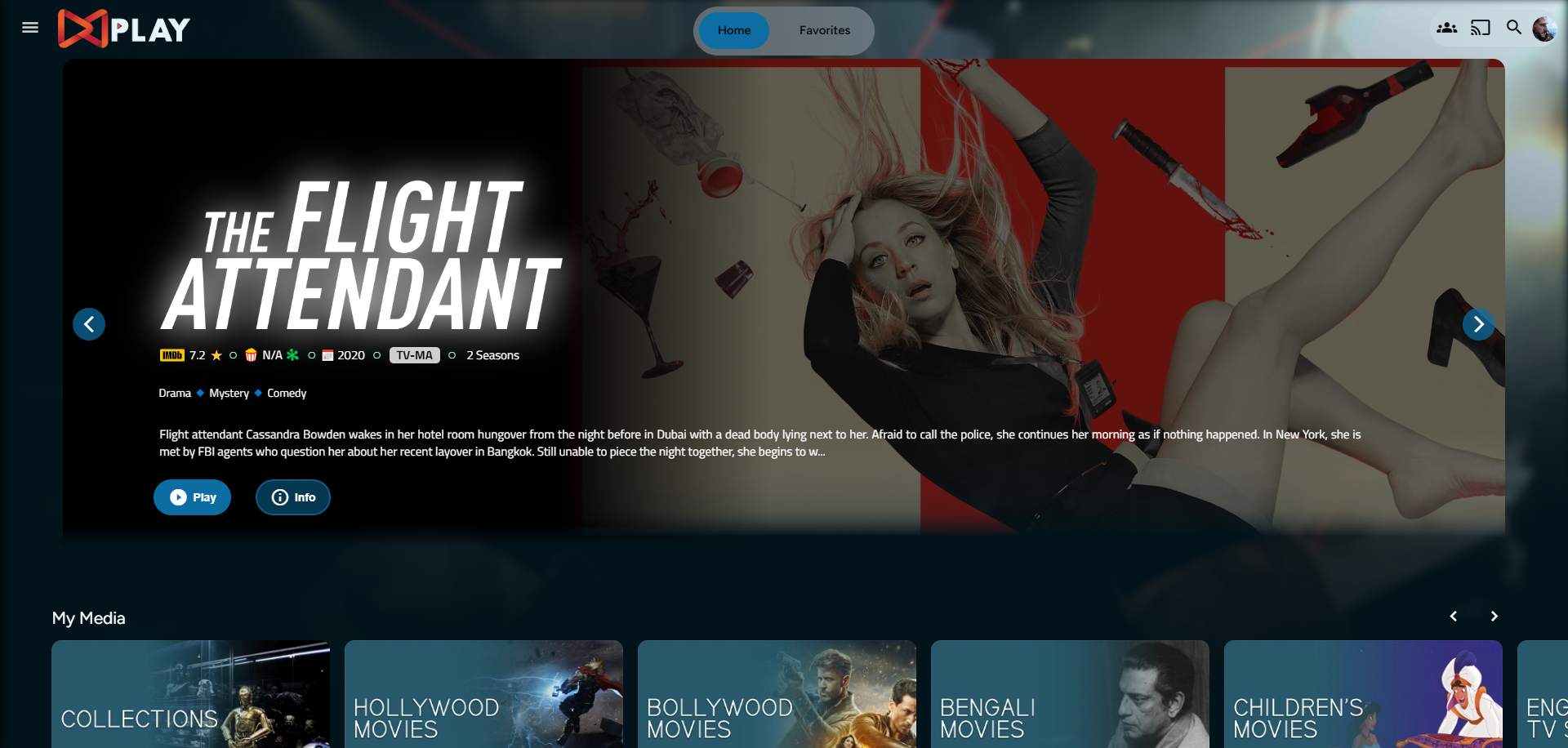
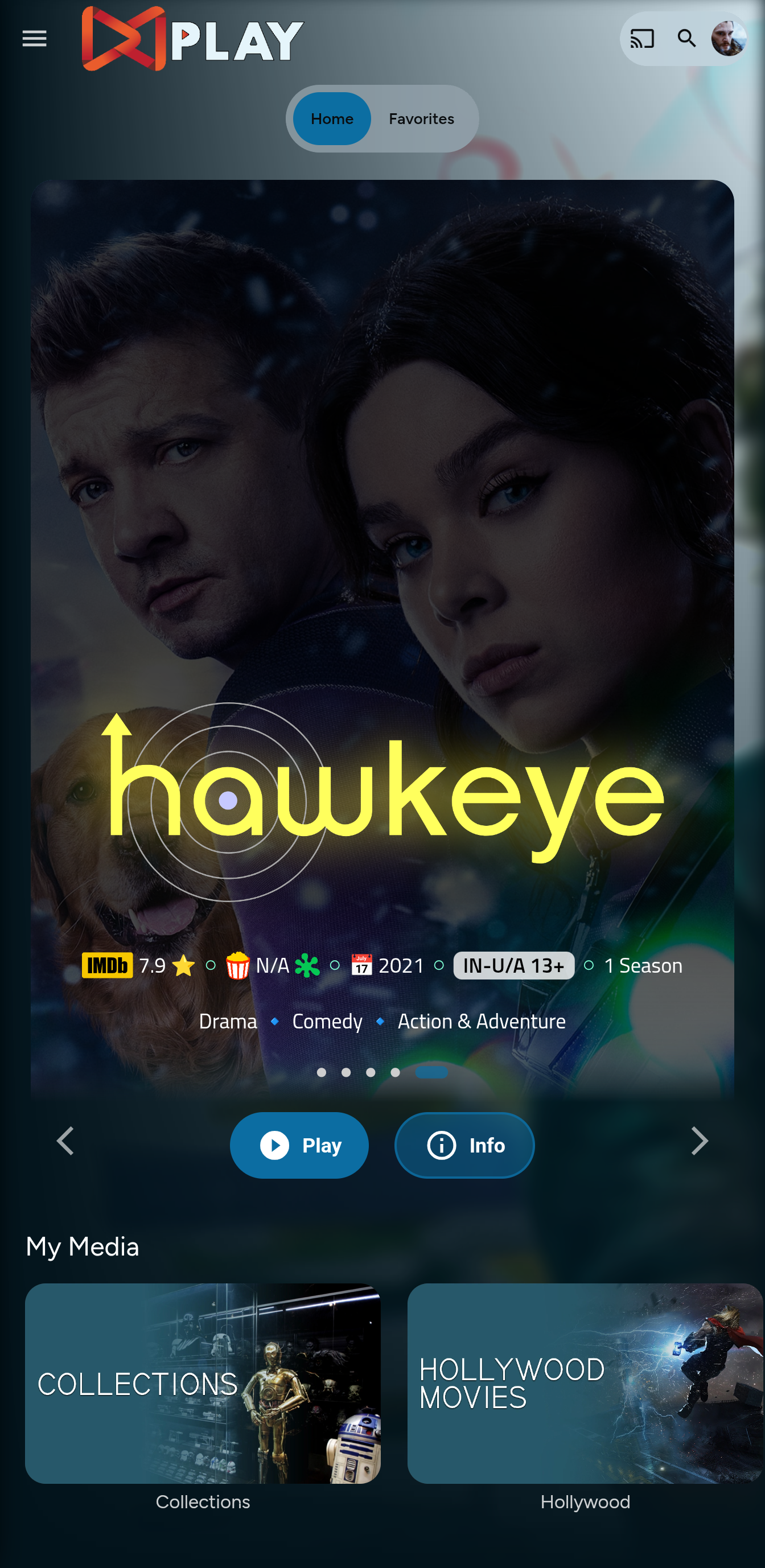
Here I present my version of the same with some code improvements, loading optimizations, and Security Enhancements. Works best with the [Zombie theme](https://github.com/MakD/zombie-release) (_Shameless Plug_), but it fits with every other theme the creators have put their hard work in. You might've to edit the color accents in the CSS to match yours.
|
|
|
|
<details>
|
|
<summary> Desktop Layout </summary>
|
|
|
|
|
|
|
|
</details>
|
|
|
|
<details>
|
|
<summary> Mobile Layout </summary>
|
|
|
|
|
|
|
|
</details>
|
|
|
|
> <ins>**Before Installing, please take a backup of your index.html and home-html.xxxxxx.chunk.js files**<ins>
|
|
|
|
# Prepping the Environment
|
|
|
|
<details>
|
|
|
|
<summary> Steps </summary>
|
|
|
|
1. Create a folder `avatars` in your `jellyfin-web` folder. (Usually in C:\Program Files\Jellyfin\Server)
|
|
2. Download the files `slideshowpure.js` and `slideshowpure.css`
|
|
3. Paste them inside the avatars folder created, and you are ready to venture down the rabbit hole.
|
|
|
|
</details>
|
|
|
|
# Prepping the files
|
|
<details>
|
|
|
|
<summary>index.html</summary>
|
|
|
|
1. Navigate to your `jellyfin-web` folder and search for the file index.html. (you can use any code editor, just remember to open with administrator privileges.
|
|
2. Search for `</body></html>`
|
|
3. Just before the `</body`, plug the below code
|
|
```
|
|
|
|
<script>
|
|
function saveCredentialsToSessionStorage(credentials) {
|
|
try {
|
|
sessionStorage.setItem(
|
|
"json-credentials",
|
|
JSON.stringify(credentials)
|
|
);
|
|
console.log("Credentials saved to sessionStorage.");
|
|
} catch (error) {
|
|
console.error("Error saving credentials:", error);
|
|
}
|
|
}
|
|
function saveApiKey(apiKey) {
|
|
try {
|
|
sessionStorage.setItem("api-key", apiKey);
|
|
console.log("API key saved to sessionStorage.");
|
|
} catch (error) {
|
|
console.error("Error saving API key:", error);
|
|
}
|
|
}
|
|
(function () {
|
|
var originalConsoleLog = console.log;
|
|
console.log = function (message) {
|
|
originalConsoleLog.apply(console, arguments);
|
|
if (
|
|
typeof message === "string" &&
|
|
message.startsWith("Stored JSON credentials:")
|
|
) {
|
|
try {
|
|
var jsonString = message.substring(
|
|
"Stored JSON credentials: ".length
|
|
);
|
|
var credentials = JSON.parse(jsonString);
|
|
saveCredentialsToSessionStorage(credentials);
|
|
} catch (error) {
|
|
console.error("Error parsing credentials:", error);
|
|
}
|
|
}
|
|
if (
|
|
typeof message === "string" &&
|
|
message.startsWith("opening web socket with url:")
|
|
) {
|
|
try {
|
|
var url = message.split("url:")[1].trim();
|
|
var urlParams = new URL(url).searchParams;
|
|
var apiKey = urlParams.get("api_key");
|
|
if (apiKey) {
|
|
saveApiKey(apiKey);
|
|
}
|
|
} catch (error) {
|
|
console.error("Error extracting API key:", error);
|
|
}
|
|
}
|
|
};
|
|
})();
|
|
</script>
|
|
<link rel="preload" href="/web/avatars/slideshowpure.css" as="style" />
|
|
<link rel="stylesheet" href="/web/avatars/slideshowpure.css" />
|
|
<script defer src="/web/avatars/slideshowpure.js"></script>
|
|
```
|
|
</details>
|
|
|
|
<details>
|
|
|
|
<summary>home-html.xxxxxx.chunk.js</summary>
|
|
|
|
1. Similarly, search for `home-html` in the `jellyfin-web` directory. You should be able to see a file named `home-html.xxxxxx.chunk.js` with random numbers in place of the `xxxx`. Open it with any code editor with administrator privileges.
|
|
2. Search for `id="homeTab" data-index="0">`
|
|
3. Right after the `>`, paste the code block `<div id="slides-container"></div><script>slidesInit()</script>`
|
|
|
|
</details>
|
|
|
|
And that is it. Hard refresh your web page (CTRL+Shift+R) twice, and Profit!
|
|
|
|
# Want a Custom List to be showcased instead of random items??
|
|
|
|
No worries this got you covered.
|
|
|
|
## Steps
|
|
|
|
1. Create a `list.txt` file inside your `avatars` folder.
|
|
2. In line 1 give your list a name.
|
|
3. Starting line 2, paste the item IDs you want to be showcased, one ID per line. For Example :
|
|
|
|
```
|
|
Awesome Playlist Name
|
|
ItemID1
|
|
ItemID2
|
|
ItemID3
|
|
ItemID4
|
|
ItemID5
|
|
```
|
|
The next time it loads, it will display these items.
|
|
</details>
|