mirror of
https://github.com/alam00000/bentopdf.git
synced 2026-11-05 11:52:48 +01:00
Compare commits
| Author | SHA1 | Date | |
|---|---|---|---|
 alam00000 |
f96cd4e516 | ||
|
alam00000
|
a453313ff3 | ||
|
alam00000
|
9132dd42b5 | ||
|
alam00000
|
f35224f16f | ||
|
alam00000
|
62041f4677 | ||
|
alam00000
|
4f57cb076f | ||
|
github-actions[bot]
|
627288ca13 | ||
|
Alam
|
480acfdf44 | ||
|
alam00000
|
7888fca6fa | ||
|
Alam
|
921a5b4249 | ||
|
alam00000
|
4bb43fda08 | ||
|
alam00000
|
acdca59f18 | ||
|
Alam
|
829b13f8ff | ||
|
Alam
|
4339d21d41 | ||
|
alam00000
|
1d78b8ec72 | ||
|
alam00000
|
bf513bbcb9 | ||
|
r0ckarong
|
7831571696 | ||
|
alam00000
|
c449a85745 | ||
|
Alam
|
8e606b652c | ||
|
Alam
|
3fa731aa6e | ||
|
Alam
|
121c3d891a | ||
|
Alam
|
32db7cb173 | ||
|
Alam
|
1713fb0991 | ||
|
Alam
|
47d6871bc5 | ||
|
Alam
|
be36588468 | ||
|
Alam
|
532ba68f4f | ||
|
alam00000
|
5bcdd8deeb | ||
|
alam00000
|
7f6bebf21f | ||
|
Alam
|
0f65fdb2f4 | ||
|
Alam
|
09d1860396 | ||
|
alam00000
|
5b4b40fe81 | ||
|
alam00000
|
6ac503efae | ||
|
alam00000
|
c72185ed0b | ||
|
alam00000
|
aee3e0a65a | ||
|
alam00000
|
5392c1be76 | ||
|
alam00000
|
356128c60d | ||
|
alam00000
|
8dc7509ceb | ||
|
alam00000
|
cba16fe750 | ||
|
alam00000
|
a55614d5ab | ||
|
alam00000
|
6b4e9f2a94 | ||
|
alam00000
|
75e76c9619 | ||
|
github-actions[bot]
|
6529b0e9b7 | ||
|
alam00000
|
78cb827ec7 | ||
|
OctoBored
|
dbcb9cc153 | ||
|
github-actions[bot]
|
1d2cd3f805 | ||
|
alam00000
|
053f22a87b | ||
|
alam00000
|
e8f26c4a70 | ||
|
alam00000
|
9635c398d6 | ||
|
alam00000
|
5bf54f1dad | ||
|
alam00000
|
ee17fa8760 | ||
|
alam00000
|
61fde80a90 | ||
|
alam00000
|
ca95925de9 | ||
|
alam00000
|
706e74f084 | ||
|
alam00000
|
e1a4a31458 | ||
|
alam00000
|
866ecfed2d | ||
|
alam00000
|
10b63b5f89 | ||
|
alam00000
|
af5b95e93c | ||
|
dependabot[bot]
|
b8f3d4e582 | ||
|
Stephan Paternotte
|
3672ecf91d | ||
|
dependabot[bot]
|
7c8c7600ae | ||
|
dependabot[bot]
|
42b2615882 | ||
|
dependabot[bot]
|
02548b80b1 | ||
|
github-actions[bot]
|
2ed0575ca3 | ||
|
github-actions[bot]
|
54778a7e43 | ||
|
github-actions[bot]
|
59de529311 | ||
|
github-actions[bot]
|
5a4be8e7f2 | ||
|
github-actions[bot]
|
d9183028d5 | ||
|
Alam
|
fae0aa4c04 | ||
|
alam00000
|
55915a2901 | ||
|
dependabot[bot]
|
f2a8b77733 | ||
|
Alam
|
c8d04e51b9 | ||
|
Alam
|
b003355a0c | ||
|
Alam
|
79ae42d73a | ||
|
dependabot[bot]
|
2835e7e5f9 | ||
|
dependabot[bot]
|
a59a1f41cd | ||
|
alam00000
|
0447cfc032 | ||
|
alam00000
|
7070bae927 | ||
|
alam00000
|
a3e64f6340 | ||
|
alam00000
|
45496fcd2e | ||
|
Matt Van Horn
|
115bc70ad1 | ||
|
dependabot[bot]
|
e59ce4feac | ||
|
Peter Dave Hello
|
ea0a8755bf | ||
|
Alam
|
21c924a3e6 | ||
|
alam00000
|
58cd1a8893 | ||
|
Peter Dave Hello
|
57a6422e61 | ||
|
github-actions[bot]
|
0ef279e0da | ||
|
alam00000
|
8dcd936873 | ||
|
github-actions[bot]
|
5ef0b40dea | ||
|
alam00000
|
6f02f2d2b7 | ||
|
alam00000
|
b21f602cca | ||
|
Alam
|
b09fc21e66 | ||
|
dependabot[bot]
|
fa6355b98a | ||
|
alam00000
|
53bcf09566 | ||
|
alam00000
|
d2dc459ba9 | ||
|
alam00000
|
71ced499e7 | ||
|
github-actions[bot]
|
fc264f796a | ||
|
r0ckarongandCopilot
|
ad5811efb0 | ||
|
r0ckarongandcoderabbitai[bot]
|
1ada0cee13 | ||
|
r0ckarong
|
d7c14f821a | ||
|
r0ckarong
|
98371733a6 | ||
|
r0ckarong
|
6c53646e94 | ||
|
r0ckarong
|
4812d5b389 | ||
|
github-actions[bot]
|
e55c2ed405 | ||
|
github-actions[bot]
|
4b875a638c | ||
|
Alam
|
b71d6c9b96 | ||
|
Alam
|
d63d1683c7 | ||
|
Alam
|
0347013df1 | ||
|
github-actions[bot]
|
412f2f1acb | ||
|
github-actions[bot]
|
a471bbcf4d | ||
|
Mondeep Chetry
|
e1843e17b3 | ||
|
alam00000
|
ac3ad68b56 | ||
|
marek-mraz
|
745698a5ba | ||
|
github-actions[bot]
|
dc1dbb036c | ||
|
marek-mraz
|
175c52bb1f | ||
|
alam00000
|
1d9b7c2a07 | ||
|
alam00000
|
1534ce4d85 | ||
|
dependabot[bot]
|
3cab1d37c7 |
@@ -29,6 +29,9 @@ jobs:
|
||||
- name: Install dependencies
|
||||
run: npm ci
|
||||
|
||||
- name: Run tests
|
||||
run: npm run test:run
|
||||
|
||||
- name: Build distribution
|
||||
run: npm run build
|
||||
|
||||
|
||||
@@ -0,0 +1,59 @@
|
||||
name: Update Docker Downloads Badge
|
||||
|
||||
on:
|
||||
schedule:
|
||||
- cron: '17 4 * * 1'
|
||||
workflow_dispatch:
|
||||
|
||||
permissions:
|
||||
contents: write
|
||||
|
||||
concurrency:
|
||||
group: docker-downloads-badge
|
||||
cancel-in-progress: false
|
||||
|
||||
jobs:
|
||||
update:
|
||||
if: github.repository == 'alam00000/bentopdf'
|
||||
runs-on: ubuntu-latest
|
||||
steps:
|
||||
- name: Sum GHCR download counts
|
||||
id: counts
|
||||
run: |
|
||||
set -euo pipefail
|
||||
total=0
|
||||
for pkg in bentopdf bentopdf-simple; do
|
||||
raw=$(curl -sf --retry 3 --retry-delay 5 --max-time 30 \
|
||||
"https://ghcr-badge.elias.eu.org/api/alam00000/bentopdf/$pkg" \
|
||||
| jq -e -r '.downloadCountRaw')
|
||||
case "$raw" in ''|*[!0-9]*) echo "::error::invalid count for $pkg: $raw"; exit 1 ;; esac
|
||||
echo "$pkg: $raw"
|
||||
total=$((total + raw))
|
||||
done
|
||||
if [ "$total" -le 0 ]; then echo "::error::total is zero"; exit 1; fi
|
||||
message=$(awk -v n="$total" 'BEGIN{
|
||||
if (n >= 1000000) printf "%.1fM", n/1000000;
|
||||
else if (n >= 1000) printf "%.1fk", n/1000;
|
||||
else printf "%d", n
|
||||
}')
|
||||
echo "total=$total" >> "$GITHUB_OUTPUT"
|
||||
echo "message=$message" >> "$GITHUB_OUTPUT"
|
||||
echo "combined: $total -> $message"
|
||||
|
||||
- name: Publish badge JSON to badges branch
|
||||
env:
|
||||
GH_TOKEN: ${{ secrets.GITHUB_TOKEN }}
|
||||
MESSAGE: ${{ steps.counts.outputs.message }}
|
||||
run: |
|
||||
set -euo pipefail
|
||||
mkdir badges && cd badges
|
||||
jq -n --arg message "$MESSAGE" \
|
||||
'{schemaVersion: 1, label: "Docker Downloads", message: $message, color: "blue", namedLogo: "docker"}' \
|
||||
> docker-downloads.json
|
||||
cat docker-downloads.json
|
||||
git init -q -b badges
|
||||
git config user.name "github-actions[bot]"
|
||||
git config user.email "41898282+github-actions[bot]@users.noreply.github.com"
|
||||
git add docker-downloads.json
|
||||
git commit -qm "chore: update docker downloads badge ($MESSAGE)"
|
||||
git push -qf "https://x-access-token:${GH_TOKEN}@github.com/${GITHUB_REPOSITORY}.git" badges
|
||||
@@ -0,0 +1,36 @@
|
||||
name: Tests
|
||||
|
||||
on:
|
||||
push:
|
||||
branches:
|
||||
- 'main'
|
||||
pull_request:
|
||||
workflow_dispatch:
|
||||
|
||||
concurrency:
|
||||
group: tests-${{ github.ref }}
|
||||
cancel-in-progress: true
|
||||
|
||||
jobs:
|
||||
test:
|
||||
runs-on: ubuntu-latest
|
||||
env:
|
||||
HUSKY: 0
|
||||
steps:
|
||||
- name: Checkout code
|
||||
uses: actions/checkout@v4
|
||||
|
||||
- name: Setup Node.js
|
||||
uses: actions/setup-node@v4
|
||||
with:
|
||||
node-version: '20'
|
||||
cache: 'npm'
|
||||
|
||||
- name: Install dependencies
|
||||
run: npm ci
|
||||
|
||||
- name: Typecheck
|
||||
run: npx tsc --noEmit
|
||||
|
||||
- name: Run tests
|
||||
run: npm run test:run
|
||||
@@ -0,0 +1,198 @@
|
||||
name: Update PDF Engine and Viewer
|
||||
|
||||
on:
|
||||
workflow_dispatch:
|
||||
schedule:
|
||||
- cron: '17 4 * * *'
|
||||
|
||||
permissions:
|
||||
contents: write
|
||||
pull-requests: write
|
||||
|
||||
concurrency:
|
||||
group: update-engine
|
||||
cancel-in-progress: false
|
||||
|
||||
env:
|
||||
FORK_URL: https://github.com/alam00000/bentopdf-pdfium-viewer
|
||||
HUSKY: 0
|
||||
|
||||
jobs:
|
||||
update:
|
||||
runs-on: ubuntu-latest
|
||||
if: github.repository == 'alam00000/bentopdf'
|
||||
steps:
|
||||
- name: Checkout repo
|
||||
uses: actions/checkout@v4
|
||||
|
||||
- name: Read current upstream marker
|
||||
id: current
|
||||
run: |
|
||||
if [ -f vendor/bentopdf-viewer/.upstream-version ]; then
|
||||
echo "version=$(cat vendor/bentopdf-viewer/.upstream-version)" >> "$GITHUB_OUTPUT"
|
||||
else
|
||||
echo "version=" >> "$GITHUB_OUTPUT"
|
||||
fi
|
||||
|
||||
- name: Read fork HEAD
|
||||
id: upstream
|
||||
run: echo "version=$(git ls-remote "$FORK_URL" refs/heads/main | cut -c1-12)" >> "$GITHUB_OUTPUT"
|
||||
|
||||
- name: Should update?
|
||||
id: gate
|
||||
run: |
|
||||
if [ "${{ steps.upstream.outputs.version }}" = "${{ steps.current.outputs.version }}" ]; then
|
||||
echo "run=false" >> "$GITHUB_OUTPUT"
|
||||
echo "Already on ${{ steps.current.outputs.version }}."
|
||||
else
|
||||
echo "run=true" >> "$GITHUB_OUTPUT"
|
||||
echo "Updating ${{ steps.current.outputs.version }} -> ${{ steps.upstream.outputs.version }}"
|
||||
fi
|
||||
|
||||
- name: Setup Node
|
||||
if: steps.gate.outputs.run == 'true'
|
||||
uses: actions/setup-node@v4
|
||||
with:
|
||||
node-version: 22
|
||||
cache: npm
|
||||
|
||||
- name: Enable corepack (pnpm)
|
||||
if: steps.gate.outputs.run == 'true'
|
||||
run: corepack enable
|
||||
|
||||
- name: Clone the viewer fork
|
||||
if: steps.gate.outputs.run == 'true'
|
||||
run: git clone --depth 1 --branch main "$FORK_URL" ./_fork
|
||||
|
||||
- name: Require a published engine
|
||||
if: steps.gate.outputs.run == 'true'
|
||||
run: |
|
||||
test -s ./_fork/packages/pdfium/src/vendor/pdfium.wasm
|
||||
test -s ./_fork/packages/pdfium/src/vendor/pdfium.js
|
||||
|
||||
- name: Pack the engine
|
||||
if: steps.gate.outputs.run == 'true'
|
||||
id: engine
|
||||
run: |
|
||||
set -euo pipefail
|
||||
SHA=${{ steps.upstream.outputs.version }}
|
||||
VENDOR=./_fork/packages/pdfium/src/vendor
|
||||
STAGE=$(mktemp -d)/package
|
||||
mkdir -p "$STAGE"
|
||||
cp "$VENDOR/pdfium.js" "$STAGE/editcore.js"
|
||||
cp "$VENDOR/pdfium.wasm" "$STAGE/editcore.wasm"
|
||||
cat > "$STAGE/package.json" <<JSON
|
||||
{
|
||||
"name": "bentopdf-pdfium",
|
||||
"version": "0.0.0-$SHA",
|
||||
"type": "module",
|
||||
"main": "editcore.js",
|
||||
"exports": { ".": "./editcore.js", "./editcore.wasm": "./editcore.wasm" },
|
||||
"license": "AGPL-3.0"
|
||||
}
|
||||
JSON
|
||||
mkdir -p vendor/bentopdf-pdfium
|
||||
OUT="vendor/bentopdf-pdfium/bentopdf-pdfium-$SHA.tgz"
|
||||
tar -czf "$OUT" -C "$(dirname "$STAGE")" package
|
||||
find vendor/bentopdf-pdfium -maxdepth 1 -name 'bentopdf-pdfium*.tgz' ! -name "$(basename "$OUT")" -delete
|
||||
echo "tarball=$OUT" >> "$GITHUB_OUTPUT"
|
||||
|
||||
- name: Build the viewer
|
||||
if: steps.gate.outputs.run == 'true'
|
||||
working-directory: ./_fork
|
||||
run: |
|
||||
pnpm install --no-frozen-lockfile
|
||||
pnpm run build:snippet
|
||||
|
||||
- name: Pack the viewer without a second engine
|
||||
if: steps.gate.outputs.run == 'true'
|
||||
id: viewer
|
||||
run: |
|
||||
set -euo pipefail
|
||||
SHA=${{ steps.upstream.outputs.version }}
|
||||
WORK=$(mktemp -d)
|
||||
(cd ./_fork && npm pack ./viewers/snippet --pack-destination "$WORK" >/dev/null)
|
||||
TMP=$(mktemp -d)
|
||||
tar -xzf "$WORK"/*.tgz -C "$TMP"
|
||||
rm -f "$TMP/package/dist/pdfium.wasm"
|
||||
PKG="$TMP/package/package.json" node - <<'NODE'
|
||||
const fs = require('fs');
|
||||
const p = process.env.PKG;
|
||||
const pkg = JSON.parse(fs.readFileSync(p, 'utf8'));
|
||||
pkg.name = 'bentopdf-viewer';
|
||||
pkg.dependencies = pkg.dependencies || {};
|
||||
// The rollup bundle inlines every @embedpdf/* package, so these
|
||||
// declared deps would only pull unused copies from upstream npm.
|
||||
for (const k of Object.keys(pkg.dependencies)) {
|
||||
if (k.startsWith('@embedpdf/')) delete pkg.dependencies[k];
|
||||
if (k === 'preact') pkg.dependencies[k] = '^10.17.0';
|
||||
}
|
||||
fs.writeFileSync(p, JSON.stringify(pkg, null, 2) + '\n');
|
||||
NODE
|
||||
mkdir -p vendor/bentopdf-viewer
|
||||
OUT="vendor/bentopdf-viewer/bentopdf-viewer-$SHA.tgz"
|
||||
tar -czf "$OUT" -C "$TMP" package
|
||||
find vendor/bentopdf-viewer -maxdepth 1 -name 'bentopdf-viewer-*.tgz' ! -name "$(basename "$OUT")" -delete
|
||||
echo "tarball=$OUT" >> "$GITHUB_OUTPUT"
|
||||
|
||||
- name: Point dependencies at the new tarballs
|
||||
if: steps.gate.outputs.run == 'true'
|
||||
run: |
|
||||
node -e "
|
||||
const fs = require('fs');
|
||||
const pkg = JSON.parse(fs.readFileSync('package.json', 'utf8'));
|
||||
pkg.dependencies['bentopdf-pdfium'] = 'file:' + process.argv[1];
|
||||
pkg.dependencies['bentopdf-viewer'] = 'file:' + process.argv[2];
|
||||
fs.writeFileSync('package.json', JSON.stringify(pkg, null, 2) + '\n');
|
||||
" "${{ steps.engine.outputs.tarball }}" "${{ steps.viewer.outputs.tarball }}"
|
||||
|
||||
- name: Cleanup upstream clone
|
||||
if: steps.gate.outputs.run == 'true'
|
||||
run: rm -rf ./_fork
|
||||
|
||||
- name: Install and verify one shared engine
|
||||
if: steps.gate.outputs.run == 'true'
|
||||
run: |
|
||||
set -euo pipefail
|
||||
npm install
|
||||
test -s node_modules/bentopdf-pdfium/editcore.wasm
|
||||
if find node_modules/bentopdf-viewer -name '*.wasm' | grep -q .; then
|
||||
echo "::error::viewer package still ships a wasm; the engine would be duplicated"
|
||||
exit 1
|
||||
fi
|
||||
if ! grep -q "bentopdf-pdfium/editcore.wasm" src/js/logic/edit-pdf-page.ts; then
|
||||
echo "::error::the PDF editor no longer points at the shared engine"
|
||||
exit 1
|
||||
fi
|
||||
echo "engine sha256: $(sha256sum node_modules/bentopdf-pdfium/editcore.wasm | cut -c1-16)"
|
||||
|
||||
- name: Typecheck and test
|
||||
if: steps.gate.outputs.run == 'true'
|
||||
run: |
|
||||
npx tsc --noEmit
|
||||
npm run test:run
|
||||
|
||||
- name: Write upstream marker
|
||||
if: steps.gate.outputs.run == 'true'
|
||||
run: |
|
||||
echo "${{ steps.upstream.outputs.version }}" > vendor/bentopdf-viewer/.upstream-version
|
||||
echo "${{ steps.upstream.outputs.version }}" > vendor/bentopdf-pdfium/.upstream-version
|
||||
|
||||
- name: Create Pull Request
|
||||
if: steps.gate.outputs.run == 'true'
|
||||
uses: peter-evans/create-pull-request@v6
|
||||
with:
|
||||
commit-message: 'build(deps): bump PDF engine and viewer to ${{ steps.upstream.outputs.version }}'
|
||||
title: 'build(deps): bump PDF engine and viewer to ${{ steps.upstream.outputs.version }}'
|
||||
body: |
|
||||
Both vendored packages built from one clone of the viewer fork at
|
||||
`${{ steps.upstream.outputs.version }}`, so the text editor and the
|
||||
PDF editor run the same engine.
|
||||
|
||||
- `bentopdf-pdfium` — the engine wasm, packed from the fork's published `src/vendor`
|
||||
- `bentopdf-viewer` — the snippet bundle, packed **without** `dist/pdfium.wasm`
|
||||
|
||||
The viewer loads the shared engine through `EmbedPDF.init({ wasmUrl })`.
|
||||
CI verified a single wasm on disk, typecheck, and the test suite.
|
||||
branch: chore/update-pdf-engine
|
||||
delete-branch: true
|
||||
@@ -1,141 +0,0 @@
|
||||
name: Update EmbedPDF Snippet
|
||||
|
||||
on:
|
||||
workflow_dispatch:
|
||||
|
||||
permissions:
|
||||
contents: write
|
||||
pull-requests: write
|
||||
|
||||
jobs:
|
||||
update-snippet:
|
||||
runs-on: ubuntu-latest
|
||||
steps:
|
||||
- name: Checkout repo
|
||||
uses: actions/checkout@v4
|
||||
|
||||
- name: Read current upstream version marker
|
||||
id: current-version
|
||||
run: |
|
||||
if [ -f vendor/embedpdf/.upstream-version ]; then
|
||||
CUR=$(cat vendor/embedpdf/.upstream-version)
|
||||
else
|
||||
CUR=""
|
||||
fi
|
||||
echo "version=$CUR" >> "$GITHUB_OUTPUT"
|
||||
|
||||
- name: Read latest upstream version (@embedpdf/core)
|
||||
id: upstream-version
|
||||
run: |
|
||||
LATEST=$(npm view @embedpdf/core version)
|
||||
echo "version=$LATEST" >> "$GITHUB_OUTPUT"
|
||||
|
||||
- name: Should update?
|
||||
id: gate
|
||||
run: |
|
||||
if [ "${{ steps.upstream-version.outputs.version }}" = "${{ steps.current-version.outputs.version }}" ]; then
|
||||
echo "run=false" >> "$GITHUB_OUTPUT"
|
||||
echo "No upstream version change detected."
|
||||
else
|
||||
echo "run=true" >> "$GITHUB_OUTPUT"
|
||||
echo "Updating from '${{ steps.current-version.outputs.version }}' to '${{ steps.upstream-version.outputs.version }}'"
|
||||
fi
|
||||
|
||||
- name: Enable corepack (pnpm)
|
||||
if: steps.gate.outputs.run == 'true'
|
||||
run: corepack enable
|
||||
|
||||
- name: Prepare workspace
|
||||
if: steps.gate.outputs.run == 'true'
|
||||
run: |
|
||||
mkdir -p vendor/embedpdf
|
||||
npm config set cache ./\.npm-cache
|
||||
|
||||
- name: Clone upstream embed-pdf-viewer
|
||||
if: steps.gate.outputs.run == 'true'
|
||||
run: git clone --depth 1 --branch main https://github.com/embedpdf/embed-pdf-viewer ./_upstream/embed-pdf-viewer
|
||||
|
||||
- name: Setup Node
|
||||
if: steps.gate.outputs.run == 'true'
|
||||
uses: actions/setup-node@v4
|
||||
with:
|
||||
node-version: 20
|
||||
cache: npm
|
||||
|
||||
- name: Install upstream deps
|
||||
if: steps.gate.outputs.run == 'true'
|
||||
working-directory: ./_upstream/embed-pdf-viewer
|
||||
run: pnpm install --no-frozen-lockfile
|
||||
|
||||
- name: Build snippet
|
||||
if: steps.gate.outputs.run == 'true'
|
||||
working-directory: ./_upstream/embed-pdf-viewer
|
||||
run: pnpm run build:snippet
|
||||
|
||||
- name: Pack snippet tarball
|
||||
if: steps.gate.outputs.run == 'true'
|
||||
working-directory: ./_upstream/embed-pdf-viewer
|
||||
run: |
|
||||
npm pack ./viewers/snippet --pack-destination ../../vendor/embedpdf
|
||||
ls -l ../../vendor/embedpdf
|
||||
|
||||
- name: Sanitize tarball (rename pkg and pin deps)
|
||||
if: steps.gate.outputs.run == 'true'
|
||||
env:
|
||||
UPSTREAM_VERSION: ${{ steps.upstream-version.outputs.version }}
|
||||
run: |
|
||||
TARBALL=$(ls vendor/embedpdf/*.tgz | sort | tail -n1)
|
||||
TMP=$(mktemp -d)
|
||||
tar -xzf "$TARBALL" -C "$TMP"
|
||||
PKG="$TMP/package/package.json"
|
||||
PKG="$PKG" node - <<'NODE'
|
||||
const fs = require("fs");
|
||||
const path = process.env.PKG;
|
||||
const ver = process.env.UPSTREAM_VERSION || "1.4.1";
|
||||
const pkg = JSON.parse(fs.readFileSync(path, "utf8"));
|
||||
pkg.name = "embedpdf-snippet";
|
||||
pkg.dependencies = pkg.dependencies || {};
|
||||
for (const k of Object.keys(pkg.dependencies)) {
|
||||
if (k.startsWith("@embedpdf/")) pkg.dependencies[k] = `^${ver}`;
|
||||
if (k === "preact") pkg.dependencies[k] = "^10.17.0";
|
||||
}
|
||||
fs.writeFileSync(path, JSON.stringify(pkg, null, 2) + "\n");
|
||||
NODE
|
||||
NEW=vendor/embedpdf/embedpdf-snippet-${UPSTREAM_VERSION}.tgz
|
||||
tar -czf "$NEW" -C "$TMP" package
|
||||
# Remove any older snippet tarballs, keep only the new one
|
||||
find vendor/embedpdf -maxdepth 1 -name 'embedpdf-snippet-*.tgz' ! -name "$(basename "$NEW")" -delete
|
||||
rm -rf "$TMP"
|
||||
ls -l vendor/embedpdf
|
||||
|
||||
- name: Update package.json dependency path
|
||||
if: steps.gate.outputs.run == 'true'
|
||||
run: |
|
||||
TARBALL=$(ls vendor/embedpdf/embedpdf-snippet-*.tgz | sort | tail -n1)
|
||||
node -e "const fs=require('fs');const pkg=require('./package.json');const tar=process.argv[1];pkg.dependencies['embedpdf-snippet']='file:'+tar;fs.writeFileSync('package.json',JSON.stringify(pkg,null,2)+'\n');" "$TARBALL"
|
||||
|
||||
- name: Refresh lockfile
|
||||
if: steps.gate.outputs.run == 'true'
|
||||
run: npm install --package-lock-only --ignore-scripts
|
||||
|
||||
- name: Write upstream version marker
|
||||
if: steps.gate.outputs.run == 'true'
|
||||
run: |
|
||||
echo "${{ steps.upstream-version.outputs.version }}" > vendor/embedpdf/.upstream-version
|
||||
|
||||
- name: Cleanup upstream clone
|
||||
if: steps.gate.outputs.run == 'true'
|
||||
run: rm -rf ./_upstream
|
||||
|
||||
- name: Create Pull Request
|
||||
if: steps.gate.outputs.run == 'true'
|
||||
uses: peter-evans/create-pull-request@v6
|
||||
with:
|
||||
commit-message: "build(deps): bump embedpdf-snippet from ${{ steps.current-version.outputs.version }} to ${{ steps.upstream-version.outputs.version }}"
|
||||
title: "build(deps): bump embedpdf-snippet from ${{ steps.current-version.outputs.version }} to ${{ steps.upstream-version.outputs.version }}"
|
||||
body: |
|
||||
- Build snippet from upstream embed-pdf-viewer via `npm run build:snippet`
|
||||
- Pack tarball into `vendor/embedpdf/` and point dependency to it
|
||||
- Refresh package-lock.json
|
||||
branch: chore/update-embedpdf-snippet
|
||||
delete-branch: true
|
||||
+5
-2
@@ -46,8 +46,11 @@ codeql-results.csv
|
||||
libreoffice-wasm-package
|
||||
|
||||
# helm chart
|
||||
bentopdf-*.tgz
|
||||
/bentopdf-*.tgz
|
||||
|
||||
# test
|
||||
dist-test
|
||||
test
|
||||
test
|
||||
# Sibling checkouts of the engine/viewer forks
|
||||
bentopdf-pdfium-viewer/
|
||||
bentopdf-pymupdf-wasm/
|
||||
|
||||
@@ -12,8 +12,14 @@ Header always set Referrer-Policy "strict-origin-when-cross-origin"
|
||||
Header always set Permissions-Policy "geolocation=(), microphone=(), camera=()"
|
||||
Header always set Cross-Origin-Opener-Policy "same-origin"
|
||||
Header always set Cross-Origin-Embedder-Policy "require-corp"
|
||||
Header always set Content-Security-Policy "default-src 'self'; script-src 'self' 'wasm-unsafe-eval' 'unsafe-eval' blob: https://cdn.jsdelivr.net; worker-src 'self' blob:; style-src 'self' 'unsafe-inline' https://fonts.googleapis.com; img-src 'self' data: blob: https:; font-src 'self' data: https://fonts.gstatic.com https://rawcdn.githack.com; connect-src 'self' blob: https://api.github.com https://fonts.gstatic.com https://cdn.jsdelivr.net https://bentopdf-cors-proxy.bentopdf.workers.dev https://rawcdn.githack.com; object-src 'none'; base-uri 'self'; frame-src 'self' blob:; frame-ancestors 'self'; form-action 'self'"
|
||||
</IfModule>
|
||||
|
||||
# Block source maps from being served
|
||||
<FilesMatch "\.map$">
|
||||
Require all denied
|
||||
</FilesMatch>
|
||||
|
||||
# ============================================
|
||||
# 2. BROWSER CACHING
|
||||
# ============================================
|
||||
|
||||
+4
-2
@@ -1,3 +1,5 @@
|
||||
# Dockerfile.nonroot intentionally starts as root to support PUID/PGID (LSIO pattern).
|
||||
# The entrypoint.sh creates the user at runtime and drops privileges via su-exec.
|
||||
DS-0002
|
||||
|
||||
KSV-0125
|
||||
|
||||
DS-0013
|
||||
|
||||
+1
-1
@@ -81,7 +81,7 @@ When submitting code contributions, please use our [pull request template](.gith
|
||||
|
||||
```bash
|
||||
git clone https://github.com/alam00000/bentopdf.git
|
||||
cd bento-pdf
|
||||
cd bentopdf
|
||||
npm install
|
||||
```
|
||||
|
||||
|
||||
@@ -19,6 +19,8 @@ COPY . .
|
||||
# Pass SIMPLE_MODE environment variable if provided
|
||||
ARG SIMPLE_MODE=false
|
||||
ENV SIMPLE_MODE=$SIMPLE_MODE
|
||||
ARG DISABLE_GITHUB_STARS=false
|
||||
ENV DISABLE_GITHUB_STARS=$DISABLE_GITHUB_STARS
|
||||
ARG COMPRESSION_MODE=all
|
||||
ENV COMPRESSION_MODE=$COMPRESSION_MODE
|
||||
|
||||
|
||||
@@ -19,6 +19,8 @@ COPY . .
|
||||
|
||||
ARG SIMPLE_MODE=false
|
||||
ENV SIMPLE_MODE=$SIMPLE_MODE
|
||||
ARG DISABLE_GITHUB_STARS=false
|
||||
ENV DISABLE_GITHUB_STARS=$DISABLE_GITHUB_STARS
|
||||
ARG COMPRESSION_MODE=all
|
||||
ENV COMPRESSION_MODE=$COMPRESSION_MODE
|
||||
|
||||
|
||||
@@ -6,17 +6,13 @@
|
||||
</a>
|
||||
</p>
|
||||
|
||||
**BentoPDF** is a powerful, privacy-first, client-side PDF toolkit that is self hostable and allows you to manipulate, edit, merge, and process PDF files directly in your browser. No server-side processing is required, ensuring your files remain secure and private.
|
||||
**BentoPDF** is a powerful, privacy-first, client-side PDF toolkit that is self-hostable and allows you to manipulate, edit, merge, and process PDF files directly in your browser. No server-side processing is required, ensuring your files remain secure and private.
|
||||
|
||||
[](https://github.com/alam00000/bentopdf/pkgs/container/bentopdf) [](https://ko-fi.com/alio01) 
|
||||
[](https://github.com/alam00000/bentopdf/pkgs/container/bentopdf-simple) [](https://ko-fi.com/alio01) 
|
||||
[](https://github.com/sponsors/alam00000)
|
||||
|
||||

|
||||
|
||||
### FOSS Hack 2026
|
||||
|
||||
[](https://drive.google.com/file/d/14Vf62PvHiuf1RKFKtMlAzpbf4QQPLpRF/view?usp=sharing)
|
||||
|
||||
---
|
||||
|
||||
## Table of Contents
|
||||
@@ -45,6 +41,7 @@
|
||||
- [Commercial Build](#-commercial-build)
|
||||
- [Custom Branding](#-custom-branding)
|
||||
- [Disabling Specific Tools](#-disabling-specific-tools)
|
||||
- [Disabling the GitHub Star Counter](#-disabling-the-github-star-counter)
|
||||
- [WASM Configuration](#wasm-configuration)
|
||||
- [Air-Gapped / Offline Deployment](#air-gapped--offline-deployment)
|
||||
- [Security Features](#-security-features)
|
||||
@@ -116,7 +113,7 @@ BentoPDF does **not** bundle AGPL-licensed processing libraries in its source co
|
||||
|
||||
## ⭐ Stargazers over time
|
||||
|
||||
[](https://star-history.com/#alam00000/bentopdf&Date)
|
||||
[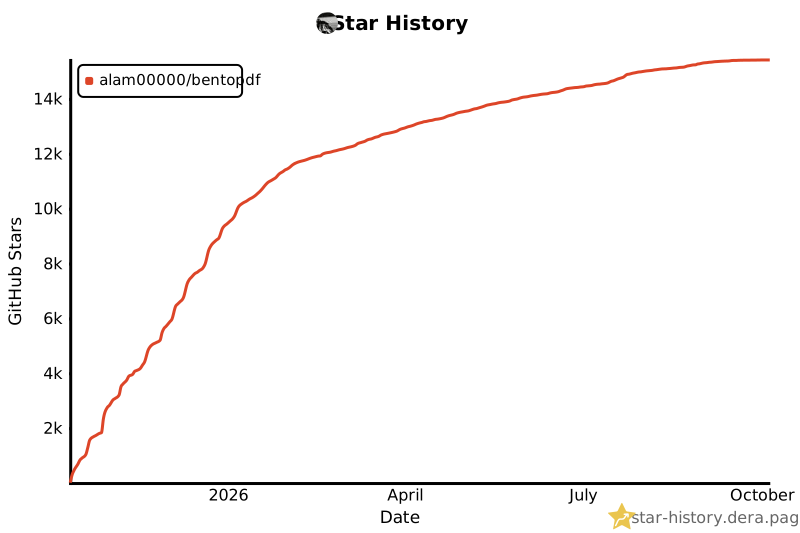](https://github.com/alam00000/bentopdf/stargazers)
|
||||
|
||||
---
|
||||
|
||||
@@ -135,7 +132,7 @@ We're incredibly grateful to all our sponsors and supporters who help keep Bento
|
||||
## ✨ Why BentoPDF?
|
||||
|
||||
- **Privacy First**: All processing happens in your browser. Your files are never uploaded to a server, guaranteeing 100% privacy.
|
||||
- **No Limits**: Manipulate as many files as you want, as often you want. There are no restrictions or upload limits.
|
||||
- **No Limits**: Manipulate as many files as you want, as often as you want. There are no restrictions or upload limits.
|
||||
- **High Performance**: Built with modern web technologies, BentoPDF is fast and efficient, handling even large PDF files with ease.
|
||||
- **Completely Free**: BentoPDF is a free and open-source tool for everyone.
|
||||
|
||||
@@ -147,31 +144,31 @@ BentoPDF offers a comprehensive suite of tools to handle all your PDF needs.
|
||||
|
||||
### Organize & Manage PDFs
|
||||
|
||||
| Tool Name | Description |
|
||||
| :--------------------------- | :------------------------------------------------------------------------------------------------------ |
|
||||
| **Merge PDFs** | Combine multiple PDF files into one. Preserves Bookmarks. |
|
||||
| **Split PDFs** | Extract specific pages or divide a document into smaller files. |
|
||||
| **Organize Pages** | Reorder, duplicate, or delete pages with a simple drag-and-drop interface. |
|
||||
| **Extract Pages** | Save a specific range of pages as a new PDF. |
|
||||
| **Delete Pages** | Remove unwanted pages from your document. |
|
||||
| **Rotate PDF** | Rotate individual or all pages in a document. |
|
||||
| **Rotate by Custom Degrees** | Rotate pages by any custom angle. |
|
||||
| **N-Up PDF** | Combine multiple pages onto a single page. |
|
||||
| **View PDF** | A powerful, integrated PDF viewer. |
|
||||
| **Alternate & Mix Pages** | Merge pages by alternating pages from each PDF. Preserves Bookmarks. |
|
||||
| **Posterize PDF** | Split a PDF into multiple smaller pages for print. |
|
||||
| **PDF Multi Tool** | Merge, Split, Organize, Delete, Rotate, Add Blank Pages, Extract and Duplicate in an unified interface. |
|
||||
| **PDF Booklet** | Rearrange pages for double-sided booklet printing. Fold and staple to create a booklet. |
|
||||
| **Add Attachments** | Embed one or more files into your PDF. |
|
||||
| **Extract Attachments** | Extract all embedded files from PDF(s) as a ZIP. |
|
||||
| **Edit Attachments** | View or remove attachments in your PDF. |
|
||||
| **Divide Pages** | Divide pages horizontally or vertically. |
|
||||
| **Combine to Single Page** | Stitch all pages into one continuous scroll. |
|
||||
| **Add Blank Page** | Insert an empty page anywhere in your PDF. |
|
||||
| **Reverse Pages** | Flip the order of all pages in your document. |
|
||||
| **View Metadata** | Inspect the hidden properties of your PDF. |
|
||||
| **PDFs to ZIP** | Package multiple PDF files into a ZIP archive. |
|
||||
| **Compare PDFs** | Compare two PDFs side by side. |
|
||||
| Tool Name | Description |
|
||||
| :--------------------------- | :----------------------------------------------------------------------------------------------------- |
|
||||
| **Merge PDFs** | Combine multiple PDF files into one. Preserves Bookmarks. |
|
||||
| **Split PDFs** | Extract specific pages or divide a document into smaller files. |
|
||||
| **Organize Pages** | Reorder, duplicate, or delete pages with a simple drag-and-drop interface. |
|
||||
| **Extract Pages** | Save a specific range of pages as a new PDF. |
|
||||
| **Delete Pages** | Remove unwanted pages from your document. |
|
||||
| **Rotate PDF** | Rotate individual or all pages in a document. |
|
||||
| **Rotate by Custom Degrees** | Rotate pages by any custom angle. |
|
||||
| **N-Up PDF** | Combine multiple pages onto a single page. |
|
||||
| **View PDF** | A powerful, integrated PDF viewer. |
|
||||
| **Alternate & Mix Pages** | Merge pages by alternating pages from each PDF. Preserves Bookmarks. |
|
||||
| **Posterize PDF** | Split a PDF into multiple smaller pages for print. |
|
||||
| **PDF Multi Tool** | Merge, Split, Organize, Delete, Rotate, Add Blank Pages, Extract and Duplicate in a unified interface. |
|
||||
| **PDF Booklet** | Rearrange pages for double-sided booklet printing. Fold and staple to create a booklet. |
|
||||
| **Add Attachments** | Embed one or more files into your PDF. |
|
||||
| **Extract Attachments** | Extract all embedded files from PDF(s) as a ZIP. |
|
||||
| **Edit Attachments** | View or remove attachments in your PDF. |
|
||||
| **Divide Pages** | Divide pages horizontally or vertically. |
|
||||
| **Combine to Single Page** | Stitch all pages into one continuous scroll. |
|
||||
| **Add Blank Page** | Insert an empty page anywhere in your PDF. |
|
||||
| **Reverse Pages** | Flip the order of all pages in your document. |
|
||||
| **View Metadata** | Inspect the hidden properties of your PDF. |
|
||||
| **PDFs to ZIP** | Package multiple PDF files into a ZIP archive. |
|
||||
| **Compare PDFs** | Compare two PDFs side by side. |
|
||||
|
||||
### Edit & Modify PDFs
|
||||
|
||||
@@ -336,7 +333,7 @@ Open your browser at: http://localhost:3000
|
||||
> - **Self-Hosted build** — `ghcr.io/alam00000/bentopdf-simple:latest`. Every PDF tool the public site has, **without** the BentoPDF marketing (no hero, FAQ, testimonials, footer). Use this for internal/team/organization deployments. It is **not** a feature-reduced lite version.
|
||||
> - **Commercial build** — `ghcr.io/alam00000/bentopdf:latest`. The full marketing site, used by bentopdf.com itself and by commercial license holders running public-facing deployments. Includes hero, FAQ, testimonials, and footer.
|
||||
>
|
||||
> If in doubt: pull the Self Hosted build.
|
||||
> If in doubt: pull the Self-Hosted build.
|
||||
|
||||
<details>
|
||||
<summary><b>Alternative: Using Docker Hub or Podman</b></summary>
|
||||
@@ -688,7 +685,7 @@ BentoPDF can also be hosted from a subdirectory (e.g., `example.com/tools/bentop
|
||||
```bash
|
||||
|
||||
# Example:
|
||||
# 1. Build the app with the specific BASE_URL. BASE_URL must have a trailing and leading slash. The BASE_URL can be any url of your choice. Here we are using /tools/bentopdf/ as an example.
|
||||
# 1. Build the app with the specific BASE_URL. BASE_URL must have a trailing and leading slash. The BASE_URL can be any URL of your choice. Here we are using /tools/bentopdf/ as an example.
|
||||
|
||||
BASE_URL=/tools/bentopdf/ npm run build
|
||||
|
||||
@@ -810,7 +807,7 @@ For detailed Quadlet configuration, see [Self-Hosting Docker Guide](https://bent
|
||||
|
||||
### 🏢 Self-Hosted build (Simple Mode)
|
||||
|
||||
The Self-Hosted build (the `bentopdf-simple` image, also called Simple Mode) is **functionally identical** to the Commercial build. Every PDF tool is present and behaves the same. It just hides the marketing that only makes sense on bentopdf.com itself or on a commercial public-facing deployment. **It is not a feature reduced or "lite" version.**
|
||||
The Self-Hosted build (the `bentopdf-simple` image, also called Simple Mode) is **functionally identical** to the Commercial build. Every PDF tool is present and behaves the same. It just hides the marketing that only makes sense on bentopdf.com itself or on a commercial public-facing deployment. **It is not a feature-reduced or "lite" version.**
|
||||
|
||||
**What the Self-Hosted build hides** (cosmetic only, no PDF features are removed):
|
||||
|
||||
@@ -822,7 +819,7 @@ The Self-Hosted build (the `bentopdf-simple` image, also called Simple Mode) is
|
||||
- All PDF tools (merge, split, edit, sign, OCR, Office conversion, every other tool)
|
||||
- Custom branding support, all build-time and runtime config
|
||||
|
||||
The Commercial build (`ghcr.io/alam00000/bentopdf:latest`) is what powers bentopdf.com itself and is used by commercial license holders running public facing deployments. It adds the hero, FAQ, testimonials, and footer that wouldn't make sense on an internal tool.
|
||||
The Commercial build (`ghcr.io/alam00000/bentopdf:latest`) is what powers bentopdf.com itself and is used by commercial license holders running public-facing deployments. It adds the hero, FAQ, testimonials, and footer that wouldn't make sense on an internal tool.
|
||||
|
||||
If you're self-hosting BentoPDF for your team, organization, or as an internal tool, pull `ghcr.io/alam00000/bentopdf-simple:latest`. For more details, see [SIMPLE_MODE.md](SIMPLE_MODE.md).
|
||||
|
||||
@@ -938,6 +935,24 @@ You can also disable specific features inside the PDF Editor (e.g., redaction, f
|
||||
|
||||
For the full list of editor categories, see the [self-hosting docs](https://bentopdf.com/docs/self-hosting/docker#disabling-editor-features).
|
||||
|
||||
### 🔕 Disabling the GitHub Star Counter
|
||||
|
||||
The navbar shows a live GitHub star count, fetched from `api.github.com` on page load. The only external request that isn't serving a PDF feature. Self-hosters who want zero non-essential network calls can disable it at build time. This removes the fetch code from the bundle entirely and drops `api.github.com` from the Content-Security-Policy.
|
||||
|
||||
Simple Mode builds (`bentopdf-simple`) always skip the star counter — this flag is only needed on the Commercial build or custom full builds.
|
||||
|
||||
**Docker:**
|
||||
|
||||
```bash
|
||||
docker build --build-arg DISABLE_GITHUB_STARS=true -t bentopdf .
|
||||
```
|
||||
|
||||
**Building from source:**
|
||||
|
||||
```bash
|
||||
DISABLE_GITHUB_STARS=true npm run build
|
||||
```
|
||||
|
||||
### 🔒 Security Features
|
||||
|
||||
BentoPDF runs as a non-root user using nginx-unprivileged for enhanced security:
|
||||
|
||||
+8
-8
@@ -1,18 +1,18 @@
|
||||
# Hosting BentoPDF as a static website
|
||||
|
||||
As an alternative to runnning BenotPDF locally or in a Docker container, you can very easily host it as a set of static web pages. Here are a few examples:
|
||||
As an alternative to running BentoPDF locally or in a Docker container, you can easily host it as a set of static web pages. Here are a few examples:
|
||||
|
||||
## Netlify
|
||||
|
||||
### Netlify - static deployment
|
||||
|
||||
One of simplest ways to host BentoPDF is to create a project at [Netlify](https://www.netlify.com/) and create a static deployment. You can accomplish this by first downloading the pre-built distribution file from our [GitHub releases](https://github.com/alam00000/bentopdf/releases). Each release includes a `dist-{version}.zip` file that contains all necessary files for self-hosting.
|
||||
One of the simplest ways to host BentoPDF is to create a project at [Netlify](https://www.netlify.com/) and create a static deployment. You can accomplish this by first downloading the pre-built distribution file from our [GitHub releases](https://github.com/alam00000/bentopdf/releases). Each release includes a `dist-{version}.zip` file that contains all necessary files for self-hosting.
|
||||
|
||||
1. Go to [BentoPDF Releases](https://github.com/alam00000/bentopdf/releases)
|
||||
2. Download the latest `dist-{version}.zip` file
|
||||
3. Next, if you have not already done so, create a Netlify account and log in.
|
||||
4. From your Netlify projects page, add a new project and select "Deploy manually".
|
||||
5. Drag and drop to upload the Bentopdf zip file you downloaded in step 3.
|
||||
5. Drag and drop to upload the BentoPDF zip file you downloaded in step 2.
|
||||
6. Your BentoPDF deployment should now be working! Optionally, you can go into Project Configuration and change the project name.
|
||||
|
||||
When a new BentoPDF release becomes available, you will need to repeat steps 1-3, then go into "Deploys" and upload the new release.
|
||||
@@ -21,7 +21,7 @@ When a new BentoPDF release becomes available, you will need to repeat steps 1-3
|
||||
|
||||
Alternatively, you can configure a Netlify project to automatically deploy whenever your BentoPDF is updated.
|
||||
|
||||
1. If you have not done so already, create a fork of BentoPDF into your own Github account.
|
||||
1. If you have not done so already, create a fork of BentoPDF into your own GitHub account.
|
||||
2. If you have not already done so, create a Netlify account and log in.
|
||||
3. From your Netlify projects page, add a new project and select 'Import an existing project'.
|
||||
4. Select the GitHub button, authorize Netlify, then choose where to install the integration. You can choose 'All repositories' or 'Only select repositories' and choose your BentoPDF fork.
|
||||
@@ -36,7 +36,7 @@ If you want to use BentoPDF's simple mode, go into Deploy Settings, then Environ
|
||||
|
||||
Vercel provides similar services to Netlify dynamic hosting.
|
||||
|
||||
1. If you have not done so already, create a fork of BentoPDF into your own Github account.
|
||||
1. If you have not done so already, create a fork of BentoPDF into your own GitHub account.
|
||||
2. If you have not already done so, create a Vercel account and log in.
|
||||
3. From your Vercel Overview page, select 'Add new project'
|
||||
4. Under 'Import Git Repository' and then choose 'Add GitHub Account'. Follow the prompts to authorize Vercel integration. You can choose 'All repositories' or 'Only select repositories' and choose your BentoPDF fork.
|
||||
@@ -44,15 +44,15 @@ Vercel provides similar services to Netlify dynamic hosting.
|
||||
6. Under 'Framework Preset', select 'Vite' and save the settings.
|
||||
7. The Vercel build & deploy process will kick off. Once it finishes, you can click on the provided link to view your deployment of BentoPDF.
|
||||
|
||||
Whenever the BentoPDF source code is updated, you can sync the changes into your repo. This will kick off a new build and deploy within BentoPDF.
|
||||
Whenever the BentoPDF source code is updated, you can sync the changes into your repo. This will kick off a new build and deploy within Vercel.
|
||||
|
||||
If you want to use BentoPDF's simple mode, go into Project Settings, then Environment Variables, and Create a new variable. Add `SIMPLE_MODE` and set it to `true`. You will need to redeploy to get this to take effect.
|
||||
|
||||
## GitHub Pages
|
||||
|
||||
You can also host your own instance of BentoPDF using GitHub pages. An advantage of this over the other options is you are able to do everything in GitHub without any third party service.
|
||||
You can also host your own instance of BentoPDF using GitHub Pages. An advantage of this over the other options is you are able to do everything in GitHub without any third-party service.
|
||||
|
||||
1. If you have not done so already, create a fork of BentoPDF into your own Github account.
|
||||
1. If you have not done so already, create a fork of BentoPDF into your own GitHub account.
|
||||
2. From your fork, go to `Settings->Pages`, and change the 'Source' to 'GitHub Actions'
|
||||
3. Go to `Settings->Secrets and Variables > Actions`, then select 'Variables', and add the repository variable `BASE_URL`. Set the value to `/bentopdf`. _If you've renamed the repo to something other than bentopdf, put that here_.
|
||||
4. Go to `Actions` in the top menu, and select 'I understand' to enable Actions
|
||||
|
||||
+17
-3
@@ -33,6 +33,13 @@ BentoPDF uses **i18next** for internationalization (i18n). Currently supported l
|
||||
- **Traditional Chinese (Taiwan)** (`zh-TW`)
|
||||
- **Korean** (`ko`)
|
||||
- **Russian** (`ru`)
|
||||
- **Ukrainian** (`uk`)
|
||||
- **Slovak** (`sk`)
|
||||
- **Arabic** (`ar`)
|
||||
- **Dutch** (`nl`)
|
||||
- **Danish** (`da`)
|
||||
- **Swedish** (`sv`)
|
||||
- **Japanese** (`ja`)
|
||||
|
||||
The app automatically detects the language from the URL path:
|
||||
|
||||
@@ -393,7 +400,7 @@ Some strings contain HTML or special characters:
|
||||
|
||||
```json
|
||||
{
|
||||
"faq.analytics.answer": "We care about your privacy. BentoPDF does not track personal information. We use <a href=\"https://simpleanalytics.com\" class=\"text-indigo-400 hover:underline\" target=\"_blank\" rel=\"noopener noreferrer\">Simple Analytics</a> solely to see anonymous visit counts."
|
||||
"faq.analytics.answer": "No. BentoPDF does not track you at all. We do not use cookies, analytics, or any tracking scripts, not even on the live website at bentopdf.com. We never know who you are or what you do with the tools."
|
||||
}
|
||||
```
|
||||
|
||||
@@ -401,7 +408,7 @@ When translating, **keep the HTML tags intact**:
|
||||
|
||||
```json
|
||||
{
|
||||
"faq.analytics.answer": "Wir schätzen Ihre Privatsphäre. BentoPDF verfolgt keine persönlichen Informationen. Wir verwenden <a href=\"https://simpleanalytics.com\" class=\"text-indigo-400 hover:underline\" target=\"_blank\" rel=\"noopener noreferrer\">Simple Analytics</a> ausschließlich, um anonyme Besucherzahlen zu sehen."
|
||||
"faq.analytics.answer": "Nein. BentoPDF verfolgt Sie in keiner Weise. Wir verwenden keine Cookies, keine Analysetools und keine Tracking-Skripte – auch nicht auf der Live-Website bentopdf.com. Wir wissen nie, wer Sie sind oder was Sie mit den Tools tun."
|
||||
}
|
||||
```
|
||||
|
||||
@@ -603,8 +610,15 @@ Current translation coverage:
|
||||
| Traditional Chinese | `zh-TW` | ✅ Complete | Community |
|
||||
| Korean | `ko` | ✅ Complete | Community |
|
||||
| Russian | `ru` | ✅ Complete | Community |
|
||||
| Ukrainian | `uk` | ✅ Complete | Community |
|
||||
| Slovak | `sk` | ✅ Complete | Community |
|
||||
| Arabic | `ar` | ✅ Complete | Community |
|
||||
| Dutch | `nl` | ✅ Complete | Community |
|
||||
| Danish | `da` | ✅ Complete | Community |
|
||||
| Swedish | `sv` | ✅ Complete | Community |
|
||||
| Japanese | `ja` | ✅ Complete | Community |
|
||||
| Your Language | `??` | 🚧 In Progress | You? |
|
||||
|
||||
---
|
||||
|
||||
**Last Updated**: January 2026
|
||||
**Last Updated**: June 2026
|
||||
|
||||
+3
-3
@@ -145,7 +145,7 @@
|
||||
data-i18n="about.philosophy.description"
|
||||
>
|
||||
In an era where data is a commodity, we take a different approach.
|
||||
All processing for Bentopdf tools happens locally in your browser.
|
||||
All processing for BentoPDF tools happens locally in your browser.
|
||||
This means your files never touch our servers, we never see your
|
||||
documents, and we don't track what you do. Your documents remain
|
||||
completely and unequivocally private. It's not just a feature;
|
||||
@@ -172,7 +172,7 @@
|
||||
<section id="why-Bentopdf" class="py-16">
|
||||
<h2 class="text-3xl md:text-4xl font-bold text-center text-white mb-12">
|
||||
<span data-i18n="about.whyBentopdf.title">Why</span>
|
||||
<span class="marker-slanted">Bentopdf?</span>
|
||||
<span class="marker-slanted">BentoPDF?</span>
|
||||
</h2>
|
||||
<div class="grid grid-cols-1 md:grid-cols-2 gap-8 max-w-5xl mx-auto">
|
||||
<div class="bg-gray-800 p-6 rounded-lg flex items-start gap-4">
|
||||
@@ -280,7 +280,7 @@
|
||||
class="text-lg text-gray-400 mb-8 max-w-2xl mx-auto"
|
||||
data-i18n="about.cta.description"
|
||||
>
|
||||
Join thousands of users who trust Bentopdf for their daily document
|
||||
Join thousands of users who trust BentoPDF for their daily document
|
||||
needs. Experience the difference that privacy and performance can
|
||||
make.
|
||||
</p>
|
||||
|
||||
Binary file not shown.
Binary file not shown.
+2
-2
@@ -7,10 +7,10 @@ type: application
|
||||
# This is the chart version. This version number should be incremented each time you make changes
|
||||
# to the chart and its templates, including the app version.
|
||||
# Versions are expected to follow Semantic Versioning (https://semver.org/)
|
||||
version: 1.0.4
|
||||
version: 1.0.7
|
||||
|
||||
# This is the version number of the application being deployed. This version number should be
|
||||
# incremented each time you make changes to the application. Versions are not expected to
|
||||
# follow Semantic Versioning. They should reflect the version the application is using.
|
||||
# It is recommended to use it with quotes.
|
||||
appVersion: '2.8.5'
|
||||
appVersion: '2.8.8'
|
||||
|
||||
+1
-1
@@ -91,7 +91,7 @@ helm package .
|
||||
helm push bentopdf-*.tgz oci://ghcr.io/$GHCR_USERNAME/charts
|
||||
```
|
||||
|
||||
This could be automated as part of a Github workflow.
|
||||
This could be automated as part of a GitHub workflow.
|
||||
|
||||
### Deploy
|
||||
|
||||
|
||||
@@ -75,6 +75,8 @@ securityContext:
|
||||
capabilities:
|
||||
drop:
|
||||
- ALL
|
||||
seccompProfile:
|
||||
type: RuntimeDefault
|
||||
|
||||
resources: {}
|
||||
|
||||
|
||||
@@ -13,13 +13,11 @@
|
||||
*/
|
||||
|
||||
const ALLOWED_PATH_PATTERNS = [
|
||||
/\.crt$/i,
|
||||
/\.cer$/i,
|
||||
/\.pem$/i,
|
||||
/\/certs\//i,
|
||||
/\/ocsp/i,
|
||||
/\/crl/i,
|
||||
/caIssuers/i,
|
||||
/\.(crt|cer|pem|der|p7c|p7b)$/i,
|
||||
/(^|\/)certs(\/|$)/i,
|
||||
/(^|\/)ocsp(\/|$)/i,
|
||||
/(^|\/)crl(\/|$)/i,
|
||||
/(^|\/)caissuers(\/|$)/i,
|
||||
];
|
||||
|
||||
const ALLOWED_TSA_HOSTS = new Set([
|
||||
@@ -49,6 +47,8 @@ const RATE_LIMIT_WINDOW_MS = 60 * 1000;
|
||||
|
||||
const MAX_FILE_SIZE_BYTES = 10 * 1024 * 1024;
|
||||
|
||||
let warnedNoProxySecret = false;
|
||||
|
||||
async function verifySignature(message, signature, secret) {
|
||||
try {
|
||||
const encoder = new TextEncoder();
|
||||
@@ -123,6 +123,31 @@ function isPrivateOrReservedHost(hostname) {
|
||||
return false;
|
||||
}
|
||||
|
||||
async function hostnameResolvesToPrivate(hostname) {
|
||||
const clean = hostname.replace(/^\[|\]$/g, '');
|
||||
if (/^\d+\.\d+\.\d+\.\d+$/.test(clean) || clean.includes(':')) {
|
||||
return isPrivateOrReservedHost(clean);
|
||||
}
|
||||
const ips = [];
|
||||
for (const type of ['A', 'AAAA']) {
|
||||
try {
|
||||
const res = await fetch(
|
||||
`https://1.1.1.1/dns-query?name=${encodeURIComponent(clean)}&type=${type}`,
|
||||
{ headers: { accept: 'application/dns-json' } }
|
||||
);
|
||||
if (!res.ok) return true;
|
||||
const data = await res.json();
|
||||
for (const ans of data.Answer || []) {
|
||||
if (ans && ans.data) ips.push(String(ans.data).replace(/\.$/, ''));
|
||||
}
|
||||
} catch {
|
||||
return true;
|
||||
}
|
||||
}
|
||||
if (ips.length === 0) return true;
|
||||
return ips.some((ip) => isPrivateOrReservedHost(ip));
|
||||
}
|
||||
|
||||
function isValidCertificateUrl(urlString) {
|
||||
try {
|
||||
const url = new URL(urlString);
|
||||
@@ -181,7 +206,7 @@ function handleOptions(request) {
|
||||
}
|
||||
|
||||
export default {
|
||||
async fetch(request, env, ctx) {
|
||||
async fetch(request, env) {
|
||||
const url = new URL(request.url);
|
||||
const origin = request.headers.get('Origin');
|
||||
|
||||
@@ -190,6 +215,10 @@ export default {
|
||||
}
|
||||
|
||||
// NOTE: If you are selfhosting this proxy, you can remove this check, or can set it to only accept requests from your own domain
|
||||
// SECURITY: The Origin allow-list and the optional PROXY_SECRET HMAC are anti-abuse controls, NOT a security boundary — the Origin
|
||||
// header is forgeable by non-browser clients and the HMAC secret ships in the public client bundle. The real SSRF defense is the
|
||||
// private/reserved-IP resolution check (hostnameResolvesToPrivate). Deployments running this off Cloudflare cannot fully close the
|
||||
// DNS-rebinding gap in code and MUST add network egress filtering (see docs/self-hosting/cors-proxy.md).
|
||||
if (!isAllowedOrigin(origin)) {
|
||||
return new Response(
|
||||
JSON.stringify({
|
||||
@@ -293,7 +322,8 @@ export default {
|
||||
const now = Date.now();
|
||||
if (
|
||||
isNaN(requestTime) ||
|
||||
Math.abs(now - requestTime) > MAX_TIMESTAMP_AGE_MS
|
||||
requestTime > now + 60000 ||
|
||||
now - requestTime > MAX_TIMESTAMP_AGE_MS
|
||||
) {
|
||||
return new Response(
|
||||
JSON.stringify({
|
||||
@@ -332,6 +362,13 @@ export default {
|
||||
}
|
||||
);
|
||||
}
|
||||
} else if (!warnedNoProxySecret) {
|
||||
warnedNoProxySecret = true;
|
||||
console.warn(
|
||||
'[CORS Proxy] PROXY_SECRET is not set — request signatures are not verified, so the proxy is callable by any client that can ' +
|
||||
'send an allowed Origin header. Set PROXY_SECRET to deter casual abuse (note: it ships in the public client bundle, so it is ' +
|
||||
'not a real authentication boundary), and add network egress filtering if running off Cloudflare.'
|
||||
);
|
||||
}
|
||||
|
||||
const clientIP = request.headers.get('CF-Connecting-IP') || 'unknown';
|
||||
@@ -384,9 +421,33 @@ export default {
|
||||
);
|
||||
}
|
||||
|
||||
let targetHostname;
|
||||
try {
|
||||
targetHostname = new URL(targetUrl).hostname;
|
||||
} catch {
|
||||
targetHostname = '';
|
||||
}
|
||||
if (!targetHostname || (await hostnameResolvesToPrivate(targetHostname))) {
|
||||
return new Response(
|
||||
JSON.stringify({
|
||||
error: 'Forbidden destination',
|
||||
message: 'The requested host is not permitted',
|
||||
}),
|
||||
{
|
||||
status: 403,
|
||||
headers: {
|
||||
...corsHeaders(origin),
|
||||
'Content-Type': 'application/json',
|
||||
},
|
||||
}
|
||||
);
|
||||
}
|
||||
|
||||
try {
|
||||
const upstreamInit = {
|
||||
method: request.method,
|
||||
redirect: 'manual',
|
||||
signal: AbortSignal.timeout(10000),
|
||||
headers: {
|
||||
'User-Agent': 'BentoPDF-CertProxy/1.0',
|
||||
},
|
||||
@@ -399,6 +460,22 @@ export default {
|
||||
|
||||
const response = await fetch(targetUrl, upstreamInit);
|
||||
|
||||
if (response.status >= 300 && response.status < 400) {
|
||||
return new Response(
|
||||
JSON.stringify({
|
||||
error: 'Redirect blocked',
|
||||
message: 'Upstream redirects are not allowed',
|
||||
}),
|
||||
{
|
||||
status: 502,
|
||||
headers: {
|
||||
...corsHeaders(origin),
|
||||
'Content-Type': 'application/json',
|
||||
},
|
||||
}
|
||||
);
|
||||
}
|
||||
|
||||
if (!response.ok) {
|
||||
return new Response(
|
||||
JSON.stringify({
|
||||
@@ -480,7 +557,7 @@ export default {
|
||||
response.headers.get('Content-Type')
|
||||
),
|
||||
'Content-Length': totalSize.toString(),
|
||||
'Cache-Control': 'public, max-age=86400',
|
||||
'Cache-Control': 'no-store',
|
||||
'X-Content-Type-Options': 'nosniff',
|
||||
},
|
||||
});
|
||||
|
||||
@@ -3,7 +3,7 @@ main = "cors-proxy-worker.js"
|
||||
compatibility_date = "2024-01-01"
|
||||
|
||||
# Deploy to Cloudflare's global network
|
||||
# If you are self hosting change the name to your worker name
|
||||
# If you are self-hosting, change the name to your worker name
|
||||
# Run: npx wrangler deploy
|
||||
|
||||
# =============================================================================
|
||||
|
||||
@@ -132,6 +132,7 @@ export default defineConfig({
|
||||
{ text: 'OCR PDF', link: '/tools/ocr-pdf' },
|
||||
{ text: 'Merge PDF', link: '/tools/merge-pdf' },
|
||||
{ text: 'Alternate & Mix Pages', link: '/tools/alternate-merge' },
|
||||
{ text: 'Duplex Collate', link: '/tools/duplex-collate' },
|
||||
{ text: 'Organize & Duplicate', link: '/tools/organize-pdf' },
|
||||
{ text: 'Add Attachments', link: '/tools/add-attachments' },
|
||||
{ text: 'Extract Attachments', link: '/tools/extract-attachments' },
|
||||
|
||||
@@ -126,6 +126,14 @@ The included Cloudflare Worker has several security measures:
|
||||
| **Rate Limiting** | 60 requests per IP per minute (requires KV) |
|
||||
| **HMAC Signatures** | Optional client-side signing (deters casual abuse) |
|
||||
|
||||
### DNS rebinding (self-hosting off Cloudflare)
|
||||
|
||||
The worker rejects any URL that resolves to a private or internal IP. It can't use a fixed allowlist of hosts, since certificate-chain URLs point to whatever CA issued the cert (FNMT, corporate CAs, and so on), so the destinations aren't known up front. That leaves a small rebinding window: someone running the DNS for their own domain could hand a public IP to the safety check and a private one to the real request a moment later.
|
||||
|
||||
On Cloudflare this isn't exploitable — Workers can't reach private IPs or the `169.254.169.254` metadata endpoint, so a rebind lands on nothing. Just don't give the worker a way in: don't attach a Tunnel, Service, or private-network binding (it only needs `RATE_LIMIT_KV`).
|
||||
|
||||
If you run this off Cloudflare (workerd, Node, and the like) inside a VPC, the runtime _can_ reach internal IPs. Put an egress firewall in front of it and block the private ranges — `10.0.0.0/8`, `172.16.0.0/12`, `192.168.0.0/16`, `127.0.0.0/8`, `169.254.0.0/16`, and their IPv6 equivalents. App code can't enforce that once you're off Cloudflare.
|
||||
|
||||
## Disabling the Proxy
|
||||
|
||||
If you don't want to use a CORS proxy, set the environment variable to an empty string:
|
||||
|
||||
@@ -115,6 +115,7 @@ docker run -d -p 3000:8080 bentopdf:custom
|
||||
| `VITE_BRAND_LOGO` | Logo path relative to `public/` | `images/favicon-no-bg.svg` |
|
||||
| `VITE_FOOTER_TEXT` | Custom footer/copyright text | `© 2026 BentoPDF. All rights reserved.` |
|
||||
| `DISABLE_TOOLS` | Comma-separated tool IDs to hide | _(empty; all tools enabled)_ |
|
||||
| `DISABLE_GITHUB_STARS` | Skip the GitHub star-count fetch on page load and drop `api.github.com` from the CSP. Simple Mode builds always skip it. | `false` |
|
||||
|
||||
WASM module URLs are pre-configured with CDN defaults — all advanced features work out of the box. Override these for air-gapped or self-hosted deployments.
|
||||
|
||||
@@ -263,6 +264,16 @@ You can also disable specific features inside the PDF Editor (e.g., redaction, a
|
||||
|
||||
Categories are hierarchical — disabling a parent (e.g., `annotation`) disables all its children.
|
||||
|
||||
### Disabling the GitHub Star Counter
|
||||
|
||||
The navbar shows a live GitHub star count, fetched from `api.github.com` on page load. The only external request that isn't serving a PDF feature. Disable it at build time to remove the fetch code from the bundle and drop `api.github.com` from the Content-Security-Policy:
|
||||
|
||||
```bash
|
||||
docker build --build-arg DISABLE_GITHUB_STARS=true -t bentopdf .
|
||||
```
|
||||
|
||||
Simple Mode builds (`bentopdf-simple`) always skip the star counter — this flag is only needed on the Commercial build or custom full builds.
|
||||
|
||||
### Custom WASM URLs (Air-Gapped / Self-Hosted)
|
||||
|
||||
> [!IMPORTANT]
|
||||
|
||||
@@ -33,6 +33,13 @@ Add text or image watermarks to your PDF pages using a visual editor. You can po
|
||||
- **Opacity** -- Control image transparency.
|
||||
- **Scale** -- Resize the image watermark.
|
||||
|
||||
**Layout settings:**
|
||||
|
||||
- **Single** -- One watermark per page, positioned by dragging or with the position presets.
|
||||
- **Tiled** -- Repeats the watermark across the whole page in a diagonal grid that follows the rotation angle, so the mark covers the document from edge to edge.
|
||||
- **Horizontal gap** -- Spacing between tiles along the text direction, as a percentage of the watermark width (tiled mode only).
|
||||
- **Vertical gap** -- Spacing between tile rows, as a percentage of the watermark height (tiled mode only).
|
||||
|
||||
**General settings:**
|
||||
|
||||
- **Apply to all pages** -- When checked, the same watermark applies to every page. Uncheck to set individual watermarks per page.
|
||||
@@ -43,6 +50,7 @@ Add text or image watermarks to your PDF pages using a visual editor. You can po
|
||||
- Visual drag-and-drop positioning on a live PDF preview
|
||||
- Resizable watermark with corner handles
|
||||
- Text and image watermark modes
|
||||
- Single or full-page tiled (repeating) layout with adjustable spacing
|
||||
- Per-page or global watermark application
|
||||
- Page-by-page navigation in the preview
|
||||
- Opacity and rotation controls
|
||||
@@ -59,6 +67,7 @@ Add text or image watermarks to your PDF pages using a visual editor. You can po
|
||||
## Tips
|
||||
|
||||
- For diagonal watermarks across the page, set a rotation around 45 degrees and increase the font size.
|
||||
- Tiled mode makes a document much harder to reuse after cropping, since removing one mark still leaves dozens behind. Lower the opacity when tiling so the underlying text stays readable.
|
||||
- Image watermarks with transparent backgrounds (PNG format) blend more naturally with the document content.
|
||||
- If you need different watermark text on different pages, uncheck "Apply to all pages" and navigate page by page.
|
||||
|
||||
|
||||
@@ -0,0 +1,55 @@
|
||||
---
|
||||
title: Duplex Collate
|
||||
description: Reorder duplex scan PDFs that contain front pages and back pages in separate blocks into proper front/back page order.
|
||||
---
|
||||
|
||||
# Duplex Collate
|
||||
|
||||
Duplex Collate is designed for ADF scan workflows where one PDF contains two blocks of pages:
|
||||
|
||||
- all front sides first
|
||||
- all back sides second
|
||||
|
||||
Instead of manually splitting and reassembling, this tool interleaves the two blocks into natural reading order: front1, back1, front2, back2, and so on.
|
||||
|
||||
## How It Works
|
||||
|
||||
1. Upload a single PDF created from duplex stack scanning.
|
||||
2. Set the split point where the front block ends.
|
||||
3. Choose back block handling:
|
||||
- **Reverse back block** (common when the stack is flipped before scanning backs)
|
||||
- **Keep back block as-is**
|
||||
4. Click **Collate PDF** to download the reordered result.
|
||||
|
||||
## Options
|
||||
|
||||
- **Auto-detect split (half)**: sets the split point to `ceil(totalPages / 2)`.
|
||||
- **Odd page warning**: warns when total pages are odd (often a scan mismatch).
|
||||
- **Uneven block confirmation**: asks for confirmation when front/back block sizes differ.
|
||||
- **Grouped export**: split the collated output into separate PDFs based on original document page count and download as ZIP.
|
||||
|
||||
## Output Behavior
|
||||
|
||||
- **Default**: one output PDF (single input PDF in, single output PDF out).
|
||||
- **Grouped mode**: output is chunked by your pages-per-document value; if multiple chunks are produced, they are downloaded as one ZIP, otherwise a single PDF is downloaded.
|
||||
|
||||
If block sizes are uneven, paired pages are collated first, and remaining unpaired pages are appended at the end.
|
||||
|
||||
## Common Use Cases
|
||||
|
||||
- Restoring order after scanning a pile of double-sided forms in two passes.
|
||||
- Rebuilding front/back packets from office scanners that output all fronts then all backs.
|
||||
- Post-processing archive scans before splitting into per-document files.
|
||||
|
||||
## Tips
|
||||
|
||||
- Most duplex batches should have an even total page count.
|
||||
- If output looks inverted on backs, switch between **Reverse back block** and **Keep back block as-is**.
|
||||
- For 2-page originals (front+back), use grouped export with `2` pages per document.
|
||||
|
||||
## Related Tools
|
||||
|
||||
- [Alternate & Mix Pages](./alternate-merge)
|
||||
- [Split PDF](./split-pdf)
|
||||
- [Merge PDF](./merge-pdf)
|
||||
- [Organize & Duplicate](./organize-pdf)
|
||||
@@ -117,6 +117,7 @@ Rearrange, combine, split, and manage your PDF pages and files.
|
||||
- [**OCR PDF**](./ocr-pdf) — Make a PDF searchable and copyable.
|
||||
- [**Merge PDF**](./merge-pdf) — Combine multiple PDFs into one file.
|
||||
- [**Alternate & Mix Pages**](./alternate-merge) — Merge PDFs by alternating pages from each PDF.
|
||||
- [**Duplex Collate**](./duplex-collate) — Reorder front/back scan blocks into proper page sequence.
|
||||
- [**Organize & Duplicate**](./organize-pdf) — Duplicate, reorder, and delete pages.
|
||||
- [**Add Attachments**](./add-attachments) — Embed one or more files into your PDF.
|
||||
- [**Extract Attachments**](./extract-attachments) — Extract all embedded files from PDF(s) as a ZIP.
|
||||
|
||||
@@ -35,6 +35,13 @@ chown -R "$PUID:$PGID" \
|
||||
/etc/nginx/nginx.conf
|
||||
|
||||
PORT=${PORT:-8080}
|
||||
case "$PORT" in
|
||||
''|*[!0-9]*) echo "ERROR: PORT must be a number, got '$PORT'" >&2; exit 1 ;;
|
||||
esac
|
||||
if [ "$PORT" -lt 1 ] || [ "$PORT" -gt 65535 ]; then
|
||||
echo "ERROR: PORT must be between 1 and 65535, got '$PORT'" >&2
|
||||
exit 1
|
||||
fi
|
||||
if [ "$PORT" != "8080" ]; then
|
||||
echo "Changing Nginx listen port to $PORT"
|
||||
sed -i "s/listen 8080/listen $PORT/g; s/listen \[::\]:8080/listen [::]:$PORT/g" /etc/nginx/nginx.conf
|
||||
|
||||
@@ -26,6 +26,7 @@ export default [
|
||||
],
|
||||
},
|
||||
{ languageOptions: { globals: { ...globals.browser, ...globals.node } } },
|
||||
|
||||
pluginJs.configs.recommended,
|
||||
...tseslint.configs.recommended,
|
||||
eslintConfigPrettier,
|
||||
@@ -89,4 +90,14 @@ export default [
|
||||
'no-misleading-character-class': 'warn',
|
||||
},
|
||||
},
|
||||
{
|
||||
files: ['src/js/editcore/**/*.js'],
|
||||
rules: {
|
||||
'no-useless-assignment': 'off',
|
||||
'security/detect-unsafe-regex': 'off',
|
||||
'security/detect-object-injection': 'off',
|
||||
'no-unsanitized/property': 'off',
|
||||
'no-empty': 'off',
|
||||
},
|
||||
},
|
||||
];
|
||||
|
||||
@@ -226,19 +226,10 @@
|
||||
</summary>
|
||||
<div class="mt-4 text-gray-400">
|
||||
<p>
|
||||
We care about your privacy. BentoPDF does not track personal
|
||||
information. We use
|
||||
<a
|
||||
href="https://simpleanalytics.com"
|
||||
class="text-indigo-400 hover:underline"
|
||||
target="_blank"
|
||||
rel="noopener noreferrer"
|
||||
>Simple Analytics</a
|
||||
>
|
||||
solely to see anonymous visit counts. This means we can know how
|
||||
many users visit our site, but
|
||||
<strong>we never know who you are</strong>. Simple Analytics is
|
||||
fully GDPR-compliant and respects your privacy.
|
||||
No. BentoPDF does not track you at all. We do not use cookies,
|
||||
analytics, or any tracking scripts, not even on the live website
|
||||
at bentopdf.com. We never know who you are or what you do with the
|
||||
tools.
|
||||
</p>
|
||||
</div>
|
||||
</details>
|
||||
@@ -342,7 +333,7 @@
|
||||
"name": "Do you track my activity on BentoPDF?",
|
||||
"acceptedAnswer": {
|
||||
"@type": "Answer",
|
||||
"text": "We care about your privacy. BentoPDF does not track personal information. We use Simple Analytics solely to see anonymous visit counts. This means we can know how many users visit our site, but we never know who you are. Simple Analytics is fully GDPR-compliant and respects your privacy."
|
||||
"text": "No. BentoPDF does not track you at all. We do not use cookies, analytics, or any tracking scripts, not even on the live website at bentopdf.com. We never know who you are or what you do with the tools."
|
||||
}
|
||||
},
|
||||
{
|
||||
|
||||
+5
-14
@@ -780,7 +780,7 @@
|
||||
</div>
|
||||
</section>
|
||||
|
||||
<!-- COMPLAINCE SECTION END -->
|
||||
<!-- COMPLIANCE SECTION END -->
|
||||
|
||||
<div class="section-divider hide-section"></div>
|
||||
|
||||
@@ -1010,19 +1010,10 @@
|
||||
class="faq-answer max-h-0 overflow-hidden transition-all duration-300 ease-in-out"
|
||||
>
|
||||
<p class="p-6 pt-0 text-gray-400" data-i18n="faq.analytics.answer">
|
||||
We care about your privacy. BentoPDF does not track personal
|
||||
information. We use
|
||||
<a
|
||||
href="https://simpleanalytics.com"
|
||||
class="text-indigo-400 hover:underline"
|
||||
target="_blank"
|
||||
rel="noopener noreferrer"
|
||||
>Simple Analytics</a
|
||||
>
|
||||
solely to see anonymous visit counts. This means we can know how
|
||||
many users visit our site, but
|
||||
<strong>we never know who you are</strong>. Simple Analytics is
|
||||
fully GDPR-compliant and respects your privacy.
|
||||
No. BentoPDF does not track you at all. We do not use cookies,
|
||||
analytics, or any tracking scripts, not even on the live website
|
||||
at bentopdf.com. We never know who you are or what you do with the
|
||||
tools.
|
||||
</p>
|
||||
</div>
|
||||
</div>
|
||||
|
||||
@@ -306,6 +306,25 @@
|
||||
>
|
||||
without sharing your source code, you must purchase a commercial
|
||||
license.
|
||||
<strong class="text-white"
|
||||
>The commercial license covers BentoPDF only and grants no
|
||||
rights to
|
||||
<a
|
||||
href="https://github.com/alam00000/bentopdf-kura"
|
||||
class="text-indigo-400 hover:underline"
|
||||
target="_blank"
|
||||
rel="noopener"
|
||||
>Kura</a
|
||||
>
|
||||
or
|
||||
<a
|
||||
href="https://github.com/alam00000/bentopdf-hyper-compress"
|
||||
class="text-indigo-400 hover:underline"
|
||||
target="_blank"
|
||||
rel="noopener"
|
||||
>Hyper Compress</a
|
||||
>.</strong
|
||||
>
|
||||
</p>
|
||||
<div class="space-y-4">
|
||||
<div class="flex items-start gap-3">
|
||||
@@ -912,6 +931,47 @@
|
||||
</p>
|
||||
</div>
|
||||
</div>
|
||||
|
||||
<div class="faq-item bg-gray-800 rounded-lg border border-gray-700">
|
||||
<button
|
||||
class="faq-question w-full flex justify-between items-center text-left p-6"
|
||||
>
|
||||
<span class="text-lg font-semibold text-white"
|
||||
>Does the commercial license cover Kura or Hyper Compress?</span
|
||||
>
|
||||
<i
|
||||
data-lucide="chevron-down"
|
||||
class="faq-icon w-6 h-6 text-gray-400 transition-transform"
|
||||
></i>
|
||||
</button>
|
||||
<div
|
||||
class="faq-answer max-h-0 overflow-hidden transition-all duration-300 ease-in-out"
|
||||
>
|
||||
<p class="p-6 pt-0 text-gray-400">
|
||||
<strong class="text-white"
|
||||
>No. The BentoPDF commercial license covers BentoPDF
|
||||
only.</strong
|
||||
>
|
||||
It grants no rights to
|
||||
<a
|
||||
href="https://github.com/alam00000/bentopdf-kura"
|
||||
class="text-indigo-400 hover:underline"
|
||||
target="_blank"
|
||||
rel="noopener"
|
||||
>Kura</a
|
||||
>
|
||||
or
|
||||
<a
|
||||
href="https://github.com/alam00000/bentopdf-hyper-compress"
|
||||
class="text-indigo-400 hover:underline"
|
||||
target="_blank"
|
||||
rel="noopener"
|
||||
>Hyper Compress</a
|
||||
>. Those are separate projects with their own licenses, and any
|
||||
commercial use of them must be licensed separately.
|
||||
</p>
|
||||
</div>
|
||||
</div>
|
||||
</div>
|
||||
</section>
|
||||
|
||||
|
||||
@@ -10,6 +10,13 @@ entrypoint_log() {
|
||||
}
|
||||
|
||||
PORT=${PORT:-8080}
|
||||
case "$PORT" in
|
||||
''|*[!0-9]*) echo "ERROR: PORT must be a number, got '$PORT'" >&2; exit 1 ;;
|
||||
esac
|
||||
if [ "$PORT" -lt 1 ] || [ "$PORT" -gt 65535 ]; then
|
||||
echo "ERROR: PORT must be between 1 and 65535, got '$PORT'" >&2
|
||||
exit 1
|
||||
fi
|
||||
if [ "$PORT" != "8080" ]; then
|
||||
entrypoint_log "Changing Nginx listen port to $PORT"
|
||||
sed -i "s/listen 8080/listen $PORT/g; s/listen \[::\]:8080/listen [::]:$PORT/g" /etc/nginx/nginx.conf
|
||||
|
||||
+1
-1
@@ -119,7 +119,7 @@ http {
|
||||
}
|
||||
|
||||
location ~* \.json$ {
|
||||
expires 1w;
|
||||
expires epoch;
|
||||
}
|
||||
|
||||
location ~* \.pdf$ {
|
||||
|
||||
Generated
+219
-925
File diff suppressed because it is too large
Load Diff
+10
-7
@@ -1,7 +1,7 @@
|
||||
{
|
||||
"name": "bento-pdf",
|
||||
"private": true,
|
||||
"version": "2.8.5",
|
||||
"version": "2.8.8",
|
||||
"license": "AGPL-3.0-only",
|
||||
"type": "module",
|
||||
"scripts": {
|
||||
@@ -37,7 +37,8 @@
|
||||
"lint:security": "eslint . --no-inline-config --rule 'no-unsanitized/method:error' --rule 'no-unsanitized/property:error' --rule 'security/detect-eval-with-expression:error'",
|
||||
"security:codeql": "codeql database create ./codeql-db --language=javascript-typescript --source-root=. --overwrite --threads=0 && codeql database analyze ./codeql-db --format=sarif-latest --output=codeql-results.sarif --threads=0 codeql/javascript-queries:codeql-suites/javascript-security-extended.qls",
|
||||
"security:codeql:quick": "codeql database analyze ./codeql-db --format=csv --output=codeql-results.csv --threads=0 codeql/javascript-queries:codeql-suites/javascript-security-extended.qls",
|
||||
"security:audit": "npm audit --audit-level=high && npm run lint:security",
|
||||
"security:patterns": "node scripts/security-patterns-check.mjs",
|
||||
"security:audit": "npm audit --audit-level=high && npm run lint:security && npm run security:patterns",
|
||||
"prepare": "husky"
|
||||
},
|
||||
"devDependencies": {
|
||||
@@ -62,7 +63,7 @@
|
||||
"prettier": "^3.8.1",
|
||||
"typescript": "~5.9.3",
|
||||
"typescript-eslint": "^8.56.1",
|
||||
"vite": "^8.0.9",
|
||||
"vite": "^8.0.16",
|
||||
"vite-plugin-compression": "^0.5.1",
|
||||
"vite-plugin-handlebars": "^2.0.0",
|
||||
"vite-plugin-node-polyfills": "^0.26.0",
|
||||
@@ -89,12 +90,13 @@
|
||||
"@types/node-forge": "^1.3.14",
|
||||
"@types/papaparse": "^5.5.2",
|
||||
"archiver": "^7.0.1",
|
||||
"bentopdf-pdfium": "file:vendor/bentopdf-pdfium/bentopdf-pdfium-8ff5002c6cd5.tgz",
|
||||
"bentopdf-viewer": "file:vendor/bentopdf-viewer/bentopdf-viewer-8ff5002c6cd5.tgz",
|
||||
"blob-stream": "^0.1.3",
|
||||
"bwip-js": "^4.8.0",
|
||||
"cropperjs": "^1.6.2",
|
||||
"diff": "^8.0.3",
|
||||
"dompurify": "^3.4.0",
|
||||
"embedpdf-snippet": "file:vendor/embedpdf/embedpdf-snippet-2.9.1.tgz",
|
||||
"dompurify": "^3.4.12",
|
||||
"fast-xml-parser": "^5.7.1",
|
||||
"heic2any": "^0.0.4",
|
||||
"highlight.js": "^11.11.1",
|
||||
@@ -107,7 +109,7 @@
|
||||
"jszip": "^3.10.1",
|
||||
"lit": "^3.3.2",
|
||||
"lucide": "^0.575.0",
|
||||
"markdown-it": "^14.1.1",
|
||||
"markdown-it": "^14.2.0",
|
||||
"markdown-it-abbr": "^2.0.0",
|
||||
"markdown-it-anchor": "^9.2.0",
|
||||
"markdown-it-deflist": "^3.0.0",
|
||||
@@ -119,7 +121,7 @@
|
||||
"markdown-it-sup": "^2.0.0",
|
||||
"markdown-it-task-lists": "^2.1.1",
|
||||
"markdown-it-toc-done-right": "^4.2.0",
|
||||
"mermaid": "^11.15.0",
|
||||
"mermaid": "^11.16.1",
|
||||
"microdiff": "^1.5.0",
|
||||
"node-forge": "^1.4.0",
|
||||
"papaparse": "^5.5.3",
|
||||
@@ -154,6 +156,7 @@
|
||||
]
|
||||
},
|
||||
"overrides": {
|
||||
"uuid": "^14",
|
||||
"node-forge": "^1.4.0",
|
||||
"flatted": "^3.4.2",
|
||||
"react": "^18.3.1",
|
||||
|
||||
@@ -116,6 +116,11 @@
|
||||
<h3 class="font-semibold text-white">Edit PDF</h3>
|
||||
<p class="text-gray-400 text-sm">Comprehensive editing</p>
|
||||
</a>
|
||||
<a href="/edit-pdf-text" class="tool-card">
|
||||
<i class="ph ph-cursor-text text-4xl text-indigo-400 mb-2"></i>
|
||||
<h3 class="font-semibold text-white">Edit PDF Text</h3>
|
||||
<p class="text-gray-400 text-sm">Rewrite text in place</p>
|
||||
</a>
|
||||
<a href="/compress-pdf" class="tool-card">
|
||||
<i class="ph ph-lightning text-4xl text-indigo-400 mb-2"></i>
|
||||
<h3 class="font-semibold text-white">Compress PDF</h3>
|
||||
|
||||
@@ -14,7 +14,7 @@
|
||||
/>
|
||||
<meta
|
||||
name="keywords"
|
||||
content="pdf merge & split, merge pdf, split pdf, organize pdf, extract pages, delete pages, divide pages, add blank page, reverse pages, alternate merge, combine pages, compare pdfs, pdf booklet"
|
||||
content="pdf merge & split, merge pdf, split pdf, organize pdf, extract pages, delete pages, divide pages, add blank page, reverse pages, alternate merge, duplex collate, combine pages, compare pdfs, pdf booklet"
|
||||
/>
|
||||
<meta name="author" content="BentoPDF" />
|
||||
<meta name="robots" content="index, follow, max-image-preview:large" />
|
||||
@@ -164,6 +164,11 @@
|
||||
<h3 class="font-semibold text-white">Alternate Merge</h3>
|
||||
<p class="text-gray-400 text-sm">Interleave PDFs</p>
|
||||
</a>
|
||||
<a href="/duplex-collate" class="tool-card">
|
||||
<i class="ph ph-arrows-vertical text-4xl text-indigo-400 mb-2"></i>
|
||||
<h3 class="font-semibold text-white">Duplex Collate</h3>
|
||||
<p class="text-gray-400 text-sm">Front/back sort</p>
|
||||
</a>
|
||||
<a href="/combine-single-page" class="tool-card">
|
||||
<i
|
||||
class="ph ph-arrows-out-line-vertical text-4xl text-indigo-400 mb-2"
|
||||
|
||||
+4
-4
@@ -231,11 +231,11 @@
|
||||
<summary
|
||||
class="cursor-pointer font-semibold text-white flex items-center justify-between"
|
||||
>
|
||||
Are these pdf security tools really free?
|
||||
Are these PDF security tools really free?
|
||||
<i class="ph ph-caret-down text-xl"></i>
|
||||
</summary>
|
||||
<p class="mt-3 text-gray-400">
|
||||
Yes! All BentoPDF pdf security tools are 100% free with no hidden
|
||||
Yes! All BentoPDF PDF security tools are 100% free with no hidden
|
||||
fees, no premium tiers, and no subscription required. Use
|
||||
unlimited tools, unlimited times.
|
||||
</p>
|
||||
@@ -250,8 +250,8 @@
|
||||
</summary>
|
||||
<p class="mt-3 text-gray-400">
|
||||
Absolutely! All processing happens entirely in your browser. Your
|
||||
files never leave your device, are never uploaded to servers.
|
||||
Complete privacy guaranteed.
|
||||
files never leave your device and are never uploaded to servers.
|
||||
Complete privacy is guaranteed.
|
||||
</p>
|
||||
</details>
|
||||
|
||||
|
||||
+10
-39
@@ -83,9 +83,7 @@
|
||||
<h1 class="text-4xl md:text-5xl font-bold text-center text-white mb-4">
|
||||
Privacy Policy
|
||||
</h1>
|
||||
<p class="text-center text-gray-500">
|
||||
Last Updated: September 14, 2025
|
||||
</p>
|
||||
<p class="text-center text-gray-500">Last Updated: August 29, 2026</p>
|
||||
|
||||
<div class="legal-content mt-12">
|
||||
<h2>1. Our Commitment to Privacy</h2>
|
||||
@@ -127,44 +125,17 @@
|
||||
</li>
|
||||
</ul>
|
||||
|
||||
<h2>3. Information We May Collect (Non-Personal Data)</h2>
|
||||
<h2>3. No Tracking or Analytics</h2>
|
||||
<p>
|
||||
To improve our website and services, we may collect anonymous,
|
||||
non-personally identifiable information. This type of data helps us
|
||||
understand how users interact with our site, which tools are most
|
||||
popular, and how we can improve the user experience. This includes:
|
||||
</p>
|
||||
<ul>
|
||||
<li>
|
||||
<strong>Usage Analytics:</strong> Anonymized data such as which
|
||||
tools are used, how often they are used, and which features are
|
||||
accessed. This is aggregated and cannot be tied back to an
|
||||
individual user or document.
|
||||
</li>
|
||||
<li>
|
||||
<strong>Performance Data:</strong> Anonymized error reports or
|
||||
performance metrics to help us identify and fix bugs. This data
|
||||
contains no personal information or file content.
|
||||
</li>
|
||||
</ul>
|
||||
<p>
|
||||
We use privacy-respecting analytics platforms for this purpose.
|
||||
Specifically, we use
|
||||
<a
|
||||
href="https://simpleanalytics.com"
|
||||
target="_blank"
|
||||
rel="noopener noreferrer"
|
||||
class="text-indigo-400 hover:underline"
|
||||
>Simple Analytics</a
|
||||
>
|
||||
to track anonymous visit counts. This means we can see how many
|
||||
users visit our site, but
|
||||
BentoPDF does not track you at all. We do not use cookies, analytics
|
||||
platforms, error-reporting services, or any tracking scripts, not
|
||||
even on the live website at bentopdf.com. We do not collect usage
|
||||
data, visit counts, performance metrics, or any other information
|
||||
about you or your session, anonymized or otherwise.
|
||||
<strong
|
||||
>we never collect personal information or identify individual
|
||||
users</strong
|
||||
>. Simple Analytics is fully GDPR-compliant and respects user
|
||||
privacy. We do not use tracking cookies for advertising or
|
||||
cross-site profiling.
|
||||
>We never know who you are, how many people use BentoPDF, or what
|
||||
you do with it.</strong
|
||||
>
|
||||
</p>
|
||||
|
||||
<h2>4. Third-Party Libraries</h2>
|
||||
|
||||
+2
-2
@@ -19,7 +19,7 @@ Generated by [`auto-changelog`](https://github.com/CookPete/auto-changelog).
|
||||
- Feature/reverse multi pdfs [`#58`](https://github.com/alam00000/bentopdf/pull/58)
|
||||
- added description to Unraid XML [`#65`](https://github.com/alam00000/bentopdf/pull/65)
|
||||
- Added hamburger Navbar [`#62`](https://github.com/alam00000/bentopdf/pull/62)
|
||||
- feat(versioning): Added version management sysytem [`#52`](https://github.com/alam00000/bentopdf/pull/52)
|
||||
- feat(versioning): Added version management system [`#52`](https://github.com/alam00000/bentopdf/pull/52)
|
||||
- Fix#20 : fixed the tesseract issue [`#60`](https://github.com/alam00000/bentopdf/pull/60)
|
||||
- feat: add search bar keyboard shortcut [`#49`](https://github.com/alam00000/bentopdf/pull/49)
|
||||
- feat(pdf-tools): add attachments feature to embed files in PDFs [`#53`](https://github.com/alam00000/bentopdf/pull/53)
|
||||
@@ -27,7 +27,7 @@ Generated by [`auto-changelog`](https://github.com/CookPete/auto-changelog).
|
||||
- feat: add support for multiple blank pages insertion [`#42`](https://github.com/alam00000/bentopdf/pull/42)
|
||||
- Multiupload handle encrypted pdf [`#43`](https://github.com/alam00000/bentopdf/pull/43)
|
||||
- feat:Setup Prettier for code formatting [`#30`](https://github.com/alam00000/bentopdf/pull/30)
|
||||
- created png as unraid does not supprot svg [`#24`](https://github.com/alam00000/bentopdf/pull/24)
|
||||
- created png as unraid does not support svg [`#24`](https://github.com/alam00000/bentopdf/pull/24)
|
||||
- adding unraid template [`#23`](https://github.com/alam00000/bentopdf/pull/23)
|
||||
- feat(pdf-tools): add alternate merge tool for mixing pdf pages [`#21`](https://github.com/alam00000/bentopdf/pull/21)
|
||||
- feat: add remove blank pages tool with sensitivity control [`#19`](https://github.com/alam00000/bentopdf/pull/19)
|
||||
|
||||
@@ -216,7 +216,7 @@
|
||||
},
|
||||
"analytics": {
|
||||
"question": "هل تستخدمون ملفات تعريف الارتباط أو التحليلات لتتبعي؟",
|
||||
"answer": "نحن نهتم بخصوصيتك. BentoPDF لا يتتبع المعلومات الشخصية. نستخدم Simple Analytics فقط لرؤية عدد الزيارات المجهولة. هذا يعني أننا نعرف عدد المستخدمين الذين يزورون موقعنا، لكننا لا نعرف أبدًا من أنت. Simple Analytics متوافق تمامًا مع GDPR ويحترم خصوصيتك."
|
||||
"answer": "لا. لا يتتبعك BentoPDF على الإطلاق. لا نستخدم ملفات تعريف الارتباط أو أدوات التحليلات أو أي نصوص تتبع، ولا حتى على الموقع المباشر bentopdf.com. لا نعرف أبدًا من أنت أو ماذا تفعل بالأدوات."
|
||||
}
|
||||
},
|
||||
"testimonials": {
|
||||
@@ -350,9 +350,12 @@
|
||||
"download": "تنزيل:",
|
||||
"downloadSelected": "تنزيل المحدد",
|
||||
"exportPdf": "تصدير PDF",
|
||||
"uploadPdfFiles": "اختر ملفات PDF",
|
||||
"dragAndDrop": "اسحب وأفلت ملفات PDF هنا، أو انقر للاختيار",
|
||||
"uploadPdfFiles": "اختر ملفات PDF أو صور",
|
||||
"dragAndDrop": "اسحب وأفلت ملفات PDF أو الصور هنا، أو انقر للاختيار",
|
||||
"selectFiles": "اختر الملفات",
|
||||
"dropToAdd": "أفلت ملفات PDF أو الصور للإضافة",
|
||||
"convertingImages": "جارٍ تحويل الصور إلى PDF...",
|
||||
"failedToConvertImages": "فشل تحويل الصور إلى PDF.",
|
||||
"renderingPages": "جارٍ عرض الصفحات...",
|
||||
"actions": {
|
||||
"duplicatePage": "تكرار هذه الصفحة",
|
||||
|
||||
@@ -55,6 +55,122 @@
|
||||
"name": "محرر PDF",
|
||||
"subtitle": "تعليق، تمييز، تنقيح، تعليقات، إضافة أشكال/صور، بحث وعرض ملفات PDF."
|
||||
},
|
||||
"editPdfText": {
|
||||
"name": "تحرير نص PDF",
|
||||
"subtitle": "انقر على أي فقرة وحرّرها في مكانها مع إعادة تدفق فوري للنص والخطوط والأنماط.",
|
||||
"saved": "تم حفظ ملف PDF بنجاح! ({{size}} كيلوبايت)",
|
||||
"failedToLoad": "تعذّر تحميل محرّر نصوص PDF.",
|
||||
"howToUpload": "رفع ملف PDF",
|
||||
"howToClick": "انقر على فقرة",
|
||||
"howToRestyle": "غيّر تنسيق أي شيء",
|
||||
"relatedPdfEditor": "التعليق على ملفات PDF وتمييزها",
|
||||
"relatedSignPdf": "ارسم توقيعك أو اكتبه أو ارفعه",
|
||||
"relatedWatermark": "اطبع نصًا أو صورًا",
|
||||
"relatedStamps": "ضع أختامًا على الصفحات",
|
||||
"relatedCompress": "تقليل حجم الملف",
|
||||
"relatedOrganizeName": "تنظيم PDF",
|
||||
"relatedOrganize": "إعادة ترتيب الصفحات وإدارتها",
|
||||
"open": "فتح",
|
||||
"export": "تصدير",
|
||||
"filterAll": "الكل",
|
||||
"filterText": "نص",
|
||||
"filterImages": "صور",
|
||||
"filterShapes": "أشكال",
|
||||
"addText": "إضافة نص",
|
||||
"langAuto": "تلقائي",
|
||||
"change": "تغيير",
|
||||
"ignore": "تجاهل",
|
||||
"next": "التالي",
|
||||
"replace": "استبدال",
|
||||
"replaceAll": "استبدال الكل",
|
||||
"emptyState": "افتح ملف PDF لتحرير نصه وصوره وأشكاله.",
|
||||
"choosePdf": "اختر ملف PDF…",
|
||||
"font": "الخط",
|
||||
"systemFonts": "خطوط النظام",
|
||||
"color": "اللون",
|
||||
"alignment": "المحاذاة",
|
||||
"style": "النمط",
|
||||
"lists": "القوائم",
|
||||
"outline": "المخطط",
|
||||
"spacing": "التباعد",
|
||||
"direction": "الاتجاه",
|
||||
"dirAuto": "تلقائي",
|
||||
"pathStroke": "حد المسار",
|
||||
"tipBackToUpload": "العودة إلى الرفع",
|
||||
"tipOpenAnotherPdf": "فتح ملف PDF آخر",
|
||||
"tipExportS": "تصدير (⌘S)",
|
||||
"tipUndoZ": "تراجع (⌘Z)",
|
||||
"tipRedoZ": "إعادة (⇧⌘Z)",
|
||||
"tipFileDetails": "تفاصيل الملف",
|
||||
"tipEditExistingContent": "تحرير المحتوى الحالي",
|
||||
"tipWhatTheEditToolTouchesNarrowTheScopeOnBus": "ما تتأثر به أداة التحرير — ضيّق النطاق في الصفحات المزدحمة",
|
||||
"tipClickThePageToAddATextBox": "انقر على الصفحة لإضافة مربع نص",
|
||||
"tipSpellCheckLanguage": "لغة التدقيق الإملائي",
|
||||
"tipFindAndReplace": "بحث واستبدال",
|
||||
"tipAddAnImage": "إضافة صورة",
|
||||
"tipCopyThisPageSTextInReadingOrder": "نسخ نص هذه الصفحة بترتيب القراءة",
|
||||
"tipCheckTheSpellingOfThisPage": "تدقيق إملاء هذه الصفحة",
|
||||
"tipShowOrHideTheFormatPanel": "إظهار لوحة التنسيق أو إخفاؤها",
|
||||
"phReplaceWith": "استبدال بـ",
|
||||
"tipAddToYourDictionary": "إضافة إلى القاموس",
|
||||
"tipClose": "إغلاق",
|
||||
"phFind": "بحث",
|
||||
"tipPreviousMatch": "التطابق السابق",
|
||||
"tipNextMatch": "التطابق التالي",
|
||||
"tipRotateLeft90": "تدوير 90° لليسار",
|
||||
"tipRotateRight90": "تدوير 90° لليمين",
|
||||
"tipFlipHorizontal": "قلب أفقي",
|
||||
"tipFlipVertical": "قلب رأسي",
|
||||
"tipReplaceThisImageKeepingItsPlacement": "استبدال هذه الصورة مع الحفاظ على موضعها",
|
||||
"tipAlternateTextForAccessibilityTaggedPdfs": "نص بديل لإمكانية الوصول (ملفات PDF الموسومة)",
|
||||
"tipBringToFront": "إحضار إلى الأمام",
|
||||
"tipSendToBack": "إرسال إلى الخلف",
|
||||
"tipDuplicate": "تكرار",
|
||||
"tipDelete": "حذف",
|
||||
"tipAlignLeftEdges": "محاذاة الحواف اليسرى",
|
||||
"tipAlignHorizontalCenters": "توسيط أفقي",
|
||||
"tipAlignRightEdges": "محاذاة الحواف اليمنى",
|
||||
"tipAlignTops": "محاذاة الحواف العلوية",
|
||||
"tipAlignVerticalCenters": "توسيط رأسي",
|
||||
"tipAlignBottoms": "محاذاة الحواف السفلية",
|
||||
"tipDistributeHorizontally": "توزيع أفقي",
|
||||
"tipDistributeVertically": "توزيع رأسي",
|
||||
"tipFontSize": "حجم الخط",
|
||||
"tipListFontsInstalledOnThisDeviceChromium": "عرض الخطوط المثبتة على هذا الجهاز (Chromium)",
|
||||
"tipCustomTextColor": "لون نص مخصص",
|
||||
"tipAlignLeft": "محاذاة لليسار",
|
||||
"tipAlignCenter": "توسيط",
|
||||
"tipAlignRight": "محاذاة لليمين",
|
||||
"tipJustify": "ضبط",
|
||||
"tipBold": "عريض",
|
||||
"tipItalic": "مائل",
|
||||
"tipUnderline": "تسطير",
|
||||
"tipStrikethrough": "يتوسطه خط",
|
||||
"tipSuperscript": "حرف مرتفع",
|
||||
"tipSubscript": "حرف منخفض",
|
||||
"tipToggleBulletedItem": "تبديل عنصر نقطي",
|
||||
"tipToggleNumberedItem": "تبديل عنصر مرقّم",
|
||||
"tipNumberedListMarkerStyle": "نمط علامة القوائم المرقّمة",
|
||||
"tipDecreaseListIndentTab": "تقليل المسافة البادئة (⇧Tab)",
|
||||
"tipIncreaseListIndentTab": "زيادة المسافة البادئة (Tab)",
|
||||
"tipTextOutlineColor": "لون حد النص",
|
||||
"tipOutlineWidth0None": "عرض الحد (0 = بلا)",
|
||||
"tipFromContent": "من المحتوى",
|
||||
"tipLeftToRight": "من اليسار إلى اليمين",
|
||||
"tipRightToLeft": "من اليمين إلى اليسار",
|
||||
"tipStrokeColor": "لون الحد",
|
||||
"tipStrokeWidth": "عرض الحد",
|
||||
"tipZoomPresets": "إعدادات التكبير المسبقة",
|
||||
"tipZoomOut": "تصغير",
|
||||
"tipZoomIn": "تكبير",
|
||||
"tipFitPage": "ملاءمة الصفحة",
|
||||
"tipPreviousPage": "الصفحة السابقة",
|
||||
"tipTypeAPageNumberAndPressEnter": "اكتب رقم الصفحة ثم اضغط Enter",
|
||||
"tipNextPage": "الصفحة التالية",
|
||||
"tipDocumentProperties": "خصائص المستند",
|
||||
"tipHideBar": "إخفاء الشريط",
|
||||
"tipShowBar": "إظهار الشريط"
|
||||
},
|
||||
"jpgToPdf": {
|
||||
"name": "JPG إلى PDF",
|
||||
"subtitle": "إنشاء PDF من صور JPG وJPEG وJPEG2000 (JP2/JPX)."
|
||||
@@ -514,6 +630,51 @@
|
||||
"retainPageLabels": "الاحتفاظ بتسميات الصفحات الأصلية لكل ملف",
|
||||
"retainPageLabelsHint": "غير مفعّل (افتراضي): يستخدم ملف PDF المدمج ترقيمًا طبيعيًا من 1 إلى N. مفعّل: يتم الاحتفاظ بتسميات الصفحات الأصلية لكل ملف (قد ينتج عن ذلك تسميات مكررة)."
|
||||
},
|
||||
"duplexCollate": {
|
||||
"name": "ترتيب المسح على الوجهين",
|
||||
"subtitle": "أعد ترتيب ملف PDF ممسوح في كتلتين (كل الوجوه الأمامية أولًا، ثم كل الوجوه الخلفية) إلى ترتيب أمامي/خلفي صحيح.",
|
||||
"totalPagesLabel": "إجمالي الصفحات:",
|
||||
"splitAfterPageLabel": "التقسيم بعد الصفحة",
|
||||
"splitAfterPagePlaceholder": "مثال: 50",
|
||||
"backBlockOrderLabel": "ترتيب كتلة الوجه الخلفي",
|
||||
"backBlockReverseOption": "عكس كتلة الوجه الخلفي (شائع عند قلب الرزمة)",
|
||||
"backBlockKeepOption": "إبقاء كتلة الوجه الخلفي كما هي",
|
||||
"autoSplitButton": "اكتشاف نقطة التقسيم تلقائيًا (المنتصف)",
|
||||
"exportGroupedLabel": "تصدير ملفات مجمّعة حسب طول المستند الأصلي",
|
||||
"pagesPerDocumentLabel": "عدد الصفحات لكل مستند أصلي",
|
||||
"groupedHelp": "عند التفعيل، يكون الناتج ملف ZIP يحتوي على ملف PDF لكل مستند مجمّع.",
|
||||
"collateButton": "ترتيب ملف PDF",
|
||||
"invalidFileTitle": "ملف غير صالح",
|
||||
"invalidFileMessage": "يرجى اختيار ملف PDF.",
|
||||
"loadingPdf": "جارٍ تحميل ملف PDF...",
|
||||
"loadErrorMessage": "تعذّر تحميل ملف PDF.",
|
||||
"fileMeta": "{{size}} - {{count}} صفحة",
|
||||
"oddPageWarning": "عدد الصفحات فردي ({{count}}). يجب أن يكون عدد صفحات المسح على الوجهين زوجيًا؛ قد تكون هناك صفحة ناقصة أو زائدة.",
|
||||
"previewSummary": "كتلة الوجه الأمامي: {{frontCount}} صفحة، كتلة الوجه الخلفي: {{backCount}} صفحة. الناتج: {{outputCount}} صفحة بترتيب أمامي/خلفي.",
|
||||
"previewMismatchWarning": "طول كتلتي الوجه الأمامي والخلفي مختلف ({{frontCount}} أمامية مقابل {{backCount}} خلفية). ستُضاف الصفحات الزائدة ({{extraCount}}) من الكتلة الأطول في النهاية دون مقابل.",
|
||||
"missingFileTitle": "ملف مفقود",
|
||||
"missingFileMessage": "يرجى رفع ملف PDF يحتوي على صفحتين على الأقل قبل المعالجة.",
|
||||
"invalidSplitTitle": "نقطة تقسيم غير صالحة",
|
||||
"invalidSplitMessage": "يجب أن تكون نقطة التقسيم بين الصفحة 1 والصفحة {{maxSplit}}.",
|
||||
"unevenConfirmTitle": "كتل غير متساوية",
|
||||
"unevenConfirmMessage": "تحتوي كتلة الوجه الأمامي على {{frontCount}} صفحة وكتلة الوجه الخلفي على {{backCount}} صفحة.\nيعني ذلك عادةً أن صفحة مُسحت مرتين أو أنها مفقودة.\n\nستُضاف الصفحات غير المقترنة ({{extraCount}}) في النهاية.\n\nهل تريد المتابعة على أي حال؟",
|
||||
"invalidGroupTitle": "حجم مجموعة غير صالح",
|
||||
"invalidGroupMessage": "يرجى إدخال عدد صفحات صالح لكل مستند أصلي.",
|
||||
"collatingLoader": "جارٍ ترتيب المسح على الوجهين...",
|
||||
"successMessage": "تم إنشاء ملف PDF المرتَّب بنجاح.",
|
||||
"successGroupedMessage": "اكتمل الترتيب. تم إنشاء {{fileCount}} ملف مجمّع.",
|
||||
"processErrorMessage": "تعذّر ترتيب ملف PDF.",
|
||||
"howItWorksStep1Title": "ارفع الملف الممسوح",
|
||||
"howItWorksStep1": "أفلت ملف PDF واحدًا يحتوي على جميع الوجوه الأمامية يليها جميع الوجوه الخلفية.",
|
||||
"howItWorksStep2Title": "حدّد نقطة التقسيم",
|
||||
"howItWorksStep2": "حدّد أين تنتهي كتلة الوجوه الأمامية، ثم اختر ما إذا كانت كتلة الوجوه الخلفية بحاجة إلى عكس.",
|
||||
"howItWorksStep3Title": "رتّب ونزّل",
|
||||
"howItWorksStep3": "احصل على ملف PDF واحد بترتيب متعاقب، أو ملف ZIP يحتوي على ملف منفصل لكل مستند أصلي.",
|
||||
"faqOddPagesQuestion": "ماذا لو كان عدد صفحات الملف الممسوح فرديًا؟",
|
||||
"faqOddPagesAnswer": "يجب أن يكون عدد صفحات المسح على الوجهين زوجيًا. إذا لم يكن كذلك، فغالبًا مُسحت صفحة مرتين أو فُقدت صفحة. تنبّهك الأداة قبل المعالجة، وتُضاف الصفحات غير المقترنة في النهاية حتى لا يضيع أي شيء.",
|
||||
"faqBackOrderQuestion": "لماذا قد أُبقي كتلة الوجوه الخلفية كما هي؟",
|
||||
"faqBackOrderAnswer": "يعتمد ذلك على طريقة إدخال الرزمة في التمريرة الثانية. قلب الرزمة بالكامل ينتج وجوهًا خلفية بترتيب معكوس، وهو الإعداد الافتراضي. أما إذا أعادها الماسح الضوئي بالترتيب نفسه للوجوه الأمامية، فاختر إبقاء الكتلة كما هي."
|
||||
},
|
||||
"addAttachments": {
|
||||
"name": "إضافة مرفقات",
|
||||
"subtitle": "تضمين ملف واحد أو أكثر في PDF الخاص بك."
|
||||
|
||||
@@ -216,7 +216,7 @@
|
||||
},
|
||||
"analytics": {
|
||||
"question": "Вы выкарыстоўваеце cookies або аналітыку, каб сачыць за мной?",
|
||||
"answer": "Мы дбаем пра вашу прыватнасць. BentoPDF не адсочвае персанальную інфармацыю. Мы выкарыстоўваем Simple Analytics, толькі каб бачыць ананімную статыстыку наведванняў. Гэта значыць, мы ведаем, колькі карыстальнікаў наведвае наш сайт, але ніколі не ведаем, хто вы. Simple Analytics цалкам адпавядае GDPR і шануе вашу прыватнасць."
|
||||
"answer": "Не. BentoPDF вас ніяк не адсочвае. Мы не выкарыстоўваем файлы cookie, аналітыку ці скрыпты адсочвання — нават на працоўным сайце bentopdf.com. Мы ніколі не ведаем, хто вы і што вы робіце з інструментамі."
|
||||
}
|
||||
},
|
||||
"testimonials": {
|
||||
@@ -350,9 +350,12 @@
|
||||
"download": "Спампаваць:",
|
||||
"downloadSelected": "Спампаваць выбранае",
|
||||
"exportPdf": "Экспартаваць PDF",
|
||||
"uploadPdfFiles": "Выбраць PDF файлы",
|
||||
"dragAndDrop": "Перацягніце PDF файлы сюды або націсніце, каб выбраць",
|
||||
"uploadPdfFiles": "Выбраць PDF або выявы",
|
||||
"dragAndDrop": "Перацягніце PDF або выявы сюды або націсніце, каб выбраць",
|
||||
"selectFiles": "Выбраць файлы",
|
||||
"dropToAdd": "Адпусціце PDF або выявы для дабаўлення",
|
||||
"convertingImages": "Канвертацыя выяў у PDF...",
|
||||
"failedToConvertImages": "Не ўдалося канвертаваць выявы ў PDF.",
|
||||
"renderingPages": "Апрацоўка старонак...",
|
||||
"actions": {
|
||||
"duplicatePage": "Дубляваць гэту старонку",
|
||||
|
||||
@@ -55,6 +55,122 @@
|
||||
"name": "Рэдактар PDF",
|
||||
"subtitle": "Анатаваць, вылучыць, зацямніць, дадаць фігуры/відарысы, каментарыі, пошук і прагляд PDF."
|
||||
},
|
||||
"editPdfText": {
|
||||
"name": "Рэдагаваць тэкст PDF",
|
||||
"subtitle": "Націсніце на любы абзац і рэдагуйце яго на месцы з імгненнай перакампаноўкай тэксту, шрыфтамі і стылямі.",
|
||||
"saved": "PDF паспяхова захаваны! ({{size}} КБ)",
|
||||
"failedToLoad": "Не ўдалося загрузіць рэдактар тэксту PDF.",
|
||||
"howToUpload": "Загрузіць PDF",
|
||||
"howToClick": "Націсніце на абзац",
|
||||
"howToRestyle": "Змяніце стыль",
|
||||
"relatedPdfEditor": "Каментуйце і разметьце PDF",
|
||||
"relatedSignPdf": "Намалюйце, увядзіце або загрузіце подпіс",
|
||||
"relatedWatermark": "Нанясіце тэкст або выявы",
|
||||
"relatedStamps": "Размяшчайце штампы на старонках",
|
||||
"relatedCompress": "Паменшыце памер файла",
|
||||
"relatedOrganizeName": "Упарадкаваць PDF",
|
||||
"relatedOrganize": "Мяняйце парадак і кіруйце старонкамі",
|
||||
"open": "Адкрыць",
|
||||
"export": "Экспарт",
|
||||
"filterAll": "Усе",
|
||||
"filterText": "Тэкст",
|
||||
"filterImages": "Выявы",
|
||||
"filterShapes": "Фігуры",
|
||||
"addText": "Дадаць тэкст",
|
||||
"langAuto": "Аўта",
|
||||
"change": "Змяніць",
|
||||
"ignore": "Прапусціць",
|
||||
"next": "Далей",
|
||||
"replace": "Замяніць",
|
||||
"replaceAll": "Замяніць усё",
|
||||
"emptyState": "Адкрыйце PDF, каб рэдагаваць тэкст, выявы і фігуры.",
|
||||
"choosePdf": "Выберыце PDF…",
|
||||
"font": "Шрыфт",
|
||||
"systemFonts": "Сістэмныя шрыфты",
|
||||
"color": "Колер",
|
||||
"alignment": "Выраўноўванне",
|
||||
"style": "Стыль",
|
||||
"lists": "Спісы",
|
||||
"outline": "Абвядзенне",
|
||||
"spacing": "Інтэрвал",
|
||||
"direction": "Напрамак",
|
||||
"dirAuto": "Аўта",
|
||||
"pathStroke": "Абвядзенне контуру",
|
||||
"tipBackToUpload": "Назад да загрузкі",
|
||||
"tipOpenAnotherPdf": "Адкрыць іншы PDF",
|
||||
"tipExportS": "Экспарт (⌘S)",
|
||||
"tipUndoZ": "Адмяніць (⌘Z)",
|
||||
"tipRedoZ": "Паўтарыць (⇧⌘Z)",
|
||||
"tipFileDetails": "Звесткі пра файл",
|
||||
"tipEditExistingContent": "Рэдагаваць наяўнае змесціва",
|
||||
"tipWhatTheEditToolTouchesNarrowTheScopeOnBus": "На што дзейнічае інструмент рэдагавання — звузьце вобласць на насычаных старонках",
|
||||
"tipClickThePageToAddATextBox": "Націсніце на старонку, каб дадаць тэкставае поле",
|
||||
"tipSpellCheckLanguage": "Мова праверкі правапісу",
|
||||
"tipFindAndReplace": "Знайсці і замяніць",
|
||||
"tipAddAnImage": "Дадаць выяву",
|
||||
"tipCopyThisPageSTextInReadingOrder": "Скапіяваць тэкст старонкі ў парадку чытання",
|
||||
"tipCheckTheSpellingOfThisPage": "Праверыць правапіс на гэтай старонцы",
|
||||
"tipShowOrHideTheFormatPanel": "Паказаць або схаваць панэль фарматавання",
|
||||
"phReplaceWith": "Замяніць на",
|
||||
"tipAddToYourDictionary": "Дадаць у слоўнік",
|
||||
"tipClose": "Закрыць",
|
||||
"phFind": "Знайсці",
|
||||
"tipPreviousMatch": "Папярэдні супадзенне",
|
||||
"tipNextMatch": "Наступнае супадзенне",
|
||||
"tipRotateLeft90": "Павярнуць на 90° улева",
|
||||
"tipRotateRight90": "Павярнуць на 90° управа",
|
||||
"tipFlipHorizontal": "Адлюстраваць гарызантальна",
|
||||
"tipFlipVertical": "Адлюстраваць вертыкальна",
|
||||
"tipReplaceThisImageKeepingItsPlacement": "Замяніць выяву, захаваўшы размяшчэнне",
|
||||
"tipAlternateTextForAccessibilityTaggedPdfs": "Альтэрнатыўны тэкст для даступнасці (тэгаваныя PDF)",
|
||||
"tipBringToFront": "На пярэдні план",
|
||||
"tipSendToBack": "На задні план",
|
||||
"tipDuplicate": "Дубляваць",
|
||||
"tipDelete": "Выдаліць",
|
||||
"tipAlignLeftEdges": "Выраўнаваць па левых краях",
|
||||
"tipAlignHorizontalCenters": "Цэнтраваць гарызантальна",
|
||||
"tipAlignRightEdges": "Выраўнаваць па правых краях",
|
||||
"tipAlignTops": "Выраўнаваць па верхніх краях",
|
||||
"tipAlignVerticalCenters": "Цэнтраваць вертыкальна",
|
||||
"tipAlignBottoms": "Выраўнаваць па ніжніх краях",
|
||||
"tipDistributeHorizontally": "Размеркаваць гарызантальна",
|
||||
"tipDistributeVertically": "Размеркаваць вертыкальна",
|
||||
"tipFontSize": "Памер шрыфта",
|
||||
"tipListFontsInstalledOnThisDeviceChromium": "Паказаць шрыфты, усталяваныя на гэтай прыладзе (Chromium)",
|
||||
"tipCustomTextColor": "Уласны колер тэксту",
|
||||
"tipAlignLeft": "Па левым краі",
|
||||
"tipAlignCenter": "Па цэнтры",
|
||||
"tipAlignRight": "Па правым краі",
|
||||
"tipJustify": "Па шырыні",
|
||||
"tipBold": "Тлусты",
|
||||
"tipItalic": "Курсіў",
|
||||
"tipUnderline": "Падкрэслены",
|
||||
"tipStrikethrough": "Закрэслены",
|
||||
"tipSuperscript": "Верхні індэкс",
|
||||
"tipSubscript": "Ніжні індэкс",
|
||||
"tipToggleBulletedItem": "Маркіраваны пункт",
|
||||
"tipToggleNumberedItem": "Нумараваны пункт",
|
||||
"tipNumberedListMarkerStyle": "Стыль маркера нумараваных спісаў",
|
||||
"tipDecreaseListIndentTab": "Паменшыць водступ (⇧Tab)",
|
||||
"tipIncreaseListIndentTab": "Павялічыць водступ (Tab)",
|
||||
"tipTextOutlineColor": "Колер контуру тэксту",
|
||||
"tipOutlineWidth0None": "Таўшчыня контуру (0 = няма)",
|
||||
"tipFromContent": "Са змесціва",
|
||||
"tipLeftToRight": "Злева направа",
|
||||
"tipRightToLeft": "Справа налева",
|
||||
"tipStrokeColor": "Колер абвядзення",
|
||||
"tipStrokeWidth": "Таўшчыня абвядзення",
|
||||
"tipZoomPresets": "Прадусталёўкі маштабу",
|
||||
"tipZoomOut": "Паменшыць",
|
||||
"tipZoomIn": "Павялічыць",
|
||||
"tipFitPage": "Па памеры старонкі",
|
||||
"tipPreviousPage": "Папярэдняя старонка",
|
||||
"tipTypeAPageNumberAndPressEnter": "Увядзіце нумар старонкі і націсніце Enter",
|
||||
"tipNextPage": "Наступная старонка",
|
||||
"tipDocumentProperties": "Уласцівасці дакумента",
|
||||
"tipHideBar": "Схаваць панэль",
|
||||
"tipShowBar": "Паказаць панэль"
|
||||
},
|
||||
"jpgToPdf": {
|
||||
"name": "JPG у PDF",
|
||||
"subtitle": "Стварыць PDF з відарысаў JPG, JPEG і JPEG2000 (JP2/JPX)."
|
||||
@@ -514,6 +630,51 @@
|
||||
"retainPageLabels": "Захоўваць арыгінальныя пазнакі старонак з кожнага файла",
|
||||
"retainPageLabelsHint": "Выключана (па змаўчанні): аб’яднаны PDF выкарыстоўвае натуральную нумарацыю 1–N. Уключана: арыгінальныя пазнакі старонак кожнага файла захоўваюцца (могуць узнікнуць паўторы)."
|
||||
},
|
||||
"duplexCollate": {
|
||||
"name": "Сартаванне двухбаковага сканавання",
|
||||
"subtitle": "Упарадкоўвае PDF, адсканаваны двума блокамі (спачатку ўсе пярэднія бакі, потым усе адваротныя), у правільны парадак пярэдні/адваротны.",
|
||||
"totalPagesLabel": "Усяго старонак:",
|
||||
"splitAfterPageLabel": "Падзяліць пасля старонкі",
|
||||
"splitAfterPagePlaceholder": "напр. 50",
|
||||
"backBlockOrderLabel": "Парадак блока адваротных бакоў",
|
||||
"backBlockReverseOption": "Перавярнуць блок адваротных бакоў (звычайна пры перавернутым стосе)",
|
||||
"backBlockKeepOption": "Пакінуць блок адваротных бакоў без змен",
|
||||
"autoSplitButton": "Вызначыць падзел аўтаматычна (палова)",
|
||||
"exportGroupedLabel": "Экспартаваць файлы групамі паводле даўжыні зыходнага дакумента",
|
||||
"pagesPerDocumentLabel": "Старонак у зыходным дакуменце",
|
||||
"groupedHelp": "Калі ўключана, вынікам будзе ZIP-архіў з асобным PDF для кожнага згрупаванага дакумента.",
|
||||
"collateButton": "Сабраць PDF",
|
||||
"invalidFileTitle": "Няправільны файл",
|
||||
"invalidFileMessage": "Выберыце файл PDF.",
|
||||
"loadingPdf": "Загрузка PDF...",
|
||||
"loadErrorMessage": "Не ўдалося загрузіць файл PDF.",
|
||||
"fileMeta": "{{size}} - {{count}} стар.",
|
||||
"oddPageWarning": "Няцотная колькасць старонак ({{count}}). Двухбаковае сканаванне павінна мець цотную колькасць старонак; магчыма, старонкі не хапае або ёсць лішняя.",
|
||||
"previewSummary": "Блок пярэдніх бакоў: {{frontCount}} стар., блок адваротных: {{backCount}} стар. Вынік: {{outputCount}} стар. у парадку пярэдні/адваротны.",
|
||||
"previewMismatchWarning": "Даўжыня блокаў пярэдніх і адваротных бакоў адрозніваецца ({{frontCount}} пярэдніх супраць {{backCount}} адваротных). Лішнія старонкі ({{extraCount}}) з даўжэйшага блока будуць дададзены без пары ў канец.",
|
||||
"missingFileTitle": "Файл не выбраны",
|
||||
"missingFileMessage": "Перад апрацоўкай загрузіце PDF прынамсі з 2 старонкамі.",
|
||||
"invalidSplitTitle": "Няправільны пункт падзелу",
|
||||
"invalidSplitMessage": "Пункт падзелу павінен быць паміж старонкай 1 і старонкай {{maxSplit}}.",
|
||||
"unevenConfirmTitle": "Няроўныя блокі",
|
||||
"unevenConfirmMessage": "У блоку пярэдніх бакоў {{frontCount}} стар., у блоку адваротных — {{backCount}} стар.\nЗвычайна гэта азначае, што старонка адсканавана двойчы або яе не хапае.\n\nСтаронкі без пары ({{extraCount}}) будуць дададзены ў канец.\n\nУсё роўна працягнуць?",
|
||||
"invalidGroupTitle": "Няправільны памер групы",
|
||||
"invalidGroupMessage": "Увядзіце правільную колькасць старонак у зыходным дакуменце.",
|
||||
"collatingLoader": "Збор двухбаковага сканавання...",
|
||||
"successMessage": "Сабраны PDF паспяхова створаны.",
|
||||
"successGroupedMessage": "Збор завершаны. Створана файлаў: {{fileCount}}.",
|
||||
"processErrorMessage": "Не ўдалося сабраць PDF.",
|
||||
"howItWorksStep1Title": "Загрузіце скан",
|
||||
"howItWorksStep1": "Перацягніце адзін PDF, у якім спачатку ідуць усе пярэднія бакі, а потым усе адваротныя.",
|
||||
"howItWorksStep2Title": "Задайце пункт падзелу",
|
||||
"howItWorksStep2": "Пазначце, дзе заканчваецца блок пярэдніх бакоў, і выберыце, ці трэба перавярнуць блок адваротных.",
|
||||
"howItWorksStep3Title": "Сабярыце і спампуйце",
|
||||
"howItWorksStep3": "Вы атрымаеце адзін PDF з чаргаваннем старонак або ZIP-архіў з асобным файлам для кожнага зыходнага дакумента.",
|
||||
"faqOddPagesQuestion": "Што рабіць, калі ў скане няцотная колькасць старонак?",
|
||||
"faqOddPagesAnswer": "Двухбаковае сканаванне павінна мець цотную колькасць старонак. Калі гэта не так, старонка, хутчэй за ўсё, адсканавана двойчы або прапушчана. Інструмент папярэдзіць вас перад апрацоўкай, а старонкі без пары будуць дададзены ў канец, каб нічога не згубілася.",
|
||||
"faqBackOrderQuestion": "Навошта пакідаць блок адваротных бакоў без змен?",
|
||||
"faqBackOrderAnswer": "Гэта залежыць ад таго, як стос падавалі на другім праходзе. Калі перавярнуць увесь стос, адваротныя бакі ідуць у адваротным парадку — гэта варыянт па змаўчанні. Калі сканер выдаў іх у тым самым парадку, што і пярэднія бакі, выберыце пакінуць блок без змен."
|
||||
},
|
||||
"addAttachments": {
|
||||
"name": "Дадаць далучэнні",
|
||||
"subtitle": "Убудаваць адзін або некалькі файлаў у PDF."
|
||||
|
||||
@@ -216,7 +216,7 @@
|
||||
},
|
||||
"analytics": {
|
||||
"question": "Bruger I cookies eller analyseværktøjer?",
|
||||
"answer": "Vi bruger kun Simple Analytics til anonyme besøgsdata. Ingen personlige oplysninger indsamles."
|
||||
"answer": "Nej. BentoPDF sporer dig slet ikke. Vi bruger hverken cookies, analyseværktøjer eller sporingsscripts – heller ikke på den live hjemmeside bentopdf.com. Vi ved aldrig, hvem du er, eller hvad du bruger værktøjerne til."
|
||||
}
|
||||
},
|
||||
"testimonials": {
|
||||
@@ -350,9 +350,12 @@
|
||||
"download": "Download:",
|
||||
"downloadSelected": "Download valgte",
|
||||
"exportPdf": "Eksportér PDF",
|
||||
"uploadPdfFiles": "Vælg PDF-filer",
|
||||
"dragAndDrop": "Træk og slip PDF-filer her, eller klik for at vælge",
|
||||
"uploadPdfFiles": "Vælg PDF- eller billedfiler",
|
||||
"dragAndDrop": "Træk og slip PDF- eller billedfiler her, eller klik for at vælge",
|
||||
"selectFiles": "Vælg filer",
|
||||
"dropToAdd": "Slip PDF- eller billedfiler for at tilføje",
|
||||
"convertingImages": "Konverterer billeder til PDF...",
|
||||
"failedToConvertImages": "Kunne ikke konvertere billeder til PDF.",
|
||||
"renderingPages": "Renderer sider...",
|
||||
"actions": {
|
||||
"duplicatePage": "Duplikér denne side",
|
||||
|
||||
@@ -55,6 +55,122 @@
|
||||
"name": "PDF-editor",
|
||||
"subtitle": "Annotér, fremhæv, redigér, kommentér, tilføj former/billeder, søg og vis PDF’er."
|
||||
},
|
||||
"editPdfText": {
|
||||
"name": "Redigér PDF-tekst",
|
||||
"subtitle": "Klik på et hvilket som helst afsnit, og redigér det direkte med live-ombrydning, skrifttyper og formatering.",
|
||||
"saved": "PDF blev gemt! ({{size}} KB)",
|
||||
"failedToLoad": "PDF-teksteditoren kunne ikke indlæses.",
|
||||
"howToUpload": "Upload PDF",
|
||||
"howToClick": "Klik på et afsnit",
|
||||
"howToRestyle": "Giv alt ny stil",
|
||||
"relatedPdfEditor": "Kommentér og markér PDF-filer",
|
||||
"relatedSignPdf": "Tegn, skriv eller upload en underskrift",
|
||||
"relatedWatermark": "Stempl tekst eller billeder",
|
||||
"relatedStamps": "Placer stempler på sider",
|
||||
"relatedCompress": "Reducer filstørrelsen",
|
||||
"relatedOrganizeName": "Organiser PDF",
|
||||
"relatedOrganize": "Omarranger og administrer sider",
|
||||
"open": "Åbn",
|
||||
"export": "Eksportér",
|
||||
"filterAll": "Alle",
|
||||
"filterText": "Tekst",
|
||||
"filterImages": "Billeder",
|
||||
"filterShapes": "Former",
|
||||
"addText": "Tilføj tekst",
|
||||
"langAuto": "Automatisk",
|
||||
"change": "Skift",
|
||||
"ignore": "Ignorér",
|
||||
"next": "Næste",
|
||||
"replace": "Erstat",
|
||||
"replaceAll": "Erstat alle",
|
||||
"emptyState": "Åbn en PDF for at redigere dens tekst, billeder og former.",
|
||||
"choosePdf": "Vælg en PDF…",
|
||||
"font": "Skrifttype",
|
||||
"systemFonts": "Systemskrifttyper",
|
||||
"color": "Farve",
|
||||
"alignment": "Justering",
|
||||
"style": "Stil",
|
||||
"lists": "Lister",
|
||||
"outline": "Kontur",
|
||||
"spacing": "Afstand",
|
||||
"direction": "Retning",
|
||||
"dirAuto": "Automatisk",
|
||||
"pathStroke": "Stikontur",
|
||||
"tipBackToUpload": "Tilbage til upload",
|
||||
"tipOpenAnotherPdf": "Åbn en anden PDF",
|
||||
"tipExportS": "Eksportér (⌘S)",
|
||||
"tipUndoZ": "Fortryd (⌘Z)",
|
||||
"tipRedoZ": "Gentag (⇧⌘Z)",
|
||||
"tipFileDetails": "Filoplysninger",
|
||||
"tipEditExistingContent": "Rediger eksisterende indhold",
|
||||
"tipWhatTheEditToolTouchesNarrowTheScopeOnBus": "Hvad Rediger-værktøjet berører — begræns omfanget på travle sider",
|
||||
"tipClickThePageToAddATextBox": "Klik på siden for at tilføje et tekstfelt",
|
||||
"tipSpellCheckLanguage": "Sprog for stavekontrol",
|
||||
"tipFindAndReplace": "Søg og erstat",
|
||||
"tipAddAnImage": "Tilføj et billede",
|
||||
"tipCopyThisPageSTextInReadingOrder": "Kopiér sidens tekst i læserækkefølge",
|
||||
"tipCheckTheSpellingOfThisPage": "Kontrollér stavningen på denne side",
|
||||
"tipShowOrHideTheFormatPanel": "Vis eller skjul formatpanelet",
|
||||
"phReplaceWith": "Erstat med",
|
||||
"tipAddToYourDictionary": "Føj til ordbogen",
|
||||
"tipClose": "Luk",
|
||||
"phFind": "Søg",
|
||||
"tipPreviousMatch": "Forrige match",
|
||||
"tipNextMatch": "Næste match",
|
||||
"tipRotateLeft90": "Rotér 90° mod venstre",
|
||||
"tipRotateRight90": "Rotér 90° mod højre",
|
||||
"tipFlipHorizontal": "Vend vandret",
|
||||
"tipFlipVertical": "Vend lodret",
|
||||
"tipReplaceThisImageKeepingItsPlacement": "Erstat dette billede, og behold placeringen",
|
||||
"tipAlternateTextForAccessibilityTaggedPdfs": "Alternativ tekst til tilgængelighed (taggede PDF-filer)",
|
||||
"tipBringToFront": "Placer forrest",
|
||||
"tipSendToBack": "Placer bagerst",
|
||||
"tipDuplicate": "Dublér",
|
||||
"tipDelete": "Slet",
|
||||
"tipAlignLeftEdges": "Justér venstre kanter",
|
||||
"tipAlignHorizontalCenters": "Centrér vandret",
|
||||
"tipAlignRightEdges": "Justér højre kanter",
|
||||
"tipAlignTops": "Justér øverste kanter",
|
||||
"tipAlignVerticalCenters": "Centrér lodret",
|
||||
"tipAlignBottoms": "Justér nederste kanter",
|
||||
"tipDistributeHorizontally": "Fordel vandret",
|
||||
"tipDistributeVertically": "Fordel lodret",
|
||||
"tipFontSize": "Skriftstørrelse",
|
||||
"tipListFontsInstalledOnThisDeviceChromium": "Vis skrifttyper installeret på denne enhed (Chromium)",
|
||||
"tipCustomTextColor": "Tilpasset tekstfarve",
|
||||
"tipAlignLeft": "Justér til venstre",
|
||||
"tipAlignCenter": "Centrér",
|
||||
"tipAlignRight": "Justér til højre",
|
||||
"tipJustify": "Lige margener",
|
||||
"tipBold": "Fed",
|
||||
"tipItalic": "Kursiv",
|
||||
"tipUnderline": "Understreget",
|
||||
"tipStrikethrough": "Gennemstreget",
|
||||
"tipSuperscript": "Hævet skrift",
|
||||
"tipSubscript": "Sænket skrift",
|
||||
"tipToggleBulletedItem": "Slå punktopstilling til/fra",
|
||||
"tipToggleNumberedItem": "Slå nummereret punkt til/fra",
|
||||
"tipNumberedListMarkerStyle": "Markeringstype for nummererede lister",
|
||||
"tipDecreaseListIndentTab": "Formindsk indrykning (⇧Tab)",
|
||||
"tipIncreaseListIndentTab": "Forøg indrykning (Tab)",
|
||||
"tipTextOutlineColor": "Farve på tekstkontur",
|
||||
"tipOutlineWidth0None": "Konturbredde (0 = ingen)",
|
||||
"tipFromContent": "Fra indhold",
|
||||
"tipLeftToRight": "Venstre mod højre",
|
||||
"tipRightToLeft": "Højre mod venstre",
|
||||
"tipStrokeColor": "Stregfarve",
|
||||
"tipStrokeWidth": "Stregbredde",
|
||||
"tipZoomPresets": "Zoomforudindstillinger",
|
||||
"tipZoomOut": "Zoom ud",
|
||||
"tipZoomIn": "Zoom ind",
|
||||
"tipFitPage": "Tilpas side",
|
||||
"tipPreviousPage": "Forrige side",
|
||||
"tipTypeAPageNumberAndPressEnter": "Skriv et sidetal, og tryk på Enter",
|
||||
"tipNextPage": "Næste side",
|
||||
"tipDocumentProperties": "Dokumentegenskaber",
|
||||
"tipHideBar": "Skjul bjælke",
|
||||
"tipShowBar": "Vis bjælke"
|
||||
},
|
||||
"jpgToPdf": {
|
||||
"name": "JPG til PDF",
|
||||
"subtitle": "Opret en PDF fra JPG, JPEG og JPEG2000 (JP2/JPX) billeder."
|
||||
@@ -514,6 +630,51 @@
|
||||
"retainPageLabels": "Behold de oprindelige sideetiketter fra hver fil",
|
||||
"retainPageLabelsHint": "Fra (standard): den sammenflettede PDF bruger naturlig sidenummerering 1–N. Til: hver fils oprindelige sideetiketter bevares (kan give dublerede etiketter)."
|
||||
},
|
||||
"duplexCollate": {
|
||||
"name": "Sortér dupleks-scanning",
|
||||
"subtitle": "Omarrangér en PDF, der er scannet i to blokke (først alle forsider, derefter alle bagsider), til den rigtige for-/bagsiderækkefølge.",
|
||||
"totalPagesLabel": "Sider i alt:",
|
||||
"splitAfterPageLabel": "Opdel efter side",
|
||||
"splitAfterPagePlaceholder": "f.eks. 50",
|
||||
"backBlockOrderLabel": "Rækkefølge for bagsideblok",
|
||||
"backBlockReverseOption": "Vend bagsideblokken om (almindeligt ved vendt stak)",
|
||||
"backBlockKeepOption": "Behold bagsideblokken, som den er",
|
||||
"autoSplitButton": "Find opdeling automatisk (halvdelen)",
|
||||
"exportGroupedLabel": "Eksportér grupperede filer efter det oprindelige dokuments længde",
|
||||
"pagesPerDocumentLabel": "Sider pr. oprindeligt dokument",
|
||||
"groupedHelp": "Når det er slået til, er resultatet en ZIP-fil med én PDF pr. grupperet dokument.",
|
||||
"collateButton": "Sortér PDF",
|
||||
"invalidFileTitle": "Ugyldig fil",
|
||||
"invalidFileMessage": "Vælg en PDF-fil.",
|
||||
"loadingPdf": "Indlæser PDF...",
|
||||
"loadErrorMessage": "PDF-filen kunne ikke indlæses.",
|
||||
"fileMeta": "{{size}} - {{count}} sider",
|
||||
"oddPageWarning": "Ulige sidetal ({{count}}). En dupleks-scanning bør have et lige antal sider; der mangler måske en side, eller der er en for meget.",
|
||||
"previewSummary": "Forsideblok: {{frontCount}} side(r), bagsideblok: {{backCount}} side(r). Resultat: {{outputCount}} side(r) i for-/bagsiderækkefølge.",
|
||||
"previewMismatchWarning": "For- og bagsideblokkene har forskellig længde ({{frontCount}} forsider mod {{backCount}} bagsider). De {{extraCount}} overskydende side(r) i den længste blok tilføjes uden makker til sidst.",
|
||||
"missingFileTitle": "Manglende fil",
|
||||
"missingFileMessage": "Upload en PDF med mindst 2 sider, før du behandler den.",
|
||||
"invalidSplitTitle": "Ugyldigt opdelingspunkt",
|
||||
"invalidSplitMessage": "Opdelingspunktet skal ligge mellem side 1 og side {{maxSplit}}.",
|
||||
"unevenConfirmTitle": "Ulige blokke",
|
||||
"unevenConfirmMessage": "Forsideblokken har {{frontCount}} side(r), og bagsideblokken har {{backCount}} side(r).\nDet betyder som regel, at en side er scannet to gange eller mangler.\n\nDe {{extraCount}} side(r) uden makker tilføjes til sidst.\n\nVil du fortsætte alligevel?",
|
||||
"invalidGroupTitle": "Ugyldig gruppestørrelse",
|
||||
"invalidGroupMessage": "Angiv et gyldigt antal sider pr. oprindeligt dokument.",
|
||||
"collatingLoader": "Sorterer dupleks-scanning...",
|
||||
"successMessage": "Den sorterede PDF blev oprettet.",
|
||||
"successGroupedMessage": "Sortering fuldført. Der blev oprettet {{fileCount}} grupperede filer.",
|
||||
"processErrorMessage": "PDF'en kunne ikke sorteres.",
|
||||
"howItWorksStep1Title": "Upload scanningen",
|
||||
"howItWorksStep1": "Slip den ene PDF, der indeholder alle forsider efterfulgt af alle bagsider.",
|
||||
"howItWorksStep2Title": "Angiv opdelingspunktet",
|
||||
"howItWorksStep2": "Markér, hvor forsideblokken slutter, og vælg, om bagsideblokken skal vendes om.",
|
||||
"howItWorksStep3Title": "Sortér og download",
|
||||
"howItWorksStep3": "Du får én PDF med sammenflettede sider eller en ZIP-fil med en separat fil pr. oprindeligt dokument.",
|
||||
"faqOddPagesQuestion": "Hvad hvis min scanning har et ulige antal sider?",
|
||||
"faqOddPagesAnswer": "En dupleks-scanning bør have et lige antal sider. Hvis den ikke har det, er en side sandsynligvis scannet to gange eller sprunget over. Værktøjet advarer dig før behandlingen, og sider uden makker tilføjes til sidst, så intet går tabt.",
|
||||
"faqBackOrderQuestion": "Hvorfor skulle jeg beholde bagsideblokken, som den er?",
|
||||
"faqBackOrderAnswer": "Det afhænger af, hvordan stakken blev lagt i ved anden kørsel. Hvis hele stakken vendes, kommer bagsiderne i omvendt rækkefølge, hvilket er standardindstillingen. Hvis din scanner leverede dem i samme rækkefølge som forsiderne, så vælg at beholde blokken, som den er."
|
||||
},
|
||||
"addAttachments": {
|
||||
"name": "Tilføj vedhæftninger",
|
||||
"subtitle": "Indlejr en eller flere filer i din PDF."
|
||||
|
||||
@@ -216,7 +216,7 @@
|
||||
},
|
||||
"analytics": {
|
||||
"question": "Verwendet ihr Cookies oder Analysen, um mich zu verfolgen?",
|
||||
"answer": "Uns liegt deine Privatsphäre am Herzen. BentoPDF verfolgt keine persönlichen Informationen. Wir verwenden Simple Analytics ausschließlich, um anonyme Besucherzahlen zu sehen. Das bedeutet, wir können wissen, wie viele Benutzer unsere Seite besuchen, aber wir wissen nie, wer sie sind. Simple Analytics ist vollständig DSGVO-konform und respektiert deine Privatsphäre."
|
||||
"answer": "Nein. BentoPDF verfolgt Sie in keiner Weise. Wir verwenden keine Cookies, keine Analysetools und keine Tracking-Skripte – auch nicht auf der Live-Website bentopdf.com. Wir wissen nie, wer Sie sind oder was Sie mit den Tools tun."
|
||||
}
|
||||
},
|
||||
"testimonials": {
|
||||
@@ -350,9 +350,12 @@
|
||||
"download": "Download:",
|
||||
"downloadSelected": "Auswahl herunterladen",
|
||||
"exportPdf": "PDF exportieren",
|
||||
"uploadPdfFiles": "PDF-Dateien auswählen",
|
||||
"dragAndDrop": "PDF-Dateien hierhin ziehen oder klicken zum Auswählen",
|
||||
"uploadPdfFiles": "PDF- oder Bilddateien auswählen",
|
||||
"dragAndDrop": "PDF- oder Bilddateien hierhin ziehen oder klicken zum Auswählen",
|
||||
"selectFiles": "Dateien auswählen",
|
||||
"dropToAdd": "PDF- oder Bilddateien zum Hinzufügen ablegen",
|
||||
"convertingImages": "Bilder werden in PDF konvertiert...",
|
||||
"failedToConvertImages": "Bilder konnten nicht in PDF konvertiert werden.",
|
||||
"renderingPages": "Seiten werden gerendert...",
|
||||
"actions": {
|
||||
"duplicatePage": "Diese Seite duplizieren",
|
||||
|
||||
@@ -55,6 +55,122 @@
|
||||
"name": "PDF-Editor",
|
||||
"subtitle": "Annotieren, hervorheben, schwärzen, kommentieren, Formen/Bilder hinzufügen, suchen und PDFs anzeigen."
|
||||
},
|
||||
"editPdfText": {
|
||||
"name": "PDF-Text bearbeiten",
|
||||
"subtitle": "Auf einen beliebigen Absatz klicken und ihn direkt bearbeiten – mit Live-Umbruch, Schriftarten und Formatierung.",
|
||||
"saved": "PDF erfolgreich gespeichert! ({{size}} KB)",
|
||||
"failedToLoad": "Der PDF-Texteditor konnte nicht geladen werden.",
|
||||
"howToUpload": "PDF hochladen",
|
||||
"howToClick": "Absatz anklicken",
|
||||
"howToRestyle": "Alles umgestalten",
|
||||
"relatedPdfEditor": "PDFs kommentieren und markieren",
|
||||
"relatedSignPdf": "Unterschrift zeichnen, tippen oder hochladen",
|
||||
"relatedWatermark": "Text oder Bilder aufbringen",
|
||||
"relatedStamps": "Stempel auf Seiten platzieren",
|
||||
"relatedCompress": "Dateigröße verringern",
|
||||
"relatedOrganizeName": "PDF organisieren",
|
||||
"relatedOrganize": "Seiten neu anordnen und verwalten",
|
||||
"open": "Öffnen",
|
||||
"export": "Exportieren",
|
||||
"filterAll": "Alle",
|
||||
"filterText": "Text",
|
||||
"filterImages": "Bilder",
|
||||
"filterShapes": "Formen",
|
||||
"addText": "Text hinzufügen",
|
||||
"langAuto": "Automatisch",
|
||||
"change": "Ändern",
|
||||
"ignore": "Ignorieren",
|
||||
"next": "Weiter",
|
||||
"replace": "Ersetzen",
|
||||
"replaceAll": "Alle ersetzen",
|
||||
"emptyState": "Öffnen Sie eine PDF, um Text, Bilder und Formen zu bearbeiten.",
|
||||
"choosePdf": "PDF auswählen …",
|
||||
"font": "Schriftart",
|
||||
"systemFonts": "Systemschriften",
|
||||
"color": "Farbe",
|
||||
"alignment": "Ausrichtung",
|
||||
"style": "Stil",
|
||||
"lists": "Listen",
|
||||
"outline": "Kontur",
|
||||
"spacing": "Abstand",
|
||||
"direction": "Richtung",
|
||||
"dirAuto": "Automatisch",
|
||||
"pathStroke": "Pfadkontur",
|
||||
"tipBackToUpload": "Zurück zum Upload",
|
||||
"tipOpenAnotherPdf": "Weitere PDF öffnen",
|
||||
"tipExportS": "Exportieren (⌘S)",
|
||||
"tipUndoZ": "Rückgängig (⌘Z)",
|
||||
"tipRedoZ": "Wiederherstellen (⇧⌘Z)",
|
||||
"tipFileDetails": "Dateidetails",
|
||||
"tipEditExistingContent": "Vorhandene Inhalte bearbeiten",
|
||||
"tipWhatTheEditToolTouchesNarrowTheScopeOnBus": "Was das Bearbeiten-Werkzeug erfasst – Umfang auf vollen Seiten eingrenzen",
|
||||
"tipClickThePageToAddATextBox": "Klicken Sie auf die Seite, um ein Textfeld hinzuzufügen",
|
||||
"tipSpellCheckLanguage": "Sprache der Rechtschreibprüfung",
|
||||
"tipFindAndReplace": "Suchen & ersetzen",
|
||||
"tipAddAnImage": "Bild hinzufügen",
|
||||
"tipCopyThisPageSTextInReadingOrder": "Text dieser Seite in Lesereihenfolge kopieren",
|
||||
"tipCheckTheSpellingOfThisPage": "Rechtschreibung dieser Seite prüfen",
|
||||
"tipShowOrHideTheFormatPanel": "Formatbereich ein- oder ausblenden",
|
||||
"phReplaceWith": "Ersetzen durch",
|
||||
"tipAddToYourDictionary": "Zum Wörterbuch hinzufügen",
|
||||
"tipClose": "Schließen",
|
||||
"phFind": "Suchen",
|
||||
"tipPreviousMatch": "Vorheriger Treffer",
|
||||
"tipNextMatch": "Nächster Treffer",
|
||||
"tipRotateLeft90": "90° nach links drehen",
|
||||
"tipRotateRight90": "90° nach rechts drehen",
|
||||
"tipFlipHorizontal": "Horizontal spiegeln",
|
||||
"tipFlipVertical": "Vertikal spiegeln",
|
||||
"tipReplaceThisImageKeepingItsPlacement": "Dieses Bild ersetzen, Position beibehalten",
|
||||
"tipAlternateTextForAccessibilityTaggedPdfs": "Alternativtext für Barrierefreiheit (getaggte PDFs)",
|
||||
"tipBringToFront": "In den Vordergrund",
|
||||
"tipSendToBack": "In den Hintergrund",
|
||||
"tipDuplicate": "Duplizieren",
|
||||
"tipDelete": "Löschen",
|
||||
"tipAlignLeftEdges": "Linke Kanten ausrichten",
|
||||
"tipAlignHorizontalCenters": "Horizontal zentrieren",
|
||||
"tipAlignRightEdges": "Rechte Kanten ausrichten",
|
||||
"tipAlignTops": "Oberkanten ausrichten",
|
||||
"tipAlignVerticalCenters": "Vertikal zentrieren",
|
||||
"tipAlignBottoms": "Unterkanten ausrichten",
|
||||
"tipDistributeHorizontally": "Horizontal verteilen",
|
||||
"tipDistributeVertically": "Vertikal verteilen",
|
||||
"tipFontSize": "Schriftgröße",
|
||||
"tipListFontsInstalledOnThisDeviceChromium": "Auf diesem Gerät installierte Schriften auflisten (Chromium)",
|
||||
"tipCustomTextColor": "Benutzerdefinierte Textfarbe",
|
||||
"tipAlignLeft": "Linksbündig",
|
||||
"tipAlignCenter": "Zentriert",
|
||||
"tipAlignRight": "Rechtsbündig",
|
||||
"tipJustify": "Blocksatz",
|
||||
"tipBold": "Fett",
|
||||
"tipItalic": "Kursiv",
|
||||
"tipUnderline": "Unterstrichen",
|
||||
"tipStrikethrough": "Durchgestrichen",
|
||||
"tipSuperscript": "Hochgestellt",
|
||||
"tipSubscript": "Tiefgestellt",
|
||||
"tipToggleBulletedItem": "Aufzählungspunkt umschalten",
|
||||
"tipToggleNumberedItem": "Nummerierten Punkt umschalten",
|
||||
"tipNumberedListMarkerStyle": "Markierungsstil für nummerierte Listen",
|
||||
"tipDecreaseListIndentTab": "Listeneinzug verringern (⇧Tab)",
|
||||
"tipIncreaseListIndentTab": "Listeneinzug vergrößern (Tab)",
|
||||
"tipTextOutlineColor": "Textkonturfarbe",
|
||||
"tipOutlineWidth0None": "Konturbreite (0 = keine)",
|
||||
"tipFromContent": "Aus Inhalt",
|
||||
"tipLeftToRight": "Von links nach rechts",
|
||||
"tipRightToLeft": "Von rechts nach links",
|
||||
"tipStrokeColor": "Linienfarbe",
|
||||
"tipStrokeWidth": "Linienbreite",
|
||||
"tipZoomPresets": "Zoom-Voreinstellungen",
|
||||
"tipZoomOut": "Verkleinern",
|
||||
"tipZoomIn": "Vergrößern",
|
||||
"tipFitPage": "Seite einpassen",
|
||||
"tipPreviousPage": "Vorherige Seite",
|
||||
"tipTypeAPageNumberAndPressEnter": "Seitenzahl eingeben und Enter drücken",
|
||||
"tipNextPage": "Nächste Seite",
|
||||
"tipDocumentProperties": "Dokumenteigenschaften",
|
||||
"tipHideBar": "Leiste ausblenden",
|
||||
"tipShowBar": "Leiste einblenden"
|
||||
},
|
||||
"jpgToPdf": {
|
||||
"name": "JPG zu PDF",
|
||||
"subtitle": "Eine PDF aus JPG, JPEG und JPEG2000 (JP2/JPX) Bildern erstellen."
|
||||
@@ -514,6 +630,51 @@
|
||||
"retainPageLabels": "Originale Seitenbeschriftungen jeder Datei beibehalten",
|
||||
"retainPageLabelsHint": "Aus (Standard): Das zusammengeführte PDF verwendet die natürliche Seitennummerierung 1–N. An: Die ursprünglichen Seitenbeschriftungen jeder Datei bleiben erhalten (kann zu doppelten Beschriftungen führen)."
|
||||
},
|
||||
"duplexCollate": {
|
||||
"name": "Seitenfolge für Duplex-Scans neu anordnen",
|
||||
"subtitle": "Ein PDF, das in zwei Blöcken gescannt wurde (erst alle Vorderseiten, dann alle Rückseiten), in die richtige Vorder-/Rückseiten-Reihenfolge bringen.",
|
||||
"totalPagesLabel": "Seiten gesamt:",
|
||||
"splitAfterPageLabel": "Teilen nach Seite",
|
||||
"splitAfterPagePlaceholder": "z. B. 50",
|
||||
"backBlockOrderLabel": "Reihenfolge des Rückseiten-Blocks",
|
||||
"backBlockReverseOption": "Rückseiten-Block umkehren (üblich bei umgedrehtem Stapel)",
|
||||
"backBlockKeepOption": "Rückseiten-Block unverändert lassen",
|
||||
"autoSplitButton": "Teilung automatisch erkennen (Hälfte)",
|
||||
"exportGroupedLabel": "Gruppierte Dateien nach ursprünglicher Dokumentlänge exportieren",
|
||||
"pagesPerDocumentLabel": "Seiten pro Originaldokument",
|
||||
"groupedHelp": "Wenn aktiviert, ist die Ausgabe eine ZIP-Datei mit einer PDF-Datei pro gruppiertem Dokument.",
|
||||
"collateButton": "PDF zusammenführen",
|
||||
"invalidFileTitle": "Ungültige Datei",
|
||||
"invalidFileMessage": "Bitte wählen Sie eine PDF-Datei aus.",
|
||||
"loadingPdf": "PDF wird geladen...",
|
||||
"loadErrorMessage": "PDF-Datei konnte nicht geladen werden.",
|
||||
"fileMeta": "{{size}} - {{count}} Seiten",
|
||||
"oddPageWarning": "Ungerade Seitenzahl ({{count}}). Ein Duplex-Scan sollte eine gerade Seitenzahl haben; möglicherweise fehlt eine Seite oder es ist eine zu viel.",
|
||||
"previewSummary": "Vorderseiten-Block: {{frontCount}} Seite(n), Rückseiten-Block: {{backCount}} Seite(n). Ausgabe: {{outputCount}} Seite(n) in Vorder-/Rückseiten-Reihenfolge.",
|
||||
"previewMismatchWarning": "Die Blocklängen von Vorder- und Rückseiten unterscheiden sich ({{frontCount}} Vorderseiten gegenüber {{backCount}} Rückseiten). Die {{extraCount}} überzähligen Seite(n) der längeren Seite werden ohne Gegenstück am Ende angehängt.",
|
||||
"missingFileTitle": "Fehlende Datei",
|
||||
"missingFileMessage": "Bitte laden Sie vor der Verarbeitung ein PDF mit mindestens 2 Seiten hoch.",
|
||||
"invalidSplitTitle": "Ungültiger Teilungspunkt",
|
||||
"invalidSplitMessage": "Der Teilungspunkt muss zwischen Seite 1 und Seite {{maxSplit}} liegen.",
|
||||
"unevenConfirmTitle": "Ungleiche Blöcke",
|
||||
"unevenConfirmMessage": "Der Vorderseiten-Block hat {{frontCount}} Seite(n) und der Rückseiten-Block {{backCount}} Seite(n).\nMeist bedeutet das, dass eine Seite doppelt gescannt wurde oder fehlt.\n\nDie {{extraCount}} Seite(n) ohne Gegenstück werden am Ende angehängt.\n\nTrotzdem fortfahren?",
|
||||
"invalidGroupTitle": "Ungültige Gruppengröße",
|
||||
"invalidGroupMessage": "Bitte geben Sie eine gültige Seitenzahl pro Originaldokument ein.",
|
||||
"collatingLoader": "Duplex-Scan wird zusammengeführt...",
|
||||
"successMessage": "Zusammengeführtes PDF wurde erfolgreich erstellt.",
|
||||
"successGroupedMessage": "Zusammenführung abgeschlossen. {{fileCount}} gruppierte Datei(en) erstellt.",
|
||||
"processErrorMessage": "PDF konnte nicht zusammengeführt werden.",
|
||||
"howItWorksStep1Title": "Scan hochladen",
|
||||
"howItWorksStep1": "Laden Sie das einzelne PDF hoch, das erst alle Vorderseiten und danach alle Rückseiten enthält.",
|
||||
"howItWorksStep2Title": "Teilungspunkt festlegen",
|
||||
"howItWorksStep2": "Geben Sie an, wo der Vorderseiten-Block endet, und wählen Sie, ob der Rückseiten-Block umgekehrt werden muss.",
|
||||
"howItWorksStep3Title": "Zusammenführen und herunterladen",
|
||||
"howItWorksStep3": "Sie erhalten ein ineinander sortiertes PDF oder eine ZIP-Datei mit einer eigenen Datei pro Originaldokument.",
|
||||
"faqOddPagesQuestion": "Was ist, wenn mein Scan eine ungerade Seitenzahl hat?",
|
||||
"faqOddPagesAnswer": "Ein Duplex-Scan sollte eine gerade Seitenzahl haben. Ist das nicht der Fall, wurde vermutlich eine Seite doppelt gescannt oder übersprungen. Das Werkzeug warnt Sie vor der Verarbeitung, und Seiten ohne Gegenstück werden am Ende angehängt, damit nichts verloren geht.",
|
||||
"faqBackOrderQuestion": "Warum sollte ich den Rückseiten-Block unverändert lassen?",
|
||||
"faqBackOrderAnswer": "Das hängt davon ab, wie der Stapel für den zweiten Durchgang eingelegt wurde. Wird der gesamte Stapel umgedreht, liegen die Rückseiten in umgekehrter Reihenfolge vor – das ist die Standardeinstellung. Hat Ihr Scanner sie in derselben Reihenfolge wie die Vorderseiten ausgegeben, lassen Sie den Block unverändert."
|
||||
},
|
||||
"addAttachments": {
|
||||
"name": "Anhänge hinzufügen",
|
||||
"subtitle": "Eine oder mehrere Dateien in Ihre PDF einbetten."
|
||||
|
||||
@@ -216,7 +216,7 @@
|
||||
},
|
||||
"analytics": {
|
||||
"question": "Do you use cookies or analytics to track me?",
|
||||
"answer": "We care about your privacy. BentoPDF does not track personal information. We use Simple Analytics solely to see anonymous visit counts. This means we can know how many users visit our site, but we never know who you are. Simple Analytics is fully GDPR-compliant and respects your privacy."
|
||||
"answer": "No. BentoPDF does not track you at all. We do not use cookies, analytics, or any tracking scripts, not even on the live website at bentopdf.com. We never know who you are or what you do with the tools."
|
||||
}
|
||||
},
|
||||
"testimonials": {
|
||||
@@ -350,9 +350,12 @@
|
||||
"download": "Download:",
|
||||
"downloadSelected": "Download Selected",
|
||||
"exportPdf": "Export PDF",
|
||||
"uploadPdfFiles": "Select PDF Files",
|
||||
"dragAndDrop": "Drag and drop PDF files here, or click to select",
|
||||
"uploadPdfFiles": "Select PDF or image files",
|
||||
"dragAndDrop": "Drag and drop PDF or image files here, or click to select",
|
||||
"selectFiles": "Select Files",
|
||||
"dropToAdd": "Drop PDF or image files to add",
|
||||
"convertingImages": "Converting images to PDF...",
|
||||
"failedToConvertImages": "Failed to convert images to PDF.",
|
||||
"renderingPages": "Rendering pages...",
|
||||
"actions": {
|
||||
"duplicatePage": "Duplicate this page",
|
||||
|
||||
@@ -13,13 +13,14 @@
|
||||
"convertToPdf": "Convert to PDF",
|
||||
"pdfMultiTool": {
|
||||
"name": "PDF Multi Tool",
|
||||
"subtitle": "Merge, Split, Organize, Delete, Rotate, Add Blank Pages, Extract and Duplicate in an unified interface."
|
||||
"subtitle": "Merge, Split, Organize, Delete, Rotate, Add Blank Pages, Extract and Duplicate in a unified interface."
|
||||
},
|
||||
"mergePdf": {
|
||||
"name": "Merge PDF",
|
||||
"subtitle": "Combine multiple PDFs into one file. Preserves Bookmarks.",
|
||||
"retainPageLabels": "Keep original page labels from each file",
|
||||
"retainPageLabelsHint": "Off (default): the merged PDF uses natural page numbering 1–N. On: each file's original page labels are preserved (may produce duplicate labels)."
|
||||
"retainPageLabelsHint": "Off (default): the merged PDF uses natural page numbering 1–N. On: each file's original page labels are preserved (may produce duplicate labels).",
|
||||
"removeDuplicateFonts": "Remove duplicate fonts"
|
||||
},
|
||||
"splitPdf": {
|
||||
"name": "Split PDF",
|
||||
@@ -55,6 +56,122 @@
|
||||
"name": "PDF Editor",
|
||||
"subtitle": "Annotate, highlight, redact, comment, add shapes/images, search, and view PDFs."
|
||||
},
|
||||
"editPdfText": {
|
||||
"name": "Edit PDF Text",
|
||||
"subtitle": "Click any paragraph and edit it in place with live reflow, fonts, and styling.",
|
||||
"saved": "PDF saved successfully! ({{size}} KB)",
|
||||
"failedToLoad": "Failed to load the PDF Text Editor.",
|
||||
"howToUpload": "Upload PDF",
|
||||
"howToClick": "Click a Paragraph",
|
||||
"howToRestyle": "Restyle Anything",
|
||||
"relatedPdfEditor": "Annotate and mark up PDFs",
|
||||
"relatedSignPdf": "Draw, type or upload a signature",
|
||||
"relatedWatermark": "Stamp text or images",
|
||||
"relatedStamps": "Place stamps on pages",
|
||||
"relatedCompress": "Shrink the file size",
|
||||
"relatedOrganizeName": "Organize PDF",
|
||||
"relatedOrganize": "Reorder and manage pages",
|
||||
"open": "Open",
|
||||
"export": "Export",
|
||||
"filterAll": "All",
|
||||
"filterText": "Text",
|
||||
"filterImages": "Images",
|
||||
"filterShapes": "Shapes",
|
||||
"addText": "Add Text",
|
||||
"langAuto": "Auto",
|
||||
"change": "Change",
|
||||
"ignore": "Ignore",
|
||||
"next": "Next",
|
||||
"replace": "Replace",
|
||||
"replaceAll": "Replace All",
|
||||
"emptyState": "Open a PDF to edit its text, images and shapes.",
|
||||
"choosePdf": "Choose a PDF…",
|
||||
"font": "Font",
|
||||
"systemFonts": "System fonts",
|
||||
"color": "Color",
|
||||
"alignment": "Alignment",
|
||||
"style": "Style",
|
||||
"lists": "Lists",
|
||||
"outline": "Outline",
|
||||
"spacing": "Spacing",
|
||||
"direction": "Direction",
|
||||
"dirAuto": "Auto",
|
||||
"pathStroke": "Path stroke",
|
||||
"tipBackToUpload": "Back to upload",
|
||||
"tipOpenAnotherPdf": "Open another PDF",
|
||||
"tipExportS": "Export (⌘S)",
|
||||
"tipUndoZ": "Undo (⌘Z)",
|
||||
"tipRedoZ": "Redo (⇧⌘Z)",
|
||||
"tipFileDetails": "File details",
|
||||
"tipEditExistingContent": "Edit existing content",
|
||||
"tipWhatTheEditToolTouchesNarrowTheScopeOnBus": "What the Edit tool touches — narrow the scope on busy pages",
|
||||
"tipClickThePageToAddATextBox": "Click the page to add a text box",
|
||||
"tipSpellCheckLanguage": "Spell-check language",
|
||||
"tipFindAndReplace": "Find & replace",
|
||||
"tipAddAnImage": "Add an image",
|
||||
"tipCopyThisPageSTextInReadingOrder": "Copy this page's text in reading order",
|
||||
"tipCheckTheSpellingOfThisPage": "Check the spelling of this page",
|
||||
"tipShowOrHideTheFormatPanel": "Show or hide the format panel",
|
||||
"phReplaceWith": "Replace with",
|
||||
"tipAddToYourDictionary": "Add to your dictionary",
|
||||
"tipClose": "Close",
|
||||
"phFind": "Find",
|
||||
"tipPreviousMatch": "Previous match",
|
||||
"tipNextMatch": "Next match",
|
||||
"tipRotateLeft90": "Rotate left 90°",
|
||||
"tipRotateRight90": "Rotate right 90°",
|
||||
"tipFlipHorizontal": "Flip horizontal",
|
||||
"tipFlipVertical": "Flip vertical",
|
||||
"tipReplaceThisImageKeepingItsPlacement": "Replace this image, keeping its placement",
|
||||
"tipAlternateTextForAccessibilityTaggedPdfs": "Alternate text for accessibility (tagged PDFs)",
|
||||
"tipBringToFront": "Bring to front",
|
||||
"tipSendToBack": "Send to back",
|
||||
"tipDuplicate": "Duplicate",
|
||||
"tipDelete": "Delete",
|
||||
"tipAlignLeftEdges": "Align left edges",
|
||||
"tipAlignHorizontalCenters": "Align horizontal centers",
|
||||
"tipAlignRightEdges": "Align right edges",
|
||||
"tipAlignTops": "Align tops",
|
||||
"tipAlignVerticalCenters": "Align vertical centers",
|
||||
"tipAlignBottoms": "Align bottoms",
|
||||
"tipDistributeHorizontally": "Distribute horizontally",
|
||||
"tipDistributeVertically": "Distribute vertically",
|
||||
"tipFontSize": "Font size",
|
||||
"tipListFontsInstalledOnThisDeviceChromium": "List fonts installed on this device (Chromium)",
|
||||
"tipCustomTextColor": "Custom text color",
|
||||
"tipAlignLeft": "Align left",
|
||||
"tipAlignCenter": "Align center",
|
||||
"tipAlignRight": "Align right",
|
||||
"tipJustify": "Justify",
|
||||
"tipBold": "Bold",
|
||||
"tipItalic": "Italic",
|
||||
"tipUnderline": "Underline",
|
||||
"tipStrikethrough": "Strikethrough",
|
||||
"tipSuperscript": "Superscript",
|
||||
"tipSubscript": "Subscript",
|
||||
"tipToggleBulletedItem": "Toggle bulleted item",
|
||||
"tipToggleNumberedItem": "Toggle numbered item",
|
||||
"tipNumberedListMarkerStyle": "Numbered-list marker style",
|
||||
"tipDecreaseListIndentTab": "Decrease list indent (⇧Tab)",
|
||||
"tipIncreaseListIndentTab": "Increase list indent (Tab)",
|
||||
"tipTextOutlineColor": "Text outline color",
|
||||
"tipOutlineWidth0None": "Outline width (0 = none)",
|
||||
"tipFromContent": "From content",
|
||||
"tipLeftToRight": "Left to right",
|
||||
"tipRightToLeft": "Right to left",
|
||||
"tipStrokeColor": "Stroke color",
|
||||
"tipStrokeWidth": "Stroke width",
|
||||
"tipZoomPresets": "Zoom presets",
|
||||
"tipZoomOut": "Zoom out",
|
||||
"tipZoomIn": "Zoom in",
|
||||
"tipFitPage": "Fit page",
|
||||
"tipPreviousPage": "Previous page",
|
||||
"tipTypeAPageNumberAndPressEnter": "Type a page number and press Enter",
|
||||
"tipNextPage": "Next page",
|
||||
"tipDocumentProperties": "Document properties",
|
||||
"tipHideBar": "Hide bar",
|
||||
"tipShowBar": "Show bar"
|
||||
},
|
||||
"jpgToPdf": {
|
||||
"name": "JPG to PDF",
|
||||
"subtitle": "Create a PDF from JPG, JPEG, and JPEG2000 (JP2/JPX) images."
|
||||
@@ -399,7 +516,8 @@
|
||||
"noFile": "No File",
|
||||
"noFileExplanation": "Please upload a PDF file first.",
|
||||
"conversionSuccess": "PDF converted to TIFFs successfully!",
|
||||
"conversionError": "Failed to convert PDF to TIFF. The file might be corrupted."
|
||||
"conversionError": "Failed to convert PDF to TIFF. The file might be corrupted.",
|
||||
"conversionOutOfMemory": "The browser ran out of memory while converting. Try a lower DPI, or uncheck the multi-page TIFF option to convert pages one at a time."
|
||||
}
|
||||
},
|
||||
"pdfToCbz": {
|
||||
@@ -514,6 +632,51 @@
|
||||
"retainPageLabels": "Keep original page labels from each file",
|
||||
"retainPageLabelsHint": "Off (default): the merged PDF uses natural page numbering 1–N. On: each file's original page labels are preserved (may produce duplicate labels)."
|
||||
},
|
||||
"duplexCollate": {
|
||||
"name": "Duplex Collate",
|
||||
"subtitle": "Reorder a PDF scanned as two blocks (all fronts, then all backs) into proper front/back order.",
|
||||
"totalPagesLabel": "Total pages:",
|
||||
"splitAfterPageLabel": "Split after page",
|
||||
"splitAfterPagePlaceholder": "e.g. 50",
|
||||
"backBlockOrderLabel": "Back block order",
|
||||
"backBlockReverseOption": "Reverse back block (common for flipped stacks)",
|
||||
"backBlockKeepOption": "Keep back block as-is",
|
||||
"autoSplitButton": "Auto-detect split (half)",
|
||||
"exportGroupedLabel": "Export grouped files by original document length",
|
||||
"pagesPerDocumentLabel": "Pages per original document",
|
||||
"groupedHelp": "If enabled, output is a ZIP containing one PDF per grouped document.",
|
||||
"collateButton": "Collate PDF",
|
||||
"invalidFileTitle": "Invalid File",
|
||||
"invalidFileMessage": "Please select a PDF file.",
|
||||
"loadingPdf": "Loading PDF...",
|
||||
"loadErrorMessage": "Failed to load PDF file.",
|
||||
"fileMeta": "{{size}} - {{count}} pages",
|
||||
"oddPageWarning": "Odd page count ({{count}}). A duplex scan should have an even number of pages; you may have a missing or extra page.",
|
||||
"previewSummary": "Front block: {{frontCount}} page(s), back block: {{backCount}} page(s). Output: {{outputCount}} page(s), in front/back sequence.",
|
||||
"previewMismatchWarning": "Front and back block lengths differ ({{frontCount}} front vs {{backCount}} back). The {{extraCount}} extra page(s) on the longer side will be appended unpaired at the end.",
|
||||
"missingFileTitle": "Missing File",
|
||||
"missingFileMessage": "Please upload a PDF with at least 2 pages before processing.",
|
||||
"invalidSplitTitle": "Invalid Split Point",
|
||||
"invalidSplitMessage": "Split point must be between page 1 and page {{maxSplit}}.",
|
||||
"unevenConfirmTitle": "Uneven Blocks",
|
||||
"unevenConfirmMessage": "The front block has {{frontCount}} page(s) and the back block has {{backCount}} page(s).\nThis usually means a page was scanned twice or is missing.\n\nThe {{extraCount}} unpaired page(s) will be appended at the end.\n\nContinue anyway?",
|
||||
"invalidGroupTitle": "Invalid Group Size",
|
||||
"invalidGroupMessage": "Please enter a valid number of pages per original document.",
|
||||
"collatingLoader": "Collating duplex scan...",
|
||||
"successMessage": "Collated PDF generated successfully.",
|
||||
"successGroupedMessage": "Collation complete. Generated {{fileCount}} grouped file(s).",
|
||||
"processErrorMessage": "Failed to collate PDF.",
|
||||
"howItWorksStep1Title": "Upload the scan",
|
||||
"howItWorksStep1": "Drop in the single PDF that holds all the front sides followed by all the back sides.",
|
||||
"howItWorksStep2Title": "Set the split point",
|
||||
"howItWorksStep2": "Mark where the front block ends, then choose whether the back block needs reversing.",
|
||||
"howItWorksStep3Title": "Collate and download",
|
||||
"howItWorksStep3": "Get one interleaved PDF, or a ZIP with a separate file per original document.",
|
||||
"faqOddPagesQuestion": "What if my scan has an odd number of pages?",
|
||||
"faqOddPagesAnswer": "A duplex scan should have an even page count. If it does not, a page was probably scanned twice or missed. The tool warns you before processing, and any unpaired pages are appended at the end so nothing is lost.",
|
||||
"faqBackOrderQuestion": "Why would I keep the back block as-is?",
|
||||
"faqBackOrderAnswer": "It depends on how the stack was fed for the second pass. Flipping the whole stack over produces back sides in reverse order, which is the default. If your scanner returned them in the same order as the fronts, choose to keep the block as-is."
|
||||
},
|
||||
"addAttachments": {
|
||||
"name": "Add Attachments",
|
||||
"subtitle": "Embed one or more files into your PDF."
|
||||
|
||||
@@ -216,7 +216,7 @@
|
||||
},
|
||||
"analytics": {
|
||||
"question": "¿Usan cookies o análisis para rastrearme?",
|
||||
"answer": "Nos preocupamos por tu privacidad. BentoPDF no rastrea información personal. Usamos Simple Analytics únicamente para ver recuentos de visitas anónimas. Esto significa que podemos saber cuántos usuarios visitan nuestro sitio, pero nunca sabemos quién eres. Simple Analytics cumple completamente con GDPR y respeta tu privacidad."
|
||||
"answer": "No. BentoPDF no te rastrea en absoluto. No usamos cookies, analíticas ni scripts de seguimiento, ni siquiera en el sitio web en vivo bentopdf.com. Nunca sabemos quién eres ni qué haces con las herramientas."
|
||||
}
|
||||
},
|
||||
"testimonials": {
|
||||
@@ -350,9 +350,12 @@
|
||||
"download": "Descargar:",
|
||||
"downloadSelected": "Descargar Seleccionados",
|
||||
"exportPdf": "Exportar PDF",
|
||||
"uploadPdfFiles": "Seleccionar Archivos PDF",
|
||||
"dragAndDrop": "Arrastra y suelta archivos PDF aquí, o haz clic para seleccionar",
|
||||
"uploadPdfFiles": "Seleccionar archivos PDF o imágenes",
|
||||
"dragAndDrop": "Arrastra y suelta archivos PDF o imágenes aquí, o haz clic para seleccionar",
|
||||
"selectFiles": "Seleccionar Archivos",
|
||||
"dropToAdd": "Suelta archivos PDF o imágenes para añadir",
|
||||
"convertingImages": "Convirtiendo imágenes a PDF...",
|
||||
"failedToConvertImages": "No se pudieron convertir las imágenes a PDF.",
|
||||
"renderingPages": "Renderizando páginas...",
|
||||
"actions": {
|
||||
"duplicatePage": "Duplicar esta página",
|
||||
|
||||
@@ -55,6 +55,122 @@
|
||||
"name": "Editor PDF",
|
||||
"subtitle": "Anotar, resaltar, redactar, comentar, agregar formas/imágenes, buscar y ver PDFs."
|
||||
},
|
||||
"editPdfText": {
|
||||
"name": "Editar texto PDF",
|
||||
"subtitle": "Haz clic en cualquier párrafo y edítalo directamente con reajuste de texto en vivo, fuentes y estilos.",
|
||||
"saved": "¡PDF guardado correctamente! ({{size}} KB)",
|
||||
"failedToLoad": "No se pudo cargar el editor de texto PDF.",
|
||||
"howToUpload": "Subir PDF",
|
||||
"howToClick": "Haz clic en un párrafo",
|
||||
"howToRestyle": "Cambia el estilo de todo",
|
||||
"relatedPdfEditor": "Anota y resalta PDF",
|
||||
"relatedSignPdf": "Dibuja, escribe o sube una firma",
|
||||
"relatedWatermark": "Estampa texto o imágenes",
|
||||
"relatedStamps": "Coloca sellos en las páginas",
|
||||
"relatedCompress": "Reduce el tamaño del archivo",
|
||||
"relatedOrganizeName": "Organizar PDF",
|
||||
"relatedOrganize": "Reordena y gestiona páginas",
|
||||
"open": "Abrir",
|
||||
"export": "Exportar",
|
||||
"filterAll": "Todo",
|
||||
"filterText": "Texto",
|
||||
"filterImages": "Imágenes",
|
||||
"filterShapes": "Formas",
|
||||
"addText": "Añadir texto",
|
||||
"langAuto": "Automático",
|
||||
"change": "Cambiar",
|
||||
"ignore": "Ignorar",
|
||||
"next": "Siguiente",
|
||||
"replace": "Reemplazar",
|
||||
"replaceAll": "Reemplazar todo",
|
||||
"emptyState": "Abre un PDF para editar su texto, imágenes y formas.",
|
||||
"choosePdf": "Elegir un PDF…",
|
||||
"font": "Fuente",
|
||||
"systemFonts": "Fuentes del sistema",
|
||||
"color": "Color",
|
||||
"alignment": "Alineación",
|
||||
"style": "Estilo",
|
||||
"lists": "Listas",
|
||||
"outline": "Contorno",
|
||||
"spacing": "Espaciado",
|
||||
"direction": "Dirección",
|
||||
"dirAuto": "Automático",
|
||||
"pathStroke": "Contorno del trazado",
|
||||
"tipBackToUpload": "Volver a la subida",
|
||||
"tipOpenAnotherPdf": "Abrir otro PDF",
|
||||
"tipExportS": "Exportar (⌘S)",
|
||||
"tipUndoZ": "Deshacer (⌘Z)",
|
||||
"tipRedoZ": "Rehacer (⇧⌘Z)",
|
||||
"tipFileDetails": "Detalles del archivo",
|
||||
"tipEditExistingContent": "Editar contenido existente",
|
||||
"tipWhatTheEditToolTouchesNarrowTheScopeOnBus": "Qué modifica la herramienta Editar: limita el alcance en páginas con mucho contenido",
|
||||
"tipClickThePageToAddATextBox": "Haz clic en la página para añadir un cuadro de texto",
|
||||
"tipSpellCheckLanguage": "Idioma del corrector ortográfico",
|
||||
"tipFindAndReplace": "Buscar y reemplazar",
|
||||
"tipAddAnImage": "Añadir una imagen",
|
||||
"tipCopyThisPageSTextInReadingOrder": "Copiar el texto de esta página en orden de lectura",
|
||||
"tipCheckTheSpellingOfThisPage": "Revisar la ortografía de esta página",
|
||||
"tipShowOrHideTheFormatPanel": "Mostrar u ocultar el panel de formato",
|
||||
"phReplaceWith": "Reemplazar con",
|
||||
"tipAddToYourDictionary": "Añadir al diccionario",
|
||||
"tipClose": "Cerrar",
|
||||
"phFind": "Buscar",
|
||||
"tipPreviousMatch": "Coincidencia anterior",
|
||||
"tipNextMatch": "Coincidencia siguiente",
|
||||
"tipRotateLeft90": "Girar 90° a la izquierda",
|
||||
"tipRotateRight90": "Girar 90° a la derecha",
|
||||
"tipFlipHorizontal": "Voltear horizontalmente",
|
||||
"tipFlipVertical": "Voltear verticalmente",
|
||||
"tipReplaceThisImageKeepingItsPlacement": "Reemplazar esta imagen conservando su posición",
|
||||
"tipAlternateTextForAccessibilityTaggedPdfs": "Texto alternativo para accesibilidad (PDF etiquetados)",
|
||||
"tipBringToFront": "Traer al frente",
|
||||
"tipSendToBack": "Enviar al fondo",
|
||||
"tipDuplicate": "Duplicar",
|
||||
"tipDelete": "Eliminar",
|
||||
"tipAlignLeftEdges": "Alinear bordes izquierdos",
|
||||
"tipAlignHorizontalCenters": "Centrar horizontalmente",
|
||||
"tipAlignRightEdges": "Alinear bordes derechos",
|
||||
"tipAlignTops": "Alinear bordes superiores",
|
||||
"tipAlignVerticalCenters": "Centrar verticalmente",
|
||||
"tipAlignBottoms": "Alinear bordes inferiores",
|
||||
"tipDistributeHorizontally": "Distribuir horizontalmente",
|
||||
"tipDistributeVertically": "Distribuir verticalmente",
|
||||
"tipFontSize": "Tamaño de fuente",
|
||||
"tipListFontsInstalledOnThisDeviceChromium": "Listar las fuentes instaladas en este dispositivo (Chromium)",
|
||||
"tipCustomTextColor": "Color de texto personalizado",
|
||||
"tipAlignLeft": "Alinear a la izquierda",
|
||||
"tipAlignCenter": "Centrar",
|
||||
"tipAlignRight": "Alinear a la derecha",
|
||||
"tipJustify": "Justificar",
|
||||
"tipBold": "Negrita",
|
||||
"tipItalic": "Cursiva",
|
||||
"tipUnderline": "Subrayado",
|
||||
"tipStrikethrough": "Tachado",
|
||||
"tipSuperscript": "Superíndice",
|
||||
"tipSubscript": "Subíndice",
|
||||
"tipToggleBulletedItem": "Alternar viñeta",
|
||||
"tipToggleNumberedItem": "Alternar elemento numerado",
|
||||
"tipNumberedListMarkerStyle": "Estilo de marcador de listas numeradas",
|
||||
"tipDecreaseListIndentTab": "Reducir sangría (⇧Tab)",
|
||||
"tipIncreaseListIndentTab": "Aumentar sangría (Tab)",
|
||||
"tipTextOutlineColor": "Color del contorno del texto",
|
||||
"tipOutlineWidth0None": "Grosor del contorno (0 = ninguno)",
|
||||
"tipFromContent": "Del contenido",
|
||||
"tipLeftToRight": "De izquierda a derecha",
|
||||
"tipRightToLeft": "De derecha a izquierda",
|
||||
"tipStrokeColor": "Color del trazo",
|
||||
"tipStrokeWidth": "Grosor del trazo",
|
||||
"tipZoomPresets": "Ajustes de zoom",
|
||||
"tipZoomOut": "Alejar",
|
||||
"tipZoomIn": "Acercar",
|
||||
"tipFitPage": "Ajustar página",
|
||||
"tipPreviousPage": "Página anterior",
|
||||
"tipTypeAPageNumberAndPressEnter": "Escribe un número de página y pulsa Intro",
|
||||
"tipNextPage": "Página siguiente",
|
||||
"tipDocumentProperties": "Propiedades del documento",
|
||||
"tipHideBar": "Ocultar barra",
|
||||
"tipShowBar": "Mostrar barra"
|
||||
},
|
||||
"jpgToPdf": {
|
||||
"name": "JPG a PDF",
|
||||
"subtitle": "Crea un PDF desde imágenes JPG, JPEG y JPEG2000 (JP2/JPX)."
|
||||
@@ -514,6 +630,51 @@
|
||||
"retainPageLabels": "Conservar las etiquetas de página originales de cada archivo",
|
||||
"retainPageLabelsHint": "Desactivado (predeterminado): el PDF combinado usa numeración natural 1–N. Activado: se conservan las etiquetas de página originales de cada archivo (puede producir etiquetas duplicadas)."
|
||||
},
|
||||
"duplexCollate": {
|
||||
"name": "Intercalar escaneo a doble cara",
|
||||
"subtitle": "Reordena un PDF escaneado en dos bloques (primero todos los anversos, luego todos los reversos) en el orden anverso/reverso correcto.",
|
||||
"totalPagesLabel": "Páginas totales:",
|
||||
"splitAfterPageLabel": "Dividir después de la página",
|
||||
"splitAfterPagePlaceholder": "p. ej. 50",
|
||||
"backBlockOrderLabel": "Orden del bloque de reversos",
|
||||
"backBlockReverseOption": "Invertir el bloque de reversos (habitual si se giró la pila)",
|
||||
"backBlockKeepOption": "Mantener el bloque de reversos tal cual",
|
||||
"autoSplitButton": "Detectar división automáticamente (mitad)",
|
||||
"exportGroupedLabel": "Exportar archivos agrupados según la longitud del documento original",
|
||||
"pagesPerDocumentLabel": "Páginas por documento original",
|
||||
"groupedHelp": "Si se activa, el resultado es un ZIP con un PDF por cada documento agrupado.",
|
||||
"collateButton": "Intercalar PDF",
|
||||
"invalidFileTitle": "Archivo no válido",
|
||||
"invalidFileMessage": "Selecciona un archivo PDF.",
|
||||
"loadingPdf": "Cargando PDF...",
|
||||
"loadErrorMessage": "No se pudo cargar el archivo PDF.",
|
||||
"fileMeta": "{{size}} - {{count}} páginas",
|
||||
"oddPageWarning": "Número de páginas impar ({{count}}). Un escaneo a doble cara debería tener un número par de páginas; puede que falte una página o sobre una.",
|
||||
"previewSummary": "Bloque de anversos: {{frontCount}} página(s), bloque de reversos: {{backCount}} página(s). Resultado: {{outputCount}} página(s), en secuencia anverso/reverso.",
|
||||
"previewMismatchWarning": "Los bloques de anversos y reversos tienen longitudes distintas ({{frontCount}} anversos frente a {{backCount}} reversos). Las {{extraCount}} página(s) sobrantes del bloque más largo se añadirán sin pareja al final.",
|
||||
"missingFileTitle": "Falta el archivo",
|
||||
"missingFileMessage": "Sube un PDF con al menos 2 páginas antes de procesarlo.",
|
||||
"invalidSplitTitle": "Punto de división no válido",
|
||||
"invalidSplitMessage": "El punto de división debe estar entre la página 1 y la página {{maxSplit}}.",
|
||||
"unevenConfirmTitle": "Bloques desiguales",
|
||||
"unevenConfirmMessage": "El bloque de anversos tiene {{frontCount}} página(s) y el de reversos {{backCount}} página(s).\nNormalmente esto significa que una página se escaneó dos veces o que falta alguna.\n\nLas {{extraCount}} página(s) sin pareja se añadirán al final.\n\n¿Continuar de todos modos?",
|
||||
"invalidGroupTitle": "Tamaño de grupo no válido",
|
||||
"invalidGroupMessage": "Introduce un número válido de páginas por documento original.",
|
||||
"collatingLoader": "Intercalando el escaneo a doble cara...",
|
||||
"successMessage": "PDF intercalado generado correctamente.",
|
||||
"successGroupedMessage": "Intercalado completado. Se han generado {{fileCount}} archivo(s) agrupado(s).",
|
||||
"processErrorMessage": "No se pudo intercalar el PDF.",
|
||||
"howItWorksStep1Title": "Sube el escaneo",
|
||||
"howItWorksStep1": "Suelta el PDF único que contiene todos los anversos seguidos de todos los reversos.",
|
||||
"howItWorksStep2Title": "Define el punto de división",
|
||||
"howItWorksStep2": "Indica dónde termina el bloque de anversos y elige si el bloque de reversos debe invertirse.",
|
||||
"howItWorksStep3Title": "Intercala y descarga",
|
||||
"howItWorksStep3": "Obtén un PDF intercalado o un ZIP con un archivo independiente por cada documento original.",
|
||||
"faqOddPagesQuestion": "¿Y si mi escaneo tiene un número impar de páginas?",
|
||||
"faqOddPagesAnswer": "Un escaneo a doble cara debería tener un número par de páginas. Si no es así, probablemente se escaneó una página dos veces o se omitió alguna. La herramienta te avisa antes de procesar y las páginas sin pareja se añaden al final para que no se pierda nada.",
|
||||
"faqBackOrderQuestion": "¿Por qué querría mantener el bloque de reversos tal cual?",
|
||||
"faqBackOrderAnswer": "Depende de cómo se colocó la pila en la segunda pasada. Girar la pila entera produce reversos en orden inverso, que es la opción predeterminada. Si tu escáner los devolvió en el mismo orden que los anversos, elige mantener el bloque tal cual."
|
||||
},
|
||||
"addAttachments": {
|
||||
"name": "Agregar Adjuntos",
|
||||
"subtitle": "Incrusta uno o más archivos en tu PDF."
|
||||
|
||||
@@ -350,9 +350,12 @@
|
||||
"download": "Téléchargement :",
|
||||
"downloadSelected": "Télécharger la sélection",
|
||||
"exportPdf": "Exporter en PDF",
|
||||
"uploadPdfFiles": "Sélectionner des fichiers PDF",
|
||||
"dragAndDrop": "Glissez-déposez vos fichiers PDF ici ou cliquez pour sélectionner",
|
||||
"uploadPdfFiles": "Sélectionner des fichiers PDF ou des images",
|
||||
"dragAndDrop": "Glissez-déposez vos fichiers PDF ou images ici, ou cliquez pour sélectionner",
|
||||
"selectFiles": "Sélectionner des fichiers",
|
||||
"dropToAdd": "Déposez des fichiers PDF ou images à ajouter",
|
||||
"convertingImages": "Conversion des images en PDF...",
|
||||
"failedToConvertImages": "Échec de la conversion des images en PDF.",
|
||||
"renderingPages": "Rendu des pages...",
|
||||
"actions": {
|
||||
"duplicatePage": "Dupliquer cette page",
|
||||
|
||||
@@ -55,6 +55,122 @@
|
||||
"name": "Éditeur PDF",
|
||||
"subtitle": "Annoter, surligner, masquer, commenter, ajouter des formes ou images, rechercher et afficher des PDF."
|
||||
},
|
||||
"editPdfText": {
|
||||
"name": "Modifier le texte d'un PDF",
|
||||
"subtitle": "Cliquer sur un paragraphe et le modifier directement, avec remise en page instantanée, polices et styles.",
|
||||
"saved": "PDF enregistré avec succès ! ({{size}} Ko)",
|
||||
"failedToLoad": "Impossible de charger l'éditeur de texte PDF.",
|
||||
"howToUpload": "Importer un PDF",
|
||||
"howToClick": "Cliquer sur un paragraphe",
|
||||
"howToRestyle": "Tout restyler",
|
||||
"relatedPdfEditor": "Annoter et surligner des PDF",
|
||||
"relatedSignPdf": "Dessiner, saisir ou importer une signature",
|
||||
"relatedWatermark": "Apposer du texte ou des images",
|
||||
"relatedStamps": "Placer des tampons sur les pages",
|
||||
"relatedCompress": "Réduire la taille du fichier",
|
||||
"relatedOrganizeName": "Organiser le PDF",
|
||||
"relatedOrganize": "Réorganiser et gérer les pages",
|
||||
"open": "Ouvrir",
|
||||
"export": "Exporter",
|
||||
"filterAll": "Tout",
|
||||
"filterText": "Texte",
|
||||
"filterImages": "Images",
|
||||
"filterShapes": "Formes",
|
||||
"addText": "Ajouter du texte",
|
||||
"langAuto": "Auto",
|
||||
"change": "Modifier",
|
||||
"ignore": "Ignorer",
|
||||
"next": "Suivant",
|
||||
"replace": "Remplacer",
|
||||
"replaceAll": "Tout remplacer",
|
||||
"emptyState": "Ouvrez un PDF pour en modifier le texte, les images et les formes.",
|
||||
"choosePdf": "Choisir un PDF…",
|
||||
"font": "Police",
|
||||
"systemFonts": "Polices système",
|
||||
"color": "Couleur",
|
||||
"alignment": "Alignement",
|
||||
"style": "Style",
|
||||
"lists": "Listes",
|
||||
"outline": "Contour",
|
||||
"spacing": "Espacement",
|
||||
"direction": "Direction",
|
||||
"dirAuto": "Auto",
|
||||
"pathStroke": "Contour du tracé",
|
||||
"tipBackToUpload": "Retour à l'import",
|
||||
"tipOpenAnotherPdf": "Ouvrir un autre PDF",
|
||||
"tipExportS": "Exporter (⌘S)",
|
||||
"tipUndoZ": "Annuler (⌘Z)",
|
||||
"tipRedoZ": "Rétablir (⇧⌘Z)",
|
||||
"tipFileDetails": "Détails du fichier",
|
||||
"tipEditExistingContent": "Modifier le contenu existant",
|
||||
"tipWhatTheEditToolTouchesNarrowTheScopeOnBus": "Ce que l'outil Modifier affecte — restreindre la portée sur les pages chargées",
|
||||
"tipClickThePageToAddATextBox": "Cliquez sur la page pour ajouter une zone de texte",
|
||||
"tipSpellCheckLanguage": "Langue du correcteur orthographique",
|
||||
"tipFindAndReplace": "Rechercher et remplacer",
|
||||
"tipAddAnImage": "Ajouter une image",
|
||||
"tipCopyThisPageSTextInReadingOrder": "Copier le texte de cette page dans l'ordre de lecture",
|
||||
"tipCheckTheSpellingOfThisPage": "Vérifier l'orthographe de cette page",
|
||||
"tipShowOrHideTheFormatPanel": "Afficher ou masquer le panneau de mise en forme",
|
||||
"phReplaceWith": "Remplacer par",
|
||||
"tipAddToYourDictionary": "Ajouter au dictionnaire",
|
||||
"tipClose": "Fermer",
|
||||
"phFind": "Rechercher",
|
||||
"tipPreviousMatch": "Occurrence précédente",
|
||||
"tipNextMatch": "Occurrence suivante",
|
||||
"tipRotateLeft90": "Rotation 90° à gauche",
|
||||
"tipRotateRight90": "Rotation 90° à droite",
|
||||
"tipFlipHorizontal": "Miroir horizontal",
|
||||
"tipFlipVertical": "Miroir vertical",
|
||||
"tipReplaceThisImageKeepingItsPlacement": "Remplacer cette image en conservant sa position",
|
||||
"tipAlternateTextForAccessibilityTaggedPdfs": "Texte alternatif pour l'accessibilité (PDF balisés)",
|
||||
"tipBringToFront": "Mettre au premier plan",
|
||||
"tipSendToBack": "Mettre à l'arrière-plan",
|
||||
"tipDuplicate": "Dupliquer",
|
||||
"tipDelete": "Supprimer",
|
||||
"tipAlignLeftEdges": "Aligner les bords gauches",
|
||||
"tipAlignHorizontalCenters": "Centrer horizontalement",
|
||||
"tipAlignRightEdges": "Aligner les bords droits",
|
||||
"tipAlignTops": "Aligner les bords supérieurs",
|
||||
"tipAlignVerticalCenters": "Centrer verticalement",
|
||||
"tipAlignBottoms": "Aligner les bords inférieurs",
|
||||
"tipDistributeHorizontally": "Répartir horizontalement",
|
||||
"tipDistributeVertically": "Répartir verticalement",
|
||||
"tipFontSize": "Taille de police",
|
||||
"tipListFontsInstalledOnThisDeviceChromium": "Lister les polices installées sur cet appareil (Chromium)",
|
||||
"tipCustomTextColor": "Couleur de texte personnalisée",
|
||||
"tipAlignLeft": "Aligner à gauche",
|
||||
"tipAlignCenter": "Centrer",
|
||||
"tipAlignRight": "Aligner à droite",
|
||||
"tipJustify": "Justifier",
|
||||
"tipBold": "Gras",
|
||||
"tipItalic": "Italique",
|
||||
"tipUnderline": "Souligné",
|
||||
"tipStrikethrough": "Barré",
|
||||
"tipSuperscript": "Exposant",
|
||||
"tipSubscript": "Indice",
|
||||
"tipToggleBulletedItem": "Activer la puce",
|
||||
"tipToggleNumberedItem": "Activer la numérotation",
|
||||
"tipNumberedListMarkerStyle": "Style de puce des listes numérotées",
|
||||
"tipDecreaseListIndentTab": "Diminuer le retrait (⇧Tab)",
|
||||
"tipIncreaseListIndentTab": "Augmenter le retrait (Tab)",
|
||||
"tipTextOutlineColor": "Couleur du contour du texte",
|
||||
"tipOutlineWidth0None": "Épaisseur du contour (0 = aucune)",
|
||||
"tipFromContent": "À partir du contenu",
|
||||
"tipLeftToRight": "De gauche à droite",
|
||||
"tipRightToLeft": "De droite à gauche",
|
||||
"tipStrokeColor": "Couleur du trait",
|
||||
"tipStrokeWidth": "Épaisseur du trait",
|
||||
"tipZoomPresets": "Préréglages de zoom",
|
||||
"tipZoomOut": "Zoom arrière",
|
||||
"tipZoomIn": "Zoom avant",
|
||||
"tipFitPage": "Ajuster à la page",
|
||||
"tipPreviousPage": "Page précédente",
|
||||
"tipTypeAPageNumberAndPressEnter": "Saisissez un numéro de page et appuyez sur Entrée",
|
||||
"tipNextPage": "Page suivante",
|
||||
"tipDocumentProperties": "Propriétés du document",
|
||||
"tipHideBar": "Masquer la barre",
|
||||
"tipShowBar": "Afficher la barre"
|
||||
},
|
||||
"jpgToPdf": {
|
||||
"name": "JPG vers PDF",
|
||||
"subtitle": "Créer un PDF à partir d’une ou plusieurs images JPG."
|
||||
@@ -514,6 +630,51 @@
|
||||
"retainPageLabels": "Conserver les étiquettes de page d'origine de chaque fichier",
|
||||
"retainPageLabelsHint": "Désactivé (par défaut) : le PDF fusionné utilise une numérotation naturelle 1–N. Activé : les étiquettes de page d'origine de chaque fichier sont conservées (peut produire des étiquettes en double)."
|
||||
},
|
||||
"duplexCollate": {
|
||||
"name": "Assembler un scan recto/verso",
|
||||
"subtitle": "Réorganiser un PDF numérisé en deux blocs (tous les rectos, puis tous les versos) dans le bon ordre recto/verso.",
|
||||
"totalPagesLabel": "Pages au total :",
|
||||
"splitAfterPageLabel": "Séparer après la page",
|
||||
"splitAfterPagePlaceholder": "ex. 50",
|
||||
"backBlockOrderLabel": "Ordre du bloc verso",
|
||||
"backBlockReverseOption": "Inverser le bloc verso (courant si la pile a été retournée)",
|
||||
"backBlockKeepOption": "Conserver le bloc verso tel quel",
|
||||
"autoSplitButton": "Détecter la séparation (moitié)",
|
||||
"exportGroupedLabel": "Exporter des fichiers groupés selon la longueur du document d'origine",
|
||||
"pagesPerDocumentLabel": "Pages par document d'origine",
|
||||
"groupedHelp": "Si cette option est activée, la sortie est une archive ZIP contenant un PDF par document groupé.",
|
||||
"collateButton": "Assembler le PDF",
|
||||
"invalidFileTitle": "Fichier invalide",
|
||||
"invalidFileMessage": "Veuillez sélectionner un fichier PDF.",
|
||||
"loadingPdf": "Chargement du PDF...",
|
||||
"loadErrorMessage": "Échec du chargement du fichier PDF.",
|
||||
"fileMeta": "{{size}} - {{count}} pages",
|
||||
"oddPageWarning": "Nombre de pages impair ({{count}}). Un scan recto/verso doit comporter un nombre pair de pages ; il manque peut-être une page ou il y en a une en trop.",
|
||||
"previewSummary": "Bloc recto : {{frontCount}} page(s), bloc verso : {{backCount}} page(s). Sortie : {{outputCount}} page(s), en séquence recto/verso.",
|
||||
"previewMismatchWarning": "Les blocs recto et verso n'ont pas la même longueur ({{frontCount}} rectos contre {{backCount}} versos). Les {{extraCount}} page(s) en trop du bloc le plus long seront ajoutées sans paire à la fin.",
|
||||
"missingFileTitle": "Fichier manquant",
|
||||
"missingFileMessage": "Veuillez importer un PDF d'au moins 2 pages avant de lancer le traitement.",
|
||||
"invalidSplitTitle": "Point de séparation invalide",
|
||||
"invalidSplitMessage": "Le point de séparation doit être compris entre la page 1 et la page {{maxSplit}}.",
|
||||
"unevenConfirmTitle": "Blocs inégaux",
|
||||
"unevenConfirmMessage": "Le bloc recto contient {{frontCount}} page(s) et le bloc verso {{backCount}} page(s).\nCela signifie généralement qu'une page a été numérisée deux fois ou qu'il en manque une.\n\nLes {{extraCount}} page(s) sans paire seront ajoutées à la fin.\n\nContinuer quand même ?",
|
||||
"invalidGroupTitle": "Taille de groupe invalide",
|
||||
"invalidGroupMessage": "Veuillez saisir un nombre de pages valide par document d'origine.",
|
||||
"collatingLoader": "Assemblage du scan recto/verso...",
|
||||
"successMessage": "PDF assemblé généré avec succès.",
|
||||
"successGroupedMessage": "Assemblage terminé. {{fileCount}} fichier(s) groupé(s) généré(s).",
|
||||
"processErrorMessage": "Échec de l'assemblage du PDF.",
|
||||
"howItWorksStep1Title": "Importer le scan",
|
||||
"howItWorksStep1": "Déposez le PDF unique qui contient tous les rectos, suivis de tous les versos.",
|
||||
"howItWorksStep2Title": "Définir le point de séparation",
|
||||
"howItWorksStep2": "Indiquez où se termine le bloc recto, puis choisissez si le bloc verso doit être inversé.",
|
||||
"howItWorksStep3Title": "Assembler et télécharger",
|
||||
"howItWorksStep3": "Obtenez un PDF intercalé, ou une archive ZIP avec un fichier distinct par document d'origine.",
|
||||
"faqOddPagesQuestion": "Que faire si mon scan a un nombre de pages impair ?",
|
||||
"faqOddPagesAnswer": "Un scan recto/verso doit avoir un nombre pair de pages. Si ce n'est pas le cas, une page a probablement été numérisée deux fois ou oubliée. L'outil vous avertit avant le traitement, et les pages sans paire sont ajoutées à la fin afin que rien ne soit perdu.",
|
||||
"faqBackOrderQuestion": "Pourquoi conserverais-je le bloc verso tel quel ?",
|
||||
"faqBackOrderAnswer": "Cela dépend de la façon dont la pile a été insérée pour le second passage. Retourner la pile entière produit des versos en ordre inverse, ce qui correspond au réglage par défaut. Si votre scanner les a restitués dans le même ordre que les rectos, choisissez de conserver le bloc tel quel."
|
||||
},
|
||||
"addAttachments": {
|
||||
"name": "Ajouter des pièces jointes",
|
||||
"subtitle": "Intégrer un ou plusieurs fichiers dans le PDF."
|
||||
|
||||
@@ -216,7 +216,7 @@
|
||||
},
|
||||
"analytics": {
|
||||
"question": "Apakah Anda menggunakan cookie atau analitik untuk melacak saya?",
|
||||
"answer": "Kami peduli dengan privasi Anda. BentoPDF tidak melacak informasi pribadi. Kami menggunakan Simple Analytics hanya untuk melihat jumlah kunjungan anonim. Ini berarti kami dapat mengetahui berapa banyak pengguna yang mengunjungi situs kami, tetapi kami tidak pernah tahu siapa Anda. Simple Analytics sepenuhnya patuh GDPR dan menghormati privasi Anda."
|
||||
"answer": "Tidak. BentoPDF sama sekali tidak melacak Anda. Kami tidak menggunakan cookie, analitik, atau skrip pelacakan apa pun, bahkan di situs web langsung bentopdf.com. Kami tidak pernah tahu siapa Anda atau apa yang Anda lakukan dengan alat-alat ini."
|
||||
}
|
||||
},
|
||||
"testimonials": {
|
||||
@@ -350,9 +350,12 @@
|
||||
"download": "Unduh:",
|
||||
"downloadSelected": "Unduh yang Dipilih",
|
||||
"exportPdf": "Ekspor PDF",
|
||||
"uploadPdfFiles": "Pilih File PDF",
|
||||
"dragAndDrop": "Seret dan jatuhkan file PDF di sini, atau klik untuk memilih",
|
||||
"uploadPdfFiles": "Pilih File PDF atau Gambar",
|
||||
"dragAndDrop": "Seret dan jatuhkan file PDF atau gambar di sini, atau klik untuk memilih",
|
||||
"selectFiles": "Pilih File",
|
||||
"dropToAdd": "Jatuhkan file PDF atau gambar untuk menambahkan",
|
||||
"convertingImages": "Mengonversi gambar ke PDF...",
|
||||
"failedToConvertImages": "Gagal mengonversi gambar ke PDF.",
|
||||
"renderingPages": "Merender halaman...",
|
||||
"actions": {
|
||||
"duplicatePage": "Duplikat halaman ini",
|
||||
|
||||
@@ -55,6 +55,122 @@
|
||||
"name": "Editor PDF",
|
||||
"subtitle": "Anotasi, sorot, redaksi, komentar, tambah bentuk/gambar, cari, dan lihat PDF."
|
||||
},
|
||||
"editPdfText": {
|
||||
"name": "Edit Teks PDF",
|
||||
"subtitle": "Klik paragraf mana pun dan edit langsung di tempat dengan penyusunan ulang teks secara langsung, font, dan gaya.",
|
||||
"saved": "PDF berhasil disimpan! ({{size}} KB)",
|
||||
"failedToLoad": "Gagal memuat Editor Teks PDF.",
|
||||
"howToUpload": "Unggah PDF",
|
||||
"howToClick": "Klik sebuah paragraf",
|
||||
"howToRestyle": "Ubah gaya apa pun",
|
||||
"relatedPdfEditor": "Beri anotasi dan tandai PDF",
|
||||
"relatedSignPdf": "Gambar, ketik, atau unggah tanda tangan",
|
||||
"relatedWatermark": "Bubuhkan teks atau gambar",
|
||||
"relatedStamps": "Tempatkan stempel di halaman",
|
||||
"relatedCompress": "Perkecil ukuran file",
|
||||
"relatedOrganizeName": "Atur PDF",
|
||||
"relatedOrganize": "Susun ulang dan kelola halaman",
|
||||
"open": "Buka",
|
||||
"export": "Ekspor",
|
||||
"filterAll": "Semua",
|
||||
"filterText": "Teks",
|
||||
"filterImages": "Gambar",
|
||||
"filterShapes": "Bentuk",
|
||||
"addText": "Tambah teks",
|
||||
"langAuto": "Otomatis",
|
||||
"change": "Ubah",
|
||||
"ignore": "Abaikan",
|
||||
"next": "Berikutnya",
|
||||
"replace": "Ganti",
|
||||
"replaceAll": "Ganti semua",
|
||||
"emptyState": "Buka PDF untuk mengedit teks, gambar, dan bentuknya.",
|
||||
"choosePdf": "Pilih PDF…",
|
||||
"font": "Font",
|
||||
"systemFonts": "Font sistem",
|
||||
"color": "Warna",
|
||||
"alignment": "Perataan",
|
||||
"style": "Gaya",
|
||||
"lists": "Daftar",
|
||||
"outline": "Garis luar",
|
||||
"spacing": "Jarak",
|
||||
"direction": "Arah",
|
||||
"dirAuto": "Otomatis",
|
||||
"pathStroke": "Goresan jalur",
|
||||
"tipBackToUpload": "Kembali ke unggahan",
|
||||
"tipOpenAnotherPdf": "Buka PDF lain",
|
||||
"tipExportS": "Ekspor (⌘S)",
|
||||
"tipUndoZ": "Urungkan (⌘Z)",
|
||||
"tipRedoZ": "Ulangi (⇧⌘Z)",
|
||||
"tipFileDetails": "Detail file",
|
||||
"tipEditExistingContent": "Edit konten yang ada",
|
||||
"tipWhatTheEditToolTouchesNarrowTheScopeOnBus": "Yang dipengaruhi alat Edit — persempit cakupan pada halaman yang padat",
|
||||
"tipClickThePageToAddATextBox": "Klik halaman untuk menambahkan kotak teks",
|
||||
"tipSpellCheckLanguage": "Bahasa pemeriksa ejaan",
|
||||
"tipFindAndReplace": "Cari dan ganti",
|
||||
"tipAddAnImage": "Tambahkan gambar",
|
||||
"tipCopyThisPageSTextInReadingOrder": "Salin teks halaman ini sesuai urutan baca",
|
||||
"tipCheckTheSpellingOfThisPage": "Periksa ejaan halaman ini",
|
||||
"tipShowOrHideTheFormatPanel": "Tampilkan atau sembunyikan panel format",
|
||||
"phReplaceWith": "Ganti dengan",
|
||||
"tipAddToYourDictionary": "Tambahkan ke kamus",
|
||||
"tipClose": "Tutup",
|
||||
"phFind": "Cari",
|
||||
"tipPreviousMatch": "Kecocokan sebelumnya",
|
||||
"tipNextMatch": "Kecocokan berikutnya",
|
||||
"tipRotateLeft90": "Putar 90° ke kiri",
|
||||
"tipRotateRight90": "Putar 90° ke kanan",
|
||||
"tipFlipHorizontal": "Balik horizontal",
|
||||
"tipFlipVertical": "Balik vertikal",
|
||||
"tipReplaceThisImageKeepingItsPlacement": "Ganti gambar ini dengan mempertahankan posisinya",
|
||||
"tipAlternateTextForAccessibilityTaggedPdfs": "Teks alternatif untuk aksesibilitas (PDF bertag)",
|
||||
"tipBringToFront": "Bawa ke depan",
|
||||
"tipSendToBack": "Kirim ke belakang",
|
||||
"tipDuplicate": "Duplikat",
|
||||
"tipDelete": "Hapus",
|
||||
"tipAlignLeftEdges": "Ratakan tepi kiri",
|
||||
"tipAlignHorizontalCenters": "Pusatkan horizontal",
|
||||
"tipAlignRightEdges": "Ratakan tepi kanan",
|
||||
"tipAlignTops": "Ratakan tepi atas",
|
||||
"tipAlignVerticalCenters": "Pusatkan vertikal",
|
||||
"tipAlignBottoms": "Ratakan tepi bawah",
|
||||
"tipDistributeHorizontally": "Distribusikan horizontal",
|
||||
"tipDistributeVertically": "Distribusikan vertikal",
|
||||
"tipFontSize": "Ukuran font",
|
||||
"tipListFontsInstalledOnThisDeviceChromium": "Daftar font yang terpasang di perangkat ini (Chromium)",
|
||||
"tipCustomTextColor": "Warna teks khusus",
|
||||
"tipAlignLeft": "Rata kiri",
|
||||
"tipAlignCenter": "Rata tengah",
|
||||
"tipAlignRight": "Rata kanan",
|
||||
"tipJustify": "Rata kanan-kiri",
|
||||
"tipBold": "Tebal",
|
||||
"tipItalic": "Miring",
|
||||
"tipUnderline": "Garis bawah",
|
||||
"tipStrikethrough": "Coret",
|
||||
"tipSuperscript": "Superskrip",
|
||||
"tipSubscript": "Subskrip",
|
||||
"tipToggleBulletedItem": "Alihkan butir",
|
||||
"tipToggleNumberedItem": "Alihkan item bernomor",
|
||||
"tipNumberedListMarkerStyle": "Gaya penanda daftar bernomor",
|
||||
"tipDecreaseListIndentTab": "Kurangi indentasi (⇧Tab)",
|
||||
"tipIncreaseListIndentTab": "Tambah indentasi (Tab)",
|
||||
"tipTextOutlineColor": "Warna garis luar teks",
|
||||
"tipOutlineWidth0None": "Lebar garis luar (0 = tidak ada)",
|
||||
"tipFromContent": "Dari konten",
|
||||
"tipLeftToRight": "Kiri ke kanan",
|
||||
"tipRightToLeft": "Kanan ke kiri",
|
||||
"tipStrokeColor": "Warna goresan",
|
||||
"tipStrokeWidth": "Lebar goresan",
|
||||
"tipZoomPresets": "Prasetel zoom",
|
||||
"tipZoomOut": "Perkecil",
|
||||
"tipZoomIn": "Perbesar",
|
||||
"tipFitPage": "Paskan halaman",
|
||||
"tipPreviousPage": "Halaman sebelumnya",
|
||||
"tipTypeAPageNumberAndPressEnter": "Ketik nomor halaman lalu tekan Enter",
|
||||
"tipNextPage": "Halaman berikutnya",
|
||||
"tipDocumentProperties": "Properti dokumen",
|
||||
"tipHideBar": "Sembunyikan bilah",
|
||||
"tipShowBar": "Tampilkan bilah"
|
||||
},
|
||||
"jpgToPdf": {
|
||||
"name": "JPG ke PDF",
|
||||
"subtitle": "Buat PDF dari gambar JPG, JPEG, dan JPEG2000 (JP2/JPX)."
|
||||
@@ -514,6 +630,51 @@
|
||||
"retainPageLabels": "Pertahankan label halaman asli dari setiap file",
|
||||
"retainPageLabelsHint": "Mati (default): PDF yang digabungkan menggunakan penomoran halaman alami 1–N. Aktif: label halaman asli setiap file dipertahankan (dapat menghasilkan label ganda)."
|
||||
},
|
||||
"duplexCollate": {
|
||||
"name": "Susun Ulang Pindaian Dupleks",
|
||||
"subtitle": "Susun ulang PDF yang dipindai dalam dua blok (semua halaman depan, lalu semua halaman belakang) menjadi urutan depan/belakang yang benar.",
|
||||
"totalPagesLabel": "Total halaman:",
|
||||
"splitAfterPageLabel": "Pisahkan setelah halaman",
|
||||
"splitAfterPagePlaceholder": "mis. 50",
|
||||
"backBlockOrderLabel": "Urutan blok halaman belakang",
|
||||
"backBlockReverseOption": "Balik blok halaman belakang (umum jika tumpukan dibalik)",
|
||||
"backBlockKeepOption": "Biarkan blok halaman belakang apa adanya",
|
||||
"autoSplitButton": "Deteksi pemisahan otomatis (setengah)",
|
||||
"exportGroupedLabel": "Ekspor file yang dikelompokkan sesuai panjang dokumen asli",
|
||||
"pagesPerDocumentLabel": "Halaman per dokumen asli",
|
||||
"groupedHelp": "Jika diaktifkan, hasilnya berupa ZIP berisi satu PDF untuk setiap dokumen yang dikelompokkan.",
|
||||
"collateButton": "Susun PDF",
|
||||
"invalidFileTitle": "File Tidak Valid",
|
||||
"invalidFileMessage": "Silakan pilih file PDF.",
|
||||
"loadingPdf": "Memuat PDF...",
|
||||
"loadErrorMessage": "Gagal memuat file PDF.",
|
||||
"fileMeta": "{{size}} - {{count}} halaman",
|
||||
"oddPageWarning": "Jumlah halaman ganjil ({{count}}). Pindaian dupleks seharusnya berjumlah genap; mungkin ada halaman yang hilang atau berlebih.",
|
||||
"previewSummary": "Blok depan: {{frontCount}} halaman, blok belakang: {{backCount}} halaman. Hasil: {{outputCount}} halaman, dalam urutan depan/belakang.",
|
||||
"previewMismatchWarning": "Panjang blok depan dan belakang berbeda ({{frontCount}} depan vs {{backCount}} belakang). {{extraCount}} halaman berlebih pada sisi yang lebih panjang akan ditambahkan tanpa pasangan di akhir.",
|
||||
"missingFileTitle": "File Tidak Ada",
|
||||
"missingFileMessage": "Unggah PDF dengan minimal 2 halaman sebelum diproses.",
|
||||
"invalidSplitTitle": "Titik Pemisah Tidak Valid",
|
||||
"invalidSplitMessage": "Titik pemisah harus antara halaman 1 dan halaman {{maxSplit}}.",
|
||||
"unevenConfirmTitle": "Blok Tidak Seimbang",
|
||||
"unevenConfirmMessage": "Blok depan memiliki {{frontCount}} halaman dan blok belakang {{backCount}} halaman.\nBiasanya ini berarti ada halaman yang terpindai dua kali atau hilang.\n\n{{extraCount}} halaman tanpa pasangan akan ditambahkan di akhir.\n\nTetap lanjutkan?",
|
||||
"invalidGroupTitle": "Ukuran Grup Tidak Valid",
|
||||
"invalidGroupMessage": "Masukkan jumlah halaman per dokumen asli yang valid.",
|
||||
"collatingLoader": "Menyusun pindaian dupleks...",
|
||||
"successMessage": "PDF tersusun berhasil dibuat.",
|
||||
"successGroupedMessage": "Penyusunan selesai. {{fileCount}} file kelompok dibuat.",
|
||||
"processErrorMessage": "Gagal menyusun PDF.",
|
||||
"howItWorksStep1Title": "Unggah hasil pindai",
|
||||
"howItWorksStep1": "Letakkan satu PDF yang berisi semua halaman depan diikuti semua halaman belakang.",
|
||||
"howItWorksStep2Title": "Tentukan titik pemisah",
|
||||
"howItWorksStep2": "Tandai di mana blok depan berakhir, lalu pilih apakah blok belakang perlu dibalik.",
|
||||
"howItWorksStep3Title": "Susun dan unduh",
|
||||
"howItWorksStep3": "Dapatkan satu PDF dengan halaman berselang-seling, atau ZIP berisi file terpisah untuk setiap dokumen asli.",
|
||||
"faqOddPagesQuestion": "Bagaimana jika jumlah halaman hasil pindai saya ganjil?",
|
||||
"faqOddPagesAnswer": "Pindaian dupleks seharusnya berjumlah halaman genap. Jika tidak, kemungkinan ada halaman yang terpindai dua kali atau terlewat. Alat ini memperingatkan Anda sebelum memproses, dan halaman tanpa pasangan ditambahkan di akhir sehingga tidak ada yang hilang.",
|
||||
"faqBackOrderQuestion": "Mengapa saya perlu membiarkan blok belakang apa adanya?",
|
||||
"faqBackOrderAnswer": "Itu tergantung cara tumpukan dimasukkan pada pemindaian kedua. Membalik seluruh tumpukan menghasilkan halaman belakang dalam urutan terbalik, dan itulah pengaturan bawaannya. Jika pemindai Anda mengembalikannya dalam urutan yang sama dengan halaman depan, pilih untuk membiarkan blok apa adanya."
|
||||
},
|
||||
"addAttachments": {
|
||||
"name": "Tambah Lampiran",
|
||||
"subtitle": "Sematkan satu atau lebih file ke PDF Anda."
|
||||
|
||||
@@ -216,7 +216,7 @@
|
||||
},
|
||||
"analytics": {
|
||||
"question": "Usate cookie o analytics per tracciarmi?",
|
||||
"answer": "Ci teniamo alla tua privacy. BentoPDF non traccia informazioni personali. Usiamo Simple Analytics solo per visualizzare conteggi di visite anonime. Questo significa che possiamo sapere quante persone visitano il sito, ma non chi sei. Simple Analytics è pienamente conforme al GDPR e rispetta la tua privacy."
|
||||
"answer": "No. BentoPDF non ti traccia in alcun modo. Non usiamo cookie, strumenti di analisi né script di tracciamento, nemmeno sul sito web live bentopdf.com. Non sappiamo mai chi sei né cosa fai con gli strumenti."
|
||||
}
|
||||
},
|
||||
"testimonials": {
|
||||
@@ -350,9 +350,12 @@
|
||||
"download": "Scarica:",
|
||||
"downloadSelected": "Scarica selezionati",
|
||||
"exportPdf": "Esporta PDF",
|
||||
"uploadPdfFiles": "Seleziona file PDF",
|
||||
"dragAndDrop": "Trascina e rilascia i file PDF qui, oppure clicca per selezionare",
|
||||
"uploadPdfFiles": "Seleziona file PDF o immagini",
|
||||
"dragAndDrop": "Trascina e rilascia file PDF o immagini qui, oppure clicca per selezionare",
|
||||
"selectFiles": "Seleziona file",
|
||||
"dropToAdd": "Rilascia file PDF o immagini per aggiungere",
|
||||
"convertingImages": "Conversione delle immagini in PDF...",
|
||||
"failedToConvertImages": "Impossibile convertire le immagini in PDF.",
|
||||
"renderingPages": "Generazione anteprime pagine...",
|
||||
"actions": {
|
||||
"duplicatePage": "Duplica questa pagina",
|
||||
|
||||
@@ -55,6 +55,122 @@
|
||||
"name": "Editor PDF",
|
||||
"subtitle": "Annota, evidenzia, redigi, commenta, aggiungi forme/immagini, cerca e visualizza PDF."
|
||||
},
|
||||
"editPdfText": {
|
||||
"name": "Modifica testo PDF",
|
||||
"subtitle": "Clicca su un paragrafo qualsiasi e modificalo direttamente con ricomposizione del testo in tempo reale, caratteri e stili.",
|
||||
"saved": "PDF salvato correttamente! ({{size}} KB)",
|
||||
"failedToLoad": "Impossibile caricare l'editor di testo PDF.",
|
||||
"howToUpload": "Carica PDF",
|
||||
"howToClick": "Fai clic su un paragrafo",
|
||||
"howToRestyle": "Ridefinisci lo stile",
|
||||
"relatedPdfEditor": "Annota ed evidenzia i PDF",
|
||||
"relatedSignPdf": "Disegna, digita o carica una firma",
|
||||
"relatedWatermark": "Applica testo o immagini",
|
||||
"relatedStamps": "Posiziona timbri sulle pagine",
|
||||
"relatedCompress": "Riduci le dimensioni del file",
|
||||
"relatedOrganizeName": "Organizza PDF",
|
||||
"relatedOrganize": "Riordina e gestisci le pagine",
|
||||
"open": "Apri",
|
||||
"export": "Esporta",
|
||||
"filterAll": "Tutto",
|
||||
"filterText": "Testo",
|
||||
"filterImages": "Immagini",
|
||||
"filterShapes": "Forme",
|
||||
"addText": "Aggiungi testo",
|
||||
"langAuto": "Automatico",
|
||||
"change": "Modifica",
|
||||
"ignore": "Ignora",
|
||||
"next": "Avanti",
|
||||
"replace": "Sostituisci",
|
||||
"replaceAll": "Sostituisci tutto",
|
||||
"emptyState": "Apri un PDF per modificarne testo, immagini e forme.",
|
||||
"choosePdf": "Scegli un PDF…",
|
||||
"font": "Carattere",
|
||||
"systemFonts": "Caratteri di sistema",
|
||||
"color": "Colore",
|
||||
"alignment": "Allineamento",
|
||||
"style": "Stile",
|
||||
"lists": "Elenchi",
|
||||
"outline": "Contorno",
|
||||
"spacing": "Spaziatura",
|
||||
"direction": "Direzione",
|
||||
"dirAuto": "Automatico",
|
||||
"pathStroke": "Contorno del tracciato",
|
||||
"tipBackToUpload": "Torna al caricamento",
|
||||
"tipOpenAnotherPdf": "Apri un altro PDF",
|
||||
"tipExportS": "Esporta (⌘S)",
|
||||
"tipUndoZ": "Annulla (⌘Z)",
|
||||
"tipRedoZ": "Ripristina (⇧⌘Z)",
|
||||
"tipFileDetails": "Dettagli file",
|
||||
"tipEditExistingContent": "Modifica contenuti esistenti",
|
||||
"tipWhatTheEditToolTouchesNarrowTheScopeOnBus": "Cosa modifica lo strumento Modifica: restringi l'ambito nelle pagine affollate",
|
||||
"tipClickThePageToAddATextBox": "Fai clic sulla pagina per aggiungere una casella di testo",
|
||||
"tipSpellCheckLanguage": "Lingua del correttore ortografico",
|
||||
"tipFindAndReplace": "Trova e sostituisci",
|
||||
"tipAddAnImage": "Aggiungi un'immagine",
|
||||
"tipCopyThisPageSTextInReadingOrder": "Copia il testo di questa pagina nell'ordine di lettura",
|
||||
"tipCheckTheSpellingOfThisPage": "Controlla l'ortografia di questa pagina",
|
||||
"tipShowOrHideTheFormatPanel": "Mostra o nascondi il pannello formato",
|
||||
"phReplaceWith": "Sostituisci con",
|
||||
"tipAddToYourDictionary": "Aggiungi al dizionario",
|
||||
"tipClose": "Chiudi",
|
||||
"phFind": "Trova",
|
||||
"tipPreviousMatch": "Corrispondenza precedente",
|
||||
"tipNextMatch": "Corrispondenza successiva",
|
||||
"tipRotateLeft90": "Ruota di 90° a sinistra",
|
||||
"tipRotateRight90": "Ruota di 90° a destra",
|
||||
"tipFlipHorizontal": "Capovolgi orizzontalmente",
|
||||
"tipFlipVertical": "Capovolgi verticalmente",
|
||||
"tipReplaceThisImageKeepingItsPlacement": "Sostituisci questa immagine mantenendone la posizione",
|
||||
"tipAlternateTextForAccessibilityTaggedPdfs": "Testo alternativo per l'accessibilità (PDF taggati)",
|
||||
"tipBringToFront": "Porta in primo piano",
|
||||
"tipSendToBack": "Porta in secondo piano",
|
||||
"tipDuplicate": "Duplica",
|
||||
"tipDelete": "Elimina",
|
||||
"tipAlignLeftEdges": "Allinea i bordi sinistri",
|
||||
"tipAlignHorizontalCenters": "Centra orizzontalmente",
|
||||
"tipAlignRightEdges": "Allinea i bordi destri",
|
||||
"tipAlignTops": "Allinea i bordi superiori",
|
||||
"tipAlignVerticalCenters": "Centra verticalmente",
|
||||
"tipAlignBottoms": "Allinea i bordi inferiori",
|
||||
"tipDistributeHorizontally": "Distribuisci orizzontalmente",
|
||||
"tipDistributeVertically": "Distribuisci verticalmente",
|
||||
"tipFontSize": "Dimensione carattere",
|
||||
"tipListFontsInstalledOnThisDeviceChromium": "Elenca i caratteri installati su questo dispositivo (Chromium)",
|
||||
"tipCustomTextColor": "Colore testo personalizzato",
|
||||
"tipAlignLeft": "Allinea a sinistra",
|
||||
"tipAlignCenter": "Centra",
|
||||
"tipAlignRight": "Allinea a destra",
|
||||
"tipJustify": "Giustifica",
|
||||
"tipBold": "Grassetto",
|
||||
"tipItalic": "Corsivo",
|
||||
"tipUnderline": "Sottolineato",
|
||||
"tipStrikethrough": "Barrato",
|
||||
"tipSuperscript": "Apice",
|
||||
"tipSubscript": "Pedice",
|
||||
"tipToggleBulletedItem": "Attiva/disattiva punto elenco",
|
||||
"tipToggleNumberedItem": "Attiva/disattiva elemento numerato",
|
||||
"tipNumberedListMarkerStyle": "Stile marcatore elenchi numerati",
|
||||
"tipDecreaseListIndentTab": "Riduci rientro (⇧Tab)",
|
||||
"tipIncreaseListIndentTab": "Aumenta rientro (Tab)",
|
||||
"tipTextOutlineColor": "Colore contorno testo",
|
||||
"tipOutlineWidth0None": "Spessore contorno (0 = nessuno)",
|
||||
"tipFromContent": "Dal contenuto",
|
||||
"tipLeftToRight": "Da sinistra a destra",
|
||||
"tipRightToLeft": "Da destra a sinistra",
|
||||
"tipStrokeColor": "Colore traccia",
|
||||
"tipStrokeWidth": "Spessore traccia",
|
||||
"tipZoomPresets": "Preimpostazioni zoom",
|
||||
"tipZoomOut": "Riduci zoom",
|
||||
"tipZoomIn": "Aumenta zoom",
|
||||
"tipFitPage": "Adatta pagina",
|
||||
"tipPreviousPage": "Pagina precedente",
|
||||
"tipTypeAPageNumberAndPressEnter": "Digita un numero di pagina e premi Invio",
|
||||
"tipNextPage": "Pagina successiva",
|
||||
"tipDocumentProperties": "Proprietà del documento",
|
||||
"tipHideBar": "Nascondi barra",
|
||||
"tipShowBar": "Mostra barra"
|
||||
},
|
||||
"jpgToPdf": {
|
||||
"name": "JPG in PDF",
|
||||
"subtitle": "Crea un PDF da immagini JPG, JPEG e JPEG2000 (JP2/JPX)."
|
||||
@@ -514,6 +630,51 @@
|
||||
"retainPageLabels": "Mantieni le etichette di pagina originali di ogni file",
|
||||
"retainPageLabelsHint": "Disattivato (predefinito): il PDF unito usa la numerazione naturale 1–N. Attivato: le etichette di pagina originali di ogni file vengono mantenute (può produrre etichette duplicate)."
|
||||
},
|
||||
"duplexCollate": {
|
||||
"name": "Fascicola scansione fronte/retro",
|
||||
"subtitle": "Riordina un PDF scansionato in due blocchi (prima tutti i fronti, poi tutti i retri) nel corretto ordine fronte/retro.",
|
||||
"totalPagesLabel": "Pagine totali:",
|
||||
"splitAfterPageLabel": "Dividi dopo la pagina",
|
||||
"splitAfterPagePlaceholder": "es. 50",
|
||||
"backBlockOrderLabel": "Ordine del blocco dei retri",
|
||||
"backBlockReverseOption": "Inverti il blocco dei retri (comune se la pila è stata girata)",
|
||||
"backBlockKeepOption": "Mantieni il blocco dei retri così com'è",
|
||||
"autoSplitButton": "Rileva divisione automaticamente (metà)",
|
||||
"exportGroupedLabel": "Esporta file raggruppati in base alla lunghezza del documento originale",
|
||||
"pagesPerDocumentLabel": "Pagine per documento originale",
|
||||
"groupedHelp": "Se attivo, il risultato è un file ZIP contenente un PDF per ogni documento raggruppato.",
|
||||
"collateButton": "Fascicola PDF",
|
||||
"invalidFileTitle": "File non valido",
|
||||
"invalidFileMessage": "Seleziona un file PDF.",
|
||||
"loadingPdf": "Caricamento del PDF...",
|
||||
"loadErrorMessage": "Impossibile caricare il file PDF.",
|
||||
"fileMeta": "{{size}} - {{count}} pagine",
|
||||
"oddPageWarning": "Numero di pagine dispari ({{count}}). Una scansione fronte/retro dovrebbe avere un numero pari di pagine: potrebbe mancarne una o essercene una in più.",
|
||||
"previewSummary": "Blocco fronti: {{frontCount}} pagina/e, blocco retri: {{backCount}} pagina/e. Risultato: {{outputCount}} pagina/e, in sequenza fronte/retro.",
|
||||
"previewMismatchWarning": "I blocchi fronte e retro hanno lunghezze diverse ({{frontCount}} fronti contro {{backCount}} retri). Le {{extraCount}} pagina/e in eccesso del blocco più lungo verranno aggiunte spaiate alla fine.",
|
||||
"missingFileTitle": "File mancante",
|
||||
"missingFileMessage": "Carica un PDF di almeno 2 pagine prima di procedere.",
|
||||
"invalidSplitTitle": "Punto di divisione non valido",
|
||||
"invalidSplitMessage": "Il punto di divisione deve essere compreso tra la pagina 1 e la pagina {{maxSplit}}.",
|
||||
"unevenConfirmTitle": "Blocchi disuguali",
|
||||
"unevenConfirmMessage": "Il blocco dei fronti ha {{frontCount}} pagina/e e quello dei retri {{backCount}} pagina/e.\nDi solito significa che una pagina è stata scansionata due volte o che ne manca una.\n\nLe {{extraCount}} pagina/e spaiate verranno aggiunte alla fine.\n\nContinuare comunque?",
|
||||
"invalidGroupTitle": "Dimensione del gruppo non valida",
|
||||
"invalidGroupMessage": "Inserisci un numero valido di pagine per documento originale.",
|
||||
"collatingLoader": "Fascicolazione della scansione fronte/retro...",
|
||||
"successMessage": "PDF fascicolato generato correttamente.",
|
||||
"successGroupedMessage": "Fascicolazione completata. Generati {{fileCount}} file raggruppati.",
|
||||
"processErrorMessage": "Impossibile fascicolare il PDF.",
|
||||
"howItWorksStep1Title": "Carica la scansione",
|
||||
"howItWorksStep1": "Trascina il PDF unico che contiene prima tutti i fronti e poi tutti i retri.",
|
||||
"howItWorksStep2Title": "Imposta il punto di divisione",
|
||||
"howItWorksStep2": "Indica dove finisce il blocco dei fronti, poi scegli se il blocco dei retri deve essere invertito.",
|
||||
"howItWorksStep3Title": "Fascicola e scarica",
|
||||
"howItWorksStep3": "Ottieni un PDF con le pagine alternate, oppure un file ZIP con un file separato per ogni documento originale.",
|
||||
"faqOddPagesQuestion": "E se la mia scansione ha un numero dispari di pagine?",
|
||||
"faqOddPagesAnswer": "Una scansione fronte/retro dovrebbe avere un numero pari di pagine. In caso contrario, probabilmente una pagina è stata scansionata due volte o saltata. Lo strumento ti avvisa prima di procedere e le pagine spaiate vengono aggiunte alla fine, così non si perde nulla.",
|
||||
"faqBackOrderQuestion": "Perché dovrei mantenere il blocco dei retri così com'è?",
|
||||
"faqBackOrderAnswer": "Dipende da come è stata inserita la pila nel secondo passaggio. Girando l'intera pila i retri risultano in ordine inverso, che è l'impostazione predefinita. Se il tuo scanner li ha restituiti nello stesso ordine dei fronti, scegli di mantenere il blocco così com'è."
|
||||
},
|
||||
"addAttachments": {
|
||||
"name": "Aggiungi Allegati",
|
||||
"subtitle": "Incorpora uno o più file nel tuo PDF."
|
||||
|
||||
@@ -216,7 +216,7 @@
|
||||
},
|
||||
"analytics": {
|
||||
"question": "私を追跡するためにCookieまたは分析を使用しますか?",
|
||||
"answer": "私たちはあなたのプライバシーを大切にしています。BentoPDFは個人情報を追跡しません。私たちは匿名の訪問数を確認するためにのみSimple Analyticsを使用します。これは私たちのサイトにアクセスしたユーザーの数を知ることはできますが、あなたが誰であるかは決して分からないことを意味します。 Simple AnalyticsはGDPRに完全に準拠しており、プライバシーを尊重します。"
|
||||
"answer": "いいえ。BentoPDF はあなたを一切追跡しません。Cookie、アナリティクス、トラッキングスクリプトは使用しておらず、公開サイト bentopdf.com でも同様です。あなたが誰で、ツールで何をしているかを私たちが知ることはありません。"
|
||||
}
|
||||
},
|
||||
"testimonials": {
|
||||
@@ -350,9 +350,12 @@
|
||||
"download": "ダウンロード:",
|
||||
"downloadSelected": "選択したものをダウンロード",
|
||||
"exportPdf": "PDFをエクスポート",
|
||||
"uploadPdfFiles": "PDFファイルを選択",
|
||||
"dragAndDrop": "ここにPDFファイルをドラッグ&ドロップするかクリックして選択します",
|
||||
"uploadPdfFiles": "PDFまたは画像ファイルを選択",
|
||||
"dragAndDrop": "ここにPDFまたは画像ファイルをドラッグ&ドロップするかクリックして選択します",
|
||||
"selectFiles": "ファイルの選択",
|
||||
"dropToAdd": "PDFまたは画像ファイルをドロップして追加",
|
||||
"convertingImages": "画像をPDFに変換中...",
|
||||
"failedToConvertImages": "画像をPDFに変換できませんでした。",
|
||||
"renderingPages": "ページをレンダリング中...",
|
||||
"actions": {
|
||||
"duplicatePage": "このページを複製",
|
||||
|
||||
@@ -55,6 +55,122 @@
|
||||
"name": "PDFエディター",
|
||||
"subtitle": "PDFへの注釈追加、ハイライト、黒塗り、コメント、図形や画像の挿入、検索、および表示が可能です。"
|
||||
},
|
||||
"editPdfText": {
|
||||
"name": "PDFテキストの編集",
|
||||
"subtitle": "段落をクリックしてその場で編集。テキストは自動で再配置され、フォントやスタイルも変更できます。",
|
||||
"saved": "PDF を保存しました!({{size}} KB)",
|
||||
"failedToLoad": "PDF テキストエディタを読み込めませんでした。",
|
||||
"howToUpload": "PDF をアップロード",
|
||||
"howToClick": "段落をクリック",
|
||||
"howToRestyle": "自由にスタイル変更",
|
||||
"relatedPdfEditor": "PDF に注釈やマークを追加",
|
||||
"relatedSignPdf": "署名を描く・入力・アップロード",
|
||||
"relatedWatermark": "テキストや画像を重ねる",
|
||||
"relatedStamps": "ページにスタンプを配置",
|
||||
"relatedCompress": "ファイルサイズを縮小",
|
||||
"relatedOrganizeName": "PDF を整理",
|
||||
"relatedOrganize": "ページの並べ替えと管理",
|
||||
"open": "開く",
|
||||
"export": "書き出し",
|
||||
"filterAll": "すべて",
|
||||
"filterText": "テキスト",
|
||||
"filterImages": "画像",
|
||||
"filterShapes": "図形",
|
||||
"addText": "テキストを追加",
|
||||
"langAuto": "自動",
|
||||
"change": "変更",
|
||||
"ignore": "無視",
|
||||
"next": "次へ",
|
||||
"replace": "置換",
|
||||
"replaceAll": "すべて置換",
|
||||
"emptyState": "PDF を開いて、テキスト・画像・図形を編集します。",
|
||||
"choosePdf": "PDF を選択…",
|
||||
"font": "フォント",
|
||||
"systemFonts": "システムフォント",
|
||||
"color": "色",
|
||||
"alignment": "配置",
|
||||
"style": "スタイル",
|
||||
"lists": "リスト",
|
||||
"outline": "アウトライン",
|
||||
"spacing": "間隔",
|
||||
"direction": "方向",
|
||||
"dirAuto": "自動",
|
||||
"pathStroke": "パスの線",
|
||||
"tipBackToUpload": "アップロードに戻る",
|
||||
"tipOpenAnotherPdf": "別の PDF を開く",
|
||||
"tipExportS": "書き出し (⌘S)",
|
||||
"tipUndoZ": "取り消す (⌘Z)",
|
||||
"tipRedoZ": "やり直す (⇧⌘Z)",
|
||||
"tipFileDetails": "ファイル情報",
|
||||
"tipEditExistingContent": "既存のコンテンツを編集",
|
||||
"tipWhatTheEditToolTouchesNarrowTheScopeOnBus": "編集ツールの対象範囲 — 要素の多いページでは範囲を絞り込みます",
|
||||
"tipClickThePageToAddATextBox": "ページをクリックしてテキストボックスを追加",
|
||||
"tipSpellCheckLanguage": "スペルチェックの言語",
|
||||
"tipFindAndReplace": "検索と置換",
|
||||
"tipAddAnImage": "画像を追加",
|
||||
"tipCopyThisPageSTextInReadingOrder": "このページのテキストを読み順でコピー",
|
||||
"tipCheckTheSpellingOfThisPage": "このページのスペルをチェック",
|
||||
"tipShowOrHideTheFormatPanel": "書式パネルの表示/非表示",
|
||||
"phReplaceWith": "置換後の文字列",
|
||||
"tipAddToYourDictionary": "辞書に追加",
|
||||
"tipClose": "閉じる",
|
||||
"phFind": "検索",
|
||||
"tipPreviousMatch": "前の一致",
|
||||
"tipNextMatch": "次の一致",
|
||||
"tipRotateLeft90": "左に 90° 回転",
|
||||
"tipRotateRight90": "右に 90° 回転",
|
||||
"tipFlipHorizontal": "左右反転",
|
||||
"tipFlipVertical": "上下反転",
|
||||
"tipReplaceThisImageKeepingItsPlacement": "配置を保ったままこの画像を置き換え",
|
||||
"tipAlternateTextForAccessibilityTaggedPdfs": "アクセシビリティ用の代替テキスト(タグ付き PDF)",
|
||||
"tipBringToFront": "最前面へ",
|
||||
"tipSendToBack": "最背面へ",
|
||||
"tipDuplicate": "複製",
|
||||
"tipDelete": "削除",
|
||||
"tipAlignLeftEdges": "左端を揃える",
|
||||
"tipAlignHorizontalCenters": "左右中央に揃える",
|
||||
"tipAlignRightEdges": "右端を揃える",
|
||||
"tipAlignTops": "上端を揃える",
|
||||
"tipAlignVerticalCenters": "上下中央に揃える",
|
||||
"tipAlignBottoms": "下端を揃える",
|
||||
"tipDistributeHorizontally": "左右に整列",
|
||||
"tipDistributeVertically": "上下に整列",
|
||||
"tipFontSize": "フォントサイズ",
|
||||
"tipListFontsInstalledOnThisDeviceChromium": "このデバイスにインストールされたフォントを一覧表示(Chromium)",
|
||||
"tipCustomTextColor": "カスタム文字色",
|
||||
"tipAlignLeft": "左揃え",
|
||||
"tipAlignCenter": "中央揃え",
|
||||
"tipAlignRight": "右揃え",
|
||||
"tipJustify": "両端揃え",
|
||||
"tipBold": "太字",
|
||||
"tipItalic": "斜体",
|
||||
"tipUnderline": "下線",
|
||||
"tipStrikethrough": "取り消し線",
|
||||
"tipSuperscript": "上付き文字",
|
||||
"tipSubscript": "下付き文字",
|
||||
"tipToggleBulletedItem": "箇条書き項目の切り替え",
|
||||
"tipToggleNumberedItem": "番号付き項目の切り替え",
|
||||
"tipNumberedListMarkerStyle": "番号付きリストの記号スタイル",
|
||||
"tipDecreaseListIndentTab": "インデントを減らす (⇧Tab)",
|
||||
"tipIncreaseListIndentTab": "インデントを増やす (Tab)",
|
||||
"tipTextOutlineColor": "文字の輪郭の色",
|
||||
"tipOutlineWidth0None": "輪郭の太さ(0 = なし)",
|
||||
"tipFromContent": "コンテンツから",
|
||||
"tipLeftToRight": "左から右",
|
||||
"tipRightToLeft": "右から左",
|
||||
"tipStrokeColor": "線の色",
|
||||
"tipStrokeWidth": "線の太さ",
|
||||
"tipZoomPresets": "ズームのプリセット",
|
||||
"tipZoomOut": "縮小",
|
||||
"tipZoomIn": "拡大",
|
||||
"tipFitPage": "ページに合わせる",
|
||||
"tipPreviousPage": "前のページ",
|
||||
"tipTypeAPageNumberAndPressEnter": "ページ番号を入力して Enter を押してください",
|
||||
"tipNextPage": "次のページ",
|
||||
"tipDocumentProperties": "ドキュメントのプロパティ",
|
||||
"tipHideBar": "バーを隠す",
|
||||
"tipShowBar": "バーを表示"
|
||||
},
|
||||
"jpgToPdf": {
|
||||
"name": "JPGからPDF",
|
||||
"subtitle": "JPG、JPEG、およびJPEG2000(JP2/JPX)形式の画像からPDFを作成します。"
|
||||
@@ -514,6 +630,51 @@
|
||||
"retainPageLabels": "各ファイルの元のページラベルを保持する",
|
||||
"retainPageLabelsHint": "オフ(デフォルト): マージされたPDFは1–Nの自然なページ番号を使用します。オン: 各ファイルの元のページラベルが保持されます(ラベルが重複する可能性があります)。"
|
||||
},
|
||||
"duplexCollate": {
|
||||
"name": "両面スキャンの並べ替え",
|
||||
"subtitle": "2つのブロック(先に表面すべて、次に裏面すべて)としてスキャンしたPDFを、正しい表面/裏面の順に並べ替えます。",
|
||||
"totalPagesLabel": "総ページ数:",
|
||||
"splitAfterPageLabel": "分割位置のページ",
|
||||
"splitAfterPagePlaceholder": "例: 50",
|
||||
"backBlockOrderLabel": "裏面ブロックの順序",
|
||||
"backBlockReverseOption": "裏面ブロックを逆順にする(束を裏返した場合に一般的)",
|
||||
"backBlockKeepOption": "裏面ブロックをそのままにする",
|
||||
"autoSplitButton": "分割位置を自動判定(半分)",
|
||||
"exportGroupedLabel": "元の文書のページ数ごとにファイルを分けて書き出す",
|
||||
"pagesPerDocumentLabel": "元の文書1件あたりのページ数",
|
||||
"groupedHelp": "有効にすると、分割された文書ごとに1つのPDFを含むZIPファイルが出力されます。",
|
||||
"collateButton": "PDFを並べ替え",
|
||||
"invalidFileTitle": "無効なファイル",
|
||||
"invalidFileMessage": "PDFファイルを選択してください。",
|
||||
"loadingPdf": "PDFを読み込んでいます...",
|
||||
"loadErrorMessage": "PDFファイルを読み込めませんでした。",
|
||||
"fileMeta": "{{size}} - {{count}} ページ",
|
||||
"oddPageWarning": "ページ数が奇数です({{count}} ページ)。両面スキャンのページ数は偶数になるはずです。ページの不足または重複の可能性があります。",
|
||||
"previewSummary": "表面ブロック: {{frontCount}} ページ、裏面ブロック: {{backCount}} ページ。出力: {{outputCount}} ページ(表面/裏面の順)。",
|
||||
"previewMismatchWarning": "表面と裏面のブロックのページ数が異なります(表面 {{frontCount}} ページ、裏面 {{backCount}} ページ)。多い側の余分な {{extraCount}} ページは、対にならないまま末尾に追加されます。",
|
||||
"missingFileTitle": "ファイルがありません",
|
||||
"missingFileMessage": "処理する前に、2ページ以上のPDFをアップロードしてください。",
|
||||
"invalidSplitTitle": "無効な分割位置",
|
||||
"invalidSplitMessage": "分割位置は1ページ目から{{maxSplit}}ページ目の間で指定してください。",
|
||||
"unevenConfirmTitle": "ブロックのページ数が不一致",
|
||||
"unevenConfirmMessage": "表面ブロックは {{frontCount}} ページ、裏面ブロックは {{backCount}} ページです。\n通常、これはページが二重にスキャンされたか、不足していることを意味します。\n\n対にならない {{extraCount}} ページは末尾に追加されます。\n\nこのまま続行しますか?",
|
||||
"invalidGroupTitle": "無効なグループサイズ",
|
||||
"invalidGroupMessage": "元の文書1件あたりの有効なページ数を入力してください。",
|
||||
"collatingLoader": "両面スキャンを並べ替えています...",
|
||||
"successMessage": "並べ替えたPDFを作成しました。",
|
||||
"successGroupedMessage": "並べ替えが完了しました。{{fileCount}} 個のファイルを作成しました。",
|
||||
"processErrorMessage": "PDFを並べ替えられませんでした。",
|
||||
"howItWorksStep1Title": "スキャンをアップロード",
|
||||
"howItWorksStep1": "表面すべての後に裏面すべてが並んだ1つのPDFをドロップします。",
|
||||
"howItWorksStep2Title": "分割位置を設定",
|
||||
"howItWorksStep2": "表面ブロックが終わる位置を指定し、裏面ブロックを逆順にする必要があるかを選びます。",
|
||||
"howItWorksStep3Title": "並べ替えてダウンロード",
|
||||
"howItWorksStep3": "ページを交互に並べた1つのPDF、または元の文書ごとにファイルを分けたZIPを取得できます。",
|
||||
"faqOddPagesQuestion": "スキャンのページ数が奇数の場合はどうなりますか?",
|
||||
"faqOddPagesAnswer": "両面スキャンのページ数は偶数になるはずです。そうでない場合は、ページが二重にスキャンされたか、読み取られなかった可能性があります。処理前に警告が表示され、対にならないページは末尾に追加されるため、失われるものはありません。",
|
||||
"faqBackOrderQuestion": "裏面ブロックをそのままにするのはどのような場合ですか?",
|
||||
"faqBackOrderAnswer": "2回目の読み取りで束をどのようにセットしたかによります。束全体を裏返すと裏面は逆順になり、これが既定の設定です。スキャナーが表面と同じ順序で出力した場合は、ブロックをそのままにする方を選んでください。"
|
||||
},
|
||||
"addAttachments": {
|
||||
"name": "添付ファイルの追加",
|
||||
"subtitle": "1つ以上のファイルをPDFに埋め込みます。"
|
||||
|
||||
@@ -216,7 +216,7 @@
|
||||
},
|
||||
"analytics": {
|
||||
"question": "쿠키나 분석 도구로 사용자를 추적하나요?",
|
||||
"answer": "여러분의 프라이버시를 소중히 여깁니다. BentoPDF는 개인정보를 추적하지 않으며, 익명 방문 수 확인만을 위해 Simple Analytics를 사용합니다. 방문자 수는 알 수 있지만 누가 방문했는지는 절대 알 수 없습니다. Simple Analytics는 GDPR을 완전히 준수합니다."
|
||||
"answer": "아니요. BentoPDF는 사용자를 전혀 추적하지 않습니다. 쿠키, 분석 도구, 추적 스크립트를 사용하지 않으며, 실제 웹사이트 bentopdf.com에서도 마찬가지입니다. 저희는 사용자가 누구인지, 도구로 무엇을 하는지 결코 알 수 없습니다."
|
||||
}
|
||||
},
|
||||
"testimonials": {
|
||||
@@ -350,9 +350,12 @@
|
||||
"download": "다운로드:",
|
||||
"downloadSelected": "선택 항목 다운로드",
|
||||
"exportPdf": "PDF 내보내기",
|
||||
"uploadPdfFiles": "PDF 파일 선택",
|
||||
"dragAndDrop": "PDF 파일을 여기에 끌어다 놓거나 클릭하여 선택하세요",
|
||||
"uploadPdfFiles": "PDF 또는 이미지 파일 선택",
|
||||
"dragAndDrop": "PDF 또는 이미지 파일을 여기에 끌어다 놓거나 클릭하여 선택하세요",
|
||||
"selectFiles": "파일 선택",
|
||||
"dropToAdd": "PDF 또는 이미지 파일을 놓아 추가",
|
||||
"convertingImages": "이미지를 PDF로 변환 중...",
|
||||
"failedToConvertImages": "이미지를 PDF로 변환하지 못했습니다.",
|
||||
"renderingPages": "페이지 렌더링 중...",
|
||||
"actions": {
|
||||
"duplicatePage": "이 페이지 복제",
|
||||
|
||||
@@ -55,6 +55,122 @@
|
||||
"name": "PDF 편집기",
|
||||
"subtitle": "주석, 하이라이트, 마스킹, 댓글, 도형/이미지 추가, 검색 및 보기."
|
||||
},
|
||||
"editPdfText": {
|
||||
"name": "PDF 텍스트 편집",
|
||||
"subtitle": "아무 단락이나 클릭해 실시간 리플로우, 글꼴, 스타일과 함께 바로 편집하세요.",
|
||||
"saved": "PDF를 저장했습니다! ({{size}} KB)",
|
||||
"failedToLoad": "PDF 텍스트 편집기를 불러오지 못했습니다.",
|
||||
"howToUpload": "PDF 업로드",
|
||||
"howToClick": "문단 클릭",
|
||||
"howToRestyle": "무엇이든 스타일 변경",
|
||||
"relatedPdfEditor": "PDF에 주석 달고 표시하기",
|
||||
"relatedSignPdf": "서명 그리기, 입력 또는 업로드",
|
||||
"relatedWatermark": "텍스트나 이미지 찍기",
|
||||
"relatedStamps": "페이지에 스탬프 배치",
|
||||
"relatedCompress": "파일 크기 줄이기",
|
||||
"relatedOrganizeName": "PDF 정리",
|
||||
"relatedOrganize": "페이지 순서 변경 및 관리",
|
||||
"open": "열기",
|
||||
"export": "내보내기",
|
||||
"filterAll": "전체",
|
||||
"filterText": "텍스트",
|
||||
"filterImages": "이미지",
|
||||
"filterShapes": "도형",
|
||||
"addText": "텍스트 추가",
|
||||
"langAuto": "자동",
|
||||
"change": "변경",
|
||||
"ignore": "무시",
|
||||
"next": "다음",
|
||||
"replace": "바꾸기",
|
||||
"replaceAll": "모두 바꾸기",
|
||||
"emptyState": "PDF를 열어 텍스트, 이미지, 도형을 편집하세요.",
|
||||
"choosePdf": "PDF 선택…",
|
||||
"font": "글꼴",
|
||||
"systemFonts": "시스템 글꼴",
|
||||
"color": "색상",
|
||||
"alignment": "정렬",
|
||||
"style": "스타일",
|
||||
"lists": "목록",
|
||||
"outline": "윤곽선",
|
||||
"spacing": "간격",
|
||||
"direction": "방향",
|
||||
"dirAuto": "자동",
|
||||
"pathStroke": "패스 선",
|
||||
"tipBackToUpload": "업로드로 돌아가기",
|
||||
"tipOpenAnotherPdf": "다른 PDF 열기",
|
||||
"tipExportS": "내보내기 (⌘S)",
|
||||
"tipUndoZ": "실행 취소 (⌘Z)",
|
||||
"tipRedoZ": "다시 실행 (⇧⌘Z)",
|
||||
"tipFileDetails": "파일 정보",
|
||||
"tipEditExistingContent": "기존 콘텐츠 편집",
|
||||
"tipWhatTheEditToolTouchesNarrowTheScopeOnBus": "편집 도구가 적용되는 대상 — 복잡한 페이지에서는 범위를 좁히세요",
|
||||
"tipClickThePageToAddATextBox": "페이지를 클릭해 텍스트 상자를 추가하세요",
|
||||
"tipSpellCheckLanguage": "맞춤법 검사 언어",
|
||||
"tipFindAndReplace": "찾기 및 바꾸기",
|
||||
"tipAddAnImage": "이미지 추가",
|
||||
"tipCopyThisPageSTextInReadingOrder": "이 페이지의 텍스트를 읽기 순서대로 복사",
|
||||
"tipCheckTheSpellingOfThisPage": "이 페이지의 맞춤법 검사",
|
||||
"tipShowOrHideTheFormatPanel": "서식 패널 표시/숨기기",
|
||||
"phReplaceWith": "바꿀 내용",
|
||||
"tipAddToYourDictionary": "사전에 추가",
|
||||
"tipClose": "닫기",
|
||||
"phFind": "찾기",
|
||||
"tipPreviousMatch": "이전 일치 항목",
|
||||
"tipNextMatch": "다음 일치 항목",
|
||||
"tipRotateLeft90": "왼쪽으로 90° 회전",
|
||||
"tipRotateRight90": "오른쪽으로 90° 회전",
|
||||
"tipFlipHorizontal": "좌우 반전",
|
||||
"tipFlipVertical": "상하 반전",
|
||||
"tipReplaceThisImageKeepingItsPlacement": "위치를 유지한 채 이 이미지 바꾸기",
|
||||
"tipAlternateTextForAccessibilityTaggedPdfs": "접근성을 위한 대체 텍스트(태그된 PDF)",
|
||||
"tipBringToFront": "맨 앞으로 가져오기",
|
||||
"tipSendToBack": "맨 뒤로 보내기",
|
||||
"tipDuplicate": "복제",
|
||||
"tipDelete": "삭제",
|
||||
"tipAlignLeftEdges": "왼쪽 가장자리 정렬",
|
||||
"tipAlignHorizontalCenters": "가로 가운데 정렬",
|
||||
"tipAlignRightEdges": "오른쪽 가장자리 정렬",
|
||||
"tipAlignTops": "위쪽 가장자리 정렬",
|
||||
"tipAlignVerticalCenters": "세로 가운데 정렬",
|
||||
"tipAlignBottoms": "아래쪽 가장자리 정렬",
|
||||
"tipDistributeHorizontally": "가로로 균등 배분",
|
||||
"tipDistributeVertically": "세로로 균등 배분",
|
||||
"tipFontSize": "글꼴 크기",
|
||||
"tipListFontsInstalledOnThisDeviceChromium": "이 기기에 설치된 글꼴 목록 보기(Chromium)",
|
||||
"tipCustomTextColor": "사용자 지정 텍스트 색",
|
||||
"tipAlignLeft": "왼쪽 정렬",
|
||||
"tipAlignCenter": "가운데 정렬",
|
||||
"tipAlignRight": "오른쪽 정렬",
|
||||
"tipJustify": "양쪽 정렬",
|
||||
"tipBold": "굵게",
|
||||
"tipItalic": "기울임꼴",
|
||||
"tipUnderline": "밑줄",
|
||||
"tipStrikethrough": "취소선",
|
||||
"tipSuperscript": "위 첨자",
|
||||
"tipSubscript": "아래 첨자",
|
||||
"tipToggleBulletedItem": "글머리 기호 켜기/끄기",
|
||||
"tipToggleNumberedItem": "번호 매기기 켜기/끄기",
|
||||
"tipNumberedListMarkerStyle": "번호 매기기 기호 스타일",
|
||||
"tipDecreaseListIndentTab": "들여쓰기 줄이기 (⇧Tab)",
|
||||
"tipIncreaseListIndentTab": "들여쓰기 늘리기 (Tab)",
|
||||
"tipTextOutlineColor": "텍스트 윤곽선 색",
|
||||
"tipOutlineWidth0None": "윤곽선 두께(0 = 없음)",
|
||||
"tipFromContent": "콘텐츠에서",
|
||||
"tipLeftToRight": "왼쪽에서 오른쪽",
|
||||
"tipRightToLeft": "오른쪽에서 왼쪽",
|
||||
"tipStrokeColor": "선 색",
|
||||
"tipStrokeWidth": "선 두께",
|
||||
"tipZoomPresets": "확대/축소 사전 설정",
|
||||
"tipZoomOut": "축소",
|
||||
"tipZoomIn": "확대",
|
||||
"tipFitPage": "페이지 맞춤",
|
||||
"tipPreviousPage": "이전 페이지",
|
||||
"tipTypeAPageNumberAndPressEnter": "페이지 번호를 입력하고 Enter를 누르세요",
|
||||
"tipNextPage": "다음 페이지",
|
||||
"tipDocumentProperties": "문서 속성",
|
||||
"tipHideBar": "막대 숨기기",
|
||||
"tipShowBar": "막대 표시"
|
||||
},
|
||||
"jpgToPdf": {
|
||||
"name": "JPG를 PDF로",
|
||||
"subtitle": "JPG, JPEG, JPEG2000(JP2/JPX) 이미지로 PDF를 만듭니다."
|
||||
@@ -514,6 +630,51 @@
|
||||
"retainPageLabels": "각 파일의 원래 페이지 레이블 유지",
|
||||
"retainPageLabelsHint": "꺼짐(기본): 병합된 PDF는 1–N의 자연스러운 페이지 번호를 사용합니다. 켜짐: 각 파일의 원래 페이지 레이블이 유지됩니다(중복 레이블이 발생할 수 있음)."
|
||||
},
|
||||
"duplexCollate": {
|
||||
"name": "양면 스캔 정렬",
|
||||
"subtitle": "두 묶음(앞면 전체, 그다음 뒷면 전체)으로 스캔한 PDF를 올바른 앞/뒤 순서로 재정렬합니다.",
|
||||
"totalPagesLabel": "전체 페이지:",
|
||||
"splitAfterPageLabel": "분할 기준 페이지",
|
||||
"splitAfterPagePlaceholder": "예: 50",
|
||||
"backBlockOrderLabel": "뒷면 묶음 순서",
|
||||
"backBlockReverseOption": "뒷면 묶음 뒤집기 (용지를 뒤집어 스캔한 경우 일반적)",
|
||||
"backBlockKeepOption": "뒷면 묶음 그대로 두기",
|
||||
"autoSplitButton": "분할 지점 자동 감지 (절반)",
|
||||
"exportGroupedLabel": "원본 문서 길이에 따라 파일을 나누어 내보내기",
|
||||
"pagesPerDocumentLabel": "원본 문서당 페이지 수",
|
||||
"groupedHelp": "사용하면 나뉜 문서마다 PDF 하나씩 담긴 ZIP 파일로 저장됩니다.",
|
||||
"collateButton": "PDF 정렬",
|
||||
"invalidFileTitle": "잘못된 파일",
|
||||
"invalidFileMessage": "PDF 파일을 선택하세요.",
|
||||
"loadingPdf": "PDF 불러오는 중...",
|
||||
"loadErrorMessage": "PDF 파일을 불러오지 못했습니다.",
|
||||
"fileMeta": "{{size}} - {{count}}페이지",
|
||||
"oddPageWarning": "페이지 수가 홀수입니다({{count}}페이지). 양면 스캔은 페이지 수가 짝수여야 합니다. 페이지가 누락되었거나 중복되었을 수 있습니다.",
|
||||
"previewSummary": "앞면 묶음: {{frontCount}}페이지, 뒷면 묶음: {{backCount}}페이지. 결과: 앞/뒤 순서로 {{outputCount}}페이지.",
|
||||
"previewMismatchWarning": "앞면과 뒷면 묶음의 길이가 다릅니다(앞면 {{frontCount}}페이지, 뒷면 {{backCount}}페이지). 더 긴 쪽의 남은 {{extraCount}}페이지는 짝 없이 맨 뒤에 추가됩니다.",
|
||||
"missingFileTitle": "파일 없음",
|
||||
"missingFileMessage": "처리하기 전에 2페이지 이상인 PDF를 업로드하세요.",
|
||||
"invalidSplitTitle": "잘못된 분할 지점",
|
||||
"invalidSplitMessage": "분할 지점은 1페이지에서 {{maxSplit}}페이지 사이여야 합니다.",
|
||||
"unevenConfirmTitle": "묶음 길이 불일치",
|
||||
"unevenConfirmMessage": "앞면 묶음은 {{frontCount}}페이지, 뒷면 묶음은 {{backCount}}페이지입니다.\n보통 페이지가 두 번 스캔되었거나 누락되었다는 뜻입니다.\n\n짝이 없는 {{extraCount}}페이지는 맨 뒤에 추가됩니다.\n\n계속하시겠습니까?",
|
||||
"invalidGroupTitle": "잘못된 그룹 크기",
|
||||
"invalidGroupMessage": "원본 문서당 페이지 수를 올바르게 입력하세요.",
|
||||
"collatingLoader": "양면 스캔 정렬 중...",
|
||||
"successMessage": "정렬된 PDF를 만들었습니다.",
|
||||
"successGroupedMessage": "정렬이 완료되었습니다. {{fileCount}}개 파일을 만들었습니다.",
|
||||
"processErrorMessage": "PDF를 정렬하지 못했습니다.",
|
||||
"howItWorksStep1Title": "스캔 업로드",
|
||||
"howItWorksStep1": "앞면 전체 다음에 뒷면 전체가 들어 있는 PDF 한 개를 놓으세요.",
|
||||
"howItWorksStep2Title": "분할 지점 설정",
|
||||
"howItWorksStep2": "앞면 묶음이 끝나는 위치를 지정한 뒤, 뒷면 묶음을 뒤집어야 하는지 선택하세요.",
|
||||
"howItWorksStep3Title": "정렬 후 다운로드",
|
||||
"howItWorksStep3": "페이지가 번갈아 배치된 PDF 하나를 받거나, 원본 문서마다 파일이 나뉜 ZIP을 받으세요.",
|
||||
"faqOddPagesQuestion": "스캔한 페이지 수가 홀수이면 어떻게 되나요?",
|
||||
"faqOddPagesAnswer": "양면 스캔은 페이지 수가 짝수여야 합니다. 그렇지 않다면 한 페이지가 두 번 스캔되었거나 빠졌을 가능성이 큽니다. 처리 전에 경고가 표시되며, 짝이 없는 페이지는 맨 뒤에 추가되므로 사라지는 내용은 없습니다.",
|
||||
"faqBackOrderQuestion": "뒷면 묶음을 그대로 두는 경우는 언제인가요?",
|
||||
"faqBackOrderAnswer": "두 번째 스캔에서 용지를 어떻게 넣었는지에 따라 다릅니다. 전체 묶음을 뒤집으면 뒷면이 역순이 되며, 이것이 기본 설정입니다. 스캐너가 앞면과 같은 순서로 출력했다면 묶음을 그대로 두도록 선택하세요."
|
||||
},
|
||||
"addAttachments": {
|
||||
"name": "첨부파일 추가",
|
||||
"subtitle": "PDF에 파일을 첨부합니다."
|
||||
|
||||
@@ -216,7 +216,7 @@
|
||||
},
|
||||
"analytics": {
|
||||
"question": "Gebruikt BentoPDF cookies of analytics om mij te volgen?",
|
||||
"answer": "We geven om je privacy. BentoPDF houdt geen persoonlijke gegevens bij. We gebruiken Simple Analytics alleen om anonieme bezoekersaantallen te zien. Dit betekent dat we kunnen weten hoeveel mensen onze site bezoeken, maar we weten nooit wie jij bent. Simple Analytics is volledig AVG-conform en respecteert je privacy."
|
||||
"answer": "Nee. BentoPDF volgt je helemaal niet. We gebruiken geen cookies, analytics of trackingscripts – ook niet op de live website bentopdf.com. We weten nooit wie je bent of wat je met de tools doet."
|
||||
}
|
||||
},
|
||||
"testimonials": {
|
||||
@@ -350,9 +350,12 @@
|
||||
"download": "Laden:",
|
||||
"downloadSelected": "Selectie laden",
|
||||
"exportPdf": "PDF exporteren",
|
||||
"uploadPdfFiles": "PDF-bestanden selecteren",
|
||||
"dragAndDrop": "Klik om een bestand te selecteren, of sleep er een hierheen",
|
||||
"uploadPdfFiles": "PDF- of afbeeldingsbestanden selecteren",
|
||||
"dragAndDrop": "Klik om een bestand te selecteren, of sleep een PDF of afbeelding hierheen",
|
||||
"selectFiles": "Bestanden selecteren",
|
||||
"dropToAdd": "Sleep PDF- of afbeeldingsbestanden om toe te voegen",
|
||||
"convertingImages": "Afbeeldingen omzetten naar PDF...",
|
||||
"failedToConvertImages": "Afbeeldingen omzetten naar PDF mislukt.",
|
||||
"renderingPages": "Pagina's verwerken…",
|
||||
"actions": {
|
||||
"duplicatePage": "Deze pagina dupliceren",
|
||||
|
||||
@@ -55,6 +55,122 @@
|
||||
"name": "PDF Bewerken",
|
||||
"subtitle": "PDF's annoteren, markeren, redigeren, commentaar toevoegen, vormen/afbeelding toevoegen, doorzoeken and weergeven."
|
||||
},
|
||||
"editPdfText": {
|
||||
"name": "PDF-tekst Bewerken",
|
||||
"subtitle": "Klik op een alinea en bewerk deze direct, met live tekstomloop, lettertypen en opmaak.",
|
||||
"saved": "PDF is opgeslagen! ({{size}} KB)",
|
||||
"failedToLoad": "Kan de PDF-teksteditor niet laden.",
|
||||
"howToUpload": "PDF uploaden",
|
||||
"howToClick": "Klik op een alinea",
|
||||
"howToRestyle": "Alles opnieuw vormgeven",
|
||||
"relatedPdfEditor": "PDF's annoteren en markeren",
|
||||
"relatedSignPdf": "Handtekening tekenen, typen of uploaden",
|
||||
"relatedWatermark": "Tekst of afbeeldingen stempelen",
|
||||
"relatedStamps": "Stempels op pagina's plaatsen",
|
||||
"relatedCompress": "Bestandsgrootte verkleinen",
|
||||
"relatedOrganizeName": "PDF ordenen",
|
||||
"relatedOrganize": "Pagina's herschikken en beheren",
|
||||
"open": "Openen",
|
||||
"export": "Exporteren",
|
||||
"filterAll": "Alles",
|
||||
"filterText": "Tekst",
|
||||
"filterImages": "Afbeeldingen",
|
||||
"filterShapes": "Vormen",
|
||||
"addText": "Tekst toevoegen",
|
||||
"langAuto": "Automatisch",
|
||||
"change": "Wijzigen",
|
||||
"ignore": "Negeren",
|
||||
"next": "Volgende",
|
||||
"replace": "Vervangen",
|
||||
"replaceAll": "Alles vervangen",
|
||||
"emptyState": "Open een PDF om de tekst, afbeeldingen en vormen te bewerken.",
|
||||
"choosePdf": "Kies een PDF…",
|
||||
"font": "Lettertype",
|
||||
"systemFonts": "Systeemlettertypen",
|
||||
"color": "Kleur",
|
||||
"alignment": "Uitlijning",
|
||||
"style": "Stijl",
|
||||
"lists": "Lijsten",
|
||||
"outline": "Omtrek",
|
||||
"spacing": "Afstand",
|
||||
"direction": "Richting",
|
||||
"dirAuto": "Automatisch",
|
||||
"pathStroke": "Padomtrek",
|
||||
"tipBackToUpload": "Terug naar uploaden",
|
||||
"tipOpenAnotherPdf": "Nog een PDF openen",
|
||||
"tipExportS": "Exporteren (⌘S)",
|
||||
"tipUndoZ": "Ongedaan maken (⌘Z)",
|
||||
"tipRedoZ": "Opnieuw (⇧⌘Z)",
|
||||
"tipFileDetails": "Bestandsgegevens",
|
||||
"tipEditExistingContent": "Bestaande inhoud bewerken",
|
||||
"tipWhatTheEditToolTouchesNarrowTheScopeOnBus": "Wat het hulpmiddel Bewerken raakt — beperk het bereik op drukke pagina's",
|
||||
"tipClickThePageToAddATextBox": "Klik op de pagina om een tekstvak toe te voegen",
|
||||
"tipSpellCheckLanguage": "Taal van de spellingcontrole",
|
||||
"tipFindAndReplace": "Zoeken en vervangen",
|
||||
"tipAddAnImage": "Een afbeelding toevoegen",
|
||||
"tipCopyThisPageSTextInReadingOrder": "Tekst van deze pagina in leesvolgorde kopiëren",
|
||||
"tipCheckTheSpellingOfThisPage": "Spelling van deze pagina controleren",
|
||||
"tipShowOrHideTheFormatPanel": "Opmaakpaneel tonen of verbergen",
|
||||
"phReplaceWith": "Vervangen door",
|
||||
"tipAddToYourDictionary": "Aan woordenboek toevoegen",
|
||||
"tipClose": "Sluiten",
|
||||
"phFind": "Zoeken",
|
||||
"tipPreviousMatch": "Vorige overeenkomst",
|
||||
"tipNextMatch": "Volgende overeenkomst",
|
||||
"tipRotateLeft90": "90° naar links draaien",
|
||||
"tipRotateRight90": "90° naar rechts draaien",
|
||||
"tipFlipHorizontal": "Horizontaal spiegelen",
|
||||
"tipFlipVertical": "Verticaal spiegelen",
|
||||
"tipReplaceThisImageKeepingItsPlacement": "Deze afbeelding vervangen met behoud van plaatsing",
|
||||
"tipAlternateTextForAccessibilityTaggedPdfs": "Alternatieve tekst voor toegankelijkheid (getagde PDF's)",
|
||||
"tipBringToFront": "Naar voorgrond",
|
||||
"tipSendToBack": "Naar achtergrond",
|
||||
"tipDuplicate": "Dupliceren",
|
||||
"tipDelete": "Verwijderen",
|
||||
"tipAlignLeftEdges": "Linkerranden uitlijnen",
|
||||
"tipAlignHorizontalCenters": "Horizontaal centreren",
|
||||
"tipAlignRightEdges": "Rechterranden uitlijnen",
|
||||
"tipAlignTops": "Bovenranden uitlijnen",
|
||||
"tipAlignVerticalCenters": "Verticaal centreren",
|
||||
"tipAlignBottoms": "Onderranden uitlijnen",
|
||||
"tipDistributeHorizontally": "Horizontaal verdelen",
|
||||
"tipDistributeVertically": "Verticaal verdelen",
|
||||
"tipFontSize": "Tekengrootte",
|
||||
"tipListFontsInstalledOnThisDeviceChromium": "Lettertypen op dit apparaat weergeven (Chromium)",
|
||||
"tipCustomTextColor": "Aangepaste tekstkleur",
|
||||
"tipAlignLeft": "Links uitlijnen",
|
||||
"tipAlignCenter": "Centreren",
|
||||
"tipAlignRight": "Rechts uitlijnen",
|
||||
"tipJustify": "Uitvullen",
|
||||
"tipBold": "Vet",
|
||||
"tipItalic": "Cursief",
|
||||
"tipUnderline": "Onderstrepen",
|
||||
"tipStrikethrough": "Doorhalen",
|
||||
"tipSuperscript": "Superscript",
|
||||
"tipSubscript": "Subscript",
|
||||
"tipToggleBulletedItem": "Opsommingsteken in-/uitschakelen",
|
||||
"tipToggleNumberedItem": "Genummerd item in-/uitschakelen",
|
||||
"tipNumberedListMarkerStyle": "Markeringsstijl voor genummerde lijsten",
|
||||
"tipDecreaseListIndentTab": "Inspringing verkleinen (⇧Tab)",
|
||||
"tipIncreaseListIndentTab": "Inspringing vergroten (Tab)",
|
||||
"tipTextOutlineColor": "Kleur tekstomtrek",
|
||||
"tipOutlineWidth0None": "Omtrekbreedte (0 = geen)",
|
||||
"tipFromContent": "Uit inhoud",
|
||||
"tipLeftToRight": "Van links naar rechts",
|
||||
"tipRightToLeft": "Van rechts naar links",
|
||||
"tipStrokeColor": "Lijnkleur",
|
||||
"tipStrokeWidth": "Lijndikte",
|
||||
"tipZoomPresets": "Zoomvoorinstellingen",
|
||||
"tipZoomOut": "Uitzoomen",
|
||||
"tipZoomIn": "Inzoomen",
|
||||
"tipFitPage": "Pagina passend maken",
|
||||
"tipPreviousPage": "Vorige pagina",
|
||||
"tipTypeAPageNumberAndPressEnter": "Typ een paginanummer en druk op Enter",
|
||||
"tipNextPage": "Volgende pagina",
|
||||
"tipDocumentProperties": "Documenteigenschappen",
|
||||
"tipHideBar": "Balk verbergen",
|
||||
"tipShowBar": "Balk tonen"
|
||||
},
|
||||
"jpgToPdf": {
|
||||
"name": "JPG naar PDF",
|
||||
"subtitle": "Een of meer JPG-afbeeldingen opslaan als PDF."
|
||||
@@ -103,7 +219,7 @@
|
||||
"statusReadingFileMainThread": "Bestand lezen (Hoofdthread)...",
|
||||
"statusGenerating": "Inhoudsopgave genereren...",
|
||||
"errorReadingFileWithMessage": "Fout bij lezen bestand: {{message}}",
|
||||
"successGeneratedDownloadStarted": "Inhoudsopgave succesvol gegenereerd! Download gestart.",
|
||||
"successGeneratedDownloadStarted": "Inhoudsopgave met succes gegenereerd! Download gestart.",
|
||||
"workerErrorWithMessage": "Fout: {{message}}",
|
||||
"workerErrorOccurred": "Er is een worker-fout opgetreden. Controleer de console voor details."
|
||||
},
|
||||
@@ -159,7 +275,7 @@
|
||||
"invalidRangeMessage": "Regel {{number}} heeft een ongeldig paginabereik: {{range}}",
|
||||
"allPages": "alle pagina's",
|
||||
"emptyOutputMessage": "CoherentPDF heeft een leeg bestand geproduceerd.",
|
||||
"successMessage": "Paginalabels zijn succesvol toegevoegd!",
|
||||
"successMessage": "Paginalabels zijn met succes toegevoegd!",
|
||||
"processErrorMessage": "Kon de paginalabels niet toevoegen.",
|
||||
"styleOptions": {
|
||||
"DecimalArabic": "Decimale cijfers",
|
||||
@@ -310,7 +426,7 @@
|
||||
"converting": "JSON-bestanden naar PDF converteren...",
|
||||
"readError": "Fout bij lezen bestanden: {{message}}",
|
||||
"creatingZip": "ZIP-bestand maken...",
|
||||
"success": "JSON-bestanden succesvol naar PDF geconverteerd! ZIP-download gestart.",
|
||||
"success": "JSON-bestanden met succes naar PDF geconverteerd! ZIP-download gestart.",
|
||||
"zipError": "Fout bij maken ZIP: {{message}}",
|
||||
"workerError": "Worker-fout: {{message}}",
|
||||
"getStarted": "Selecteer JSON-bestanden om te beginnen"
|
||||
@@ -428,7 +544,7 @@
|
||||
"invalidFileExplanation": "Upload een PDF-bestand.",
|
||||
"noFile": "Geen bestand",
|
||||
"noFileExplanation": "Upload eerst een PDF-bestand.",
|
||||
"conversionSuccess": "PDF succesvol geconverteerd naar CBZ!",
|
||||
"conversionSuccess": "PDF met succes geconverteerd naar CBZ!",
|
||||
"conversionError": "Kan PDF niet converteren naar CBZ. Het bestand is mogelijk beschadigd."
|
||||
}
|
||||
},
|
||||
@@ -448,7 +564,7 @@
|
||||
"converting": "PDF's naar JSON converteren...",
|
||||
"readError": "Fout bij lezen bestanden: {{message}}",
|
||||
"creatingZip": "ZIP-bestand maken...",
|
||||
"success": "PDF's succesvol naar JSON geconverteerd! ZIP-download gestart.",
|
||||
"success": "PDF's met succes naar JSON geconverteerd! ZIP-download gestart.",
|
||||
"zipError": "Fout bij maken ZIP: {{message}}",
|
||||
"workerError": "Worker-fout: {{message}}",
|
||||
"getStarted": "Selecteer PDF-bestanden om te beginnen"
|
||||
@@ -514,6 +630,51 @@
|
||||
"retainPageLabels": "Originele pagina-labels van elk bestand behouden",
|
||||
"retainPageLabelsHint": "Uit (standaard): de samengevoegde PDF gebruikt natuurlijke paginanummering 1–N. Aan: de originele pagina-labels van elk bestand blijven behouden (kan dubbele labels opleveren)."
|
||||
},
|
||||
"duplexCollate": {
|
||||
"name": "Dubbelzijdige scan sorteren",
|
||||
"subtitle": "Een PDF die in twee blokken is gescand (eerst alle voorkanten, dan alle achterkanten) in de juiste voor-/achterkantvolgorde zetten.",
|
||||
"totalPagesLabel": "Totaal aantal pagina's:",
|
||||
"splitAfterPageLabel": "Splitsen na pagina",
|
||||
"splitAfterPagePlaceholder": "bijv. 50",
|
||||
"backBlockOrderLabel": "Volgorde van achterkantblok",
|
||||
"backBlockReverseOption": "Achterkantblok omkeren (gebruikelijk bij een omgedraaide stapel)",
|
||||
"backBlockKeepOption": "Achterkantblok ongewijzigd laten",
|
||||
"autoSplitButton": "Splitsing automatisch bepalen (helft)",
|
||||
"exportGroupedLabel": "Gegroepeerde bestanden exporteren op lengte van het originele document",
|
||||
"pagesPerDocumentLabel": "Pagina's per origineel document",
|
||||
"groupedHelp": "Indien ingeschakeld is de uitvoer een ZIP-bestand met één PDF per gegroepeerd document.",
|
||||
"collateButton": "PDF sorteren",
|
||||
"invalidFileTitle": "Ongeldig bestand",
|
||||
"invalidFileMessage": "Selecteer een PDF-bestand.",
|
||||
"loadingPdf": "PDF laden...",
|
||||
"loadErrorMessage": "Kan het PDF-bestand niet laden.",
|
||||
"fileMeta": "{{size}} - {{count}} pagina's",
|
||||
"oddPageWarning": "Oneven aantal pagina's ({{count}}). Een dubbelzijdige scan hoort een even aantal pagina's te hebben; mogelijk ontbreekt er een pagina of is er een te veel.",
|
||||
"previewSummary": "Voorkantblok: {{frontCount}} pagina's, achterkantblok: {{backCount}} pagina's. Uitvoer: {{outputCount}} pagina's, in voor-/achterkantvolgorde.",
|
||||
"previewMismatchWarning": "De blokken met voor- en achterkanten verschillen in lengte ({{frontCount}} voorkanten tegenover {{backCount}} achterkanten). De {{extraCount}} extra pagina's van het langste blok worden zonder tegenhanger achteraan toegevoegd.",
|
||||
"missingFileTitle": "Bestand ontbreekt",
|
||||
"missingFileMessage": "Upload een PDF met minstens 2 pagina's voordat je verwerkt.",
|
||||
"invalidSplitTitle": "Ongeldig splitspunt",
|
||||
"invalidSplitMessage": "Het splitspunt moet tussen pagina 1 en pagina {{maxSplit}} liggen.",
|
||||
"unevenConfirmTitle": "Ongelijke blokken",
|
||||
"unevenConfirmMessage": "Het voorkantblok heeft {{frontCount}} pagina's en het achterkantblok {{backCount}} pagina's.\nMeestal betekent dit dat een pagina dubbel is gescand of ontbreekt.\n\nDe {{extraCount}} pagina's zonder tegenhanger worden achteraan toegevoegd.\n\nToch doorgaan?",
|
||||
"invalidGroupTitle": "Ongeldige groepsgrootte",
|
||||
"invalidGroupMessage": "Voer een geldig aantal pagina's per origineel document in.",
|
||||
"collatingLoader": "Dubbelzijdige scan sorteren...",
|
||||
"successMessage": "Gesorteerde PDF is aangemaakt.",
|
||||
"successGroupedMessage": "Sorteren voltooid. {{fileCount}} gegroepeerde bestanden aangemaakt.",
|
||||
"processErrorMessage": "Kan de PDF niet sorteren.",
|
||||
"howItWorksStep1Title": "Upload de scan",
|
||||
"howItWorksStep1": "Sleep de ene PDF met eerst alle voorkanten en daarna alle achterkanten naar binnen.",
|
||||
"howItWorksStep2Title": "Stel het splitspunt in",
|
||||
"howItWorksStep2": "Geef aan waar het voorkantblok eindigt en kies of het achterkantblok omgekeerd moet worden.",
|
||||
"howItWorksStep3Title": "Sorteer en download",
|
||||
"howItWorksStep3": "Je krijgt één PDF met afwisselende pagina's, of een ZIP met een apart bestand per origineel document.",
|
||||
"faqOddPagesQuestion": "Wat als mijn scan een oneven aantal pagina's heeft?",
|
||||
"faqOddPagesAnswer": "Een dubbelzijdige scan hoort een even aantal pagina's te hebben. Is dat niet zo, dan is er waarschijnlijk een pagina dubbel gescand of overgeslagen. De tool waarschuwt je voor het verwerken, en pagina's zonder tegenhanger worden achteraan toegevoegd zodat er niets verloren gaat.",
|
||||
"faqBackOrderQuestion": "Waarom zou ik het achterkantblok ongewijzigd laten?",
|
||||
"faqBackOrderAnswer": "Dat hangt af van hoe de stapel bij de tweede ronde is ingevoerd. De hele stapel omdraaien levert achterkanten in omgekeerde volgorde op; dat is de standaardinstelling. Gaf je scanner ze in dezelfde volgorde als de voorkanten terug, kies dan om het blok ongewijzigd te laten."
|
||||
},
|
||||
"addAttachments": {
|
||||
"name": "Bijlagen Toevoegen",
|
||||
"subtitle": "Een of meer bestanden toevoegen aan een PDF."
|
||||
@@ -942,7 +1103,7 @@
|
||||
"tsaSectionTitle": "Tijdstempelserver (TSA)",
|
||||
"selectTsa": "Selecteer een TSA-server",
|
||||
"applyTimestamp": "Tijdstempel toepassen",
|
||||
"successMessage": "PDF succesvol voorzien van tijdstempel! Het tijdstempel kan in elke PDF-lezer worden geverifieerd."
|
||||
"successMessage": "PDF met succes voorzien van tijdstempel! Het tijdstempel kan in elke PDF-lezer worden geverifieerd."
|
||||
},
|
||||
"emailToPdf": {
|
||||
"name": "E-mail naar PDF",
|
||||
@@ -1109,7 +1270,7 @@
|
||||
"saveConfiguration": "Configuratie opslaan",
|
||||
"savingConfiguration": "Configuratie opslaan...",
|
||||
"savedTitle": "Opgeslagen",
|
||||
"savedMessage": "Configuratie succesvol opgeslagen!",
|
||||
"savedMessage": "Configuratie met succes opgeslagen!",
|
||||
"errorTitle": "Fout",
|
||||
"failedSave": "Kon configuratie niet opslaan: {{message}}",
|
||||
"emptyUrlTitle": "Lege URL",
|
||||
|
||||
@@ -216,7 +216,7 @@
|
||||
},
|
||||
"analytics": {
|
||||
"question": "Vocês usam cookies ou rastreamento?",
|
||||
"answer": "Usamos apenas o Simple Analytics para contar visitas de forma anônima. Sabemos quantos usuários nos visitam, mas nunca quem você é. O sistema respeita totalmente a GDPR."
|
||||
"answer": "Não. O BentoPDF não rastreia você de forma alguma. Não usamos cookies, análises nem scripts de rastreamento, nem mesmo no site ao vivo bentopdf.com. Nunca sabemos quem você é ou o que faz com as ferramentas."
|
||||
}
|
||||
},
|
||||
"testimonials": {
|
||||
@@ -350,9 +350,12 @@
|
||||
"download": "Baixar:",
|
||||
"downloadSelected": "Baixar Selecionadas",
|
||||
"exportPdf": "Exportar PDF",
|
||||
"uploadPdfFiles": "Selecionar Arquivos PDF",
|
||||
"dragAndDrop": "Arraste arquivos PDF aqui ou clique para selecionar",
|
||||
"uploadPdfFiles": "Selecionar Arquivos PDF ou Imagens",
|
||||
"dragAndDrop": "Arraste arquivos PDF ou imagens aqui ou clique para selecionar",
|
||||
"selectFiles": "Selecionar Arquivos",
|
||||
"dropToAdd": "Solte arquivos PDF ou imagens para adicionar",
|
||||
"convertingImages": "Convertendo imagens em PDF...",
|
||||
"failedToConvertImages": "Falha ao converter imagens em PDF.",
|
||||
"renderingPages": "Renderizando páginas...",
|
||||
"actions": {
|
||||
"duplicatePage": "Duplicar esta página",
|
||||
|
||||
@@ -55,6 +55,122 @@
|
||||
"name": "Editor de PDF",
|
||||
"subtitle": "Anotar, destacar, redigir, comentar, adicionar formas/imagens, pesquisar e visualizar PDFs."
|
||||
},
|
||||
"editPdfText": {
|
||||
"name": "Editar texto do PDF",
|
||||
"subtitle": "Clique em qualquer parágrafo e edite-o no local com reorganização do texto em tempo real, fontes e estilos.",
|
||||
"saved": "PDF salvo com sucesso! ({{size}} KB)",
|
||||
"failedToLoad": "Não foi possível carregar o editor de texto PDF.",
|
||||
"howToUpload": "Enviar PDF",
|
||||
"howToClick": "Clique em um parágrafo",
|
||||
"howToRestyle": "Reestilize tudo",
|
||||
"relatedPdfEditor": "Anote e marque PDFs",
|
||||
"relatedSignPdf": "Desenhe, digite ou envie uma assinatura",
|
||||
"relatedWatermark": "Aplique texto ou imagens",
|
||||
"relatedStamps": "Coloque carimbos nas páginas",
|
||||
"relatedCompress": "Reduza o tamanho do arquivo",
|
||||
"relatedOrganizeName": "Organizar PDF",
|
||||
"relatedOrganize": "Reordene e gerencie páginas",
|
||||
"open": "Abrir",
|
||||
"export": "Exportar",
|
||||
"filterAll": "Tudo",
|
||||
"filterText": "Texto",
|
||||
"filterImages": "Imagens",
|
||||
"filterShapes": "Formas",
|
||||
"addText": "Adicionar texto",
|
||||
"langAuto": "Automático",
|
||||
"change": "Alterar",
|
||||
"ignore": "Ignorar",
|
||||
"next": "Próximo",
|
||||
"replace": "Substituir",
|
||||
"replaceAll": "Substituir tudo",
|
||||
"emptyState": "Abra um PDF para editar seu texto, imagens e formas.",
|
||||
"choosePdf": "Escolher um PDF…",
|
||||
"font": "Fonte",
|
||||
"systemFonts": "Fontes do sistema",
|
||||
"color": "Cor",
|
||||
"alignment": "Alinhamento",
|
||||
"style": "Estilo",
|
||||
"lists": "Listas",
|
||||
"outline": "Contorno",
|
||||
"spacing": "Espaçamento",
|
||||
"direction": "Direção",
|
||||
"dirAuto": "Automático",
|
||||
"pathStroke": "Contorno do traçado",
|
||||
"tipBackToUpload": "Voltar ao envio",
|
||||
"tipOpenAnotherPdf": "Abrir outro PDF",
|
||||
"tipExportS": "Exportar (⌘S)",
|
||||
"tipUndoZ": "Desfazer (⌘Z)",
|
||||
"tipRedoZ": "Refazer (⇧⌘Z)",
|
||||
"tipFileDetails": "Detalhes do arquivo",
|
||||
"tipEditExistingContent": "Editar conteúdo existente",
|
||||
"tipWhatTheEditToolTouchesNarrowTheScopeOnBus": "O que a ferramenta Editar afeta — restrinja o alcance em páginas cheias",
|
||||
"tipClickThePageToAddATextBox": "Clique na página para adicionar uma caixa de texto",
|
||||
"tipSpellCheckLanguage": "Idioma do corretor ortográfico",
|
||||
"tipFindAndReplace": "Localizar e substituir",
|
||||
"tipAddAnImage": "Adicionar uma imagem",
|
||||
"tipCopyThisPageSTextInReadingOrder": "Copiar o texto desta página na ordem de leitura",
|
||||
"tipCheckTheSpellingOfThisPage": "Verificar a ortografia desta página",
|
||||
"tipShowOrHideTheFormatPanel": "Mostrar ou ocultar o painel de formatação",
|
||||
"phReplaceWith": "Substituir por",
|
||||
"tipAddToYourDictionary": "Adicionar ao dicionário",
|
||||
"tipClose": "Fechar",
|
||||
"phFind": "Localizar",
|
||||
"tipPreviousMatch": "Ocorrência anterior",
|
||||
"tipNextMatch": "Próxima ocorrência",
|
||||
"tipRotateLeft90": "Girar 90° à esquerda",
|
||||
"tipRotateRight90": "Girar 90° à direita",
|
||||
"tipFlipHorizontal": "Inverter horizontalmente",
|
||||
"tipFlipVertical": "Inverter verticalmente",
|
||||
"tipReplaceThisImageKeepingItsPlacement": "Substituir esta imagem mantendo a posição",
|
||||
"tipAlternateTextForAccessibilityTaggedPdfs": "Texto alternativo para acessibilidade (PDFs marcados)",
|
||||
"tipBringToFront": "Trazer para a frente",
|
||||
"tipSendToBack": "Enviar para trás",
|
||||
"tipDuplicate": "Duplicar",
|
||||
"tipDelete": "Excluir",
|
||||
"tipAlignLeftEdges": "Alinhar bordas esquerdas",
|
||||
"tipAlignHorizontalCenters": "Centralizar horizontalmente",
|
||||
"tipAlignRightEdges": "Alinhar bordas direitas",
|
||||
"tipAlignTops": "Alinhar bordas superiores",
|
||||
"tipAlignVerticalCenters": "Centralizar verticalmente",
|
||||
"tipAlignBottoms": "Alinhar bordas inferiores",
|
||||
"tipDistributeHorizontally": "Distribuir horizontalmente",
|
||||
"tipDistributeVertically": "Distribuir verticalmente",
|
||||
"tipFontSize": "Tamanho da fonte",
|
||||
"tipListFontsInstalledOnThisDeviceChromium": "Listar as fontes instaladas neste dispositivo (Chromium)",
|
||||
"tipCustomTextColor": "Cor de texto personalizada",
|
||||
"tipAlignLeft": "Alinhar à esquerda",
|
||||
"tipAlignCenter": "Centralizar",
|
||||
"tipAlignRight": "Alinhar à direita",
|
||||
"tipJustify": "Justificar",
|
||||
"tipBold": "Negrito",
|
||||
"tipItalic": "Itálico",
|
||||
"tipUnderline": "Sublinhado",
|
||||
"tipStrikethrough": "Tachado",
|
||||
"tipSuperscript": "Sobrescrito",
|
||||
"tipSubscript": "Subscrito",
|
||||
"tipToggleBulletedItem": "Alternar item com marcador",
|
||||
"tipToggleNumberedItem": "Alternar item numerado",
|
||||
"tipNumberedListMarkerStyle": "Estilo de marcador de listas numeradas",
|
||||
"tipDecreaseListIndentTab": "Diminuir recuo (⇧Tab)",
|
||||
"tipIncreaseListIndentTab": "Aumentar recuo (Tab)",
|
||||
"tipTextOutlineColor": "Cor do contorno do texto",
|
||||
"tipOutlineWidth0None": "Espessura do contorno (0 = nenhum)",
|
||||
"tipFromContent": "Do conteúdo",
|
||||
"tipLeftToRight": "Da esquerda para a direita",
|
||||
"tipRightToLeft": "Da direita para a esquerda",
|
||||
"tipStrokeColor": "Cor do traço",
|
||||
"tipStrokeWidth": "Espessura do traço",
|
||||
"tipZoomPresets": "Predefinições de zoom",
|
||||
"tipZoomOut": "Reduzir zoom",
|
||||
"tipZoomIn": "Ampliar zoom",
|
||||
"tipFitPage": "Ajustar página",
|
||||
"tipPreviousPage": "Página anterior",
|
||||
"tipTypeAPageNumberAndPressEnter": "Digite um número de página e pressione Enter",
|
||||
"tipNextPage": "Próxima página",
|
||||
"tipDocumentProperties": "Propriedades do documento",
|
||||
"tipHideBar": "Ocultar barra",
|
||||
"tipShowBar": "Mostrar barra"
|
||||
},
|
||||
"jpgToPdf": {
|
||||
"name": "JPG para PDF",
|
||||
"subtitle": "Crie um PDF a partir de uma ou mais imagens JPG."
|
||||
@@ -514,6 +630,51 @@
|
||||
"retainPageLabels": "Manter os rótulos de página originais de cada ficheiro",
|
||||
"retainPageLabelsHint": "Desligado (padrão): o PDF mesclado usa numeração natural 1–N. Ligado: os rótulos de página originais de cada ficheiro são preservados (pode produzir rótulos duplicados)."
|
||||
},
|
||||
"duplexCollate": {
|
||||
"name": "Intercalar digitalização frente e verso",
|
||||
"subtitle": "Reorganize um PDF digitalizado em dois blocos (primeiro todas as frentes, depois todos os versos) na ordem frente/verso correta.",
|
||||
"totalPagesLabel": "Total de páginas:",
|
||||
"splitAfterPageLabel": "Dividir após a página",
|
||||
"splitAfterPagePlaceholder": "ex.: 50",
|
||||
"backBlockOrderLabel": "Ordem do bloco de versos",
|
||||
"backBlockReverseOption": "Inverter o bloco de versos (comum quando a pilha é virada)",
|
||||
"backBlockKeepOption": "Manter o bloco de versos como está",
|
||||
"autoSplitButton": "Detectar divisão automaticamente (metade)",
|
||||
"exportGroupedLabel": "Exportar arquivos agrupados pelo tamanho do documento original",
|
||||
"pagesPerDocumentLabel": "Páginas por documento original",
|
||||
"groupedHelp": "Se ativado, a saída é um ZIP contendo um PDF para cada documento agrupado.",
|
||||
"collateButton": "Intercalar PDF",
|
||||
"invalidFileTitle": "Arquivo inválido",
|
||||
"invalidFileMessage": "Selecione um arquivo PDF.",
|
||||
"loadingPdf": "Carregando PDF...",
|
||||
"loadErrorMessage": "Falha ao carregar o arquivo PDF.",
|
||||
"fileMeta": "{{size}} - {{count}} páginas",
|
||||
"oddPageWarning": "Número ímpar de páginas ({{count}}). Uma digitalização frente e verso deve ter um número par de páginas; pode haver uma página faltando ou sobrando.",
|
||||
"previewSummary": "Bloco de frentes: {{frontCount}} página(s), bloco de versos: {{backCount}} página(s). Saída: {{outputCount}} página(s), na sequência frente/verso.",
|
||||
"previewMismatchWarning": "Os blocos de frentes e versos têm tamanhos diferentes ({{frontCount}} frentes contra {{backCount}} versos). As {{extraCount}} página(s) excedentes do bloco maior serão anexadas sem par no final.",
|
||||
"missingFileTitle": "Arquivo ausente",
|
||||
"missingFileMessage": "Envie um PDF com pelo menos 2 páginas antes de processar.",
|
||||
"invalidSplitTitle": "Ponto de divisão inválido",
|
||||
"invalidSplitMessage": "O ponto de divisão deve estar entre a página 1 e a página {{maxSplit}}.",
|
||||
"unevenConfirmTitle": "Blocos desiguais",
|
||||
"unevenConfirmMessage": "O bloco de frentes tem {{frontCount}} página(s) e o de versos tem {{backCount}} página(s).\nNormalmente isso significa que uma página foi digitalizada duas vezes ou está faltando.\n\nAs {{extraCount}} página(s) sem par serão anexadas no final.\n\nContinuar mesmo assim?",
|
||||
"invalidGroupTitle": "Tamanho de grupo inválido",
|
||||
"invalidGroupMessage": "Informe um número válido de páginas por documento original.",
|
||||
"collatingLoader": "Intercalando a digitalização frente e verso...",
|
||||
"successMessage": "PDF intercalado gerado com sucesso.",
|
||||
"successGroupedMessage": "Intercalação concluída. {{fileCount}} arquivo(s) agrupado(s) gerado(s).",
|
||||
"processErrorMessage": "Falha ao intercalar o PDF.",
|
||||
"howItWorksStep1Title": "Envie a digitalização",
|
||||
"howItWorksStep1": "Solte o PDF único que contém todas as frentes seguidas de todos os versos.",
|
||||
"howItWorksStep2Title": "Defina o ponto de divisão",
|
||||
"howItWorksStep2": "Indique onde termina o bloco de frentes e escolha se o bloco de versos precisa ser invertido.",
|
||||
"howItWorksStep3Title": "Intercale e baixe",
|
||||
"howItWorksStep3": "Receba um PDF intercalado ou um ZIP com um arquivo separado para cada documento original.",
|
||||
"faqOddPagesQuestion": "E se a minha digitalização tiver um número ímpar de páginas?",
|
||||
"faqOddPagesAnswer": "Uma digitalização frente e verso deve ter um número par de páginas. Se não tiver, provavelmente uma página foi digitalizada duas vezes ou ficou de fora. A ferramenta avisa antes de processar, e as páginas sem par são anexadas no final para que nada se perca.",
|
||||
"faqBackOrderQuestion": "Por que eu manteria o bloco de versos como está?",
|
||||
"faqBackOrderAnswer": "Depende de como a pilha foi inserida na segunda passagem. Virar a pilha inteira produz versos em ordem invertida, que é a opção padrão. Se o seu scanner os devolveu na mesma ordem das frentes, escolha manter o bloco como está."
|
||||
},
|
||||
"addAttachments": {
|
||||
"name": "Adicionar Anexos",
|
||||
"subtitle": "Incorpore um ou mais arquivos dentro do seu PDF."
|
||||
|
||||
@@ -216,7 +216,7 @@
|
||||
},
|
||||
"analytics": {
|
||||
"question": "Вы используете cookies или аналитику для слежки за мной?",
|
||||
"answer": "Мы уважаем вашу приватность. BentoPDF не отслеживает персональную информацию. Мы используем Simple Analytics исключительно для анонимного подсчета посещений нашего сайта. Это означает, что мы знаем, как много посетителей зашло на наш сайт, но мы не знаем, кто они. Simple Analytics полностью соответствует GDPR."
|
||||
"answer": "Нет. BentoPDF вас никак не отслеживает. Мы не используем файлы cookie, аналитику или трекинговые скрипты — даже на действующем сайте bentopdf.com. Мы никогда не знаем, кто вы и что вы делаете с инструментами."
|
||||
}
|
||||
},
|
||||
"testimonials": {
|
||||
@@ -350,9 +350,12 @@
|
||||
"download": "Скачать:",
|
||||
"downloadSelected": "Скачать выбранное",
|
||||
"exportPdf": "Экспортировать PDF",
|
||||
"uploadPdfFiles": "Выбрать PDF-файлы",
|
||||
"dragAndDrop": "Перетащите PDF-файлы сюда или нажмите, чтобы выбрать",
|
||||
"uploadPdfFiles": "Выбрать PDF-файлы или изображения",
|
||||
"dragAndDrop": "Перетащите PDF-файлы или изображения сюда или нажмите, чтобы выбрать",
|
||||
"selectFiles": "Выбрать файлы",
|
||||
"dropToAdd": "Отпустите PDF-файлы или изображения, чтобы добавить",
|
||||
"convertingImages": "Преобразование изображений в PDF...",
|
||||
"failedToConvertImages": "Не удалось преобразовать изображения в PDF.",
|
||||
"renderingPages": "Отрисовка страниц...",
|
||||
"actions": {
|
||||
"duplicatePage": "Дублировать эту страницу",
|
||||
|
||||
@@ -55,6 +55,122 @@
|
||||
"name": "Редактор PDF",
|
||||
"subtitle": "Добавить аннотации, выделения и комментарии, вымарать текст, добавить фигуры/изображения, найти в тексте, просмотреть документ."
|
||||
},
|
||||
"editPdfText": {
|
||||
"name": "Редактирование текста PDF",
|
||||
"subtitle": "Нажать на любой абзац и отредактировать его на месте — с мгновенной перекомпоновкой текста, шрифтами и стилями.",
|
||||
"saved": "PDF успешно сохранён! ({{size}} КБ)",
|
||||
"failedToLoad": "Не удалось загрузить редактор текста PDF.",
|
||||
"howToUpload": "Загрузить PDF",
|
||||
"howToClick": "Нажмите на абзац",
|
||||
"howToRestyle": "Измените стиль",
|
||||
"relatedPdfEditor": "Комментируйте и размечайте PDF",
|
||||
"relatedSignPdf": "Нарисуйте, введите или загрузите подпись",
|
||||
"relatedWatermark": "Нанесите текст или изображения",
|
||||
"relatedStamps": "Размещайте штампы на страницах",
|
||||
"relatedCompress": "Уменьшите размер файла",
|
||||
"relatedOrganizeName": "Упорядочить PDF",
|
||||
"relatedOrganize": "Меняйте порядок и управляйте страницами",
|
||||
"open": "Открыть",
|
||||
"export": "Экспорт",
|
||||
"filterAll": "Все",
|
||||
"filterText": "Текст",
|
||||
"filterImages": "Изображения",
|
||||
"filterShapes": "Фигуры",
|
||||
"addText": "Добавить текст",
|
||||
"langAuto": "Авто",
|
||||
"change": "Изменить",
|
||||
"ignore": "Пропустить",
|
||||
"next": "Далее",
|
||||
"replace": "Заменить",
|
||||
"replaceAll": "Заменить все",
|
||||
"emptyState": "Откройте PDF, чтобы редактировать текст, изображения и фигуры.",
|
||||
"choosePdf": "Выберите PDF…",
|
||||
"font": "Шрифт",
|
||||
"systemFonts": "Системные шрифты",
|
||||
"color": "Цвет",
|
||||
"alignment": "Выравнивание",
|
||||
"style": "Стиль",
|
||||
"lists": "Списки",
|
||||
"outline": "Обводка",
|
||||
"spacing": "Интервал",
|
||||
"direction": "Направление",
|
||||
"dirAuto": "Авто",
|
||||
"pathStroke": "Обводка контура",
|
||||
"tipBackToUpload": "Назад к загрузке",
|
||||
"tipOpenAnotherPdf": "Открыть другой PDF",
|
||||
"tipExportS": "Экспорт (⌘S)",
|
||||
"tipUndoZ": "Отменить (⌘Z)",
|
||||
"tipRedoZ": "Повторить (⇧⌘Z)",
|
||||
"tipFileDetails": "Сведения о файле",
|
||||
"tipEditExistingContent": "Редактировать существующее содержимое",
|
||||
"tipWhatTheEditToolTouchesNarrowTheScopeOnBus": "На что действует инструмент редактирования — сузьте область на насыщенных страницах",
|
||||
"tipClickThePageToAddATextBox": "Нажмите на страницу, чтобы добавить текстовое поле",
|
||||
"tipSpellCheckLanguage": "Язык проверки орфографии",
|
||||
"tipFindAndReplace": "Найти и заменить",
|
||||
"tipAddAnImage": "Добавить изображение",
|
||||
"tipCopyThisPageSTextInReadingOrder": "Скопировать текст страницы в порядке чтения",
|
||||
"tipCheckTheSpellingOfThisPage": "Проверить орфографию на этой странице",
|
||||
"tipShowOrHideTheFormatPanel": "Показать или скрыть панель форматирования",
|
||||
"phReplaceWith": "Заменить на",
|
||||
"tipAddToYourDictionary": "Добавить в словарь",
|
||||
"tipClose": "Закрыть",
|
||||
"phFind": "Найти",
|
||||
"tipPreviousMatch": "Предыдущее совпадение",
|
||||
"tipNextMatch": "Следующее совпадение",
|
||||
"tipRotateLeft90": "Повернуть на 90° влево",
|
||||
"tipRotateRight90": "Повернуть на 90° вправо",
|
||||
"tipFlipHorizontal": "Отразить по горизонтали",
|
||||
"tipFlipVertical": "Отразить по вертикали",
|
||||
"tipReplaceThisImageKeepingItsPlacement": "Заменить изображение, сохранив положение",
|
||||
"tipAlternateTextForAccessibilityTaggedPdfs": "Альтернативный текст для доступности (теговые PDF)",
|
||||
"tipBringToFront": "На передний план",
|
||||
"tipSendToBack": "На задний план",
|
||||
"tipDuplicate": "Дублировать",
|
||||
"tipDelete": "Удалить",
|
||||
"tipAlignLeftEdges": "Выровнять по левым краям",
|
||||
"tipAlignHorizontalCenters": "Центрировать по горизонтали",
|
||||
"tipAlignRightEdges": "Выровнять по правым краям",
|
||||
"tipAlignTops": "Выровнять по верхним краям",
|
||||
"tipAlignVerticalCenters": "Центрировать по вертикали",
|
||||
"tipAlignBottoms": "Выровнять по нижним краям",
|
||||
"tipDistributeHorizontally": "Распределить по горизонтали",
|
||||
"tipDistributeVertically": "Распределить по вертикали",
|
||||
"tipFontSize": "Размер шрифта",
|
||||
"tipListFontsInstalledOnThisDeviceChromium": "Показать шрифты, установленные на этом устройстве (Chromium)",
|
||||
"tipCustomTextColor": "Свой цвет текста",
|
||||
"tipAlignLeft": "По левому краю",
|
||||
"tipAlignCenter": "По центру",
|
||||
"tipAlignRight": "По правому краю",
|
||||
"tipJustify": "По ширине",
|
||||
"tipBold": "Полужирный",
|
||||
"tipItalic": "Курсив",
|
||||
"tipUnderline": "Подчёркнутый",
|
||||
"tipStrikethrough": "Зачёркнутый",
|
||||
"tipSuperscript": "Верхний индекс",
|
||||
"tipSubscript": "Нижний индекс",
|
||||
"tipToggleBulletedItem": "Маркированный пункт",
|
||||
"tipToggleNumberedItem": "Нумерованный пункт",
|
||||
"tipNumberedListMarkerStyle": "Стиль маркера нумерованных списков",
|
||||
"tipDecreaseListIndentTab": "Уменьшить отступ (⇧Tab)",
|
||||
"tipIncreaseListIndentTab": "Увеличить отступ (Tab)",
|
||||
"tipTextOutlineColor": "Цвет контура текста",
|
||||
"tipOutlineWidth0None": "Толщина контура (0 = нет)",
|
||||
"tipFromContent": "Из содержимого",
|
||||
"tipLeftToRight": "Слева направо",
|
||||
"tipRightToLeft": "Справа налево",
|
||||
"tipStrokeColor": "Цвет обводки",
|
||||
"tipStrokeWidth": "Толщина обводки",
|
||||
"tipZoomPresets": "Предустановки масштаба",
|
||||
"tipZoomOut": "Уменьшить",
|
||||
"tipZoomIn": "Увеличить",
|
||||
"tipFitPage": "По размеру страницы",
|
||||
"tipPreviousPage": "Предыдущая страница",
|
||||
"tipTypeAPageNumberAndPressEnter": "Введите номер страницы и нажмите Enter",
|
||||
"tipNextPage": "Следующая страница",
|
||||
"tipDocumentProperties": "Свойства документа",
|
||||
"tipHideBar": "Скрыть панель",
|
||||
"tipShowBar": "Показать панель"
|
||||
},
|
||||
"jpgToPdf": {
|
||||
"name": "JPG в PDF",
|
||||
"subtitle": "Создать PDF из JPG, JPEG или JPEG2000 (JP2/JPX)."
|
||||
@@ -514,6 +630,51 @@
|
||||
"retainPageLabels": "Сохранять исходные метки страниц из каждого файла",
|
||||
"retainPageLabelsHint": "Выкл (по умолчанию): объединённый PDF использует естественную нумерацию страниц 1–N. Вкл: исходные метки страниц каждого файла сохраняются (могут появиться дубликаты)."
|
||||
},
|
||||
"duplexCollate": {
|
||||
"name": "Сортировка двустороннего сканирования",
|
||||
"subtitle": "Переупорядочивает PDF, отсканированный двумя блоками (сначала все лицевые стороны, затем все обороты), в правильный порядок лицевая/оборот.",
|
||||
"totalPagesLabel": "Всего страниц:",
|
||||
"splitAfterPageLabel": "Разделить после страницы",
|
||||
"splitAfterPagePlaceholder": "напр. 50",
|
||||
"backBlockOrderLabel": "Порядок блока оборотов",
|
||||
"backBlockReverseOption": "Обратить блок оборотов (обычно при перевёрнутой стопке)",
|
||||
"backBlockKeepOption": "Оставить блок оборотов без изменений",
|
||||
"autoSplitButton": "Определить разделение автоматически (половина)",
|
||||
"exportGroupedLabel": "Экспортировать файлы группами по длине исходного документа",
|
||||
"pagesPerDocumentLabel": "Страниц в исходном документе",
|
||||
"groupedHelp": "Если включено, результатом будет ZIP-архив с отдельным PDF для каждого сгруппированного документа.",
|
||||
"collateButton": "Собрать PDF",
|
||||
"invalidFileTitle": "Недопустимый файл",
|
||||
"invalidFileMessage": "Выберите файл PDF.",
|
||||
"loadingPdf": "Загрузка PDF...",
|
||||
"loadErrorMessage": "Не удалось загрузить файл PDF.",
|
||||
"fileMeta": "{{size}} - {{count}} стр.",
|
||||
"oddPageWarning": "Нечётное число страниц ({{count}}). При двустороннем сканировании число страниц должно быть чётным; возможно, страница пропущена или лишняя.",
|
||||
"previewSummary": "Блок лицевых сторон: {{frontCount}} стр., блок оборотов: {{backCount}} стр. Результат: {{outputCount}} стр. в порядке лицевая/оборот.",
|
||||
"previewMismatchWarning": "Длина блоков лицевых и оборотных сторон различается ({{frontCount}} лицевых против {{backCount}} оборотов). Лишние страницы ({{extraCount}}) из более длинного блока будут добавлены без пары в конец.",
|
||||
"missingFileTitle": "Файл не выбран",
|
||||
"missingFileMessage": "Перед обработкой загрузите PDF не менее чем с 2 страницами.",
|
||||
"invalidSplitTitle": "Недопустимая точка разделения",
|
||||
"invalidSplitMessage": "Точка разделения должна быть между страницей 1 и страницей {{maxSplit}}.",
|
||||
"unevenConfirmTitle": "Неравные блоки",
|
||||
"unevenConfirmMessage": "В блоке лицевых сторон {{frontCount}} стр., в блоке оборотов — {{backCount}} стр.\nОбычно это означает, что страница отсканирована дважды или отсутствует.\n\nСтраницы без пары ({{extraCount}}) будут добавлены в конец.\n\nВсё равно продолжить?",
|
||||
"invalidGroupTitle": "Недопустимый размер группы",
|
||||
"invalidGroupMessage": "Введите допустимое число страниц в исходном документе.",
|
||||
"collatingLoader": "Сборка двустороннего сканирования...",
|
||||
"successMessage": "Собранный PDF успешно создан.",
|
||||
"successGroupedMessage": "Сборка завершена. Создано файлов: {{fileCount}}.",
|
||||
"processErrorMessage": "Не удалось собрать PDF.",
|
||||
"howItWorksStep1Title": "Загрузите скан",
|
||||
"howItWorksStep1": "Перетащите один PDF, в котором сначала идут все лицевые стороны, а затем все обороты.",
|
||||
"howItWorksStep2Title": "Задайте точку разделения",
|
||||
"howItWorksStep2": "Укажите, где заканчивается блок лицевых сторон, и выберите, нужно ли обращать блок оборотов.",
|
||||
"howItWorksStep3Title": "Соберите и скачайте",
|
||||
"howItWorksStep3": "Вы получите один PDF с чередованием страниц или ZIP-архив с отдельным файлом для каждого исходного документа.",
|
||||
"faqOddPagesQuestion": "Что делать, если в скане нечётное число страниц?",
|
||||
"faqOddPagesAnswer": "При двустороннем сканировании число страниц должно быть чётным. Если это не так, страница, скорее всего, отсканирована дважды или пропущена. Инструмент предупредит вас перед обработкой, а страницы без пары будут добавлены в конец, чтобы ничего не потерялось.",
|
||||
"faqBackOrderQuestion": "Зачем оставлять блок оборотов без изменений?",
|
||||
"faqBackOrderAnswer": "Это зависит от того, как стопка подавалась на втором проходе. Если перевернуть всю стопку целиком, обороты идут в обратном порядке — это вариант по умолчанию. Если сканер выдал их в том же порядке, что и лицевые стороны, выберите вариант «оставить без изменений»."
|
||||
},
|
||||
"addAttachments": {
|
||||
"name": "Добавление вложений",
|
||||
"subtitle": "Вложить один или несколько файлов в документ."
|
||||
|
||||
@@ -0,0 +1,387 @@
|
||||
{
|
||||
"nav": {
|
||||
"home": "Domov",
|
||||
"about": "O nás",
|
||||
"contact": "Kontakt",
|
||||
"licensing": "Licencie",
|
||||
"allTools": "Všetky nástroje",
|
||||
"docs": "Dokumentácia",
|
||||
"openMainMenu": "Otvoriť hlavné menu",
|
||||
"language": "Jazyk",
|
||||
"searchLanguage": "Hľadať jazyk…",
|
||||
"noLanguagesFound": "Nenašli sa žiadne jazyky"
|
||||
},
|
||||
"donation": {
|
||||
"message": "Páči sa vám BentoPDF? Pomôžte nám udržať ho bezplatný a open source!",
|
||||
"button": "Prispieť"
|
||||
},
|
||||
"hero": {
|
||||
"title": "Sada",
|
||||
"pdfToolkit": "PDF nástrojov",
|
||||
"builtForPrivacy": "vytvorená pre súkromie",
|
||||
"noSignups": "Žiadne registrácie",
|
||||
"unlimitedUse": "Neobmedzené používanie",
|
||||
"worksOffline": "Funguje offline",
|
||||
"startUsing": "Začať používať teraz"
|
||||
},
|
||||
"usedBy": {
|
||||
"title": "Používajú spoločnosti a ľudia, ktorí pracujú v"
|
||||
},
|
||||
"features": {
|
||||
"title": "Prečo si vybrať",
|
||||
"bentoPdf": "BentoPDF?",
|
||||
"noSignup": {
|
||||
"title": "Žiadna registrácia",
|
||||
"description": "Začnite okamžite, nepotrebujete žiadne účty ani e-maily."
|
||||
},
|
||||
"noUploads": {
|
||||
"title": "Žiadne nahrávanie na server",
|
||||
"description": "100% lokálne spracovanie, vaše súbory nikdy neopustia vaše zariadenie."
|
||||
},
|
||||
"foreverFree": {
|
||||
"title": "Navždy zadarmo",
|
||||
"description": "Všetky nástroje, žiadne skúšobné verzie, žiadne skryté poplatky."
|
||||
},
|
||||
"noLimits": {
|
||||
"title": "Bez obmedzení",
|
||||
"description": "Používajte koľko chcete, bez skrytých limitov."
|
||||
},
|
||||
"batchProcessing": {
|
||||
"title": "Dávkové spracovanie",
|
||||
"description": "Spracujte neobmedzené množstvo PDF dokumentov naraz."
|
||||
},
|
||||
"lightningFast": {
|
||||
"title": "Bleskovo rýchle",
|
||||
"description": "Spracujte PDF okamžite, bez zbytočného čakania."
|
||||
}
|
||||
},
|
||||
"tools": {
|
||||
"title": "Začnite s",
|
||||
"toolsLabel": "Nástroje",
|
||||
"subtitle": "Kliknutím na nástroj otvoríte nahrávanie súborov",
|
||||
"searchPlaceholder": "Vyhľadajte nástroj (napr. 'rozdeliť', 'usporiadať'...)",
|
||||
"backToTools": "Späť na nástroje",
|
||||
"firstLoadNotice": "Prvé načítanie chvíľu trvá, kým sa stiahne náš konverzný nástroj. Potom už budú všetky procesy okamžité."
|
||||
},
|
||||
"upload": {
|
||||
"clickToSelect": "Kliknite pre výber súboru",
|
||||
"orDragAndDrop": "alebo ho potiahnite a pusťte",
|
||||
"pdfOrImages": "PDF alebo obrázky",
|
||||
"filesNeverLeave": "Vaše súbory nikdy neopustia vaše zariadenie.",
|
||||
"addMore": "Pridať ďalšie súbory",
|
||||
"clearAll": "Vymazať všetko",
|
||||
"clearFiles": "Vymazať súbory",
|
||||
"hints": {
|
||||
"singlePdf": "Jeden PDF súbor",
|
||||
"pdfFile": "PDF súbor",
|
||||
"multiplePdfs2": "Viacero PDF súborov (aspoň 2)",
|
||||
"bmpImages": "Obrázky BMP",
|
||||
"oneOrMorePdfs": "Jeden alebo viac PDF súborov",
|
||||
"pdfDocuments": "PDF dokumenty",
|
||||
"oneOrMoreCsv": "Jeden alebo viac CSV súborov",
|
||||
"multiplePdfsSupported": "Podporuje sa viacero PDF súborov",
|
||||
"singleOrMultiplePdfs": "Podporovaný jeden alebo viacero PDF súborov",
|
||||
"singlePdfFile": "Jeden PDF súbor",
|
||||
"pdfWithForms": "PDF súbor s poľami formulára",
|
||||
"heicImages": "Obrázky HEIC/HEIF",
|
||||
"jpgImages": "Obrázky JPG, JPEG, JP2, JPX",
|
||||
"pdfsOrImages": "PDF alebo obrázky",
|
||||
"oneOrMoreOdt": "Jeden alebo viac ODT súborov",
|
||||
"singlePdfOnly": "Iba jeden PDF súbor",
|
||||
"pdfFiles": "PDF súbory",
|
||||
"multiplePdfs": "Viacero PDF súborov",
|
||||
"pngImages": "Obrázky PNG",
|
||||
"pdfFilesOneOrMore": "PDF súbory (jeden alebo viac)",
|
||||
"oneOrMoreRtf": "Jeden alebo viac RTF súborov",
|
||||
"svgGraphics": "Grafika SVG",
|
||||
"tiffImages": "Obrázky TIFF",
|
||||
"webpImages": "Obrázky WebP"
|
||||
}
|
||||
},
|
||||
"howItWorks": {
|
||||
"title": "Ako to funguje",
|
||||
"step1Title": "Nahrať súbor",
|
||||
"step1": "Kliknite alebo presuňte súbor pre začiatok",
|
||||
"step2Title": "Spracovať",
|
||||
"step2": "Kliknutím na tlačidlo spracovať začnete",
|
||||
"step3Title": "Stiahnuť",
|
||||
"step3": "Okamžite si uložte svoj spracovaný súbor"
|
||||
},
|
||||
"relatedTools": {
|
||||
"title": "Súvisiace PDF nástroje"
|
||||
},
|
||||
"loader": {
|
||||
"processing": "Spracováva sa..."
|
||||
},
|
||||
"alert": {
|
||||
"title": "Upozornenie",
|
||||
"ok": "OK"
|
||||
},
|
||||
"preview": {
|
||||
"title": "Náhľad dokumentu",
|
||||
"downloadAsPdf": "Stiahnuť ako PDF",
|
||||
"close": "Zavrieť"
|
||||
},
|
||||
"settings": {
|
||||
"title": "Nastavenia",
|
||||
"shortcuts": "Klávesové skratky",
|
||||
"preferences": "Predvoľby",
|
||||
"displayPreferences": "Predvoľby zobrazenia",
|
||||
"searchShortcuts": "Hľadať skratky...",
|
||||
"shortcutsInfo": "Stlačením a podržaním klávesov nastavíte skratku. Zmeny sa automaticky ukladajú.",
|
||||
"shortcutsWarning": "⚠️ Vyhnite sa bežným skratkám prehliadača (Cmd/Ctrl+W, Cmd/Ctrl+T, Cmd/Ctrl+N atď.), pretože nemusia fungovať spoľahlivo.",
|
||||
"import": "Importovať",
|
||||
"export": "Exportovať",
|
||||
"resetToDefaults": "Obnoviť predvolené",
|
||||
"fullWidthMode": "Režim celej šírky",
|
||||
"fullWidthDescription": "Použiť celú šírku obrazovky pre všetky nástroje namiesto vycentrovaného rozloženia",
|
||||
"compactMode": "Kompaktný režim",
|
||||
"compactModeDescription": "Zobraziť nástroje ako kompaktný zoznam namiesto kariet",
|
||||
"advancedSettings": "Pokročilé nastavenia",
|
||||
"advancedSettingsDescription": "Konfigurácia externých modulov pre spracovanie (PyMuPDF, Ghostscript, CoherentPDF)",
|
||||
"settingsAutoSaved": "Nastavenia sa automaticky ukladajú",
|
||||
"clickToSet": "Kliknutím nastavte",
|
||||
"pressKeys": "Stlačte klávesy...",
|
||||
"warnings": {
|
||||
"alreadyInUse": "Skratka sa už používa",
|
||||
"assignedTo": "je už priradená k:",
|
||||
"chooseDifferent": "Zvoľte si prosím inú skratku.",
|
||||
"reserved": "Upozornenie na vyhradenú skratku",
|
||||
"commonlyUsed": "sa bežne používa pre:",
|
||||
"unreliable": "Táto skratka nemusí fungovať spoľahlivo alebo môže spôsobovať konflikt s prehliadačom/systémom.",
|
||||
"useAnyway": "Chcete ju napriek tomu použiť?",
|
||||
"resetTitle": "Obnoviť skratky",
|
||||
"resetMessage": "Naozaj chcete obnoviť všetky skratky na predvolené?<br><br>Túto akciu nie je možné vrátiť späť.",
|
||||
"importSuccessTitle": "Import úspešný",
|
||||
"importSuccessMessage": "Skratky boli úspešne importované!",
|
||||
"importFailTitle": "Import zlyhal",
|
||||
"importFailMessage": "Nepodarilo sa importovať skratky. Neplatný formát súboru."
|
||||
}
|
||||
},
|
||||
"warning": {
|
||||
"title": "Varovanie",
|
||||
"cancel": "Zrušiť",
|
||||
"proceed": "Pokračovať"
|
||||
},
|
||||
"compliance": {
|
||||
"title": "Vaše dáta nikdy neopustia vaše zariadenie",
|
||||
"weKeep": "Udržujeme",
|
||||
"yourInfoSafe": "vaše informácie v bezpečí",
|
||||
"byFollowingStandards": "dodržiavaním globálnych bezpečnostných štandardov.",
|
||||
"processingLocal": "Všetko spracovanie prebieha lokálne priamo na vašom zariadení.",
|
||||
"gdpr": {
|
||||
"title": "Súlad s GDPR",
|
||||
"description": "Chráni osobné údaje a súkromie jednotlivcov v rámci Európskej únie."
|
||||
},
|
||||
"ccpa": {
|
||||
"title": "Súlad s CCPA",
|
||||
"description": "Dáva obyvateľom Kalifornie práva týkajúce sa toho, ako sa zhromažďujú, používajú a zdieľajú ich osobné informácie."
|
||||
},
|
||||
"hipaa": {
|
||||
"title": "Súlad s HIPAA",
|
||||
"description": "Stanovuje ochranné opatrenia pre nakladanie s citlivými zdravotnými informáciami v systéme zdravotnej starostlivosti v USA."
|
||||
}
|
||||
},
|
||||
"faq": {
|
||||
"title": "Často kladené",
|
||||
"questions": "otázky",
|
||||
"sectionTitle": "Často kladené otázky",
|
||||
"isFree": {
|
||||
"question": "Je BentoPDF naozaj zadarmo?",
|
||||
"answer": "Áno, absolútne. Všetky nástroje na BentoPDF sú na 100% bezplatné, bez obmedzení súborov, bez registrácie a bez vodotlače. Veríme, že každý si zaslúži prístup k jednoduchým a výkonným nástrojom PDF bez poplatkov."
|
||||
},
|
||||
"areFilesSecure": {
|
||||
"question": "Sú moje súbory v bezpečí? Kde sa spracúvajú?",
|
||||
"answer": "Vaše súbory sú v maximálnom bezpečí, pretože nikdy neopustia váš počítač. Všetko spracovanie prebieha priamo vo vašom webovom prehliadači (na strane klienta). Nikdy nenahrávame vaše súbory na server, takže máte úplné súkromie a kontrolu nad svojimi dokumentmi."
|
||||
},
|
||||
"platforms": {
|
||||
"question": "Funguje to na Macu, vo Windows a na mobilných zariadeniach?",
|
||||
"answer": "Áno! Keďže BentoPDF beží výlučne vo vašom prehliadači, funguje na akomkoľvek operačnom systéme s moderným webovým prehliadačom vrátane Windows, macOS, Linux, iOS a Android."
|
||||
},
|
||||
"gdprCompliant": {
|
||||
"question": "Je BentoPDF v súlade s GDPR?",
|
||||
"answer": "Áno. BentoPDF je plne v súlade s GDPR. Keďže všetko spracovanie súborov prebieha lokálne vo vašom prehliadači a my vaše súbory nikdy nezhromažďujeme ani neprenášame na žiadny server, nemáme prístup k vašim údajom. To zaisťuje, že máte svoje dokumenty vždy pod kontrolou."
|
||||
},
|
||||
"dataStorage": {
|
||||
"question": "Ukladáte alebo sledujete nejaké moje súbory?",
|
||||
"answer": "Nie. Vaše súbory nikdy neukladáme, nesledujeme ani nezaznamenávame. Všetko, čo v BentoPDF urobíte, sa odohráva v pamäti vášho prehliadača a po zatvorení stránky zmizne. Nedochádza k žiadnemu nahrávaniu, logovaniu ani sa nevyužívajú žiadne servery."
|
||||
},
|
||||
"different": {
|
||||
"question": "V čom je BentoPDF odlišné od iných PDF nástrojov?",
|
||||
"answer": "Väčšina PDF nástrojov nahráva vaše súbory na spracovanie na server. BentoPDF to nerobí. Na spracovanie vašich súborov priamo vo vašom prehliadači používame bezpečné moderné webové technológie. Znamená to vyšší výkon, silnejšiu ochranu súkromia a úplný pokoj v duši."
|
||||
},
|
||||
"browserBased": {
|
||||
"question": "Ako ma spracovanie založené na prehliadači chráni?",
|
||||
"answer": "Tým, že BentoPDF beží výlučne vnútri vášho prehliadača, zabezpečuje, že vaše súbory nikdy neopustia vaše zariadenie. Tým sa eliminujú riziká napadnutia serverov, úniku dát alebo neoprávneného prístupu. Vaše súbory zostávajú vždy vaše."
|
||||
},
|
||||
"analytics": {
|
||||
"question": "Používate súbory cookie alebo analytiku na moje sledovanie?",
|
||||
"answer": "Nie. BentoPDF vás vôbec nesleduje. Nepoužívame cookies, analytiku ani sledovacie skripty – ani na živej webovej stránke bentopdf.com. Nikdy nevieme, kto ste ani čo s nástrojmi robíte."
|
||||
}
|
||||
},
|
||||
"testimonials": {
|
||||
"title": "Čo hovoria",
|
||||
"users": "naši",
|
||||
"say": "používatelia"
|
||||
},
|
||||
"support": {
|
||||
"title": "Páči sa vám moja práca?",
|
||||
"description": "BentoPDF je srdcový projekt, vytvorený s cieľom poskytnúť bezplatnú, súkromnú a výkonnú sadu PDF nástrojov pre každého. Ak sa vám zdá užitočný, zvážte podporu jeho vývoja. Každá káva pomôže!",
|
||||
"buyMeCoffee": "Kúpte mi kávu"
|
||||
},
|
||||
"footer": {
|
||||
"copyright": "© 2026 BentoPDF. Všetky práva vyhradené.",
|
||||
"version": "Verzia",
|
||||
"company": "Spoločnosť",
|
||||
"aboutUs": "O nás",
|
||||
"faqLink": "Časté otázky",
|
||||
"contactUs": "Kontaktujte nás",
|
||||
"legal": "Právne informácie",
|
||||
"termsAndConditions": "Obchodné podmienky",
|
||||
"privacyPolicy": "Zásady ochrany osobných údajov",
|
||||
"followUs": "Sledujte nás"
|
||||
},
|
||||
"merge": {
|
||||
"title": "Zlúčiť PDF",
|
||||
"description": "Spojte celé súbory alebo vyberte konkrétne strany na zlúčenie do nového dokumentu.",
|
||||
"fileMode": "Režim súborov",
|
||||
"pageMode": "Režim strán",
|
||||
"howItWorks": "Ako to funguje:",
|
||||
"fileModeInstructions": [
|
||||
"Kliknite a potiahnite ikonu pre zmenu poradia súborov.",
|
||||
"V poli \"Strany\" pri každom súbore môžete zadať rozsahy (napr. \"1-3, 5\") na zlúčenie iba týchto strán.",
|
||||
"Ak chcete zahrnúť všetky strany z daného súboru, nechajte pole \"Strany\" prázdne."
|
||||
],
|
||||
"pageModeInstructions": [
|
||||
"Všetky strany z vašich nahratých PDF dokumentov sú zobrazené nižšie.",
|
||||
"Jednoducho potiahnite a pusťte jednotlivé miniatúry strán a vytvorte presné poradie pre váš nový súbor."
|
||||
],
|
||||
"mergePdfs": "Zlúčiť PDF"
|
||||
},
|
||||
"common": {
|
||||
"page": "Strana",
|
||||
"pages": "Strany",
|
||||
"of": "z",
|
||||
"download": "Stiahnuť",
|
||||
"cancel": "Zrušiť",
|
||||
"save": "Uložiť",
|
||||
"delete": "Zmazať",
|
||||
"edit": "Upraviť",
|
||||
"add": "Pridať",
|
||||
"remove": "Odstrániť",
|
||||
"loading": "Načítava sa...",
|
||||
"loadingPageCount": "Načítavajú sa strany...",
|
||||
"error": "Chyba",
|
||||
"success": "Úspech",
|
||||
"file": "Súbor",
|
||||
"files": "Súbory",
|
||||
"close": "Zavrieť",
|
||||
"convert": "Konvertovať",
|
||||
"unknownError": "Neznáma chyba"
|
||||
},
|
||||
"about": {
|
||||
"hero": {
|
||||
"title": "Veríme, že PDF nástroje by mali byť",
|
||||
"subtitle": "rýchle, súkromné a bezplatné.",
|
||||
"noCompromises": "Bez kompromisov."
|
||||
},
|
||||
"mission": {
|
||||
"title": "Naša misia",
|
||||
"description": "Poskytnúť najkomplexnejšiu sadu PDF nástrojov, ktorá rešpektuje vaše súkromie a nikdy nepožaduje platbu. Veríme, že základné nástroje pre prácu s dokumentmi by mali byť dostupné pre každého, všade a bez bariér."
|
||||
},
|
||||
"philosophy": {
|
||||
"label": "Naša hlavná filozofia",
|
||||
"title": "Súkromie na prvom mieste. Vždy.",
|
||||
"description": "V dobe, kedy sú dáta komoditou, k tomu pristupujeme inak. Všetko spracovanie nástrojov BentoPDF prebieha lokálne vo vašom prehliadači. To znamená, že vaše súbory sa nikdy nedotknú našich serverov, nikdy nevidíme vaše dokumenty a nesledujeme, čo robíte. Vaše dokumenty zostávajú úplne a jednoznačne súkromné. Nie je to len funkcia, je to náš základ."
|
||||
},
|
||||
"whyBentopdf": {
|
||||
"title": "Prečo",
|
||||
"speed": {
|
||||
"title": "Zostavené pre rýchlosť",
|
||||
"description": "Žiadne čakanie na nahrávanie alebo sťahovanie zo servera. Spracovaním súborov priamo vo vašom prehliadači pomocou moderných webových technológií ako WebAssembly, ponúkame bezkonkurenčnú rýchlosť pre všetky naše nástroje."
|
||||
},
|
||||
"free": {
|
||||
"title": "Úplne zadarmo",
|
||||
"description": "Žiadne skúšobné verzie, žiadne predplatné, žiadne skryté poplatky a žiadne „prémiové“ funkcie držané ako rukojemníci. Veríme, že výkonné PDF nástroje by mali byť verejnou službou, nie centrom zisku."
|
||||
},
|
||||
"noAccount": {
|
||||
"title": "Nevyžaduje sa žiadny účet",
|
||||
"description": "Začnite používať akýkoľvek nástroj okamžite. Nepotrebujeme váš e-mail, heslo ani žiadne osobné údaje. Váš pracovný postup by mal byť plynulý a anonymný."
|
||||
},
|
||||
"openSource": {
|
||||
"title": "Duch open-source",
|
||||
"description": "Vytvorené s ohľadom na transparentnosť. Využívame neuveriteľné open-source knižnice ako PDF-lib a PDF.js, a veríme v úsilie poháňané komunitou s cieľom sprístupniť výkonné nástroje všetkým."
|
||||
}
|
||||
},
|
||||
"cta": {
|
||||
"title": "Ste pripravení začať?",
|
||||
"description": "Pridajte sa k tisícom používateľov, ktorí dôverujú BentoPDF vo svojich každodenných potrebách s dokumentmi. Vyskúšajte, aký rozdiel môže urobiť súkromie a výkon.",
|
||||
"button": "Preskúmať všetky nástroje"
|
||||
}
|
||||
},
|
||||
"contact": {
|
||||
"title": "Kontaktujte nás",
|
||||
"subtitle": "Radi o vás budeme počuť. Či už máte otázku, spätnú väzbu, alebo návrh na novú funkciu, neváhajte sa ozvať.",
|
||||
"email": "Môžete nás kontaktovať priamo e-mailom na:"
|
||||
},
|
||||
"licensing": {
|
||||
"title": "Licencovanie pre",
|
||||
"subtitle": "Vyberte si licenciu, ktorá vyhovuje vašim potrebám."
|
||||
},
|
||||
"multiTool": {
|
||||
"uploadPdfs": "Nahrať PDF",
|
||||
"upload": "Nahrať",
|
||||
"addBlankPage": "Pridať prázdnu stranu",
|
||||
"edit": "Upraviť:",
|
||||
"undo": "Späť",
|
||||
"redo": "Znova",
|
||||
"reset": "Obnoviť",
|
||||
"selection": "Výber:",
|
||||
"selectAll": "Vybrať všetko",
|
||||
"deselectAll": "Zrušiť výber",
|
||||
"rotate": "Otočiť:",
|
||||
"rotateLeft": "Doľava",
|
||||
"rotateRight": "Doprava",
|
||||
"transform": "Transformovať:",
|
||||
"duplicate": "Duplikovať",
|
||||
"split": "Rozdeliť",
|
||||
"clear": "Vyčistiť:",
|
||||
"delete": "Zmazať",
|
||||
"download": "Stiahnuť:",
|
||||
"downloadSelected": "Stiahnuť vybrané",
|
||||
"exportPdf": "Exportovať PDF",
|
||||
"uploadPdfFiles": "Vyberte PDF alebo obrázky",
|
||||
"dragAndDrop": "Potiahnite a pusťte PDF alebo obrázky sem, alebo kliknite pre výber",
|
||||
"selectFiles": "Vybrať súbory",
|
||||
"dropToAdd": "Pusťte PDF alebo obrázky pre pridanie",
|
||||
"convertingImages": "Konvertujú sa obrázky do PDF...",
|
||||
"failedToConvertImages": "Nepodarilo sa konvertovať obrázky do PDF.",
|
||||
"renderingPages": "Vykresľujú sa strany...",
|
||||
"actions": {
|
||||
"duplicatePage": "Duplikovať túto stranu",
|
||||
"deletePage": "Zmazať túto stranu",
|
||||
"insertPdf": "Vložiť PDF za túto stranu",
|
||||
"toggleSplit": "Prepnúť rozdelenie za touto stranou"
|
||||
},
|
||||
"pleaseWait": "Prosím čakajte",
|
||||
"pagesRendering": "Strany sa stále vykresľujú. Prosím čakajte...",
|
||||
"noPagesSelected": "Žiadne vybrané strany",
|
||||
"selectOnePage": "Prosím vyberte aspoň jednu stranu na stiahnutie.",
|
||||
"noPages": "Žiadne strany",
|
||||
"noPagesToExport": "Nie sú tu žiadne strany na export.",
|
||||
"renderingTitle": "Vykresľujú sa náhľady strán",
|
||||
"errorRendering": "Nepodarilo sa vykresliť miniatúry strán",
|
||||
"error": "Chyba",
|
||||
"failedToLoad": "Nepodarilo sa načítať"
|
||||
},
|
||||
"simpleMode": {
|
||||
"title": "Nástroje PDF",
|
||||
"subtitle": "Vyberte si nástroj pre začiatok"
|
||||
},
|
||||
"disabledTool": {
|
||||
"title": "Nástroj nedostupný",
|
||||
"heading": "Tento nástroj bol zakázaný",
|
||||
"message": "Tento nástroj nie je vo vašom nasadení dostupný. Pre viac informácií kontaktujte svojho administrátora.",
|
||||
"backHome": "Späť domov"
|
||||
}
|
||||
}
|
||||
File diff suppressed because it is too large
Load Diff
@@ -216,7 +216,7 @@
|
||||
},
|
||||
"analytics": {
|
||||
"question": "Använder ni cookies eller analys för att spåra mig?",
|
||||
"answer": "Vi bryr oss om din integritet. BentoPDF spårar inte personlig information. Vi använder Simple Analytics enbart för att se anonyma besöksantal. Det betyder att vi kan se hur många användare som besöker vår site, men vi vet aldrig vem du är. Simple Analytics är fullt GDPR-kompatibelt och respekterar din integritet."
|
||||
"answer": "Nej. BentoPDF spårar dig inte alls. Vi använder inga cookies, ingen analys och inga spårningsskript – inte ens på den publika webbplatsen bentopdf.com. Vi vet aldrig vem du är eller vad du gör med verktygen."
|
||||
}
|
||||
},
|
||||
"testimonials": {
|
||||
@@ -350,9 +350,12 @@
|
||||
"download": "Ladda ner:",
|
||||
"downloadSelected": "Ladda ner markerade",
|
||||
"exportPdf": "Exportera PDF",
|
||||
"uploadPdfFiles": "Välj PDF-filer",
|
||||
"dragAndDrop": "Dra och släpp PDF-filer här, eller klicka för att välja",
|
||||
"uploadPdfFiles": "Välj PDF- eller bildfiler",
|
||||
"dragAndDrop": "Dra och släpp PDF- eller bildfiler här, eller klicka för att välja",
|
||||
"selectFiles": "Välj filer",
|
||||
"dropToAdd": "Släpp PDF- eller bildfiler för att lägga till",
|
||||
"convertingImages": "Konverterar bilder till PDF...",
|
||||
"failedToConvertImages": "Kunde inte konvertera bilder till PDF.",
|
||||
"renderingPages": "Renderar sidor...",
|
||||
"actions": {
|
||||
"duplicatePage": "Duplicera denna sida",
|
||||
|
||||
@@ -55,6 +55,122 @@
|
||||
"name": "PDF-redigerare",
|
||||
"subtitle": "Kommentera, markera, redigera, kommentera, lägg till former/bilder, sök och visa PDF:er."
|
||||
},
|
||||
"editPdfText": {
|
||||
"name": "Redigera PDF-text",
|
||||
"subtitle": "Klicka på valfritt stycke och redigera det på plats med direkt textomflöde, typsnitt och stilar.",
|
||||
"saved": "PDF-filen sparades! ({{size}} KB)",
|
||||
"failedToLoad": "Det gick inte att läsa in PDF-textredigeraren.",
|
||||
"howToUpload": "Ladda upp PDF",
|
||||
"howToClick": "Klicka på ett stycke",
|
||||
"howToRestyle": "Ge allt ny stil",
|
||||
"relatedPdfEditor": "Kommentera och markera PDF-filer",
|
||||
"relatedSignPdf": "Rita, skriv eller ladda upp en signatur",
|
||||
"relatedWatermark": "Stämpla text eller bilder",
|
||||
"relatedStamps": "Placera stämplar på sidor",
|
||||
"relatedCompress": "Minska filstorleken",
|
||||
"relatedOrganizeName": "Organisera PDF",
|
||||
"relatedOrganize": "Ordna om och hantera sidor",
|
||||
"open": "Öppna",
|
||||
"export": "Exportera",
|
||||
"filterAll": "Alla",
|
||||
"filterText": "Text",
|
||||
"filterImages": "Bilder",
|
||||
"filterShapes": "Former",
|
||||
"addText": "Lägg till text",
|
||||
"langAuto": "Automatisk",
|
||||
"change": "Ändra",
|
||||
"ignore": "Ignorera",
|
||||
"next": "Nästa",
|
||||
"replace": "Ersätt",
|
||||
"replaceAll": "Ersätt alla",
|
||||
"emptyState": "Öppna en PDF för att redigera text, bilder och former.",
|
||||
"choosePdf": "Välj en PDF…",
|
||||
"font": "Teckensnitt",
|
||||
"systemFonts": "Systemteckensnitt",
|
||||
"color": "Färg",
|
||||
"alignment": "Justering",
|
||||
"style": "Stil",
|
||||
"lists": "Listor",
|
||||
"outline": "Kontur",
|
||||
"spacing": "Avstånd",
|
||||
"direction": "Riktning",
|
||||
"dirAuto": "Automatisk",
|
||||
"pathStroke": "Bankontur",
|
||||
"tipBackToUpload": "Tillbaka till uppladdning",
|
||||
"tipOpenAnotherPdf": "Öppna en annan PDF",
|
||||
"tipExportS": "Exportera (⌘S)",
|
||||
"tipUndoZ": "Ångra (⌘Z)",
|
||||
"tipRedoZ": "Gör om (⇧⌘Z)",
|
||||
"tipFileDetails": "Filinformation",
|
||||
"tipEditExistingContent": "Redigera befintligt innehåll",
|
||||
"tipWhatTheEditToolTouchesNarrowTheScopeOnBus": "Vad verktyget Redigera påverkar – begränsa omfattningen på fulla sidor",
|
||||
"tipClickThePageToAddATextBox": "Klicka på sidan för att lägga till en textruta",
|
||||
"tipSpellCheckLanguage": "Språk för stavningskontroll",
|
||||
"tipFindAndReplace": "Sök och ersätt",
|
||||
"tipAddAnImage": "Lägg till en bild",
|
||||
"tipCopyThisPageSTextInReadingOrder": "Kopiera sidans text i läsordning",
|
||||
"tipCheckTheSpellingOfThisPage": "Kontrollera stavningen på den här sidan",
|
||||
"tipShowOrHideTheFormatPanel": "Visa eller dölj formatpanelen",
|
||||
"phReplaceWith": "Ersätt med",
|
||||
"tipAddToYourDictionary": "Lägg till i ordlistan",
|
||||
"tipClose": "Stäng",
|
||||
"phFind": "Sök",
|
||||
"tipPreviousMatch": "Föregående träff",
|
||||
"tipNextMatch": "Nästa träff",
|
||||
"tipRotateLeft90": "Rotera 90° åt vänster",
|
||||
"tipRotateRight90": "Rotera 90° åt höger",
|
||||
"tipFlipHorizontal": "Vänd vågrätt",
|
||||
"tipFlipVertical": "Vänd lodrätt",
|
||||
"tipReplaceThisImageKeepingItsPlacement": "Ersätt den här bilden och behåll placeringen",
|
||||
"tipAlternateTextForAccessibilityTaggedPdfs": "Alternativtext för tillgänglighet (taggade PDF-filer)",
|
||||
"tipBringToFront": "Flytta längst fram",
|
||||
"tipSendToBack": "Flytta längst bak",
|
||||
"tipDuplicate": "Duplicera",
|
||||
"tipDelete": "Ta bort",
|
||||
"tipAlignLeftEdges": "Justera vänsterkanter",
|
||||
"tipAlignHorizontalCenters": "Centrera vågrätt",
|
||||
"tipAlignRightEdges": "Justera högerkanter",
|
||||
"tipAlignTops": "Justera överkanter",
|
||||
"tipAlignVerticalCenters": "Centrera lodrätt",
|
||||
"tipAlignBottoms": "Justera underkanter",
|
||||
"tipDistributeHorizontally": "Fördela vågrätt",
|
||||
"tipDistributeVertically": "Fördela lodrätt",
|
||||
"tipFontSize": "Teckenstorlek",
|
||||
"tipListFontsInstalledOnThisDeviceChromium": "Lista teckensnitt som är installerade på den här enheten (Chromium)",
|
||||
"tipCustomTextColor": "Anpassad textfärg",
|
||||
"tipAlignLeft": "Vänsterjustera",
|
||||
"tipAlignCenter": "Centrera",
|
||||
"tipAlignRight": "Högerjustera",
|
||||
"tipJustify": "Marginaljustera",
|
||||
"tipBold": "Fet",
|
||||
"tipItalic": "Kursiv",
|
||||
"tipUnderline": "Understruken",
|
||||
"tipStrikethrough": "Genomstruken",
|
||||
"tipSuperscript": "Upphöjd",
|
||||
"tipSubscript": "Nedsänkt",
|
||||
"tipToggleBulletedItem": "Växla punktlista",
|
||||
"tipToggleNumberedItem": "Växla numrerad punkt",
|
||||
"tipNumberedListMarkerStyle": "Markörstil för numrerade listor",
|
||||
"tipDecreaseListIndentTab": "Minska indrag (⇧Tab)",
|
||||
"tipIncreaseListIndentTab": "Öka indrag (Tab)",
|
||||
"tipTextOutlineColor": "Färg på textkontur",
|
||||
"tipOutlineWidth0None": "Konturbredd (0 = ingen)",
|
||||
"tipFromContent": "Från innehåll",
|
||||
"tipLeftToRight": "Vänster till höger",
|
||||
"tipRightToLeft": "Höger till vänster",
|
||||
"tipStrokeColor": "Linjefärg",
|
||||
"tipStrokeWidth": "Linjebredd",
|
||||
"tipZoomPresets": "Zoomförinställningar",
|
||||
"tipZoomOut": "Zooma ut",
|
||||
"tipZoomIn": "Zooma in",
|
||||
"tipFitPage": "Anpassa sida",
|
||||
"tipPreviousPage": "Föregående sida",
|
||||
"tipTypeAPageNumberAndPressEnter": "Skriv ett sidnummer och tryck på Retur",
|
||||
"tipNextPage": "Nästa sida",
|
||||
"tipDocumentProperties": "Dokumentegenskaper",
|
||||
"tipHideBar": "Dölj fältet",
|
||||
"tipShowBar": "Visa fältet"
|
||||
},
|
||||
"jpgToPdf": {
|
||||
"name": "JPG till PDF",
|
||||
"subtitle": "Skapa en PDF från JPG, JPEG och JPEG2000 (JP2/JPX)-bilder."
|
||||
@@ -514,6 +630,51 @@
|
||||
"retainPageLabels": "Behåll de ursprungliga sidetiketterna från varje fil",
|
||||
"retainPageLabelsHint": "Av (standard): den sammanslagna PDF:en använder naturlig sidnumrering 1–N. På: varje fils ursprungliga sidetiketter bevaras (kan ge duplicerade etiketter)."
|
||||
},
|
||||
"duplexCollate": {
|
||||
"name": "Sortera dubbelsidig skanning",
|
||||
"subtitle": "Ordna om en PDF som skannats i två block (först alla framsidor, sedan alla baksidor) till rätt fram-/baksidesordning.",
|
||||
"totalPagesLabel": "Totalt antal sidor:",
|
||||
"splitAfterPageLabel": "Dela efter sida",
|
||||
"splitAfterPagePlaceholder": "t.ex. 50",
|
||||
"backBlockOrderLabel": "Ordning för baksidesblocket",
|
||||
"backBlockReverseOption": "Vänd baksidesblocket (vanligt när bunten vänds)",
|
||||
"backBlockKeepOption": "Behåll baksidesblocket som det är",
|
||||
"autoSplitButton": "Hitta delning automatiskt (hälften)",
|
||||
"exportGroupedLabel": "Exportera grupperade filer efter originaldokumentets längd",
|
||||
"pagesPerDocumentLabel": "Sidor per originaldokument",
|
||||
"groupedHelp": "Om detta är aktiverat blir resultatet en ZIP-fil med en PDF per grupperat dokument.",
|
||||
"collateButton": "Sortera PDF",
|
||||
"invalidFileTitle": "Ogiltig fil",
|
||||
"invalidFileMessage": "Välj en PDF-fil.",
|
||||
"loadingPdf": "Läser in PDF...",
|
||||
"loadErrorMessage": "Det gick inte att läsa in PDF-filen.",
|
||||
"fileMeta": "{{size}} - {{count}} sidor",
|
||||
"oddPageWarning": "Udda antal sidor ({{count}}). En dubbelsidig skanning bör ha ett jämnt antal sidor; en sida kan saknas eller vara för mycket.",
|
||||
"previewSummary": "Framsidesblock: {{frontCount}} sidor, baksidesblock: {{backCount}} sidor. Resultat: {{outputCount}} sidor i fram-/baksidesordning.",
|
||||
"previewMismatchWarning": "Fram- och baksidesblocken är olika långa ({{frontCount}} framsidor mot {{backCount}} baksidor). De {{extraCount}} överblivna sidorna i det längre blocket läggs till oparade i slutet.",
|
||||
"missingFileTitle": "Fil saknas",
|
||||
"missingFileMessage": "Ladda upp en PDF med minst 2 sidor innan du bearbetar den.",
|
||||
"invalidSplitTitle": "Ogiltig delningspunkt",
|
||||
"invalidSplitMessage": "Delningspunkten måste ligga mellan sida 1 och sida {{maxSplit}}.",
|
||||
"unevenConfirmTitle": "Ojämna block",
|
||||
"unevenConfirmMessage": "Framsidesblocket har {{frontCount}} sidor och baksidesblocket {{backCount}} sidor.\nDet betyder oftast att en sida skannats två gånger eller saknas.\n\nDe {{extraCount}} oparade sidorna läggs till i slutet.\n\nVill du fortsätta ändå?",
|
||||
"invalidGroupTitle": "Ogiltig gruppstorlek",
|
||||
"invalidGroupMessage": "Ange ett giltigt antal sidor per originaldokument.",
|
||||
"collatingLoader": "Sorterar dubbelsidig skanning...",
|
||||
"successMessage": "Den sorterade PDF-filen har skapats.",
|
||||
"successGroupedMessage": "Sorteringen är klar. {{fileCount}} grupperade filer har skapats.",
|
||||
"processErrorMessage": "Det gick inte att sortera PDF-filen.",
|
||||
"howItWorksStep1Title": "Ladda upp skanningen",
|
||||
"howItWorksStep1": "Släpp den enda PDF-filen som innehåller alla framsidor följt av alla baksidor.",
|
||||
"howItWorksStep2Title": "Ange delningspunkten",
|
||||
"howItWorksStep2": "Markera var framsidesblocket slutar och välj om baksidesblocket behöver vändas.",
|
||||
"howItWorksStep3Title": "Sortera och ladda ner",
|
||||
"howItWorksStep3": "Du får en PDF med varvade sidor, eller en ZIP-fil med en separat fil per originaldokument.",
|
||||
"faqOddPagesQuestion": "Vad händer om min skanning har ett udda antal sidor?",
|
||||
"faqOddPagesAnswer": "En dubbelsidig skanning bör ha ett jämnt antal sidor. Om den inte har det har en sida troligen skannats två gånger eller hoppats över. Verktyget varnar dig före bearbetningen, och oparade sidor läggs till i slutet så att inget går förlorat.",
|
||||
"faqBackOrderQuestion": "Varför skulle jag behålla baksidesblocket som det är?",
|
||||
"faqBackOrderAnswer": "Det beror på hur bunten matades in vid den andra körningen. Att vända hela bunten ger baksidor i omvänd ordning, vilket är standardinställningen. Om din skanner returnerade dem i samma ordning som framsidorna väljer du att behålla blocket som det är."
|
||||
},
|
||||
"addAttachments": {
|
||||
"name": "Lägg till bilagor",
|
||||
"subtitle": "Bädda in en eller flera filer i din PDF."
|
||||
|
||||
@@ -216,7 +216,7 @@
|
||||
},
|
||||
"analytics": {
|
||||
"question": "Beni takip etmek için çerez veya analiz kullanıyor musunuz?",
|
||||
"answer": "Gizliliğinizi önemsiyoruz. BentoPDF kişisel bilgileri takip etmez. Sadece anonim ziyaretçi sayılarını görmek için Simple Analytics kullanıyoruz. Bu, sitemizi kaç kişinin ziyaret ettiğini görebileceğimiz, ancak kim olduğunuzu asla bilemeyeceğimiz anlamına gelir. Simple Analytics tamamen GDPR uyumludur ve gizliliğinize saygı gösterir."
|
||||
"answer": "Hayır. BentoPDF sizi hiçbir şekilde takip etmez. Çerez, analiz aracı veya izleme betiği kullanmıyoruz; canlı web sitesi bentopdf.com'da bile. Kim olduğunuzu veya araçlarla ne yaptığınızı asla bilmeyiz."
|
||||
}
|
||||
},
|
||||
"testimonials": {
|
||||
@@ -350,9 +350,12 @@
|
||||
"download": "İndir:",
|
||||
"downloadSelected": "Seçilenleri İndir",
|
||||
"exportPdf": "PDF Olarak Dışa Aktar",
|
||||
"uploadPdfFiles": "PDF Dosyalarını Seçin",
|
||||
"dragAndDrop": "PDF dosyalarını buraya sürükleyip bırakın veya seçmek için tıklayın",
|
||||
"uploadPdfFiles": "PDF veya Görsel Dosyalarını Seçin",
|
||||
"dragAndDrop": "PDF veya görsel dosyalarını buraya sürükleyip bırakın veya seçmek için tıklayın",
|
||||
"selectFiles": "Dosya Seç",
|
||||
"dropToAdd": "Eklemek için PDF veya görsel dosyalarını bırakın",
|
||||
"convertingImages": "Görseller PDF'e dönüştürülüyor...",
|
||||
"failedToConvertImages": "Görseller PDF'e dönüştürülemedi.",
|
||||
"renderingPages": "Sayfalar oluşturuluyor...",
|
||||
"actions": {
|
||||
"duplicatePage": "Bu sayfayı çoğalt",
|
||||
|
||||
@@ -55,6 +55,122 @@
|
||||
"name": "PDF Düzenleyici",
|
||||
"subtitle": "Açıklama ekleyin, vurgulayın, düzenleyin, yorum yapın, şekil/resim ekleyin, arama yapın ve PDF'leri görüntüleyin."
|
||||
},
|
||||
"editPdfText": {
|
||||
"name": "PDF Metni Düzenle",
|
||||
"subtitle": "Herhangi bir paragrafa tıklayın ve canlı yeniden akış, yazı tipleri ve stillerle yerinde düzenleyin.",
|
||||
"saved": "PDF başarıyla kaydedildi! ({{size}} KB)",
|
||||
"failedToLoad": "PDF Metin Düzenleyici yüklenemedi.",
|
||||
"howToUpload": "PDF yükle",
|
||||
"howToClick": "Bir paragrafa tıklayın",
|
||||
"howToRestyle": "Her şeyi yeniden biçimlendirin",
|
||||
"relatedPdfEditor": "PDF'lere not ekleyin ve işaretleyin",
|
||||
"relatedSignPdf": "İmza çizin, yazın veya yükleyin",
|
||||
"relatedWatermark": "Metin veya görsel damgalayın",
|
||||
"relatedStamps": "Sayfalara damga yerleştirin",
|
||||
"relatedCompress": "Dosya boyutunu küçültün",
|
||||
"relatedOrganizeName": "PDF düzenle",
|
||||
"relatedOrganize": "Sayfaları yeniden sıralayın ve yönetin",
|
||||
"open": "Aç",
|
||||
"export": "Dışa aktar",
|
||||
"filterAll": "Tümü",
|
||||
"filterText": "Metin",
|
||||
"filterImages": "Görseller",
|
||||
"filterShapes": "Şekiller",
|
||||
"addText": "Metin ekle",
|
||||
"langAuto": "Otomatik",
|
||||
"change": "Değiştir",
|
||||
"ignore": "Yoksay",
|
||||
"next": "İleri",
|
||||
"replace": "Değiştir",
|
||||
"replaceAll": "Tümünü değiştir",
|
||||
"emptyState": "Metnini, görsellerini ve şekillerini düzenlemek için bir PDF açın.",
|
||||
"choosePdf": "Bir PDF seçin…",
|
||||
"font": "Yazı tipi",
|
||||
"systemFonts": "Sistem yazı tipleri",
|
||||
"color": "Renk",
|
||||
"alignment": "Hizalama",
|
||||
"style": "Stil",
|
||||
"lists": "Listeler",
|
||||
"outline": "Dış çizgi",
|
||||
"spacing": "Aralık",
|
||||
"direction": "Yön",
|
||||
"dirAuto": "Otomatik",
|
||||
"pathStroke": "Yol konturu",
|
||||
"tipBackToUpload": "Yüklemeye dön",
|
||||
"tipOpenAnotherPdf": "Başka bir PDF aç",
|
||||
"tipExportS": "Dışa aktar (⌘S)",
|
||||
"tipUndoZ": "Geri al (⌘Z)",
|
||||
"tipRedoZ": "Yinele (⇧⌘Z)",
|
||||
"tipFileDetails": "Dosya ayrıntıları",
|
||||
"tipEditExistingContent": "Mevcut içeriği düzenle",
|
||||
"tipWhatTheEditToolTouchesNarrowTheScopeOnBus": "Düzenle aracının etkilediği öğeler — yoğun sayfalarda kapsamı daraltın",
|
||||
"tipClickThePageToAddATextBox": "Metin kutusu eklemek için sayfaya tıklayın",
|
||||
"tipSpellCheckLanguage": "Yazım denetimi dili",
|
||||
"tipFindAndReplace": "Bul ve değiştir",
|
||||
"tipAddAnImage": "Görsel ekle",
|
||||
"tipCopyThisPageSTextInReadingOrder": "Bu sayfanın metnini okuma sırasına göre kopyala",
|
||||
"tipCheckTheSpellingOfThisPage": "Bu sayfanın yazımını denetle",
|
||||
"tipShowOrHideTheFormatPanel": "Biçim panelini göster veya gizle",
|
||||
"phReplaceWith": "Şununla değiştir",
|
||||
"tipAddToYourDictionary": "Sözlüğe ekle",
|
||||
"tipClose": "Kapat",
|
||||
"phFind": "Bul",
|
||||
"tipPreviousMatch": "Önceki eşleşme",
|
||||
"tipNextMatch": "Sonraki eşleşme",
|
||||
"tipRotateLeft90": "90° sola döndür",
|
||||
"tipRotateRight90": "90° sağa döndür",
|
||||
"tipFlipHorizontal": "Yatay çevir",
|
||||
"tipFlipVertical": "Dikey çevir",
|
||||
"tipReplaceThisImageKeepingItsPlacement": "Bu görseli, yerleşimini koruyarak değiştir",
|
||||
"tipAlternateTextForAccessibilityTaggedPdfs": "Erişilebilirlik için alternatif metin (etiketli PDF'ler)",
|
||||
"tipBringToFront": "Öne getir",
|
||||
"tipSendToBack": "Arkaya gönder",
|
||||
"tipDuplicate": "Çoğalt",
|
||||
"tipDelete": "Sil",
|
||||
"tipAlignLeftEdges": "Sol kenarları hizala",
|
||||
"tipAlignHorizontalCenters": "Yatayda ortala",
|
||||
"tipAlignRightEdges": "Sağ kenarları hizala",
|
||||
"tipAlignTops": "Üst kenarları hizala",
|
||||
"tipAlignVerticalCenters": "Dikeyde ortala",
|
||||
"tipAlignBottoms": "Alt kenarları hizala",
|
||||
"tipDistributeHorizontally": "Yatayda dağıt",
|
||||
"tipDistributeVertically": "Dikeyde dağıt",
|
||||
"tipFontSize": "Yazı tipi boyutu",
|
||||
"tipListFontsInstalledOnThisDeviceChromium": "Bu cihazda yüklü yazı tiplerini listele (Chromium)",
|
||||
"tipCustomTextColor": "Özel metin rengi",
|
||||
"tipAlignLeft": "Sola hizala",
|
||||
"tipAlignCenter": "Ortala",
|
||||
"tipAlignRight": "Sağa hizala",
|
||||
"tipJustify": "İki yana yasla",
|
||||
"tipBold": "Kalın",
|
||||
"tipItalic": "İtalik",
|
||||
"tipUnderline": "Altı çizili",
|
||||
"tipStrikethrough": "Üstü çizili",
|
||||
"tipSuperscript": "Üst simge",
|
||||
"tipSubscript": "Alt simge",
|
||||
"tipToggleBulletedItem": "Madde işaretini aç/kapat",
|
||||
"tipToggleNumberedItem": "Numaralı öğeyi aç/kapat",
|
||||
"tipNumberedListMarkerStyle": "Numaralı liste işareti stili",
|
||||
"tipDecreaseListIndentTab": "Girintiyi azalt (⇧Tab)",
|
||||
"tipIncreaseListIndentTab": "Girintiyi artır (Tab)",
|
||||
"tipTextOutlineColor": "Metin dış çizgi rengi",
|
||||
"tipOutlineWidth0None": "Dış çizgi kalınlığı (0 = yok)",
|
||||
"tipFromContent": "İçerikten",
|
||||
"tipLeftToRight": "Soldan sağa",
|
||||
"tipRightToLeft": "Sağdan sola",
|
||||
"tipStrokeColor": "Kontur rengi",
|
||||
"tipStrokeWidth": "Kontur kalınlığı",
|
||||
"tipZoomPresets": "Yakınlaştırma ön ayarları",
|
||||
"tipZoomOut": "Uzaklaştır",
|
||||
"tipZoomIn": "Yakınlaştır",
|
||||
"tipFitPage": "Sayfaya sığdır",
|
||||
"tipPreviousPage": "Önceki sayfa",
|
||||
"tipTypeAPageNumberAndPressEnter": "Sayfa numarası yazıp Enter'a basın",
|
||||
"tipNextPage": "Sonraki sayfa",
|
||||
"tipDocumentProperties": "Belge özellikleri",
|
||||
"tipHideBar": "Çubuğu gizle",
|
||||
"tipShowBar": "Çubuğu göster"
|
||||
},
|
||||
"jpgToPdf": {
|
||||
"name": "JPG'den PDF'ye",
|
||||
"subtitle": "Bir veya daha fazla JPG görselinden PDF oluşturun."
|
||||
@@ -514,6 +630,51 @@
|
||||
"retainPageLabels": "Her dosyanın orijinal sayfa etiketlerini koru",
|
||||
"retainPageLabelsHint": "Kapalı (varsayılan): birleştirilmiş PDF doğal 1–N sayfa numaralandırmasını kullanır. Açık: her dosyanın orijinal sayfa etiketleri korunur (yinelenen etiketler oluşabilir)."
|
||||
},
|
||||
"duplexCollate": {
|
||||
"name": "Çift taraflı taramayı harmanla",
|
||||
"subtitle": "İki blok hâlinde taranmış bir PDF'i (önce tüm ön yüzler, sonra tüm arka yüzler) doğru ön/arka sırasına göre yeniden düzenleyin.",
|
||||
"totalPagesLabel": "Toplam sayfa:",
|
||||
"splitAfterPageLabel": "Şu sayfadan sonra böl",
|
||||
"splitAfterPagePlaceholder": "örn. 50",
|
||||
"backBlockOrderLabel": "Arka yüz bloğu sırası",
|
||||
"backBlockReverseOption": "Arka yüz bloğunu ters çevir (deste ters konduğunda yaygındır)",
|
||||
"backBlockKeepOption": "Arka yüz bloğunu olduğu gibi bırak",
|
||||
"autoSplitButton": "Bölme noktasını otomatik bul (yarısı)",
|
||||
"exportGroupedLabel": "Dosyaları özgün belge uzunluğuna göre gruplayarak dışa aktar",
|
||||
"pagesPerDocumentLabel": "Özgün belge başına sayfa",
|
||||
"groupedHelp": "Etkinleştirilirse çıktı, her gruplanmış belge için bir PDF içeren bir ZIP dosyası olur.",
|
||||
"collateButton": "PDF'i harmanla",
|
||||
"invalidFileTitle": "Geçersiz dosya",
|
||||
"invalidFileMessage": "Lütfen bir PDF dosyası seçin.",
|
||||
"loadingPdf": "PDF yükleniyor...",
|
||||
"loadErrorMessage": "PDF dosyası yüklenemedi.",
|
||||
"fileMeta": "{{size}} - {{count}} sayfa",
|
||||
"oddPageWarning": "Sayfa sayısı tek ({{count}}). Çift taraflı taramanın sayfa sayısı çift olmalıdır; eksik ya da fazla bir sayfa olabilir.",
|
||||
"previewSummary": "Ön yüz bloğu: {{frontCount}} sayfa, arka yüz bloğu: {{backCount}} sayfa. Çıktı: ön/arka sırasında {{outputCount}} sayfa.",
|
||||
"previewMismatchWarning": "Ön ve arka blok uzunlukları farklı ({{frontCount}} ön, {{backCount}} arka). Uzun taraftaki {{extraCount}} fazla sayfa eşleşmeden sona eklenecek.",
|
||||
"missingFileTitle": "Dosya eksik",
|
||||
"missingFileMessage": "İşlemden önce en az 2 sayfalık bir PDF yükleyin.",
|
||||
"invalidSplitTitle": "Geçersiz bölme noktası",
|
||||
"invalidSplitMessage": "Bölme noktası 1. sayfa ile {{maxSplit}}. sayfa arasında olmalıdır.",
|
||||
"unevenConfirmTitle": "Eşit olmayan bloklar",
|
||||
"unevenConfirmMessage": "Ön yüz bloğunda {{frontCount}} sayfa, arka yüz bloğunda {{backCount}} sayfa var.\nBu genellikle bir sayfanın iki kez tarandığı ya da eksik olduğu anlamına gelir.\n\nEşleşmeyen {{extraCount}} sayfa sona eklenecek.\n\nYine de devam edilsin mi?",
|
||||
"invalidGroupTitle": "Geçersiz grup boyutu",
|
||||
"invalidGroupMessage": "Özgün belge başına geçerli bir sayfa sayısı girin.",
|
||||
"collatingLoader": "Çift taraflı tarama harmanlanıyor...",
|
||||
"successMessage": "Harmanlanmış PDF başarıyla oluşturuldu.",
|
||||
"successGroupedMessage": "Harmanlama tamamlandı. {{fileCount}} gruplanmış dosya oluşturuldu.",
|
||||
"processErrorMessage": "PDF harmanlanamadı.",
|
||||
"howItWorksStep1Title": "Taramayı yükleyin",
|
||||
"howItWorksStep1": "Önce tüm ön yüzleri, ardından tüm arka yüzleri içeren tek PDF'i bırakın.",
|
||||
"howItWorksStep2Title": "Bölme noktasını belirleyin",
|
||||
"howItWorksStep2": "Ön yüz bloğunun nerede bittiğini işaretleyin, sonra arka yüz bloğunun ters çevrilmesi gerekip gerekmediğini seçin.",
|
||||
"howItWorksStep3Title": "Harmanlayın ve indirin",
|
||||
"howItWorksStep3": "Sayfaları sırayla yerleştirilmiş tek bir PDF ya da her özgün belge için ayrı dosya içeren bir ZIP alın.",
|
||||
"faqOddPagesQuestion": "Taramamda tek sayıda sayfa varsa ne olur?",
|
||||
"faqOddPagesAnswer": "Çift taraflı taramanın sayfa sayısı çift olmalıdır. Değilse, bir sayfa muhtemelen iki kez tarandı ya da atlandı. Araç işlemden önce sizi uyarır ve eşleşmeyen sayfalar sona eklenir; böylece hiçbir şey kaybolmaz.",
|
||||
"faqBackOrderQuestion": "Arka yüz bloğunu neden olduğu gibi bırakayım?",
|
||||
"faqBackOrderAnswer": "Bu, ikinci geçişte destenin nasıl yerleştirildiğine bağlıdır. Tüm desteyi ters çevirmek arka yüzleri ters sırada verir; varsayılan ayar budur. Tarayıcınız bunları ön yüzlerle aynı sırada verdiyse bloğu olduğu gibi bırakmayı seçin."
|
||||
},
|
||||
"addAttachments": {
|
||||
"name": "Ek Dosya Ekle",
|
||||
"subtitle": "PDF'nize bir veya daha fazla dosya ekleyin."
|
||||
|
||||
@@ -216,7 +216,7 @@
|
||||
},
|
||||
"analytics": {
|
||||
"question": "Чи використовуєте ви cookies або аналітику?",
|
||||
"answer": "Ми поважаємо вашу приватність. BentoPDF не відстежує персональні дані. Ми використовуємо Simple Analytics лише для анонімної статистики відвідувань. Ми бачимо кількість користувачів, але не знаємо, хто саме ви. Simple Analytics відповідає GDPR і поважає вашу приватність."
|
||||
"answer": "Ні. BentoPDF вас ніяк не відстежує. Ми не використовуємо файли cookie, аналітику чи скрипти відстеження — навіть на робочому сайті bentopdf.com. Ми ніколи не знаємо, хто ви і що ви робите з інструментами."
|
||||
}
|
||||
},
|
||||
"testimonials": {
|
||||
@@ -350,9 +350,12 @@
|
||||
"download": "Завантажити:",
|
||||
"downloadSelected": "Завантажити вибране",
|
||||
"exportPdf": "Експортувати PDF",
|
||||
"uploadPdfFiles": "Виберіть PDF-файли",
|
||||
"dragAndDrop": "Перетягніть PDF або натисніть для вибору",
|
||||
"uploadPdfFiles": "Виберіть PDF-файли або зображення",
|
||||
"dragAndDrop": "Перетягніть PDF або зображення сюди, або натисніть для вибору",
|
||||
"selectFiles": "Вибрати файли",
|
||||
"dropToAdd": "Відпустіть PDF або зображення для додавання",
|
||||
"convertingImages": "Перетворення зображень на PDF...",
|
||||
"failedToConvertImages": "Не вдалося перетворити зображення на PDF.",
|
||||
"renderingPages": "Рендеринг сторінок...",
|
||||
"actions": {
|
||||
"duplicatePage": "Дублювати сторінку",
|
||||
|
||||
@@ -55,6 +55,122 @@
|
||||
"name": "Редактор PDF",
|
||||
"subtitle": "Додавати анотації, виділяти, редагувати, коментувати, додавати фігури/зображення, шукати та переглядати PDF."
|
||||
},
|
||||
"editPdfText": {
|
||||
"name": "Редагувати текст PDF",
|
||||
"subtitle": "Натисніть на будь-який абзац і редагуйте його на місці з миттєвим перекомпонуванням тексту, шрифтами та стилями.",
|
||||
"saved": "PDF успішно збережено! ({{size}} КБ)",
|
||||
"failedToLoad": "Не вдалося завантажити редактор тексту PDF.",
|
||||
"howToUpload": "Завантажити PDF",
|
||||
"howToClick": "Натисніть на абзац",
|
||||
"howToRestyle": "Змініть стиль",
|
||||
"relatedPdfEditor": "Коментуйте та розмічайте PDF",
|
||||
"relatedSignPdf": "Намалюйте, введіть або завантажте підпис",
|
||||
"relatedWatermark": "Нанесіть текст або зображення",
|
||||
"relatedStamps": "Розміщуйте штампи на сторінках",
|
||||
"relatedCompress": "Зменште розмір файлу",
|
||||
"relatedOrganizeName": "Упорядкувати PDF",
|
||||
"relatedOrganize": "Змінюйте порядок і керуйте сторінками",
|
||||
"open": "Відкрити",
|
||||
"export": "Експорт",
|
||||
"filterAll": "Усі",
|
||||
"filterText": "Текст",
|
||||
"filterImages": "Зображення",
|
||||
"filterShapes": "Фігури",
|
||||
"addText": "Додати текст",
|
||||
"langAuto": "Авто",
|
||||
"change": "Змінити",
|
||||
"ignore": "Пропустити",
|
||||
"next": "Далі",
|
||||
"replace": "Замінити",
|
||||
"replaceAll": "Замінити все",
|
||||
"emptyState": "Відкрийте PDF, щоб редагувати текст, зображення та фігури.",
|
||||
"choosePdf": "Виберіть PDF…",
|
||||
"font": "Шрифт",
|
||||
"systemFonts": "Системні шрифти",
|
||||
"color": "Колір",
|
||||
"alignment": "Вирівнювання",
|
||||
"style": "Стиль",
|
||||
"lists": "Списки",
|
||||
"outline": "Обведення",
|
||||
"spacing": "Інтервал",
|
||||
"direction": "Напрямок",
|
||||
"dirAuto": "Авто",
|
||||
"pathStroke": "Обведення контуру",
|
||||
"tipBackToUpload": "Назад до завантаження",
|
||||
"tipOpenAnotherPdf": "Відкрити інший PDF",
|
||||
"tipExportS": "Експорт (⌘S)",
|
||||
"tipUndoZ": "Скасувати (⌘Z)",
|
||||
"tipRedoZ": "Повторити (⇧⌘Z)",
|
||||
"tipFileDetails": "Відомості про файл",
|
||||
"tipEditExistingContent": "Редагувати наявний вміст",
|
||||
"tipWhatTheEditToolTouchesNarrowTheScopeOnBus": "На що діє інструмент редагування — звузьте область на насичених сторінках",
|
||||
"tipClickThePageToAddATextBox": "Натисніть на сторінку, щоб додати текстове поле",
|
||||
"tipSpellCheckLanguage": "Мова перевірки орфографії",
|
||||
"tipFindAndReplace": "Знайти й замінити",
|
||||
"tipAddAnImage": "Додати зображення",
|
||||
"tipCopyThisPageSTextInReadingOrder": "Скопіювати текст сторінки в порядку читання",
|
||||
"tipCheckTheSpellingOfThisPage": "Перевірити орфографію на цій сторінці",
|
||||
"tipShowOrHideTheFormatPanel": "Показати або сховати панель форматування",
|
||||
"phReplaceWith": "Замінити на",
|
||||
"tipAddToYourDictionary": "Додати до словника",
|
||||
"tipClose": "Закрити",
|
||||
"phFind": "Знайти",
|
||||
"tipPreviousMatch": "Попередній збіг",
|
||||
"tipNextMatch": "Наступний збіг",
|
||||
"tipRotateLeft90": "Повернути на 90° ліворуч",
|
||||
"tipRotateRight90": "Повернути на 90° праворуч",
|
||||
"tipFlipHorizontal": "Відобразити горизонтально",
|
||||
"tipFlipVertical": "Відобразити вертикально",
|
||||
"tipReplaceThisImageKeepingItsPlacement": "Замінити зображення, зберігши розташування",
|
||||
"tipAlternateTextForAccessibilityTaggedPdfs": "Альтернативний текст для доступності (теговані PDF)",
|
||||
"tipBringToFront": "На передній план",
|
||||
"tipSendToBack": "На задній план",
|
||||
"tipDuplicate": "Дублювати",
|
||||
"tipDelete": "Видалити",
|
||||
"tipAlignLeftEdges": "Вирівняти за лівими краями",
|
||||
"tipAlignHorizontalCenters": "Центрувати горизонтально",
|
||||
"tipAlignRightEdges": "Вирівняти за правими краями",
|
||||
"tipAlignTops": "Вирівняти за верхніми краями",
|
||||
"tipAlignVerticalCenters": "Центрувати вертикально",
|
||||
"tipAlignBottoms": "Вирівняти за нижніми краями",
|
||||
"tipDistributeHorizontally": "Розподілити горизонтально",
|
||||
"tipDistributeVertically": "Розподілити вертикально",
|
||||
"tipFontSize": "Розмір шрифту",
|
||||
"tipListFontsInstalledOnThisDeviceChromium": "Показати шрифти, встановлені на цьому пристрої (Chromium)",
|
||||
"tipCustomTextColor": "Власний колір тексту",
|
||||
"tipAlignLeft": "За лівим краєм",
|
||||
"tipAlignCenter": "По центру",
|
||||
"tipAlignRight": "За правим краєм",
|
||||
"tipJustify": "За шириною",
|
||||
"tipBold": "Жирний",
|
||||
"tipItalic": "Курсив",
|
||||
"tipUnderline": "Підкреслений",
|
||||
"tipStrikethrough": "Закреслений",
|
||||
"tipSuperscript": "Верхній індекс",
|
||||
"tipSubscript": "Нижній індекс",
|
||||
"tipToggleBulletedItem": "Маркований пункт",
|
||||
"tipToggleNumberedItem": "Нумерований пункт",
|
||||
"tipNumberedListMarkerStyle": "Стиль маркера нумерованих списків",
|
||||
"tipDecreaseListIndentTab": "Зменшити відступ (⇧Tab)",
|
||||
"tipIncreaseListIndentTab": "Збільшити відступ (Tab)",
|
||||
"tipTextOutlineColor": "Колір контуру тексту",
|
||||
"tipOutlineWidth0None": "Товщина контуру (0 = немає)",
|
||||
"tipFromContent": "Із вмісту",
|
||||
"tipLeftToRight": "Зліва направо",
|
||||
"tipRightToLeft": "Справа наліво",
|
||||
"tipStrokeColor": "Колір обведення",
|
||||
"tipStrokeWidth": "Товщина обведення",
|
||||
"tipZoomPresets": "Попередні налаштування масштабу",
|
||||
"tipZoomOut": "Зменшити",
|
||||
"tipZoomIn": "Збільшити",
|
||||
"tipFitPage": "За розміром сторінки",
|
||||
"tipPreviousPage": "Попередня сторінка",
|
||||
"tipTypeAPageNumberAndPressEnter": "Введіть номер сторінки та натисніть Enter",
|
||||
"tipNextPage": "Наступна сторінка",
|
||||
"tipDocumentProperties": "Властивості документа",
|
||||
"tipHideBar": "Сховати панель",
|
||||
"tipShowBar": "Показати панель"
|
||||
},
|
||||
"jpgToPdf": {
|
||||
"name": "JPG у PDF",
|
||||
"subtitle": "Створити PDF із зображень JPG, JPEG та JPEG2000 (JP2/JPX)."
|
||||
@@ -514,6 +630,51 @@
|
||||
"retainPageLabels": "Зберігати оригінальні мітки сторінок з кожного файлу",
|
||||
"retainPageLabelsHint": "Вимкнено (за замовчуванням): об’єднаний PDF використовує природну нумерацію 1–N. Увімкнено: оригінальні мітки сторінок кожного файлу зберігаються (можуть з’явитися дублікати)."
|
||||
},
|
||||
"duplexCollate": {
|
||||
"name": "Сортування двостороннього сканування",
|
||||
"subtitle": "Упорядковує PDF, відсканований двома блоками (спочатку всі лицьові сторони, потім усі звороти), у правильний порядок лицьова/зворот.",
|
||||
"totalPagesLabel": "Усього сторінок:",
|
||||
"splitAfterPageLabel": "Розділити після сторінки",
|
||||
"splitAfterPagePlaceholder": "напр. 50",
|
||||
"backBlockOrderLabel": "Порядок блоку зворотів",
|
||||
"backBlockReverseOption": "Обернути блок зворотів (типово для перевернутої стопки)",
|
||||
"backBlockKeepOption": "Залишити блок зворотів без змін",
|
||||
"autoSplitButton": "Визначити розділення автоматично (половина)",
|
||||
"exportGroupedLabel": "Експортувати файли групами за довжиною вихідного документа",
|
||||
"pagesPerDocumentLabel": "Сторінок у вихідному документі",
|
||||
"groupedHelp": "Якщо ввімкнено, результатом буде ZIP-архів з окремим PDF для кожного згрупованого документа.",
|
||||
"collateButton": "Зібрати PDF",
|
||||
"invalidFileTitle": "Недійсний файл",
|
||||
"invalidFileMessage": "Виберіть файл PDF.",
|
||||
"loadingPdf": "Завантаження PDF...",
|
||||
"loadErrorMessage": "Не вдалося завантажити файл PDF.",
|
||||
"fileMeta": "{{size}} - {{count}} стор.",
|
||||
"oddPageWarning": "Непарна кількість сторінок ({{count}}). Двостороннє сканування має мати парну кількість сторінок; можливо, сторінки бракує або є зайва.",
|
||||
"previewSummary": "Блок лицьових сторін: {{frontCount}} стор., блок зворотів: {{backCount}} стор. Результат: {{outputCount}} стор. у порядку лицьова/зворот.",
|
||||
"previewMismatchWarning": "Довжина блоків лицьових і зворотних сторін різна ({{frontCount}} лицьових проти {{backCount}} зворотів). Зайві сторінки ({{extraCount}}) з довшого блоку буде додано без пари в кінець.",
|
||||
"missingFileTitle": "Файл не вибрано",
|
||||
"missingFileMessage": "Перед обробкою завантажте PDF щонайменше з 2 сторінками.",
|
||||
"invalidSplitTitle": "Недійсна точка розділення",
|
||||
"invalidSplitMessage": "Точка розділення має бути між сторінкою 1 і сторінкою {{maxSplit}}.",
|
||||
"unevenConfirmTitle": "Нерівні блоки",
|
||||
"unevenConfirmMessage": "У блоці лицьових сторін {{frontCount}} стор., у блоці зворотів — {{backCount}} стор.\nЗазвичай це означає, що сторінку відскановано двічі або її бракує.\n\nСторінки без пари ({{extraCount}}) буде додано в кінець.\n\nВсе одно продовжити?",
|
||||
"invalidGroupTitle": "Недійсний розмір групи",
|
||||
"invalidGroupMessage": "Введіть коректну кількість сторінок у вихідному документі.",
|
||||
"collatingLoader": "Збирання двостороннього сканування...",
|
||||
"successMessage": "Зібраний PDF успішно створено.",
|
||||
"successGroupedMessage": "Збирання завершено. Створено файлів: {{fileCount}}.",
|
||||
"processErrorMessage": "Не вдалося зібрати PDF.",
|
||||
"howItWorksStep1Title": "Завантажте скан",
|
||||
"howItWorksStep1": "Перетягніть один PDF, у якому спочатку йдуть усі лицьові сторони, а потім усі звороти.",
|
||||
"howItWorksStep2Title": "Задайте точку розділення",
|
||||
"howItWorksStep2": "Укажіть, де закінчується блок лицьових сторін, і виберіть, чи потрібно обертати блок зворотів.",
|
||||
"howItWorksStep3Title": "Зберіть і завантажте",
|
||||
"howItWorksStep3": "Ви отримаєте один PDF із чергуванням сторінок або ZIP-архів з окремим файлом для кожного вихідного документа.",
|
||||
"faqOddPagesQuestion": "Що робити, якщо у скані непарна кількість сторінок?",
|
||||
"faqOddPagesAnswer": "Двостороннє сканування має мати парну кількість сторінок. Якщо це не так, сторінку, найімовірніше, відскановано двічі або пропущено. Інструмент попередить вас перед обробкою, а сторінки без пари буде додано в кінець, щоб нічого не загубилося.",
|
||||
"faqBackOrderQuestion": "Навіщо залишати блок зворотів без змін?",
|
||||
"faqBackOrderAnswer": "Це залежить від того, як стопку подавали на другому проході. Якщо перевернути всю стопку, звороти йдуть у зворотному порядку — це варіант за замовчуванням. Якщо сканер видав їх у тому самому порядку, що й лицьові сторони, виберіть залишити блок без змін."
|
||||
},
|
||||
"addAttachments": {
|
||||
"name": "Додати вкладення",
|
||||
"subtitle": "Вбудувати один або кілька файлів у PDF."
|
||||
|
||||
@@ -216,7 +216,7 @@
|
||||
},
|
||||
"analytics": {
|
||||
"question": "Bạn có sử dụng cookie hoặc phân tích để theo dõi tôi không?",
|
||||
"answer": "Chúng tôi quan tâm đến quyền riêng tư của bạn. BentoPDF không theo dõi thông tin cá nhân. Chúng tôi chỉ sử dụng Simple Analytics để xem số lượt truy cập ẩn danh. Điều này có nghĩa là chúng tôi có thể biết có bao nhiêu người dùng truy cập trang web của chúng tôi, nhưng chúng tôi không bao giờ biết bạn là ai. Simple Analytics hoàn toàn tuân thủ GDPR và tôn trọng quyền riêng tư của bạn."
|
||||
"answer": "Không. BentoPDF hoàn toàn không theo dõi bạn. Chúng tôi không dùng cookie, công cụ phân tích hay bất kỳ tập lệnh theo dõi nào, kể cả trên trang web chính thức bentopdf.com. Chúng tôi không bao giờ biết bạn là ai hay bạn làm gì với các công cụ."
|
||||
}
|
||||
},
|
||||
"testimonials": {
|
||||
@@ -350,9 +350,12 @@
|
||||
"download": "Tải xuống:",
|
||||
"downloadSelected": "Tải xuống đã chọn",
|
||||
"exportPdf": "Xuất PDF",
|
||||
"uploadPdfFiles": "Chọn tệp PDF",
|
||||
"dragAndDrop": "Kéo và thả tệp PDF vào đây, hoặc nhấp để chọn",
|
||||
"uploadPdfFiles": "Chọn tệp PDF hoặc hình ảnh",
|
||||
"dragAndDrop": "Kéo và thả tệp PDF hoặc hình ảnh vào đây, hoặc nhấp để chọn",
|
||||
"selectFiles": "Chọn tệp",
|
||||
"dropToAdd": "Thả tệp PDF hoặc hình ảnh để thêm",
|
||||
"convertingImages": "Đang chuyển đổi hình ảnh sang PDF...",
|
||||
"failedToConvertImages": "Không thể chuyển đổi hình ảnh sang PDF.",
|
||||
"renderingPages": "Đang kết xuất trang...",
|
||||
"actions": {
|
||||
"duplicatePage": "Nhân bản trang này",
|
||||
|
||||
@@ -55,6 +55,122 @@
|
||||
"name": "Trình chỉnh sửa PDF",
|
||||
"subtitle": "Ghi chú, tô sáng, chỉnh sửa, bình luận, thêm hình dạng/hình ảnh, tìm kiếm và xem PDF."
|
||||
},
|
||||
"editPdfText": {
|
||||
"name": "Chỉnh sửa văn bản PDF",
|
||||
"subtitle": "Nhấp vào bất kỳ đoạn văn nào và chỉnh sửa ngay tại chỗ với tính năng tự động dàn lại văn bản, phông chữ và kiểu dáng.",
|
||||
"saved": "Đã lưu PDF thành công! ({{size}} KB)",
|
||||
"failedToLoad": "Không thể tải Trình chỉnh sửa văn bản PDF.",
|
||||
"howToUpload": "Tải PDF lên",
|
||||
"howToClick": "Nhấp vào một đoạn văn",
|
||||
"howToRestyle": "Đổi kiểu mọi thứ",
|
||||
"relatedPdfEditor": "Chú thích và đánh dấu PDF",
|
||||
"relatedSignPdf": "Vẽ, nhập hoặc tải lên chữ ký",
|
||||
"relatedWatermark": "Đóng dấu văn bản hoặc hình ảnh",
|
||||
"relatedStamps": "Đặt con dấu lên trang",
|
||||
"relatedCompress": "Giảm kích thước tệp",
|
||||
"relatedOrganizeName": "Sắp xếp PDF",
|
||||
"relatedOrganize": "Sắp xếp lại và quản lý trang",
|
||||
"open": "Mở",
|
||||
"export": "Xuất",
|
||||
"filterAll": "Tất cả",
|
||||
"filterText": "Văn bản",
|
||||
"filterImages": "Hình ảnh",
|
||||
"filterShapes": "Hình khối",
|
||||
"addText": "Thêm văn bản",
|
||||
"langAuto": "Tự động",
|
||||
"change": "Thay đổi",
|
||||
"ignore": "Bỏ qua",
|
||||
"next": "Tiếp theo",
|
||||
"replace": "Thay thế",
|
||||
"replaceAll": "Thay thế tất cả",
|
||||
"emptyState": "Mở một PDF để chỉnh sửa văn bản, hình ảnh và hình khối.",
|
||||
"choosePdf": "Chọn một PDF…",
|
||||
"font": "Phông chữ",
|
||||
"systemFonts": "Phông chữ hệ thống",
|
||||
"color": "Màu",
|
||||
"alignment": "Căn chỉnh",
|
||||
"style": "Kiểu",
|
||||
"lists": "Danh sách",
|
||||
"outline": "Đường viền",
|
||||
"spacing": "Giãn cách",
|
||||
"direction": "Hướng",
|
||||
"dirAuto": "Tự động",
|
||||
"pathStroke": "Nét đường dẫn",
|
||||
"tipBackToUpload": "Quay lại tải lên",
|
||||
"tipOpenAnotherPdf": "Mở PDF khác",
|
||||
"tipExportS": "Xuất (⌘S)",
|
||||
"tipUndoZ": "Hoàn tác (⌘Z)",
|
||||
"tipRedoZ": "Làm lại (⇧⌘Z)",
|
||||
"tipFileDetails": "Chi tiết tệp",
|
||||
"tipEditExistingContent": "Chỉnh sửa nội dung hiện có",
|
||||
"tipWhatTheEditToolTouchesNarrowTheScopeOnBus": "Phạm vi tác động của công cụ Chỉnh sửa — thu hẹp phạm vi trên trang dày đặc",
|
||||
"tipClickThePageToAddATextBox": "Nhấp vào trang để thêm hộp văn bản",
|
||||
"tipSpellCheckLanguage": "Ngôn ngữ kiểm tra chính tả",
|
||||
"tipFindAndReplace": "Tìm và thay thế",
|
||||
"tipAddAnImage": "Thêm hình ảnh",
|
||||
"tipCopyThisPageSTextInReadingOrder": "Sao chép văn bản trang này theo thứ tự đọc",
|
||||
"tipCheckTheSpellingOfThisPage": "Kiểm tra chính tả trang này",
|
||||
"tipShowOrHideTheFormatPanel": "Hiện hoặc ẩn bảng định dạng",
|
||||
"phReplaceWith": "Thay bằng",
|
||||
"tipAddToYourDictionary": "Thêm vào từ điển",
|
||||
"tipClose": "Đóng",
|
||||
"phFind": "Tìm",
|
||||
"tipPreviousMatch": "Kết quả trước",
|
||||
"tipNextMatch": "Kết quả tiếp theo",
|
||||
"tipRotateLeft90": "Xoay trái 90°",
|
||||
"tipRotateRight90": "Xoay phải 90°",
|
||||
"tipFlipHorizontal": "Lật ngang",
|
||||
"tipFlipVertical": "Lật dọc",
|
||||
"tipReplaceThisImageKeepingItsPlacement": "Thay ảnh này và giữ nguyên vị trí",
|
||||
"tipAlternateTextForAccessibilityTaggedPdfs": "Văn bản thay thế cho trợ năng (PDF có thẻ)",
|
||||
"tipBringToFront": "Đưa lên trước",
|
||||
"tipSendToBack": "Đưa ra sau",
|
||||
"tipDuplicate": "Nhân bản",
|
||||
"tipDelete": "Xóa",
|
||||
"tipAlignLeftEdges": "Căn mép trái",
|
||||
"tipAlignHorizontalCenters": "Căn giữa theo chiều ngang",
|
||||
"tipAlignRightEdges": "Căn mép phải",
|
||||
"tipAlignTops": "Căn mép trên",
|
||||
"tipAlignVerticalCenters": "Căn giữa theo chiều dọc",
|
||||
"tipAlignBottoms": "Căn mép dưới",
|
||||
"tipDistributeHorizontally": "Phân bố theo chiều ngang",
|
||||
"tipDistributeVertically": "Phân bố theo chiều dọc",
|
||||
"tipFontSize": "Cỡ chữ",
|
||||
"tipListFontsInstalledOnThisDeviceChromium": "Liệt kê phông chữ đã cài trên thiết bị này (Chromium)",
|
||||
"tipCustomTextColor": "Màu chữ tùy chỉnh",
|
||||
"tipAlignLeft": "Căn trái",
|
||||
"tipAlignCenter": "Căn giữa",
|
||||
"tipAlignRight": "Căn phải",
|
||||
"tipJustify": "Căn đều",
|
||||
"tipBold": "Đậm",
|
||||
"tipItalic": "Nghiêng",
|
||||
"tipUnderline": "Gạch chân",
|
||||
"tipStrikethrough": "Gạch ngang",
|
||||
"tipSuperscript": "Chỉ số trên",
|
||||
"tipSubscript": "Chỉ số dưới",
|
||||
"tipToggleBulletedItem": "Bật/tắt mục dấu đầu dòng",
|
||||
"tipToggleNumberedItem": "Bật/tắt mục đánh số",
|
||||
"tipNumberedListMarkerStyle": "Kiểu ký hiệu danh sách đánh số",
|
||||
"tipDecreaseListIndentTab": "Giảm thụt lề (⇧Tab)",
|
||||
"tipIncreaseListIndentTab": "Tăng thụt lề (Tab)",
|
||||
"tipTextOutlineColor": "Màu viền chữ",
|
||||
"tipOutlineWidth0None": "Độ dày viền (0 = không có)",
|
||||
"tipFromContent": "Từ nội dung",
|
||||
"tipLeftToRight": "Trái sang phải",
|
||||
"tipRightToLeft": "Phải sang trái",
|
||||
"tipStrokeColor": "Màu nét",
|
||||
"tipStrokeWidth": "Độ dày nét",
|
||||
"tipZoomPresets": "Mức thu phóng đặt sẵn",
|
||||
"tipZoomOut": "Thu nhỏ",
|
||||
"tipZoomIn": "Phóng to",
|
||||
"tipFitPage": "Vừa trang",
|
||||
"tipPreviousPage": "Trang trước",
|
||||
"tipTypeAPageNumberAndPressEnter": "Nhập số trang rồi nhấn Enter",
|
||||
"tipNextPage": "Trang sau",
|
||||
"tipDocumentProperties": "Thuộc tính tài liệu",
|
||||
"tipHideBar": "Ẩn thanh",
|
||||
"tipShowBar": "Hiện thanh"
|
||||
},
|
||||
"jpgToPdf": {
|
||||
"name": "JPG sang PDF",
|
||||
"subtitle": "Tạo PDF từ hình ảnh JPG, JPEG và JPEG2000 (JP2/JPX)."
|
||||
@@ -514,6 +630,51 @@
|
||||
"retainPageLabels": "Giữ nhãn trang gốc từ mỗi tệp",
|
||||
"retainPageLabelsHint": "Tắt (mặc định): PDF đã hợp nhất sử dụng đánh số trang tự nhiên 1–N. Bật: nhãn trang gốc của từng tệp được giữ lại (có thể tạo ra nhãn trùng lặp)."
|
||||
},
|
||||
"duplexCollate": {
|
||||
"name": "Sắp xếp bản quét hai mặt",
|
||||
"subtitle": "Sắp xếp lại tệp PDF được quét thành hai khối (tất cả mặt trước, rồi tất cả mặt sau) thành đúng thứ tự trước/sau.",
|
||||
"totalPagesLabel": "Tổng số trang:",
|
||||
"splitAfterPageLabel": "Tách sau trang",
|
||||
"splitAfterPagePlaceholder": "vd. 50",
|
||||
"backBlockOrderLabel": "Thứ tự khối mặt sau",
|
||||
"backBlockReverseOption": "Đảo ngược khối mặt sau (thường gặp khi lật chồng giấy)",
|
||||
"backBlockKeepOption": "Giữ nguyên khối mặt sau",
|
||||
"autoSplitButton": "Tự động xác định điểm tách (một nửa)",
|
||||
"exportGroupedLabel": "Xuất tệp theo nhóm dựa trên độ dài tài liệu gốc",
|
||||
"pagesPerDocumentLabel": "Số trang mỗi tài liệu gốc",
|
||||
"groupedHelp": "Nếu bật, kết quả là tệp ZIP chứa một PDF cho mỗi tài liệu được nhóm.",
|
||||
"collateButton": "Sắp xếp PDF",
|
||||
"invalidFileTitle": "Tệp không hợp lệ",
|
||||
"invalidFileMessage": "Vui lòng chọn một tệp PDF.",
|
||||
"loadingPdf": "Đang tải PDF...",
|
||||
"loadErrorMessage": "Không tải được tệp PDF.",
|
||||
"fileMeta": "{{size}} - {{count}} trang",
|
||||
"oddPageWarning": "Số trang lẻ ({{count}}). Bản quét hai mặt phải có số trang chẵn; có thể thiếu hoặc thừa một trang.",
|
||||
"previewSummary": "Khối mặt trước: {{frontCount}} trang, khối mặt sau: {{backCount}} trang. Kết quả: {{outputCount}} trang, theo thứ tự trước/sau.",
|
||||
"previewMismatchWarning": "Độ dài khối mặt trước và mặt sau khác nhau ({{frontCount}} mặt trước so với {{backCount}} mặt sau). {{extraCount}} trang dư ở khối dài hơn sẽ được thêm vào cuối mà không có trang ghép đôi.",
|
||||
"missingFileTitle": "Thiếu tệp",
|
||||
"missingFileMessage": "Vui lòng tải lên PDF có ít nhất 2 trang trước khi xử lý.",
|
||||
"invalidSplitTitle": "Điểm tách không hợp lệ",
|
||||
"invalidSplitMessage": "Điểm tách phải nằm giữa trang 1 và trang {{maxSplit}}.",
|
||||
"unevenConfirmTitle": "Khối không đều",
|
||||
"unevenConfirmMessage": "Khối mặt trước có {{frontCount}} trang và khối mặt sau có {{backCount}} trang.\nĐiều này thường có nghĩa là một trang bị quét hai lần hoặc bị thiếu.\n\n{{extraCount}} trang không ghép đôi sẽ được thêm vào cuối.\n\nVẫn tiếp tục?",
|
||||
"invalidGroupTitle": "Kích thước nhóm không hợp lệ",
|
||||
"invalidGroupMessage": "Vui lòng nhập số trang hợp lệ cho mỗi tài liệu gốc.",
|
||||
"collatingLoader": "Đang sắp xếp bản quét hai mặt...",
|
||||
"successMessage": "Đã tạo PDF đã sắp xếp thành công.",
|
||||
"successGroupedMessage": "Sắp xếp hoàn tất. Đã tạo {{fileCount}} tệp nhóm.",
|
||||
"processErrorMessage": "Không sắp xếp được PDF.",
|
||||
"howItWorksStep1Title": "Tải bản quét lên",
|
||||
"howItWorksStep1": "Thả vào tệp PDF duy nhất chứa tất cả mặt trước rồi đến tất cả mặt sau.",
|
||||
"howItWorksStep2Title": "Đặt điểm tách",
|
||||
"howItWorksStep2": "Đánh dấu nơi khối mặt trước kết thúc, sau đó chọn xem khối mặt sau có cần đảo ngược hay không.",
|
||||
"howItWorksStep3Title": "Sắp xếp và tải xuống",
|
||||
"howItWorksStep3": "Nhận một tệp PDF có các trang xen kẽ, hoặc một tệp ZIP với từng tệp riêng cho mỗi tài liệu gốc.",
|
||||
"faqOddPagesQuestion": "Nếu bản quét của tôi có số trang lẻ thì sao?",
|
||||
"faqOddPagesAnswer": "Bản quét hai mặt phải có số trang chẵn. Nếu không, có thể một trang đã bị quét hai lần hoặc bị bỏ sót. Công cụ sẽ cảnh báo bạn trước khi xử lý, và những trang không ghép đôi sẽ được thêm vào cuối để không mất gì.",
|
||||
"faqBackOrderQuestion": "Tại sao tôi lại giữ nguyên khối mặt sau?",
|
||||
"faqBackOrderAnswer": "Điều đó tùy thuộc vào cách xếp chồng giấy ở lần quét thứ hai. Lật cả chồng giấy sẽ cho các mặt sau theo thứ tự ngược lại, và đó là tùy chọn mặc định. Nếu máy quét trả về chúng theo cùng thứ tự với mặt trước, hãy chọn giữ nguyên khối."
|
||||
},
|
||||
"addAttachments": {
|
||||
"name": "Thêm tệp đính kèm",
|
||||
"subtitle": "Nhúng một hoặc nhiều tệp vào PDF của bạn."
|
||||
|
||||
+129
-126
@@ -5,21 +5,21 @@
|
||||
"contact": "聯絡我們",
|
||||
"licensing": "產品授權",
|
||||
"allTools": "所有工具",
|
||||
"docs": "Docs",
|
||||
"docs": "說明文件",
|
||||
"openMainMenu": "開啟主選單",
|
||||
"language": "語言",
|
||||
"searchLanguage": "搜尋語言…",
|
||||
"noLanguagesFound": "找不到語言"
|
||||
},
|
||||
"donation": {
|
||||
"message": "喜歡 BentoPDF?幫助我們保持免費和開源!",
|
||||
"button": "捐贈"
|
||||
"message": "喜歡 BentoPDF 嗎?請協助我們繼續免費提供 BentoPDF,並維持原始碼開放!",
|
||||
"button": "贊助"
|
||||
},
|
||||
"hero": {
|
||||
"title": "專為隱私打造的",
|
||||
"pdfToolkit": "PDF 工具箱",
|
||||
"builtForPrivacy": " ",
|
||||
"noSignups": "不須註冊",
|
||||
"noSignups": "免註冊",
|
||||
"unlimitedUse": "無限使用",
|
||||
"worksOffline": "離線可用",
|
||||
"startUsing": "立刻開始使用"
|
||||
@@ -28,51 +28,51 @@
|
||||
"title": "被下列公司及其員工採用"
|
||||
},
|
||||
"features": {
|
||||
"title": "為何你該選擇",
|
||||
"title": "為何您該選擇",
|
||||
"bentoPdf": "BentoPDF?",
|
||||
"noSignup": {
|
||||
"title": "不須註冊",
|
||||
"description": "立即可用,不須帳號或電子郵件。"
|
||||
"title": "免註冊",
|
||||
"description": "立即可用,無需帳號或電子郵件。"
|
||||
},
|
||||
"noUploads": {
|
||||
"title": "不須上傳",
|
||||
"description": "所有文件都在用戶端處理,永遠不會離開你的裝置。"
|
||||
"title": "免上傳",
|
||||
"description": "完全在本機處理,您的檔案絕不離開您的裝置。"
|
||||
},
|
||||
"foreverFree": {
|
||||
"title": "永遠免費",
|
||||
"description": "所有工具免費使用,沒有試用期,也沒有付費牆。"
|
||||
},
|
||||
"noLimits": {
|
||||
"title": "沒有限制",
|
||||
"description": "隨心所欲的使用,沒有任何隱藏限制。"
|
||||
"title": "無使用限制",
|
||||
"description": "隨心所欲地使用,沒有任何隱藏限制。"
|
||||
},
|
||||
"batchProcessing": {
|
||||
"title": "批量處理",
|
||||
"description": "一次處理無限量的 PDF 檔案。"
|
||||
"title": "批次處理",
|
||||
"description": "可同時處理多個 PDF 檔案,無數量限制。"
|
||||
},
|
||||
"lightningFast": {
|
||||
"title": "快如閃電",
|
||||
"description": "瞬間處理 PDF,無須忍受任何等待或延遲。"
|
||||
"title": "極速處理",
|
||||
"description": "瞬間處理 PDF,無需任何等待或延遲。"
|
||||
}
|
||||
},
|
||||
"tools": {
|
||||
"title": "開始使用",
|
||||
"toolsLabel": "工具",
|
||||
"subtitle": "點擊任意工具以開始上傳檔案",
|
||||
"searchPlaceholder": "搜尋工具(例如「合併」或「分割」...)",
|
||||
"backToTools": "返回工具列表",
|
||||
"title": "立即開始使用",
|
||||
"toolsLabel": "PDF 工具",
|
||||
"subtitle": "點選任意工具即可開啟檔案上傳器",
|
||||
"searchPlaceholder": "搜尋工具(例如「分割」或「整理」…)",
|
||||
"backToTools": "回到工具清單",
|
||||
"firstLoadNotice": "首次載入需要一點時間,因為我們正在下載轉換引擎。之後所有載入將即時完成。"
|
||||
},
|
||||
"upload": {
|
||||
"clickToSelect": "點擊以選擇檔案",
|
||||
"orDragAndDrop": "或將檔案拖放到此處",
|
||||
"clickToSelect": "點選以選擇檔案",
|
||||
"orDragAndDrop": "或將檔案拖曳至此處",
|
||||
"pdfOrImages": "PDF 或圖片",
|
||||
"filesNeverLeave": "你的檔案永遠不會離開你的裝置。",
|
||||
"addMore": "添加更多檔案",
|
||||
"filesNeverLeave": "您的檔案絕不會離開您的裝置。",
|
||||
"addMore": "新增更多檔案",
|
||||
"clearAll": "清除全部",
|
||||
"clearFiles": "清除檔案",
|
||||
"hints": {
|
||||
"singlePdf": "單個 PDF 檔案",
|
||||
"singlePdf": "單一 PDF 檔案",
|
||||
"pdfFile": "PDF 檔案",
|
||||
"multiplePdfs2": "多個 PDF 檔案(至少 2 個)",
|
||||
"bmpImages": "BMP 圖片",
|
||||
@@ -80,20 +80,20 @@
|
||||
"pdfDocuments": "PDF 文件",
|
||||
"oneOrMoreCsv": "一個或多個 CSV 檔案",
|
||||
"multiplePdfsSupported": "支援多個 PDF 檔案",
|
||||
"singleOrMultiplePdfs": "支援單個或多個 PDF 檔案",
|
||||
"singlePdfFile": "單個 PDF 檔案",
|
||||
"singleOrMultiplePdfs": "支援單一或多個 PDF 檔案",
|
||||
"singlePdfFile": "單一 PDF 檔案",
|
||||
"pdfWithForms": "含有表單欄位的 PDF 檔案",
|
||||
"heicImages": "HEIC/HEIF 圖片",
|
||||
"jpgImages": "JPG、JPEG、JP2、JPX 圖片",
|
||||
"pdfsOrImages": "PDF 或圖片",
|
||||
"oneOrMoreOdt": "一個或多個 ODT 檔案",
|
||||
"singlePdfOnly": "僅限單個 PDF 檔案",
|
||||
"singlePdfOnly": "僅限單一 PDF 檔案",
|
||||
"pdfFiles": "PDF 檔案",
|
||||
"multiplePdfs": "多個 PDF 檔案",
|
||||
"pngImages": "PNG 圖片",
|
||||
"pdfFilesOneOrMore": "PDF 檔案(一個或多個)",
|
||||
"oneOrMoreRtf": "一個或多個 RTF 檔案",
|
||||
"svgGraphics": "SVG 圖形",
|
||||
"svgGraphics": "SVG 向量圖形",
|
||||
"tiffImages": "TIFF 圖片",
|
||||
"webpImages": "WebP 圖片"
|
||||
}
|
||||
@@ -101,21 +101,21 @@
|
||||
"howItWorks": {
|
||||
"title": "使用方式",
|
||||
"step1Title": "上傳檔案",
|
||||
"step1": "點擊或拖放您的檔案到此處",
|
||||
"step2Title": "處理",
|
||||
"step2": "點擊處理按鈕開始",
|
||||
"step3Title": "下載",
|
||||
"step1": "點選或拖曳檔案至此處以開始",
|
||||
"step2Title": "開始處理",
|
||||
"step2": "點選處理按鈕以開始",
|
||||
"step3Title": "下載檔案",
|
||||
"step3": "立即儲存處理後的檔案"
|
||||
},
|
||||
"relatedTools": {
|
||||
"title": "相關 PDF 工具"
|
||||
},
|
||||
"loader": {
|
||||
"processing": "正在處理..."
|
||||
"processing": "正在處理…"
|
||||
},
|
||||
"alert": {
|
||||
"title": "提示",
|
||||
"ok": "確認"
|
||||
"ok": "確定"
|
||||
},
|
||||
"preview": {
|
||||
"title": "文件預覽",
|
||||
@@ -126,36 +126,36 @@
|
||||
"title": "設定",
|
||||
"shortcuts": "快捷鍵",
|
||||
"preferences": "偏好設定",
|
||||
"displayPreferences": "顯示設定",
|
||||
"searchShortcuts": "搜尋快捷鍵...",
|
||||
"shortcutsInfo": "按下並按住按鍵以設定快捷鍵。變更將自動儲存。",
|
||||
"shortcutsWarning": "⚠️ 避免使用瀏覽器常用快捷鍵(Cmd/Ctrl+W、Cmd/Ctrl+T、Cmd/Ctrl+N 等),它們可能無法穩定運作。",
|
||||
"displayPreferences": "顯示偏好設定",
|
||||
"searchShortcuts": "搜尋快捷鍵…",
|
||||
"shortcutsInfo": "請按住按鍵組合以設定快捷鍵。系統會自動儲存變更。",
|
||||
"shortcutsWarning": "⚠️ 請避免使用瀏覽器常見的快捷鍵(如 Cmd/Ctrl+W、Cmd/Ctrl+T、Cmd/Ctrl+N 等),以免無法正常運作。",
|
||||
"import": "匯入",
|
||||
"export": "匯出",
|
||||
"resetToDefaults": "恢復預設值",
|
||||
"resetToDefaults": "還原為預設值",
|
||||
"fullWidthMode": "全寬模式",
|
||||
"fullWidthDescription": "使用全螢幕寬度而非置中容器顯示所有工具",
|
||||
"compactMode": "精簡模式",
|
||||
"compactModeDescription": "以精簡列表而非卡片顯示工具",
|
||||
"compactModeDescription": "以精簡清單取代卡片顯示工具",
|
||||
"advancedSettings": "進階設定",
|
||||
"advancedSettingsDescription": "設定外部處理模組(PyMuPDF、Ghostscript、CoherentPDF)",
|
||||
"settingsAutoSaved": "設定會自動儲存",
|
||||
"clickToSet": "點擊以設定",
|
||||
"pressKeys": "按下按鍵...",
|
||||
"settingsAutoSaved": "系統會自動儲存設定",
|
||||
"clickToSet": "點選以設定",
|
||||
"pressKeys": "請按下按鍵…",
|
||||
"warnings": {
|
||||
"alreadyInUse": "快捷鍵已被占用",
|
||||
"assignedTo": "已被指定為:",
|
||||
"chooseDifferent": "請選擇一個不同的快捷鍵。",
|
||||
"reserved": "保留快捷鍵警告",
|
||||
"commonlyUsed": "常被用於:",
|
||||
"unreliable": "這個快捷鍵可能與系統/瀏覽器行為衝突或無法穩定運作。",
|
||||
"alreadyInUse": "快捷鍵已被使用",
|
||||
"assignedTo": "已指定至:",
|
||||
"chooseDifferent": "請選擇其他快捷鍵組合。",
|
||||
"reserved": "系統保留快捷鍵警告",
|
||||
"commonlyUsed": "通常用於:",
|
||||
"unreliable": "此快捷鍵可能與系統或瀏覽器行為衝突,或無法穩定運作。",
|
||||
"useAnyway": "仍要使用嗎?",
|
||||
"resetTitle": "重設快捷鍵",
|
||||
"resetMessage": "確定要將所有快捷鍵恢復為預設值嗎?<br><br>這個操作無法被撤回。",
|
||||
"resetMessage": "確定要將所有快捷鍵還原為預設值嗎?<br><br>此操作無法復原。",
|
||||
"importSuccessTitle": "匯入成功",
|
||||
"importSuccessMessage": "快捷鍵匯入成功!",
|
||||
"importFailTitle": "匯入失敗",
|
||||
"importFailMessage": "匯入快捷鍵失敗。無效的檔案格式。"
|
||||
"importFailMessage": "匯入快捷鍵失敗。檔案格式無效。"
|
||||
}
|
||||
},
|
||||
"warning": {
|
||||
@@ -164,22 +164,22 @@
|
||||
"proceed": "繼續"
|
||||
},
|
||||
"compliance": {
|
||||
"title": "你的資料永遠不會離開你的裝置",
|
||||
"weKeep": "我們確保",
|
||||
"yourInfoSafe": "你的資訊安全",
|
||||
"byFollowingStandards": "遵循全球安全標準。",
|
||||
"processingLocal": "所有處理過程都在你的裝置上進行。",
|
||||
"title": "您的資料絕不會離開您的裝置",
|
||||
"weKeep": "我們透過遵循全球安全標準,",
|
||||
"yourInfoSafe": "確保您的資訊安全",
|
||||
"byFollowingStandards": "。",
|
||||
"processingLocal": "所有處理過程都在您的裝置上進行。",
|
||||
"gdpr": {
|
||||
"title": "符合 GDPR 規範",
|
||||
"description": "保護歐盟境內個人的數據及隱私。"
|
||||
"description": "保護歐盟境內個人的個人資料與隱私。"
|
||||
},
|
||||
"ccpa": {
|
||||
"title": "符合 CCPA 規範",
|
||||
"description": "賦予加州居民對其個人資訊如何被蒐集、使用及分享的權利。"
|
||||
"description": "賦予加州居民對其個人資料如何被蒐集、使用及分享的權利。"
|
||||
},
|
||||
"hipaa": {
|
||||
"title": "符合 HIPAA 規範",
|
||||
"description": "制定處理美國健保系統中敏感健康資訊的規範。"
|
||||
"description": "制定處理美國醫療保健系統中敏感健康資訊的安全規範。"
|
||||
}
|
||||
},
|
||||
"faq": {
|
||||
@@ -188,35 +188,35 @@
|
||||
"sectionTitle": "常見問題",
|
||||
"isFree": {
|
||||
"question": "BentoPDF 真的是免費的嗎?",
|
||||
"answer": "沒錯,完全免費。BentoPDF 上的所有工具均為 100% 免費使用,並且沒有檔案限制、無須註冊且無浮水印。我們相信每個人都值得免費使用簡單且強大的 PDF 工具。"
|
||||
"answer": "是的,完全免費。BentoPDF 上的所有工具皆為 100% 免費使用,並且沒有檔案大小或數量限制、無需註冊,也沒有任何浮水印。我們相信每個人都應該享有簡單且強大的免費 PDF 工具。"
|
||||
},
|
||||
"areFilesSecure": {
|
||||
"question": "我的檔案都是安全的嗎?它們都在哪裡被處理?",
|
||||
"answer": "你的檔案都非常安全,因為它們從未離開你的電腦。所有處理過程都直接在你的網頁瀏覽器中進行(用戶端)。我們永遠不會將你的檔案上傳到伺服器,因此你對你的文件保有完全的隱私與控制權。"
|
||||
"question": "我的檔案安全嗎?它們是在哪裡進行處理的?",
|
||||
"answer": "檔案會受到妥善保護,因為它們絕不會離開電腦。所有處理都直接在網頁瀏覽器中執行,也就是在本機處理。我們絕不會將檔案上傳到任何伺服器,因此文件內容能完全保密,並始終由您掌控。"
|
||||
},
|
||||
"platforms": {
|
||||
"question": "我能在 Mac、Windows 和行動裝置上使用嗎?",
|
||||
"answer": "可以!由於 BentoPDF 完全在你的瀏覽器中運作,它在任何有著現代網頁瀏覽器的系統中都能運行,包含 Windows、macOS、Linux、iOS 和 Android。"
|
||||
"answer": "當然可以!BentoPDF 完全在瀏覽器中執行,因此可用於任何具備現代網頁瀏覽器的作業系統,包括 Windows、macOS、Linux、iOS 與 Android。"
|
||||
},
|
||||
"gdprCompliant": {
|
||||
"question": "BentoPDF 符合 GDPR 規範嗎?",
|
||||
"answer": "是的。BentoPDF 完全符合 GDPR 規範。由於所有檔案處理都在你的瀏覽器本地發生且我們永不蒐集或傳輸你的檔案至任何伺服器,我們無法存取你的資料。這確保你的文件永遠都在你的控制之中。"
|
||||
"answer": "是的。BentoPDF 完全符合 GDPR 規範。由於所有檔案處理都在您的瀏覽器本機進行,且我們絕不蒐集或傳送您的檔案到任何伺服器,我們完全無法存取您的資料。這確保您的文件永遠處於您的掌控之中。"
|
||||
},
|
||||
"dataStorage": {
|
||||
"question": "你會保存或追蹤我的檔案嗎?",
|
||||
"answer": "不。我們永不儲存、追蹤或記錄你的檔案。你在 BentoPDF 上進行的任何操作都發生在你的瀏覽器記憶體中,並且會在你關閉頁面後立即消失。沒有上傳、沒有歷史紀錄且無伺服器參與。"
|
||||
"question": "你們會儲存或追蹤我的檔案嗎?",
|
||||
"answer": "不會。我們絕不儲存、追蹤或記錄您的檔案。您在 BentoPDF 進行的所有操作皆在瀏覽器記憶體中完成,關閉網頁後便會立即消失。沒有上傳、沒有歷史紀錄,也完全不經手任何伺服器。"
|
||||
},
|
||||
"different": {
|
||||
"question": "BentoPDF 跟其他的 PDF 工具有何不同之處?",
|
||||
"answer": "大多數 PDF 工具都透過將你的檔案上傳至伺服器好進行處理。BentoPDF 永遠不會那麼做。我們使用安全且現代的網頁科技以在你的瀏覽器中直接處理檔案。這意味著更快的性能、更強的隱私與完全的安心。"
|
||||
"question": "BentoPDF 與其他 PDF 工具有何不同?",
|
||||
"answer": "大多數 PDF 工具都會將檔案上傳到伺服器進行處理,而 BentoPDF 絕不會這麼做。我們採用安全且先進的網頁技術,直接在瀏覽器中處理檔案,因此處理速度更快、隱私保護更完善,也更令人安心。"
|
||||
},
|
||||
"browserBased": {
|
||||
"question": "瀏覽器端處理如何保障我的安全?",
|
||||
"answer": "透過完全在你的瀏覽器內運作,BentoPDF 確保你的文件從未離開你的裝置。這消除了伺服器遭駭、資料外洩與未授權訪問的風險。你的檔案永遠都屬於你。"
|
||||
"question": "瀏覽器端(本機)處理如何確保我的安全?",
|
||||
"answer": "透過完全在您的瀏覽器內運作,BentoPDF 可確保您的檔案絕不離開您的裝置。這徹底消除了伺服器遭駭、資料外洩與未授權存取的風險。您的檔案永遠只屬於您自己。"
|
||||
},
|
||||
"analytics": {
|
||||
"question": "你會使用 Cookies 或網站分析來追蹤我嗎?",
|
||||
"answer": "我們在乎你的隱私。BentoPDF 並不追蹤個人資訊。我們僅使用 Simple Analytics 來查看匿名訪問次數。這代表我們能知道有多少使用者造訪過我們的網站,但我們永遠都不會知道你是誰。Simple Analytics 完全符合 GDPR 規範且尊重你的隱私。"
|
||||
"question": "BentoPDF 會使用 Cookie 或網站分析工具追蹤我嗎?",
|
||||
"answer": "不會。BentoPDF 完全不會追蹤您。我們不使用 Cookie、分析工具或任何追蹤指令碼,即使在正式網站 bentopdf.com 上也是如此。我們永遠不知道您是誰,也不知道您用這些工具做了什麼。"
|
||||
}
|
||||
},
|
||||
"testimonials": {
|
||||
@@ -226,35 +226,35 @@
|
||||
},
|
||||
"support": {
|
||||
"title": "喜歡我的作品嗎?",
|
||||
"description": "BentoPDF 是一個出於熱情開發的專案,旨在為每個人提供一個免費、注重隱私且強大的 PDF 工具組。如果有幫上你的忙,請考慮支持它的開發。每杯咖啡都意義重大!",
|
||||
"description": "BentoPDF 是一個出於熱情開發的專案,為每個人提供一個免費、注重隱私且強大的 PDF 工具組。如果有幫上您的忙,請考慮支援它的開發。每杯咖啡都意義重大!",
|
||||
"buyMeCoffee": "買杯咖啡給我"
|
||||
},
|
||||
"footer": {
|
||||
"copyright": "© 2026 BentoPDF。版權所有。",
|
||||
"copyright": "© 2026 BentoPDF,版權所有。",
|
||||
"version": "版本",
|
||||
"company": "公司",
|
||||
"aboutUs": "關於我們",
|
||||
"faqLink": "常見問題",
|
||||
"contactUs": "聯絡我們",
|
||||
"legal": "法律",
|
||||
"legal": "法律聲明",
|
||||
"termsAndConditions": "服務條款",
|
||||
"privacyPolicy": "隱私政策",
|
||||
"followUs": "關注我們"
|
||||
"privacyPolicy": "隱私權政策",
|
||||
"followUs": "追蹤我們"
|
||||
},
|
||||
"merge": {
|
||||
"title": "合併 PDF",
|
||||
"description": "合併整個檔案,或選擇特定頁面合併為新文件。",
|
||||
"description": "合併整個檔案,或選取特定頁面合併為新文件。",
|
||||
"fileMode": "檔案模式",
|
||||
"pageMode": "頁面模式",
|
||||
"howItWorks": "使用說明:",
|
||||
"fileModeInstructions": [
|
||||
"點擊並抓取圖標來改變檔案順序。",
|
||||
"在每個文件的「頁碼」框中,你可以僅指定想要合併的頁面範圍(例如「1-3, 5」)。",
|
||||
"將「頁碼」框留空以包含該檔案的所有頁面。"
|
||||
"拖曳圖示以調整檔案順序。",
|
||||
"在每個檔案的「頁數」輸入框中,您可以指定要合併的特定頁面範圍(例如「1-3, 5」)。",
|
||||
"留空則會包含該檔案的所有頁面。"
|
||||
],
|
||||
"pageModeInstructions": [
|
||||
"下列是你上傳的 PDF 中的所有頁面。",
|
||||
"只要將個別頁面縮圖拖放到指定位置,即可為新檔案建立您想要的精確排序。"
|
||||
"下方顯示您上傳的 PDF 檔案中的所有頁面。",
|
||||
"拖曳個別頁面縮圖到指定位置,即可自由調整新檔案的頁面順序。"
|
||||
],
|
||||
"mergePdfs": "合併 PDF"
|
||||
},
|
||||
@@ -267,10 +267,10 @@
|
||||
"save": "儲存",
|
||||
"delete": "刪除",
|
||||
"edit": "編輯",
|
||||
"add": "添加",
|
||||
"add": "新增",
|
||||
"remove": "移除",
|
||||
"loading": "載入中...",
|
||||
"loadingPageCount": "正在加載頁面...",
|
||||
"loading": "載入中…",
|
||||
"loadingPageCount": "正在載入頁面…",
|
||||
"error": "錯誤",
|
||||
"success": "成功",
|
||||
"file": "檔案",
|
||||
@@ -286,99 +286,102 @@
|
||||
"noCompromises": "絕不妥協。"
|
||||
},
|
||||
"mission": {
|
||||
"title": "我們的任務",
|
||||
"description": "在尊重你的隱私且從不要求收費的同時提供最全面的 PDF 工具箱。我們相信核心文件工具應讓任何人隨時隨地不受限的使用。"
|
||||
"title": "我們的使命",
|
||||
"description": "在尊重您的隱私且完全不收費的同時,提供最全面的 PDF 工具箱。我們相信人人都應該能隨時隨地、不受限制地使用必備的文件工具。"
|
||||
},
|
||||
"philosophy": {
|
||||
"label": "我們的核心理念",
|
||||
"title": "永遠以隱私為重。",
|
||||
"description": "在數據被商品化的時代,我們採取截然不同的做法。所有 BentoPDF 工具的處理流程皆在你的瀏覽器本地完成。這意味著你的檔案絕不觸及我們的伺服器,我們從未看見你的文件內容,更不會追蹤你的行為。你的文件將始終保持無可置疑的私密性。這不僅是功能,更是我們的立身之本。"
|
||||
"title": "隱私至上,始終如一。",
|
||||
"description": "在個人資料被商品化的時代,我們採取截然不同的做法。所有 BentoPDF 工具的處理流程皆在您的瀏覽器本機完成。這代表您的檔案絕不會觸及我們的伺服器,我們無法查看您的文件內容,更不會追蹤您的行為。您的文件將始終保持絕對的私密性。這不僅是一項功能,更是我們的立身之本。"
|
||||
},
|
||||
"whyBentopdf": {
|
||||
"title": "為何選擇",
|
||||
"speed": {
|
||||
"title": "生來迅捷",
|
||||
"description": "無需等待與伺服器間的上傳和下載。透過在你的瀏覽器中使用 WebAssembly 等現代網路科技處理檔案,我們得以為所有工具提供無與倫比的速度。"
|
||||
"title": "極速處理",
|
||||
"description": "無需等待檔案上傳與下載至伺服器。透過在您的瀏覽器中使用 WebAssembly 等現代網頁技術來處理檔案,我們得以提供所有工具無與倫比的處理速度。"
|
||||
},
|
||||
"free": {
|
||||
"title": "完全免費",
|
||||
"description": "沒有試用期、訂閱、隱藏費用與所謂的「高級」功能。我們相信強大的 PDF 工具應該是一種公共設施,而非以營利為重。"
|
||||
"description": "沒有試用期、訂閱制、隱藏費用,也不會將「進階」功能封鎖在付費牆後。我們相信強大的 PDF 工具應該是每個人都能享有的公共設施,而非營利手段。"
|
||||
},
|
||||
"noAccount": {
|
||||
"title": "無須帳號",
|
||||
"description": "立即開始使用任何工具。我們不需要你的電子郵件、密碼或任何個人資訊。你的工作流程應當匿名且不受阻礙。"
|
||||
"title": "無需註冊帳號",
|
||||
"description": "立即開始使用任何工具。我們不需要您的電子郵件、密碼或任何個人資料。您的工作流程應當匿名且順暢無阻。"
|
||||
},
|
||||
"openSource": {
|
||||
"title": "開源精神",
|
||||
"description": "將透明性視為核心打造。我們使用了如 PDF-lib 和 PDF.js 等優秀的開源庫,並且相信社群驅動力能讓強大的工具惠及每一個人。"
|
||||
"title": "開放原始碼精神",
|
||||
"description": "以透明度為核心打造。我們採用了如 PDF-lib 和 PDF.js 等優秀的開放原始碼函式庫,並深信社群驅動的力量能讓強大的工具造福每一個人。"
|
||||
}
|
||||
},
|
||||
"cta": {
|
||||
"title": "準備好開始了嗎?",
|
||||
"description": "加入成千上萬信任 BentoPDF 能勝任他們日常文件需求的使用者們。體驗隱私與性能所帶來的差距。",
|
||||
"description": "加入成千上萬信任 BentoPDF 的使用者行列,用它來處理日常文件需求。親自體驗隱私與效能所帶來的全新感受。",
|
||||
"button": "探索所有工具"
|
||||
}
|
||||
},
|
||||
"contact": {
|
||||
"title": "保持聯絡",
|
||||
"subtitle": "我們很樂意收到你的訊息。無論你想提出的是問題、回饋或功能請求,都請隨時聯繫我們。",
|
||||
"email": "你可以直接透過電子郵件聯繫我們:"
|
||||
"title": "聯絡我們",
|
||||
"subtitle": "我們非常樂意收到您的訊息。無論您有任何問題、意見或功能需求,都歡迎隨時與我們聯絡。",
|
||||
"email": "您也可以直接透過電子郵件與我們聯絡:"
|
||||
},
|
||||
"licensing": {
|
||||
"title": "授權使用",
|
||||
"subtitle": "選擇適合需求的產品授權。"
|
||||
"title": "產品授權",
|
||||
"subtitle": "選擇符合您需求的授權方式。"
|
||||
},
|
||||
"multiTool": {
|
||||
"uploadPdfs": "上傳 PDF",
|
||||
"upload": "上傳",
|
||||
"addBlankPage": "添加空白頁面",
|
||||
"addBlankPage": "新增空白頁面",
|
||||
"edit": "編輯:",
|
||||
"undo": "復原",
|
||||
"redo": "取消復原",
|
||||
"redo": "重做",
|
||||
"reset": "重設",
|
||||
"selection": "選取:",
|
||||
"selectAll": "選取全部",
|
||||
"deselectAll": "取消選取全部",
|
||||
"selectAll": "全選",
|
||||
"deselectAll": "取消全選",
|
||||
"rotate": "旋轉:",
|
||||
"rotateLeft": "左",
|
||||
"rotateRight": "右",
|
||||
"transform": "變換:",
|
||||
"rotateLeft": "向左",
|
||||
"rotateRight": "向右",
|
||||
"transform": "轉換:",
|
||||
"duplicate": "複製",
|
||||
"split": "分割",
|
||||
"clear": "清除:",
|
||||
"delete": "刪除",
|
||||
"download": "下載:",
|
||||
"downloadSelected": "下載選取的項目",
|
||||
"downloadSelected": "下載選取的頁面",
|
||||
"exportPdf": "匯出 PDF",
|
||||
"uploadPdfFiles": "選擇 PDF 檔案",
|
||||
"dragAndDrop": "拖放 PDF 檔案至此處,或是點擊以選取",
|
||||
"selectFiles": "選擇檔案",
|
||||
"renderingPages": "渲染頁面...",
|
||||
"uploadPdfFiles": "選取 PDF 或圖片檔案",
|
||||
"dragAndDrop": "拖曳 PDF 或圖片檔案至此,或點選以選取",
|
||||
"selectFiles": "選取檔案",
|
||||
"dropToAdd": "拖曳 PDF 或圖片檔案至此以新增",
|
||||
"convertingImages": "正在將圖片轉換為 PDF…",
|
||||
"failedToConvertImages": "圖片轉換為 PDF 失敗。",
|
||||
"renderingPages": "正在產生頁面預覽…",
|
||||
"actions": {
|
||||
"duplicatePage": "複製此頁",
|
||||
"deletePage": "刪除此頁",
|
||||
"insertPdf": "在此頁後插入 PDF",
|
||||
"toggleSplit": "在此頁後切換分割"
|
||||
"toggleSplit": "切換此頁後的分割標記"
|
||||
},
|
||||
"pleaseWait": "請稍後",
|
||||
"pagesRendering": "正在渲染頁面。請稍後...",
|
||||
"noPagesSelected": "未選擇頁面",
|
||||
"selectOnePage": "請至少選擇一頁以開始下載。",
|
||||
"noPages": "無頁面",
|
||||
"pleaseWait": "請稍候",
|
||||
"pagesRendering": "正在產生頁面預覽,請稍候…",
|
||||
"noPagesSelected": "未選取任何頁面",
|
||||
"selectOnePage": "請至少選取一個頁面以開始下載。",
|
||||
"noPages": "沒有頁面",
|
||||
"noPagesToExport": "無可匯出的頁面。",
|
||||
"renderingTitle": "正在渲染頁面預覽",
|
||||
"errorRendering": "無法渲染頁面縮圖",
|
||||
"renderingTitle": "正在產生頁面預覽",
|
||||
"errorRendering": "無法產生頁面預覽縮圖",
|
||||
"error": "錯誤",
|
||||
"failedToLoad": "載入失敗"
|
||||
},
|
||||
"simpleMode": {
|
||||
"title": "PDF 工具",
|
||||
"subtitle": "選擇一個工具開始使用"
|
||||
"subtitle": "選取工具以開始使用"
|
||||
},
|
||||
"disabledTool": {
|
||||
"title": "工具無法使用",
|
||||
"heading": "此工具已被停用",
|
||||
"message": "此工具在您的部署環境中無法使用。請聯絡管理員以取得更多資訊。",
|
||||
"backHome": "返回首頁"
|
||||
"backHome": "回到首頁"
|
||||
}
|
||||
}
|
||||
|
||||
+606
-446
File diff suppressed because it is too large
Load Diff
@@ -216,7 +216,7 @@
|
||||
},
|
||||
"analytics": {
|
||||
"question": "你们使用 Cookie 或分析来跟踪我吗?",
|
||||
"answer": "我们关心您的隐私。BentoPDF 不会跟踪个人信息。我们仅使用 Simple Analytics 查看匿名访问计数。这意味着我们可以知道有多少用户访问我们的网站,但我们永远不知道您是谁。Simple Analytics 完全符合 GDPR 并尊重您的隐私。"
|
||||
"answer": "不会。BentoPDF 完全不会追踪您。我们不使用 Cookie、分析工具或任何追踪脚本,即使在正式网站 bentopdf.com 上也是如此。我们永远不知道您是谁,也不知道您用这些工具做了什么。"
|
||||
}
|
||||
},
|
||||
"testimonials": {
|
||||
@@ -350,9 +350,12 @@
|
||||
"download": "下载:",
|
||||
"downloadSelected": "下载选中",
|
||||
"exportPdf": "导出 PDF",
|
||||
"uploadPdfFiles": "选择 PDF 文件",
|
||||
"dragAndDrop": "将 PDF 文件拖放到此处,或点击选择",
|
||||
"uploadPdfFiles": "选择 PDF 或图片文件",
|
||||
"dragAndDrop": "将 PDF 或图片文件拖放到此处,或点击选择",
|
||||
"selectFiles": "选择文件",
|
||||
"dropToAdd": "拖放 PDF 或图片文件以添加",
|
||||
"convertingImages": "正在将图片转换为 PDF...",
|
||||
"failedToConvertImages": "图片转换为 PDF 失败。",
|
||||
"renderingPages": "正在渲染页面...",
|
||||
"actions": {
|
||||
"duplicatePage": "复制此页",
|
||||
|
||||
@@ -55,6 +55,122 @@
|
||||
"name": "PDF 编辑器",
|
||||
"subtitle": "注释、高亮、涂黑、评论、添加形状/图片、搜索和查看 PDF。"
|
||||
},
|
||||
"editPdfText": {
|
||||
"name": "编辑 PDF 文本",
|
||||
"subtitle": "点击任意段落即可就地编辑,支持实时重排、字体和样式设置。",
|
||||
"saved": "PDF 保存成功!({{size}} KB)",
|
||||
"failedToLoad": "无法加载 PDF 文本编辑器。",
|
||||
"howToUpload": "上传 PDF",
|
||||
"howToClick": "点击段落",
|
||||
"howToRestyle": "随意restyle",
|
||||
"relatedPdfEditor": "为 PDF 添加批注和标记",
|
||||
"relatedSignPdf": "手写、输入或上传签名",
|
||||
"relatedWatermark": "叠加文字或图片",
|
||||
"relatedStamps": "在页面上添加图章",
|
||||
"relatedCompress": "减小文件体积",
|
||||
"relatedOrganizeName": "整理 PDF",
|
||||
"relatedOrganize": "重新排序和管理页面",
|
||||
"open": "打开",
|
||||
"export": "导出",
|
||||
"filterAll": "全部",
|
||||
"filterText": "文本",
|
||||
"filterImages": "图片",
|
||||
"filterShapes": "形状",
|
||||
"addText": "添加文本",
|
||||
"langAuto": "自动",
|
||||
"change": "更改",
|
||||
"ignore": "忽略",
|
||||
"next": "下一个",
|
||||
"replace": "替换",
|
||||
"replaceAll": "全部替换",
|
||||
"emptyState": "打开一个 PDF 即可编辑其中的文本、图片和形状。",
|
||||
"choosePdf": "选择 PDF…",
|
||||
"font": "字体",
|
||||
"systemFonts": "系统字体",
|
||||
"color": "颜色",
|
||||
"alignment": "对齐",
|
||||
"style": "样式",
|
||||
"lists": "列表",
|
||||
"outline": "轮廓",
|
||||
"spacing": "间距",
|
||||
"direction": "方向",
|
||||
"dirAuto": "自动",
|
||||
"pathStroke": "路径描边",
|
||||
"tipBackToUpload": "返回上传",
|
||||
"tipOpenAnotherPdf": "打开另一个 PDF",
|
||||
"tipExportS": "导出 (⌘S)",
|
||||
"tipUndoZ": "撤销 (⌘Z)",
|
||||
"tipRedoZ": "重做 (⇧⌘Z)",
|
||||
"tipFileDetails": "文件详情",
|
||||
"tipEditExistingContent": "编辑现有内容",
|
||||
"tipWhatTheEditToolTouchesNarrowTheScopeOnBus": "编辑工具的作用范围——在内容密集的页面上缩小范围",
|
||||
"tipClickThePageToAddATextBox": "点击页面以添加文本框",
|
||||
"tipSpellCheckLanguage": "拼写检查语言",
|
||||
"tipFindAndReplace": "查找和替换",
|
||||
"tipAddAnImage": "添加图片",
|
||||
"tipCopyThisPageSTextInReadingOrder": "按阅读顺序复制本页文本",
|
||||
"tipCheckTheSpellingOfThisPage": "检查本页拼写",
|
||||
"tipShowOrHideTheFormatPanel": "显示或隐藏格式面板",
|
||||
"phReplaceWith": "替换为",
|
||||
"tipAddToYourDictionary": "添加到词典",
|
||||
"tipClose": "关闭",
|
||||
"phFind": "查找",
|
||||
"tipPreviousMatch": "上一个匹配项",
|
||||
"tipNextMatch": "下一个匹配项",
|
||||
"tipRotateLeft90": "向左旋转 90°",
|
||||
"tipRotateRight90": "向右旋转 90°",
|
||||
"tipFlipHorizontal": "水平翻转",
|
||||
"tipFlipVertical": "垂直翻转",
|
||||
"tipReplaceThisImageKeepingItsPlacement": "替换此图片并保持其位置",
|
||||
"tipAlternateTextForAccessibilityTaggedPdfs": "无障碍替代文本(带标记的 PDF)",
|
||||
"tipBringToFront": "置于顶层",
|
||||
"tipSendToBack": "置于底层",
|
||||
"tipDuplicate": "复制",
|
||||
"tipDelete": "删除",
|
||||
"tipAlignLeftEdges": "左边缘对齐",
|
||||
"tipAlignHorizontalCenters": "水平居中对齐",
|
||||
"tipAlignRightEdges": "右边缘对齐",
|
||||
"tipAlignTops": "顶端对齐",
|
||||
"tipAlignVerticalCenters": "垂直居中对齐",
|
||||
"tipAlignBottoms": "底端对齐",
|
||||
"tipDistributeHorizontally": "水平分布",
|
||||
"tipDistributeVertically": "垂直分布",
|
||||
"tipFontSize": "字号",
|
||||
"tipListFontsInstalledOnThisDeviceChromium": "列出本设备已安装的字体(Chromium)",
|
||||
"tipCustomTextColor": "自定义文字颜色",
|
||||
"tipAlignLeft": "左对齐",
|
||||
"tipAlignCenter": "居中对齐",
|
||||
"tipAlignRight": "右对齐",
|
||||
"tipJustify": "两端对齐",
|
||||
"tipBold": "加粗",
|
||||
"tipItalic": "斜体",
|
||||
"tipUnderline": "下划线",
|
||||
"tipStrikethrough": "删除线",
|
||||
"tipSuperscript": "上标",
|
||||
"tipSubscript": "下标",
|
||||
"tipToggleBulletedItem": "切换项目符号",
|
||||
"tipToggleNumberedItem": "切换编号项",
|
||||
"tipNumberedListMarkerStyle": "编号列表标记样式",
|
||||
"tipDecreaseListIndentTab": "减少缩进 (⇧Tab)",
|
||||
"tipIncreaseListIndentTab": "增加缩进 (Tab)",
|
||||
"tipTextOutlineColor": "文字轮廓颜色",
|
||||
"tipOutlineWidth0None": "轮廓宽度(0 = 无)",
|
||||
"tipFromContent": "来自内容",
|
||||
"tipLeftToRight": "从左到右",
|
||||
"tipRightToLeft": "从右到左",
|
||||
"tipStrokeColor": "描边颜色",
|
||||
"tipStrokeWidth": "描边宽度",
|
||||
"tipZoomPresets": "缩放预设",
|
||||
"tipZoomOut": "缩小",
|
||||
"tipZoomIn": "放大",
|
||||
"tipFitPage": "适合页面",
|
||||
"tipPreviousPage": "上一页",
|
||||
"tipTypeAPageNumberAndPressEnter": "输入页码后按 Enter",
|
||||
"tipNextPage": "下一页",
|
||||
"tipDocumentProperties": "文档属性",
|
||||
"tipHideBar": "隐藏工具栏",
|
||||
"tipShowBar": "显示工具栏"
|
||||
},
|
||||
"jpgToPdf": {
|
||||
"name": "JPG 转 PDF",
|
||||
"subtitle": "从 JPG、JPEG 和 JPEG2000 (JP2/JPX) 图片创建 PDF。"
|
||||
@@ -514,6 +630,51 @@
|
||||
"retainPageLabels": "保留每个文件的原始页面标签",
|
||||
"retainPageLabelsHint": "关闭(默认):合并后的 PDF 使用自然页码 1–N。开启:保留每个文件的原始页面标签(可能产生重复标签)。"
|
||||
},
|
||||
"duplexCollate": {
|
||||
"name": "双面扫描整理",
|
||||
"subtitle": "将分两块扫描的 PDF(先全部正面,再全部背面)重新排列为正确的正面/背面顺序。",
|
||||
"totalPagesLabel": "总页数:",
|
||||
"splitAfterPageLabel": "在此页后分割",
|
||||
"splitAfterPagePlaceholder": "例如 50",
|
||||
"backBlockOrderLabel": "背面块顺序",
|
||||
"backBlockReverseOption": "反转背面块(纸叠翻面扫描时常用)",
|
||||
"backBlockKeepOption": "保持背面块原样",
|
||||
"autoSplitButton": "自动检测分割点(对半)",
|
||||
"exportGroupedLabel": "按原始文档长度分组导出文件",
|
||||
"pagesPerDocumentLabel": "每份原始文档的页数",
|
||||
"groupedHelp": "启用后,输出为 ZIP 文件,其中每份分组文档对应一个 PDF。",
|
||||
"collateButton": "整理 PDF",
|
||||
"invalidFileTitle": "文件无效",
|
||||
"invalidFileMessage": "请选择 PDF 文件。",
|
||||
"loadingPdf": "正在加载 PDF...",
|
||||
"loadErrorMessage": "无法加载 PDF 文件。",
|
||||
"fileMeta": "{{size}} - {{count}} 页",
|
||||
"oddPageWarning": "页数为奇数({{count}} 页)。双面扫描的页数应为偶数,可能缺少或多出一页。",
|
||||
"previewSummary": "正面块:{{frontCount}} 页,背面块:{{backCount}} 页。输出:{{outputCount}} 页,按正面/背面顺序排列。",
|
||||
"previewMismatchWarning": "正面块与背面块页数不一致(正面 {{frontCount}} 页,背面 {{backCount}} 页)。较长一侧多出的 {{extraCount}} 页将不配对地附加在末尾。",
|
||||
"missingFileTitle": "缺少文件",
|
||||
"missingFileMessage": "请先上传至少 2 页的 PDF 再进行处理。",
|
||||
"invalidSplitTitle": "分割点无效",
|
||||
"invalidSplitMessage": "分割点必须介于第 1 页和第 {{maxSplit}} 页之间。",
|
||||
"unevenConfirmTitle": "页块不均等",
|
||||
"unevenConfirmMessage": "正面块有 {{frontCount}} 页,背面块有 {{backCount}} 页。\n这通常意味着某一页被扫描了两次或缺失。\n\n未配对的 {{extraCount}} 页将附加在末尾。\n\n仍要继续吗?",
|
||||
"invalidGroupTitle": "分组大小无效",
|
||||
"invalidGroupMessage": "请输入有效的每份原始文档页数。",
|
||||
"collatingLoader": "正在整理双面扫描...",
|
||||
"successMessage": "已成功生成整理后的 PDF。",
|
||||
"successGroupedMessage": "整理完成,已生成 {{fileCount}} 个分组文件。",
|
||||
"processErrorMessage": "无法整理 PDF。",
|
||||
"howItWorksStep1Title": "上传扫描件",
|
||||
"howItWorksStep1": "拖入一个 PDF,其中先是全部正面,然后是全部背面。",
|
||||
"howItWorksStep2Title": "设置分割点",
|
||||
"howItWorksStep2": "标出正面块结束的位置,然后选择背面块是否需要反转。",
|
||||
"howItWorksStep3Title": "整理并下载",
|
||||
"howItWorksStep3": "得到一个正反交替排列的 PDF,或一个为每份原始文档分别成文件的 ZIP。",
|
||||
"faqOddPagesQuestion": "如果扫描件的页数是奇数怎么办?",
|
||||
"faqOddPagesAnswer": "双面扫描的页数应为偶数。若不是,通常说明某一页被扫描了两次或被漏掉。处理前工具会提示你,未配对的页面会附加在末尾,因此不会丢失任何内容。",
|
||||
"faqBackOrderQuestion": "什么情况下要保持背面块原样?",
|
||||
"faqBackOrderAnswer": "这取决于第二遍扫描时纸叠是如何放入的。将整叠纸翻面会让背面呈倒序,这也是默认设置。如果扫描仪输出的背面顺序与正面相同,请选择保持背面块原样。"
|
||||
},
|
||||
"addAttachments": {
|
||||
"name": "添加附件",
|
||||
"subtitle": "将一个或多个文件嵌入到您的 PDF 中。"
|
||||
|
||||
@@ -2,7 +2,6 @@
|
||||
# License, v. 2.0. If a copy of the MPL was not distributed with this
|
||||
# file, You can obtain one at http://mozilla.org/MPL/2.0/.
|
||||
|
||||
|
||||
## Main toolbar buttons (tooltips and alt text for images)
|
||||
|
||||
pdfjs-previous-button =
|
||||
@@ -11,17 +10,21 @@ pdfjs-previous-button-label = 上一頁
|
||||
pdfjs-next-button =
|
||||
.title = 下一頁
|
||||
pdfjs-next-button-label = 下一頁
|
||||
|
||||
# .title: Tooltip for the pageNumber input.
|
||||
pdfjs-page-input =
|
||||
.title = 第
|
||||
|
||||
# Variables:
|
||||
# $pagesCount (Number) - the total number of pages in the document
|
||||
# This string follows an input field with the number of the page currently displayed.
|
||||
pdfjs-of-pages = 頁,共 { $pagesCount } 頁
|
||||
|
||||
# Variables:
|
||||
# $pageNumber (Number) - the currently visible page
|
||||
# $pagesCount (Number) - the total number of pages in the document
|
||||
pdfjs-page-of-pages = (第 { $pageNumber } 頁,共 { $pagesCount } 頁)
|
||||
|
||||
pdfjs-zoom-out-button =
|
||||
.title = 縮小
|
||||
pdfjs-zoom-out-button-label = 縮小
|
||||
@@ -42,26 +45,24 @@ pdfjs-print-button-label = 列印
|
||||
pdfjs-save-button =
|
||||
.title = 儲存
|
||||
pdfjs-save-button-label = 儲存
|
||||
|
||||
# Used in Firefox for Android as a tooltip for the download button (“download” is a verb).
|
||||
pdfjs-download-button =
|
||||
.title = 下載
|
||||
|
||||
# Used in Firefox for Android as a label for the download button (“download” is a verb).
|
||||
# Length of the translation matters since we are in a mobile context, with limited screen estate.
|
||||
pdfjs-download-button-label = 下載
|
||||
|
||||
pdfjs-bookmark-button =
|
||||
.title = 目前頁面(含目前檢視頁面的網址)
|
||||
pdfjs-bookmark-button-label = 目前頁面
|
||||
# Used in Firefox for Android.
|
||||
pdfjs-open-in-app-button =
|
||||
.title = 在應用程式中開啟
|
||||
# Used in Firefox for Android.
|
||||
# Length of the translation matters since we are in a mobile context, with limited screen estate.
|
||||
pdfjs-open-in-app-button-label = 用程式開啟
|
||||
|
||||
## Secondary toolbar and context menu
|
||||
|
||||
pdfjs-tools-button =
|
||||
.title = 工具
|
||||
|
||||
pdfjs-tools-button-label = 工具
|
||||
pdfjs-first-page-button =
|
||||
.title = 跳到第一頁
|
||||
@@ -110,24 +111,29 @@ pdfjs-document-properties-button =
|
||||
pdfjs-document-properties-button-label = 文件內容…
|
||||
pdfjs-document-properties-file-name = 檔案名稱:
|
||||
pdfjs-document-properties-file-size = 檔案大小:
|
||||
|
||||
# Variables:
|
||||
# $size_kb (Number) - the PDF file size in kilobytes
|
||||
# $size_b (Number) - the PDF file size in bytes
|
||||
pdfjs-document-properties-kb = { $size_kb } KB({ $size_b } 位元組)
|
||||
|
||||
# Variables:
|
||||
# $size_mb (Number) - the PDF file size in megabytes
|
||||
# $size_b (Number) - the PDF file size in bytes
|
||||
pdfjs-document-properties-mb = { $size_mb } MB({ $size_b } 位元組)
|
||||
|
||||
pdfjs-document-properties-title = 標題:
|
||||
pdfjs-document-properties-author = 作者:
|
||||
pdfjs-document-properties-subject = 主旨:
|
||||
pdfjs-document-properties-keywords = 關鍵字:
|
||||
pdfjs-document-properties-creation-date = 建立日期:
|
||||
pdfjs-document-properties-modification-date = 修改日期:
|
||||
|
||||
# Variables:
|
||||
# $date (Date) - the creation/modification date of the PDF file
|
||||
# $time (Time) - the creation/modification time of the PDF file
|
||||
pdfjs-document-properties-date-string = { $date } { $time }
|
||||
|
||||
pdfjs-document-properties-creator = 建立者:
|
||||
pdfjs-document-properties-producer = PDF 產生器:
|
||||
pdfjs-document-properties-version = PDF 版本:
|
||||
@@ -164,9 +170,11 @@ pdfjs-document-properties-close-button = 關閉
|
||||
## Print
|
||||
|
||||
pdfjs-print-progress-message = 正在準備列印文件…
|
||||
|
||||
# Variables:
|
||||
# $progress (Number) - percent value
|
||||
pdfjs-print-progress-percent = { $progress }%
|
||||
|
||||
pdfjs-print-progress-close-button = 取消
|
||||
pdfjs-printing-not-supported = 警告: 此瀏覽器未完整支援列印功能。
|
||||
pdfjs-printing-not-ready = 警告: 此 PDF 未完成下載以供列印。
|
||||
@@ -204,6 +212,7 @@ pdfjs-additional-layers = 其他圖層
|
||||
# $page (Number) - the page number
|
||||
pdfjs-thumb-page-title =
|
||||
.title = 第 { $page } 頁
|
||||
|
||||
# Variables:
|
||||
# $page (Number) - the page number
|
||||
pdfjs-thumb-page-canvas =
|
||||
@@ -226,13 +235,24 @@ pdfjs-find-match-diacritics-checkbox-label = 符合變音符號
|
||||
pdfjs-find-entire-word-checkbox-label = 符合整個字
|
||||
pdfjs-find-reached-top = 已搜尋至文件頂端,自底端繼續搜尋
|
||||
pdfjs-find-reached-bottom = 已搜尋至文件底端,自頂端繼續搜尋
|
||||
|
||||
# Variables:
|
||||
# $current (Number) - the index of the currently active find result
|
||||
# $total (Number) - the total number of matches in the document
|
||||
pdfjs-find-match-count = 第 { $current } 筆符合,共符合 { $total } 筆
|
||||
pdfjs-find-match-count =
|
||||
{ $total ->
|
||||
[one] 第 { $current } 筆符合,共符合 { $total } 筆
|
||||
*[other] 第 { $current } 筆符合,共符合 { $total } 筆
|
||||
}
|
||||
|
||||
# Variables:
|
||||
# $limit (Number) - the maximum number of matches
|
||||
pdfjs-find-match-count-limit = 符合超過 { $limit } 項
|
||||
pdfjs-find-match-count-limit =
|
||||
{ $limit ->
|
||||
[one] 符合超過 { $limit } 項
|
||||
*[other] 符合超過 { $limit } 項
|
||||
}
|
||||
|
||||
pdfjs-find-not-found = 找不到指定文字
|
||||
|
||||
## Predefined zoom values
|
||||
@@ -241,6 +261,7 @@ pdfjs-page-scale-width = 頁面寬度
|
||||
pdfjs-page-scale-fit = 縮放至頁面大小
|
||||
pdfjs-page-scale-auto = 自動縮放
|
||||
pdfjs-page-scale-actual = 實際大小
|
||||
|
||||
# Variables:
|
||||
# $scale (Number) - percent value for page scale
|
||||
pdfjs-page-scale-percent = { $scale }%
|
||||
@@ -266,6 +287,7 @@ pdfjs-rendering-error = 描繪頁面時發生錯誤。
|
||||
# $date (Date) - the modification date of the annotation
|
||||
# $time (Time) - the modification time of the annotation
|
||||
pdfjs-annotation-date-string = { $date } { $time }
|
||||
|
||||
# .alt: This is used as a tooltip.
|
||||
# Variables:
|
||||
# $type (String) - an annotation type from a list defined in the PDF spec
|
||||
@@ -296,8 +318,6 @@ pdfjs-editor-stamp-button-label = 新增或編輯圖片
|
||||
pdfjs-editor-highlight-button =
|
||||
.title = 強調
|
||||
pdfjs-editor-highlight-button-label = 強調
|
||||
pdfjs-highlight-floating-button =
|
||||
.title = 強調
|
||||
pdfjs-highlight-floating-button1 =
|
||||
.title = 強調
|
||||
.aria-label = 強調
|
||||
@@ -329,6 +349,7 @@ pdfjs-editor-stamp-add-image-button-label = 新增圖片
|
||||
pdfjs-editor-free-highlight-thickness-input = 線條粗細
|
||||
pdfjs-editor-free-highlight-thickness-title =
|
||||
.title = 更改強調文字以外的項目時的線條粗細
|
||||
|
||||
pdfjs-free-text =
|
||||
.aria-label = 文本編輯器
|
||||
pdfjs-free-text-default-content = 開始打字…
|
||||
@@ -341,6 +362,7 @@ pdfjs-ink-canvas =
|
||||
|
||||
# Alternative text (alt text) helps when people can't see the image.
|
||||
pdfjs-editor-alt-text-button-label = 替代文字
|
||||
|
||||
pdfjs-editor-alt-text-edit-button-label = 編輯替代文字
|
||||
pdfjs-editor-alt-text-dialog-label = 挑選一種
|
||||
pdfjs-editor-alt-text-dialog-description = 替代文字可協助盲人,或於圖片無法載入時提供說明。
|
||||
@@ -351,6 +373,7 @@ pdfjs-editor-alt-text-mark-decorative-description = 這是裝飾性圖片,例
|
||||
pdfjs-editor-alt-text-cancel-button = 取消
|
||||
pdfjs-editor-alt-text-save-button = 儲存
|
||||
pdfjs-editor-alt-text-decorative-tooltip = 已標示為裝飾性內容
|
||||
|
||||
# .placeholder: This is a placeholder for the alt text input area
|
||||
pdfjs-editor-alt-text-textarea =
|
||||
.placeholder = 例如:「有一位年輕男人坐在桌子前面吃飯」
|
||||
@@ -371,6 +394,7 @@ pdfjs-editor-resizer-label-middle-left = 中間左方 — 調整大小
|
||||
|
||||
# This means "Color used to highlight text"
|
||||
pdfjs-editor-highlight-colorpicker-label = 強調色彩
|
||||
|
||||
pdfjs-editor-colorpicker-button =
|
||||
.title = 更改色彩
|
||||
pdfjs-editor-colorpicker-dropdown =
|
||||
|
||||
@@ -220,6 +220,7 @@
|
||||
|
||||
// Listen for messages from parent window
|
||||
window.addEventListener('message', async (event) => {
|
||||
if (event.origin !== window.location.origin) return;
|
||||
if (event.data.type === 'loadPDF') {
|
||||
const { data } = event.data;
|
||||
loadPDF(data);
|
||||
|
||||
@@ -2,7 +2,6 @@
|
||||
# License, v. 2.0. If a copy of the MPL was not distributed with this
|
||||
# file, You can obtain one at http://mozilla.org/MPL/2.0/.
|
||||
|
||||
|
||||
## Main toolbar buttons (tooltips and alt text for images)
|
||||
|
||||
pdfjs-previous-button =
|
||||
@@ -11,17 +10,21 @@ pdfjs-previous-button-label = 上一頁
|
||||
pdfjs-next-button =
|
||||
.title = 下一頁
|
||||
pdfjs-next-button-label = 下一頁
|
||||
|
||||
# .title: Tooltip for the pageNumber input.
|
||||
pdfjs-page-input =
|
||||
.title = 第
|
||||
|
||||
# Variables:
|
||||
# $pagesCount (Number) - the total number of pages in the document
|
||||
# This string follows an input field with the number of the page currently displayed.
|
||||
pdfjs-of-pages = 頁,共 { $pagesCount } 頁
|
||||
|
||||
# Variables:
|
||||
# $pageNumber (Number) - the currently visible page
|
||||
# $pagesCount (Number) - the total number of pages in the document
|
||||
pdfjs-page-of-pages = (第 { $pageNumber } 頁,共 { $pagesCount } 頁)
|
||||
|
||||
pdfjs-zoom-out-button =
|
||||
.title = 縮小
|
||||
pdfjs-zoom-out-button-label = 縮小
|
||||
@@ -42,12 +45,15 @@ pdfjs-print-button-label = 列印
|
||||
pdfjs-save-button =
|
||||
.title = 儲存
|
||||
pdfjs-save-button-label = 儲存
|
||||
|
||||
# Used in Firefox for Android as a tooltip for the download button (“download” is a verb).
|
||||
pdfjs-download-button =
|
||||
.title = 下載
|
||||
|
||||
# Used in Firefox for Android as a label for the download button (“download” is a verb).
|
||||
# Length of the translation matters since we are in a mobile context, with limited screen estate.
|
||||
pdfjs-download-button-label = 下載
|
||||
|
||||
pdfjs-bookmark-button =
|
||||
.title = 目前頁面(含目前檢視頁面的網址)
|
||||
pdfjs-bookmark-button-label = 目前頁面
|
||||
@@ -56,6 +62,7 @@ pdfjs-bookmark-button-label = 目前頁面
|
||||
|
||||
pdfjs-tools-button =
|
||||
.title = 工具
|
||||
|
||||
pdfjs-tools-button-label = 工具
|
||||
pdfjs-first-page-button =
|
||||
.title = 跳到第一頁
|
||||
@@ -104,23 +111,28 @@ pdfjs-document-properties-button =
|
||||
pdfjs-document-properties-button-label = 文件內容…
|
||||
pdfjs-document-properties-file-name = 檔案名稱:
|
||||
pdfjs-document-properties-file-size = 檔案大小:
|
||||
|
||||
# Variables:
|
||||
# $kb (Number) - the PDF file size in kilobytes
|
||||
# $b (Number) - the PDF file size in bytes
|
||||
pdfjs-document-properties-size-kb = { NUMBER($kb, maximumSignificantDigits: 3) } KB({ $b } 位元組)
|
||||
|
||||
# Variables:
|
||||
# $mb (Number) - the PDF file size in megabytes
|
||||
# $b (Number) - the PDF file size in bytes
|
||||
pdfjs-document-properties-size-mb = { NUMBER($mb, maximumSignificantDigits: 3) } MB({ $b } 位元組)
|
||||
|
||||
pdfjs-document-properties-title = 標題:
|
||||
pdfjs-document-properties-author = 作者:
|
||||
pdfjs-document-properties-subject = 主旨:
|
||||
pdfjs-document-properties-keywords = 關鍵字:
|
||||
pdfjs-document-properties-creation-date = 建立日期:
|
||||
pdfjs-document-properties-modification-date = 修改日期:
|
||||
|
||||
# Variables:
|
||||
# $dateObj (Date) - the creation/modification date and time of the PDF file
|
||||
pdfjs-document-properties-date-time-string = { DATETIME($dateObj, dateStyle: "short", timeStyle: "medium") }
|
||||
|
||||
pdfjs-document-properties-creator = 建立者:
|
||||
pdfjs-document-properties-producer = PDF 產生器:
|
||||
pdfjs-document-properties-version = PDF 版本:
|
||||
@@ -157,9 +169,11 @@ pdfjs-document-properties-close-button = 關閉
|
||||
## Print
|
||||
|
||||
pdfjs-print-progress-message = 正在準備列印文件…
|
||||
|
||||
# Variables:
|
||||
# $progress (Number) - percent value
|
||||
pdfjs-print-progress-percent = { $progress }%
|
||||
|
||||
pdfjs-print-progress-close-button = 取消
|
||||
pdfjs-printing-not-supported = 警告:此瀏覽器未完整支援列印功能。
|
||||
pdfjs-printing-not-ready = 警告:此 PDF 未完成下載以供列印。
|
||||
@@ -197,6 +211,7 @@ pdfjs-additional-layers = 其他圖層
|
||||
# $page (Number) - the page number
|
||||
pdfjs-thumb-page-title =
|
||||
.title = 第 { $page } 頁
|
||||
|
||||
# Variables:
|
||||
# $page (Number) - the page number
|
||||
pdfjs-thumb-page-canvas =
|
||||
@@ -219,13 +234,24 @@ pdfjs-find-match-diacritics-checkbox-label = 符合變音符號
|
||||
pdfjs-find-entire-word-checkbox-label = 符合整個字
|
||||
pdfjs-find-reached-top = 已搜尋至文件頂端,自底端繼續搜尋
|
||||
pdfjs-find-reached-bottom = 已搜尋至文件底端,自頂端繼續搜尋
|
||||
|
||||
# Variables:
|
||||
# $current (Number) - the index of the currently active find result
|
||||
# $total (Number) - the total number of matches in the document
|
||||
pdfjs-find-match-count = 第 { $current } 筆符合,共符合 { $total } 筆
|
||||
pdfjs-find-match-count =
|
||||
{ $total ->
|
||||
[one] { $current } / { $total } 筆相符
|
||||
*[other] { $current } / { $total } 筆相符
|
||||
}
|
||||
|
||||
# Variables:
|
||||
# $limit (Number) - the maximum number of matches
|
||||
pdfjs-find-match-count-limit = 符合超過 { $limit } 項
|
||||
pdfjs-find-match-count-limit =
|
||||
{ $limit ->
|
||||
[one] 符合超過 { $limit } 項
|
||||
*[other] 符合超過 { $limit } 項
|
||||
}
|
||||
|
||||
pdfjs-find-not-found = 找不到指定文字
|
||||
|
||||
## Predefined zoom values
|
||||
@@ -234,6 +260,7 @@ pdfjs-page-scale-width = 頁面寬度
|
||||
pdfjs-page-scale-fit = 縮放至頁面大小
|
||||
pdfjs-page-scale-auto = 自動縮放
|
||||
pdfjs-page-scale-actual = 實際大小
|
||||
|
||||
# Variables:
|
||||
# $scale (Number) - percent value for page scale
|
||||
pdfjs-page-scale-percent = { $scale }%
|
||||
@@ -255,6 +282,10 @@ pdfjs-rendering-error = 描繪頁面時發生錯誤。
|
||||
|
||||
## Annotations
|
||||
|
||||
# Variables:
|
||||
# $dateObj (Date) - the modification date and time of the annotation
|
||||
pdfjs-annotation-date-time-string = { DATETIME($dateObj, dateStyle: "short", timeStyle: "medium") }
|
||||
|
||||
# .alt: This is used as a tooltip.
|
||||
# Variables:
|
||||
# $type (String) - an annotation type from a list defined in the PDF spec
|
||||
@@ -262,9 +293,6 @@ pdfjs-rendering-error = 描繪頁面時發生錯誤。
|
||||
# Some common types are e.g.: "Check", "Text", "Comment", "Note"
|
||||
pdfjs-text-annotation-type =
|
||||
.alt = [{ $type } 註解]
|
||||
# Variables:
|
||||
# $dateObj (Date) - the modification date and time of the annotation
|
||||
pdfjs-annotation-date-time-string = { DATETIME($dateObj, dateStyle: "short", timeStyle: "medium") }
|
||||
|
||||
## Password
|
||||
|
||||
@@ -300,6 +328,10 @@ pdfjs-comment-floating-button =
|
||||
.title = 註解
|
||||
.aria-label = 註解
|
||||
pdfjs-comment-floating-button-label = 註解
|
||||
pdfjs-editor-comment-button =
|
||||
.title = 註解
|
||||
.aria-label = 註解
|
||||
pdfjs-editor-comment-button-label = 註解
|
||||
pdfjs-editor-signature-button =
|
||||
.title = 加入簽章
|
||||
pdfjs-editor-signature-button-label = 加入簽章
|
||||
@@ -312,11 +344,13 @@ pdfjs-editor-highlight-editor =
|
||||
# “Drawing” is a noun, the string is used on the editor for drawings.
|
||||
pdfjs-editor-ink-editor =
|
||||
.aria-label = 繪圖編輯器
|
||||
|
||||
# Used when a signature editor is selected/hovered.
|
||||
# Variables:
|
||||
# $description (String) - a string describing/labeling the signature.
|
||||
pdfjs-editor-signature-editor1 =
|
||||
.aria-description = 簽章編輯器:{ $description }
|
||||
|
||||
pdfjs-editor-stamp-editor =
|
||||
.aria-label = 圖片編輯器
|
||||
|
||||
@@ -353,19 +387,43 @@ pdfjs-editor-add-signature-container =
|
||||
pdfjs-editor-signature-add-signature-button =
|
||||
.title = 新增簽章
|
||||
pdfjs-editor-signature-add-signature-button-label = 新增簽章
|
||||
|
||||
# Used on the button to use an already saved signature.
|
||||
# Variables:
|
||||
# $description (String) - a string describing/labeling the signature.
|
||||
pdfjs-editor-add-saved-signature-button =
|
||||
.title = 已儲存簽章:{ $description }
|
||||
|
||||
# .default-content is used as a placeholder in an empty text editor.
|
||||
pdfjs-free-text2 =
|
||||
.aria-label = 文字編輯器
|
||||
.default-content = 請打字…
|
||||
|
||||
# Used to show how many comments are present in the pdf file.
|
||||
# Variables:
|
||||
# $count (Number) - the number of comments.
|
||||
pdfjs-editor-comments-sidebar-title =
|
||||
{ $count ->
|
||||
[one] 註解
|
||||
*[other] 註解
|
||||
}
|
||||
|
||||
pdfjs-editor-comments-sidebar-close-button =
|
||||
.title = 關閉側邊欄
|
||||
.aria-label = 關閉側邊欄
|
||||
pdfjs-editor-comments-sidebar-close-button-label = 關閉側邊欄
|
||||
|
||||
# Instructional copy to add a comment by selecting text or an annotations.
|
||||
pdfjs-editor-comments-sidebar-no-comments1 = 看到值得注意的內容嗎?將其標註並留下註解。
|
||||
pdfjs-editor-comments-sidebar-no-comments-link = 進一步了解
|
||||
|
||||
## Alt-text dialog
|
||||
|
||||
# Alternative text (alt text) helps when people can't see the image.
|
||||
pdfjs-editor-alt-text-button =
|
||||
.aria-label = 替代文字
|
||||
pdfjs-editor-alt-text-button-label = 替代文字
|
||||
|
||||
pdfjs-editor-alt-text-edit-button =
|
||||
.aria-label = 編輯替代文字
|
||||
pdfjs-editor-alt-text-dialog-label = 挑選一種
|
||||
@@ -377,12 +435,10 @@ pdfjs-editor-alt-text-mark-decorative-description = 這是裝飾性圖片,例
|
||||
pdfjs-editor-alt-text-cancel-button = 取消
|
||||
pdfjs-editor-alt-text-save-button = 儲存
|
||||
pdfjs-editor-alt-text-decorative-tooltip = 已標示為裝飾性內容
|
||||
|
||||
# .placeholder: This is a placeholder for the alt text input area
|
||||
pdfjs-editor-alt-text-textarea =
|
||||
.placeholder = 例如:「有一位年輕男人坐在桌子前面吃飯」
|
||||
# Alternative text (alt text) helps when people can't see the image.
|
||||
pdfjs-editor-alt-text-button =
|
||||
.aria-label = 替代文字
|
||||
|
||||
## Editor resizers
|
||||
## This is used in an aria label to help to understand the role of the resizer.
|
||||
@@ -408,6 +464,7 @@ pdfjs-editor-resizer-middle-left =
|
||||
|
||||
# This means "Color used to highlight text"
|
||||
pdfjs-editor-highlight-colorpicker-label = 強調色彩
|
||||
|
||||
pdfjs-editor-colorpicker-button =
|
||||
.title = 更改色彩
|
||||
pdfjs-editor-colorpicker-dropdown =
|
||||
@@ -435,37 +492,47 @@ pdfjs-editor-highlight-show-all-button =
|
||||
|
||||
# Modal header positioned above a text box where users can edit the alt text.
|
||||
pdfjs-editor-new-alt-text-dialog-edit-label = 編輯替代文字(圖片描述)
|
||||
|
||||
# Modal header positioned above a text box where users can add the alt text.
|
||||
pdfjs-editor-new-alt-text-dialog-add-label = 新增替代文字(圖片描述)
|
||||
|
||||
pdfjs-editor-new-alt-text-textarea =
|
||||
.placeholder = 在此寫下您的描述文字…
|
||||
|
||||
# This text refers to the alt text box above this description. It offers a definition of alt text.
|
||||
pdfjs-editor-new-alt-text-description = 為看不到圖片的讀者,或圖片無法載入時顯示的簡短描述。
|
||||
|
||||
# This is a required legal disclaimer that refers to the automatically created text inside the alt text box above this text. It disappears if the text is edited by a human.
|
||||
pdfjs-editor-new-alt-text-disclaimer1 = 此替代文字是自動產生的,可能不夠精確。
|
||||
pdfjs-editor-new-alt-text-disclaimer-learn-more-url = 更多資訊
|
||||
|
||||
pdfjs-editor-new-alt-text-create-automatically-button-label = 自動產生替代文字
|
||||
pdfjs-editor-new-alt-text-not-now-button = 暫時不要
|
||||
pdfjs-editor-new-alt-text-error-title = 無法自動產生替代文字
|
||||
pdfjs-editor-new-alt-text-error-description = 請自行填寫替代文字,或稍後再試一次。
|
||||
pdfjs-editor-new-alt-text-error-close-button = 關閉
|
||||
|
||||
# Variables:
|
||||
# $totalSize (Number) - the total size (in MB) of the AI model.
|
||||
# $downloadedSize (Number) - the downloaded size (in MB) of the AI model.
|
||||
pdfjs-editor-new-alt-text-ai-model-downloading-progress = 正在下載替代文字 AI 模型({ $downloadedSize } / { $totalSize } MB)
|
||||
.aria-valuetext = 正在下載替代文字 AI 模型({ $downloadedSize } / { $totalSize } MB)
|
||||
|
||||
# This is a button that users can click to edit the alt text they have already added.
|
||||
pdfjs-editor-new-alt-text-added-button =
|
||||
.aria-label = 已新增替代文字
|
||||
pdfjs-editor-new-alt-text-added-button-label = 已新增替代文字
|
||||
|
||||
# This is a button that users can click to open the alt text editor and add alt text when it is not present.
|
||||
pdfjs-editor-new-alt-text-missing-button =
|
||||
.aria-label = 缺少替代文字
|
||||
pdfjs-editor-new-alt-text-missing-button-label = 缺少替代文字
|
||||
|
||||
# This is a button that opens up the alt text modal where users should review the alt text that was automatically generated.
|
||||
pdfjs-editor-new-alt-text-to-review-button =
|
||||
.aria-label = 確認替代文字
|
||||
pdfjs-editor-new-alt-text-to-review-button-label = 確認替代文字
|
||||
|
||||
# "Created automatically" is a prefix that will be added to the beginning of any alt text that has been automatically generated. After the colon, the user will see/hear the actual alt text description. If the alt text has been edited by a human, this prefix will not appear.
|
||||
# Variables:
|
||||
# $generatedAltText (String) - the generated alt-text.
|
||||
@@ -476,17 +543,21 @@ pdfjs-editor-new-alt-text-generated-alt-text-with-disclaimer = 自動產生:{
|
||||
pdfjs-image-alt-text-settings-button =
|
||||
.title = 圖片替代文字設定
|
||||
pdfjs-image-alt-text-settings-button-label = 圖片替代文字設定
|
||||
|
||||
pdfjs-editor-alt-text-settings-dialog-label = 圖片替代文字設定
|
||||
pdfjs-editor-alt-text-settings-automatic-title = 自動化替代文字
|
||||
pdfjs-editor-alt-text-settings-create-model-button-label = 自動產生替代文字
|
||||
pdfjs-editor-alt-text-settings-create-model-description = 為您建議圖片描述,幫助看不到圖片的讀者,或於圖片無法載入時顯示。
|
||||
|
||||
# Variables:
|
||||
# $totalSize (Number) - the total size (in MB) of the AI model.
|
||||
pdfjs-editor-alt-text-settings-download-model-label = 替代文字 AI 模型({ $totalSize } MB)
|
||||
|
||||
pdfjs-editor-alt-text-settings-ai-model-description = 在您的本機裝置上運作,以確保您的資料隱私。必須下載此模型才可以自動產生替代文字。
|
||||
pdfjs-editor-alt-text-settings-delete-model-button = 刪除
|
||||
pdfjs-editor-alt-text-settings-download-model-button = 下載
|
||||
pdfjs-editor-alt-text-settings-downloading-model-button = 下載中…
|
||||
|
||||
pdfjs-editor-alt-text-settings-editor-title = 替代文字編輯器
|
||||
pdfjs-editor-alt-text-settings-show-dialog-button-label = 新增圖片後立即顯示替代文字編輯器
|
||||
pdfjs-editor-alt-text-settings-show-dialog-description = 幫助您確保所有圖片都有替代文字。
|
||||
@@ -509,7 +580,12 @@ pdfjs-editor-undo-bar-message-stamp = 已移除圖片
|
||||
pdfjs-editor-undo-bar-message-signature = 已移除簽章
|
||||
# Variables:
|
||||
# $count (Number) - the number of removed annotations.
|
||||
pdfjs-editor-undo-bar-message-multiple = 已移除 { $count } 筆註解
|
||||
pdfjs-editor-undo-bar-message-multiple =
|
||||
{ $count ->
|
||||
[one] { $count } 個註解已移除
|
||||
*[other] { $count } 個註解已移除
|
||||
}
|
||||
|
||||
pdfjs-editor-undo-bar-undo-button =
|
||||
.title = 還原
|
||||
pdfjs-editor-undo-bar-undo-button-label = 還原
|
||||
@@ -540,10 +616,12 @@ pdfjs-editor-add-signature-type-input =
|
||||
.placeholder = 輸入簽章
|
||||
pdfjs-editor-add-signature-draw-placeholder = 手繪簽章
|
||||
pdfjs-editor-add-signature-draw-thickness-range-label = 線條粗細
|
||||
|
||||
# Variables:
|
||||
# $thickness (Number) - the thickness (in pixels) of the line used to draw a signature.
|
||||
pdfjs-editor-add-signature-draw-thickness-range =
|
||||
.title = 繪製時的線條粗細:{ $thickness }
|
||||
|
||||
pdfjs-editor-add-signature-image-placeholder = 將檔案拖曳到此處即可上傳
|
||||
pdfjs-editor-add-signature-image-browse-link =
|
||||
{ PLATFORM() ->
|
||||
@@ -557,6 +635,8 @@ pdfjs-editor-add-signature-description-label = 描述(替代文字)
|
||||
pdfjs-editor-add-signature-description-input =
|
||||
.title = 描述(替代文字)
|
||||
pdfjs-editor-add-signature-description-default-when-drawing = 簽章
|
||||
|
||||
|
||||
pdfjs-editor-add-signature-clear-button-label = 清除簽章
|
||||
pdfjs-editor-add-signature-clear-button =
|
||||
.title = 清除簽章
|
||||
@@ -572,27 +652,6 @@ pdfjs-editor-add-signature-error-close-button = 關閉
|
||||
|
||||
pdfjs-editor-add-signature-cancel-button = 取消
|
||||
pdfjs-editor-add-signature-add-button = 新增
|
||||
pdfjs-editor-edit-signature-update-button = 更新
|
||||
|
||||
## Edit a comment dialog
|
||||
|
||||
pdfjs-editor-edit-comment-actions-button-label = 動作
|
||||
pdfjs-editor-edit-comment-actions-button =
|
||||
.title = 動作
|
||||
pdfjs-editor-edit-comment-close-button-label = 關閉
|
||||
pdfjs-editor-edit-comment-close-button =
|
||||
.title = 關閉
|
||||
pdfjs-editor-edit-comment-actions-edit-button-label = 編輯
|
||||
pdfjs-editor-edit-comment-actions-delete-button-label = 刪除
|
||||
pdfjs-editor-edit-comment-manager-text-input =
|
||||
.placeholder = 輸入您的註解
|
||||
pdfjs-editor-edit-comment-manager-cancel-button = 取消
|
||||
pdfjs-editor-edit-comment-manager-save-button = 儲存
|
||||
|
||||
## Edit a comment button in the editor toolbar
|
||||
|
||||
pdfjs-editor-edit-comment-button =
|
||||
.title = 編輯註解
|
||||
|
||||
## Main menu for adding/removing signatures
|
||||
|
||||
@@ -607,3 +666,39 @@ pdfjs-editor-add-signature-edit-button-label = 編輯描述
|
||||
## Edit signature description dialog
|
||||
|
||||
pdfjs-editor-edit-signature-dialog-title = 編輯描述
|
||||
|
||||
## Dialog buttons
|
||||
|
||||
pdfjs-editor-edit-signature-update-button = 更新
|
||||
|
||||
## Comment popup
|
||||
|
||||
pdfjs-show-comment-button =
|
||||
.title = 顯示註解
|
||||
|
||||
pdfjs-editor-edit-comment-popup-button-label = 編輯註解
|
||||
pdfjs-editor-edit-comment-popup-button =
|
||||
.title = 編輯註解
|
||||
pdfjs-editor-delete-comment-popup-button-label = 移除註解
|
||||
pdfjs-editor-delete-comment-popup-button =
|
||||
.title = 移除註解
|
||||
|
||||
## Edit a comment dialog
|
||||
|
||||
# An existing comment is edited
|
||||
pdfjs-editor-edit-comment-dialog-title-when-editing = 編輯註解
|
||||
pdfjs-editor-edit-comment-dialog-save-button-when-editing = 更新
|
||||
|
||||
# No existing comment
|
||||
pdfjs-editor-edit-comment-dialog-title-when-adding = 新增註解
|
||||
pdfjs-editor-edit-comment-dialog-save-button-when-adding = 新增
|
||||
|
||||
pdfjs-editor-edit-comment-dialog-text-input =
|
||||
.placeholder = 開始輸入…
|
||||
|
||||
pdfjs-editor-edit-comment-dialog-cancel-button = 取消
|
||||
|
||||
## Edit a comment button in the editor toolbar
|
||||
|
||||
pdfjs-editor-edit-comment-button =
|
||||
.title = 編輯註解
|
||||
|
||||
@@ -239,6 +239,7 @@
|
||||
|
||||
// Listen for messages from parent window
|
||||
window.addEventListener('message', async (event) => {
|
||||
if (event.origin !== window.location.origin) return;
|
||||
console.log('Sign viewer received message:', event.data.type);
|
||||
|
||||
if (event.data.type === 'loadPDF') {
|
||||
|
||||
+12
-3
@@ -16,7 +16,14 @@ const getBasePath = () => {
|
||||
return url.pathname.replace(/\/$/, '') || '';
|
||||
};
|
||||
|
||||
const buildCriticalAssets = () => [];
|
||||
const PRECACHE_ASSETS = [];
|
||||
|
||||
const buildCriticalAssets = () => {
|
||||
const basePath = getBasePath();
|
||||
return PRECACHE_ASSETS.map(
|
||||
(asset) => `${basePath}/${asset.replace(/^\/+/, '')}`
|
||||
);
|
||||
};
|
||||
|
||||
self.addEventListener('install', (event) => {
|
||||
const CRITICAL_ASSETS = buildCriticalAssets();
|
||||
@@ -201,7 +208,9 @@ async function findCachedFile(fileName, requestUrl) {
|
||||
const requests = await cache.keys();
|
||||
for (const req of requests) {
|
||||
const reqUrl = new URL(req.url);
|
||||
if (reqUrl.pathname.endsWith(fileName)) {
|
||||
const trustedOrigin =
|
||||
reqUrl.origin === location.origin || trustedCdnOrigins.has(reqUrl.origin);
|
||||
if (trustedOrigin && reqUrl.pathname.split('/').pop() === fileName) {
|
||||
const response = await cache.match(req);
|
||||
if (response) {
|
||||
const clone = response.clone();
|
||||
@@ -221,7 +230,7 @@ async function removeDuplicateCache(cache, fileName, isCDN) {
|
||||
|
||||
for (const req of requests) {
|
||||
const reqUrl = new URL(req.url);
|
||||
if (reqUrl.pathname.endsWith(fileName)) {
|
||||
if (reqUrl.pathname.split('/').pop() === fileName) {
|
||||
const reqIsCDN = trustedCdnOrigins.has(reqUrl.origin);
|
||||
if (reqIsCDN !== isCDN) {
|
||||
await cache.delete(req);
|
||||
|
||||
@@ -21,7 +21,14 @@ function loadCpdf(cpdfUrl) {
|
||||
}
|
||||
|
||||
self.onmessage = async function (e) {
|
||||
const { command, files, jobs, cpdfUrl, retainPageLabels } = e.data;
|
||||
const {
|
||||
command,
|
||||
files,
|
||||
jobs,
|
||||
cpdfUrl,
|
||||
retainPageLabels,
|
||||
removeDuplicateFonts,
|
||||
} = e.data;
|
||||
|
||||
if (!cpdfUrl) {
|
||||
self.postMessage({
|
||||
@@ -43,11 +50,16 @@ self.onmessage = async function (e) {
|
||||
}
|
||||
|
||||
if (command === 'merge') {
|
||||
mergePDFs(files, jobs, retainPageLabels === true);
|
||||
mergePDFs(
|
||||
files,
|
||||
jobs,
|
||||
retainPageLabels === true,
|
||||
removeDuplicateFonts === true
|
||||
);
|
||||
}
|
||||
};
|
||||
|
||||
function mergePDFs(files, jobs, retainPageLabels) {
|
||||
function mergePDFs(files, jobs, retainPageLabels, removeDuplicateFonts) {
|
||||
try {
|
||||
const loadedPdfs = {};
|
||||
const pdfsToMerge = [];
|
||||
@@ -90,7 +102,7 @@ function mergePDFs(files, jobs, retainPageLabels) {
|
||||
const mergedPdf = coherentpdf.mergeSame(
|
||||
pdfsToMerge,
|
||||
retainPageLabels,
|
||||
true,
|
||||
removeDuplicateFonts,
|
||||
rangesToMerge
|
||||
);
|
||||
|
||||
|
||||
@@ -98,6 +98,12 @@ function injectOrganizationLd(document) {
|
||||
}
|
||||
|
||||
const BREADCRUMB_MARKER = 'data-bentopdf-breadcrumb';
|
||||
const BRAND_NAME = process.env.VITE_BRAND_NAME || 'BentoPDF';
|
||||
|
||||
function buildLocalHomeHref(lang) {
|
||||
const langSegment = lang === 'en' ? '/' : `/${lang}/`;
|
||||
return `${BASE_PATH}${langSegment}`.replace(/\/+/g, '/');
|
||||
}
|
||||
|
||||
function injectToolBreadcrumb(document, lang, toolName, toolUrl) {
|
||||
const h1 = document.querySelector('h1[data-i18n^="tools:"]');
|
||||
@@ -112,9 +118,9 @@ function injectToolBreadcrumb(document, lang, toolName, toolUrl) {
|
||||
nav.className = 'text-sm text-gray-400 mb-4';
|
||||
|
||||
const homeLink = document.createElement('a');
|
||||
homeLink.href = homeUrl;
|
||||
homeLink.href = buildLocalHomeHref(lang);
|
||||
homeLink.className = 'hover:text-indigo-300';
|
||||
homeLink.textContent = 'BentoPDF';
|
||||
homeLink.textContent = BRAND_NAME;
|
||||
|
||||
const sep = document.createElement('span');
|
||||
sep.setAttribute('aria-hidden', 'true');
|
||||
@@ -139,7 +145,7 @@ function injectToolBreadcrumb(document, lang, toolName, toolUrl) {
|
||||
{
|
||||
'@type': 'ListItem',
|
||||
position: 1,
|
||||
name: 'BentoPDF',
|
||||
name: BRAND_NAME,
|
||||
item: homeUrl,
|
||||
},
|
||||
{
|
||||
|
||||
@@ -27,6 +27,7 @@ const DEFAULT_WASM_ORIGINS = {
|
||||
};
|
||||
const DEFAULT_CORS_PROXY_ORIGIN =
|
||||
'https://bentopdf-cors-proxy.bentopdf.workers.dev';
|
||||
const DEFAULT_OCR_FONT_CDN_ORIGIN = 'https://rawcdn.githack.com';
|
||||
|
||||
const wasmOrigins = [
|
||||
originOf(process.env.VITE_WASM_PYMUPDF_URL) || DEFAULT_WASM_ORIGINS.pymupdf,
|
||||
@@ -43,16 +44,23 @@ const tesseractOrigins = uniq([
|
||||
const corsProxyOrigin =
|
||||
originOf(process.env.VITE_CORS_PROXY_URL) || DEFAULT_CORS_PROXY_ORIGIN;
|
||||
|
||||
const ocrFontOrigin = originOf(process.env.VITE_OCR_FONT_BASE_URL);
|
||||
const ocrFontOrigin =
|
||||
originOf(process.env.VITE_OCR_FONT_BASE_URL) || DEFAULT_OCR_FONT_CDN_ORIGIN;
|
||||
|
||||
const scriptOrigins = uniq([...wasmOrigins, ...tesseractOrigins]);
|
||||
const connectOrigins = uniq([
|
||||
...wasmOrigins,
|
||||
...tesseractOrigins,
|
||||
corsProxyOrigin,
|
||||
ocrFontOrigin,
|
||||
]);
|
||||
const fontOrigins = uniq([ocrFontOrigin].filter(Boolean));
|
||||
|
||||
const githubStarsDisabled =
|
||||
process.env.DISABLE_GITHUB_STARS === 'true' ||
|
||||
process.env.SIMPLE_MODE === 'true';
|
||||
const githubApiSource = githubStarsDisabled ? '' : ' https://api.github.com';
|
||||
|
||||
const directives = [
|
||||
`default-src 'self'`,
|
||||
`script-src 'self' 'wasm-unsafe-eval' 'unsafe-eval' blob: ${scriptOrigins.join(' ')}`.trim(),
|
||||
@@ -60,7 +68,7 @@ const directives = [
|
||||
`style-src 'self' 'unsafe-inline' https://fonts.googleapis.com`,
|
||||
`img-src 'self' data: blob: https:`,
|
||||
`font-src 'self' data: https://fonts.gstatic.com ${fontOrigins.join(' ')}`.trim(),
|
||||
`connect-src 'self' blob: https://api.github.com https://fonts.gstatic.com ${connectOrigins.join(' ')}`.trim(),
|
||||
`connect-src 'self' blob:${githubApiSource} https://fonts.gstatic.com ${connectOrigins.join(' ')}`.trim(),
|
||||
`object-src 'none'`,
|
||||
`base-uri 'self'`,
|
||||
`frame-src 'self' blob:`,
|
||||
@@ -74,7 +82,7 @@ const docsDirectives = [
|
||||
`style-src 'self' 'unsafe-inline' https://fonts.googleapis.com`,
|
||||
`img-src 'self' data: blob: https:`,
|
||||
`font-src 'self' data: https://fonts.gstatic.com ${fontOrigins.join(' ')}`.trim(),
|
||||
`connect-src 'self' https://api.github.com https://fonts.gstatic.com ${connectOrigins.join(' ')}`.trim(),
|
||||
`connect-src 'self'${githubApiSource} https://fonts.gstatic.com ${connectOrigins.join(' ')}`.trim(),
|
||||
`object-src 'none'`,
|
||||
`base-uri 'self'`,
|
||||
`frame-ancestors 'self'`,
|
||||
|
||||
@@ -0,0 +1,121 @@
|
||||
import fs from 'fs';
|
||||
import path from 'path';
|
||||
import { fileURLToPath } from 'url';
|
||||
|
||||
const __dirname = path.dirname(fileURLToPath(import.meta.url));
|
||||
const ROOT = path.resolve(__dirname, '..');
|
||||
const SCAN_DIRS = ['src/js', 'bentopdf-pymupdf-wasm/src', 'cloudflare'];
|
||||
const SKIP = ['node_modules', 'dist', '.git', 'coverage', 'tests', 'test'];
|
||||
|
||||
const findings = [];
|
||||
|
||||
function walk(dir) {
|
||||
let entries;
|
||||
try {
|
||||
entries = fs.readdirSync(dir, { withFileTypes: true });
|
||||
} catch {
|
||||
return;
|
||||
}
|
||||
for (const e of entries) {
|
||||
const full = path.join(dir, e.name);
|
||||
if (
|
||||
SKIP.some(
|
||||
(s) =>
|
||||
full.includes(`${path.sep}${s}${path.sep}`) ||
|
||||
full.endsWith(`${path.sep}${s}`)
|
||||
)
|
||||
) {
|
||||
continue;
|
||||
}
|
||||
if (e.isDirectory()) walk(full);
|
||||
else if (/\.(ts|js|mjs)$/.test(e.name) && !/\.test\.|\.d\.ts$/.test(e.name))
|
||||
checkFile(full);
|
||||
}
|
||||
}
|
||||
|
||||
function checkFile(file) {
|
||||
const rel = path.relative(ROOT, file);
|
||||
const src = fs.readFileSync(file, 'utf-8');
|
||||
const lines = src.split('\n');
|
||||
|
||||
// Rule 1: no raw string interpolation into a Python/eval template.
|
||||
const codeSink = /(runPython|\.eval)\s*\(\s*`/;
|
||||
for (let i = 0; i < lines.length; i++) {
|
||||
if (codeSink.test(lines[i])) {
|
||||
for (let j = i; j < Math.min(i + 60, lines.length); j++) {
|
||||
const interps = lines[j].match(/\$\{[^}]+\}/g) || [];
|
||||
for (const it of interps) {
|
||||
const danger =
|
||||
/^\$\{\s*(text|name|uri|url|format|password|passwd|title|label|filename|content|search|searchText|query|font|fontname|intent|usage|replaceText)\s*(\}|\.|\))/.test(
|
||||
it
|
||||
);
|
||||
const safe = /pyStr|JSON\.stringify|escapeHtml/.test(it);
|
||||
if (danger && !safe) {
|
||||
findings.push({
|
||||
rule: 'code-injection',
|
||||
file: rel,
|
||||
line: j + 1,
|
||||
detail: `Unescaped user-string interpolation ${it} into a Python/eval template — pass it via pyStr()/JSON.stringify()/globals.set().`,
|
||||
});
|
||||
}
|
||||
}
|
||||
if (lines[j].includes('`)') || lines[j].trim().endsWith('`);')) break;
|
||||
}
|
||||
}
|
||||
}
|
||||
|
||||
// Rule 2: string mutation applied AFTER a sanitize call (sanitize-then-mutate).
|
||||
const sanitizeLine = lines.findIndex((l) =>
|
||||
/DOMPurify\.sanitize|sanitizeEmailHtml|sanitize\(/.test(l)
|
||||
);
|
||||
if (sanitizeLine !== -1) {
|
||||
for (
|
||||
let j = sanitizeLine + 1;
|
||||
j < Math.min(sanitizeLine + 40, lines.length);
|
||||
j++
|
||||
) {
|
||||
if (
|
||||
/\.replace\(|innerHTML\s*=|\+=\s*`/.test(lines[j]) &&
|
||||
!/escapeHtml|escapeHTML|DOMPurify/.test(lines[j])
|
||||
) {
|
||||
findings.push({
|
||||
rule: 'sanitize-then-mutate',
|
||||
file: rel,
|
||||
line: j + 1,
|
||||
detail: `Possible mutation of sanitized HTML. Escape/validate at the final sink, or re-sanitize after mutation.`,
|
||||
});
|
||||
break;
|
||||
}
|
||||
}
|
||||
}
|
||||
}
|
||||
|
||||
for (const d of SCAN_DIRS) walk(path.join(ROOT, d));
|
||||
|
||||
const blocking = findings.filter((f) => f.rule === 'code-injection');
|
||||
const warnings = findings.filter((f) => f.rule !== 'code-injection');
|
||||
|
||||
for (const f of warnings) {
|
||||
console.warn(` ⚠ [${f.rule}] ${f.file}:${f.line}\n ${f.detail}`);
|
||||
}
|
||||
if (warnings.length) {
|
||||
console.warn(
|
||||
`\n${warnings.length} sanitize-then-mutate warning(s) — review each: escape/validate at the final sink.\n`
|
||||
);
|
||||
}
|
||||
|
||||
if (blocking.length === 0) {
|
||||
console.log('✅ security-patterns-check: no code-injection patterns found');
|
||||
process.exit(0);
|
||||
}
|
||||
|
||||
console.error(
|
||||
`\n❌ security-patterns-check found ${blocking.length} code-injection issue(s):\n`
|
||||
);
|
||||
for (const f of blocking) {
|
||||
console.error(` [${f.rule}] ${f.file}:${f.line}\n ${f.detail}\n`);
|
||||
}
|
||||
console.error(
|
||||
'This pattern caused a prior CVE (pymupdf runPython injection). Pass values via pyStr()/JSON.stringify()/globals.set().\n'
|
||||
);
|
||||
process.exit(1);
|
||||
@@ -11,6 +11,7 @@ const SITE_URL = (process.env.SITE_URL || 'https://www.bentopdf.com').replace(
|
||||
/\/+$/,
|
||||
''
|
||||
);
|
||||
const BASE_PATH = (process.env.BASE_URL || '/').replace(/\/$/, '');
|
||||
const HOST = new URL(SITE_URL).hostname;
|
||||
|
||||
const NOINDEX_ALLOWLIST = new Set(['404.html', 'wasm-settings.html']);
|
||||
@@ -72,6 +73,7 @@ function expectedCanonicalForFile(rel) {
|
||||
const baseName = fileName.replace(/\.html$/, '');
|
||||
const slug = baseName === 'index' ? '' : baseName;
|
||||
const segments = [SITE_URL];
|
||||
if (BASE_PATH) segments.push(BASE_PATH.replace(/^\//, ''));
|
||||
if (slug) segments.push(slug);
|
||||
return segments.join('/').replace(/\/+$/, '') || SITE_URL;
|
||||
}
|
||||
|
||||
@@ -1,4 +1,4 @@
|
||||
add_header Content-Security-Policy "default-src 'self'; script-src 'self' 'unsafe-inline' https://cdn.jsdelivr.net; style-src 'self' 'unsafe-inline' https://fonts.googleapis.com; img-src 'self' data: blob: https:; font-src 'self' data: https://fonts.gstatic.com; connect-src 'self' https://api.github.com https://fonts.gstatic.com https://cdn.jsdelivr.net https://bentopdf-cors-proxy.bentopdf.workers.dev; object-src 'none'; base-uri 'self'; frame-ancestors 'self'; form-action 'self'" always;
|
||||
add_header Content-Security-Policy "default-src 'self'; script-src 'self' 'unsafe-inline' https://cdn.jsdelivr.net; style-src 'self' 'unsafe-inline' https://fonts.googleapis.com; img-src 'self' data: blob: https:; font-src 'self' data: https://fonts.gstatic.com https://rawcdn.githack.com; connect-src 'self' https://api.github.com https://fonts.gstatic.com https://cdn.jsdelivr.net https://bentopdf-cors-proxy.bentopdf.workers.dev https://rawcdn.githack.com; object-src 'none'; base-uri 'self'; frame-ancestors 'self'; form-action 'self'" always;
|
||||
add_header X-Frame-Options "SAMEORIGIN" always;
|
||||
add_header X-Content-Type-Options "nosniff" always;
|
||||
add_header X-XSS-Protection "1; mode=block" always;
|
||||
|
||||
@@ -447,6 +447,134 @@
|
||||
"created_at": "2026-04-10T12:20:50Z",
|
||||
"repoId": 1074785178,
|
||||
"pullRequestNo": 650
|
||||
},
|
||||
{
|
||||
"name": "marek-mraz",
|
||||
"id": 193615612,
|
||||
"comment_id": 4613282157,
|
||||
"created_at": "2026-06-03T14:14:11Z",
|
||||
"repoId": 1074785178,
|
||||
"pullRequestNo": 736
|
||||
},
|
||||
{
|
||||
"name": "mondeep31",
|
||||
"id": 97219431,
|
||||
"comment_id": 4621895746,
|
||||
"created_at": "2026-06-04T11:55:51Z",
|
||||
"repoId": 1074785178,
|
||||
"pullRequestNo": 739
|
||||
},
|
||||
{
|
||||
"name": "mdevolde",
|
||||
"id": 73021358,
|
||||
"comment_id": 4623697031,
|
||||
"created_at": "2026-06-04T15:36:43Z",
|
||||
"repoId": 1074785178,
|
||||
"pullRequestNo": 740
|
||||
},
|
||||
{
|
||||
"name": "upmcplanetracker",
|
||||
"id": 219436948,
|
||||
"comment_id": 4660768210,
|
||||
"created_at": "2026-06-09T14:25:39Z",
|
||||
"repoId": 1074785178,
|
||||
"pullRequestNo": 746
|
||||
},
|
||||
{
|
||||
"name": "r0ckarong",
|
||||
"id": 4920542,
|
||||
"comment_id": 4719643792,
|
||||
"created_at": "2026-06-16T14:07:01Z",
|
||||
"repoId": 1074785178,
|
||||
"pullRequestNo": 752
|
||||
},
|
||||
{
|
||||
"name": "nine-dev9",
|
||||
"id": 82376723,
|
||||
"comment_id": 4772117353,
|
||||
"created_at": "2026-06-22T19:17:49Z",
|
||||
"repoId": 1074785178,
|
||||
"pullRequestNo": 761
|
||||
},
|
||||
{
|
||||
"name": "cevdetta",
|
||||
"id": 76725496,
|
||||
"comment_id": 4935679969,
|
||||
"created_at": "2026-07-10T13:12:50Z",
|
||||
"repoId": 1074785178,
|
||||
"pullRequestNo": 783
|
||||
},
|
||||
{
|
||||
"name": "PeterDaveHello",
|
||||
"id": 3691490,
|
||||
"comment_id": 4961209505,
|
||||
"created_at": "2026-07-13T18:21:14Z",
|
||||
"repoId": 1074785178,
|
||||
"pullRequestNo": 785
|
||||
},
|
||||
{
|
||||
"name": "deployn",
|
||||
"id": 54767886,
|
||||
"comment_id": 5116115187,
|
||||
"created_at": "2026-07-29T09:56:29Z",
|
||||
"repoId": 1074785178,
|
||||
"pullRequestNo": 810
|
||||
},
|
||||
{
|
||||
"name": "OBN3",
|
||||
"id": 177922983,
|
||||
"comment_id": 5132695336,
|
||||
"created_at": "2026-07-30T15:13:48Z",
|
||||
"repoId": 1074785178,
|
||||
"pullRequestNo": 812
|
||||
},
|
||||
{
|
||||
"name": "KourosZanbouri",
|
||||
"id": 40575217,
|
||||
"comment_id": 5142692442,
|
||||
"created_at": "2026-07-31T12:08:15Z",
|
||||
"repoId": 1074785178,
|
||||
"pullRequestNo": 813
|
||||
},
|
||||
{
|
||||
"name": "junedkhatri31",
|
||||
"id": 20799038,
|
||||
"comment_id": 5216703501,
|
||||
"created_at": "2026-08-07T11:50:07Z",
|
||||
"repoId": 1074785178,
|
||||
"pullRequestNo": 818
|
||||
},
|
||||
{
|
||||
"name": "florisporro",
|
||||
"id": 5805436,
|
||||
"comment_id": 5217064971,
|
||||
"created_at": "2026-08-07T12:29:25Z",
|
||||
"repoId": 1074785178,
|
||||
"pullRequestNo": 803
|
||||
},
|
||||
{
|
||||
"name": "mvanhorn",
|
||||
"id": 455140,
|
||||
"comment_id": 5309890162,
|
||||
"created_at": "2026-08-16T22:01:38Z",
|
||||
"repoId": 1074785178,
|
||||
"pullRequestNo": 795
|
||||
},
|
||||
{
|
||||
"name": "OctoBored",
|
||||
"id": 212877535,
|
||||
"comment_id": 5329340763,
|
||||
"created_at": "2026-08-18T14:06:54Z",
|
||||
"repoId": 1074785178,
|
||||
"pullRequestNo": 835
|
||||
},
|
||||
{
|
||||
"name": "nipunrajk",
|
||||
"id": 65464664,
|
||||
"comment_id": 5425563649,
|
||||
"created_at": "2026-08-26T12:51:13Z",
|
||||
"repoId": 1074785178,
|
||||
"pullRequestNo": 845
|
||||
}
|
||||
]
|
||||
}
|
||||
File diff suppressed because it is too large
Load Diff
@@ -6,11 +6,7 @@ import { icons, createIcons } from 'lucide';
|
||||
import * as pdfjsLib from 'pdfjs-dist';
|
||||
import type { PDFDocumentProxy, PDFPageProxy } from 'pdfjs-dist';
|
||||
import type { CropBox } from '@/types';
|
||||
|
||||
pdfjsLib.GlobalWorkerOptions.workerSrc = new URL(
|
||||
'pdfjs-dist/build/pdf.worker.min.mjs',
|
||||
import.meta.url
|
||||
).toString();
|
||||
import './utils/setup-pdf-worker.js';
|
||||
|
||||
const editorState: {
|
||||
pdf: PDFDocumentProxy | null;
|
||||
|
||||
@@ -0,0 +1,53 @@
|
||||
const FONT_CDN =
|
||||
import.meta.env.VITE_EMBEDPDF_FONTS_URL ||
|
||||
'https://cdn.jsdelivr.net/npm/@embedpdf';
|
||||
|
||||
const CHARSET = {
|
||||
ANSI: 0,
|
||||
DEFAULT: 1,
|
||||
SHIFTJIS: 128,
|
||||
HANGEUL: 129,
|
||||
GB2312: 134,
|
||||
CHINESEBIG5: 136,
|
||||
GREEK: 161,
|
||||
TURKISH: 162,
|
||||
VIETNAMESE: 163,
|
||||
HEBREW: 177,
|
||||
ARABIC: 178,
|
||||
BALTIC: 186,
|
||||
RUSSIAN: 204,
|
||||
THAI: 222,
|
||||
EASTEUROPE: 238,
|
||||
} as const;
|
||||
|
||||
const PACK = {
|
||||
jp: '[email protected]/fonts/NotoSansJP-Regular.otf',
|
||||
kr: '[email protected]/fonts/NotoSansKR-Regular.otf',
|
||||
sc: '[email protected]/fonts/NotoSansHans-Regular.otf',
|
||||
tc: '[email protected]/fonts/NotoSansHant-Regular.otf',
|
||||
arabic: '[email protected]/fonts/NotoNaskhArabic-Regular.ttf',
|
||||
hebrew: '[email protected]/fonts/NotoSansHebrew-Regular.ttf',
|
||||
latin: '[email protected]/fonts/NotoSans-Regular.ttf',
|
||||
} as const;
|
||||
|
||||
export const editorFontFallback = {
|
||||
baseUrl: FONT_CDN,
|
||||
fonts: {
|
||||
[CHARSET.SHIFTJIS]: PACK.jp,
|
||||
[CHARSET.HANGEUL]: PACK.kr,
|
||||
[CHARSET.GB2312]: PACK.sc,
|
||||
[CHARSET.CHINESEBIG5]: PACK.tc,
|
||||
[CHARSET.ARABIC]: PACK.arabic,
|
||||
[CHARSET.HEBREW]: PACK.hebrew,
|
||||
[CHARSET.GREEK]: PACK.latin,
|
||||
[CHARSET.TURKISH]: PACK.latin,
|
||||
[CHARSET.VIETNAMESE]: PACK.latin,
|
||||
[CHARSET.BALTIC]: PACK.latin,
|
||||
[CHARSET.RUSSIAN]: PACK.latin,
|
||||
[CHARSET.EASTEUROPE]: PACK.latin,
|
||||
[CHARSET.THAI]: PACK.latin,
|
||||
[CHARSET.ANSI]: PACK.latin,
|
||||
[CHARSET.DEFAULT]: PACK.latin,
|
||||
},
|
||||
defaultFont: PACK.latin,
|
||||
};
|
||||
@@ -160,59 +160,59 @@ export const languageToFontFamily: Record<string, string> = {
|
||||
|
||||
export const fontFamilyToUrl: Record<string, string> = {
|
||||
'Noto Sans JP':
|
||||
'https://raw.githack.com/googlefonts/noto-cjk/main/Sans/OTF/Japanese/NotoSansCJKjp-Regular.otf',
|
||||
'https://rawcdn.githack.com/googlefonts/noto-cjk/f8d157532fbfaeda587e826d4cd5b21a49186f7c/Sans/OTF/Japanese/NotoSansCJKjp-Regular.otf',
|
||||
'Noto Sans SC':
|
||||
'https://raw.githack.com/googlefonts/noto-cjk/main/Sans/OTF/SimplifiedChinese/NotoSansCJKsc-Regular.otf',
|
||||
'https://rawcdn.githack.com/googlefonts/noto-cjk/f8d157532fbfaeda587e826d4cd5b21a49186f7c/Sans/OTF/SimplifiedChinese/NotoSansCJKsc-Regular.otf',
|
||||
'Noto Sans TC':
|
||||
'https://raw.githack.com/googlefonts/noto-cjk/main/Sans/OTF/TraditionalChinese/NotoSansCJKtc-Regular.otf',
|
||||
'https://rawcdn.githack.com/googlefonts/noto-cjk/f8d157532fbfaeda587e826d4cd5b21a49186f7c/Sans/OTF/TraditionalChinese/NotoSansCJKtc-Regular.otf',
|
||||
'Noto Sans KR':
|
||||
'https://raw.githack.com/googlefonts/noto-cjk/main/Sans/OTF/Korean/NotoSansCJKkr-Regular.otf',
|
||||
'https://rawcdn.githack.com/googlefonts/noto-cjk/f8d157532fbfaeda587e826d4cd5b21a49186f7c/Sans/OTF/Korean/NotoSansCJKkr-Regular.otf',
|
||||
'Noto Naskh Arabic':
|
||||
'https://raw.githack.com/googlefonts/noto-fonts/main/hinted/ttf/NotoNaskhArabic/NotoNaskhArabic-Regular.ttf',
|
||||
'https://rawcdn.githack.com/googlefonts/noto-fonts/ffebf8c1ee449e544955a7e813c54f9b73848eac/hinted/ttf/NotoNaskhArabic/NotoNaskhArabic-Regular.ttf',
|
||||
'Noto Sans Devanagari':
|
||||
'https://raw.githack.com/googlefonts/noto-fonts/main/unhinted/ttf/NotoSansDevanagari/NotoSansDevanagari-Regular.ttf',
|
||||
'https://rawcdn.githack.com/googlefonts/noto-fonts/ffebf8c1ee449e544955a7e813c54f9b73848eac/unhinted/ttf/NotoSansDevanagari/NotoSansDevanagari-Regular.ttf',
|
||||
'Noto Sans Bengali':
|
||||
'https://raw.githack.com/googlefonts/noto-fonts/main/hinted/ttf/NotoSansBengali/NotoSansBengali-Regular.ttf',
|
||||
'https://rawcdn.githack.com/googlefonts/noto-fonts/ffebf8c1ee449e544955a7e813c54f9b73848eac/hinted/ttf/NotoSansBengali/NotoSansBengali-Regular.ttf',
|
||||
'Noto Sans Gujarati':
|
||||
'https://raw.githack.com/googlefonts/noto-fonts/main/hinted/ttf/NotoSansGujarati/NotoSansGujarati-Regular.ttf',
|
||||
'https://rawcdn.githack.com/googlefonts/noto-fonts/ffebf8c1ee449e544955a7e813c54f9b73848eac/hinted/ttf/NotoSansGujarati/NotoSansGujarati-Regular.ttf',
|
||||
'Noto Sans Kannada':
|
||||
'https://raw.githack.com/googlefonts/noto-fonts/main/hinted/ttf/NotoSansKannada/NotoSansKannada-Regular.ttf',
|
||||
'https://rawcdn.githack.com/googlefonts/noto-fonts/ffebf8c1ee449e544955a7e813c54f9b73848eac/hinted/ttf/NotoSansKannada/NotoSansKannada-Regular.ttf',
|
||||
'Noto Sans Malayalam':
|
||||
'https://raw.githack.com/googlefonts/noto-fonts/main/hinted/ttf/NotoSansMalayalam/NotoSansMalayalam-Regular.ttf',
|
||||
'https://rawcdn.githack.com/googlefonts/noto-fonts/ffebf8c1ee449e544955a7e813c54f9b73848eac/hinted/ttf/NotoSansMalayalam/NotoSansMalayalam-Regular.ttf',
|
||||
'Noto Sans Oriya':
|
||||
'https://raw.githack.com/googlefonts/noto-fonts/main/hinted/ttf/NotoSansOriya/NotoSansOriya-Regular.ttf',
|
||||
'https://rawcdn.githack.com/googlefonts/noto-fonts/ffebf8c1ee449e544955a7e813c54f9b73848eac/hinted/ttf/NotoSansOriya/NotoSansOriya-Regular.ttf',
|
||||
'Noto Sans Gurmukhi':
|
||||
'https://raw.githack.com/googlefonts/noto-fonts/main/hinted/ttf/NotoSansGurmukhi/NotoSansGurmukhi-Regular.ttf',
|
||||
'https://rawcdn.githack.com/googlefonts/noto-fonts/ffebf8c1ee449e544955a7e813c54f9b73848eac/hinted/ttf/NotoSansGurmukhi/NotoSansGurmukhi-Regular.ttf',
|
||||
'Noto Sans Tamil':
|
||||
'https://raw.githack.com/googlefonts/noto-fonts/main/hinted/ttf/NotoSansTamil/NotoSansTamil-Regular.ttf',
|
||||
'https://rawcdn.githack.com/googlefonts/noto-fonts/ffebf8c1ee449e544955a7e813c54f9b73848eac/hinted/ttf/NotoSansTamil/NotoSansTamil-Regular.ttf',
|
||||
'Noto Sans Telugu':
|
||||
'https://raw.githack.com/googlefonts/noto-fonts/main/hinted/ttf/NotoSansTelugu/NotoSansTelugu-Regular.ttf',
|
||||
'https://rawcdn.githack.com/googlefonts/noto-fonts/ffebf8c1ee449e544955a7e813c54f9b73848eac/hinted/ttf/NotoSansTelugu/NotoSansTelugu-Regular.ttf',
|
||||
'Noto Sans Sinhala':
|
||||
'https://raw.githack.com/googlefonts/noto-fonts/main/hinted/ttf/NotoSansSinhala/NotoSansSinhala-Regular.ttf',
|
||||
'https://rawcdn.githack.com/googlefonts/noto-fonts/ffebf8c1ee449e544955a7e813c54f9b73848eac/hinted/ttf/NotoSansSinhala/NotoSansSinhala-Regular.ttf',
|
||||
'Noto Sans Thai':
|
||||
'https://raw.githack.com/googlefonts/noto-fonts/main/hinted/ttf/NotoSansThai/NotoSansThai-Regular.ttf',
|
||||
'https://rawcdn.githack.com/googlefonts/noto-fonts/ffebf8c1ee449e544955a7e813c54f9b73848eac/hinted/ttf/NotoSansThai/NotoSansThai-Regular.ttf',
|
||||
'Noto Sans Khmer':
|
||||
'https://raw.githack.com/googlefonts/noto-fonts/main/hinted/ttf/NotoSansKhmer/NotoSansKhmer-Regular.ttf',
|
||||
'https://rawcdn.githack.com/googlefonts/noto-fonts/ffebf8c1ee449e544955a7e813c54f9b73848eac/hinted/ttf/NotoSansKhmer/NotoSansKhmer-Regular.ttf',
|
||||
'Noto Sans Lao':
|
||||
'https://raw.githack.com/googlefonts/noto-fonts/main/hinted/ttf/NotoSansLao/NotoSansLao-Regular.ttf',
|
||||
'https://rawcdn.githack.com/googlefonts/noto-fonts/ffebf8c1ee449e544955a7e813c54f9b73848eac/hinted/ttf/NotoSansLao/NotoSansLao-Regular.ttf',
|
||||
'Noto Sans Myanmar':
|
||||
'https://raw.githack.com/googlefonts/noto-fonts/main/hinted/ttf/NotoSansMyanmar/NotoSansMyanmar-Regular.ttf',
|
||||
'https://rawcdn.githack.com/googlefonts/noto-fonts/ffebf8c1ee449e544955a7e813c54f9b73848eac/hinted/ttf/NotoSansMyanmar/NotoSansMyanmar-Regular.ttf',
|
||||
'Noto Sans Hebrew':
|
||||
'https://raw.githack.com/googlefonts/noto-fonts/main/hinted/ttf/NotoSansHebrew/NotoSansHebrew-Regular.ttf',
|
||||
'https://rawcdn.githack.com/googlefonts/noto-fonts/ffebf8c1ee449e544955a7e813c54f9b73848eac/hinted/ttf/NotoSansHebrew/NotoSansHebrew-Regular.ttf',
|
||||
'Noto Sans Georgian':
|
||||
'https://raw.githack.com/googlefonts/noto-fonts/main/hinted/ttf/NotoSansGeorgian/NotoSansGeorgian-Regular.ttf',
|
||||
'https://rawcdn.githack.com/googlefonts/noto-fonts/ffebf8c1ee449e544955a7e813c54f9b73848eac/hinted/ttf/NotoSansGeorgian/NotoSansGeorgian-Regular.ttf',
|
||||
'Noto Sans Ethiopic':
|
||||
'https://raw.githack.com/googlefonts/noto-fonts/main/hinted/ttf/NotoSansEthiopic/NotoSansEthiopic-Regular.ttf',
|
||||
'https://rawcdn.githack.com/googlefonts/noto-fonts/ffebf8c1ee449e544955a7e813c54f9b73848eac/hinted/ttf/NotoSansEthiopic/NotoSansEthiopic-Regular.ttf',
|
||||
'Noto Serif Tibetan':
|
||||
'https://raw.githack.com/googlefonts/noto-fonts/main/hinted/ttf/NotoSerifTibetan/NotoSerifTibetan-Regular.ttf',
|
||||
'https://rawcdn.githack.com/googlefonts/noto-fonts/ffebf8c1ee449e544955a7e813c54f9b73848eac/hinted/ttf/NotoSerifTibetan/NotoSerifTibetan-Regular.ttf',
|
||||
'Noto Sans Cherokee':
|
||||
'https://raw.githack.com/googlefonts/noto-fonts/main/hinted/ttf/NotoSansCherokee/NotoSansCherokee-Regular.ttf',
|
||||
'https://rawcdn.githack.com/googlefonts/noto-fonts/ffebf8c1ee449e544955a7e813c54f9b73848eac/hinted/ttf/NotoSansCherokee/NotoSansCherokee-Regular.ttf',
|
||||
'Noto Sans Armenian':
|
||||
'https://raw.githack.com/googlefonts/noto-fonts/main/hinted/ttf/NotoSansArmenian/NotoSansArmenian-Regular.ttf',
|
||||
'https://rawcdn.githack.com/googlefonts/noto-fonts/ffebf8c1ee449e544955a7e813c54f9b73848eac/hinted/ttf/NotoSansArmenian/NotoSansArmenian-Regular.ttf',
|
||||
'Noto Sans Syriac':
|
||||
'https://raw.githack.com/googlefonts/noto-fonts/main/hinted/ttf/NotoSansSyriac/NotoSansSyriac-Regular.ttf',
|
||||
'https://rawcdn.githack.com/googlefonts/noto-fonts/ffebf8c1ee449e544955a7e813c54f9b73848eac/hinted/ttf/NotoSansSyriac/NotoSansSyriac-Regular.ttf',
|
||||
'Noto Sans':
|
||||
'https://raw.githack.com/googlefonts/noto-fonts/main/hinted/ttf/NotoSans/NotoSans-Regular.ttf',
|
||||
'https://rawcdn.githack.com/googlefonts/noto-fonts/ffebf8c1ee449e544955a7e813c54f9b73848eac/hinted/ttf/NotoSans/NotoSans-Regular.ttf',
|
||||
};
|
||||
|
||||
export function getFontUrlForFamily(fontFamily: string): string {
|
||||
|
||||
Some files were not shown because too many files have changed in this diff Show More
Reference in New Issue
Block a user